Kapwing vs Viddyoze
Kapwing and Viddyoze are top video tools, but they serve very different creative needs. Kapwing is a full, browser-based editor focused on timeline control and collaboration. Viddyoze is a powerful template generation tool built for fast branding animations. This comparison helps you decide which one best speeds up your content production.
Best for: Solo entrepreneurs needing quick repurposing tools, Remote teams of 5-10 needing collaborative editing
Best for: Marketing agencies needing high-volume branded videos, E-commerce businesses requiring professional product mockups
Easy UI, high-risk business policies.
We recognize Kapwing offers a powerful, user-friendly online editor perfect for quick social media content creation, often cited as being simple to figure out. However, serious concerns exist regarding its business model, aggressive paywalling, and unresponsive customer support practices. Overall, we caution users strongly due to predatory billing and an irresponsible user data retention policy that repeatedly results in unexpected, permanent content loss.
Pros
- User-friendly and simple interface (easy to figure out quickly).
- Browser-based editing requires no software downloads.
- Useful tools for repurposing content (e.g., short clips from long videos).
- Offers specific powerful timeline controls, including keyframes and custom animations.
Cons
- Aggressive paywalls make the free version nearly useless for core editing tasks.
- Irresponsible data retention; projects are reportedly deleted after short payment delays or 30 days.
- Unresponsive customer service, often hiding behind a strict "no refund policy".
- Auto-renewal policies sometimes lack proper notification, leading to unexpected charges.
Quick, Quality Video Creation with Billing Friction.
We find Viddyoze delivers excellent, professional video templates that are genuinely easy to customize and use. The platform significantly speeds up production for branding elements, allowing unlimited creation capacity for $47 per month. Overall, this is a highly functional tool marred by concerning reports of subscription transparency issues and difficult trial cancellation polices.
Pros
- Access to 5,000+ high-quality, professional templates.
- Extremely quick and easy to use, even for beginners.
- Unlimited creation capacity included in the monthly price.
- Commercial rights provided for client work.
Cons
- Free trial cancellation process is reported as confusing and deliberately difficult.
- Users report being incorrectly charged after attempting to cancel the trial.
- Requires caution regarding subscription monitoring and cancellation guidelines.
- The web interface is described as ‘cranky’ by some users.
AboutKapwing
Kapwing is recognized as a powerful, yet incredibly user-friendly, online video service. It’s designed for anyone who needs to be immediately ready to create high-quality content. If you are a social media manager or someone who values speed and collaboration, this tool is described as essential for your bookmark list. Users consistently call it the most user friendly software they have ever used. 💡
AboutViddyoze
Viddyoze is an intuitive, easy-to-use video creator designed for business owners and professionals. Over 180,000 creators trust this platform.
It’s been called the “Swiss Army Knife” for corporate branding video media because it allows you to brand content using your own colors and logos effortlessly. The best part?
You don’t need any video editing experience to start. If you can click a mouse, you can create amazing videos in minutes.
Highlights
Feature Comparison
Features Overview
We highlight the main differences and pick a winner for each feature.
Core Functionality
Kapwing is a versatile, full browser editor; Viddyoze is a specialized template automation generator.
Kapwing provides a complete online workshop where you manipulate timelines and layers manually. It suits users needing detailed control over video composition and timing. Viddyoze functions like a brand-focused automation machine for specialized content. You select a template, customize three elements, and render a high-quality video instantly. Kapwing is designed for content repurposing using tools like Resizer and Trimmer features. The core promise of Viddyoze is generating branded intros or outros in seconds, not complex editing work. The choice depends on your project: detailed editing (Kapwing) or rapid, branded animations (Viddyoze).
Creative Speed & Workflow
Viddyoze guarantees lightning-fast branded output; Kapwing focuses on accessible editing speed.
Viddyoze uses cutting-edge rendering technology and simple 3-step personalization. You go from idea to finished video very quickly. Its speed is phenomenal for marketers requiring constant branded assets. Kapwing's speed comes from its user-friendly interface and no required software installation process. Kapwing projects often require more manual work within the editing timeline and layers. The ViddyBot AI assistant in Viddyoze further speeds up concept generation and content structuring. Kapwing is fast for an editor, but Viddyoze is built for templated automation speed. Viddyoze saves enormous time by eliminating complex editing decisions entirely.
Template Library Size
Viddyoze offers 5,000+ niche templates; Kapwing provides standard, ready-to-use project templates.
Viddyoze provides access to a massive library of over 5,000 professional, high-quality, specialized templates. This covers nearly every industry and use case for intro/outro branding. The Kapwing platform also includes ready-made templates and Stock Assets to start projects quickly. Its emphasis is less on volume and more on utility. Viddyoze is built around the speed of template deployment and 3D semantic animation features. Kapwing templates usually serve as a base for custom editing rather than a finished product. If you need diverse, high-quality branding animations, Viddyoze is unmatched.
Team Collaboration
Kapwing offers a powerful shared workspace; Viddyoze lacks dedicated multi-user team features.
Kapwing supports full collaborative editing, allowing team members to work efficiently in a shared space. Pro and Business plans include features tailored for team productivity and organization. The Viddyoze model is designed for a single user generating high-volume content. It has no explicitly mentioned features for multi-user collaboration or team workspaces. Kapwing is essential for marketing teams needing shared folders and real-time editing access. Teams requiring shared access must choose Kapwing over Viddyoze.
Advanced Editing Control
Kapwing provides deep, manual editing control; Viddyoze focuses on fixed-template automation.
Kapwing gives users powerful editing control with keyframes, waveforms, and advanced timeline management. Users can create complex visual effects and tune audio precisely using the Clean Audio feature. Viddyoze primarily customizes and renders animations based on pre-defined templates. The platform optimizes for speed, which means sacrificing detailed control and manual modification. If raw editing ability, like trimming or subtitling, is necessary, Kapwing is the required tool. Viddyoze cannot handle complex, manual composition edits.
Customer Experience & Trust
Both platforms face severe trust issues; Kapwing deletes user data, Viddyoze has billing complexity.
Kapwing has received overwhelmingly negative feedback regarding unreliable data retention policies. Users report permanent project deletion after short billing delays and unresponsive customer support. Viddyoze reviews frequently mention frustrating and confusing trial cancellation processes that lead to unauthorized charges. Finding the cancellation link for Viddyoze’s 7-day trial is reportedly difficult. Although Kapwing’s platform is user-friendly, its administrative policies make it a high-risk system for professionals. Plan to monitor subscriptions and auto-renewals closely regardless of whether you choose Kapwing or Viddyoze.
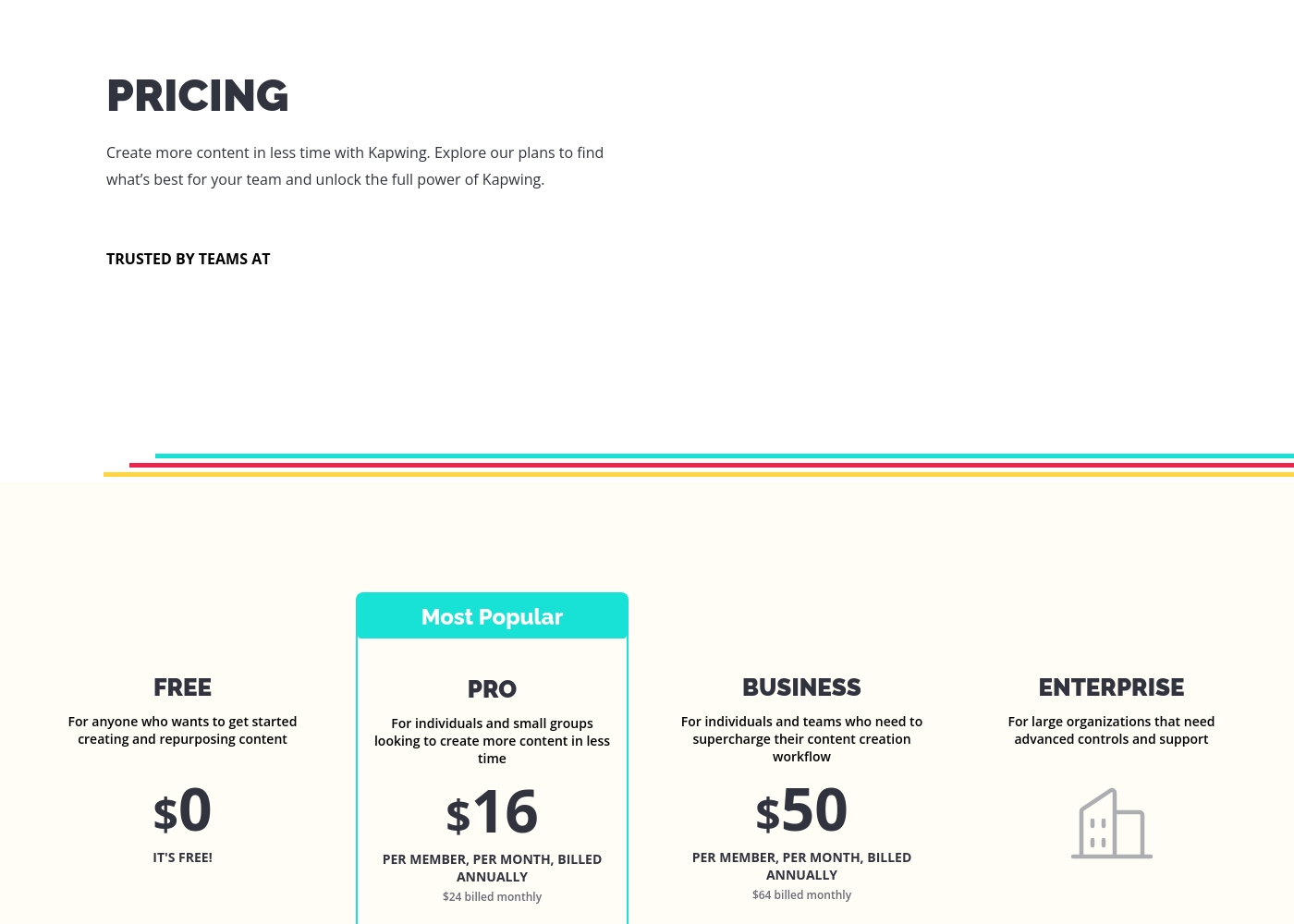
These plans help you explore Kapwing's full power and create content faster in less time.
FREE
Price: $0 Best For: Anyone who wants to get started creating and repurposing content Other Features:
- It's free!
This is the perfect starting point if you are just beginning your content creation journey. You can access core tools without spending any money.
- Perfect for getting started creating and repurposing content
- Billed per member, per month
- For individuals and small groups
- Everything in Free, plus features for your team workspace
- Billed per member, per month
- For individuals and teams
- Everything in Pro, plus features for your team workspace
- For large organizations
- Advanced controls and support
- Everything in Business, plus features for your team workspace
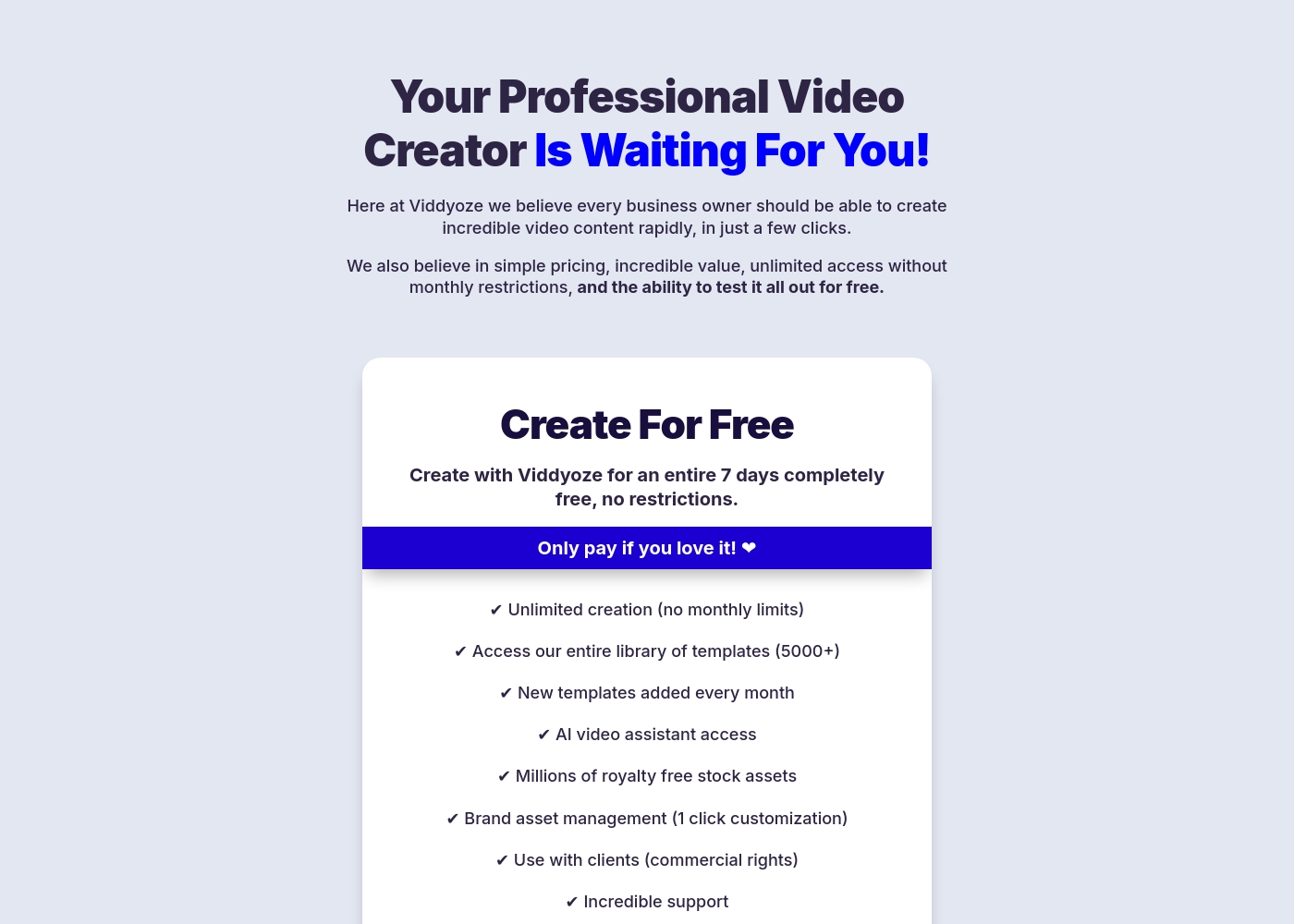
Viddyoze costs $47 per month with one plan: Monthly Subscription at $47/month.
We believe in simple pricing, so Viddyoze focuses on providing unlimited value within a single monthly fee. Here is a closer look at what the subscription includes.
Monthly Subscription
Price: $47/month Best For: Users needing unlimited video creation capacity and commercial rights Refund Policy: Cancel anytime (after the 7-day trial) Other Features:
- Unlimited creation (absolutely no monthly limits).
- Access to our massive library of over 5000+ templates.
- Includes full access to the AI video assistant (ViddyBot).
- Commercial rights for creating videos for your clients.
- Millions of royalty-free stock assets are included.
- Unlimited video creation (no monthly limits)
- Access to entire template library (5000+)
- New templates added every month
- AI video assistant access (ViddyBot)
- Millions of royalty free stock assets
Pricing Notes
- Kapwing uses a per-member model, meaning costs scale directly with team size and usage.
- Viddyoze offers a flat rate of $47 per month, providing unlimited video creation capacity.
- Kapwing offers a permanent Free plan, while Viddyoze only offers a commitment-free 7-day trial.
- Annual billing saves Kapwing users significant money on the Pro and Business plans.
- Viddyoze includes commercial usage rights for client work with its fixed monthly cost.
Pricing Head-to-Head
User Reviews
Users often praise Kapwing’s generally simple user interface, noting it’s super easy to use right in the browser without needing complex downloads. They appreciate specific powerful features like detailed timeline controls and the new “Repurpose Video” button for quick short-form content creation.
However, recent external feedback is overwhelmingly negative regarding business practices and high-risk policies. Many users complain they are misled by marketing, finding that nearly all useful tools are locked behind an immediate, expensive paywall, making the free plan useless.
Kapwing is such a great tool for editing videos and creating content. It’s super easy to use, so you don’t need to be a pro to figure it out. Everything’s right there in your browser—no downloads needed.
Users frequently praise Viddyoze for its exceptional ease of use and high-quality templates, noting it's a great tool for quickly creating professional intros, outros, and branding materials. Many long-term users call it the “best investment” and value the simplicity of customizing animations in just a few clicks.
The tool is celebrated for helping content stand out and serving as a powerful secret weapon for marketing. However, external feedback reveals serious inconsistencies regarding billing and customer support reliability, particularly around the 7-day free trial.
I have been using Viddyoze for years. I love the ease of use and the quality of the projects it delivers. This tool has gotten me out of many creative jams quickly!
Our Verdict
Kapwing and Viddyoze are specialized tools, meaning the 'best' depends entirely on your needs. Kapwing is a simplified timeline editor, while Viddyoze is an automated animation generator. Kapwing's superpower is offering powerful editing controls, like keyframes, inside a simple browser interface. It's the better choice for collaborative teams who need shared workspaces and detailed manual control. Kapwing also excels with excellent built-in subtitling tools, boosting video accessibility significantly. Viddyoze's key advantage is speed through automation and a massive content library. You get unlimited branded videos using 5,000+ templates for a fixed $47 monthly fee. Viddyoze is ideal for creating flawless, professional intros and outros in mere seconds, not hours. The deciding factor should be your workflow: choose Kapwing if you need to edit complex compositions or collaborate on timelines. Pick Viddyoze if you need constant, branded assets generated instantly without any editing skills. Be aware that both Kapwing and Viddyoze face strong complaints about their business practices and subscription management.
Frequently Asked Questions
Which is better for collaborative teams: Kapwing or Viddyoze?
Kapwing is the clear winner for teams, offering seamless collaborative editing and shared workspaces. Viddyoze is designed for individual use and lacks multi-user collaboration features. Kapwing's per-member pricing accommodates team scaling smoothly.
Does Viddyoze offer timeline editing and keyframes like Kapwing?
No. Kapwing offers advanced timeline controls, including keyframes, for granular composition editing. Viddyoze is a template generation tool and focuses on fast, 3-click customization, not manual timeline editing. You sacrifice editing depth for Viddyoze's speed.
Which tool is better for creating branded content quickly?
Viddyoze is superior for quick branding, offering 5,000+ templates and 1-click brand asset management. You can generate unlimited branded intros for one low monthly fee. Kapwing allows branding but requires more manual effort in the editor.
How do the pricing models of Kapwing and Viddyoze compare?
Kapwing uses a flexible, tiered per-member subscription model that scales with your team size. Viddyoze uses one flat rate of $47/month for a single user, granting unlimited creation capacity. Viddyoze is better for high-volume solo users, while Kapwing suits growing teams.
Is Kapwing worth the risk with its reported data retention policy?
Multiple external reports indicate Kapwing permanently deletes user projects after short billing delays or inactivity. Professionals relying on reliable storage should be very cautious. Viddyoze has problematic trial cancellation practices, but not the same reported data loss risk.
Which tool offers better support for accessibility and subtitles?
Kapwing is significantly better for accessibility. It features dedicated, powerful subtitling tools built right into the browser editor. Viddyoze does not focus on this feature and is mainly designed for short, branded animations.
Ready to Choose?
Both tools have their strengths. Choose based on your specific needs.