Kapwing vs Pinnacle Studio
Kapwing and Pinnacle Studio represent the fundamental online versus desktop editing debate. Kapwing prioritizes speed, collaboration, and social media repurposing right in your browser. Pinnacle Studio focuses on deep technical control, performance, and advanced features like MultiCam editing. Deciding means choosing workflow flexibility over raw desktop power.
Best for: Social media managers needing fast, browser-based content creation, Remote teams requiring seamless collaborative video editing
Best for: Editors who handle 8K or complex MultiCam video projects, Users requiring advanced technical controls like deep color correction
Easy UI, high-risk business policies.
We recognize Kapwing offers a powerful, user-friendly online editor perfect for quick social media content creation, often cited as being simple to figure out. However, serious concerns exist regarding its business model, aggressive paywalling, and unresponsive customer support practices. Overall, we caution users strongly due to predatory billing and an irresponsible user data retention policy that repeatedly results in unexpected, permanent content loss.
Pros
- User-friendly and simple interface (easy to figure out quickly).
- Browser-based editing requires no software downloads.
- Useful tools for repurposing content (e.g., short clips from long videos).
- Offers specific powerful timeline controls, including keyframes and custom animations.
Cons
- Aggressive paywalls make the free version nearly useless for core editing tasks.
- Irresponsible data retention; projects are reportedly deleted after short payment delays or 30 days.
- Unresponsive customer service, often hiding behind a strict "no refund policy".
- Auto-renewal policies sometimes lack proper notification, leading to unexpected charges.
Powerful features, critical flaws.
We found that Pinnacle Studio 26 advertises excellent advanced features like 8K video support and extensive creative bundles, often appealing through affordable one-time pricing. However, overwhelmingly negative user feedback regarding pervasive instability and completely absent customer support casts serious doubt on its usability. Overall, we cannot recommend this software until the severe stability and support issues reported by the user base are definitively addressed.
Pros
- Offers sophisticated, multi-track editing features (MultiCam, 8K support).
- Pricing model is an affordable one-time purchase (especially upgrade bundles).
- Includes comprehensive utility and asset bundles in higher-tier packages.
- Interface is considered user-friendly by some long-time users.
Cons
- Extremely frequent crashing and freezing are reported across multiple versions.
- Customer support is consistently described as non-existent and unhelpful.
- Users experience major issues with rendering, artifacts, and export failures.
- The software can fail to uninstall properly, requiring complex manual steps.
AboutKapwing
Kapwing is recognized as a powerful, yet incredibly user-friendly, online video service. It’s designed for anyone who needs to be immediately ready to create high-quality content. If you are a social media manager or someone who values speed and collaboration, this tool is described as essential for your bookmark list. Users consistently call it the most user friendly software they have ever used. 💡
AboutPinnacle Studio
Pinnacle Studio 26 provides a welcoming, intuitive workspace designed for sophisticated video creation. It is a comprehensive tool that includes video editing, screen recording, and DVD authoring capabilities. Whether you are new to video editing or already an experienced producer, this software has a tier that meets your goals. Use it professionally for vlogging, creating channel content, or powerful business video production. Pinnacle Studio helps you achieve professional results while taking your edits to the next level. 💡
Highlights
Feature Comparison
Features Overview
We highlight the main differences and pick a winner for each feature.
Platform & Access
Kapwing is fully browser-based; Pinnacle Studio requires a local desktop installation.
Kapwing requires no downloads and runs entirely online for immediate access. This makes Kapwing excellent for remote teams or users with low-storage devices. Pinnacle Studio is a traditional desktop software installation requiring more system resources. Its performance relies heavily on stable local components, which can sometimes lead to crashes and rendering issues. Kapwing's browser model supports agile creation, while Pinnacle Studio prioritizes deep control over the operating system. If working across multiple machines or operating systems is critical, Kapwing’s uniformity wins immediately.
Advanced Features
Pinnacle Studio handles 8K video and MultiCam; Kapwing focuses on speed utilities.
Kapwing offers streamlined utilities like Smart Cut and Clean Audio for quick quality fixes. It is built for quick social media content, not necessarily cinematic depth. Pinnacle Studio supports importing high-detail 8K footage and features specialized MultiCam editing. It offers Green Screen tools and Stop Motion animation for complex projects. Kapwing lets you repurpose existing clips fast, while Pinnacle Studio lets you film and process demanding multi-angle scenarios. For serious video tutorials or highly technical projects, Pinnacle Studio provides non-negotiable professional depth.
Team Collaboration
Kapwing offers seamless collaborative editing; Pinnacle Studio is a strictly solo desktop tool.
Kapwing is built specifically for team efficiency, offering shared workspaces and collaborative editing features. This is ideal for social media teams managing high content volume together. Pinnacle Studio lacks these collaborative editing tools as it operates primarily as a standalone desktop application. Workflow requires manual file transfers and version control. Kapwing's per-member subscription model directly supports and scales collaborative editing functionality. Teams needing to work on the same timeline in real-time must choose Kapwing.
UI & Learning Curve
Kapwing has a significantly simpler, more user-friendly interface for quick results.
Users consistently cite Kapwing as the 'most user-friendly software' they have encountered. You can start crafting high-quality content immediately without frustration. Pinnacle Studio offers an intuitive workspace but houses a much broader and more complex toolset. New users benefit from built-in learning videos and tutorials. Kapwing is designed to remove the steep learning curve entirely, focusing on utility and speed. If immediate productivity is your goal, Kapwing allows beginners to jump in faster than Pinnacle Studio.
Data Reliability Risks
Kapwing poses a catastrophic project deletion risk; Pinnacle Studio risks technical instability (crashes).
Kapwing users report their projects are permanently deleted without warning if there is a short billing delay. This punitive policy makes Kapwing a high-risk platform for professional projects. Pinnacle Studio users report stability issues, including frequent crashes and unreliable rendering/export processes. This can lose progress, but not necessarily permanently delete all past work. Both platforms have serious reliability issues, but Kapwing's risk is data retention and business policy focused. If reliable content archival is mandatory for your business, the policy issues around Kapwing are a major red flag.
Audio & Polishing
Kapwing offers Clean Audio and Background Remover; Pinnacle Studio offers deep Audio Editor control.
Kapwing focuses on utility by offering a Clean Audio function to refine sound quality instantly. It also includes the Background Remover tool for quick visual polish. Pinnacle Studio offers a dedicated Audio Editor, narration tools, and provides access to royalty-free music and sound effects. Kapwing is better for simple, efficient noise reduction and quick visual enhancement online. Pinnacle Studio allows for more precise audio shaping and intricate post-production control, which is crucial for high-end tutorials.
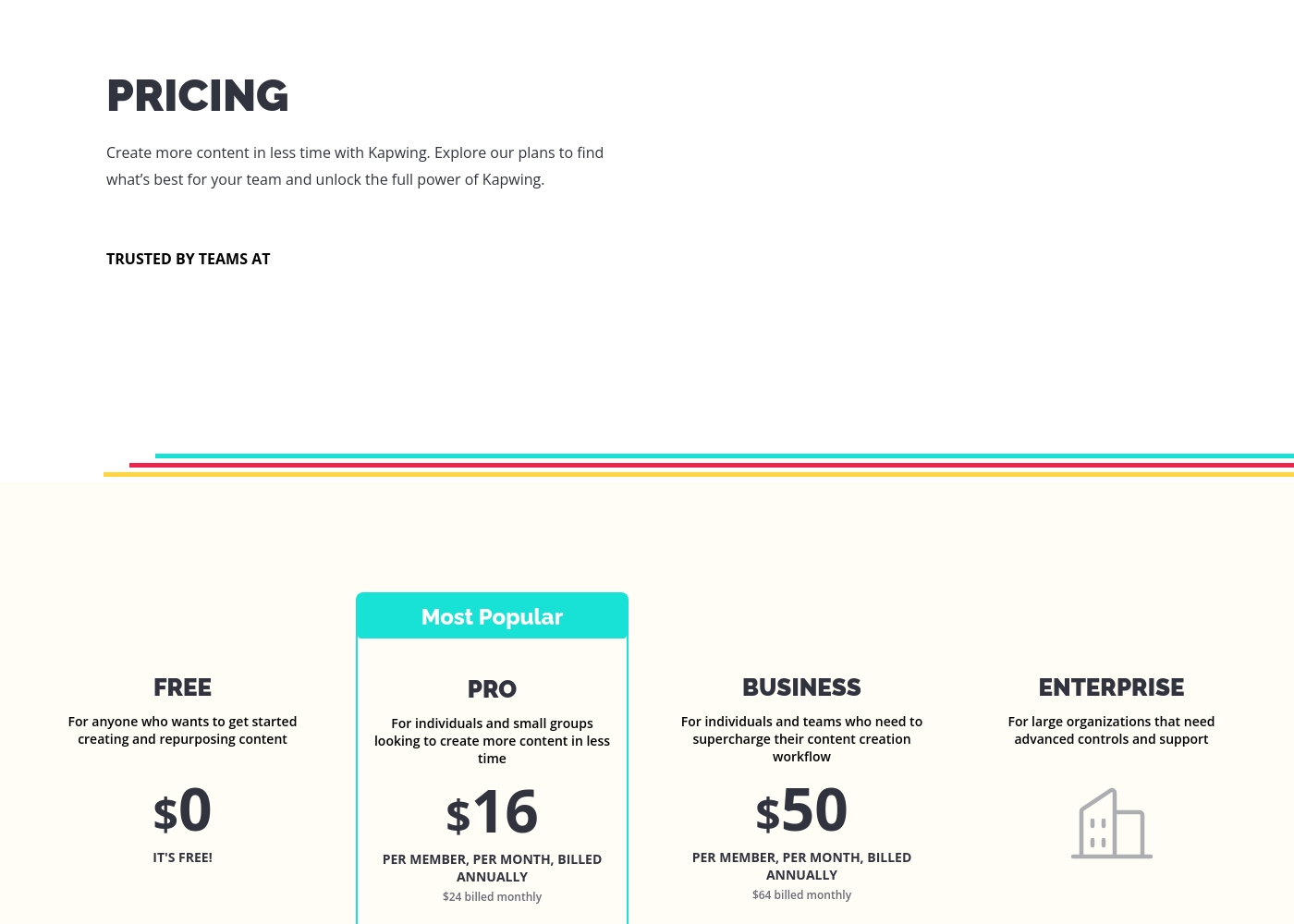
These plans help you explore Kapwing's full power and create content faster in less time.
FREE
Price: $0 Best For: Anyone who wants to get started creating and repurposing content Other Features:
- It's free!
This is the perfect starting point if you are just beginning your content creation journey. You can access core tools without spending any money.
- Perfect for getting started creating and repurposing content
- Billed per member, per month
- For individuals and small groups
- Everything in Free, plus features for your team workspace
- Billed per member, per month
- For individuals and teams
- Everything in Pro, plus features for your team workspace
- For large organizations
- Advanced controls and support
- Everything in Business, plus features for your team workspace
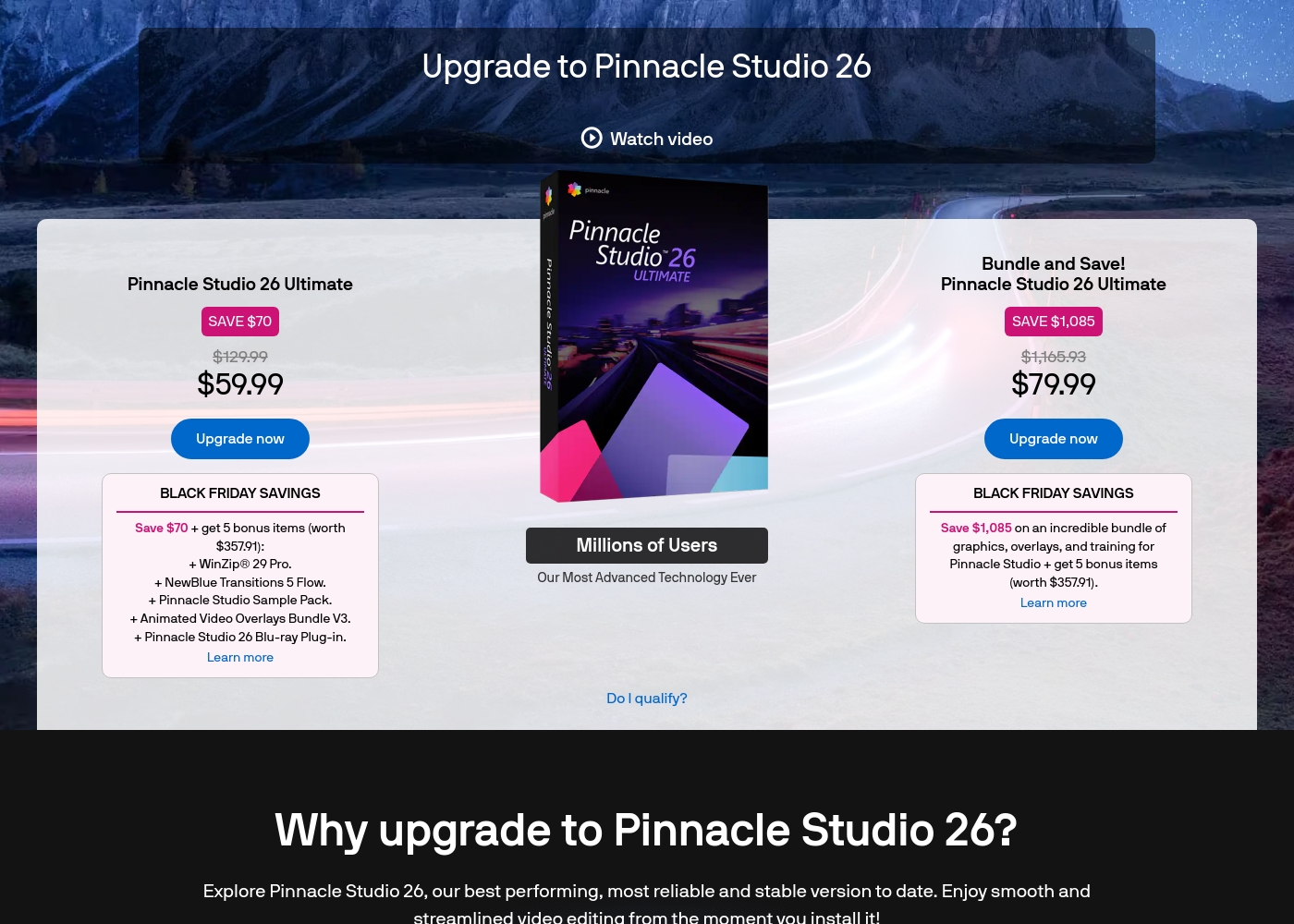
Pinnacle Studio 26 Ultimate acquisition costs range between $59.99 and $79.99 as a one-time upgrade purchase, with two main options: Pinnacle Studio 26 Ultimate at $59.99, and the Bundle and Save! version at $79.99.
These prices represent special Black Friday upgrade offers for users looking to access the latest features. Here is how the deals compare:
Pinnacle Studio 26 Ultimate
Price: $59.99 (One-time Upgrade Price) Best For: Current users who want the latest, most stable software version and specific utility tools. Other Features:
- Saves you $70 off the regular $129.99 price.
- Includes a total of 5 bonus items worth $357.91.
- Comes with WinZip® 29 Pro and NewBlue Transitions 5 Flow.
- Features the Pinnacle Studio 26 Blu-ray Plug-in.
- Includes the Pinnacle Studio Sample Pack and Animated Video Overlays Bundle V3.
- One-time price of $59.99 (was $129.99)
- 5 bonus items included (worth $357.91)
- Includes WinZip® 29 Pro
- Includes NewBlue Transitions 5 Flow
- Includes Pinnacle Studio 26 Blu-ray Plug-in
- One-time price of $79.99 (was $1,165.93)
- Includes all 5 bonus items (worth $357.91)
- Includes training, graphics, and overlays bundle
- Save $1,085 on the total package
Pricing Notes
- Kapwing pricing is per-member, meaning team costs scale rapidly, whereas Pinnacle Studio suggests a one-time purchase model for solo users.
- Kapwing offers significant savings (up to $14/member/month) if you commit to annual billing for Pro and Business plans.
- Pinnacle Studio offers a 10-day StudioBacklot free trial with training resources for first-time users.
- Kapwing reviewers warn of aggressive paywalls, rendering the permanent Free plan nearly useless for core editing tasks.
Pricing Head-to-Head
User Reviews
Users often praise Kapwing’s generally simple user interface, noting it’s super easy to use right in the browser without needing complex downloads. They appreciate specific powerful features like detailed timeline controls and the new “Repurpose Video” button for quick short-form content creation.
However, recent external feedback is overwhelmingly negative regarding business practices and high-risk policies. Many users complain they are misled by marketing, finding that nearly all useful tools are locked behind an immediate, expensive paywall, making the free plan useless.
Kapwing is such a great tool for editing videos and creating content. It’s super easy to use, so you don’t need to be a pro to figure it out. Everything’s right there in your browser—no downloads needed.
User feedback for Pinnacle Studio is exceptionally poor, primarily focusing on extreme frustrations with the software's reliability and performance. Despite newer versions claiming improved stability, many users report constant crashing, freezing, and issues with rendering, even when using high-spec computers.
This instability leads to lost progress and wasted time. The second overwhelmingly negative theme is customer support.
I’ve been using this product for several years because it is user friendly and features many nice tools. However, the tech support when there is an issue is not good at all. I was extremely disappointed and uninstalled the software despite owning it.
Our Verdict
Kapwing and Pinnacle Studio offer fundamentally different video editing experiences. If you need speed, collaboration, and high-volume social media output, Kapwing is the clear winner. However, if your top priority is deep, technical control over complex footage, Pinnacle Studio delivers far greater power. Kapwing excels due to its frictionless, browser-based workflow and instant team collaboration support. You can use its Resizer and Smart Cut features to reformat content instantly for TikTok or Instagram. But professionals must note Kapwing users frequently report permanent project deletion after short billing delays. Pinnacle Studio thrives when technical depth is required, handling advanced tools like 8K footage import and MultiCam editing. It offers dedicated features like Green Screen post-production and Stop Motion capabilities. Watch out for reported stability issues and unexpected crashes when dealing with large, complex projects in Pinnacle Studio. The decisive factor is platform and risk tolerance. Choose Kapwing if you prioritize agility and browser access, accepting the high risk of catastrophic data loss. Choose Pinnacle Studio if you require traditional desktop power and advanced control, accepting the reported risk of application instability. For agile teams focused on quick social content, Kapwing provides unparalleled speed and ease. If you are a dedicated solo editor focused on high-quality VFX or complex cinematic footage, Pinnacle Studio is the technically superior choice.
Frequently Asked Questions
Which software is better for small teams: Kapwing or Pinnacle Studio?
Kapwing is the superior choice for small teams needing to collaborate efficiently. It supports seamless collaborative editing right in a shared team workspace. Pinnacle Studio is a desktop application better suited for solo editors and high-end technical tasks.
Does Kapwing offer advanced tools like MultiCam editing?
Kapwing focuses on speed and utility tools like Clean Audio and Resizer for repurposing content. Pinnacle Studio features advanced capabilities like MultiCam editing, Green Screen, and 8K import. For complex video techniques, Pinnacle Studio is necessary over Kapwing.
Is Pinnacle Studio worth the money over Kapwing?
Pinnacle Studio offers deep technical features and high resolution support for a potentially one-time cost. Kapwing is a recurring per-member subscription, great for fast social media repurposing. Pinnacle Studio offers great value if you specifically need its advanced technical toolset.
Which is easier to learn: Kapwing or Pinnacle Studio?
Kapwing wins on ease of use; users describe it as the 'most user-friendly software' available. While Pinnacle Studio has built-in tutorials and a friendly workspace, its large feature set means a steeper learning curve than Kapwing.
How big are the storage risks associated with Kapwing?
The risks with Kapwing are substantial; external feedback confirms projects may be permanently deleted without warning. This happens often after minor billing delays or a short lapse in usage. Pinnacle Studio does not share this alarming data retention issue within its reviews.
Which tool is better for tutorials, Green Screen, and product demos?
Pinnacle Studio is excellent for tutorials and demos. It offers dedicated Screen Capture, Green Screen post-production, and MultiCam editing integration. Kapwing is better for quick format changes but lacks these deep, input-focused tools.
Ready to Choose?
Both tools have their strengths. Choose based on your specific needs.