Jotform vs Pabbly Form Builder
Jotform and Pabbly Form Builder are both excellent choices for robust data collection. This comparison usually boils down to feature depth versus volume capacity and pricing structure. Jotform takes the lead in integrations, security, and ease of use. Pabbly Form Builder offers serious cost savings for users needing unlimited forms.
Best for: Healthcare professionals needing optional HIPAA compliance, Organizations requiring 150+ integrations with existing CRMs
Best for: High-volume users needing to create dozens of forms monthly, Teams on a fixed, tight budget who prioritize form creation quantity
Highly intuitive, feature-rich form automation.
We found Jotform to be an exceptionally user-friendly form builder that democratizes complex data collection through its drag-and-drop interface and powerful features. Overall, we believe it provides outstanding value, combining robust capabilities with excellent workflow automation for businesses large and small.
Pros
- Intuitive, user-friendly interface simplifies form creation without technical skills.
- Robust, permanently free Starter plan is ideal for individual users and new startups.
- Seamless integrations with over 150 third-party apps automate crucial data tasks.
- Powerful conditional logic and customization options create dynamic, tailored forms.
Cons
- Exact pricing for Bronze, Silver, and Gold paid tiers is not explicitly listed publicly.
- Some users report slow customer service response times when troubleshooting specific technical bugs.
- Specific Enterprise features, like Data Residency, can carry a very high custom price.
- Occasional reliability issues (e.g., missed submissions or feature glitches) have been reported by some long-term users.
Excellent Features, Catastrophic Support.
Pabbly Form Builder offers strong features like unlimited form creation, robust payment collection, and secure ISO 27001 compliance, providing competitive value by bundling access to all Pabbly products. We acknowledge the robust functionality and affordable price point. Overall, we cannot recommend this platform due to severe, recurring user reports detailing unresponsive customer support, significant product bugs, and untrustworthy refund processes, which ultimately negate the tool's competitive advantages.
Pros
- Access to the entire suite of Pabbly products is included in every subscription level.
- Ability to create unlimited forms and handle unlimited payments (on the Unlimited plan).
- Features strong security compliance (ISO 27001:2022 and SOC2 Type 2 certified).
- Functionality includes powerful Conditional Logic, Redirects, and Email Autoresponders.
Cons
- Customer support is consistently reported as extremely slow and unresponsive.
- Platform bugs and high rates of automation failure create severe workflow interruption.
- Users report that the promised 30-day money-back guarantee is often not honored.
- Accusations of unprofessional business practices, including spamming and denying affiliate commissions.
AboutJotform
Jotform is known as the easiest online form builder available today. You can create professional-looking forms quickly in just minutes. It's built for anyone who needs to manage data efficiently without needing to code. Over 30 million users worldwide already trust Jotform to handle their form needs. ✅
AboutPabbly Form Builder
Pabbly Form Builder is an online tool designed to streamline your business workflows easily. It features a simple Drag & Drop Builder, so you only need to click the fields you want. These fields are added instantly to your forms, making design efficient and painless. Once a form is finished, you can share direct links with users or embed it on your site. 💡
Embedding options include sliding forms, plain forms within content, or sidebars. Importantly, the platform supports creating forms in multiple languages. This capability helps you connect with a global audience and manage all collected data from a central dashboard.
Highlights
Feature Comparison
Features Overview
We highlight the main differences and pick a winner for each feature.
Integration Depth
Jotform offers 150+ integrations; Pabbly Form Builder focuses on being self-contained.
Jotform integrates seamlessly with over 150 essential third-party business apps. This allows submissions to automatically flow to your CRM or email marketing services. You save massive time by fully automating your crucial data tasks. Pabbly Form Builder does not specify its integration count, implying a smaller, more focused ecosystem. It handles built-in functions like Stripe and PayPal payments well, but lacks the deep ecosystem. Jotform is the clear winner if connecting your form data to existing workflows is critical. Pabbly Form Builder’s value is highest if you primarily use its built-in dashboard for data management. Choose Jotform for a deeply integrated tech stack, or Pabbly Form Builder for simplicity.
Scalability & Limits
Pabbly Form Builder is built for unlimited forms; Jotform scales using strict usage limits.
Jotform’s paid plans scale based on submission limits and storage capacity. You constantly monitor usage limits and must upgrade frequently to avoid caps. Pabbly Form Builder differentiates itself by offering truly unlimited forms for a fixed $59/month. High-volume teams can deploy dozens of forms cheaply using Pabbly Form Builder. The trade-off is fixed price versus flexibility; Jotform offers more features, but Pabbly Form Builder offers sheer volume. If you need to build 50 different forms for various projects, Pabbly Form Builder provides significant value.
Compliance & Security
Jotform offers HIPAA features; Pabbly Form Builder lists specific security certifications.
Jotform offers essential optional HIPAA compliance on its Gold and Enterprise plans. This specialized feature is necessary for handling sensitive medical records securely. Pabbly Form Builder boasts high-level security like ISO 27001:2022 and SOC 2 Type 2 compliance. These certifications offer strong general assurance of data protection. For regulated industries like healthcare, Jotform is the guaranteed choice for compliance safety. Pabbly Form Builder provides excellent general security but lacks specialized features like HIPAA readiness.
Customer Support
Jotform's support is slow at times; Pabbly Form Builder users report frequent unresponsiveness.
Jotform advertises 24/7 support availability for its users. User reviews occasionally mention slow response times when reporting complex technical issues. Pabbly Form Builder faces frequent, significant user complaints regarding slow support response. Reviews cite confusion over refunds and unresponsive service for bugs. Overall reliability is cited as better by Jotform users, despite its occasional support lags. Pabbly Form Builder's low price point seems tied to lesser support infrastructure responsiveness.
Ease of Use
Jotform’s interface is praised by users; Pabbly Form Builder has reported onboarding challenges.
Jotform is celebrated for building professional forms easily with its intuitive interface. It simplifies complex concepts like conditional logic for non-coders. Pabbly Form Builder uses a dashboard interface where you click fields to add them to your form. While functional, reports suggest a steeper initial learning curve for new users trying Pabbly Form Builder. For teams prioritizing speed and absolute simplicity from day one, Jotform is the established leader. Jotform significantly reduces the time needed to go from idea to live form.
Multilingual Forms
Pabbly Form Builder supports multiple languages; Jotform does not specify this capability.
Pabbly Form Builder explicitly highlights support for creating multilingual forms. This capability is ideal for marketing teams targeting diverse, global audiences easily. Jotform does not detail built-in multilingual form functionality in its core features list. If deploying forms in languages other than English is a necessity, Pabbly Form Builder is the safer product. This feature helps Pabbly Form Builder reach a wider global market immediately.
Jotform offers a range of options suitable for individuals up to large enterprises. We structure our standard plans to scale comfortably with your growing usage needs.
Starter
Price: Free Best For: Individuals or small teams just starting data collection. Other Features:
- Standard features included (form templates, payment integrations, widgets).
- You must upgrade to increase limits.
- Forms and documents include Jotform branding.
This free plan is a powerful way to try Jotform and access all the core functionality. It is perfect if you are new to data collection or have basic personal needs. You can easily switch to a paid plan later when your requirements grow.
- Includes all standard features
- Form templates, payment integrations, and widgets available
- Lowest-priced paid plan
- Removes Jotform branding
- Best value for small to mid-tier businesses
- Removes Jotform branding
- Highest standard limits
- Optional HIPAA compliance features
- Removes Jotform branding
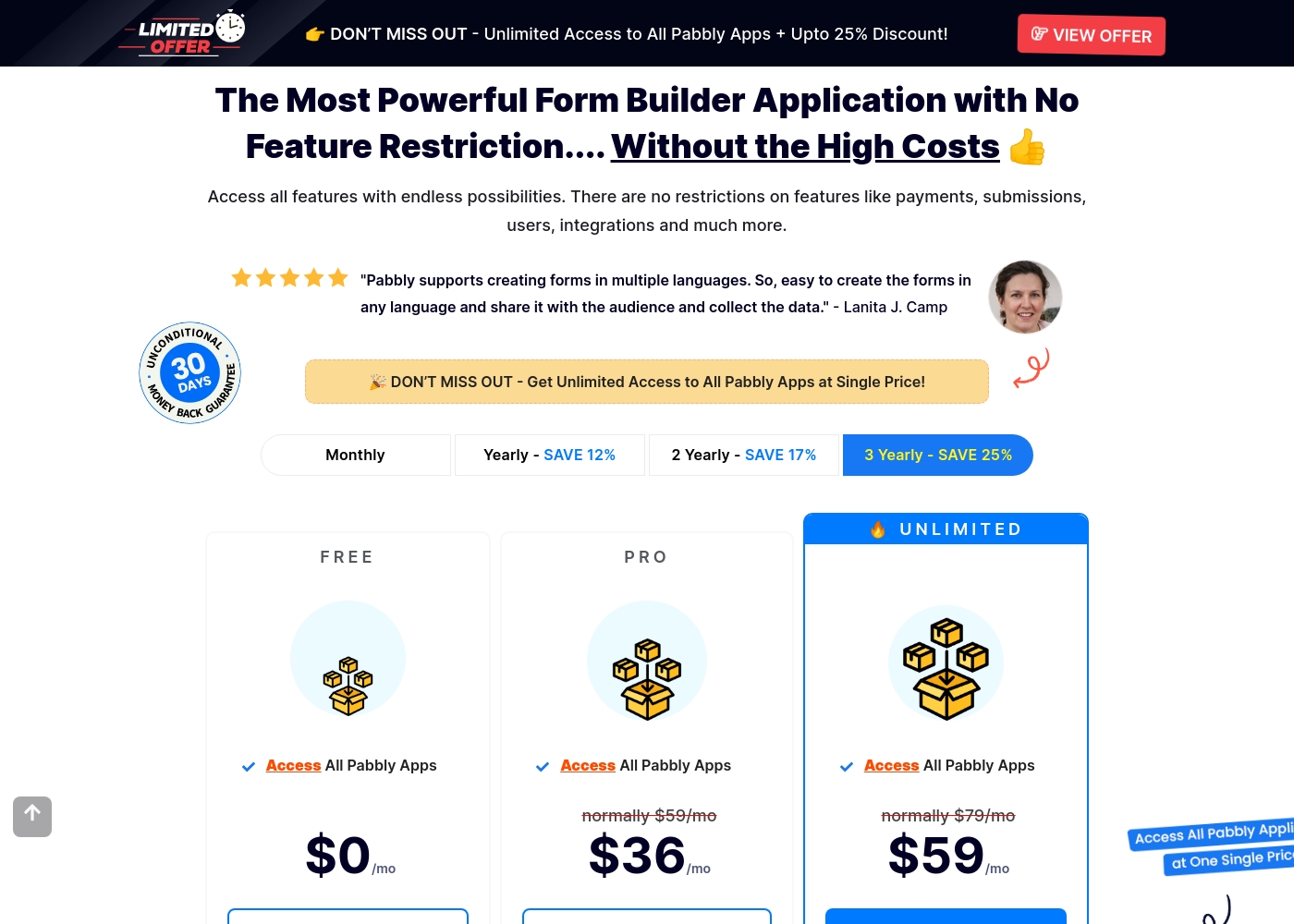
Pabbly Form Builder costs between $0 and $59 per month with 3 visible plans: Free at $0, Pro at $36 per month, and Unlimited at $59 per month.
The pricing structure here is clear, offering immediate access to all Pabbly apps across every tier shown. Let's look closely at how each plan is designed to serve different user needs.
Free
Price: $0/mo Refund Policy: Not applicable (Free plan) Other Features: Access All Pabbly Apps
- Access All Pabbly Apps
- Access All Pabbly Apps
- Access All Pabbly Apps
- Create unlimited forms
- Enjoy full access to all features
- Collect Unlimited Payments
Pricing Notes
- Jotform provides a permanent, robust free Starter plan that Pabbly Form Builder lacks.
- Pabbly Form Builder offers a transparent, fixed price ($59/month) for truly unlimited forms.
- Jotform's specific pricing for Bronze, Silver, and Gold tiers is not publicly listed and requires inquiry.
- Jotform provides a substantial 50% discount for approved nonprofits and educational institutions.
- Both Jotform and Pabbly Form Builder offer a 30-day money-back guarantee policy.
Pricing Head-to-Head
User Reviews
Jotform users are generally delighted with the platform, frequently describing it as the best form builder out there. Reviewers consistently praise its user-friendliness and intuitive drag-and-drop interface, making complex form creation possible without coding.
The ability to integrate seamlessly with tools like Google Sheets and PayPal truly streamlines workflows, saving users significant time and effort. Many users feel the robust free plan offers exceptional value, though they note that paid plans are necessary for higher usage and to remove branding.
Setting up a document for signature and sending it to our attendees was incredibly easy. It took less than 10 minutes from creating the account to actually sending it out. That swift efficiency is fantastic.
The overwhelming sentiment on Trustpilot (1.5 stars) is highly negative, focusing primarily on non-existent or inadequate customer service. Users frequently describe support interactions as slow and unhelpful, noting agents often fail to read support tickets properly, leading to tremendous frustration.
Reliability is another major concern; some users report the platform is full of bugs and automations "constantly break," forcing them to spend excessive time diagnosing issues. Crucially, multiple reports state the advertised 30-day money-back guarantee is unreliable, with the company allegedly avoiding or delaying refund processing, leading to accusations of fraud and being a "scam." While a few users found Pabbly Connect effective for automation and praised its speed, these positives are heavily overshadowed by reports of extreme inflexibility, such as refusing fundamental account changes and denying earned affiliate commissions.
The checkout software is awful, and it wasted a lot of my time. The amount of energy I've wasted on Pabbly has negatively impacted my business. I wouldn't use it even if they paid me.
Our Verdict
Jotform and Pabbly Form Builder cater to users with fundamentally different needs. Jotform is the overall victor if you need advanced features, specialized compliance, and market-leading reliability. Its interface ensures anyone can build professional forms quickly and easily. Jotform's robust 150+ integration ecosystem ensures your form data flows seamlessly into your existing stack. Pabbly Form Builder's superpower is its commitment to high-volume affordability and transparency. For just $59/month, Pabbly Form Builder offers truly unlimited forms, making it incredibly cost-effective. It excels if you need to rapidly deploy many projects, especially utilizing its specific multilingual form support. The deciding factor is usually integration depth versus extreme volume. If you manage sensitive data or need enterprise connection features, Jotform is necessary. But if you are a freelancer or agency needing unlimited projects without usage caps, Pabbly Form Builder wins on value. Ultimately, choose Jotform if stable, deeply integrated, and compliant data collection is essential. Pick Pabbly Form Builder if you are focusing on maximizing form quantity and maximizing affordability.
Frequently Asked Questions
Which offers a free plan: Jotform or Pabbly Form Builder?
Jotform offers a robust, permanent Starter plan that is completely free to use. Pabbly Form Builder does not currently offer an explicit free trial or a permanently free plan. Jotform clearly wins for getting started on zero budget.
Is Pabbly Form Builder better for high-volume forms than Jotform?
Yes, Pabbly Form Builder provides significant value for high volume users. It offers truly unlimited forms for a fixed $59 monthly price point. Jotform uses tiered plans and requires expensive upgrades when submission caps are exceeded.
Which tool supports HIPAA compliance: Jotform or Pabbly Form Builder?
Jotform supports optional features for HIPAA compliance on its Gold and Enterprise plans. Pabbly Form Builder offers strong general security (SOC 2 Type 2) but does not list specific HIPAA readiness. Jotform is the choice for handling protected health information.
How do Jotform's integration options compare to Pabbly Form Builder?
Jotform offers integration with over 150 different business applications for workflow automation. Pabbly Form Builder focuses primarily on built-in features like payments via Stripe/PayPal. Jotform provides a far broader ecosystem connection.
Does Pabbly Form Builder or Jotform offer better customer support reliability?
User reviews suggest Jotform offers better overall reliability despite reported slow response times. Pabbly Form Builder reviews consistently cite poor and unresponsive customer support. Jotform has a significantly higher user satisfaction rating.
Can I build multilingual forms using Jotform or Pabbly Form Builder?
Pabbly Form Builder explicitly confirms support for creating forms in multiple languages. Jotform’s core feature list provided does not detail this specific capability. Pabbly Form Builder is the guaranteed solution for multilingual deployment.
Ready to Choose?
Both tools have their strengths. Choose based on your specific needs.