Invideo vs VEED
Invideo and VEED both excel at AI video creation, but they target different workflows. Invideo focuses on speed, letting you create videos purely from text prompts. VEED provides a powerful, all-in-one browser editing experience for teams. Choose based on whether you prioritize instant creation or complete editing control.
Best for: Marketing agencies needing highly efficient, high-volume content pumps., Solo entrepreneurs focused solely on text-to-video generation speed.
Best for: Teams of 5+ users requiring centralized collaboration and asset management., Content creators needing advanced AI polish (e.g., Filler Word removal) on raw footage.
Rapid AI Video Creation, Backed by Humans.
We found Invideo AI to be exceptionally effective at transforming text prompts into polished videos quickly, enabling users to cut production time significantly. The platform stands out due to its genuinely dedicated, 24/7 customer support, which navigates users past complexity and technical inconsistencies. Overall, Invideo is a powerful AI tool deserving of content creators looking for speed and reliability, especially given the human safety net.
Pros
- Exceptional 24/7 customer support delivered by responsive, real humans.
- Dramatically reduces video creation time, boosting workflow efficiency.
- Highly user-friendly for generating videos from simple text prompts.
- Allows sophisticated editing of audio, voice, and captions using natural language.
Cons
- Occasional inconsistencies or anomalous results in AI-generated content quality.
- Users report frustration being charged for unsatisfactory generative AI prompts.
- Generating time can be lengthy when making multiple revisions.
- The media and video library needs expansion to offer more content variety.
Browser-based video editing power.
We find VEED to be a highly accessible, browser-based video editing solution that excels at streamlining content creation using powerful AI. Overall, we recommend this platform, especially for short-form content, despite the premium pricing required for full functionality.
Pros
- Extremely intuitive and beginner-friendly interface.
- Fully web-based; no software installation or downloads required.
- Powerful AI tools for auto-subtitles, translations, and video generation.
- Excellent for creating and editing short-form content (e.g., YouTube Shorts).
Cons
- Subscription costs are frequently cited as a limiting factor.
- Unreliable for long-form video recording and editing (potential data loss/glitches).
- Exporting 4K video is restricted to higher-tier or professional plans.
- AI translations (subtitles) can sometimes be inaccurate or difficult to edit manually.
AboutInvideo
Invideo is an AI tool designed to give you the power to play and create. It transforms simple text prompts related to your business or casual ideas into cinematic videos, professional promos, and detailed explainers instantly.
This platform is perfect for creators, educators, non-profits, and marketing agencies seeking rapid content creation. Whether you need an engaging UGC ad or a detailed product reel, Invideo handles the complex work. You're empowered to generate and edit content that reaches new customers across various countries, languages, and beliefs worldwide. 💡
AboutVEED
VEED is a complete end-to-end video suite designed for busy teams and creators. It allows you to create, collaborate, and share impressive videos entirely from within your browser. This platform offers seamless workflow consolidation, perfect for everyone from individual content makers to large organizations like the Fortune 500. It includes smart collaboration tools and a dedicated Brand Kit, ensuring your team maintains consistency. Additionally, you access a vast, royalty-free stock library featuring over 2 million video and audio assets. 💡
Highlights
Feature Comparison
Features Overview
We highlight the main differences and pick a winner for each feature.
AI Generation Workflow
Invideo focuses on instant, text-prompt video creation; VEED focuses on enhancing existing content.
Invideo excels at extreme speed using simple text prompts as the core input. You can generate a full video instantly, saving hours of conventional editing. Invideo even lets you edit video components (audio, captions) just by typing instructions. VEED primarily uses AI for enhancements like subtitles, filler word removal, and avatar creation. VEED's AI tools are designed to polish and perfect an existing video rather than generating one from scratch. VEED focuses on refining human-created content. Invideo is the winner for creating high volumes of content from zero quickly. VEED is better if you prioritize refining raw footage using smart AI features. The core difference is creation (Invideo) versus enhancement (VEED). If you start with an idea and no footage, Invideo will get you a result faster than VEED.
Team Collaboration
VEED provides dedicated tools for teams; Invideo limits multi-user access on most plans.
Invideo restricts its Plus, Max, and Generative plans to just three users total. Scaling beyond three users requires purchasing the expensive Team or Enterprise plans. Invideo focuses more on individual output speed than smooth team workflow. VEED is designed specifically for teams needing efficient consolidated workflows. Features like Review Mode simplify feedback directly on the timeline. Asset Sharing makes sure everyone uses the right brand media instantly. VEED clearly provides superior, purpose-built tools for team alignment and scaling creation. Invideo lacks dedicated collaboration features like centralized Brand Kits. If you need a team content hub, VEED is the necessary platform. Marketing agencies with complex review processes will benefit significantly from VEED's Review Mode.
Advanced AI Polishing
VEED offers specific tools to perfect raw footage; Invideo focuses on rapid text-to-video.
Invideo's AI focuses on generating the core video structure and content rapidly. It efficiently handles elements like product ads and custom voice clones. Invideo aims for speed and comprehensive content creation output. VEED provides powerful forensic AI tools to dramatically polish human-recorded footage. Features include Eye Contact Correction and Filler Word Removal. VEED ensures your speakers look professional and sound completely flawless. If your raw footage is slightly imperfect, VEED offers the immediate solution to fix it instantly. Invideo saves time by reducing the need for raw footage, but lacks these specific polishing tools. VEED's polishing features are a decisive functional advantage. VEED prevents costly reshoots by fixing speaker errors like filler words and poor camera gaze post-recording.
Pricing Transparency
Invideo has clear public pricing; VEED hides the costs of its standard paid plans.
Invideo offers highly transparent pricing across all five plans, spanning $0 to $899 per month. All usage costs and specific limits (credits, storage) are clearly defined upfront. Invideo uses a reliable credit/usage-based model that scales predictably. VEED offers a "Start for Free" entry point, but specific prices for standard paid tiers are not publicly listed. This lack of transparency forces users to hunt for pricing details or contact sales directly. VEED's non-public pricing is a significant hurdle. Invideo wins easily here due to its clear, published pricing structure across all tiers. VEED's ambiguous pricing makes budgeting difficult for any creator or small team. Always knowing your final cost makes Invideo a more reliable choice. If budget predictability is essential for your annual planning, Invideo provides the necessary open details immediately.
Mobile Experience
VEED specializes in mobile editing; Invideo requires a desktop web browser for complex work.
Invideo is primarily a web-based platform with no dedicated mobile editing application available. Accessing the full suite via a mobile browser is possible, but the workflow is not optimized. Creating complex AI videos on a phone is impractical. VEED offers the powerful VEED Captions App, effectively turning your phone into an entire editing studio. You can record, edit, add subtitles, and publish professional video entirely on the go. This is ideal for quick turnaround content. For users who need full editing and publishing capabilities away from a desktop, VEED is the specialized, clear winner. Invideo users are tied to a desktop environment for optimal workflow. VEED provides true on-the-go professional capability. Field reporters or social media influencers benefit greatly from VEED's ability to edit and publish high-quality video instantly from a mobile device.
Customer Support
Invideo guarantees 24/7 human support; VEED's support responsiveness is not publicly guaranteed.
Invideo boasts exceptional 24/7 customer support delivered by responsive, real human staff. Testimonials frequently praise specific agents for patience and detailed problem resolution. Invideo views comprehensive support as a core product asset. VEED links to a 'Contact Support' option for users needing assistance. However, public information does not guarantee 24/7 availability or a formal SLA timescale. Support expediency might depend on your unknown paid plan tier. Invideo clearly outperforms VEED in terms of publicized customer support and high user satisfaction commitment. Knowing real human help is reliably available 24/7 provides substantial peace of mind. Strong support mitigates technical inconsistencies effectively. If technical glitches or billing questions keep you awake, Invideo offers guaranteed assistance regardless of the timezone.
Localization Tools
Both offer strong global tools, but VEED has highly rated AI translation features.
Invideo is designed for global reach, supporting video creation across various languages worldwide. You can change voiceovers or add captions quickly using only simple text instructions. Invideo helps content resonate across diverse regions and beliefs. VEED leverages AI Translate and Dubbing features for robust, instant localization. Its Auto Subtitle Generator is highly accurate, providing high fidelity translation capabilities. VEED focuses heavily on maximizing global accessibility quickly. Both platforms offer powerful localization tools for expanding your audience worldwide. VEED's highly rated transcription accuracy gives it a slight technical edge. They are both top contenders for international content campaigns. Large companies needing to repurpose one video for ten different language markets will find either Invideo or VEED an efficient solution.
Both are beginner-friendly; Invideo’s text commands offer a slightly faster mastery path.
Invideo has a highly user-friendly approach centralized on natural language processing. The learning curve is very low because you simply 'edit like you think.' It simplifies complex tasks down to a written command. VEED also boasts an intuitive, unified, drag-and-drop browser interface. Users consistently call it beginner-friendly, making traditional editing concepts accessible. VEED’s web editor is fast and easy to navigate. Both are exceptionally user-friendly, but Invideo's reliance on simple text commands reduces complexity further. VEED requires understanding a standard timeline editor, even if simplified. They are both excellent options for beginners. If you hate the video editing timeline interface entirely, Invideo is a refreshing, text-input experience.
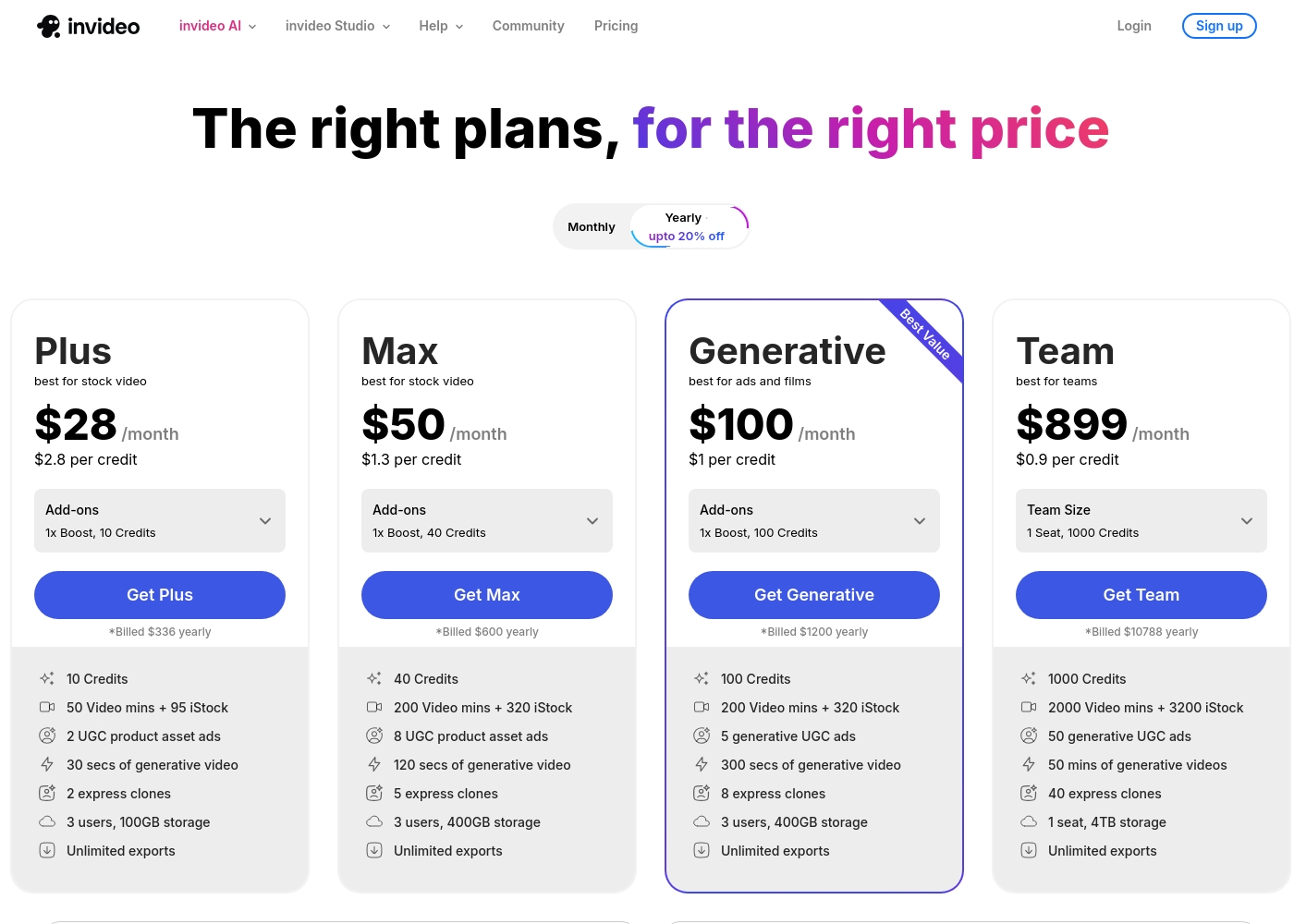
Invideo pricing ranges from $0 for the Free plan up to $899 per month for the Team plan, with three intermediate tiers: Plus at $28/month, Max at $50/month, and Generative at $100/month.
Here are the details for the plans available across monthly and yearly billing cycles.
- 10 Video mins and 1 AI credit per week
- 1 Express avatar
- 4 Exports per week with invideo watermark
- No access to generative features
- 10 Credits ($2.8 per credit)
- 50 Video mins + 95 iStock
- 2 UGC product asset ads
- 30 secs of generative video
- 2 express clones
- 40 Credits ($1.3 per credit)
- 200 Video mins + 320 iStock
- 8 UGC product asset ads
- 120 secs of generative video
- 5 express clones
- 100 Credits ($1 per credit)
- 200 Video mins + 320 iStock
- 5 generative UGC ads
- 300 secs of generative video
- 8 express clones
Specific pricing tables are not publicly detailed here, but VEED does offer multiple ways to engage with the product, ranging from free access to custom enterprise solutions. This structure ensures users of all sizes can find a suitable entry point.
Free Access
Price: Free Best For: Users who want to test core features or single creators with minimal usage needs. Other Features:
- Start for free * No credit card required
- Use the video editor
- Access AI tools like Auto Subtitle Generator
You can begin using VEED immediately without needing to enter any payment information. It’s an ideal option for anyone looking to quickly test the core capabilities and user experience of this powerful video editing suite before deciding on a financial commitment.

Pricing Notes
- Invideo offers a comprehensive free plan and clearly published pricing up to $899/month.
- VEED's standard paid pricing tiers are not publicly listed, creating significant budget opacity.
- Invideo uses a credit-based model; higher tiers like Team drop the credit cost significantly to $0.90.
- VEED restricts key features like 4K export to higher, unlisted premium plans, limiting value on lower tiers.
- You can start VEED for free immediately, but there is no time-limited trial for paid access.
Pricing Head-to-Head
User Reviews
Invideo AI enjoys widely positive reception, particularly for the strength of its customer support. Users frequently highlight the responsiveness and genuine care of the support team, praising specific agents for being patient, kind, and knowledgeable in resolving complex issues like billing errors or login problems.
Reviewers consistently find the platform an invaluable tool that is super easy to use, delivering professional results and saving significant time; some creators even attribute substantial growth in their channels to using the software. However, sentiment isn't universally positive regarding the core AI engine.
I had made the mistake of removing the email connected to my plan and couldn't understand why I was being charged. Patrick immediately located the account, helped me cancel the subscription, and provided great service. The team is excellent!
VEED enjoys generally positive external feedback, focusing heavily on its ease of use and accessibility. Reviewers consistently praise the web-based platform for being intuitive, beginner-friendly, and having a clean interface, which makes creating professional videos quick and simple.
Many users appreciate the robust features like drag-and-drop functionality, good animation options, and powerful AI tools, particularly for generating content and quickly creating YouTube Shorts. The platform’s ability to handle high-fidelity transcriptions is also frequently mentioned.
VEED simplifies the video creation process significantly. Editing and adding effects, especially utilizing new AI technology, makes improving your product fast and seamless. I highly recommend this platform.
Our Verdict
The decision between Invideo and VEED boils down to a choice: extreme workflow speed versus complete editing control. Invideo is built explicitly to generate entire videos instantly from simple text input. VEED gives you robust, powerful editing tools inside one seamless browser platform. They both offer excellent AI tools, but they solve different fundamental creator problems. Invideo's clear superpower is workflow velocity and pure simplicity. You can cut video creation time from several hours to about 30 minutes using only text prompts. Invideo even lets you edit sophisticated video details just by typing instructions. Invideo is the clear choice if you require high-volume, reliable content generation every single day. VEED’s major advantage is its all-in-one, browser-based editing environment designed for teams. VEED offers superior collaboration features crucial for scaling, like Review Mode and Brand Kits. The advanced AI polishing tools, such as Eye Contact Correction, ensure your raw footage always looks perfectly professional. The core deciding factor is your team structure and creation preferences. If high volume output is paramount, Invideo delivers rapid results and transparent credit pricing. If a growing team needs a central hub and often films raw footage, VEED's collaboration suite wins easily. Choose Invideo if you are an agency pumping out 20+ text-prompt videos per week with quick revision needs. Go with VEED if you need a specialized editing suite for large teams, complete with best-in-class mobile editing capabilities. Both Invideo and VEED offer excellent free plans to test their unique workflows.
Frequently Asked Questions
Which is better for small marketing teams: Invideo or VEED?
VEED is better suited for small teams because of its collaboration features. VEED offers Asset Sharing and Review Mode for seamless feedback loops. Invideo restricts its mid-tier plans to only three users. VEED provides a centralized hub necessary for teams to scale content creation effectively.
Does Invideo offer the same AI polishing tools as VEED?
No, Invideo focuses on generation via text, not deep polishing. VEED offers specialized AI tools like Filler Word Removal and Eye Contact Correction. Invideo handles overall content generation from scratch rapidly. If you shoot a lot of video, VEED cleans up your footage instantly.
Which tool is better for users on a strict budget?
Invideo offers clearer budgetary predictability across all its plans. All of Invideo's pricing and usage limits are transparently published. VEED's standard paid pricing is not public, making long-term budget planning difficult. Both Invideo and VEED offer robust free tiers to get started.
Which tool supports on-the-go mobile editing?
VEED is the definite winner for mobile users. VEED provides a dedicated, powerful VEED Captions App for editing and publishing. Invideo is optimized for the desktop browser experience. You'll be limited to a desktop for complex work with Invideo.
Can I edit videos using simple text commands in VEED?
Only Invideo offers the ability to edit specific video components using natural language instructions. Invideo lets you 'edit like you think' by simply typing out changes. VEED relies on a more traditional, although very user-friendly, visual timeline editor.
Why is Invideo's customer support rated higher than VEED's?
Invideo guarantees 24/7 access to unresponsive, real human support staff. User reviews consistently highlight this exceptional service across all issues. VEED's support access and response times are generally less publicized. You get a safety net with Invideo that VEED doesn't publicly promise.
Ready to Choose?
Both tools have their strengths. Choose based on your specific needs.