Invideo vs Powtoon
Invideo and Powtoon both dramatically simplify professional video creation using AI. Invideo targets raw speed and cinematic output via natural language editing commands. Powtoon focuses on animated explainers, massive asset libraries, and strict brand control. The choice hinges on whether you need speed or corporate-safe animation.
Best for: Content creators needing to maximize output speed (30+ videos/month), Agencies focused on driving sales with high volumes of UGC ads
Best for: Large organizations (corporate/Enterprise) needing strict brand control, Teams creating internal training modules and animated explainer videos
Rapid AI Video Creation, Backed by Humans.
We found Invideo AI to be exceptionally effective at transforming text prompts into polished videos quickly, enabling users to cut production time significantly. The platform stands out due to its genuinely dedicated, 24/7 customer support, which navigates users past complexity and technical inconsistencies. Overall, Invideo is a powerful AI tool deserving of content creators looking for speed and reliability, especially given the human safety net.
Pros
- Exceptional 24/7 customer support delivered by responsive, real humans.
- Dramatically reduces video creation time, boosting workflow efficiency.
- Highly user-friendly for generating videos from simple text prompts.
- Allows sophisticated editing of audio, voice, and captions using natural language.
Cons
- Occasional inconsistencies or anomalous results in AI-generated content quality.
- Users report frustration being charged for unsatisfactory generative AI prompts.
- Generating time can be lengthy when making multiple revisions.
- The media and video library needs expansion to offer more content variety.
AI power, five-star support, pricing caution.
Powtoon provides a powerful, AI-accelerated video platform that makes complex content creation accessible to anyone. We found the combination of vast asset libraries and the stated 24/7 priority support to be impressive. Overall, the product is strong, but we advise caution regarding the ambiguous subscription structures and extra charges for specific features.
Pros
- Customer support is exceptionally responsive, friendly, and professional.
- Support staff quickly resolves complex technical and account issues.
- Vast resource library includes over 4 million stock media assets.
- AI tools streamline workflow (scriptwriting, text-to-video, translation).
Cons
- Users report unexpected charges and difficulties canceling subscriptions.
- Lower-tier plans often require extra spending for 'Premium features.'
- AI features use a non-refundable, separate, usage-based credit system.
AboutInvideo
Invideo is an AI tool designed to give you the power to play and create. It transforms simple text prompts related to your business or casual ideas into cinematic videos, professional promos, and detailed explainers instantly.
This platform is perfect for creators, educators, non-profits, and marketing agencies seeking rapid content creation. Whether you need an engaging UGC ad or a detailed product reel, Invideo handles the complex work. You're empowered to generate and edit content that reaches new customers across various countries, languages, and beliefs worldwide. 💡
AboutPowtoon
Powtoon is an accessible online video maker designed for everyone, regardless of skill level. It helps you easily create amazing videos and presentations.
This platform is trusted by over 50 million users, including 96% of Fortune 500 companies. Powtoon focuses on making storytelling simple and impactful.
You can use it to transform static documents or fresh ideas into crisp, engaging videos right away. It's often called "the Canva for Video" for its simplicity and power.
Highlights
Feature Comparison
Features Overview
We highlight the main differences and pick a winner for each feature.
AI Creation Speed
Invideo delivers lightning-fast video generation, often in under 30 minutes. Powtoon focuses on converting existing documents into video efficiently.
Invideo is specifically designed to cut creation time dramatically. Users report cutting half-day editing sessions down to just 30 minutes consistently. This speed is perfect for marketers needing rapid asset production. Powtoon uses its Imagine AI suite to transform static documents or presentations. It handles instant text-to-video conversion from existing material. While still fast, Powtoon is optimizing for conversions rather than raw prompt-to-video speed. If pure, raw speed for new content is your main goal, Invideo provides clear metrics. Powtoon excels at giving existing corporate materials new life.
Editing Style
Invideo uses unique, powerful text commands; Powtoon offers robust, intuitive visual editing.
Invideo's core advantage is natural language editing. You modify video elements simply by writing instructions, like changing images or voiceovers. This allows for extremely sophisticated edits without manual interface work. Powtoon features a classic, intuitive drag-and-drop visual interface. This means there is practically no learning curve for new users creating animated content. The choice depends on user preference: visual arrangement in Powtoon or text commands in Invideo. Both minimize traditional complex timeline editing.
Asset Library Access
Powtoon has a massive library of 4M+ assets; Invideo includes a generous, curated selection of iStock visuals.
Powtoon provides access to over 4 million stock media assets in total. This includes footage, images, music, and sound effects for dynamic content. This huge repository is key to Powtoon’s strength in animation and variety. Invideo focuses heavily on AI generation but includes premium iStock visual assets. Even the Max plan only includes 320 monthly iStock images, making it less library-dependent. If your workflow relies on having endless stock footage options, Powtoon easily wins this comparison.
Branding & Security
Powtoon is heavily optimized for corporate environments, unlike Invideo’s AI-first approach.
Powtoon provides deep brand control features like shared folders and brand locking. It is trusted by 96% of Fortune 500 companies, suggesting strong corporate reliability. Powtoon meets stringent security standards, including GDPR compliance and ISO 27001 certification. Invideo reserves advanced security features for its custom Enterprise tier. Standard Invideo plans primarily focus on individual or small team AI output speed. Powtoon is the safer, more structured choice for large organizations needing strict content governance.
Pricing Clarity
Invideo clearly lists monthly costs; Powtoon is criticized for not openly stating subscription prices.
Invideo clearly specifies its subscription tiers, ranging from $28 to $899 per month. Included AI credits and video minutes are clearly documented per plan. Powtoon’s main plan overview does not explicitly list the subscription costs. This lack of transparency causes friction for users seeking simple budgeting. Additionally, Powtoon relies on separate, non-refundable AI credit purchases for advanced features. Invideo simplifies budgeting with clear, comprehensive pricing tiers.
Team Scalability
Powtoon is built for large organizations; Invideo limits standard plans to three users.
Powtoon offers dedicated Professional, Advanced, Team, and Enterprise plans. These tiers include shared folders and centralized brand management for growth. Powtoon is designed to manage large-scale corporate video production efficiently. Invideo's standard paid plans (Plus, Max, Generative) cap out at three users. Scaling above this limit requires purchasing expensive additional seats on the higher Team plan. For teams larger than three, Powtoon is structurally superior for collaboration.
AI Localization
Both offer excellent global features, but Powtoon adds personalized, lip-syncing AI Avatars.
Invideo allows rapid localization by changing voiceovers and captions using simple text commands. This expands your reach across diverse populations quickly and easily. Powtoon offers comprehensive AI translation for scripts, captions, and voiceovers. It also includes custom, localized AI avatars with authentic lip-syncing. Powtoon offers slightly deeper localization features for internal training and external communications.
Customer Support
Both platforms receive outstanding, consistent praise regarding their 24/7 technical support staff.
Invideo users consistently highlight the exceptional 24/7 human support. They praise specific agents for patience and quickly resolving complex billing issues. Powtoon also offers 24/7 Priority Support on paid plans. Reviewers frequently call out the team’s responsiveness and professionalism in technical matters. If responsive support is vital, you are safe choosing either Invideo or Powtoon.
Invideo pricing ranges from $0 for the Free plan up to $899 per month for the Team plan, with three intermediate tiers: Plus at $28/month, Max at $50/month, and Generative at $100/month.
Here are the details for the plans available across monthly and yearly billing cycles.
- 10 Video mins and 1 AI credit per week
- 1 Express avatar
- 4 Exports per week with invideo watermark
- No access to generative features
- 10 Credits ($2.8 per credit)
- 50 Video mins + 95 iStock
- 2 UGC product asset ads
- 30 secs of generative video
- 2 express clones
- 40 Credits ($1.3 per credit)
- 200 Video mins + 320 iStock
- 8 UGC product asset ads
- 120 secs of generative video
- 5 express clones
- 100 Credits ($1 per credit)
- 200 Video mins + 320 iStock
- 5 generative UGC ads
- 300 secs of generative video
- 8 express clones
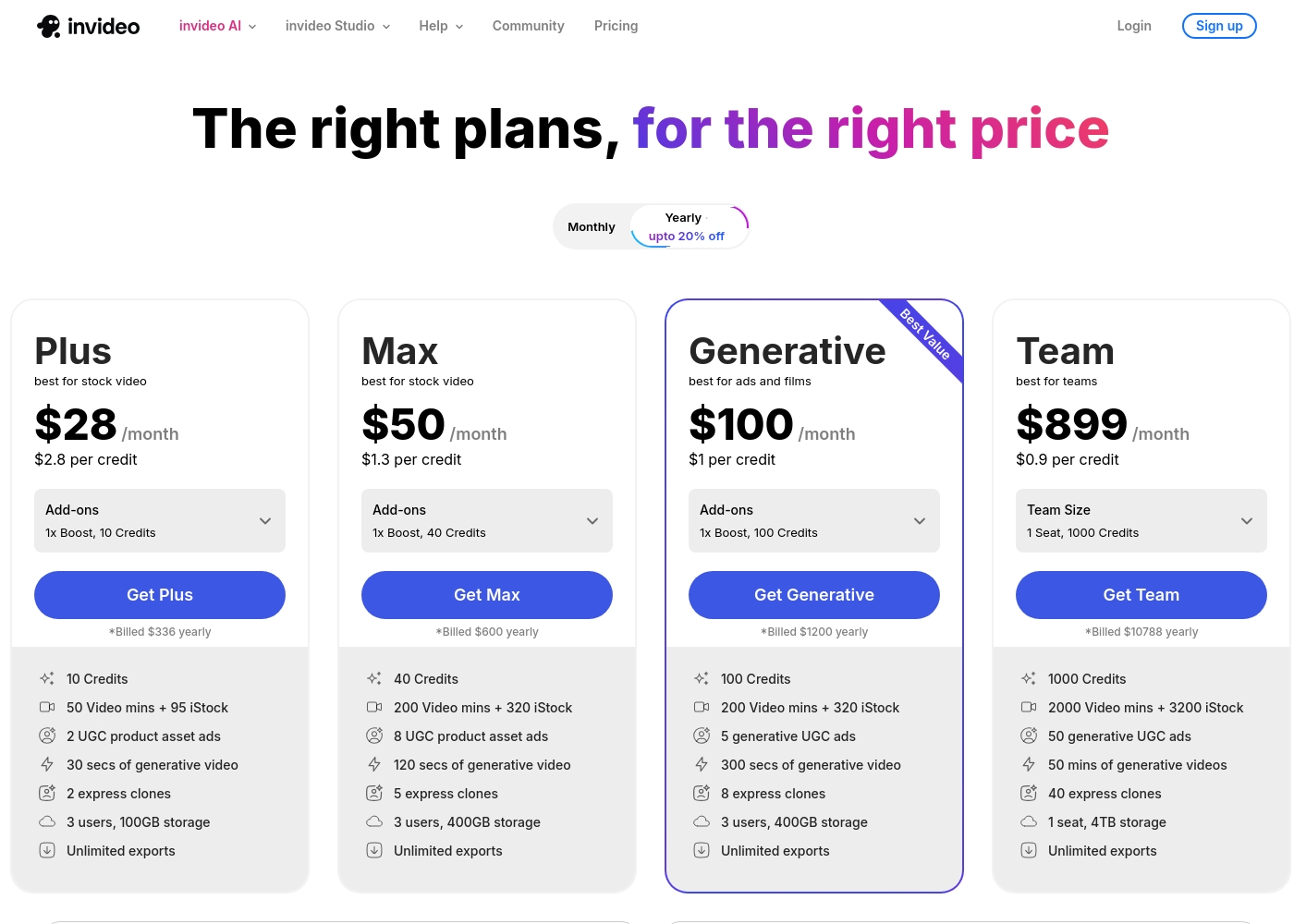
We can compare the features of these plans to help you decide which level of service best matches your needs for video creation.
FREE
Other Features: Unlimited (UNL) Powtoons
The Free plan is perfect if you want to try Powtoon's core features and start making videos right away. It includes unlimited creations, letting you explore the various tools before committing to a paid subscription.
- Unlimited Powtoons
- Unlimited Powtoons
- Powtoon branding removed
- Full HD video (1080p) download
- Full privacy control
- Commercial rights
- Unlimited Powtoons
- Powtoon branding removed
- Full HD video (1080p) download
- Full privacy control
- Commercial rights
- Unlimited Powtoons
- Powtoon branding removed
- Full HD video (1080p) download
- Full privacy control
- Commercial rights
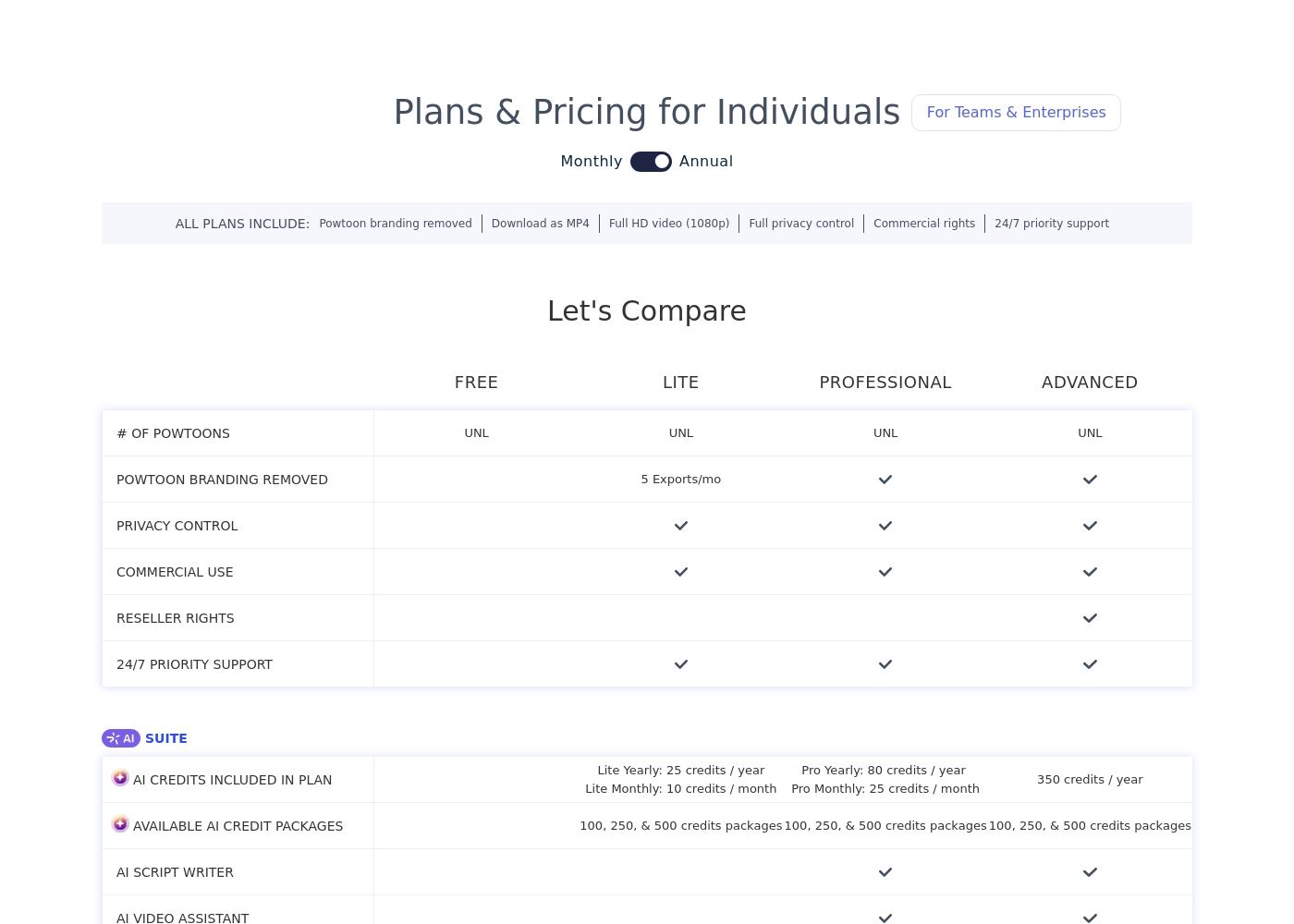
Pricing Notes
- Invideo clearly lists four distinct monthly subscription costs from $28 to $899.
- Powtoon does not explicitly state its core monthly subscription fees on the main overview.
- Powtoon uses a separate, non-refundable credit system ($25 for 100 credits) for AI features.
- Invideo’s pricing is more transparent, offering clear usage caps and included credits within its tiers.
- Users report unexpected automatic renewals and difficulties securing refunds from Powtoon’s billing system.
Pricing Head-to-Head
User Reviews
Invideo AI enjoys widely positive reception, particularly for the strength of its customer support. Users frequently highlight the responsiveness and genuine care of the support team, praising specific agents for being patient, kind, and knowledgeable in resolving complex issues like billing errors or login problems.
Reviewers consistently find the platform an invaluable tool that is super easy to use, delivering professional results and saving significant time; some creators even attribute substantial growth in their channels to using the software. However, sentiment isn't universally positive regarding the core AI engine.
I had made the mistake of removing the email connected to my plan and couldn't understand why I was being charged. Patrick immediately located the account, helped me cancel the subscription, and provided great service. The team is excellent!
Powtoon consistently earns overwhelmingly positive praise for customer support responsiveness. Users describe the support team as professional, quick, and highly effective.
Reviewers frequently mention support staff by name, noting how they solve technical problems swiftly, sometimes even over weekends, or help transfer extensive work between accounts. 💪 This high level of service suggests a strong commitment to existing customers.
Top-notch responsiveness from the Powtoon support team. Volodymyr wrote back almost immediately regarding a technical problem with text color. The development team actually fixed my issue within just a few hours. This timely communication and swift action made all the difference.
Our Verdict
Invideo and Powtoon are both fantastic AI video creation tools, but they serve different masters. Do you prioritize cinematic speed or corporate brand-safe animation? For most rapid creators and marketers, **Invideo** is the stronger choice due to transparency and workflow. Invideo’s superpower is its lightning speed and unique natural language editing. It lets you cut half-day video production down to just 30 minutes, boosting your output significantly. You simply type a description to edit captions, audio, or images, making Invideo truly intuitive. Plus, Invideo offers completely transparent, clearly published pricing. Powtoon shines in the animated explainer and corporate training space. Powtoon is trusted by major companies and secures content with ISO 27001 compliance. Its massive 4 million+ asset library ensures you always have the perfect graphic. Powtoon is better structured for enterprise use, offering dedicated Team plans and brand governance. The deciding factor should be pricing transparency versus brand customization. Powtoon offers deep character customization but hides its core subscription costs and uses complex credits. Invideo’s cost structure is clear and simple. If you need clean pricing and speed, choose Invideo. **Final Verdict:** Choose Invideo for clear pricing and rapid, text-prompt cinematic ads. Pick Powtoon if you are a large company needing customized animated training videos and strict brand adherence.
Frequently Asked Questions
Which is better for animated explainers: Invideo or Powtoon?
Powtoon is specifically designed for animated explainers and training content. It features custom character builders and a massive 4 million asset library. Invideo focuses more on rapid cinematic and UGC-style video output.
Does Invideo have a good stock media library like Powtoon?
Powtoon offers access to an extremely large library of 4 million+ assets. Invideo includes premium iStock assets but in smaller volumes (up to 320 monthly). If variety is crucial, Powtoon is the clear winner.
Which supports larger teams better: Invideo or Powtoon?
Powtoon is better structured for large teams and organizations. It offers dedicated Team and Enterprise plans with shared folders and brand locking features. Invideo’s standard plans cap users at three seats.
How do the editing approaches of Invideo and Powtoon differ?
Invideo allows advanced modification using only natural language text commands. Powtoon utilizes a user-friendly, classic drag-and-drop visual editor. Both tools dramatically reduce the reliance on complex editing timelines.
Is Powtoon’s pricing worth the potential hidden costs over Invideo?
Powtoon's core subscription cost is not published, and users report billing issues and non-refundable credit systems. Invideo offers clear, published subscription tiers from $28 to $899/month. Choose Invideo if budget clarity is important.
Are there security differences between Invideo and Powtoon?
Yes. Powtoon explicitly mentions ISO 27001 and GDPR compliance, suitable for corporate data security. Invideo refers to advanced security only in its custom Enterprise tier.
Ready to Choose?
Both tools have their strengths. Choose based on your specific needs.