Invideo vs Pinnacle Studio
Invideo offers lightning-fast video generation using powerful AI and text prompts. Pinnacle Studio gives you deep, frame-accurate control over every edit. Choosing between Invideo's speed and Pinnacle Studio's control defines your ideal workflow.
Best for: Marketing agencies needing daily, high-volume social media content, Solo entrepreneurs wanting to produce professional videos without learning NLE software
Best for: Hobbyists requiring frame-accurate editing and Stop Motion animation, Editors who work primarily with raw 8K High Definition footage
Rapid AI Video Creation, Backed by Humans.
We found Invideo AI to be exceptionally effective at transforming text prompts into polished videos quickly, enabling users to cut production time significantly. The platform stands out due to its genuinely dedicated, 24/7 customer support, which navigates users past complexity and technical inconsistencies. Overall, Invideo is a powerful AI tool deserving of content creators looking for speed and reliability, especially given the human safety net.
Pros
- Exceptional 24/7 customer support delivered by responsive, real humans.
- Dramatically reduces video creation time, boosting workflow efficiency.
- Highly user-friendly for generating videos from simple text prompts.
- Allows sophisticated editing of audio, voice, and captions using natural language.
Cons
- Occasional inconsistencies or anomalous results in AI-generated content quality.
- Users report frustration being charged for unsatisfactory generative AI prompts.
- Generating time can be lengthy when making multiple revisions.
- The media and video library needs expansion to offer more content variety.
Powerful features, critical flaws.
We found that Pinnacle Studio 26 advertises excellent advanced features like 8K video support and extensive creative bundles, often appealing through affordable one-time pricing. However, overwhelmingly negative user feedback regarding pervasive instability and completely absent customer support casts serious doubt on its usability. Overall, we cannot recommend this software until the severe stability and support issues reported by the user base are definitively addressed.
Pros
- Offers sophisticated, multi-track editing features (MultiCam, 8K support).
- Pricing model is an affordable one-time purchase (especially upgrade bundles).
- Includes comprehensive utility and asset bundles in higher-tier packages.
- Interface is considered user-friendly by some long-time users.
Cons
- Extremely frequent crashing and freezing are reported across multiple versions.
- Customer support is consistently described as non-existent and unhelpful.
- Users experience major issues with rendering, artifacts, and export failures.
- The software can fail to uninstall properly, requiring complex manual steps.
AboutInvideo
Invideo is an AI tool designed to give you the power to play and create. It transforms simple text prompts related to your business or casual ideas into cinematic videos, professional promos, and detailed explainers instantly.
This platform is perfect for creators, educators, non-profits, and marketing agencies seeking rapid content creation. Whether you need an engaging UGC ad or a detailed product reel, Invideo handles the complex work. You're empowered to generate and edit content that reaches new customers across various countries, languages, and beliefs worldwide. 💡
AboutPinnacle Studio
Pinnacle Studio 26 provides a welcoming, intuitive workspace designed for sophisticated video creation. It is a comprehensive tool that includes video editing, screen recording, and DVD authoring capabilities. Whether you are new to video editing or already an experienced producer, this software has a tier that meets your goals. Use it professionally for vlogging, creating channel content, or powerful business video production. Pinnacle Studio helps you achieve professional results while taking your edits to the next level. 💡
Highlights
Feature Comparison
Features Overview
We highlight the main differences and pick a winner for each feature.
Core Workflow
Invideo uses AI text prompts; Pinnacle Studio relies on a manual timeline editor.
Invideo is built around Generative AI, transforming text ideas into full videos rapidly. You bypass traditional timelines entirely using simple text commands. This vastly accelerates content creation for high volume needs. Pinnacle Studio offers a standard, dedicated Non-Linear Editing (NLE) timeline environment. Editors maintain deep, frame-accurate control over every clip and asset placement. This professional approach demands more time and skill. The fundamental choice is between maximizing speed (Invideo) or achieving maximum creative control (Pinnacle Studio). Invideo targets marketers; Pinnacle Studio targets enthusiasts. This determines the entire user experience for each tool.
AI Capabilities
Invideo is AI-native and generative; Pinnacle Studio offers none of these features.
Invideo is a comprehensive Generative AI platform for creating video assets quickly. It excels at turning prompts into UGC ads, explainers, and stories in minutes. Natural Language editing allows complex adjustments using simple text phrasing. Pinnacle Studio is a traditional desktop application focused on frame-accurate manual editing controls. It provides MultiCam, Green Screen, and color correction but includes no generative AI. You must supply all creative elements manually. Invideo provides unparalleled speed and automation for content marketing teams requiring high output. Pinnacle Studio is for the editor who distrusts AI and prefers full control over asset creation. If AI is a priority, Pinnacle Studio is immediately ruled out.
Advanced Editing Tools
Pinnacle Studio supports professional features like MultiCam and 8K; Invideo focuses on AI output volume.
Invideo centers output volume and speed over intricate, manual special effects. Its editing power comes from rapidly iterating on assets via text commands. It features localization tools for global reach. Pinnacle Studio supports critical high-fidelity production tools like Green Screen and Stop Motion. It allows import and editing of large 8K video files for professional workflows. MultiCam editing is essential for tutorials and interviews. If your workflow involves multi-angle footage or professional grading, Pinnacle Studio is mandatory. For simple, quick, high-volume marketing clips, Invideo is sufficient. The tools serve fundamentally different production goals.
Stability and Reliability
Pinnacle Studio is plagued by crashes; Invideo offers a generally reliable, cloud-based platform.
Invideo utilizes cloud-based processes, leading to generally consistent and reliable operation. Users may wait for revisions, but crashes are not a primary complaint. The workflow is streamlined for efficiency. Pinnacle Studio users frequently report major stability issues, including crashes during editing and rendering processes. These issues severely disrupt productivity, undermining its feature set. Support responses for these bugs are often criticized as slow. Reliability is a key differentiator when choosing high-volume tools. For consistent, dependable output, Invideo provides a safer bet over the reported instability of Pinnacle Studio. Constant crashing negates any benefit of advanced editing capabilities.
Customer Support
Invideo boasts 24/7 human support; Pinnacle Studio reviewers cite poor and slow tech assistance.
Invideo's customer support is widely praised in user reviews for being fast, human, and genuinely helpful. The team is available 24/7, even spending over an hour to solve complex billing issues. This human element is a major strength. Pinnacle Studio receives consistent criticism for slow and often unhelpful support responses. The lack of timely technical assistance compounds user frustrations with crashes and licensing issues. Users feel abandoned during critical breakdowns. Invideo provides a safety net that is essential for complex software deployments, especially for teams. The excellent support of Invideo dramatically lowers the risk of operational downtime compared to Pinnacle Studio.
Scalability & Teams
Invideo supports team seating and usage scaling; Pinnacle Studio is individual-focused.
Invideo explicitly supports teams, with standard tiers including up to three users per plan. The Team plan allows easy purchasing of additional seats for scaling operations. This is built for marketing agency growth. Pinnacle Studio focuses on the individual user license model for desktop software. There is no clear pricing or feature structure built for collaborative team environments or shared assets. Scaling requires buying separate copies. If you are an agency or a growing business, Invideo’s credit and seat system is inherently more scalable. Pinnacle Studio is designed primarily for the enthusiast or solo professional editor.
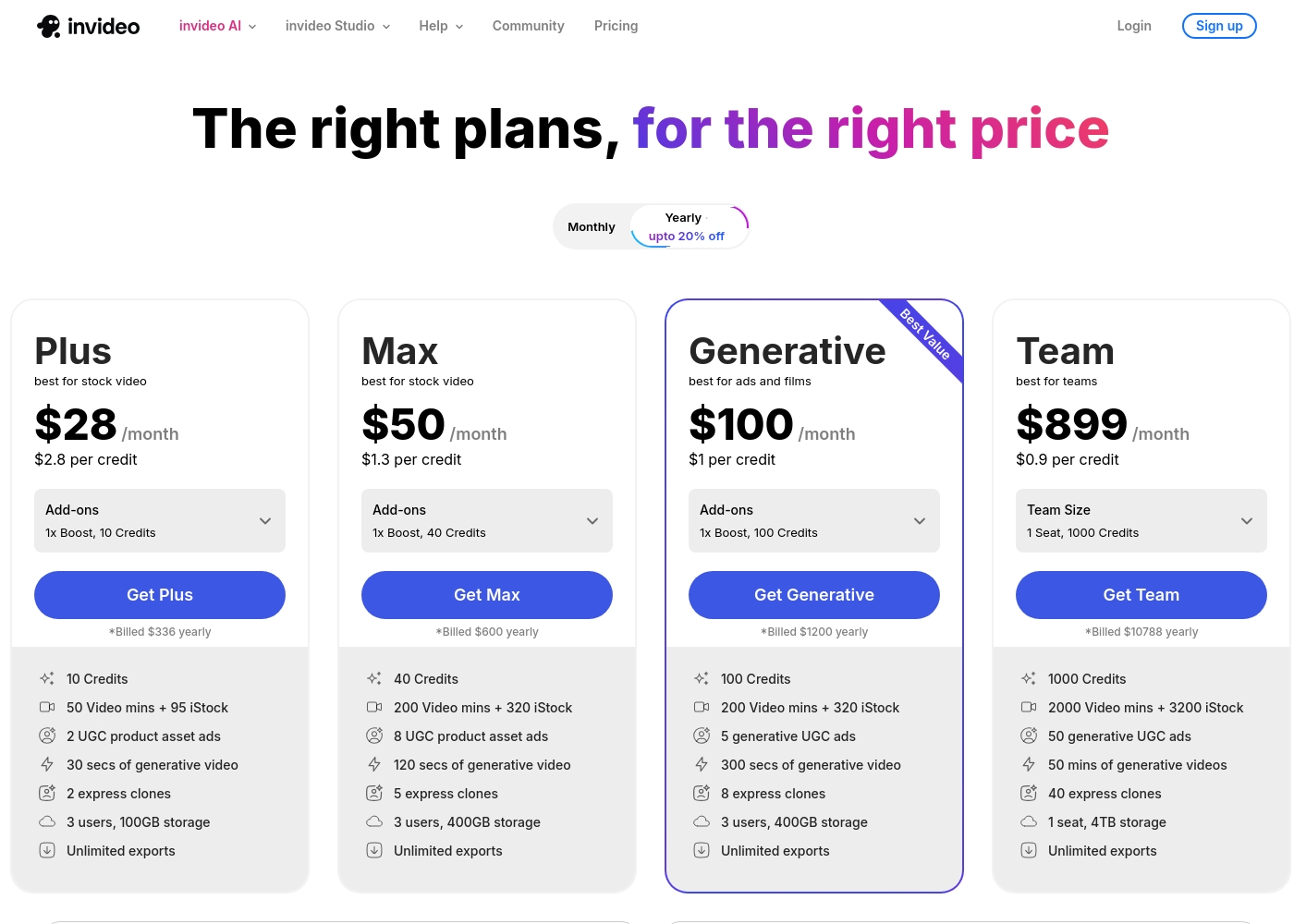
Invideo pricing ranges from $0 for the Free plan up to $899 per month for the Team plan, with three intermediate tiers: Plus at $28/month, Max at $50/month, and Generative at $100/month.
Here are the details for the plans available across monthly and yearly billing cycles.
- 10 Video mins and 1 AI credit per week
- 1 Express avatar
- 4 Exports per week with invideo watermark
- No access to generative features
- 10 Credits ($2.8 per credit)
- 50 Video mins + 95 iStock
- 2 UGC product asset ads
- 30 secs of generative video
- 2 express clones
- 40 Credits ($1.3 per credit)
- 200 Video mins + 320 iStock
- 8 UGC product asset ads
- 120 secs of generative video
- 5 express clones
- 100 Credits ($1 per credit)
- 200 Video mins + 320 iStock
- 5 generative UGC ads
- 300 secs of generative video
- 8 express clones
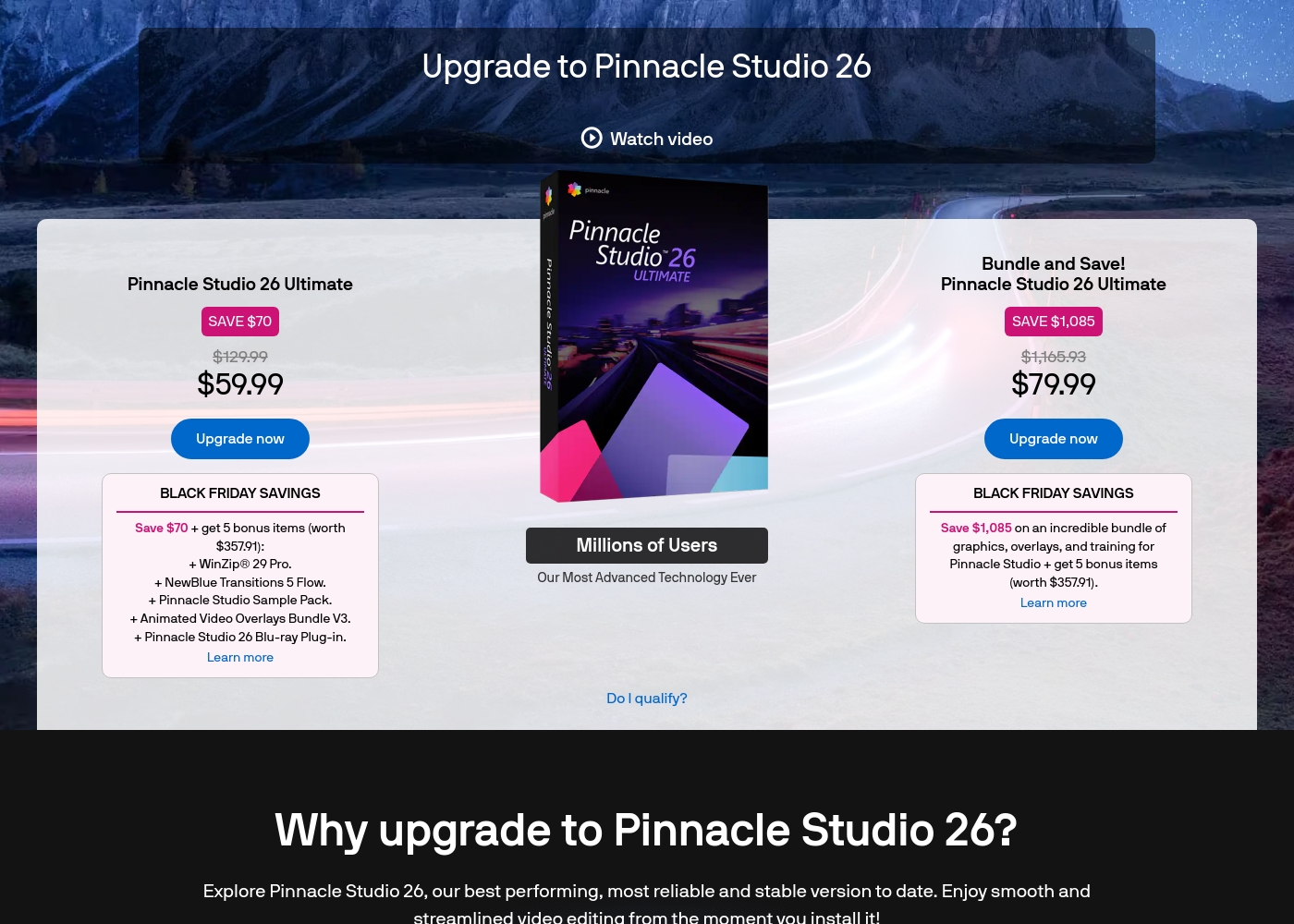
Pinnacle Studio 26 Ultimate acquisition costs range between $59.99 and $79.99 as a one-time upgrade purchase, with two main options: Pinnacle Studio 26 Ultimate at $59.99, and the Bundle and Save! version at $79.99.
These prices represent special Black Friday upgrade offers for users looking to access the latest features. Here is how the deals compare:
Pinnacle Studio 26 Ultimate
Price: $59.99 (One-time Upgrade Price) Best For: Current users who want the latest, most stable software version and specific utility tools. Other Features:
- Saves you $70 off the regular $129.99 price.
- Includes a total of 5 bonus items worth $357.91.
- Comes with WinZip® 29 Pro and NewBlue Transitions 5 Flow.
- Features the Pinnacle Studio 26 Blu-ray Plug-in.
- Includes the Pinnacle Studio Sample Pack and Animated Video Overlays Bundle V3.
- One-time price of $59.99 (was $129.99)
- 5 bonus items included (worth $357.91)
- Includes WinZip® 29 Pro
- Includes NewBlue Transitions 5 Flow
- Includes Pinnacle Studio 26 Blu-ray Plug-in
- One-time price of $79.99 (was $1,165.93)
- Includes all 5 bonus items (worth $357.91)
- Includes training, graphics, and overlays bundle
- Save $1,085 on the total package
Pricing Notes
- Invideo has a generous, permanent free plan, while Pinnacle Studio offers a 10-day content trial.
- Invideo's pricing is usage-based (credits, minutes, iStock), rewarding higher volume users with lower per-credit costs.
- Pinnacle Studio uses a purchase model, potentially leading to lower long-term costs if upgrade frustrations are ignored.
- Invideo quotas reset monthly and do not roll over, requiring careful management of usage limits.
- The effective cost per credit on Invideo drops significantly from $2.80 (Plus) to $0.90 (Team) tiers.
Pricing Head-to-Head
User Reviews
Invideo AI enjoys widely positive reception, particularly for the strength of its customer support. Users frequently highlight the responsiveness and genuine care of the support team, praising specific agents for being patient, kind, and knowledgeable in resolving complex issues like billing errors or login problems.
Reviewers consistently find the platform an invaluable tool that is super easy to use, delivering professional results and saving significant time; some creators even attribute substantial growth in their channels to using the software. However, sentiment isn't universally positive regarding the core AI engine.
I had made the mistake of removing the email connected to my plan and couldn't understand why I was being charged. Patrick immediately located the account, helped me cancel the subscription, and provided great service. The team is excellent!
User feedback for Pinnacle Studio is exceptionally poor, primarily focusing on extreme frustrations with the software's reliability and performance. Despite newer versions claiming improved stability, many users report constant crashing, freezing, and issues with rendering, even when using high-spec computers.
This instability leads to lost progress and wasted time. The second overwhelmingly negative theme is customer support.
I’ve been using this product for several years because it is user friendly and features many nice tools. However, the tech support when there is an issue is not good at all. I was extremely disappointed and uninstalled the software despite owning it.
Our Verdict
The choice between Invideo and Pinnacle Studio is fundamentally speed vs. control. However, most modern content needs favor Invideo as the clear winner. Invideo offers a vastly more reliable, faster, and well-supported experience than the alternative. Invideo's superpower is its Generative AI paired with celebrated 24/7 human support. It cuts video production time from a half-day down to only 30 minutes using simple text prompts. Invideo easily handles team scalability and content localization for expanding global audiences. Pinnacle Studio excels through its professional NLE editing feature set and deep creative control. It offers frame-accurate timelines, MultiCam editing, 8K import, and niche effects. Yet, repeated reports of poor stability, crashes, and unhelpful support undercut Pinnacle Studio’s utility significantly. The deciding factor is your faith in operational reliability and human assistance. Invideo provides a crucial safety net with its excellent support team. Pinnacle Studio users frequently complain about unacceptable crashing and slow technical service responses. Choose Invideo if you prioritize high-volume, reliable content creation for marketing and immediate scaling. Pick Pinnacle Studio only if you absolutely require specific traditional features like MultiCam and are willing to take a significant risk on crashing software.
Frequently Asked Questions
Which is easier to learn: Invideo or Pinnacle Studio?
Invideo is significantly easier to learn because it uses Natural Language text prompts for editing. Pinnacle Studio requires mastery of a traditional, complex Non-Linear Editing interface. Beginners will find Invideo far more accessible immediately.
Does Pinnacle Studio have AI features like Invideo?
No. Invideo is built on Generative AI, enabling text-to-video capabilities and NL editing. Pinnacle Studio is a traditional editor focused on manual, frame-accurate adjustments. Only Invideo offers AI generation and automation.
Which tool is better for professional 8K video editing?
Pinnacle Studio is better for high-fidelity professional editing, as it supports the import of 8K footage. Invideo focuses on rapid output, and 8K support is not listed as a core feature. Pinnacle Studio offers frame-level control over high-resolution files.
Is customer support better at Invideo or Pinnacle Studio?
Invideo wins decisively. Reviews overwhelmingly praise their responsive, 24/7 human support staff. Pinnacle Studio users often complain about inconsistent, slow, and unhelpful technical support, especially concerning crashes.
How do the pricing models compare for Invideo vs Pinnacle Studio?
Invideo uses a subscription model based on monthly credits and usage, ranging from a Free plan to $899/month. Pinnacle Studio appears to use a tiered one-time purchase or annual licensing model. Invideo is better for high-volume operational budget scaling.
Can I use MultiCam editing in Invideo?
No, Invideo does not feature MultiCam editing, as it focuses on generative AI output. MultiCam editing, which is essential for switching between multiple camera angles seamlessly, is a core feature of Pinnacle Studio.
Ready to Choose?
Both tools have their strengths. Choose based on your specific needs.