Invideo vs Kapwing
Invideo uses powerful AI to generate entire videos from text prompts very fast. Kapwing is a traditional, browser-based editor focusing on streamlined ease and collaboration. You must decide between AI-driven speed and classic, user-friendly timeline control. Invideo wins on reliability and support, while Kapwing wins on editor simplicity.
Best for: Marketing agencies focusing on content volume, Solopreneurs needing rapid text-to-video conversion
Best for: Small remote social media teams (5-10 users), Creators needing dedicated in-browser subtitling features
Rapid AI Video Creation, Backed by Humans.
We found Invideo AI to be exceptionally effective at transforming text prompts into polished videos quickly, enabling users to cut production time significantly. The platform stands out due to its genuinely dedicated, 24/7 customer support, which navigates users past complexity and technical inconsistencies. Overall, Invideo is a powerful AI tool deserving of content creators looking for speed and reliability, especially given the human safety net.
Pros
- Exceptional 24/7 customer support delivered by responsive, real humans.
- Dramatically reduces video creation time, boosting workflow efficiency.
- Highly user-friendly for generating videos from simple text prompts.
- Allows sophisticated editing of audio, voice, and captions using natural language.
Cons
- Occasional inconsistencies or anomalous results in AI-generated content quality.
- Users report frustration being charged for unsatisfactory generative AI prompts.
- Generating time can be lengthy when making multiple revisions.
- The media and video library needs expansion to offer more content variety.
Easy UI, high-risk business policies.
We recognize Kapwing offers a powerful, user-friendly online editor perfect for quick social media content creation, often cited as being simple to figure out. However, serious concerns exist regarding its business model, aggressive paywalling, and unresponsive customer support practices. Overall, we caution users strongly due to predatory billing and an irresponsible user data retention policy that repeatedly results in unexpected, permanent content loss.
Pros
- User-friendly and simple interface (easy to figure out quickly).
- Browser-based editing requires no software downloads.
- Useful tools for repurposing content (e.g., short clips from long videos).
- Offers specific powerful timeline controls, including keyframes and custom animations.
Cons
- Aggressive paywalls make the free version nearly useless for core editing tasks.
- Irresponsible data retention; projects are reportedly deleted after short payment delays or 30 days.
- Unresponsive customer service, often hiding behind a strict "no refund policy".
- Auto-renewal policies sometimes lack proper notification, leading to unexpected charges.
AboutInvideo
Invideo is an AI tool designed to give you the power to play and create. It transforms simple text prompts related to your business or casual ideas into cinematic videos, professional promos, and detailed explainers instantly.
This platform is perfect for creators, educators, non-profits, and marketing agencies seeking rapid content creation. Whether you need an engaging UGC ad or a detailed product reel, Invideo handles the complex work. You're empowered to generate and edit content that reaches new customers across various countries, languages, and beliefs worldwide. 💡
AboutKapwing
Kapwing is recognized as a powerful, yet incredibly user-friendly, online video service. It’s designed for anyone who needs to be immediately ready to create high-quality content. If you are a social media manager or someone who values speed and collaboration, this tool is described as essential for your bookmark list. Users consistently call it the most user friendly software they have ever used. 💡
Highlights
Feature Comparison
Features Overview
We highlight the main differences and pick a winner for each feature.
Core AI Functionality
Invideo is full text-to-video AI generation; Kapwing uses AI for focused utility tasks.
Invideo excels at turning complex text prompts into full cinematic videos quickly. Users report generating content in 30 minutes instead of a half day. Invideo allows sophisticated edits by typing instructions for image, audio, or voice changes. Kapwing is fundamentally a timeline editor, relying on AI for utilities like subtitling and background removal. Kapwing's focused AI features can sometimes exhibit accuracy issues. The core difference is Invideo generates the video while Kapwing helps edit existing footage. Invideo focuses on rapid new asset creation; Kapwing focuses on rapid modification. If you need to instantly turn an idea into a video, Invideo’s generative engine is unmatched. Kapwing is better suited if you already have footage and need to clean it up quickly. Invideo's approach is future-focused, empowering users to ‘edit like you think’ using simple commands.
Ease of Use
Kapwing boasts an easy UI for editing; Invideo is easy if you master text prompts.
Kapwing is consistently called the most user-friendly software for general video editing tasks. Its seamless browser UI means creators start crafting immediately without a steep learning curve. Kapwing has useful utility tools like the Smart Cut and Resizer button right on the dashboard. Invideo’s user experience relies entirely on prompt engineering and typing simple commands. This approach avoids dealing with complex software menus and timelines. It reduces the technical barrier but requires clear, structured instructions from the user. Both tools eliminate the need for complicated software downloads. If you prefer visual drag-and-drop simplicity, Kapwing may feel easier initially. If you want to bypass the timeline entirely, Invideo is the winner. Kapwing's aggressive paywalls can quickly complicate the simple experience for free users.
Customer Support
Invideo offers exceptional 24/7 human responsiveness; Kapwing's support is poor.
Invideo receives widespread praise for its highly responsive, 24/7 human customer support team. Users share positive stories of staff resolving complex billing errors and technical issues reliably. This human safety net is a huge asset. Kapwing's generalized customer support is frequently described as rigid, unhelpful, and unresponsive by external reviewers. Kapwing users dealing with billing or technical crises report frustration with the system. Only Kapwing's Enterprise plan explicitly includes dedicated support. If fast, human help is crucial for your business operations, Invideo is the undeniable choice. Kapwing risks leaving users stranded when problems arise. Invideo treats support as a core feature, guaranteeing user success beyond the technology itself.
Pricing Model
Invideo uses usage credits creating variability; Kapwing uses predictable per-member pricing.
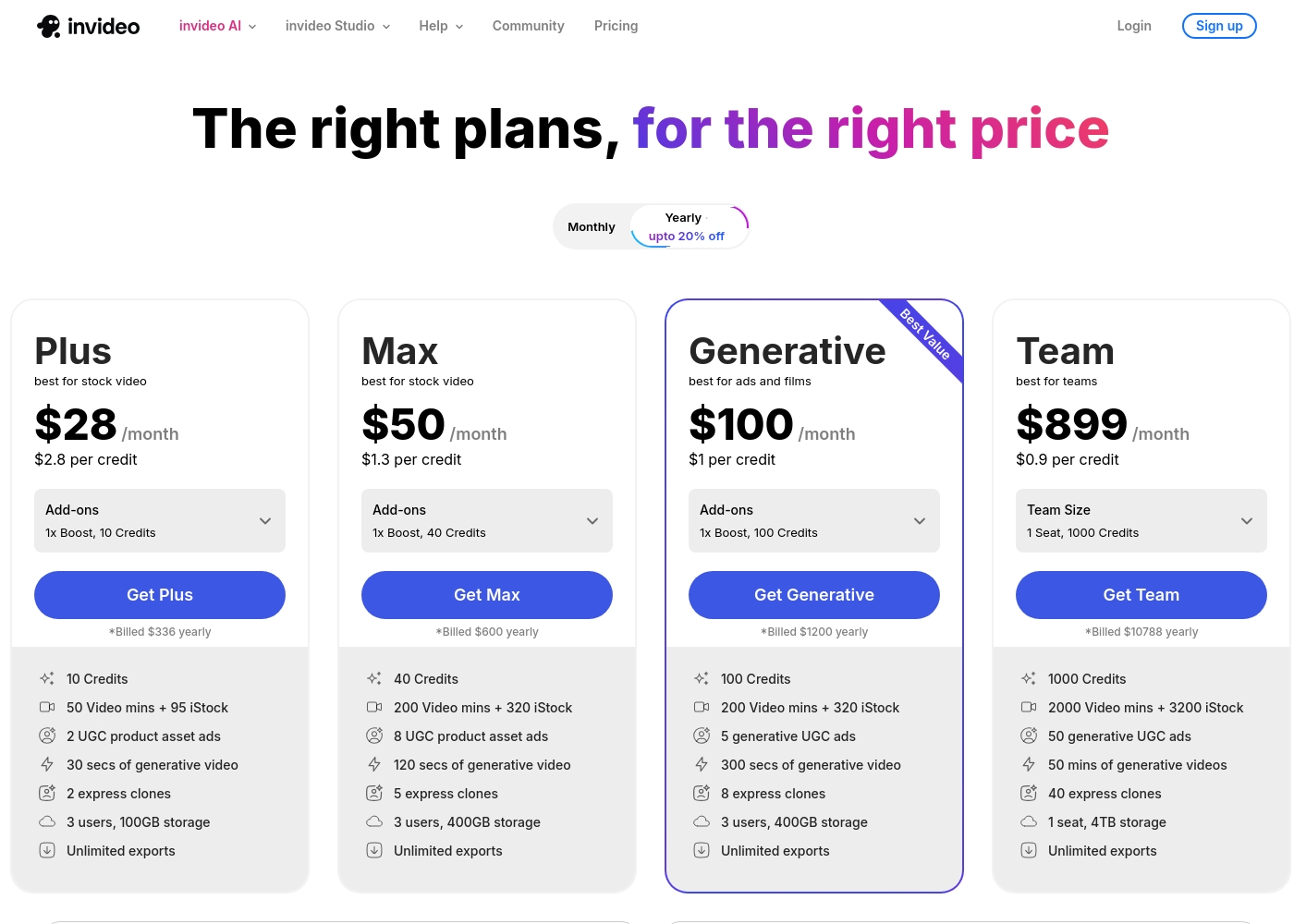
Invideo's pricing is credit-based, scaling from $28 up to $899 monthly depending on usage and generative activity. Users sometimes feel frustrated being charged credits for unsatisfactory AI prompt results. This structure means costs fluctuate monthly. Kapwing uses a fixed per-member subscription, costing $16 to $50 annually per user. This per-seat model makes budgeting simpler for established teams. Kapwing also offers significant discounts for annual commits. Kapwing's free plan is aggressively paywalled, forcing rapid upgrades for essential functions. Invideo's free platform is more functional for testing the core AI features. Kapwing offers more predictable monthly spending for teams.
Collaboration
Kapwing is built for team collaboration; Invideo limits team access on standard tiers.
Kapwing is explicitly designed for seamless collaborative editing within a shared online workspace. Its subscription is tied directly to the number of team members needed. Teams can work together efficiently, enhancing productivity. Invideo’s standard Plus, Max, and Generative plans only support three users maximum. Teams needing more seats must upgrade to the very expensive Team tier or buy additional separate seats. This configuration limits flexibility for growing teams. Kapwing integrates team needs into its core Pro and Business pricing models. Invideo primarily focuses on the solo producer or small agency model. For collaborative power and flexibility, Kapwing simply makes more sense for a rising team.
Video Accessibility
Kapwing provides excellent, dedicated subtitling; Invideo can generate captions via prompts.
Kapwing is highly praised for its excellent, built-in subtitling features that boost content accessibility for all viewers. These tools are fast and reliable for generating closed captions. Kapwing makes accessibility a high-priority feature. Invideo can add captions to the entire video when commanded using a natural language instruction. This function is part of the larger 'edit like you think' capability. However, it's not the primary focus of the tool. Kapwing makes it incredibly easy to ensure your content is welcoming to deaf or hard-of-hearing audiences. Invideo is capable but doesn't specialize here. For creators whose primary goal is ensuring accessible content, Kapwing has the superior dedicated features.
Risk of Data Loss
Kapwing poses a high risk of project deletion; Invideo is a much safer platform.
External reviews repeatedly indicate a critical issue: Kapwing permanently deletes user projects frequently without warning. This sometimes occurs after short billing delays or minimal usage gaps, making the platform dangerously unreliable. Professional users should exercise extreme caution. Invideo users do not report this high-risk data retention policy or content loss issues. If an Invideo paid plan is canceled, you can still access previous exports. Invideo values its users' existing assets. Kapwing's punitive data retention policy is a major financial and reliability risk. Invideo is the safer choice for project integrity. If your livelihood depends on your stored work, avoid Kapwing's platform entirely.
Time-Saving Focus
Invideo saves time in creation; Kapwing saves time in modification.
Invideo’s main selling point is dramatically cutting video creation time from half a day to 30 minutes. The generative AI handles most of the complex assembly immediately. This is powerful for scaling new content output. Kapwing provides time savings through utility tools like Smart Cut, Trimmer, and the Resizer, optimized for rapid modification. These help streamline the process of adapting existing assets for social media. Kapwing speeds up the editing phase of production. If you need volume of unique, newly created content, Invideo will save you more time. If you spend most of your time post-producing existing footage, Kapwing specializes there. Invideo helps scale content creation exponentially via prompt engineering.
Invideo pricing ranges from $0 for the Free plan up to $899 per month for the Team plan, with three intermediate tiers: Plus at $28/month, Max at $50/month, and Generative at $100/month.
Here are the details for the plans available across monthly and yearly billing cycles.
- 10 Video mins and 1 AI credit per week
- 1 Express avatar
- 4 Exports per week with invideo watermark
- No access to generative features
- 10 Credits ($2.8 per credit)
- 50 Video mins + 95 iStock
- 2 UGC product asset ads
- 30 secs of generative video
- 2 express clones
- 40 Credits ($1.3 per credit)
- 200 Video mins + 320 iStock
- 8 UGC product asset ads
- 120 secs of generative video
- 5 express clones
- 100 Credits ($1 per credit)
- 200 Video mins + 320 iStock
- 5 generative UGC ads
- 300 secs of generative video
- 8 express clones
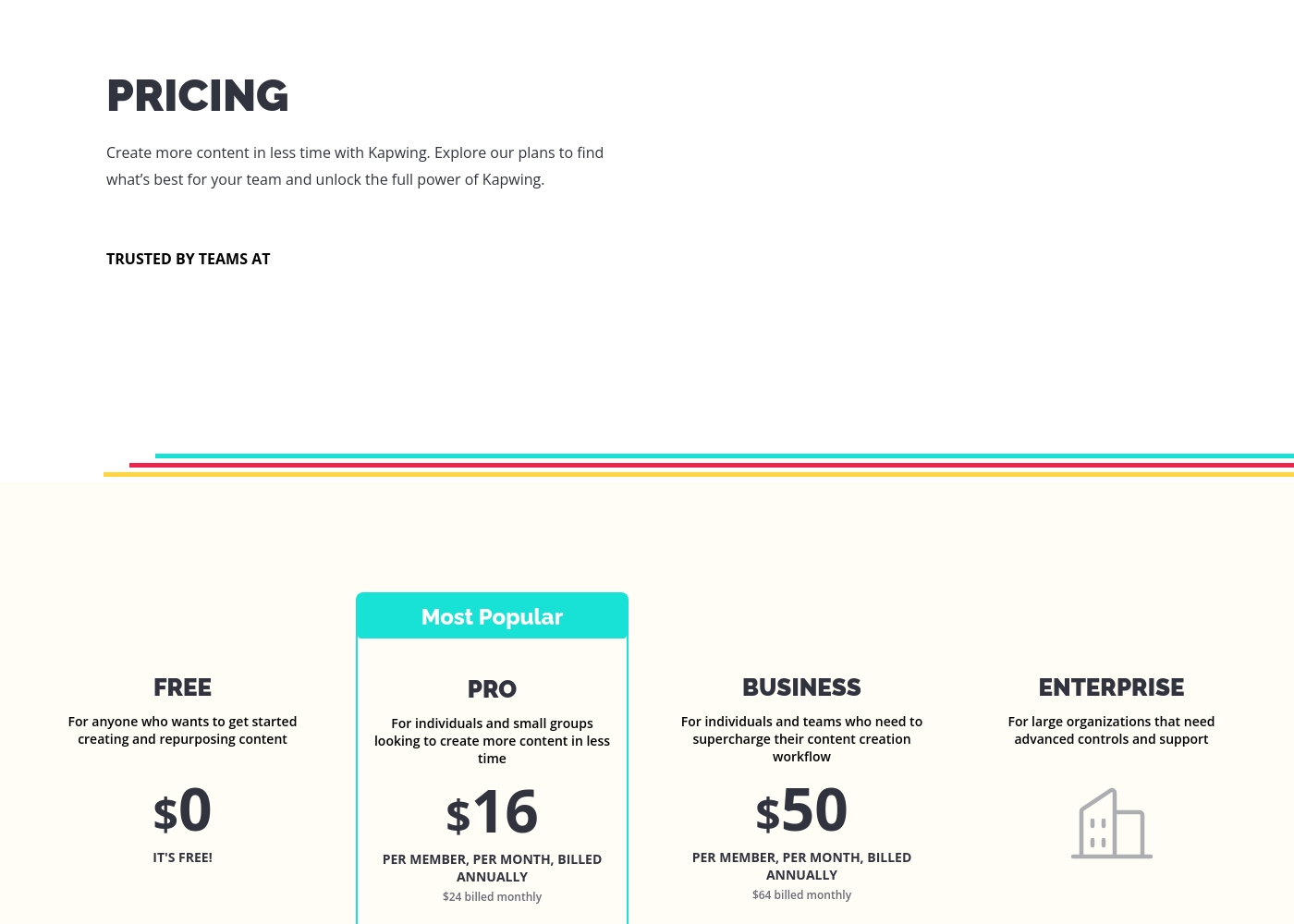
These plans help you explore Kapwing's full power and create content faster in less time.
FREE
Price: $0 Best For: Anyone who wants to get started creating and repurposing content Other Features:
- It's free!
This is the perfect starting point if you are just beginning your content creation journey. You can access core tools without spending any money.
- Perfect for getting started creating and repurposing content
- Billed per member, per month
- For individuals and small groups
- Everything in Free, plus features for your team workspace
- Billed per member, per month
- For individuals and teams
- Everything in Pro, plus features for your team workspace
- For large organizations
- Advanced controls and support
- Everything in Business, plus features for your team workspace
Pricing Notes
- Invideo pricing is credit/usage-based, meaning costs fluctuate based on AI activity and generative features used.
- Kapwing uses a predictable per-member pricing model ($16-50/member/month billed annually).
- Invideo users sometimes pay for unsatisfactory AI generated content due to the credit model.
- Kapwing offers significant savings if users commit to annual billing over monthly rates.
- Neither Invideo nor Kapwing explicitly provide a formal money-back guarantee.
Pricing Head-to-Head
User Reviews
Invideo AI enjoys widely positive reception, particularly for the strength of its customer support. Users frequently highlight the responsiveness and genuine care of the support team, praising specific agents for being patient, kind, and knowledgeable in resolving complex issues like billing errors or login problems.
Reviewers consistently find the platform an invaluable tool that is super easy to use, delivering professional results and saving significant time; some creators even attribute substantial growth in their channels to using the software. However, sentiment isn't universally positive regarding the core AI engine.
I had made the mistake of removing the email connected to my plan and couldn't understand why I was being charged. Patrick immediately located the account, helped me cancel the subscription, and provided great service. The team is excellent!
Users often praise Kapwing’s generally simple user interface, noting it’s super easy to use right in the browser without needing complex downloads. They appreciate specific powerful features like detailed timeline controls and the new “Repurpose Video” button for quick short-form content creation.
However, recent external feedback is overwhelmingly negative regarding business practices and high-risk policies. Many users complain they are misled by marketing, finding that nearly all useful tools are locked behind an immediate, expensive paywall, making the free plan useless.
Kapwing is such a great tool for editing videos and creating content. It’s super easy to use, so you don’t need to be a pro to figure it out. Everything’s right there in your browser—no downloads needed.
Our Verdict
If you need rapid, AI-driven content generation and reliable customer service, Invideo is the clear choice. Kapwing offers an easier traditional editor but serious policy risks exist for users. Most content creators should choose Invideo for security and service peace of mind. Invideo's superpower is translating complex text commands into full, polished videos instantly. Agencies use Invideo to cut production time from half a day to 30 minutes, drastically boosting output volume. Invideo backs this powerful AI with exceptional 24/7 human customer support, which is critical. Kapwing’s strength is its user-friendly, browser-based collaborative editing workspace interface. It offers excellent utility tools like the Resizer and Clean Audio, making quick modifications simple for small teams. Kapwing also offers a predictable per-member pricing system, which helps teams budget easily. The deciding factor is reliability and data management, where Kapwing fails spectacularly. Kapwing received extremely low user ratings because it permanently deletes user projects after minor billing issues. Invideo provides a reliable platform and guarantees human help when you need it most. Choose Invideo if you value generative speed, reliable customer support, and need to produce localized, high-volume assets. Pick Kapwing only if you prioritize basic timeline controls for repurposing and are willing to risk potential data loss. Invideo is the safer, more professional option.
Frequently Asked Questions
Which is better for small teams: Invideo or Kapwing?
Kapwing is generally better for small teams thanks to its collaborative, per-member pricing model. Invideo limits standard plans to three users, requiring expensive upgrades for larger teams. However, Invideo's support is far superior for any team issues.
Does Kapwing have text-to-video features like Invideo?
No, Kapwing does not offer the advanced text-to-video generation seen in Invideo. Kapwing uses AI for focused utility tasks like automatic subtitling. Invideo is built explicitly to generate entire cinematic videos from simple text prompts.
Is Invideo worth the usage-based cost over Kapwing's subscription?
If you need high volume and complex generative capabilities, Invideo provides fantastic value for its cost. Kapwing's per-member subscription is more predictable, but users complain its free version is too restrictive. Invideo includes 24/7 support which adds significant value.
Which tool is safer for long-term project storage?
Invideo is significantly safer for long-term project storage and integrity. Kapwing has been widely criticized by users who reported projects were permanently deleted after minor billing disputes. This makes Kapwing a very risky professional tool.
Which has better customer support, Invideo or Kapwing?
Invideo offers vastly superior human customer support, praised by users for being responsive 24/7. Kapwing's support is often described as rigid, unhelpful, and difficult to reach. Invideo prioritizes the user experience with dedicated help.
Does Invideo or Kapwing offer better tools for content accessibility?
Kapwing offers better, dedicated tools for accessibility, especially its highly praised subtitling features. Invideo can add captions via text prompts, but Kapwing focuses on ensuring content is easily digestible for all viewers.
Ready to Choose?
Both tools have their strengths. Choose based on your specific needs.