Infinity vs Wrike
This comparison pits high-value customization against complex enterprise maturity. Infinity saves you money with powerful features and a unique coaching framework. Wrike offers unmatched AI, scale, and 360° visibility for large teams. The ultimate choice depends on your budget vs. complexity needs.
Best for: Budget-conscious SMBs or startups prioritizing cost savings, Teams seeking high customization without complex enterprise overhead
Best for: Large organizations (20 to 20,000 users) requiring enterprise PM software, Marketing/Creative agencies needing advanced file/video proofing and approvals
High Customization, Low Cost, Manage Everything.
We find Infinity offers excellent functional depth and strong customization features for managing complex projects at a very competitive price point. Overall, we see it as a high-value, flexible alternative for teams looking to significantly reduce their annual expenditure on operational software.
Pros
- Provides powerful and highly customizable work management features.
- Designed to generate significant cost savings over expensive competitors.
- Offers advanced project views (Gantt, Chart, Document) in Pro plan.
- Includes the comprehensive 360° Business Architect framework.
Cons
- Reported issues regarding frustrating UI/UX design by some users.
- Currently has very limited public review data available for assessment.
- No visible standalone free plan or standard free trial offered.
- Discounts require choosing the per-seat annual billing commitment.
Enterprise Power Meets Complex Commitment.
We find Wrike is an exceptionally versatile project solution, noted for scaling efficiently across corporate environments up to 3000 users and unifying communication across highly complex workflows. Overall, the software offers a powerful feature set for advanced visibility and customization, but we caution users regarding the rigid annual subscriptions and documented difficulties with managing auto-renewal and pricing increases.
Pros
- Transforms and streamlines complex corporate workflows efficiently.
- Highly customizable for various methodologies (e.g., Holacracy, OKR).
- Excellent collaborative transparency and 360° project visibility.
- Provides fast and helpful customer support regarding implementation and bugs.
Cons
- Pricing practices are reported as aggressive, often resulting in significant renewal increases.
- Subscriptions are difficult to cancel, and users report trouble stopping automatic renewal.
- Some teams report challenging adoption and setup processes.
- Users report instances of being oversold on features bundles they did not need.
AboutInfinity
Infinity is designed as an economical alternative for organizations managing their growth and operations. It provides a way to significantly cut costs compared to other expensive market tools. Based on your plan, the software supports customizable numbers of workspace areas and collaborators.
Beyond basic functionality, you can also leverage specialized Professional Services. This support, available for a modest one-time fee, helps integrate these solutions smoothly into your workflow. ✨
AboutWrike
Wrike is a trusted end-to-end enterprise work management solution. It's designed for organizations ready to transform manual processes into interconnected, automated workflows. Teams from 20 to 20,000 thrive here because Wrike is highly adaptable to any industry or size. It brings multiple teams into the same place for game-changing visual collaboration. Wrike is where you can easily align strategy and effectively execute your projects and programs. 💡
Highlights
Feature Comparison
Features Overview
We highlight the main differences and pick a winner for each feature.
Value and Pricing Model
Infinity is designed for radical cost savings; Wrike is a premium enterprise investment.
Infinity focuses on budget optimization, starting at just $6 per user/month annually. The company explicitly positions Infinity as a cost-saving alternative to Trello or Airtable. You get a strong 14-day money-back guarantee securing your initial investment. Wrike’s paid plans start higher at $10 per user/month, scaling up to $25 and beyond. Wrike plans are mandatory annual commitments with no money-back guarantee policy. Users have reported aggressive pricing and difficult cancellation processes with Wrike. The cost difference is substantial, especially across mid-sized teams. Infinity is the clear winner if minimizing annual subscription costs is your main concern. Choose Infinity for massive savings, but accept the potential risks of Wrike's rigid annual contract and higher starting price.
Enterprise Security and Scale
Wrike supports massive scale and enterprise security; Infinity is highly customizable but simpler.
Wrike is built for scale, supporting organizations from 20 to 20,000 users. It provides robust security features like SOC2, ISO 27001, and full GDPR compliance. Wrike offers role-based access control and advanced security options. Infinity supports flexible capacity up to Unlimited members and Agency accounts. However, specific enterprise security certifications like SOC2 are not explicitly listed in the data. Infinity focuses more on customizability than high-level institutional security. If you require strict compliance or 99.9% uptime guarantees, Wrike is the platform for enterprise certainty. Infinity scales well, but Wrike has the certified architecture larger corporations require. This makes Wrike ideal for highly regulated industries requiring strict data governance and security guarantees.
Advanced Data Visualization
Both offer core views, but Wrike provides dedicated Resource Planning features.
Infinity’s Pro plan unlocks critical advanced views like Gantt View, Chart View, and Document View. These features are essential for tracking complex timelines and deliverables. Basic plan users only get foundational views. Wrike offers Gantt, Calendar, and Chart views starting with the Team plan ($10/user/month). Crucially, Wrike’s Business plan adds comprehensive Resource and Capacity Planning tools. Managers can precisely see resource allocation enterprise-wide. Infinity provides necessary visualization tools suitable for project tracking. Wrike provides sophisticated tools for optimizing human resources across complex portfolios. If cross-departmental labor optimization is key, Wrike is the more advanced tool for resource managers.
Unique Framework & Mentorship
Infinity provides a guided growth framework; Wrike focuses on mandatory high-cost setup services.
Infinity offers the unique 360° Business Architect, a robust management framework. This includes dedicated software, comprehensive lessons, and one-on-one mentorship for scaling operations. Professional Services are optional for a small one-time fee ($199). Wrike recommends utilizing Professional Services for every new team adopting the platform. For teams exceeding 20 users, Wrike often insists on guided deployment as mandatory. This support can add significant, undocumented costs. Infinity offers developmental guidance integrated into its value proposition. Wrike provides high-end implementation consultancy required for complex enterprise setup. Teams prioritizing guided business growth and mentorship should definitely look at Infinity’s 360° offering.
Automation and Integrations
Wrike offers massive custom automation quotas relying on 400+ integrations; Infinity details are vague.
Wrike excels in automation, offering quotas ranging from 50 to 1,500 actions per user monthly. Wrike Integrate connects over 400 popular tools like Jira, Adobe, and Salesforce. This rapid syncing eliminates context switching across systems. Infinity lists "Automations" and "Integrations" as core features but provides no specific details on quotas or supporting external apps. The data does not specify which third-party apps Infinity supports. For complex workflow automation crossing many existing corporate systems, Wrike is significantly superior. Wrike’s ability to customize and automate workflows across 400+ apps gives it the edge. If your organization requires heavy, deep integration with specialized software, Wrike is the safer and more proven platform.
User Experience (UI/UX)
Wrike's adoption is challenging; Infinity's UI consistency is a reported concern.
Wrike is known for its powerful feature set, but some teams find adoption challenging due to complexity. Its power targets users accustomed to sophisticated enterprise software. Infinity has received concrete critiques regarding its user interface and overall user experience (UI/UX). Reviewers stated that while Infinity is powerful, the design can feel poorly optimized and frustrating to navigate. Both tools present potential UI/UX hurdles, though for different reasons (Wrike's complexity vs. Infinity's design issues). This makes a clear winner difficult to determine solely from user reports. It is highly recommended that users fully test both Infinity (using the 14-day guarantee) and Wrike (using the free trial) before committing.
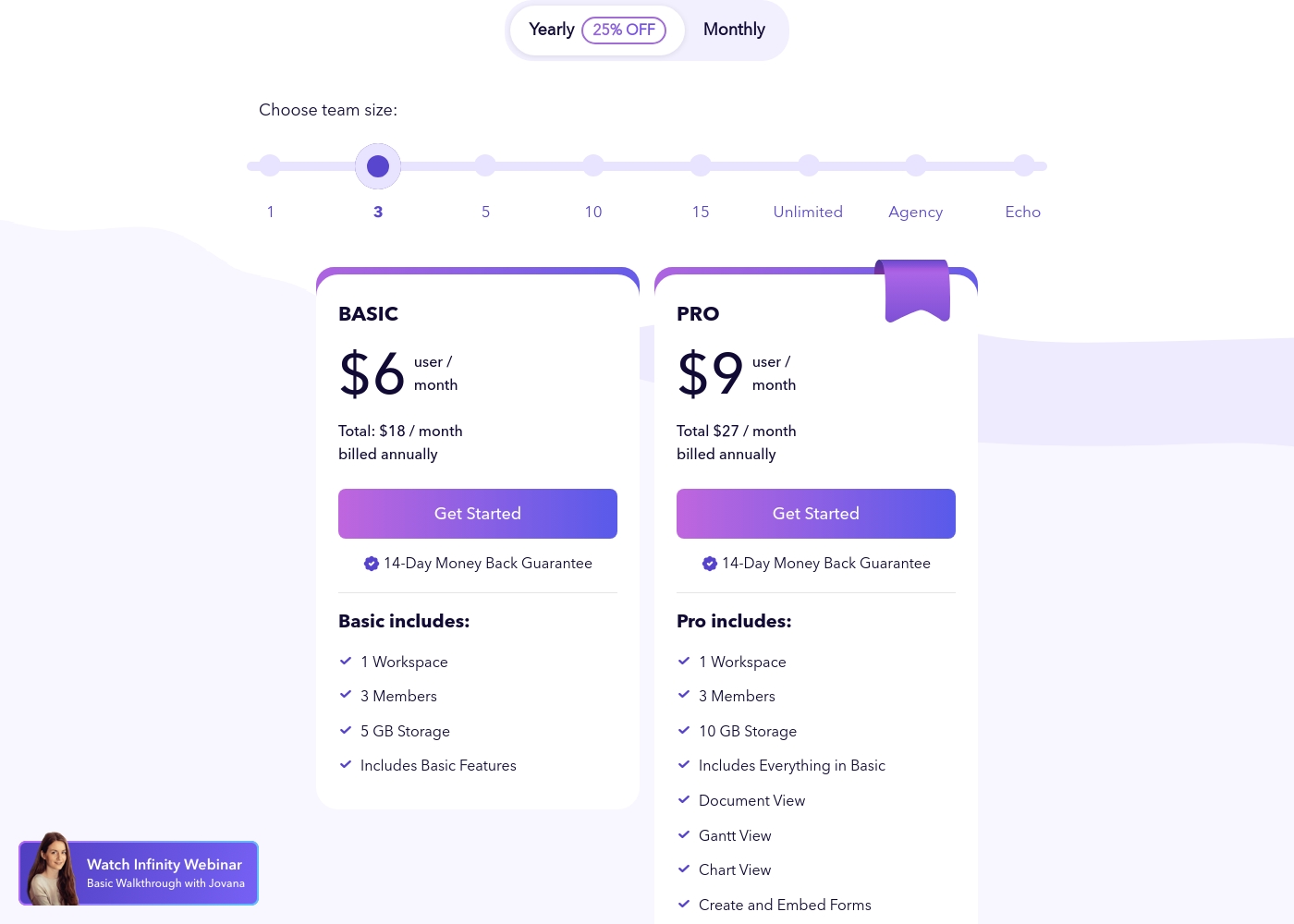
Infinity costs between $18 and $27 per month (billed annually) with two primary plans visible: Basic at $18/month and Pro at $27/month (for a 3-member team).
These plans utilize a per-user, per-month pricing structure when billed annually. You benefit from a 25% discount by selecting the yearly option.
Basic
Price: $6 user/month (Total $18/month, billed annually) Refund Policy: 14-Day Money Back Guarantee Other Features: 1 Workspace, 3 Members, 5 GB Storage, Includes Basic Features
- 1 Workspace
- 3 Members
- 5 GB Storage
- Includes Basic Features
- 1 Workspace
- 3 Members
- 10 GB Storage
- Includes Everything in Basic
- Document View
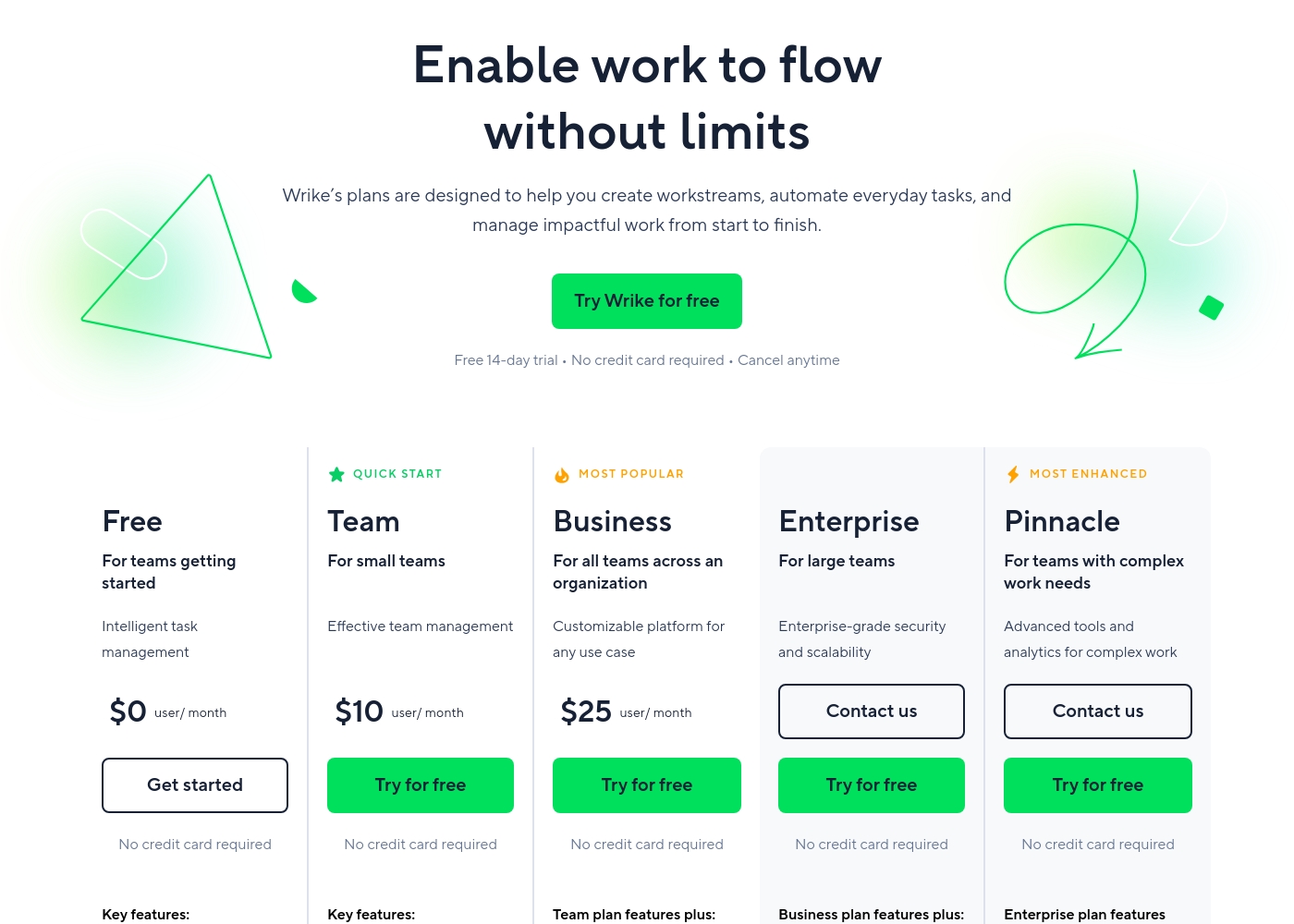
Wrike costs between $0 and $25 per user/month, with five plans: Free at $0/user/month, Team at $10/user/month, Business at $25/user/month, and Enterprise and Pinnacle which require users to contact sales.
- Web, desktop, and mobile apps
- Project and task management
- Board view (Kanban)
- Table view (spreadsheet format)
- Folders structure & nested projects
- Unlimited projects, tasks, & subtasks
- Gantt charts, Calendar & Chart view
- Generative AI, 2 GB storage per user
- Project Blueprints and Unlimited request forms
- Approvals & guest approvals
- Resource & Capacity Planning
- File and video proofing (30+ file formats)
- Real-time reports
- SAML-based SSO and Two-Factor Authentication (2FA)
- Password policies and custom access roles
- Customizable user types and Admin permissions
- User audit reports
Pricing Notes
- Infinity requires annual billing for discounts but offers a 14-day money-back guarantee.
- Wrike offers a Free plan and a 14-day trial, but paid plans require a rigid annual commitment.
- Users report significant difficulties canceling Wrike subscriptions or stopping automatic renewals.
- Infinity's Pro plan doubles storage (5GB to 10GB total) and unlocks key views for only $3 more per user/month.
- Wrike pricing is complex, with required batch purchasing of seats for growing teams.
Pricing Head-to-Head
User Reviews
Infinity currently presents a very small public feedback pool, limiting a thorough assessment of recurring themes like long-term reliability or support performance. Based on the limited sentiment available (3.5 stars across only two Trustpilot reviews), users clearly recognize the platform's core strength: its ultimate flexibility and power as a work management solution.
One reviewer highly praised Infinity as flexible software that performs great and effectively replaces competitive products like Airtable and Trello. However, the existing feedback also includes a crucial, concrete critique regarding adoption and user experience.
This is really great software that offers impressive flexibility. It easily handles all our work needs. We are using it to replace older platforms like Airtable and Trello, and it performs wonderfully.
Users consistently praise Wrike's powerful capabilities in transforming workflow management and driving organizational efficiency. Many reviewers, including team leads and large enterprise users, call it one of the best project management systems available, noting its strong suitability for high-level customization for specific methodologies like OKR.
Its ability to centralize communication, provide 360° visibility, and manage collaboration across large global teams is frequently highlighted as second to none. Furthermore, customer support is often described as exemplar, particularly regarding implementation and quick bug fixes.
Using Wrike for three years has completely changed how we manage our workflows. The biggest transformation is how streamlined and fast our operations have become. It's truly efficient for our large team.
Our Verdict
Deciding between Infinity and Wrike comes down to your financial commitment versus complexity requirements. Both tools are powerful work management platforms, but they serve different markets. Infinity is excellent for budget optimization and small to mid-sized teams looking for flexibility. Infinity’s superpower is making advanced features radically affordable while offering guidance. It provides the unique 360° Business Architect framework, including mentorship and lessons. You get Gantt views and custom forms for as little as $9 per user/month, a steal in this market. Wrike’s superpower is its sheer enterprise capability, driven by AI and comprehensive resource management. If you need to manage 20,000 users, integrate 400 apps, and use video proofing, Wrike delivers. Its advanced feature set for scale is hard to match. The critical deciding factor is risk and contract rigidity. Infinity offers a safe 14-day money-back guarantee. Wrike requires strict annual commitments, which users report are nearly impossible to cancel. Choose Infinity if you value budget savings and customization with mentorship support. Stick with Wrike only if you are a large organization where mandatory resource planning and extensive AI features justify the high cost.
Frequently Asked Questions
Which is more suitable for small teams: Infinity or Wrike?
Infinity is more suitable due to its low cost structure starting at $6/user/month. Wrike offers a free plan, but its paid tiers require annual commitment starting at $10/user/month. Wrike is generally optimized for teams larger than 20 users.
Does Infinity offer Resource Planning like Wrike?
No, Infinity does not explicitly list dedicated Resource and Capacity Planning tools. Wrike excels here, offering these crucial features starting in its Business plan. Resource management is a key differentiator for Wrike.
Is Wrike worth the extra cost over Infinity?
Wrike’s cost is only justified if you need enterprise security, AI-powered insights, or specialized proofing. Infinity provides comparable core PM features (like Gantt) at a fraction of Wrike's price point. Evaluate if your needs justify Wrike's high annual commitment.
Does Infinity have a free trial period?
Infinity does not offer a standard free trial or a free plan visible for paid tiers. However, you can try Infinity risk-free with its strong 14-day money-back guarantee. Wrike provides a permanent free plan and a 14-day free trial.
Which tool offers better customization capabilities?
Both Infinity and Wrike are praised for their substantial customization. Infinity’s flexibility helps replace multiple disparate tools. Wrike allows deep customization of workflows and item types for complex enterprise needs.
Which one handles creative asset approvals better?
Wrike handles creative approvals far better due to its specialized features. Wrike includes File and Video Proofing for over 30 formats, plus guest approvals. This is not a specific feature listed for Infinity.
Ready to Choose?
Both tools have their strengths. Choose based on your specific needs.