Infinity vs Trello
People often compare Infinity and Trello for visual task management and collaboration. Trello is the king of easy visual Kanban boards and quick, simple starts. Infinity offers massive low-cost flexibility and advanced viewing options for serious scaling. The choice depends on your budget and required project management complexity.
Best for: Businesses focused on radical budget optimization and cutting expensive subscription costs, Teams needing advanced Gantt and Chart visualizations (Pro plan)
Best for: Individuals and startups needing a free, robust task management tool, Teams prioritizing simple, visual Kanban workflow and immediate adoption
High Customization, Low Cost, Manage Everything.
We find Infinity offers excellent functional depth and strong customization features for managing complex projects at a very competitive price point. Overall, we see it as a high-value, flexible alternative for teams looking to significantly reduce their annual expenditure on operational software.
Pros
- Provides powerful and highly customizable work management features.
- Designed to generate significant cost savings over expensive competitors.
- Offers advanced project views (Gantt, Chart, Document) in Pro plan.
- Includes the comprehensive 360° Business Architect framework.
Cons
- Reported issues regarding frustrating UI/UX design by some users.
- Currently has very limited public review data available for assessment.
- No visible standalone free plan or standard free trial offered.
- Discounts require choosing the per-seat annual billing commitment.
Simple Project Management, Complex Login
We find Trello delivers exceptional value quickly due to its easy operation. Its Kanban visual organization is highly flexible for team workflows. Overall, Trello is a powerful tool, but stability issues and frustrating administrative friction points like the Atlassian login do hold it back.
Pros
- The simple, visual Kanaban board design offers great ease of use.
- A permanent Free plan is available and suitable for small teams or personal use.
- The platform is effective for team management and sharing context quickly.
- Supports extensive customization and functionality upgrades via Power-Ups.
Cons
- Users frequently report difficulty and friction with the Atlassian login process.
- Accessing billing information and invoices can be surprisingly complicated.
- The interface occasionally suffers from lag and server downtime.
- Key views like Calendar or Map require a paid Premium subscription.
AboutInfinity
Infinity is designed as an economical alternative for organizations managing their growth and operations. It provides a way to significantly cut costs compared to other expensive market tools. Based on your plan, the software supports customizable numbers of workspace areas and collaborators.
Beyond basic functionality, you can also leverage specialized Professional Services. This support, available for a modest one-time fee, helps integrate these solutions smoothly into your workflow. ✨
AboutTrello
Trello is designed to keep you at the top of your game by ensuring every to-do or idea, regardless of size, finds its proper place. The system helps you stay organized and efficient using three key components: Inbox, Boards, and Planner.
The Inbox quickly captures tasks as soon as they are on your mind, whether you are in the office or on the go. You manage your tasks using flexible Boards, where long lists become manageable by tracking items from “to-dos to tackle” to “mission accomplished!” Use the Planner to simply drag and drop your top tasks right into your calendar, ensuring you make time for what truly matters. 💡
Highlights
Feature Comparison
Features Overview
We highlight the main differences and pick a winner for each feature.
Core Project Views
Infinity offers diverse views cheaply, while Trello centers on simple Kanban. Infinity Pro provides Gantt and Chart views.
Infinity offers highly customizable structures beyond standard boards. Pro users unlock Document, Gantt, and Chart views easily. Infinity is designed to replace multiple specialized tools effectively. Trello relies on the classic visual Kanban board structure for simplicity. It requires the Premium plan to access visual aids like Calendar or Timeline. Trello's core strength remains the single, clear board view. Infinity provides powerful views like Gantt and Document at a much lower price point. Trello is mainly built around the intuitive card-based Kanban flow. Infinity fits complex planning better. Trello is optimal for simple progress tracking.
Pricing & Cost Savings
Infinity is the budget champion for features; Trello offers the best permanent free plan. Infinity is explicitly designed to save you money.
Infinity focuses explicitly on massive cost savings for budget optimization. The Pro plan is only $9 per user/month, annually, for premium features. This economical model helps teams stop paying thousands per year. Trello features a permanent, fully functional Free plan for small teams. Paid plans start at a low $5/user/month (Standard, annual). Trello pricing rises significantly for advanced administrative features like Enterprise SSO. Infinity is the clear budget winner for teams needing paid, feature-rich tiers. Trello is unbeatable if your requirements are covered by the generous free tier. Infinity secures your investment with a 14-day money-back guarantee.
Ease of Use
Trello offers superior simplicity and is faster to adopt. Infinity's flexibility sometimes leads to a frustrating user experience.
Trello is praised consistently for its exceptional ease of use and simple visual design. Trello customers report rapid value delivery within 30 days of starting. Infinity's deep customization means the UI/UX can feel frustrating to beginner users. This power comes at the cost of immediate simplicity and a steeper learning curve. Trello prioritizes immediate usability and a gentle learning curve for fast adoption. Infinity requires more initial time for setup and learning to harness its full power.
Advanced Visualization
Both offer advanced views in paid tiers, but they specialize differently. Infinity offers Gantt; Trello offers Timeline/Map.
Infinity Pro plan users get powerful tools like Gantt View and Chart View for complex task tracking. The Document View is also available for clear, long-form project specifications. Infinity caters well to engineering or documentation needs. Trello Premium subscribers unlock Calendar, Timeline, Table, Dashboard, and Map views. These visual aids are key for large-scale planning and oversight. Trello excels at workflow visualization in multiple methods. Both require a paid tier for advanced views, offering different visualization types. Trello handles time-based planning (Timeline/Calendar) better, while Infinity handles dependency tracking (Gantt).
Automation Limits
Trello Premium provides unlimited automation runs. Infinity’s automation limits are not stated clearly in available plans.
Trello Free plan automation is capped at 250 command runs monthly. Trello Premium and Enterprise offer unlimited Workspace command runs. This lets large teams automate everything without worrying about usage caps. Infinity lists Automations as a core feature available to all users. However, the data does not specify usage limitations for Basic or Pro pricing tiers. Trello offers clear limits on automation usage for growing teams. Infinity needs more transparency regarding its automation quotas.
Learning Curve
Trello is extremely fast and intuitive for beginners. Infinity requires more skill to configure but offers greater freedom.
Trello is highly praised for its simplicity and delivers immediate value for quick adoption globally. The core Kanban structure is instantly intuitive for most people. The comprehensive features of Infinity suggest a steeper learning curve for users. New teams might need Professional Services for smooth integration and adoption. Trello’s straightforward design wins easily on initial speed and adoption ease. Infinity demands more time from its users but unlocks massive customization potential.
Scaling & Enterprise
Trello offers robust enterprise features like SSO and 24/7 support. Infinity focuses more on affordable, scalable general features.
Trello Enterprise tier includes organization-wide permissions and dedicated 24/7 Admin support. Critically, it offers free SSO and user provisioning via Atlassian Guard. Infinity supports growth with packages for Unlimited Members and Agency accounts. Scaling features focus on capacity and low cost. Trello provides crucial corporate governance and security frameworks for large scale. Infinity excels in feature delivery at low cost but lacks stated enterprise security details.
Unique Business Support
Infinity offers a mentorship framework; Trello offers standard responsive tech support. Infinity focuses on guidance beyond the software.
Infinity uniquely includes the 360° Business Architect framework. This offers mentorship, lessons, and dedicated software for scaling operations. Infinity also offers Professional Services for a $199 fee for bespoke setup help. Trello offers standard tiered customer support, scaling up to 24/7 enterprise service. Trello focuses strictly on providing the best possible project management tool. Infinity provides a unique guided growth strategy for scaling businesses. Trello provides excellent, reliable tech support for its product functionality.
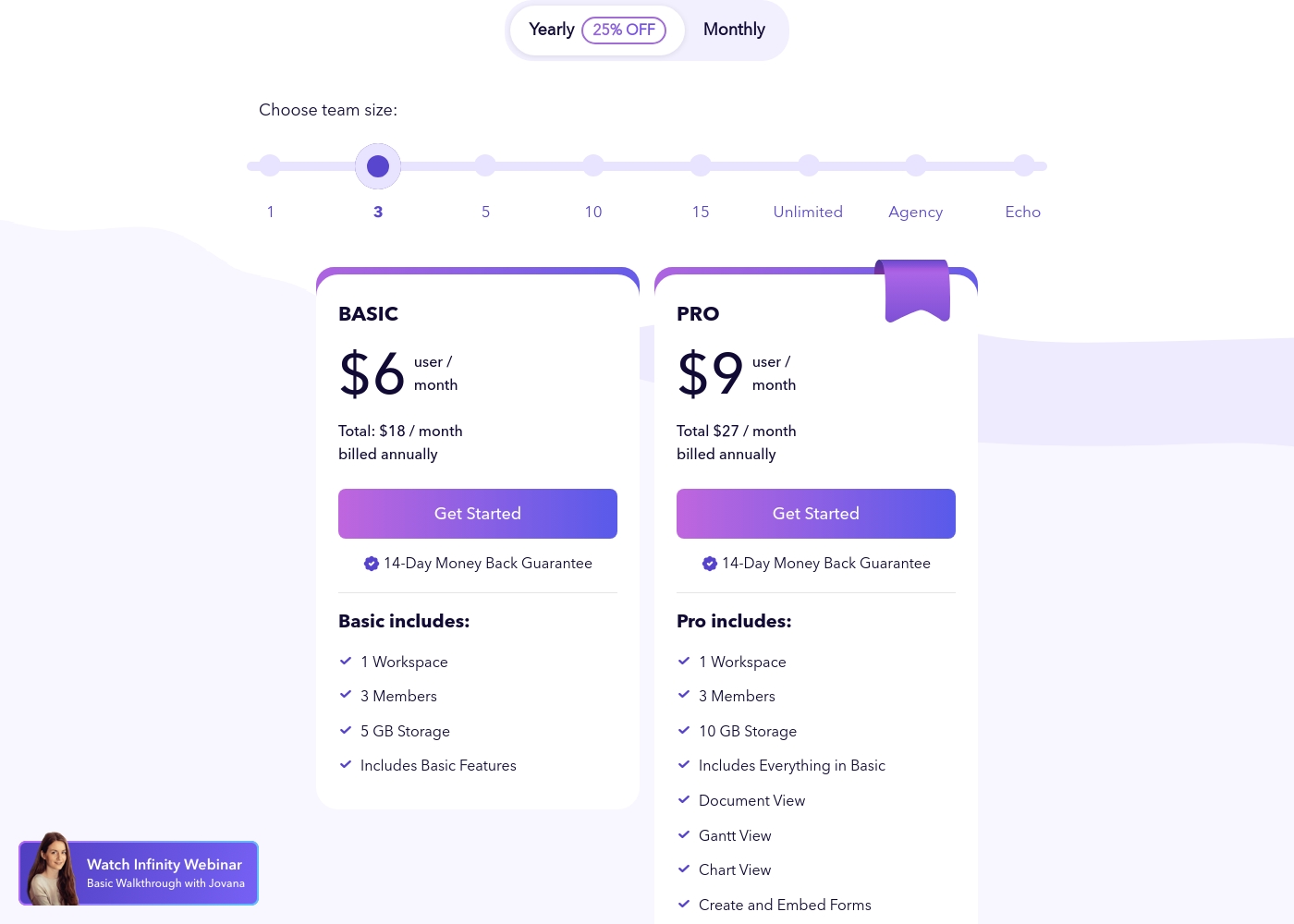
Infinity costs between $18 and $27 per month (billed annually) with two primary plans visible: Basic at $18/month and Pro at $27/month (for a 3-member team).
These plans utilize a per-user, per-month pricing structure when billed annually. You benefit from a 25% discount by selecting the yearly option.
Basic
Price: $6 user/month (Total $18/month, billed annually) Refund Policy: 14-Day Money Back Guarantee Other Features: 1 Workspace, 3 Members, 5 GB Storage, Includes Basic Features
- 1 Workspace
- 3 Members
- 5 GB Storage
- Includes Basic Features
- 1 Workspace
- 3 Members
- 10 GB Storage
- Includes Everything in Basic
- Document View
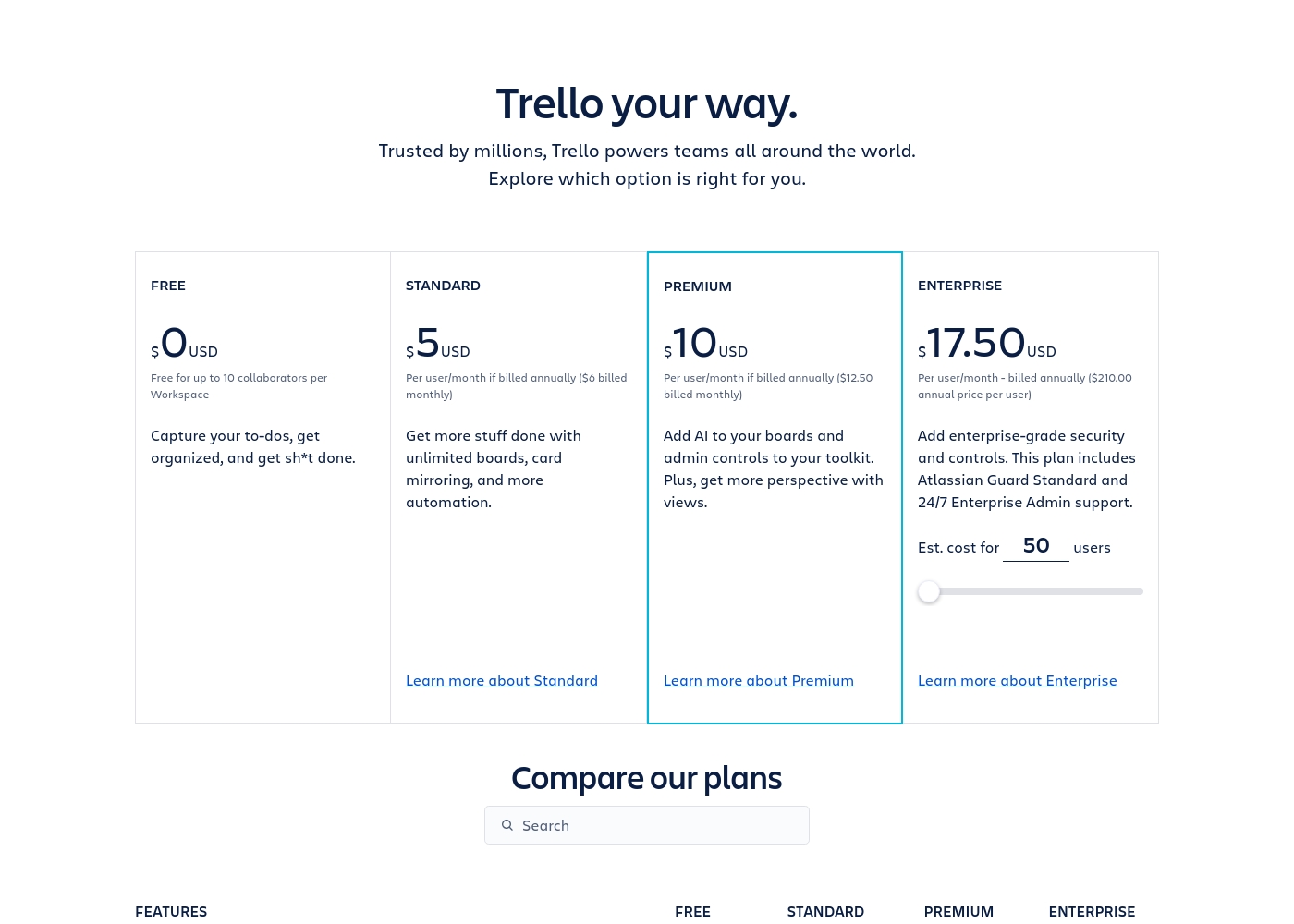
Trello costs between $0 and $17.50 per user/month, offering four plans: Free at $0, Standard at $5/user/month (annually), Premium at $10/user/month (annually), and Enterprise at $17.50/user/month (annually).
Trello offers flexible plans for individuals and large organizations. Let’s look closer at what each plan provides, based on annual pricing options.
Free
Price: $0 USD Best For: Capturing to-dos, fundamental organization Other Features:
- Unlimited cards
- Up to 10 boards per Workspace
- Unlimited Power-Ups per board
- 250 Workspace command runs per month
- 2-factor authentication
- Unlimited cards
- Unlimited Power-Ups per board
- Unlimited storage (10MB/file)
- 2-factor authentication
- Unlimited activity log
- Unlimited boards
- Card mirroring
- Advanced checklists
- Custom Fields
- Quick capture powered by AI
- Atlassian Intelligence (AI)
- Views: Calendar, Timeline, Table, Dashboard, and Map
- Admin and security features
- Workspace-level templates
- Simple data export
- Unlimited Workspaces
- Organization-wide permissions
- Free SSO and user provisioning with Atlassian Guard
- 24/7 Enterprise Admin support
- Public board management
Pricing Notes
- Infinity focuses on budget optimization and includes a 14-day money-back guarantee.
- Infinity's quoted prices reflect a 25% discount for annual billing commitment.
- Trello offers a permanent Free plan ideal for individuals or small teams.
- Trello paid plans start lower but rise to $17.50/user/month for the Enterprise tier.
- Trello users report frustration accessing billing and invoice information due to the Atlassian framework.
Pricing Head-to-Head
User Reviews
Infinity currently presents a very small public feedback pool, limiting a thorough assessment of recurring themes like long-term reliability or support performance. Based on the limited sentiment available (3.5 stars across only two Trustpilot reviews), users clearly recognize the platform's core strength: its ultimate flexibility and power as a work management solution.
One reviewer highly praised Infinity as flexible software that performs great and effectively replaces competitive products like Airtable and Trello. However, the existing feedback also includes a crucial, concrete critique regarding adoption and user experience.
This is really great software that offers impressive flexibility. It easily handles all our work needs. We are using it to replace older platforms like Airtable and Trello, and it performs wonderfully.
Trello receives mixed but generally favorable external feedback, often lauded as an amazing app for personal and team organization. Users consistently praise its simple design and exceptional ease of use, which makes it perfect for startups and small businesses utilizing the generous free plan.
The core utility, including dynamic block control and strong real-time syncing, is highly appreciated. However, recurring pain points are frequently mentioned, stemming largely from the Atlassian acquisition.
Trello is a great tool for starting out, especially for small businesses. It has a robust free plan you can use for organization before deciding to go premium. It’s an excellent option for startups working with a limited budget.
Our Verdict
The choice between Infinity and Trello is essentially a battle of power versus simplicity and cost. If your priority is quick, gentle adoption, Trello is the natural choice. If you require complex features and massive budget savings, Infinity wins easily. Both tools manage project complexity, but they target different user philosophies. Infinity’s superpower is its incredible flexibility and extremely low price tag. Advanced views like Gantt and Chart are available on the Pro plan for only $9 per user/month annually. Infinity also offers the unique 360° Business Architect support for guided operational scaling. Choose Infinity if you want to replace expensive, complex tools while cutting major annual costs. Trello thrives on its iconic, simple visual Kanban board design and generous permanent Free Plan. It delivers value quickly; 75% of users report results within 30 days. Trello is perfect for instant team collaboration and features easy AI-powered task capture from email and chat. Use Trello for maximum simplicity and superior enterprise scaling. The deciding factor should be complexity versus interface friction. Trello is easier to start, but its advanced tiers quickly become expensive for limited functionality. Infinity is far cheaper for power features but requires more initial commitment due to a steeper learning curve. Final Verdict: Pick Infinity if you hate high subscription fees and need affordable visualization like Gantt charts. Choose Trello if you must have a perfect free plan and prioritize global team-wide adoption speed.
Frequently Asked Questions
Which is easier to use: Infinity or Trello?
Trello is widely praised for its simplicity and exceptional ease of use. Infinity is powerful but some users report the UI/UX can be frustrating. Trello is easier for quick, team-wide adoption.
Does Infinity offer a free plan like Trello?
No, Infinity does not advertise a permanent free plan like Trello. Infinity's offering is secured by a 14-day money-back guarantee. Trello provides a robust permanent free tier for up to 10 boards.
Which tool is better for advanced project visualization?
Infinity Pro offers specialized Gantt and Chart views for dependency tracking and reporting. Trello Premium offers Timeline, Calendar, and Map views. The better tool depends on your specific visualization needs.
Is Trello or Infinity better for budget-conscious teams?
For teams needing only basic Kanban, Trello's Free plan is unbeatable. If you need advanced Pro features like Gantt, Infinity offers significantly better long-term value and lower per-user cost.
How does Trello's automation compare to Infinity's?
Trello Premium and Enterprise plans offer clear unlimited automation runs via Butler. While Infinity includes automation, the usage limits are not explicitly detailed in the available pricing data.
Can Infinity truly replace Trello or similar tools?
Yes, Infinity is explicitly marketed as a low-cost, customizable alternative to Trello and Airtable. It offers the advanced views and flexibility needed to consolidate spending.
Ready to Choose?
Both tools have their strengths. Choose based on your specific needs.