Infinity vs Notion
Infinity and Notion both offer powerful, flexible workspace solutions. Infinity competes directly on cost savings and high customization features. Notion dominates the all-in-one workspace and integrated AI space. Picking the right tool depends on your budget and desired all-in-one capabilities.
Best for: Businesses committed to significant budget optimization, Teams needing advanced, ready-made Gantt and Chart views
Best for: Individuals who need a powerful, perpetual free personal workspace, Teams that need a centralized, AI-powered corporate wiki/knowledge base
High Customization, Low Cost, Manage Everything.
We find Infinity offers excellent functional depth and strong customization features for managing complex projects at a very competitive price point. Overall, we see it as a high-value, flexible alternative for teams looking to significantly reduce their annual expenditure on operational software.
Pros
- Provides powerful and highly customizable work management features.
- Designed to generate significant cost savings over expensive competitors.
- Offers advanced project views (Gantt, Chart, Document) in Pro plan.
- Includes the comprehensive 360° Business Architect framework.
Cons
- Reported issues regarding frustrating UI/UX design by some users.
- Currently has very limited public review data available for assessment.
- No visible standalone free plan or standard free trial offered.
- Discounts require choosing the per-seat annual billing commitment.
Powerful software, risky provider.
We found Notion is an exceptionally flexible and powerful productivity tool, praised globally for its block-based editor and ability to consolidate diverse workflows. However, external evidence highlights significant failures in subscription management and support responsiveness. Overall, we advise extreme caution regarding billing procedures due to recurring reports of unauthorized charges and cancellation difficulties.
Pros
- Exceptionally powerful and versatile block-based editor.
- Effective for personal knowledge management and team use.
- Consolidates multiple specialized tools (wikis, CRMs, project management).
- Strong native AI assistance integrated throughout the workspace.
Cons
- Widespread reports of deceptive or confusing billing practices.
- Extremely poor and unresponsive customer support experiences.
- Users report app is often slow and unreliable.
- Difficulty canceling subscriptions and obtaining timely refunds.
AboutInfinity
Infinity is designed as an economical alternative for organizations managing their growth and operations. It provides a way to significantly cut costs compared to other expensive market tools. Based on your plan, the software supports customizable numbers of workspace areas and collaborators.
Beyond basic functionality, you can also leverage specialized Professional Services. This support, available for a modest one-time fee, helps integrate these solutions smoothly into your workflow. ✨
AboutNotion
Notion is your dedicated AI workspace and everything app. It is built to replace multiple specialized tools with one powerful platform. This centralized space lets teams consolidate project management, internal wikis, and basic CRM functions. Notion is trusted broadly; over 100 million users worldwide use it, and 62% of the Fortune 100 are customers. You can use it right in your browser or download specialized tools like Notion Mail and Notion Calendar to keep time and work together. ✅
Highlights
Feature Comparison
Features Overview
We highlight the main differences and pick a winner for each feature.
Integrated AI Features
Notion offers native AI assistance built into every workspace block. Infinity does not mention any built-in AI functionality.
Notion is recognized as the #1 rated AI writing tool by G2. Every team member gains an AI assistant for writing and summarization. This eliminates needing separate AI subscriptions for various tasks. Infinity's core features focus on project management and visualization tools. The provided data does not indicate any current integrated AI functionality. This is a significant functional gap. If AI-assisted writing or research is central to your workflow, Notion is the clear choice. Organizations can prioritize generative AI tools using Notion’s native features. Notion also offers advanced zero data retention options for AI usage on their Enterprise plan, boosting security.
Advanced Project Views
Infinity guarantees specialized Document, Chart, and Gantt views on its Pro plan. Notion supports similar views via flexible databases.
Infinity Pro explicitly unlocks critical advanced visualization tools. These include dedicated Gantt View and Chart View for complex tracking. Document View is also available for long-form operational guides. Infinity emphasizes complex project tracking tools. These visualization tools are essential for managing complex dependencies accurately. This makes dedicated project tracking clearer in Infinity. Notion's flexible databases can replicate these views, but they require user setup. While robust, Notion focuses more on general wiki structure than dedicated professional PM tools. For teams prioritizing out-of-the-box professional Gantt and Chart views, Infinity provides a simpler package.
Learning & Guidance
Infinity offers personalized mentorship via the 360° Business Architect framework. Notion relies on user documentation and community support.
The 360° Business Architect framework is unique to Infinity. This comprehensive system includes lessons, software, and one-on-one mentorship pairings. It is explicitly designed to guide the scaling of business and marketing operations. Notion’s value comes from its sheer flexibility and community resource base. Notion does not feature dedicated professional mentorship or a scaling framework. While powerful, Notion expects users to build their own systems. If your organization needs a structured, guided approach to operational scaling, Infinity wins. The framework provides personalized support often needed for complex tool adoption. Infinity offers specialized Professional Services for setup assistance for a low one-time fee.
Pricing Structure & Cost
Infinity targets cost reduction with low per-user annual prices. Notion offers a free plan and scales up to $20/user/month.
Infinity’s core messaging is focused on massive cost savings over competitors. Plans start low, around $6 per user/month, with a 25% annual discount. This makes Infinity highly economical for small, budget-conscious scaling teams. Notion has the advantage of a robust, free tier good for perpetual individual use. However, Notion requires upgrading to Plus ($10) or Business ($20) quickly for team collaboration. If minimizing recurring subscription cost is the main goal, Infinity offers better long-term pricing value. Infinity replaces expensive tools like Airtable and Trello at a fraction of their cost.
Ecosystem & Apps
Notion is an all-in-one ecosystem with dedicated companion apps. Infinity focuses solely on core workspace management features.
Notion aims to replace multiple tools with a single, unified platform. It offers dedicated companion apps like Notion Calendar and Notion Mail. This helps users harmonize time management and work output seamlessly. Infinity is designed primarily as a highly customizable project management platform. It does not advertise having supplementary mail or calendar synchronization apps. Notion excels at centralizing communication, time, and documentation in one place. Using Notion reduces app switching and keeps your focus constant throughout the day.
Security & Compliance
Notion provides advanced enterprise-grade security features. Infinity does not detail advanced security controls explicitly.
Notion's Business plan includes advanced security controls and an Audit log. Enterprise plans feature SCIM user provisioning and DLP/SIEM integrations. This makes Notion highly compliant for large organizations. Infinity is focused on core customizable project management features. Information regarding SCIM, Audit Logs, or advanced data security is not provided in their plan details. For businesses with strict compliance or large-scale user management needs, Notion is the safer bet. Notion ensures data protection, including options for zero data retention on AI usage.
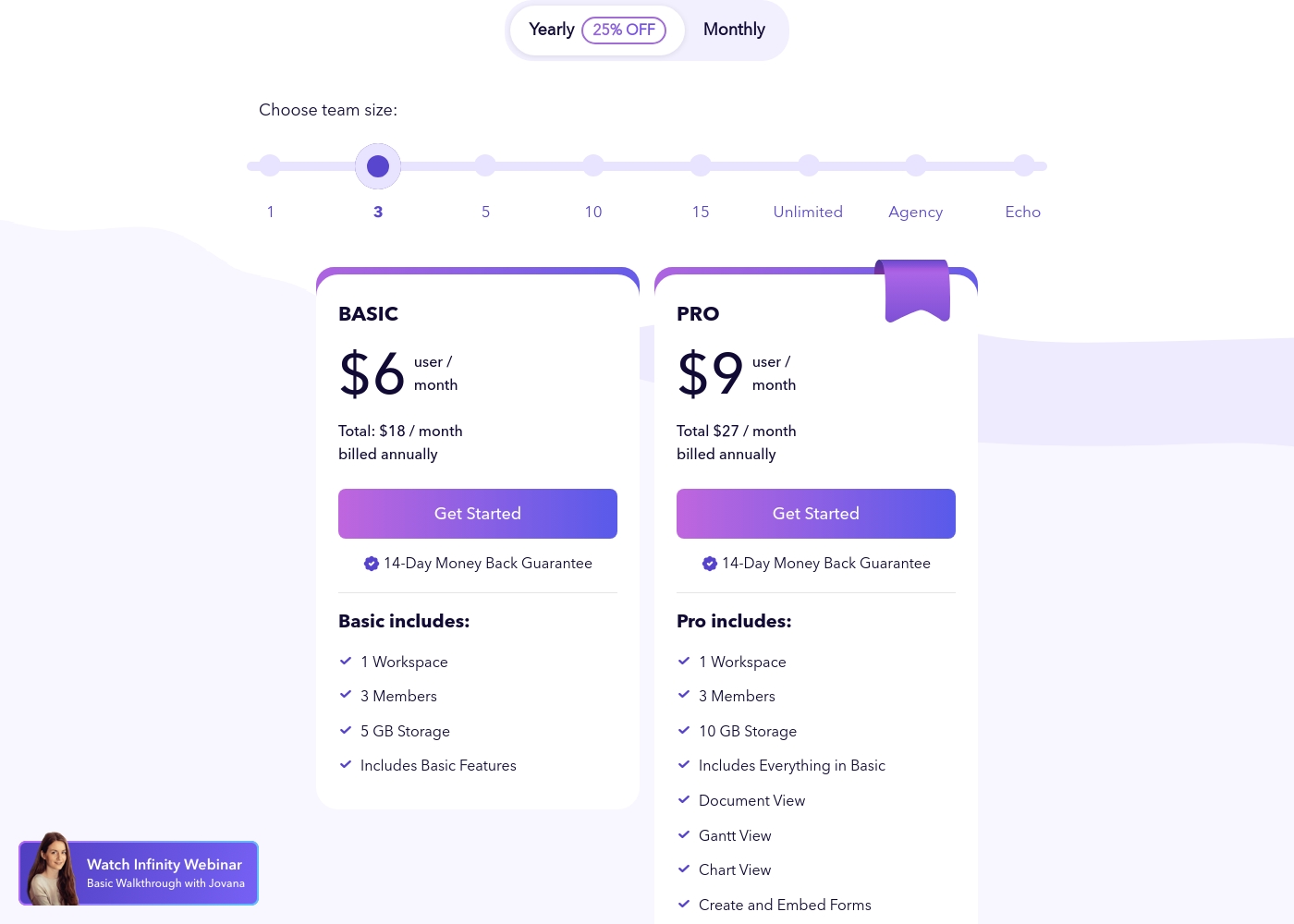
Infinity costs between $18 and $27 per month (billed annually) with two primary plans visible: Basic at $18/month and Pro at $27/month (for a 3-member team).
These plans utilize a per-user, per-month pricing structure when billed annually. You benefit from a 25% discount by selecting the yearly option.
Basic
Price: $6 user/month (Total $18/month, billed annually) Refund Policy: 14-Day Money Back Guarantee Other Features: 1 Workspace, 3 Members, 5 GB Storage, Includes Basic Features
- 1 Workspace
- 3 Members
- 5 GB Storage
- Includes Basic Features
- 1 Workspace
- 3 Members
- 10 GB Storage
- Includes Everything in Basic
- Document View
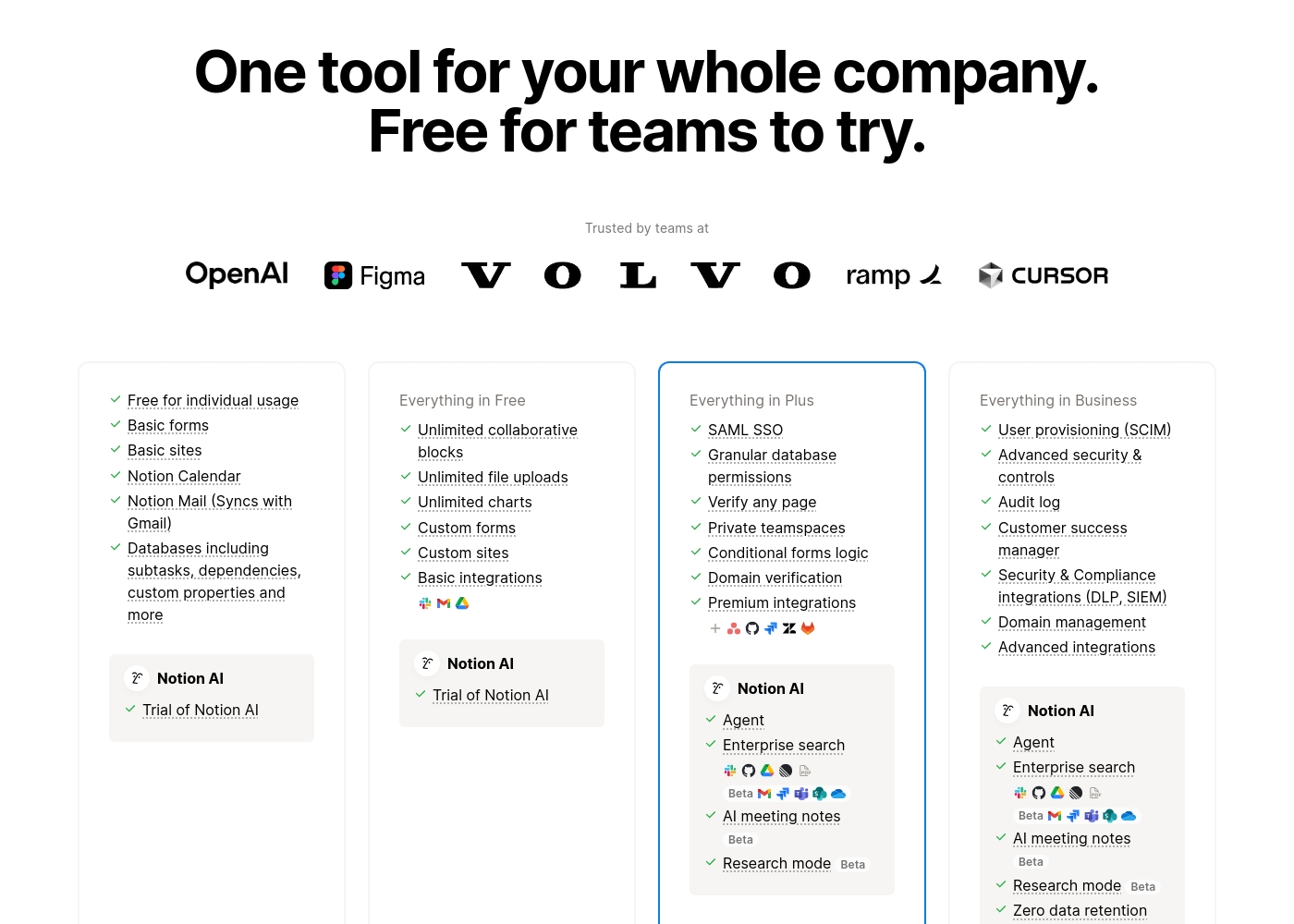
Notion costs between $0 and $20 per seat/month with four plans: Free at $0/seat/month, Plus at $10/seat/month, Business at $20/seat/month, and Enterprise (custom pricing).
Here’s a detailed look at the core features included in each subscription level.
- Unlimited pages and blocks for individuals
- Web publishing with 1 custom subdomain
- Basic forms and sites
- Notion Calendar and Mail synchronization
- Databases with subtasks and dependencies
- Unlimited blocks and file uploads
- 30 days of page history
- Basic SAML SSO
- Granular database permissions
- Access to unlimited charts
- 90 days of page history
- Advanced security controls and Audit log
- Conditional forms logic
- Domain verification
- Advanced page analytics (includes editor list)
- Unlimited page history and workspace analytics
- SCIM user provisioning
- Zero data retention with LLM providers for Notion AI
- Customer Success Manager support
- Security & Compliance integrations (DLP, SIEM)
Pricing Notes
- Infinity does not offer a free plan but secures subscriptions with a 14-day money-back guarantee.
- Notion has a robust Free plan that is suitable for permanent solo use.
- Infinity requires annual billing to access the quoted lower per-user monthly rates (25% discount).
- Notion's Business plan ($20/month) is necessary to unlock advanced features like the Audit log and conditional forms.
- Infinity’s Professional Services for setup are available for a separate, one-time charge ($199).
Pricing Head-to-Head
User Reviews
Infinity currently presents a very small public feedback pool, limiting a thorough assessment of recurring themes like long-term reliability or support performance. Based on the limited sentiment available (3.5 stars across only two Trustpilot reviews), users clearly recognize the platform's core strength: its ultimate flexibility and power as a work management solution.
One reviewer highly praised Infinity as flexible software that performs great and effectively replaces competitive products like Airtable and Trello. However, the existing feedback also includes a crucial, concrete critique regarding adoption and user experience.
This is really great software that offers impressive flexibility. It easily handles all our work needs. We are using it to replace older platforms like Airtable and Trello, and it performs wonderfully.
Trustpilot feedback paints a sharply divided picture of Notion. While many users praise the platform as a terrific tool—highlighting its power, versatility, and unique block-based editor for personal and professional organization—these compliments are often eclipsed by grave concerns regarding management and billing practices.
A recurring major theme across many reviews details frustrating experiences with unexpected charges, deceptive auto-upgrades (especially relating to annual plans and new members), and significant challenges when trying to cancel subscriptions or obtain timely refunds. Furthermore, support responsiveness is frequently described as unsatisfactory, unhelpful, or even condescending, often failing to resolve billing errors or login issues.
Enjoy using Notion a lot for my daily work interface. It helps me set up my employees and assign tasks with no issue at all. We upgraded from the free plan and will absolutely continue using the platform.
Our Verdict
Choosing between Infinity and Notion comes down to cost versus ecosystem depth. For most individual users or small teams needing limitless flexibility and AI, Notion is the natural starting point. Infinity is the smarter financial choice for budget-conscious management teams aiming to scale operations. Infinity’s superpower is its extreme focus on cost savings and robust PM views. You get professional Gantt and Chart views for a fraction of the cost of their rivals. Plus, the 360° Business Architect framework provides unique operational mentorship and guidance. Infinity is the best alternative to expensive tools like Airtable or Trello. Notion’s strength lies in its unified ecosystem and native AI assistance. It truly is an all-in-one app for project management, wikis, and basic CRM functionality. Notion is excellent for building a centralized company knowledge base that all teams can use. The deciding factor is if you require Native AI and a free starting point. Notion offers both, but its paid plans are significantly higher per user. Pick Infinity if reducing subscription costs by thousands of dollars annually is your strategic goal. Choose Infinity if you manage complex projects and need budget optimization. Go with Notion if you want a centralized AI workspace for 100M-plus users and utilize the robust free plan.
Frequently Asked Questions
Which is better for small, budget-conscious teams: Infinity or Notion?
Infinity is designed specifically for budget optimization and cost cutting. The per-user price is significantly lower than Notion's paid tiers. Notion offers a great free plan, but team collaboration features require a paid upgrade. For long-term low costs, choose Infinity.
Does Infinity offer an integrated AI assistant like Notion?
Notion has a native AI assistant built into every plan, recognized as a top AI writing tool. Infinity does not advertise integrated AI functionality within its platform. If AI features are essential for your workflow, Notion is the required choice.
Does Notion offer stronger project management features than Infinity?
Notion offers flexible database views, but Infinity provides dedicated advanced project views. Infinity Pro unlocks specialized Gantt, Chart, and Document views immediately. Infinity focuses more heavily on serious project tracking management.
Can I use either Infinity or Notion for free?
Notion offers a robust, perpetual Free plan suitable for individual users and small testing teams. Infinity does not offer a free plan or standard trial period. You can test Infinity risk-free with their 14-day money-back guarantee.
Which tool provides better guidance for scaling operations?
Infinity offers a unique competitive advantage with its 360° Business Architect framework. This includes comprehensive lessons and personalized one-on-one mentorship. Notion relies on self-service resources and documentation.
Are there reported issues with both Infinity and Notion?
Yes, both have user interface and experience concerns raised by reviewers. Notion faces widespread criticism regarding confusing billing practices and poor customer support. Infinity's negative feedback relates to frustrating UI/UX design.
Ready to Choose?
Both tools have their strengths. Choose based on your specific needs.