iMazing vs Shade
iMazing and Shade both manage files, but for totally different users. iMazing is for personal iOS device control. Shade is a team hub for large media files.
Best for: iPhone/iPad owners wanting full control over personal device backups and data, Users needing to transfer photos, videos, or music without iCloud or iTunes
Best for: Media and video production teams handling large 4K/8K files daily, Creative agencies needing centralized storage and collaboration
Essential iOS File Management Tool
We find that iMazing provides powerful flexibility for managing iOS data, effectively surpassing the limitations imposed by iTunes and iCloud. Overall, we recommend iMazing highly, recognizing its stellar support team and reliable functionality despite recent user friction over subscription pricing.
Pros
- Exceptional customer support is fast, friendly, and highly responsive, even outside normal business hours.
- Clean, intuitive interface makes advanced iOS data management easy for all users.
- Reliable features for deep backups, restoration, and data extraction from devices or files.
- Allows flexible transfer of data (photos, music, files) between PC/Mac and iOS devices.
Cons
- Recent shift from permanent licenses to a subscription-based model has caused user frustration.
- License activation is tied to a specific number of devices, requiring support requests when hardware changes.
- Was not able to consistently facilitate all transfer needs for specific data between iPhones for some users.
- Some users found support instructions occasionally too technical.
Smart search, but pricing is opaque.
We find Shade offers a compelling centralized hub for media teams, with standout AI search and intelligent file streaming. Overall, it's a strong workflow tool, but the lack of public pricing for team plans is a significant drawback for prospective buyers.
Pros
- All-in-one platform for storage, review, and approval
- Intelligent file streaming for fast access to large files
- Powerful AI search and automated metadata
- Secure archiving for long-term project storage
Cons
- Team and enterprise pricing is not publicly disclosed
- Requires a sales demo for detailed quotes and scalability
- Limited external review data for deep validation
AboutiMazing
iMazing is the world's most trusted software for handling your iPhone and iPad data on Mac or PC. It specializes in helping you transfer and save your messages, music, and various files quickly and safely. This powerful tool gives you capabilities for data extraction, media transfer, and robust backup management. Millions of users trust iMazing, and it provides specialized solutions for businesses, legal purposes, and IT management. ✅
AboutShade
💡 Shade is an all-in-one platform for media storage and management. It's designed for creative and media teams who handle large files daily. It combines intelligent file streaming, review tools, and smart search in a single place.
Highlights
Feature Comparison
Features Overview
We highlight the main differences and pick a winner for each feature.
Platform & Use Case
iMazing is a desktop app for personal iOS devices. Shade is a web platform for team media.
iMazing is installed on your Mac or PC. It connects directly to your iPhone or iPad via USB or Wi-Fi. This makes it ideal for managing personal device data securely on your own hardware. Shade is a cloud-based service you access through a web browser. It's designed as a centralized hub where teams upload and stream large media files. The focus is on collaboration, not direct device management. The key difference is audience. iMazing is for individuals managing their own Apple devices. Shade is for creative teams managing a shared library of video and photo assets.
File Management
iMazing transfers files to/from iOS devices. Shade stores and streams team media files.
iMazing excels at moving photos, videos, and music directly between your computer and an iOS device. You can transfer files without using iCloud or iTunes. Shade's file management is about centralized storage and fast access. Its intelligent streaming lets you work with large 4K video files without waiting for full downloads. The trade-off is control versus scale. iMazing gives you granular control over device files. Shade gives your team fast, organized access to a massive shared library.
Backup & Archiving
iMazing creates deep iOS backups. Shade archives completed team projects.
iMazing offers advanced backup options. You can schedule automatic wireless backups to external drives or NAS storage. It also captures device snapshots for recovery. Shade provides secure archiving for finished media projects. It ensures long-term storage and access for your team's creative output. The focus is on project preservation. The difference is the data type. iMazing archives your personal device data and messages. Shade archives professional video projects and assets.
Search & Organization
iMazing lets you browse files manually. Shade uses AI to find files instantly.
With iMazing, you browse your device or backup like an external drive. You manually navigate folders to find specific photos, contacts, or notes. Shade uses automated metadata and powerful AI search. You can find any file in seconds by describing it, like "drone shot sunset." This is built for speed at scale. The key difference is automation. iMazing requires you to know where things are. Shade's AI organizes and finds content for you, which is crucial for large media teams.
Collaboration
iMazing is for single-user management. Shade is built for team review and approval.
iMazing is fundamentally a single-user tool. It's designed for you to manage your own devices and data. There are no built-in collaboration features for feedback or sharing. Shade includes built-in review and approval workflows. Team members can leave time-stamped feedback on videos and track decisions. This streamlines the creative process. The winner is clear for teams. Shade is the only option for collaborative media work. iMazing is not designed for sharing or team-based projects.
Security & Control
iMazing keeps data local on your hardware. Shade stores data securely in the cloud.
iMazing emphasizes local control. Your data stays on your computer, external drive, or NAS. You never have to upload sensitive photos or messages to a third-party cloud. Shade offers secure cloud-based archiving. It protects your team's projects, but the data resides on Shade's servers. Security details require a demo to fully understand. The difference is data location. iMazing is for users who want everything on-premise. Shade is for teams comfortable with secure, managed cloud storage.
Pricing Model
iMazing has clear annual subscriptions. Shade has a free tier with custom team pricing.
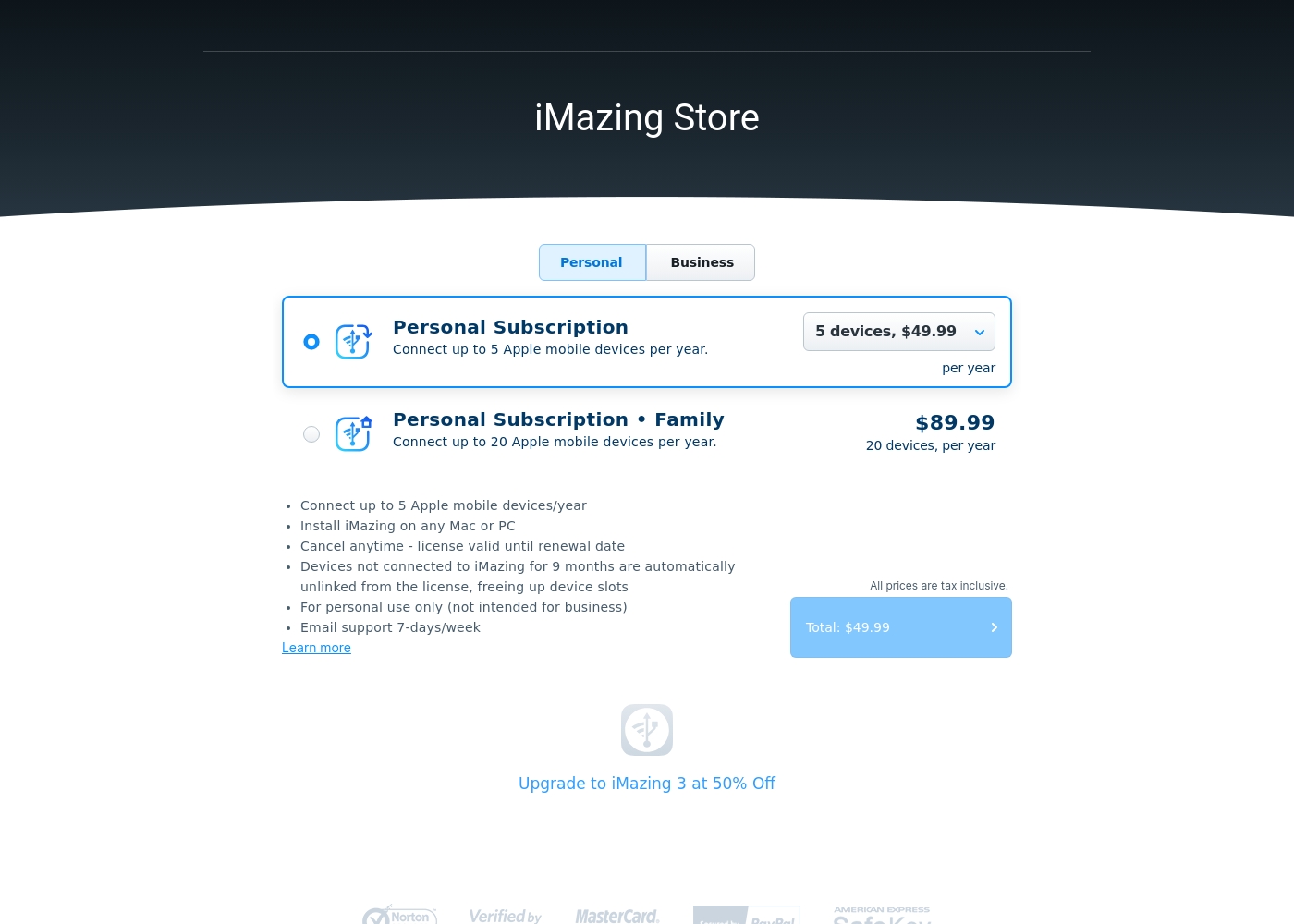
iMazing publishes its pricing. You can choose a Personal plan for $49.99/year (5 devices) or a Family plan for $89.99/year (20 devices). Shade offers a free "Start for Free" plan with core features. Pricing for larger teams is not public and requires booking a sales demo for a custom quote. Transparency is the key factor. iMazing lets you see exactly what you'll pay. Shade makes you contact sales to get a quote for your team size.
Customer Support
iMazing has highly-rated 7-day email support. Shade offers responsive support without clear SLAs.
iMazing's support is frequently praised in reviews. Users report fast, friendly help via email seven days a week, even outside business hours. Shade reviews mention responsive support. However, details like guaranteed response times or SLAs are not listed on their website. Both have positive feedback. iMazing has a stronger reputation based on the volume and specificity of user testimonials. Shade's support quality is noted but less documented publicly.
iMazing personal subscriptions cost between $49.99 and $89.99 per year with 2 plans: Personal Subscription at $49.99 and Personal Subscription • Family at $89.99. These clear, annual rates make it easy to choose the right fit for managing your Apple devices.
- Connects up to 5 Apple mobile devices/year
- Installable on any Mac or PC
- Email support 7-days/week
- Connects up to 20 Apple mobile devices/year
- Installable on any Mac or PC
- Email support 7-days/week
Shade costs an undisclosed amount with at least 1 plan: Start for Free at $0.
Finding the right plan depends on your team's specific media storage and workflow needs.
Start for Free
Price: $0 Best For: Individuals or small teams exploring AI search Other Features: Intelligent file streaming, review and approval, automated metadata, AI search, media archiving
- Intelligent file streaming
- Review and approval
- Automated metadata
- AI search
- Archive
Pricing Notes
- iMazing uses a clear annual subscription model based on device count.
- Shade's 'Start for Free' plan is a permanent free tier, not a limited trial.
- Shade's paid team pricing is opaque and requires a sales demo for a quote.
- iMazing has no public free trial or money-back guarantee for personal plans.
- Shade's free plan includes core features like AI search and streaming.
Pricing Head-to-Head
User Reviews
iMazing consistently receives excellent user feedback, holding a strong 4.6 rating across thousands of reviews. Users overwhelmingly praise the customer service, calling it responsive, friendly, and exemplary.
Support representatives often resolve intricate licensing issues quickly, sometimes even during late hours or weekends. Reviewers also find the software itself intuitive and reliable.
iMazing has been my singular go-to solution for all my iOS devices for many years. Their team has provided me with amazing support every time I needed help. An exemplary team and a highly reliable piece of software.
External reviews for Shade show a generally positive sentiment, though the sample size appears small. Users on Capterra highlight the platform's ease of use and its strong AI-powered search functionality, which helps teams quickly find files.
Some reviewers note that the onboarding process was smooth and the customer support was responsive. A few mentions point to the value of the centralized media hub for collaboration.
The AI search is a game-changer. We can locate any footage in seconds without digging through endless folders. It has saved our team so much time on projects.
Our Verdict
For most people, iMazing is the clear winner. It solves a specific, common problem: managing your iPhone or iPad data on your own terms. Shade is a fantastic tool, but it's built for a very different job. iMazing's superpower is giving you direct control. You can pull photos, backups, and messages off your device without relying on iCloud. You keep all your data local on your computer or external drive. Shade's superpower is intelligent team collaboration. It uses AI search and fast streaming to make large media files accessible. It turns a messy pile of videos into an organized, searchable hub. The deciding factor is your role. If you're an individual or family wanting to manage your own Apple devices, iMazing is the tool. If you're part of a media team struggling with file chaos, Shade is built for you. Final verdict: Choose iMazing for personal iOS control and peace of mind. Choose Shade only if you need a centralized platform to collaborate on large video projects with your team.
Frequently Asked Questions
Which is better for personal iPhone backup: iMazing or Shade?
iMazing is designed for this. It creates deep, automatic backups of your iPhone data to your computer or external drive. Shade is not built for personal device backup.
Can Shade manage my iPhone photos like iMazing does?
No. Shade is a media storage platform for teams. iMazing directly connects to your iPhone to transfer and manage photos and videos to your computer.
Is Shade worth the cost over iMazing for a creative team?
It depends on your workflow. Shade offers AI search and collaboration for video projects, which iMazing doesn't. For personal use, iMazing provides more direct value.
Does iMazing have team features like Shade's review tools?
No. iMazing is focused on individual device management. Shade includes built-in review and approval workflows designed for team collaboration.
Which tool has better customer support?
iMazing receives consistently exceptional reviews for fast, friendly support. Shade's support is responsive, but iMazing's reputation is stronger and more documented.
Can I use iMazing on a Windows PC?
Yes, iMazing works seamlessly on both Windows and Mac computers. This is a major advantage for Windows users managing their iPhones.
Ready to Choose?
Both tools have their strengths. Choose based on your specific needs.