iMazing

iMazing

Manage your iPhone. On your terms.

#1 dans File management
1 min read · Updated 11/17/2025
iMazing homepage screenshot

At a glance

Quick overview for iMazing: rating, pricing summary, key features, and highlights.

Ciroapp review

4.5
Essential iOS File Management Tool

We find that iMazing provides powerful flexibility for managing iOS data, effectively surpassing the limitations imposed by iTunes and iCloud. Overall, we recommend iMazing highly, recognizing its stellar support team and reliable functionality despite recent user friction over subscription pricing.

Pros

  • Pro:Exceptional customer support is fast, friendly, and highly responsive, even outside normal business hours.
  • Pro:Clean, intuitive interface makes advanced iOS data management easy for all users.
  • Pro:Reliable features for deep backups, restoration, and data extraction from devices or files.
  • Pro:Allows flexible transfer of data (photos, music, files) between PC/Mac and iOS devices.

Cons

  • Con:Recent shift from permanent licenses to a subscription-based model has caused user frustration.
  • Con:License activation is tied to a specific number of devices, requiring support requests when hardware changes.
  • Con:Was not able to consistently facilitate all transfer needs for specific data between iPhones for some users.
  • Con:Some users found support instructions occasionally too technical.
Range: $49.99–$89.99/yearYearly subscription, Per seat pricing
This section is a summary. Detailed sections about features, use cases, pricing, and reviews follow below.

iMazing review, pricing, features, pros & cons

Are you tired of feeling limited by traditional methods like iTunes or iCloud? Managing your iPhone data should be simple and flexible. iMazing helps you gain powerful control over your messages, music, and files.

Now, you can truly manage your iOS devices on your own terms. ✨

What is iMazing?

iMazing is the world's most trusted software for handling your iPhone and iPad data on Mac or PC. It specializes in helping you transfer and save your messages, music, and various files quickly and safely. This powerful tool gives you capabilities for data extraction, media transfer, and robust backup management.

Millions of users trust iMazing, and it provides specialized solutions for businesses, legal purposes, and IT management. ✅

iMazing Key Features

📸 Photo and Video Freedom

Tired of complicated methods? iMazing gives you more options to browse and handle your media files than Apple’s standard tools provide. You can easily save and transfer photos and videos directly to your Mac or PC without needing iCloud or iTunes.

You maintain immediate access to pictures on your iOS device right from your computer. You can connect and transfer files using either a stable USB cable connection or a reliable Wi-Fi network. This simple approach ensures your memories are always accessible, quickly and safely.

✨ Power-Up Local Backups

Keeping your essential device data safe is simple with iMazing’s specialized iOS backup capabilities. It helps you keep your sensitive backups local and secure, offering superior control compared to typical cloud methods. You can also ditch manual backups and rely on advanced options for continuous protection.

iMazing allows you to schedule automatic wireless backups, ensuring you never forget to save your crucial data again. You can also manage your backup destinations flexibly. These storage options give you peace of mind and full ownership over your backup files.

  • Save copies to external drives or NAS.
  • Utilize snapshot support for recovery.
  • Benefit from automatic archiving and cleaning.

✨ Complete Message Archiving

Don't risk losing valuable text conversations or specific digital memories. iMazing helps you preserve important messages from iMessages, SMS texts, and WhatsApp chats securely. This feature supports both organizational needs and deep personal archiving.

You can expertly archive, export, and even legally print these long conversations directly from your device. The tool includes all necessary metadata, attachments, and media alongside the text. This comprehensive record is perfect for legal compliance, court purposes, or simply protecting your valuable records.

✨ Music and Media Mobility

Moving your favorite music and media files is smooth and easy because iMazing avoids Apple's usual restrictions. You can freely transfer media back and forth between your iOS device and your Mac or PC. You no longer need to rely on specific apps like iTunes, Music, or Finder for media synchronization.

The Quick Transfer function makes copying music, photos, movies, documents, and general files straightforward. This process ensures moving large amounts of content onto your iPhone or iPad has never been faster or more direct. It's truly media management on your own terms.

✨ Deep Data Access and Extraction

iMazing lets you explore your device or its backup just like an external hard drive. This robust feature gives you easy access to data that is usually difficult to locate or extract using standard tools. It functions like a simple, powerful file browser.

From your device or backup file, you gain the ability to extract and efficiently manage many data types. This includes essential personal data like call history, voicemail, notes, voice memos, contacts, and calendar details. It also handles your Safari browsing data, ringtones, podcasts, and books.

This two-way file transfer capability gives you granular control over your stored information. You can use it to pull out specific files or confirm that crucial items are indeed archived.

💼 Enterprise and IT Management Tools

iMazing offers specialized solutions trusted by over 20,000 organizations globally. These advanced tools help IT professionals and system administrators manage large fleets of Apple devices efficiently. They support supervision, configuration, and provisioning at an enterprise scale.

The iMazing Configurator provides powerful controls to administer mobile devices like iPhones, iPads, Apple TV, and Apple Vision Pro. For administrators, the free Profile Editor helps you create, edit, and sign necessary configuration profiles for various Apple operating systems.

For advanced usage, the platform supports phone evidence extraction for court or compliance needs. You can easily enable Kiosk Mode and access advanced security options through the Supervision tool. The iMazing CLI provides a command line interface for advanced interactions with devices and backups.

Use Cases

📸 Transferring Media Without Limits

Are you tired of confusing iTunes sync processes or slow cloud photo uploads? iMazing offers a simple alternative for moving media. You can easily access your device photos and videos directly from your Mac or PC, connecting via either Wi-Fi or a USB cable. This lets you save and transfer media without relying on iCloud or complex proprietary tools.

Furthermore, you gain control over your music library. Freely move music files back and forth between your iOS devices and your computer. You no longer have to worry about the typical constraints of Apple’s built-in media management applications when updating your playlists.

💾 Powering Up Local Backups

Standard backups often lack flexibility and can quickly consume your hard drive space. iMazing’s unique backup capabilities keep your critical data safe and accessible.

You can schedule automatic, wireless backups to run whenever convenient. Importantly, you can direct these backups to specific locations, such as external hard drives or Network Attached Storage (NAS) devices. This includes snapshot support and automatic archiving that preserves historical data points, offering robust protection for your device safety.

💬 Archiving Messages for Compliance and Memories

Protecting irreplaceable communication history is crucial, sometimes for legal reasons. iMazing lets you preserve your messages completely. You can archive, export, and even print conversations from iMessages, SMS, and WhatsApp directly to your computer.

This process exports the messages along with crucial metadata and attached media. Whether you need evidence for compliance or just want to save family conversations, this capability ensures your digital memories are securely documented.

🗃️ Targeted Data Extraction (Step Flow)

You don't always need to restore a whole device to grab one piece of information. iMazing lets you browse your device or a backup like an external hard drive, making data extraction precise.

  1. Connect your device or select an existing backup in iMazing.
  2. Browse key data areas such as Call History, Voicemail, Notes, or Contacts.
  3. Select the specific records you need (e.g., calendar entries or notes).
  4. Easily extract and transfer that targeted information to your computer without restoring anything else.

📱 Managing iOS Apps Across Multiple Devices

Problem: Standard iOS management limits how you deploy and control applications, especially across many devices. Approach: Use iMazing to take charge of your iOS apps. You can download and save the app files (the .ipa files) directly to your computer.

Outcome: Once saved locally, you can install those specific app versions across all your connected iOS devices. This allows you to manage app deployment precisely according to your needs.

⚙️ Configuring Fleets for IT Administration

For sys admins managing large numbers of Apple devices, iMazing offers specialized business tools. The iMazing Configurator helps IT departments supervise, configure, and provision major fleets efficiently. This includes iPhones, iPads, and other Apple enterprise devices.

Admins can quickly enable features like Kiosk Mode and access advanced security options. They can also use the complimentary Profile Editor to create and edit Apple configuration profiles, ensuring standardized settings and control across the organization's devices.

Pricing Overview for iMazing

Pricing range
$49.99–$89.99/year
Pricing types
Yearly subscription, Per seat pricing

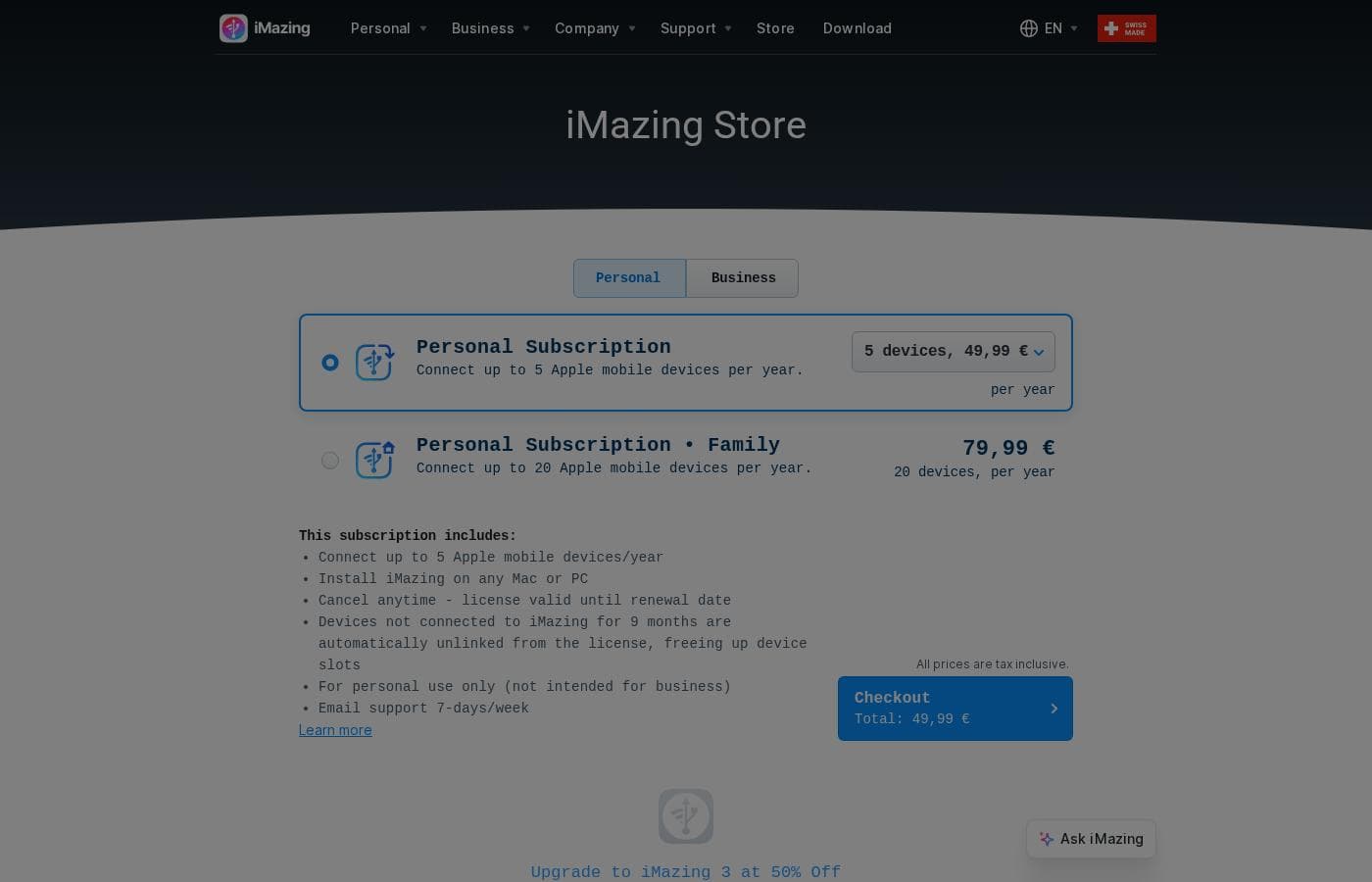
iMazing offers simple annual subscription plans designed for personal use. Pricing starts at $49.99 per year for connecting up to five devices, scaling up to $89.99 per year for robust family needs.

Plans & Pricing

Personal Subscription

Yearly$49.99
For personal use only
  • Connects up to 5 Apple mobile devices/year
  • Installable on any Mac or PC
  • Email support 7-days/week

Personal Subscription • Family

Yearly$89.99
For personal use only
  • Connects up to 20 Apple mobile devices/year
  • Installable on any Mac or PC
  • Email support 7-days/week

iMazing personal subscriptions cost between $49.99 and $89.99 per year with 2 plans: Personal Subscription at $49.99 and Personal Subscription • Family at $89.99. These clear, annual rates make it easy to choose the right fit for managing your Apple devices.

User Reviews

iMazing consistently receives excellent user feedback, holding a strong 4.6 rating across thousands of reviews. Users overwhelmingly praise the customer service, calling it responsive, friendly, and exemplary.

Support representatives often resolve intricate licensing issues quickly, sometimes even during late hours or weekends. Reviewers also find the software itself intuitive and reliable.

It simplifies managing Apple device data, allowing effortless backup, restoration, and file transfer (like music and photos) to Mac or PC, often bypassing typical iOS limitations. However, sentiment is mixed regarding recent changes to the licensing structure.

Many long-term users express disappointment concerning the shift from permanent licenses to annual subscriptions, which are limited by the number of connected devices. Despite these licensing frustrations, the core functionality and speed of support remain highly valued.

Users agree that iMazing is a must-have tool for deep iOS management. 🌟

What users say elsewhere

User B.
· Trustpilot
5.0 / 5

iMazing has been my singular go-to solution for all my iOS devices for many years. Their team has provided me with amazing support every time I needed help. An exemplary team and a highly reliable piece of software.

Alex K.
· Trustpilot
5.0 / 5

I ran into a bug when I upgraded to iPhone 17 and created a support ticket. Within 24 hours, the iMazing team reached out, reviewed, fixed the bug, and pushed the latest update. Awesome experience!

No reviews yet.

Write a Review

Write a Review for iMazing
0/100 characters
0/2000 characters

Why use iMazing?

Choosing iMazing means choosing flexibility and security for your mobile life. It empowers you to handle your valuable data exactly how you want, moving beyond the standard limitations of mobile management.

💡 Gain full control and flexibility:

  • Effortlessly transfer your photos and videos to your Mac or PC without needing iCloud or iTunes. You can connect using either USB or Wi-Fi.
  • Secure your data with unique backup options, including scheduling automatic wireless backups, snapshot support, and saving backups to external drives or NAS.
  • Freely move media files like music back and forth between your computer and iOS device, avoiding the typical constraints of Apple's built-in media apps.
  • Preserve irreplaceable memories by archiving, exporting, and even printing messages and attachments from iMessages, SMS, and WhatsApp for organizational or legal compliance.
  • Manage your iOS apps precisely by downloading your app files (.ipa) to your computer and installing them across multiple devices, exactly your way.
  • Browse your device or its backup like an external drive, letting you easily extract crucial data such as contacts, call history, voicemails, notes, and calendar information.

Ready to transform your workflow with iMazing?

iMazing Alternatives

Other tools in the File management category

Frequently Asked Questions

Regarding the annual device limit, what happens when a device is no longer needed?

If an Apple device is not connected to iMazing for nine months, it is automatically unlinked from your license. This helpful feature correctly frees up a precious device slot for you to use with a new iPhone or iPad.

Is the subscription tied to a single Mac or PC installation?

No, the license counts connected mobile devices, not desktops. You are free to install iMazing on any Mac or PC computer that you own. The subscription limit strictly applies to the number of Apple mobile devices connected yearly.

How do I cancel my subscription, and what is the effective date of the cancellation?

You are able to cancel your annual subscription anytime you wish. However, your license will remain fully valid and functional until the scheduled annual renewal date.

Does iMazing offer a free trial period or a money-back guarantee for personal users?

The official site does not explicitly state that a free trial is available for personal subscriptions. Furthermore, details regarding a money-back guarantee are not publicly provided.

Can I use the Personal or Family subscriptions for professional work or a small business?

No, both the Personal and Personal Family subscription plans are specifically limited to personal use. If you need tools for professional purposes, like legal compliance or IT management, you should explore iMazing's Enterprise Solutions.

What is the typical responsiveness or SLA for the included support?

All personal plans include access to email support seven days a week. The official documentation does not explicitly detail a guaranteed response time or service level agreement (SLA).

How does iMazing maintain the security of my data during transfers and backups?

iMazing provides control by focusing on local data handling. It allows you to save backups securely to external drives or Network Attached Storage (NAS), keeping your sensitive information out of the cloud.

What languages and regional support does iMazing offer?

iMazing supports a broad range of languages for international users. These include major languages like English, French, German, Spanish, Japanese, Korean, Arabic, and both traditional and simplified Chinese.

What kind of specific data can I extract from device backups besides photos and messages?

This tool allows powerful data extraction from backups. You can easily manage and retrieve contacts, calendar data, call history, voicemails, notes, and Safari browser data.

How does iMazing enable connectivity between my computer and my iOS devices?

You have flexibility when connecting your devices. You can establish connections and manage your data either through a reliable physical USB cable or wirelessly over Wi-Fi.

I need to configure multiple Apple devices; does iMazing have tools for large deployments?

Yes, iMazing offers specialized tools for system administrators. Solutions like iMazing Configurator and iMazing Profile Editor help configure, supervise, and provision large fleets of Apple mobile devices.

Can I transfer music between my Mac or PC and my iOS device without using Apple Music or Finder?

Yes, iMazing explicitly allows you to move media files, including music, freely back and forth. You can bypass the standard Apple syncing mechanisms like Finder or the Music app.

Ready to try iMazing? Check out the official site or pricing.