IFTTT vs Quadient
IFTTT and Quadient serve automation needs, but they're worlds apart. IFTTT is for connecting everyday apps at home and work. Quadient is built for enterprise finance and communications. Here's how to choose.
Best for: Solo entrepreneurs automating daily tasks, Small businesses connecting SaaS apps
Best for: Enterprise finance teams automating AP and AR workflows, Customer communications managers handling omnichannel document delivery
Vast connectivity, but unreliable performance.
We recognize IFTTT's technical strength in connecting a massive catalog of services, offering powerful automation potential for both home and business users. However, significant user reports indicate that reliability has dropped substantially while the pricing structure has become overly aggressive. Overall, we find that the high cost and unpredictable performance make it difficult to rely on for mission-critical automation.
Pros
- Vast ecosystem connecting over 900 different services and apps.
- Available permanent free plan for testing basic automation needs.
- Pro tiers offer advanced developer features like webhooks and filter code.
- Multi-action Applets allow for complex workflows from a single trigger.
Cons
- Severe and frequent reliability issues; applets are often delayed or fail to activate.
- Aggressive pricing model and constant shrinking of free plan functionality.
- Customer support is reportedly unresponsive and adheres to strict non-refund policies.
- Users express a deep lack of trust due to fluctuating feature limitations.
Powerful automation, but support concerns us.
We find Quadient offers robust tools for automating AP/AR and managing customer communications at scale. However, persistent user complaints about customer support and contract flexibility temper our recommendation. Overall, it's a capable suite for larger enterprises, but smaller teams should proceed with caution.
Pros
- Automates end-to-end AP and AR workflows.
- Strong omnichannel document creation and delivery.
- Empowers business users, reducing IT dependency.
- Scales well for high-volume, complex needs.
Cons
- Significant concerns about customer service and support responsiveness.
- Contracts and billing terms can be rigid or difficult.
- May be too complex or costly for small businesses.
- Onboarding and integration can present challenges.
AboutIFTTT
IFTTT is the leading no-code platform designed for powerful automation across both your business and home life. It offers an easy way to connect over 900 different services, including tools like Google Calendar, Spotify, and YouTube, using simple Applets. You can automate from anywhere, anytime, thanks to the dedicated iOS and Android apps, ensuring continuous productivity. It’s built on a massive community of over 27 million users and 900+ brands already using the platform. 💡
AboutQuadient
Quadient is a suite of process automation solutions focused on two core areas: customer communications management (CCM) and financial workflow automation. It's designed for mid-to-large enterprises that need to design, manage, and deliver personalized documents and messages across digital, print, and mobile channels, while also automating key AP and AR processes. 💡
Highlights
Feature Comparison
Features Overview
We highlight the main differences and pick a winner for each feature.
Core Automation
IFTTT connects apps with simple if-this-then-that rules. Quadient automates complex business processes end-to-end.
IFTTT uses "Applets" to link over 900 services. A typical user might save Instagram photos to Dropbox automatically. Quadient automates multi-step finance workflows. A company could automate invoice matching from PO receipt to final payment. IFTTT's strength is breadth. Quadient's strength is depth in specific business functions.
Integration Ecosystem
IFTTT offers massive pre-built integrations. Quadient focuses on custom enterprise system connectivity.
IFTTT connects to consumer and SMB tools like Google Calendar, Spotify, and Twitter out-of-the-box. Quadient integrates with ERPs and financial systems. The process involves custom setup with their team. IFTTT wins for plug-and-play simplicity. Quadient wins for deep integration with business systems.
Pricing Model
IFTTT has transparent, low-cost plans. Quadient uses custom, likely higher-cost enterprise pricing.
IFTTT offers a free plan and paid tiers starting at $2.99/month. All prices are public. Quadient requires a sales quote. Pricing is based on workflow complexity, with unlimited users included. IFTTT is accessible for individuals. Quadient is a significant investment for businesses.
Customer Support
Both tools face criticism for support. IFTTT's is unresponsive. Quadient's is slow for standard plans.
IFTTT users report silent support and unresolved issues, especially for free plan users. Quadient's standard support has a 16-hour response SLA. Upgrades offer 2-8 hour responses. Neither shines here, but Quadient offers clearer, albeit slower, service-level expectations.
Mobile Experience
IFTTT provides dedicated iOS and Android apps. Quadient is primarily a desktop-focused platform.
IFTTT's mobile app lets you monitor and manage Applets from your phone. It's key for on-the-go automation. Quadient's workflows are complex and designed for desktop use. There's no public mention of a dedicated mobile app. IFTTT clearly wins for mobile access and remote management.
Ease of Use
IFTTT is designed for simple, self-service setup. Quadient requires implementation planning and training.
IFTTT's no-code interface lets users create automations in minutes. It's built for non-technical users. Quadient is powerful but complex. Reviews note implementation can be challenging and require internal resources. IFTTT is much faster to start using for basic tasks.
Scalability
IFTTT scales for personal and small business use. Quadient scales for high-volume enterprise operations.
IFTTT's Pro+ plan offers unlimited Applets. It's designed for individuals or small teams. Quadient powers over 2 trillion connections annually for global brands. It's built for massive scale. For serious enterprise growth, Quadient is the designed solution.
Financial Automation
IFTTT has no native finance tools. Quadient specializes in AP and AR workflow automation.
IFTTT can connect to financial apps like Google Sheets for basic tracking. Quadient provides end-to-end automation for purchase orders, invoices, payments, and collections. This is the core difference. Quadient is a finance tool; IFTTT is a general connector.
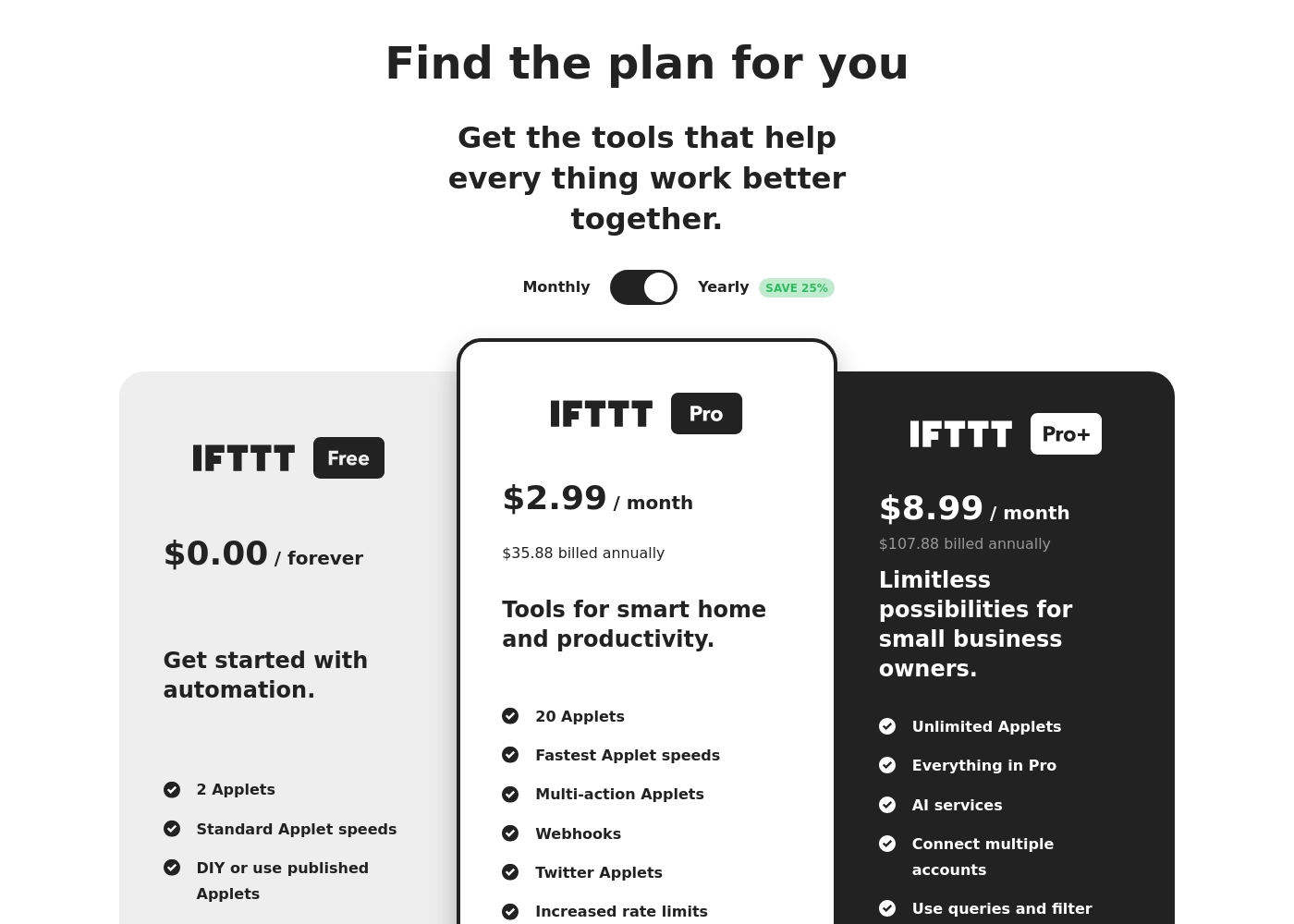
IFTTT costs between $0.00 and $107.88 per year with three plans: IFTTT Free at $0.00, IFTTT Pro at $35.88/year, and IFTTT Pro+ at $107.88/year.
Let's explore the three available plan options in detail to find the right amount of automation for your needs.
IFTTT Free
Price: $0.00 / forever Websites Supported: N/A - Automation Platform Best For: Get started with automation Other Features:
- 2 Applets
- Standard Applet speeds
- DIY or use published Applets
- Unlimited Applet runs
- Free mobile app access and simple no-code integrations
- 2 Applets
- Standard Applet speeds
- DIY or use published Applets
- Unlimited Applet runs
- Free mobile app access
- 20 Applets
- Fastest Applet speeds
- Multi-action Applets
- Webhooks
- Twitter Applets
- Unlimited Applets
- All features from Pro
- AI services
- Connect multiple accounts per service
- Use queries and filter code
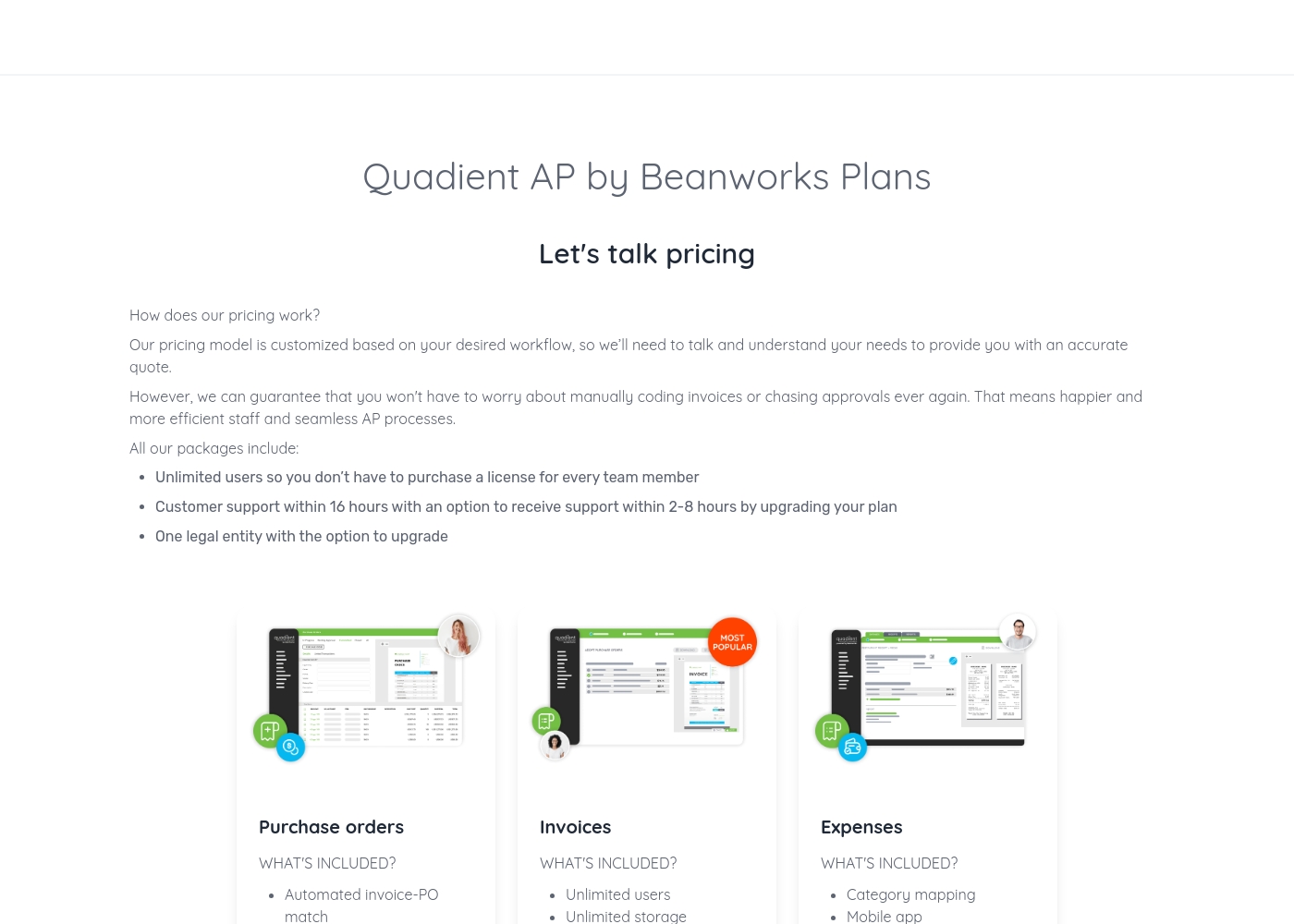
Quadient pricing: Quadient AP by Beanworks uses a custom pricing model based on your specific workflow and needs. They offer feature-specific packages for purchase orders, invoices, and expenses to ensure you only pay for what you use.
All plans include unlimited users and standard support, with the option to upgrade for faster response times or more entities. This tailored approach allows the platform to scale with your business while removing the burden of manual AP processes once and for all.
Contact them for a personalized quote today and discover how much you could save by automating your business's workflows. Their team of experts is ready to help you find the perfect solution for your accounts payable needs, whether you're a small business or a large corporation.
Pricing Notes
- IFTTT's free plan is limited to 2 Applets. Most users will need a paid plan.
- Quadient's pricing is not public and requires contacting sales. This often indicates higher, negotiated costs.
- IFTTT offers a clear upgrade path from $0 to $8.99/month. Quadient's cost is opaque and likely substantial.
- Quadient includes unlimited users in its packages. IFTTT pricing is per individual account.
Pricing Head-to-Head
User Reviews
External feedback for IFTTT paints a picture of extreme user dissatisfaction, particularly among long-time customers who experienced the platform before significant pricing reforms. Reliability is a core issue; many users report that Applets are highly unreliable, suffering from failures or severe delays, sometimes up to several hours.
The most frequent complaint centers on the shift toward an aggressive commercial model. Users feel misled by the frequent and substantial reduction in the free plan's Applet limit, which has dropped to just two, pushing them unnecessarily towards paid tiers that they find too expensive.
This service could be great, but it is unfortunately very unreliable now. It doesn't fire the triggers correctly, and the delay keeps increasing to the point where it takes several hours to run. We need stable automation, not delays.
External reviews for Quadient are mixed. On Trustpilot, users frequently complain about poor customer service, slow support, and billing issues, creating a frustrating experience.
💔 Some mention difficult contracts and a lack of responsiveness. However, on Capterra, the limited feedback for the Impress platform is more positive, with a user praising its document creation capabilities and template management as highly important features.
The software itself might work, but the customer service is a nightmare. Getting any help or a simple question answered takes forever. We've wasted so much time trying to get support.
Our Verdict
This isn't a fair fight. IFTTT and Quadient serve completely different worlds. IFTTT's superpower is connecting everything. It links over 900 apps for simple, personal automation at a low cost. Quadient's superpower is transforming business operations. It automates enterprise finance and customer communications at massive scale. Pick IFTTT if you're an individual or small team. You need affordable, simple app integrations for productivity or home use. Pick Quadient if you're an enterprise finance or communications team. You need powerful, specialized automation for high-volume, complex workflows.
Frequently Asked Questions
Is IFTTT suitable for automating business finance workflows?
No. IFTTT connects apps but lacks native AP/AR features. It's for general task automation, not financial processes.
Can Quadient connect everyday apps like social media and smart home devices?
No. Quadient focuses on enterprise systems. It doesn't offer the pre-built connectors for consumer apps that IFTTT provides.
Which is more affordable for a solo user?
IFTTT is far more affordable. It has a free plan and paid tiers starting at $2.99/month. Quadient requires a custom enterprise quote.
Does Quadient offer a free plan or trial?
No. The public site does not mention a free plan or trial. You must request a demo and custom quote from sales.
Which tool is easier to set up without technical help?
IFTTT is easier. Its no-code Applets can be created in minutes. Quadient implementation often requires planning and resources.
For a large company automating invoices, which should I choose?
Choose Quadient. Its AP automation suite is built for enterprise-scale invoice processing and workflow management.
Ready to Choose?
Both tools have their strengths. Choose based on your specific needs.