iContact vs Sender
iContact and Sender both promise easy email marketing, but they're built for different budgets and risk tolerances. iContact offers a 30-day trial but has serious billing and support issues. Sender's free plan is generous and its user experience is much more reliable.
Best for: Businesses that need to test an AI writing assistant extensively before committing., Users who prioritize a 30-day free trial over an ongoing free plan.
Best for: Startups and small businesses on a tight budget., Beginners who want the simplest possible setup and no learning curve.
Affordable Plans, Risky Service.
We note that iContact provides essential email marketing tools, including strong AI assistance and affordable starting plans at just $9 per month. However, we found the external reviews concerning, highlighting significant issues related to platform reliability, security vulnerabilities, and extremely poor customer service regarding billing and cancellations. Overall, we cannot recommend iContact until these fundamental support and security issues are resolutely corrected.
Pros
- Affordable pricing starting at $9 per month.
- Includes an AI-Powered Content Assistant to overcome writer's block.
- Simple drag-and-drop email builder with hundreds of templates.
- Offers a generous 30-day full-access free trial period.
Cons
- Customers report predatory billing and refusal to issue refunds.
- Significant support issues; representatives are often evasive and unprofessional.
- Platform downtime, including outages during holiday weekends.
- Reported security breach risks, despite claims of being user-friendly.
Simple, free, and effective for basics.
We found Sender to be a solid, no-frills tool for core email marketing tasks. Its free plan is a major draw for startups and small businesses. Overall, it delivers good value with a straightforward interface, though it may lack some advanced features for power users.
Pros
- Extremely generous free plan (2,500 contacts, 15k emails/month).
- Clean, user-friendly interface that's easy to learn.
- Transparent, affordable pricing with no hidden fees.
- Includes essential automation features from the start.
Cons
- Advanced features and segmentation are limited on lower tiers.
- Some users report occasional email deliverability issues.
- Integrations can be inconsistent with certain platforms.
- Free plan lacks SMS marketing capabilities.
AboutiContact
iContact is an easy and affordable email marketing platform specifically designed for small businesses and growing enterprises. This powerful tool helps you revolutionize your marketing strategy without breaking the bank. With plans starting as low as $9 per month, it provides flexible pricing to fit any budget, ensuring there are no hidden fees. Since 2003, iContact has empowered thousands of businesses by helping them send billions of emails efficiently. ✅ You can start creating stunning marketing emails immediately with a free 30-day trial that gives you full access to the platform.
AboutSender
Sender is an email marketing platform designed for businesses of all sizes. It helps you build, automate, and send email campaigns that people actually want to read. Think of it as your straightforward tool for staying in touch with your audience and driving sales. 🚀
Highlights
Feature Comparison
Features Overview
We highlight the main differences and pick a winner for each feature.
Pricing & Value
Sender's free plan is unbeatable for startups. iContact's paid plans start cheap but have hidden risks.
iContact starts at $9/month for 500 contacts. You get a 30-day free trial to test everything. However, user reviews warn of surprise renewals and billing disputes. Sender's Free Forever plan offers 2,500 subscribers and 15,000 emails monthly. Paid plans start at $7/month for 1,000 subscribers. Pricing is transparent with no hidden fees. The key trade-off is risk vs. reward. iContact's trial is generous, but its billing reputation is poor. Sender's free plan offers immediate value without financial risk.
Ease of Use
Both are user-friendly, but Sender's setup is faster and its interface is cleaner.
iContact uses a straightforward drag-and-drop builder with hundreds of templates. It aims for simplicity, but some users found setup required technical help. Sender is built for speed. You can build your first campaign in about 5 minutes. Its interface is consistently praised as clean and intuitive. For pure ease of use, Sender has a slight edge. Its learning curve is gentler for complete beginners.
Features & Automation
iContact has an AI assistant. Sender has better automation and extra marketing tools.
iContact's standout feature is its AI-Powered Content Assistant. It suggests personalized content ideas to defeat writer's block. Automation is also included. Sender provides powerful email automation from the start, even on the free plan. It also includes landing pages and transactional email support. iContact focuses on helping you write emails. Sender gives you a broader toolkit to capture leads and manage customer communications.
Customer Support
Sender offers 24/7 live support on all plans. iContact's support is a major pain point.
iContact lists chat, phone, and email support. However, reviews are overwhelmingly negative. Users report evasive, unprofessional service and issues with cancellations. Sender guarantees 24/7 live support across all plans. User feedback highlights responsive and helpful service. Premium support is available on higher tiers. This is a clear win for Sender. Reliable support is crucial when you're building your business.
Integrations
Both integrate with key tools, but iContact claims more connections overall.
iContact connects to 'thousands of apps' via third-party integrations. This includes major CRMs and e-commerce platforms. Syncing contacts is a key feature. Sender integrates natively with popular tools like WordPress, WooCommerce, and Zapier. It focuses on the most essential connections for online stores. iContact has a broader integration ecosystem. Sender's integrations are more curated for e-commerce beginners.
Reporting & Analytics
Both offer basic analytics. iContact's real-time tracking is a highlight, but details are limited.
iContact emphasizes real-time analytics. You can track open rates and clicks as they happen to optimize strategy quickly. Deeper reporting features aren't detailed. Sender includes analytics on all plans, but some users note the reporting could be more detailed. It covers the essential metrics for campaign performance. Both tools provide enough data for most small business needs. iContact's real-time angle is a nice perk, but neither is an advanced analytics platform.
Scalability
Sender scales more smoothly with transparent pricing. iContact's scaling comes with higher costs and support risks.
iContact's pricing scales with your contact list. While this seems flexible, reviews suggest scaling up can lead to unexpected charges. Support becomes a critical concern as you grow. Sender's pricing is clear and tiered. You can move from Free to Standard to Professional as your list grows. Enterprise plans offer unlimited emails and a dedicated success manager. Sender's path to growth is more predictable and less risky for a scaling business.
Security & Reliability
Sender is seen as more reliable. iContact has serious reports of downtime and breaches.
iContact's reviews mention platform outages, even during holidays. There are also allegations of security breaches and unauthorized data use. This is a major red flag. Sender's data security protocols aren't explicitly detailed, but user sentiment doesn't flag major reliability or security issues. The platform is described as consistent. For a business tool, reliability is non-negotiable. Sender's track record is significantly better here.
Ready to find the right fit? You can explore these affordable options below.
Launch (Starting Tier)
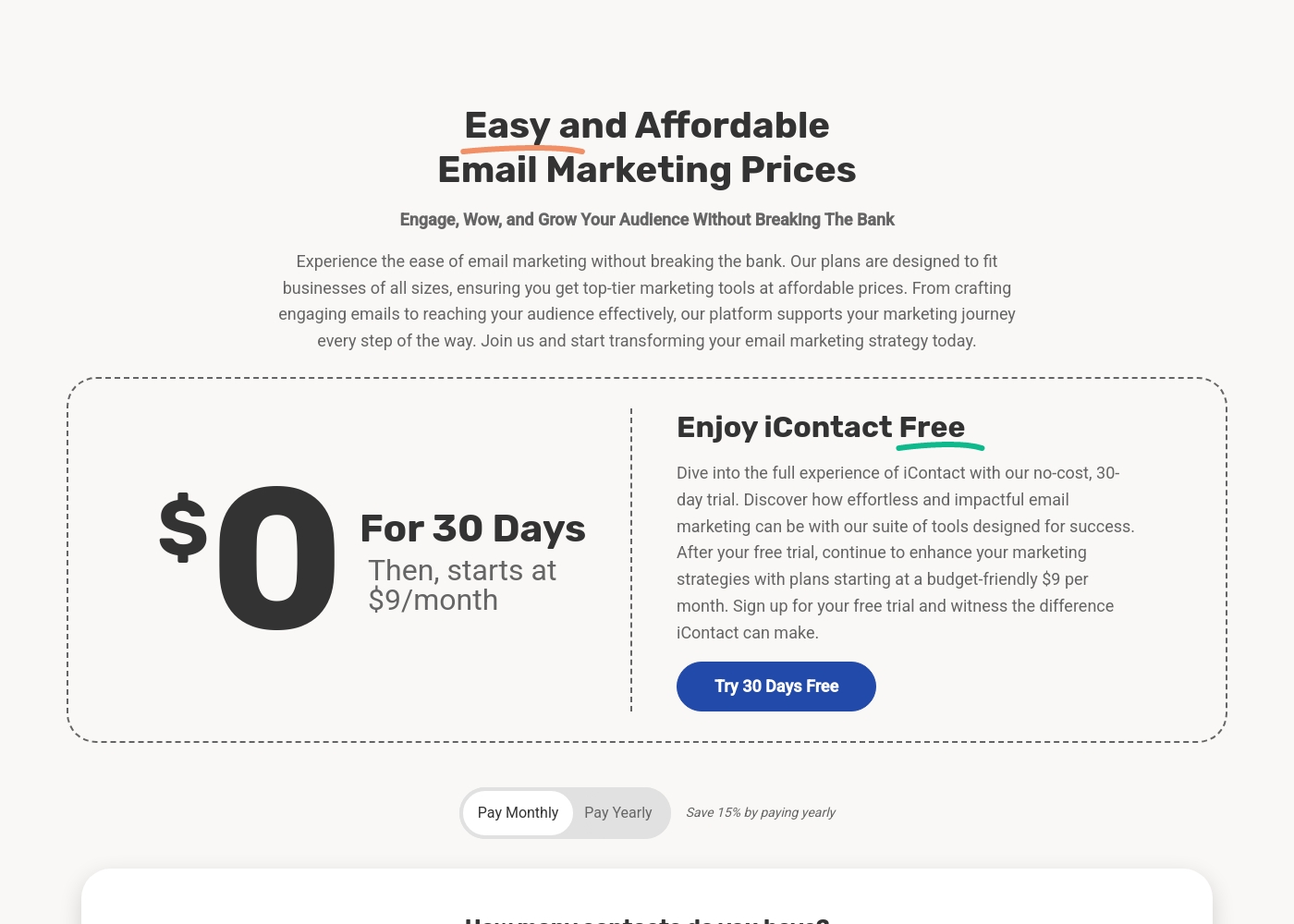
Price: $9.00/month (or save 15% annually) Best For: Small businesses or new marketers needing up to 500 contacts Other Features:
- 500 contact limit
- Hundreds of predesigned email templates
- Access to the intuitive drag-and-drop builder
- AI-powered content assistant
- Contact management tools
This entry-level plan is perfect for small businesses and new marketers just starting their email lists. It offers essential features and 500 contacts without requiring a large financial commitment. You get the foundation you need to start building engagement right away. Start sending engaging emails quickly! 🚀
- 500 Contacts included
- Hundreds of Predesigned Email Templates
- AI-Powered Content Assistant access
- Drag + Drop Builder access
- Contact Management / Segmentation
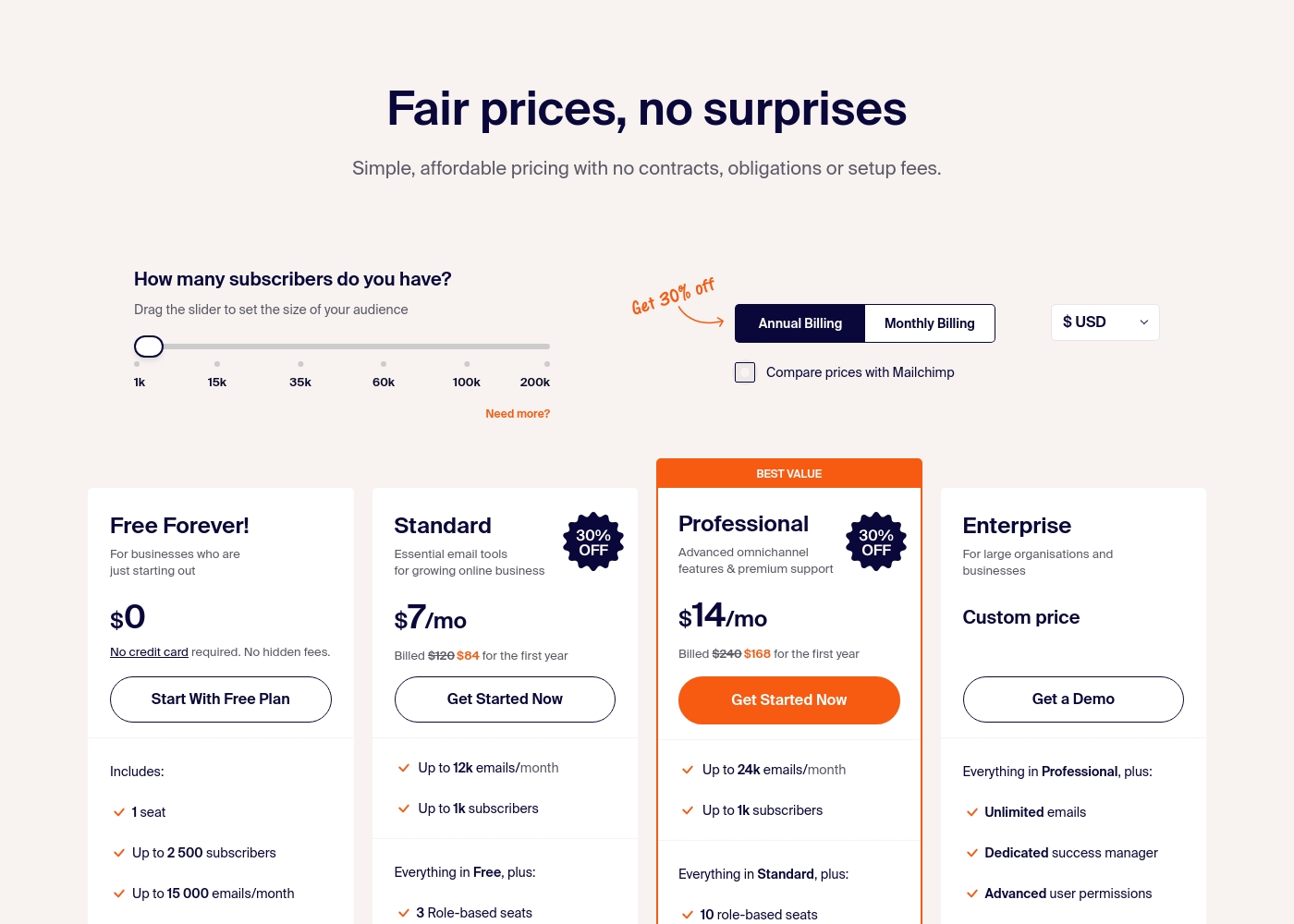
Sender costs between $0 and a custom price per month with 4 plans: Free Forever at $0, Standard at $7, Professional at $14, and Enterprise at Custom price.
Take a look at the specific features and limits included in each plan tier below.
Free Forever!
Price: $0 monthly Best For: Businesses who are just starting out Other Features: 1 seat, up to 2,500 subscribers, 15,000 emails/month, 24/7 live support, email automation.
- 1 seat
- Up to 2,500 subscribers
- Up to 15,000 emails/month
- 24/7 live support
- Email automation
- Up to 12k emails/month
- Up to 1k subscribers
- 3 Role-based seats
- Automated sequences
- Up to 24k emails/month
- Up to 1k subscribers
- 10 role-based seats
- Premium support
- Unlimited emails
- Dedicated success manager
- Advanced user permissions
Pricing Notes
- iContact's entry plan is $9/month for 500 contacts with a 30-day trial.
- Sender's Free Forever plan offers 2,500 subscribers and 15,000 emails/month at no cost.
- iContact pricing is solely based on contact list size. Higher tiers are not publicly listed.
- Sender's paid plans are based on subscriber count. Standard starts at $7/month annually.
- iContact offers a 15% discount for annual billing. Sender also has annual options.
- User reviews strongly warn about iContact's billing practices and renewal process.
- Sender's pricing is consistently described as transparent and without hidden fees.
Pricing Head-to-Head
User Reviews
While iContact markets itself as an easy email marketing platform, user feedback, primarily reflected by a low 2.3/5 TrustScore, paints a highly challenging picture. The most frequent complaints center on unacceptable billing practices and dysfunctional customer support.
Users report that the support team is dismissive, attempts to evade cancellation requests for over a month, and ultimately refuses timely refunds for erroneous or late charges. Some customers were charged as much as $900 for accounts that had been inactive for six months, labeling the approach as predatory.
The platform was marketed as user-friendly, but it nearly compromised my company’s websites and caused a serious security breach. Setting it up required a skilled IT team, contrary to the marketing. When I asked for a refund, support was dismissive and unprofessional.
User sentiment on Trustpilot and Capterra highlights Sender's generous free plan and ease of setup as major positives. Many praise the intuitive interface and reliable automation.
😊 However, some note occasional deliverability hiccups and a learning curve for advanced features. Customer support is frequently mentioned as responsive, though a few users report slow responses during peak times.
The free plan is unbeatable for a new business. I set up my first automation in minutes. The platform is simple and gets the job done without fuss.
Our Verdict
Sender is the clear winner for most users. It offers a reliable, affordable, and powerful email platform without the baggage. iContact's superpower is its AI content assistant. It's designed to help you write better emails faster, which is a neat trick. It also has a huge template library. Sender's superpower is its combination of a generous free plan and rock-solid reliability. You can start for free, automate campaigns, and get 24/7 support. It just works. The deciding factor is trust. iContact has too many red flags around security, downtime, and billing practices. Sender is the safer, more predictable choice for your business tools. Choose Sender if you're a startup, a small team, or an online store that values simplicity and budget. You'll get the core features you need without the risk. iContact is only worth considering if you specifically need its AI assistant and can stomach the potential support issues.
Frequently Asked Questions
Which is better for small teams: iContact or Sender?
Sender is better for small teams. It offers multi-user seats on paid plans and 24/7 support. iContact's support issues could be frustrating for a team.
Does iContact have an AI assistant like Sender?
Yes, iContact has an AI-Powered Content Assistant. Sender does not offer a similar AI writing tool. iContact focuses on helping you draft content.
Is Sender really free?
Yes. Sender's Free Forever plan includes 2,500 subscribers and 15,000 emails per month. It includes automation and live support with no time limit.
Can I migrate from iContact to Sender easily?
Both platforms support contact list imports. Specific migration services aren't detailed. You would need to export your list from iContact and upload it to Sender.
Which platform has better customer support?
Sender has significantly better customer support. It offers 24/7 live help on all plans. iContact receives frequent complaints about unprofessional and unhelpful support.
Which is better for e-commerce stores?
Sender is likely better. It offers pre-built integrations with WooCommerce and Shopify, plus automation for abandoned carts. iContact focuses more on general email campaigns.
Ready to Choose?
Both tools have their strengths. Choose based on your specific needs.