Hive vs Wrike
Hive and Wrike both promise to organize your team's work, but they cater to very different vibes. Hive is the agile connector that pulls your scattered tools into one place. Wrike is the enterprise powerhouse built for complex, large-scale workflows.
Best for: Agencies managing multiple client projects, Marketing teams coordinating campaigns
Best for: Enterprise organizations with 200+ employees needing robust security and compliance, Large cross-functional teams requiring resource planning and capacity management
Powerful hub for connected teams.
We found Hive excels at centralizing work across multiple tools into a single, AI-assisted workspace. Its flexible views and automation are strong assets, though the pricing structure and some user experiences around support warrant careful consideration. Overall, it's a robust choice for teams prioritizing integration and workflow efficiency.
Pros
- Centralizes work from tools like Slack, Salesforce, and email into one unified workspace.
- Offers flexible project views including Kanban, Gantt, Calendar, and Table.
- Integrates Buzz AI for smart search, summaries, and turning conversations into tasks.
- Provides a free forever tier and a free trial with no credit card required.
Cons
- Some users report confusion or dissatisfaction with billing and subscription management.
- Advanced features and support are often reserved for higher-tier, more expensive plans.
- Requires upfront integration setup to realize its full value, which may not suit all teams.
- Pricing details for some modules or support levels are not fully transparent upfront.
Enterprise Power Meets Complex Commitment.
We find Wrike is an exceptionally versatile project solution, noted for scaling efficiently across corporate environments up to 3000 users and unifying communication across highly complex workflows. Overall, the software offers a powerful feature set for advanced visibility and customization, but we caution users regarding the rigid annual subscriptions and documented difficulties with managing auto-renewal and pricing increases.
Pros
- Transforms and streamlines complex corporate workflows efficiently.
- Highly customizable for various methodologies (e.g., Holacracy, OKR).
- Excellent collaborative transparency and 360° project visibility.
- Provides fast and helpful customer support regarding implementation and bugs.
Cons
- Pricing practices are reported as aggressive, often resulting in significant renewal increases.
- Subscriptions are difficult to cancel, and users report trouble stopping automatic renewal.
- Some teams report challenging adoption and setup processes.
- Users report instances of being oversold on features bundles they did not need.
AboutHive
Hive is a project management platform built for teams of all kinds. From agencies and marketing teams to non-profits and education groups, it’s designed to organize collaboration and automate workflows. It’s not just a task list; it’s a connected system where your work happens. 💡
AboutWrike
Wrike is a trusted end-to-end enterprise work management solution. It's designed for organizations ready to transform manual processes into interconnected, automated workflows. Teams from 20 to 20,000 thrive here because Wrike is highly adaptable to any industry or size. It brings multiple teams into the same place for game-changing visual collaboration. Wrike is where you can easily align strategy and effectively execute your projects and programs. 💡
Highlights
Feature Comparison
Features Overview
We highlight the main differences and pick a winner for each feature.
User Interface & Flexibility
Hive offers flexible, user-chosen project views. Wrike provides a structured, enterprise-grade interface.
Hive lets you switch between Kanban, Gantt, Calendar, Table, and List views. You can pick the view that fits your task or team style. This flexibility is great for adapting to different workflows quickly. Wrike's interface is powerful but more rigid. It offers standard views like Board, Table, and Gantt. The platform is designed for structured, enterprise-level process management. The key difference is customization vs. structure. Hive lets each user or project customize their view. Wrike provides a consistent, controlled environment optimized for scale.
AI & Automation
Hive's Buzz AI focuses on summarizing and connecting information. Wrike's AI is deeper, focused on analytics and process automation.
Hive features Buzz AI. It searches across your connected tools, summarizes threads, and turns conversations into tasks. It's like a smart assistant inside your workspace. Wrike integrates AI into its core analytics. It helps predict project risks, optimize resource allocation, and drive data-driven decisions. Automation is central, with clear quotas per user per month. Hive's AI is about information accessibility and quick actions. Wrike's AI is about optimizing complex workflows and providing advanced business intelligence. Wrike's approach is more enterprise-oriented.
Collaboration & Visibility
Hive unifies communication from external tools. Wrike offers 360° visibility built for cross-functional teams.
Hive pulls messages and files from Slack, email, and other apps into the project context. This centralizes communication and reduces app-switching. Buzz AI helps summarize these conversations. Wrike is built for enterprise visibility. It provides a 360° view across all projects and departments. Tools like Resource Management and unlimited request forms create transparency at scale. Hive excels at bringing outside communication in. Wrike excels at providing a comprehensive, top-down view of work across a large organization.
Integrations
Hive focuses on key integrations. Wrike offers a massive ecosystem of 400+ connectors.
Hive highlights integrations with Salesforce, Slack, email, and Gong. The goal is to pull data from these core tools into one place. Setup is required to realize full value. Wrike integrates with over 400 popular tools, from Adobe and Salesforce to Jira and GitHub. Wrike Integrate enables rapid data sync and custom workflow automation across this ecosystem. Wrike has a clear advantage in breadth and depth of integrations. Hive's approach is more curated, focusing on making a few key connections work seamlessly.
Security & Compliance
Wrike offers enterprise-grade security certifications. Hive provides standard security with premium tiers.
Hive has a 'Security Overview' page. Detailed compliance info may require contacting sales. Advanced features like dedicated support are often reserved for higher-tier plans. Wrike maintains high standards. It has SOC2 Type II, ISO 27001, and ISO 27018 certifications. It's GDPR and CCPA compliant, with 99.9% uptime and role-based access control. For organizations with strict security and compliance requirements, Wrike provides more documented, out-of-the-box enterprise safeguards. Hive's security posture is less explicitly detailed for mid-tier plans.
Pricing & Contract Flexibility
Hive offers more flexible monthly billing options. Wrike requires rigid annual commitments for paid plans.
Hive pricing ranges from $0 to $12 per user/month. It offers both monthly and annual billing. This gives you flexibility to try it with less commitment. Add-ons are modular. Wrike pricing is $0 to $25 per user/month. The Team plan and above require an annual subscription. Users report difficulty cancelling and aggressive renewal practices. Seats are sold in batches. Hive is more accessible for smaller teams or those wanting to avoid long contracts. Wrike's model is designed for larger, committed enterprise deployments but can feel restrictive.
Customer Support
Both offer support, but experiences vary. Wrike is often praised for implementation help.
Hive support responsiveness varies by plan. Enterprise plans get a dedicated Customer Success Manager. Others use a contact form. Some reviews mention billing support frustrations. Wrike is frequently praised for fast, helpful support, especially during implementation. Their Professional Services are recommended for new teams to ensure proper setup. Wrike consistently receives higher marks for proactive implementation and support. Hive's support quality appears more tiered and less consistently praised in user reviews.
Scalability
Wrike is explicitly built to scale to 20,000+ users. Hive scales but with less enterprise focus.
Hive offers a Teams plan and Enterprise option. It can grow with teams, but its primary focus seems to be on collaborative teams of various sizes. The 'democratically-built' approach implies scalability. Wrike is designed for scale from the ground up. It explicitly targets teams from 20 to 20,000 users. Features like Resource Planning, advanced security, and automation quotas support massive, cross-functional operations. Wrike has the clearer, more proven path for scaling to very large enterprise sizes. Hive can scale but may not have the same depth of enterprise feature sets out of the box.
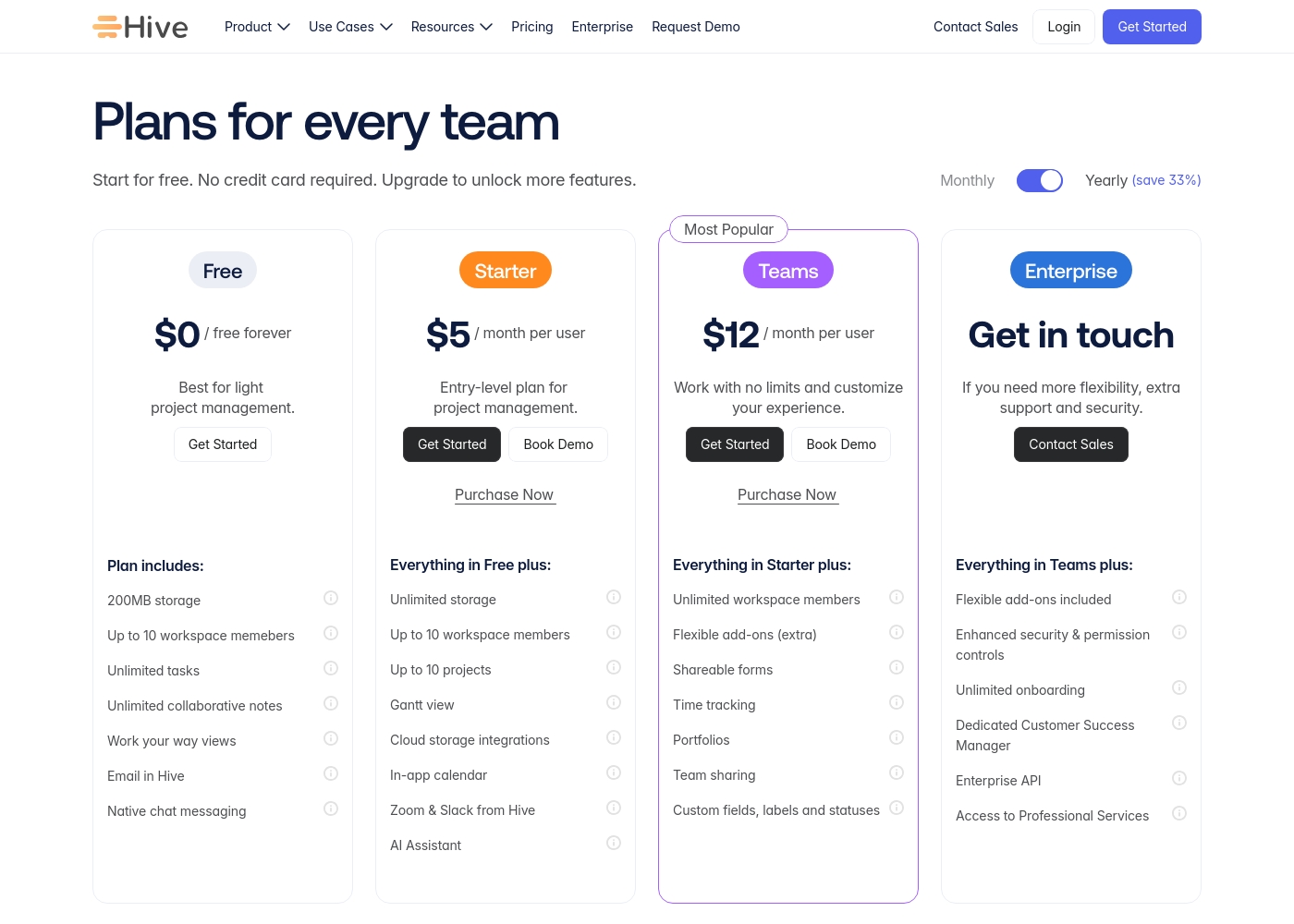
Hive pricing: Hive offers a range of options from a $0 free forever tier to a $12/month per user Teams plan. Subscriptions range from free tools for individuals to robust, feature-rich environments for growing organizations and enterprises alike.
Yearly billing is available to help you save on total costs over time. Monthly plans provide maximum flexibility if you prefer less commitment.
Pricing scales with features, allowing you to pay for only the power you need as your projects grow more complex. Add-ons like Buzz AI and time tracking are extra costs on mid-tier plans, which makes the pricing structure modular and customizable.
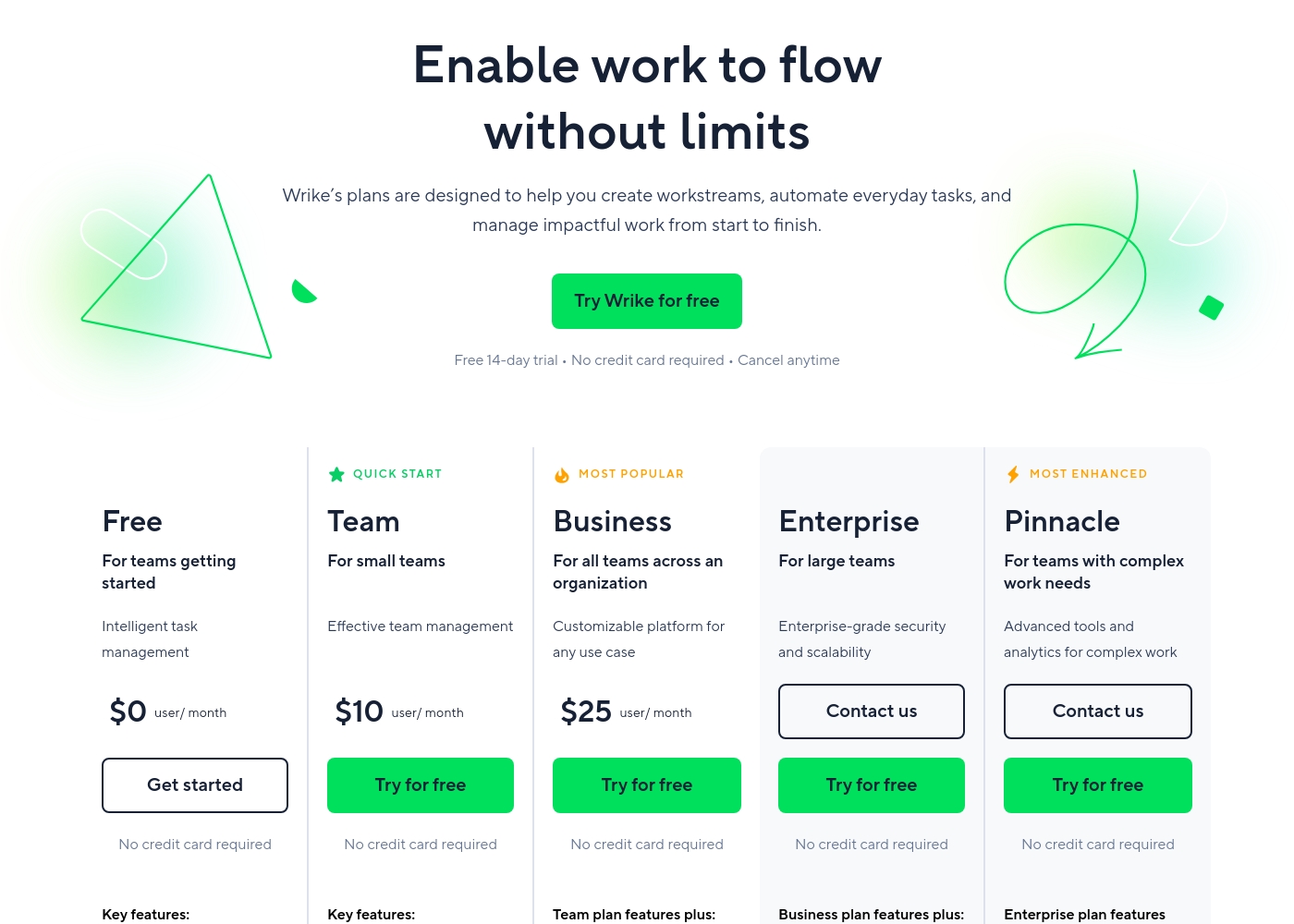
Wrike costs between $0 and $25 per user/month, with five plans: Free at $0/user/month, Team at $10/user/month, Business at $25/user/month, and Enterprise and Pinnacle which require users to contact sales.
- Web, desktop, and mobile apps
- Project and task management
- Board view (Kanban)
- Table view (spreadsheet format)
- Folders structure & nested projects
- Unlimited projects, tasks, & subtasks
- Gantt charts, Calendar & Chart view
- Generative AI, 2 GB storage per user
- Project Blueprints and Unlimited request forms
- Approvals & guest approvals
- Resource & Capacity Planning
- File and video proofing (30+ file formats)
- Real-time reports
- SAML-based SSO and Two-Factor Authentication (2FA)
- Password policies and custom access roles
- Customizable user types and Admin permissions
- User audit reports
Pricing Notes
- Hive offers a free forever plan and a 14-day trial. Monthly billing is available for flexibility.
- Wrike's free plan is limited. Paid plans (Team, Business) require an annual commitment, which can be a financial hurdle.
- User reviews frequently mention significant price increases at Wrike renewal and difficulty cancelling subscriptions.
- Hive's paid plans are simpler and can be paid monthly. Wrike's higher tiers include more advanced features but at a higher cost and commitment.
Pricing Head-to-Head
User Reviews
Reviewing Hive's external reputation, we found Trustpilot reviews to be mixed but often positive regarding the product's functionality and customer service responsiveness. Users frequently praise the platform's ease of use and comprehensive features for project management, noting its helpful support team. 📊 On the other hand, some reviews highlight concerns with pricing transparency and occasional billing issues, which can affect overall value perception. ⭐ Capterra's detailed review page was inaccessible due to security restrictions, preventing a full cross-platform synthesis. Based on the available Trustpilot snippets, the sentiment leans towards appreciation for Hive's core toolset and collaborative environment, though experiences with account management and subscription handling are less consistent.
Hive has been a game-changer for our marketing team. The ability to see all our projects in different views, like Gantt charts, helps us stay on top of deadlines. Customer support has also been very responsive whenever we had questions.
Users consistently praise Wrike's powerful capabilities in transforming workflow management and driving organizational efficiency. Many reviewers, including team leads and large enterprise users, call it one of the best project management systems available, noting its strong suitability for high-level customization for specific methodologies like OKR.
Its ability to centralize communication, provide 360° visibility, and manage collaboration across large global teams is frequently highlighted as second to none. Furthermore, customer support is often described as exemplar, particularly regarding implementation and quick bug fixes.
Using Wrike for three years has completely changed how we manage our workflows. The biggest transformation is how streamlined and fast our operations have become. It's truly efficient for our large team.
Our Verdict
There's no single winner here—it's a classic case of different tools for different missions. If your team is drowning in apps and needs a single, flexible hub, Hive is your best bet. Its free plan and monthly billing make starting low-risk. Hive's superpower is being the ultimate connector. It yanks your Slack chats, emails, and CRM data into one project view. The Buzz AI then helps you summarize it all and turn conversations into tasks. It's designed to make your existing stack more productive. Wrike's superpower is enterprise-scale orchestration. It provides 360° visibility across departments, deep resource planning, and security certifications out of the box. Its AI focuses on analytics and optimizing complex, company-wide workflows. The deciding factor is your scale and commitment level. Choose Hive if you want flexibility, ease of adoption, and to unify scattered tools. Choose Wrike if you're a larger org with formal processes, big budgets, and need ironclad project governance. For most small-to-mid teams, Hive offers a more accessible and affordable entry point. For enterprises with 200+ users and complex needs, Wrike provides the power and structure they require. Know your team's true size and process maturity before you commit.
Frequently Asked Questions
Is Hive easier to set up than Wrike for a small team?
Yes, generally. Hive offers a free plan and a simple 14-day trial with no credit card. Its interface is often considered more intuitive for smaller teams. Wrike's enterprise focus means its initial setup and onboarding can be more complex.
Can I use Hive on a month-to-month plan with Wrike?
Hive offers both monthly and annual billing on its paid plans. Wrike requires an annual subscription for its Team, Business, and higher plans. This makes Hive a more flexible option if you don't want a long-term commitment.
Which tool has better AI features for daily work?
It depends on your needs. Hive's Buzz AI is great for summarizing chats and emails across tools. Wrike's AI is more advanced for analytics, risk prediction, and optimizing resource allocation across projects.
Which is better for managing creative projects with approvals?
Wrike is stronger here. It offers advanced file and video proofing for over 30 formats, plus dedicated approval workflows with guest access. Hive's proofing capabilities are more basic by comparison.
What happens if I need to cancel my Wrike subscription?
User reports indicate this can be difficult. Wrike subscriptions are annual, and reviews mention challenges with stopping auto-renewal. It's crucial to understand the cancellation terms before committing.
Can Hive scale to a very large enterprise like Wrike?
Hive has Enterprise plans and can scale, but Wrike is explicitly built for massive scale (up to 20,000 users). Wrike offers more enterprise-grade features like advanced security, audit logs, and dedicated support that large corporations require.
Ready to Choose?
Both tools have their strengths. Choose based on your specific needs.