Hive vs Teamwork
Hive and Teamwork are both powerful project management tools, but they serve very different needs. Hive excels at connecting your existing tools into one smart workspace. Teamwork is built specifically for agencies and client work, focusing on resource planning and profitability.
Best for: Agencies managing multiple client projects, Marketing teams coordinating campaigns
Best for: Client services agencies (IT, consulting, accounting) tracking billable hours, Project managers needing real-time resource forecasting and utilization reports
Powerful hub for connected teams.
We found Hive excels at centralizing work across multiple tools into a single, AI-assisted workspace. Its flexible views and automation are strong assets, though the pricing structure and some user experiences around support warrant careful consideration. Overall, it's a robust choice for teams prioritizing integration and workflow efficiency.
Pros
- Centralizes work from tools like Slack, Salesforce, and email into one unified workspace.
- Offers flexible project views including Kanban, Gantt, Calendar, and Table.
- Integrates Buzz AI for smart search, summaries, and turning conversations into tasks.
- Provides a free forever tier and a free trial with no credit card required.
Cons
- Some users report confusion or dissatisfaction with billing and subscription management.
- Advanced features and support are often reserved for higher-tier, more expensive plans.
- Requires upfront integration setup to realize its full value, which may not suit all teams.
- Pricing details for some modules or support levels are not fully transparent upfront.
Powerful features and frustrating business practices.
We found Teamwork offers robust, unified project and resource management tools essential for professional services needing deep profitability tracking and resource forecasting. Overall, the software's powerful feature set is unfortunately being undermined by confusing, opaque upgrade paths and extremely restrictive feature limits in lower tiers.
Pros
- Unified platform combining PM, time tracking, resource forecasting, and budgeting.
- Specifically built to manage complex client work and track project profitability.
- Real-time visibility into staff availability prevents common overbooking issues.
- Simple interface with TONS of functionality and detailed project data scope.
Cons
- Upgrade processing and pricing for Scale plan are opaque and require sales engagement.
- Artificially restrictive feature limits (like budgeting caps) force expensive, premature upgrades.
- Recent new interfaces and UI changes have broken essential functions for some users.
- Customer support availability seems limited primarily to UK business work hours.
AboutHive
Hive is a project management platform built for teams of all kinds. From agencies and marketing teams to non-profits and education groups, it’s designed to organize collaboration and automate workflows. It’s not just a task list; it’s a connected system where your work happens. 💡
AboutTeamwork
Teamwork.com is project and resource management software specifically built for client work and powered by AI. It goes beyond traditional project tools by combining essential functions like resource forecasting, cost control, and profitability reporting into a single platform.
This platform is trusted by professional services businesses globally. These include agencies, consulting firms, IT service providers, and accounting teams. Teamwork helps them efficiently schedule resources, manage billable hours, and track project profitability from start to finish. ✅
Highlights
Feature Comparison
Features Overview
We highlight the main differences and pick a winner for each feature.
Unified Workspace vs. Client Focus
Hive pulls your existing tools into one hub. Teamwork is built from the ground up for managing client projects.
Hive's core strength is centralizing work. It connects apps like Slack, Salesforce, and email into a single workspace. This stops you from toggling tabs all day. Teamwork is designed for client services. It combines project management, time tracking, and resource planning in one place. This is built for agencies, consultants, and IT firms. Hive is better if your main pain is scattered communication. Teamwork is better if your main pain is tracking project costs and team availability. A marketing agency might use Hive to streamline internal workflows. An IT consulting firm would use Teamwork to bill clients accurately.
AI & Automation
Hive's Buzz AI summarizes and creates tasks. Teamwork's AI is available on the free plan for basic help.
Hive offers Buzz AI as a powerful assistant. It can search across connected apps, summarize meetings, and turn conversations into action items. Some advanced AI features may be paid add-ons. Teamwork includes Teamwork AI starting on the Free plan. It helps with project management essentials and reducing busywork. Automation limits scale with your plan. Hive's AI feels more integrated for turning communications into tasks. Teamwork's automation is more about streamlining repetitive project steps. If you live in email and chat, Hive's AI will feel magical. If you need to automate project handoffs, Teamwork's templates are very strong.
Resource & Financial Management
Teamwork dominates with real-time resource planning and profitability tracking. Hive offers basic views, not deep financial tools.
Hive provides flexible project views like Gantt and Kanban for visualizing work. However, it doesn't have dedicated tools for forecasting resource availability or tracking project budgets. Teamwork excels here. It offers a Workload Resource Planner, real-time utilization reports, and comprehensive profitability tracking. You can see who's available and which projects are making money. This is the biggest differentiator. Teamwork gives you the data to run a profitable services business. Hive helps you organize the work itself. If your business model depends on billable hours and margins, Teamwork is essential. If you're an internal team, Hive's organization is likely enough.
Ease of Use & Setup
Hive promises a simple start with a free plan. Teamwork has a simple interface but recent UI changes caused issues for some users.
Hive promotes a low-risk start with a free plan and no credit card. Its democratic development suggests features are built on user feedback, which can ease adoption. Initial setup of integrations will take planning. Teamwork is praised for having a simple interface with tons of functionality. However, recent reviews mention UI changes that broke essential functions. This can hurt team productivity. Both tools can be complex depending on how deeply you use them. Hive's complexity is in connecting your ecosystem. Teamwork's complexity is in its powerful financial features. New users might find Hive's integration setup initially challenging. Teamwork users might struggle with a recent update that changed a familiar workflow.
Pricing Transparency
Hive's pricing is clearer per-user. Teamwork's plans have hard limits that force expensive upgrades.
Hive offers a clear free tier and paid plans starting at $5/user (Starter). Pricing scales with features and user count. Add-ons like Buzz AI are extra. Teamwork has a free plan, then paid tiers at $10.99 and $19.99/user. The Scale plan requires contacting sales. Users complain about hard limits, like only 30 active budgets on the Grow plan. Hive's structure is more straightforward for budgeting. Teamwork's restrictive limits can lead to surprise costs as your team grows. A small team might hit Teamwork's budget cap quickly. Hive's model is more predictable for most growing teams.
Customer Support & Experience
Support experiences are mixed for both. Hive has billing issues; Teamwork has recent feature breakage and high data export fees.
Hive users report responsive support but also frustrating billing issues. Some find subscription management confusing. The experience seems inconsistent. Teamwork users love the core product but hate the business practices. Complaints include broken features after updates and being charged $500 just to export chat history. Support is noted as being mainly UK hours. Neither company has a flawless support reputation based on reviews. Hive's issues feel administrative. Teamwork's issues feel more fundamental to using the product. If you need quick fixes, Hive might be better. If you need to own your data, be very cautious with Teamwork's exit process.
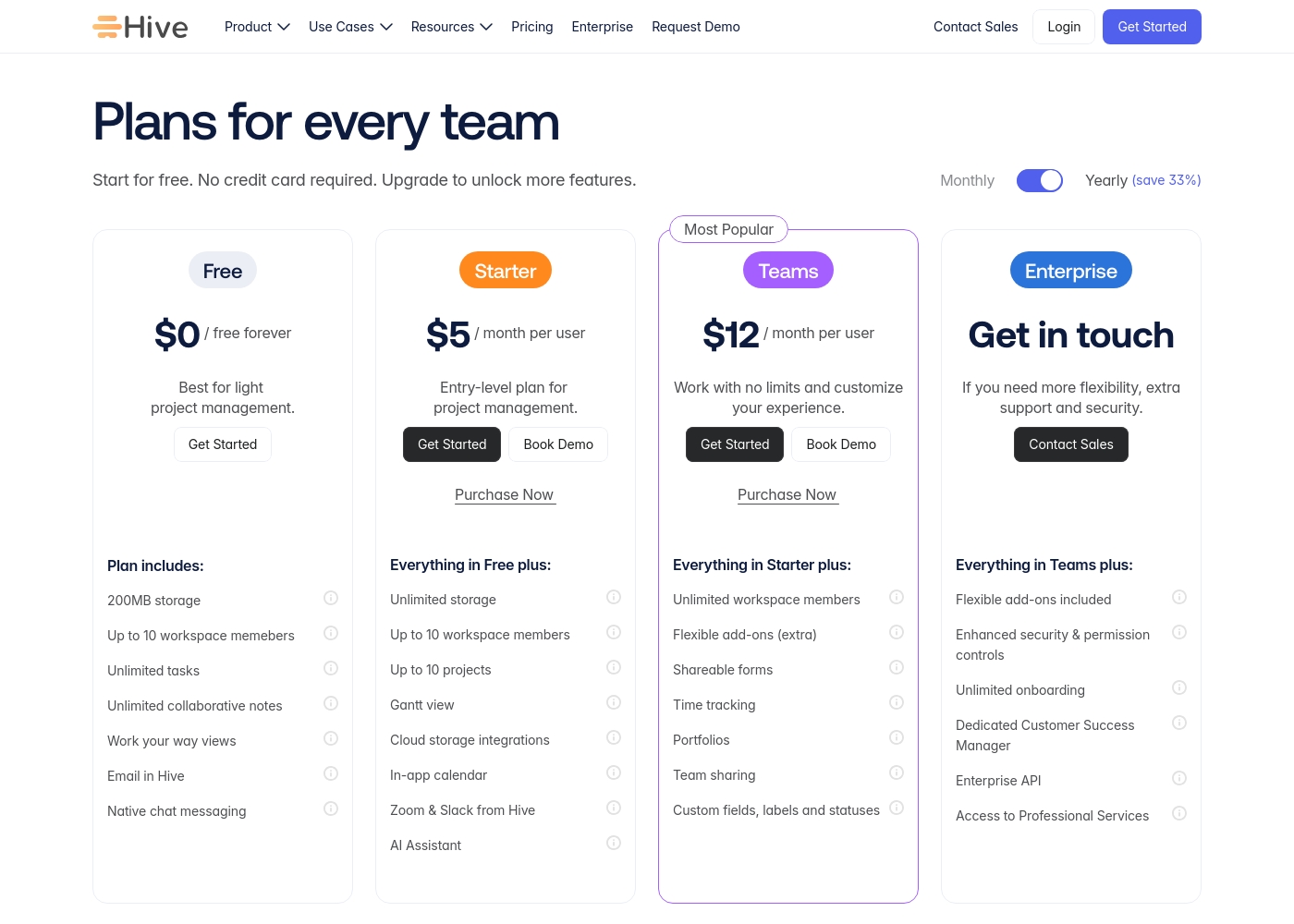
Hive pricing: Hive offers a range of options from a $0 free forever tier to a $12/month per user Teams plan. Subscriptions range from free tools for individuals to robust, feature-rich environments for growing organizations and enterprises alike.
Yearly billing is available to help you save on total costs over time. Monthly plans provide maximum flexibility if you prefer less commitment.
Pricing scales with features, allowing you to pay for only the power you need as your projects grow more complex. Add-ons like Buzz AI and time tracking are extra costs on mid-tier plans, which makes the pricing structure modular and customizable.
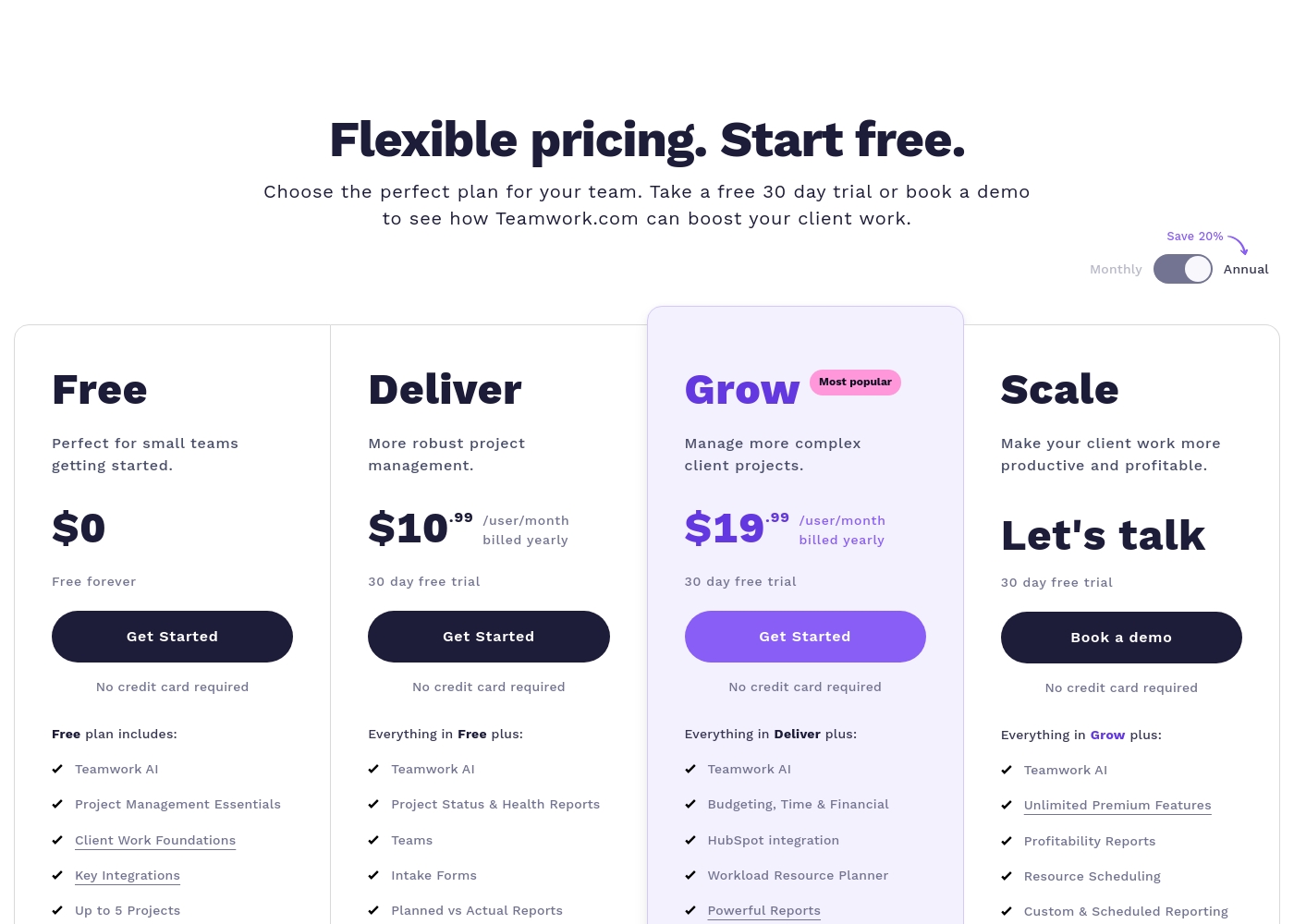
Teamwork costs between $0 and Talk to Sales per month with 4 plans: Free at $0, Deliver at $10.99/user/month, Grow at $19.99/user/month, and Scale at Talk to Sales.
Teamwork offers flexible pricing tailored to your team's size and complexity needs. You can choose to pay monthly or save 20% by selecting an annual subscription.
Free
Price: $0 (Free forever) Best For: Perfect for small teams getting started. Other Features:
- Teamwork AI and Project Management Essentials
- Built-in Time Tracking and Client Work Foundations
- Key Integrations including Slack, Zapier, and MS Teams
- Up to 5 Users and 5 Projects; 100 Automations monthly
- Teamwork AI
- Project Management Essentials
- Client Work Foundations
- Built-in Time Tracking
- Key Integrations (Slack, Zapier, MS Teams)
- Project Status & Health Reports
- Teams
- Intake Forms
- Planned vs Actual Reports
- Integrations (Quickbooks, Harvest and many others)
- Budgeting, Time & Financial
- HubSpot integration
- Workload Resource Planner
- Powerful Reports (Utilization, Time Spent)
- 50 Project Templates
- Unlimited Premium Features
- Profitability Reports
- Resource Scheduling
- Custom & Scheduled Reporting
- Retainer Management (beta)
Pricing Notes
- Hive offers a free forever plan with unlimited members, while Teamwork's free plan limits you to 5 users and 5 projects.
- Hive's paid plans start at $5/user/month (Starter), while Teamwork's first paid tier is $10.99/user/month (Deliver).
- Teamwork's Grow plan ($19.99/user) has a hard limit of 30 active budgets, which forces costly upgrades for growing agencies.
- Hive's pricing is more transparent and predictable for scaling teams. Teamwork's Scale plan requires custom quotes.
- Both offer 30-day free trials without a credit card. Hive also has a free forever option.
Pricing Head-to-Head
User Reviews
Reviewing Hive's external reputation, we found Trustpilot reviews to be mixed but often positive regarding the product's functionality and customer service responsiveness. Users frequently praise the platform's ease of use and comprehensive features for project management, noting its helpful support team. 📊 On the other hand, some reviews highlight concerns with pricing transparency and occasional billing issues, which can affect overall value perception. ⭐ Capterra's detailed review page was inaccessible due to security restrictions, preventing a full cross-platform synthesis. Based on the available Trustpilot snippets, the sentiment leans towards appreciation for Hive's core toolset and collaborative environment, though experiences with account management and subscription handling are less consistent.
Hive has been a game-changer for our marketing team. The ability to see all our projects in different views, like Gantt charts, helps us stay on top of deadlines. Customer support has also been very responsive whenever we had questions.
Teamwork's external feedback presents a sharp contrast. Users consistently praise the core software for its powerful functionality, describing it as having a simple interface and a broad scope of data that is essential for running a business.
Clients reportedly appreciate the transparency it offers. However, positive sentiment is heavily outweighed by severe criticism directed at business practices and pricing.
Teamwork is an excellent tool with an extremely simple interface and TONS of functionality. As a former project manager, the level of detail and broad scope of data available sets this tool apart easily.
Our Verdict
For most teams, Hive is the safer and more flexible choice. Its core promise of unifying your tools into one AI-powered workspace is genuinely useful. It helps you stop context-switching and focus on the work. Hive's superpower is its connected ecosystem. The Buzz AI assistant can pull insights from your emails, chats, and calls. It turns conversations directly into project tasks, which saves real time. Teamwork's superpower is deep client management. It gives you incredible tools for resource planning, budgeting, and profitability reports. If your business relies on billable work, this data is gold. The deciding factor is your business model. If you're an internal team or a simple agency, Hive is perfect. If you run a complex services business, Teamwork's financial tools are essential. Choose Hive if you want to streamline communication and love a flexible, low-cost start. Choose Teamwork if you need to forecast resources, track costs, and maximize project profit above all else.
Frequently Asked Questions
Which is better for small teams: Hive or Teamwork?
Hive's free plan is more generous for small teams. It offers unlimited members. Teamwork's free plan limits you to 5 users and 5 projects. For paid plans, Hive's Starter tier is cheaper at $5/user vs. Teamwork's $10.99.
Does Hive have time tracking like Teamwork?
Hive offers built-in time tracking, but it's often listed as an add-on or on higher tiers. Teamwork includes time tracking as a core feature on all plans, including the free one. For dedicated time management, Teamwork is more integrated.
Is Teamwork worth the extra cost over Hive?
Only if you run a client services business. Teamwork's premium covers advanced resource planning and profitability reports. Hive doesn't offer deep financial tracking. For most other teams, Hive provides better value.
Which tool is better for agencies?
It depends. Use Hive to unify client communications and internal workflows. Use Teamwork if you need to track billable hours, manage resources, and prove project profitability to clients.
Can I migrate from Hive to Teamwork easily?
Teamwork offers one-click import from tools like Asana, Trello, and Monday. They don't explicitly mention importing from Hive. You may need to use manual export/import processes. Check both tools' documentation.
Which has better AI features?
Hive's Buzz AI is more advanced for summarizing communications and creating tasks. Teamwork's AI is available on the free plan but focuses more on general project management assistance. For turning talk into action, Hive wins.
Ready to Choose?
Both tools have their strengths. Choose based on your specific needs.