Hive vs Notion
Hive and Notion are both popular work hubs, but they serve different team styles. Hive is a dedicated project manager focused on connecting your existing tools. Notion is a flexible "everything app" that wants to replace them. Here's how to pick the right one for you.
Best for: Agencies managing multiple client projects, Marketing teams coordinating campaigns
Best for: Startups building an internal company wiki, Teams wanting to replace 3+ tools (wiki, CRM, tracker) with one app
Powerful hub for connected teams.
We found Hive excels at centralizing work across multiple tools into a single, AI-assisted workspace. Its flexible views and automation are strong assets, though the pricing structure and some user experiences around support warrant careful consideration. Overall, it's a robust choice for teams prioritizing integration and workflow efficiency.
Pros
- Centralizes work from tools like Slack, Salesforce, and email into one unified workspace.
- Offers flexible project views including Kanban, Gantt, Calendar, and Table.
- Integrates Buzz AI for smart search, summaries, and turning conversations into tasks.
- Provides a free forever tier and a free trial with no credit card required.
Cons
- Some users report confusion or dissatisfaction with billing and subscription management.
- Advanced features and support are often reserved for higher-tier, more expensive plans.
- Requires upfront integration setup to realize its full value, which may not suit all teams.
- Pricing details for some modules or support levels are not fully transparent upfront.
Powerful software, risky provider.
We found Notion is an exceptionally flexible and powerful productivity tool, praised globally for its block-based editor and ability to consolidate diverse workflows. However, external evidence highlights significant failures in subscription management and support responsiveness. Overall, we advise extreme caution regarding billing procedures due to recurring reports of unauthorized charges and cancellation difficulties.
Pros
- Exceptionally powerful and versatile block-based editor.
- Effective for personal knowledge management and team use.
- Consolidates multiple specialized tools (wikis, CRMs, project management).
- Strong native AI assistance integrated throughout the workspace.
Cons
- Widespread reports of deceptive or confusing billing practices.
- Extremely poor and unresponsive customer support experiences.
- Users report app is often slow and unreliable.
- Difficulty canceling subscriptions and obtaining timely refunds.
AboutHive
Hive is a project management platform built for teams of all kinds. From agencies and marketing teams to non-profits and education groups, it’s designed to organize collaboration and automate workflows. It’s not just a task list; it’s a connected system where your work happens. 💡
AboutNotion
Notion is your dedicated AI workspace and everything app. It is built to replace multiple specialized tools with one powerful platform. This centralized space lets teams consolidate project management, internal wikis, and basic CRM functions. Notion is trusted broadly; over 100 million users worldwide use it, and 62% of the Fortune 100 are customers. You can use it right in your browser or download specialized tools like Notion Mail and Notion Calendar to keep time and work together. ✅
Highlights
Feature Comparison
Features Overview
We highlight the main differences and pick a winner for each feature.
AI Integration
Hive uses AI to connect and act on your data. Notion's AI is a built-in writing and search assistant.
Hive's Buzz AI searches across your connected apps (Slack, Salesforce). It can summarize meetings and turn conversations into tasks directly in your project board. Notion AI is a native assistant in every workspace. It's rated #1 for AI writing and helps with drafts, summarizing docs, and searching company knowledge. The key difference is focus: Hive's AI is for project execution. Notion's AI is for content creation and knowledge retrieval.
Project Views
Hive offers diverse, ready-made views for project tracking. Notion's views are database-powered and more flexible.
Hive provides classic views like Kanban, Gantt, Calendar, and Table. You can mix and match them for different tasks within one project. Notion uses databases with multiple view options. You can toggle between Table, Board, Timeline, and Calendar for the same data set. Hive's views are more intuitive for traditional project management. Notion's database system offers deeper customization.
Knowledge Management
Notion is built for wikis and documentation. Hive focuses on task and project organization.
Notion is the #1 rated knowledge base on G2 for three years. It excels at creating interconnected pages, team wikis, and SOPs. Hive is primarily a project management tool. While it has pages, it lacks Notion's powerful linking, database relationships, and wiki-specific structure. If building a company knowledge base is critical, Notion is the clear winner. Hive is for managing the work itself.
Tool Consolidation
Hive connects your tools. Notion aims to replace them.
Hive's value is pulling data from Salesforce, Slack, and email into one workspace. It acts as a central hub. Notion can replace separate tools for wikis, simple CRMs, and project trackers. Some teams cut from six apps down to Notion. Choose Hive to connect your existing stack. Choose Notion to simplify your stack.
Mobile Experience
Both have mobile apps, but user reports differ significantly on performance.
Hive offers a mobile app for project management on the go. Specific performance details are limited in the provided data. Notion's mobile app is available, but user reviews frequently cite it as slow and unreliable. Performance is a common complaint. Based on user sentiment, Hive's mobile experience may be more stable, though Notion's is feature-rich.
Customer Support
Hive support varies by plan. Notion support gets consistently poor reviews.
Hive offers responsive support for higher plans and a dedicated CSM for Enterprise. Free plan support is limited. Notion's support is described as unresponsive, unhelpful, and condescending in Trustpilot reviews. Users report difficulty resolving billing issues. Hive's support appears more reliable, especially for paying customers.
Pricing & Billing
Hive has transparent tiers. Notion's billing system is a major source of user frustration.
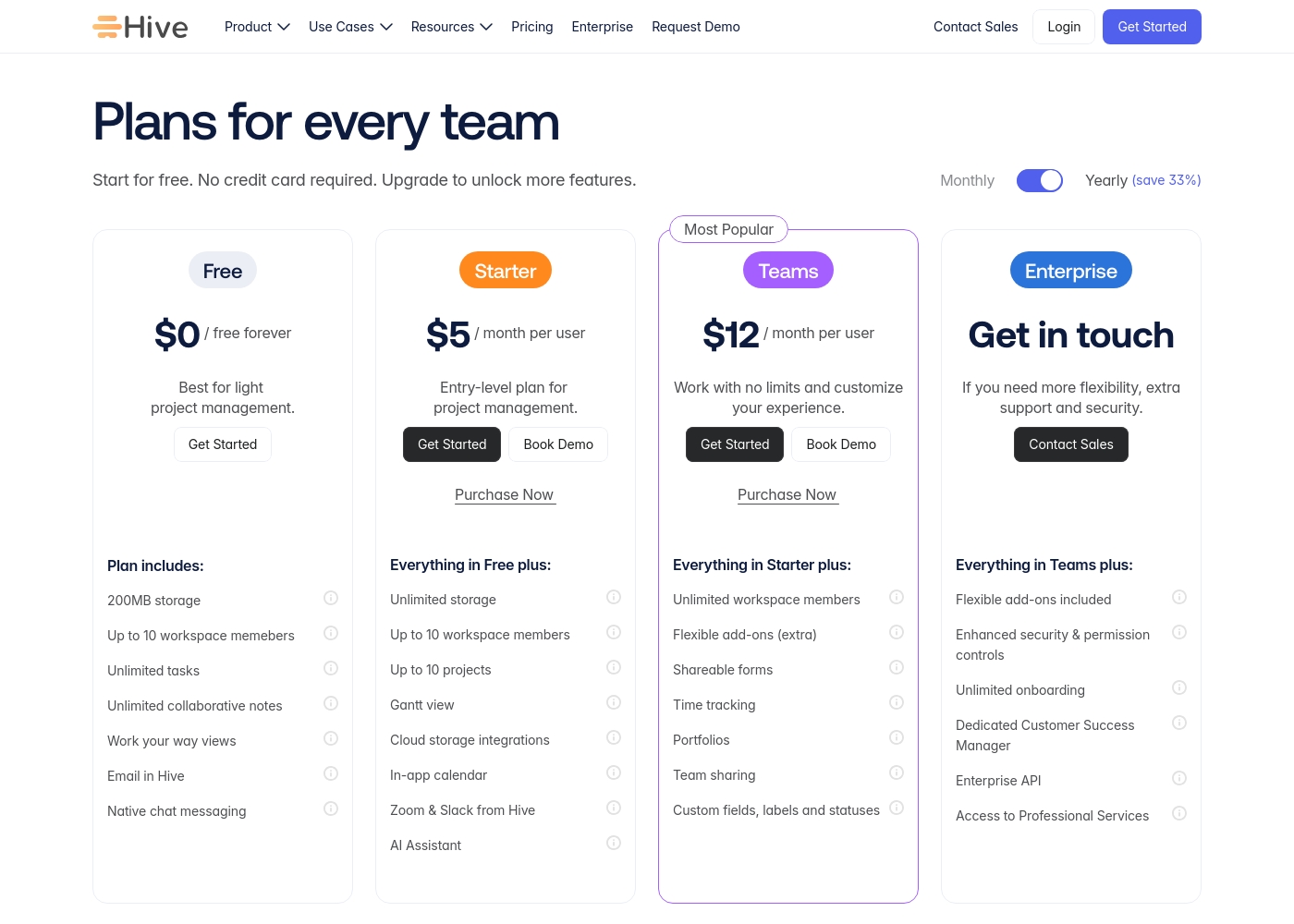
Hive pricing is clear: $0, $5, or $12/user/month. Add-ons are extra. The 14-day trial is no-risk. Notion pricing is $0, $10, or $20/user/month. However, reviews are full of complaints about unexpected charges, hard-to-cancel subscriptions, and refund issues. For a predictable, hassle-free billing experience, Hive is safer.
Hive pricing: Hive offers a range of options from a $0 free forever tier to a $12/month per user Teams plan. Subscriptions range from free tools for individuals to robust, feature-rich environments for growing organizations and enterprises alike.
Yearly billing is available to help you save on total costs over time. Monthly plans provide maximum flexibility if you prefer less commitment.
Pricing scales with features, allowing you to pay for only the power you need as your projects grow more complex. Add-ons like Buzz AI and time tracking are extra costs on mid-tier plans, which makes the pricing structure modular and customizable.
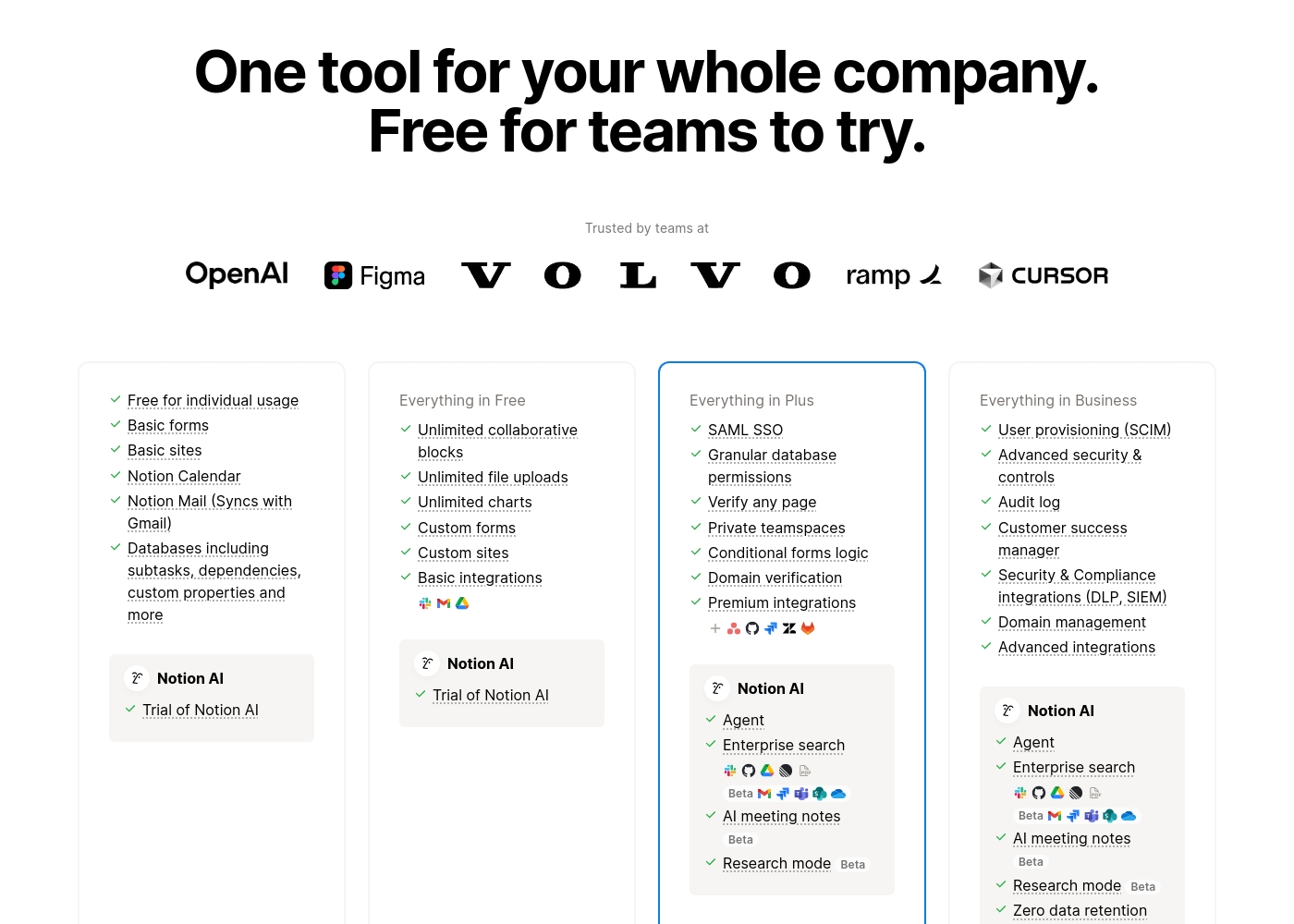
Notion costs between $0 and $20 per seat/month with four plans: Free at $0/seat/month, Plus at $10/seat/month, Business at $20/seat/month, and Enterprise (custom pricing).
Here’s a detailed look at the core features included in each subscription level.
- Unlimited pages and blocks for individuals
- Web publishing with 1 custom subdomain
- Basic forms and sites
- Notion Calendar and Mail synchronization
- Databases with subtasks and dependencies
- Unlimited blocks and file uploads
- 30 days of page history
- Basic SAML SSO
- Granular database permissions
- Access to unlimited charts
- 90 days of page history
- Advanced security controls and Audit log
- Conditional forms logic
- Domain verification
- Advanced page analytics (includes editor list)
- Unlimited page history and workspace analytics
- SCIM user provisioning
- Zero data retention with LLM providers for Notion AI
- Customer Success Manager support
- Security & Compliance integrations (DLP, SIEM)
Pricing Notes
- Hive offers a 14-day free trial with no credit card required, plus a free forever plan.
- Notion's free plan is robust for individuals but has limits for teams (5MB file uploads, 7 days page history).
- Notion's paid plans start at $10/seat/month, which is double Hive's $5/user/month Starter plan.
- Multiple Notion reviews warn of deceptive billing, unexpected charges, and difficulty canceling.
- Hive's 'adoption guarantee' shows confidence in reducing risk for new customers.
Pricing Head-to-Head
User Reviews
Reviewing Hive's external reputation, we found Trustpilot reviews to be mixed but often positive regarding the product's functionality and customer service responsiveness. Users frequently praise the platform's ease of use and comprehensive features for project management, noting its helpful support team. 📊 On the other hand, some reviews highlight concerns with pricing transparency and occasional billing issues, which can affect overall value perception. ⭐ Capterra's detailed review page was inaccessible due to security restrictions, preventing a full cross-platform synthesis. Based on the available Trustpilot snippets, the sentiment leans towards appreciation for Hive's core toolset and collaborative environment, though experiences with account management and subscription handling are less consistent.
Hive has been a game-changer for our marketing team. The ability to see all our projects in different views, like Gantt charts, helps us stay on top of deadlines. Customer support has also been very responsive whenever we had questions.
Trustpilot feedback paints a sharply divided picture of Notion. While many users praise the platform as a terrific tool—highlighting its power, versatility, and unique block-based editor for personal and professional organization—these compliments are often eclipsed by grave concerns regarding management and billing practices.
A recurring major theme across many reviews details frustrating experiences with unexpected charges, deceptive auto-upgrades (especially relating to annual plans and new members), and significant challenges when trying to cancel subscriptions or obtain timely refunds. Furthermore, support responsiveness is frequently described as unsatisfactory, unhelpful, or even condescending, often failing to resolve billing errors or login issues.
Enjoy using Notion a lot for my daily work interface. It helps me set up my employees and assign tasks with no issue at all. We upgraded from the free plan and will absolutely continue using the platform.
Our Verdict
For most teams focused on project execution, Hive is the stronger choice. Its lower price, stable billing, and responsive support give it an edge. Hive's superpower is connecting your existing tools. It pulls Slack, Salesforce, and email into one project hub. This saves time and reduces context-switching. Notion's superpower is flexibility. It can be your wiki, your project tracker, and your simple CRM. Its AI assistant is also top-tier for writing and search. The deciding factor is your primary need. Pick Hive to organize and execute projects with your current tool stack. Pick Notion to build a new, consolidated workspace from scratch. For teams juggling multiple apps, choose Hive. For teams building a centralized knowledge base, choose Notion. Always test the free plans first to see which interface clicks.
Frequently Asked Questions
Which is cheaper for a small team: Hive or Notion?
Hive's paid plan starts at $5/user/month. Notion's paid plan starts at $10/seat/month. For a team of 10, that's $50 vs $100 per month.
Is Notion good for project management?
Yes, Notion can manage projects using databases and views. However, Hive is built specifically for project management and offers more dedicated views like Gantt charts.
Does Hive have a knowledge base like Notion?
No, Hive does not have a dedicated knowledge base or wiki feature. Notion is widely regarded as a top tool for building and organizing company documentation.
Can I connect Salesforce to Hive?
Yes, Hive integrates with Salesforce, Slack, and email. Its core value is pulling data from these tools into a central project workspace.
Is Notion's AI better than Hive's AI?
They serve different purposes. Notion's AI is a built-in writing and search assistant. Hive's Buzz AI is focused on summarizing project communications and creating tasks from them.
Which tool has better customer support?
Hive's support is generally noted as responsive, especially for paid plans. Notion's support receives frequent complaints for being slow and unhelpful in resolving issues.
Ready to Choose?
Both tools have their strengths. Choose based on your specific needs.