GoTo Webinar vs Zoom
GoTo Webinar focuses specifically on hosting large, professional virtual events up to 3,000 attendees. Zoom offers an AI-first unified collaboration platform for daily team communication (UCaaS). The main difference is proven event reliability versus AI-driven daily team efficiency. GoTo Webinar is built for marketers; Zoom is built for employees.
Reliable platform for high-capacity virtual events.
We assessed GoTo Webinar based on its robust feature set and clear, scale-based pricing structure. It seems designed for hassle-free delivery of professional, large-scale virtual events that include strong analytical tools. Overall, it is a highly viable platform for businesses prioritizing participant capacity and functional reliability.
Pros
- Supports very large events (up to 3,000 participants).
- Setup is fast and the platform is described as "hassle-free."
- Higher plans include modern features like AI Meeting Summaries.
- Unlimited Cloud Storage is available on the popular Pro plan.
Cons
- Precise numerical pricing is not displayed publicly on the website.
- Annual billing is required for all listed plans.
- Advanced features require the Pro tier or the Enterprise tier.
- No explicit money-back guarantee was mentioned.
Powerful features, poor customer commitment.
We recognize Zoom Workplace as a robust, AI-first platform offering industry-leading features for collaboration and potential time savings. However, we found that its operational reality, including support and subscription handling, presents major challenges that introduce significant risks for users. Overall, organizations must weigh the advanced functionality against the widely documented customer service and billing failures.
Pros
- AI Companion features like summarization save significant time (up to six hours weekly).
- Robust core video conferencing and meeting product that is quick to deploy.
- The integrated Zoom Workplace minimizes app switching and workflow friction.
- Supports enhanced organizational culture and managing hybrid workforces.
Cons
- Customer service and technical support are widely viewed as non-existent and impossible to reach.
- Widespread issues with unexpected auto-renewal, difficult cancellation processes, and refund refusals.
- Setting up specialized services like Zoom Phone is often complicated and poorly supported.
- User interface (UI/UX) is reported as confusing and lacking intuition on the desktop application.
AboutGoTo Webinar
GoTo Webinar is designed as an all-in-one platform for hosting virtual events of any size. It makes events easy, whether you are running remote staff trainings or complex multi-day conferences.
Setup takes just minutes, and managing your ongoing events is simple. You don't even need dedicated IT support to make it work! The system is built with enterprise-grade security to keep all attendee data safe and your events uninterrupted. 🔐
AboutZoom
Zoom is an AI-first Unified Communications as a Service (UCaaS) solution built for modern teams. It is a single platform dedicated entirely to collaboration. This integrated system, called Zoom Workplace, streamlines essential communication tools like Meetings, Chat, and Docs.
It’s designed for any business that needs to strengthen its organizational culture and effectively engage a hybrid workforce. Zoom also supports critical customer-facing functions, offering specialized AI-first contact center and Customer Experience (CX) solutions. This level of connection helps your entire team work together without friction. ✅
Highlights
Feature Comparison
Features Overview
We highlight the main differences and pick a winner for each feature.
Core Purpose & Focus
GoTo Webinar is tailored for external events; Zoom targets internal team unification.
GoTo Webinar is an all-in-one platform for effortless virtual events and high-capacity webcasts. Setup is fast and described as hassle-free for planning major professional use. Zoom is designed as an AI-first Unified Communications as a Service (UCaaS) solution. Zoom Workplace integrates Meetings, Chat, and Docs to reduce application switching friction. GoTo Webinar provides superior event management tools and audience analytics. Zoom delivers seamless daily collaboration across a distributed hybrid workforce. This key difference means GoTo Webinar suits the marketing team, while Zoom suits the operations team.
Scalability & Capacity
GoTo Webinar handles vast external attendee lists; Zoom scales internally for hybrid teams.
GoTo Webinar explicitly supports massive scale, accommodating up to 3,000 participants easily. Attendees join GoTo Webcasts directly from their browser, requiring no downloads. Zoom features are built toward strengthening collaboration across complex, distributed teams. Its core video product is robust, but specified large-event maximums are less central. GoTo Webinar is the clear choice if you regularly host events requiring 1,000 or more attendees frequently. If your audience capacity is your bottleneck, GoTo Webinar provides guaranteed space and reliability for major events.
AI Functionality
Zoom's AI Companion provides huge productivity gains; GoTo Webinar limits AI to higher tiers.
Zoom's AI Companion quickly summarizes meetings and generates first draft documents efficiently. This feature is estimated to save users around six hours per week in meetings alone. GoTo Webinar includes AI Meeting Summary features, but only within its popular Pro plan tier. The focus is less on daily productivity savings. Zoom integrates AI centrally across its entire communication platform strategy for constant efficiency wins. GoTo Webinar uses AI primarily for post-event analysis. Zoom aims to eliminate manual admin tasks, giving it a strong edge in daily team output.
Customer Support & Trust
GoTo Webinar offers standard support; Zoom is widely reported as having catastrophic support issues.
GoTo Webinar emphasizes hassle-free use and offers clear channels for billing or plan adjustments. User reports generally indicate a reliable operational experience. Zoom receives extreme criticism for non-existent support and difficult cancellation processes. Users report being unable to reach a human or process legitimate refunds. The poor user sentiment regarding Zoom’s operational failures introduces massive risk to businesses relying on it. GoTo Webinar offers much better peace of mind and trust. Always ensure your mission-critical tools have accessible support; GoTo Webinar wins heavily here.
Marketing & Lead Generation
GoTo Webinar is purpose-built for sophisticated marketing funnels and tracking.
GoTo Webinar allows custom registration forms, quizzes, and secure payment acceptance using Stripe integration. You can monetize high-value content. It includes source tracking to discover which exact marketing channel drove the most valuable signups to your event effectively. Zoom offers professional webinar tools but does not prominently feature bespoke lead capture forms or integrated payment acceptance. If your event's primary goal is pipeline generation and revenue, GoTo Webinar offers superior built-in tools.
Platform Unification
Zoom Workplace unifies Meetings, Chat, and Docs; GoTo Webinar is event-only.
The Zoom Workplace is a UCaaS solution that unifies communication (Meetings, Chat, Docs) to minimize app juggling friction. This streamlines internal workflows dramatically. GoTo Webinar focuses on the event lifecycle, automating invitations and connecting with CRMs for lead tracking. Zoom also provides a Video SDK, offering developers maximum flexibility for custom app experiences and video integration. For large organizations battling application sprawl, Zoom provides a compelling single, integrated solution.
Pricing Transparency
Both platforms require contacting sales; GoTo Webinar mandates yearly contracts.
GoTo Webinar requires annual billing for all listed plans structured per organizer. Precise pricing numbers are not displayed publicly. Zoom operates on a customized quote basis and offers per-seat pricing that can be billed monthly or yearly. Neither tool provides clear, upfront pricing details, forcing users to initiate a sales conversation. GoTo Webinar mitigates this slightly with a transparent free trial. Zoom offers crucial payment flexibility by allowing monthly billing, which GoTo Webinar does not explicitly offer in its main plans.
Content Storage
GoTo Webinar includes Unlimited Cloud Storage in higher plans; Zoom’s storage is not a selling point.
GoTo Webinar includes Unlimited Cloud Storage beginning with its widely popular Pro plan. It also features GoToStage for maximizing content reach after the live event. Webinars can be pre-recorded using GoTo Webinar to ensure flawless content delivery every single time. Zoom's feature set emphasizes live collaboration and AI efficiencies. The core data does not highlight robust cloud storage or long-term content hosting features. If you plan to heavily reuse and archive your recordings, GoTo Webinar provides better capacity and distribution options.
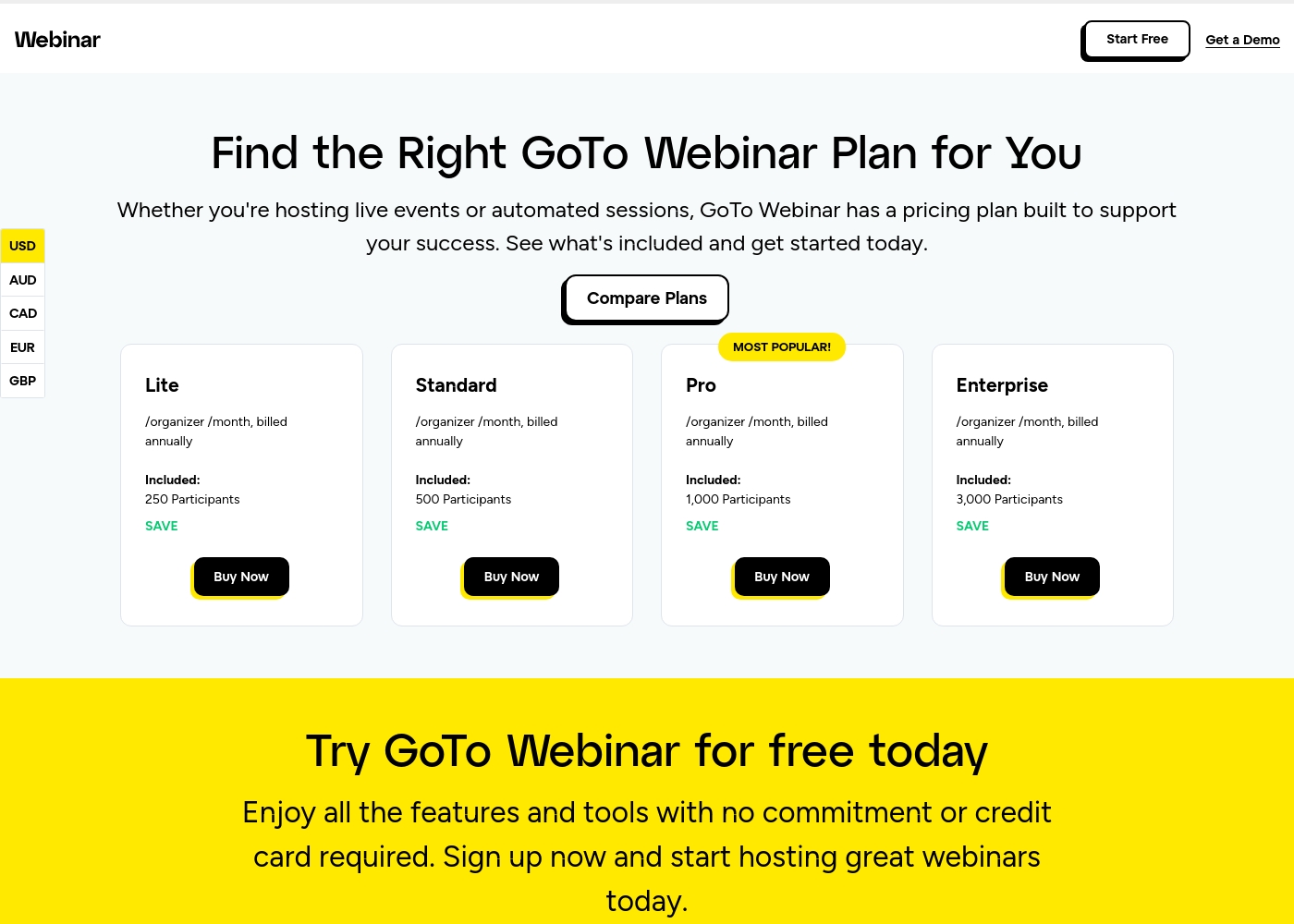
GoTo Webinar costs between Not explicitly stated and Not explicitly stated per organizer/month, billed annually with 4 plans: Lite, Standard, Pro, and Enterprise.
Selecting the right GoTo Webinar plan ensures you have the necessary capacity and features for your live events or automated sessions. Here’s a detailed look at what each plan provides:
Lite
Price: Not explicitly stated /organizer /month, billed annually Websites Supported: 5 Page Best For: Small or starting teams Refund Policy: Not explicitly stated Other Features: 250 Participants, Reporting and Analytics, Automated Emails, Mobile App, GoTo Meeting (1 License)
- 250 Participants
- Full Service Registration
- Reporting and Analytics
- Audio - VoIP and Phone
- 500 Participants
- Automated Emails
- Custom Branding
- 1 License for GoTo Meeting
- 1,000 Participants
- Unlimited Cloud Storage
- AI Meeting Summary
- Virtual Events
- New Integrations
- 3,000 Participants
- GoTo Stage
- Custom URL
- Certificates
- Transcripts
Zoom costs between Not explicitly stated and Not explicitly stated per Not explicitly stated, and offers various plans centered around Zoom Workplace.
It looks like specific plan names, detailed features, and publicly advertised prices for Zoom Workplace are not available directly on this page. You’ll need to connect with the sales team for current rates.
Zoom Workplace (Plan Details Unavailable)
Price: Not explicitly stated Websites Supported: Not explicitly stated Best For: Businesses seeking a unified, AI-first platform for collaboration and customer experience. Refund Policy: Not explicitly stated Other Features: AI Companion summarizing meetings, seamless integration, video SDK flexibility, Meetings, Chat, and Docs integration.
Pricing Notes
- GoTo Webinar requires an annual commitment for all listed paid plans, structured per organizer.
- Zoom offers more flexible payment terms, including monthly billing options for its per-seat structures.
- Both GoTo Webinar and Zoom require potential customers to contact a sales team for detailed pricing.
- GoTo Webinar provides a credit card-free free trial to explore its Pro features before committing.
- Users report widespread issues with unexpected auto-renewal and extremely difficult cancellation processes with Zoom.
Pricing Head-to-Head
User Reviews
Specific, recent user feedback snippets from leading platforms like Trustpilot and Capterra were unavailable during this review phase 🚫. Therefore, our synthesis relies solely on the product’s reported features and clear pricing structure.
GoTo Webinar is marketed as a platform emphasizing scale and ease of use. Key advertised benefits include supporting up to 3,000 participants and quick setup times, often highlighted as “hassle-free.” The system provides essential features across its four tiers (Lite, Standard, Pro, Enterprise), scaling interactivity and storage significantly in higher plans.
External sentiment, primarily from Trustpilot users, indicates extreme dissatisfaction with Zoom services outside of the core video product. While many users mention that Zoom’s video calls are generally reliable and quick to set up, the overwhelming majority of feedback centers on failures in essential business operations, particularly customer support and billing.
Users describe support as nonexistent, atrocious, and even a "myth." They consistently report inability to reach a human, long wait times (up to a week), and tickets being closed without resolution. This difficulty extends especially to Zoom Phone setup, which many call impossible and complicated.
I tried calling Sales because I couldn't reach Tech Support, but they refused to connect me unless I upgraded my account first. My account was already locked, waiting for some specific form verification. This is an absolutely disgraceful level of service for a paying customer.
Our Verdict
The critical choice between GoTo Webinar and Zoom is safety versus raw AI power, function versus frictionless operation. If you prioritize daily collaboration and AI-driven efficiency, Zoom is incredibly powerful. However, for dependable, large-scale external events, GoTo Webinar is the safer, more specialized choice. GoTo Webinar’s superpower is making large, professional events seamless, reliable, and high-capacity. It handles up to 3,000 attendees comfortably, allowing you to focus completely on your content. GoTo Webinar includes crucial marketing tools like source tracking and integrated payment processing via Stripe, built for driving results from major virtual conferences. Zoom’s superpower is transforming internal productivity using AI and unification across the organization. The Zoom Workplace integrates Chat, Docs, and Meetings to eliminate application switching friction. Zoom’s AI Companion saves users an estimated six hours weekly by summarizing meetings automatically for massive time savings. The deciding factor here isn't features, but operational support and trust. GoTo Webinar is a reliable, hassle-free platform with solid reported customer support. In contrast, Zoom has widely documented catastrophic support issues and frustrating refund processes reported by users. Choose GoTo Webinar if you value stability, host large, mission-critical events, and monetize content professionally. Choose Zoom if your business runs on hybrid collaboration and you absolutely need the unique time savings from their AI Companion, accepting the risk of poor support.
Frequently Asked Questions
Which is better for large external events: GoTo Webinar or Zoom?
GoTo Webinar is engineered for large events, supporting up to 3,000 participants and multi-day conferences. It provides specific marketing and lead capture tools that Zoom lacks. GoTo Webinar is the safer, more tailored platform for high-stakes external events.
Which tool saves teams more time: GoTo Webinar or Zoom?
Zoom is built to maximize team efficiency via its AI Companion feature. It is estimated Zoom can save users six hours weekly by summarizing meetings automatically. GoTo Webinar’s automation focuses mainly on the event invitation and follow-up process.
Does GoTo Webinar have better customer support than Zoom?
Yes, user reviews strongly suggest GoTo Webinar has a standard, reliable support experience. Zoom is widely criticized for having non-existent support, difficult cancellations, and refusal to process refunds easily.
Can I pay monthly for GoTo Webinar like I can for Zoom?
Accessing GoTo Webinar’s published Lite, Standard, and Pro plans requires an annual billing commitment. Zoom is known to offer per-seat pricing that can be billed either monthly or yearly.
Which tool is better for capturing leads and processing payments?
GoTo Webinar is superior for lead generation marketing use cases. It supports custom registration forms and allows secure payment processing through Stripe integration.
Does Zoom have a high participant limit like GoTo Webinar?
GoTo Webinar explicitly guarantees capacity up to 3,000 participants in its Enterprise plan. While Zoom offers event solutions, GoTo Webinar is the clear winner for maximum guaranteed capacity.
Ready to Choose?
Both tools have their strengths. Choose based on your specific needs.