Google Slides vs Prezi
Google Slides and Prezi solve presentations very differently. Google Slides offers easy, real-time collaboration that’s hard to beat. Prezi ditches traditional slides for dynamic, memorable visuals. We'll show you exactly how to pick the right tool for your specific presentation style.
Best for: Large corporate teams requiring simultaneous, live document editing, Organizations needing to enforce strict brand consistency via domain templates
Best for: Sales professionals or educators needing highly memorable, dynamic presentations, Users who struggle with design and want instant, AI-generated visuals
Stellar collaboration, challenging ecosystem.
We find Google Slides an exceptional tool for real-time collaboration, offering universal access and effortless integration across devices, making presentation creation highly efficient. However, reports detail that paying for premium features means entering the Google Workspace ecosystem, which is plagued by catastrophic billing complexity, non-existent support, and difficult account management on the administrative side. Overall, it's a stellar free application compromised by frustrating administrative overhead in its paid tiers.
Pros
- Free core access for anyone with a Google Account.
- Seamless, live co-editing makes real-time collaboration highly efficient.
- Works universally across all device types (desktop, mobile, tablet).
- Compatibility allows easy importing of PowerPoint and Canva files.
Cons
- Premium presentation features require a paid Google Workspace subscription.
- Paid Workspace users report severe, recurring billing and double-charging issues.
- Customer support for Workspace is frequently described as useless or non-existent.
- Difficult cancellation processes and high administrative fees for paid plans are reported.
Dynamic visuals hindered by frustrating pricing.
We found Prezi excels at creating engaging, non-linear visuals that capture audience attention, especially with the integrated AI tools and unique zooming canvas. Overall, while the dynamic presentation style is highly effective, we temper our rating due to recurring customer complaints regarding automatic renewal policies and subscription management issues.
Pros
- Provides the strongest visual impact due to its dynamic, non-linear zooming canvas.
- New AI integration quickly generates professional, full presentations from simple prompts.
- Proven effectiveness; independent studies show Prezi presentations are 40% more memorable.
- Prezi Video allows simultaneous display of the speaker and visual content for high engagement.
Cons
- Frequent issues reported regarding unexpected automatic subscription renewals and cancellation difficulties.
- Customer service responsiveness is a common point of concern for users.
- Some long-time users feel Prezi Next offers less creative freedom than the Classic version.
- The annual subscription price is considered steep by many following the initial free trial.
AboutGoogle Slides
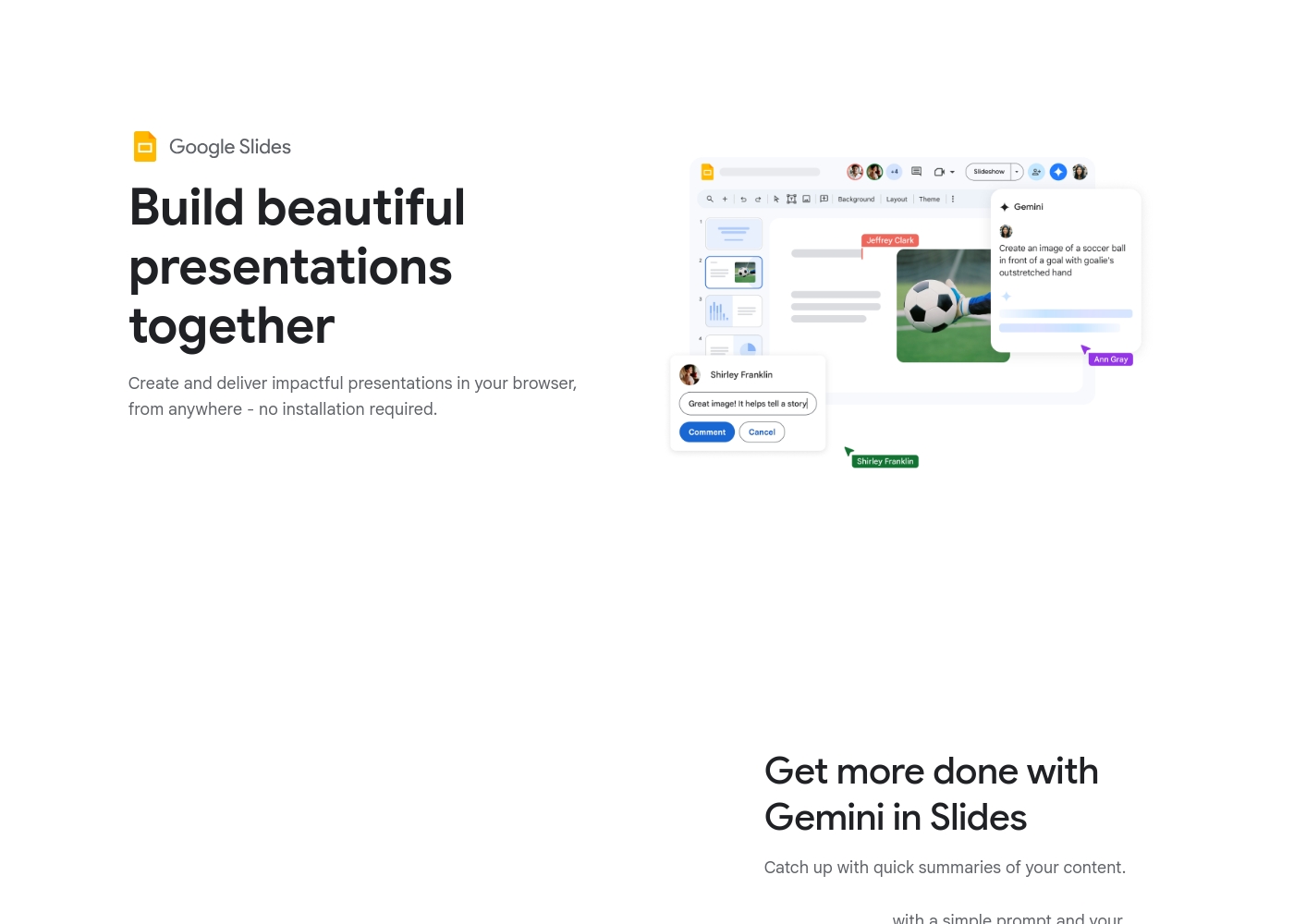
Google Slides is a powerful tool designed to help you create and deliver polished presentations. It operates right in your browser, letting you work from anywhere without needing special software installs. This flexibility extends to mobile devices, as you can view, present, or collaborate on slides using your phone or tablet. Anyone with a Google Account can start creating today.
The platform comes packed with high-quality, pre-designed templates, including different layouts, colors, and fonts. For organizations, it offers premium features like domain templates to ensure consistency across the whole company. You can easily liven up your work with videos, smooth transitions, and even playful GIFs and stickers. 💡
AboutPrezi
Prezi is a dynamic platform designed specifically for visual storytelling. It has been a trusted presentation partner for over 15 years, relied upon by users in 180+ countries. Currently, Prezi is taking this proven approach and redefining the future of presenting with powerful AI assistance. 💡
It moves beyond sequential slides using a unique open canvas and dynamic movement. This method is effective for various settings, whether you need presentations tailored for business, university, or school audiences. The unique design combined with smart assistance makes creating impressive visuals easier than ever before.
Highlights
Feature Comparison
Features Overview
We highlight the main differences and pick a winner for each feature.
Collaboration Capacity
Google Slides wins easily for teams needing true simultaneous editing. Prezi strictly limits collaborating users.
Google Slides is built for real-time collaboration with simultaneous co-editing. Teams edit the same file instantly, avoiding version control issues. You can use live pointers to guide collaborators during the process. Prezi's collaboration features are surprisingly limited for paid plans. You can only work with a maximum of two collaborators per project. This restriction makes Prezi unsuitable for larger team drafting sessions. Google Slides is the undisputed choice for efficient, multi-person teamwork.
Visual Style & Impact
Prezi excels at memorable, dynamic visuals. Google Slides uses the standard, linear slide approach.
Prezi uses a unique open canvas and dynamic zooming movement. Independent studies confirm Prezi is 40% more memorable than static slides. Prezi’s non-sequential storytelling lets you move fluidly during a conversation. Google Slides provides traditional, linear slides and transitions. While efficient, Google Slides delivers the expected presentation format. If your goal is high audience engagement, Prezi provides a genuinely unique viewing experience. Prezi is essential when standing out from the usual presentation tools is critical.
AI Generation Tools
Prezi instantly generates full presentations from prompts. Google Slides uses a paid Gemini add-on for specific tasks.
Prezi's AI is integral, letting you start by entering a simple prompt. The AI designs a full presentation framework for you immediately. The Standard Prezi plan even includes 500 AI generation credits. Google Slides uses the Gemini AI feature as an optional add-on for Workspace users. Gemini helps summarize content or generate images within Google Slides. Prezi’s AI directly helps you overcome the initial design hurdle instantly.
Cost of Entry
Google Slides offers a free, high-functioning core tool. Prezi’s free ‘Basic’ tier is severely limited.
Google Slides is free forever for anyone with a Google Account. You get collaboration, offline access, and compatibility right away. Prezi offers a “Basic / Public” plan with essential creation tools. However, these presentations must be shared publicly online. The core value of Google Slides comes at zero cost to the user. Prezi requires upgrading to the $7/month Standard plan for essential privacy features. If budget is your priority, Google Slides offers much more utility for free.
Offline Accessibility
Google Slides allows offline work on devices for free. Prezi requires a paid Plus plan and desktop app access.
Google Slides allows you to access and edit files offline on mobile and desktop instantly. Changes sync automatically when you reconnect to the internet. Prezi only offers offline access starting with the Plus plan ($19/month). Users must utilize the dedicated desktop application to work offline safely. If you travel frequently or have unreliable Wi-Fi, Google Slides provides much easier offline flexibility. You don't need a premium subscription to stay productive with Google Slides.
Performance Analytics
Prezi offers audience tracking data for premium users. Google Slides does not provide specific presentation analytics features.
Prezi’s top-tier Premium plan includes Presentation Analytics. This feature provides essential insights into audience engagement and performance. Sales teams can track how clients interact with their content. Google Slides does not list presentation analytics as a featured capability. You cannot independently track viewer performance within Google Slides. If measuring the success of your presentation after sharing is key, Prezi is necessary.
Branding & Consistency
Google Slides helps enterprises enforce branding using domain templates. Prezi focuses on individual creativity.
Google Slides, via paid Workspace tiers, can enforce domain templates organization-wide. This maintains consistent layouts, colors, and fonts for all teams. This feature is crucial for maintaining corporate brand standards. Prezi emphasizes unique creation and doesn't list domain templating as a feature. The system is designed for high visual output rather than strict corporate control. Google Slides ensures every presentation aligns with the company brand automatically.
Pricing Transparency
Prezi shows clear annual pricing across three plans. Google Slides hides specific pricing within the Workspace ecosystem.
Prezi clearly lists its three paid tiers ranging from $7 to $29 per month. All plans require an annual contract but the costs are upfront. Google Slides premium features are locked behind Google Workspace plans. Workspace pricing is not explicitly stated, forcing users to navigate complex tiers. This lack of transparency leads to user complaints about unexpected costs in Google Slides' ecosystem. Prezi makes it far easier to budget and understand your annual commitment.
Google Slides is available for free with a Google Account, but premium features require a Google Workspace plan.
While this page doesn't show exact dollar amounts, it clearly outlines three paths for accessing Google Slides features. Let’s explore which option might be the best for you.
Basic Access (via Google Account)
Price: Free with standard Google Account Best For: Individuals and casual collaboration Other Features:
- Create and deliver presentations in your browser
- Flexible collaboration with live editing and comments
- Import Microsoft PowerPoint or Canva presentations
- Co-editing functions
- Offline access on mobile
- Create and deliver impactful presentations
- Flexible collaboration with live editing and comments
- Import Microsoft PowerPoint or Canva presentations
- Co-editing functions
- Offline access via mobile/computer
- Includes core features
- Access to some premium features
- Potential access to Gemini A.I. via add-on
- Business-focused tools
- Includes all features
- Stay on brand with domain templates
- Meet directly in documents
- Present from Google Meet with controls
- Speaker spotlight and easy presentation recording
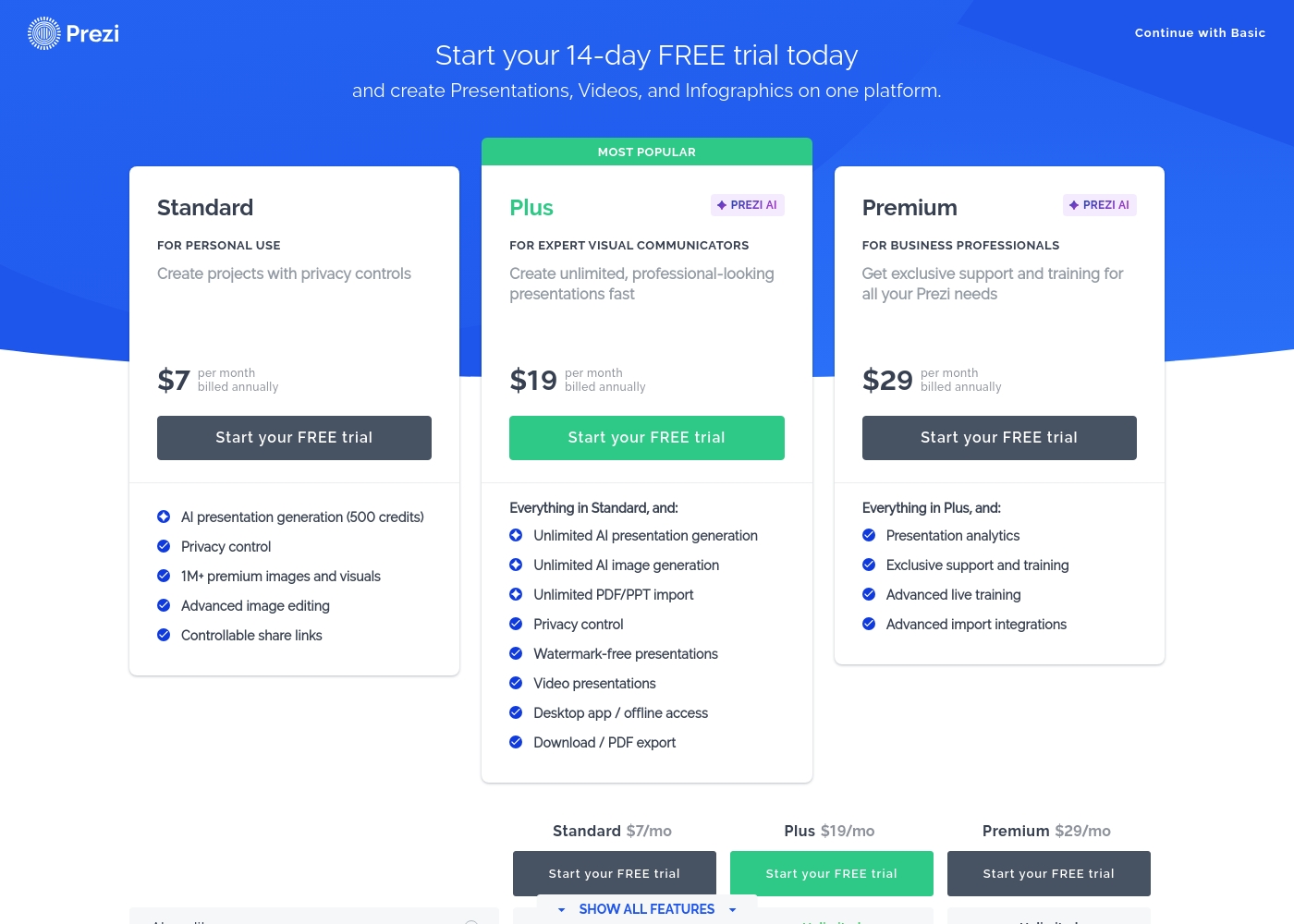
Prezi costs between $7 and $29 per month when billed annually, offering three paid plans: Standard at $7/mo, Plus at $19/mo, and Premium at $29/mo.
Here is a detailed breakdown of how Prezi structures its paid subscriptions.
Standard
Price: $7 per month, billed annually Best For: Personal Use Other Features:
- AI presentation generation (500 credits)
- Privacy control
- 1M+ premium images and visuals
- Advanced image editing
- Controllable share links
- Essential creation tools
- Public sharing
- AI presentation generation (500 credits)
- Privacy control
- 1M+ premium images and visuals
- Advanced image editing
- Controllable share links
- Unlimited AI presentation generation
- Unlimited AI image generation
- Unlimited PDF/PPT import
- Watermark-free presentations
- Desktop app / offline access
- Presentation analytics
- Exclusive support and training
- Advanced live training
- Advanced import integrations
Pricing Notes
- Google Slides is free for core use with a standard Google Account and superior collaboration features included.
- Premium features in Google Slides require purchasing a complex Google Workspace subscription, for which specific pricing is not published.
- Prezi is transparent about costs, listing annual subscription pricing clearly from $84/year to $348/year.
- Prezi Plus ($19/month) is the minimum required tier for essential features like offline desktop access and PDF export.
- Google Slides users report major administrative issues with Workspace billing, including hidden fees and difficult cancellations.
- Prezi users also commonly report unexpected annual automatic renewal issues and strict cancellation policies.
Pricing Head-to-Head
User Reviews
User reviews for the Google Workspace platform, which hosts Google Slides, reveal significant operational concerns, often overshadowing the application's benefits. The dominant theme is the non-existent and unhelpful customer support.
Users repeatedly report hours wasted trying to resolve issues, describing the process as a 'dark web maze' where technicians either fail to read requests or provide circular instructions. A massive source of frustration is the challenging subscription and billing system.
Worst experience ever. It's impossible to cancel your subscription and there is virtually no support available for basic issues. Hands down the most annoying digital ordeal I have ever come across.
Prezi receives generally positive, albeit mixed, feedback across platforms like Trustpilot (3.4/5). Users consistently praise the platform for its dynamic movement and outstanding visual impact, confirming it’s much more engaging than traditional presentation tools.
The user-friendly interface and abundance of creative templates keep users inspired, particularly in educational and training settings. The recent AI integration is a major highlight, frequently noted for its ability to quickly generate professional presentations from simple prompts, saving significant time.
I just tried the AI tool to make a presentation for a job interview. I was very impressed with the presentation that was produced! The AI saved me significant time, and I only had to make minor changes.
Our Verdict
This isn't a comparison of bad tool vs. good tool—it’s about workflow and visual style. Google Slides and Prezi deliver exceptional results, but they serve different masters. For most teams, Google Slides remains the champion for pure practicality. Its core is free, allowing unlimited, simultaneous teamwork anywhere; no one else comes close. If you need a presentation drafted by three people at once, Google Slides is your only choice. Prezi's superpower is audience engagement and high visual impact. Prezi’s dynamic, non-linear canvas is proven to make your ideas 40% more memorable. It is also perfect if you need AI to build your slide structure instantly, an area where Google Slides is catching up slowly. If your goal is to wow a client or make university lecture material sticky, Prezi is worth the investment for the guaranteed visual return. The deciding factor is collaboration vs. visual dynamism. Google Slides lets teams collaborate across endless devices and is free for core use. Prezi delivers an unforgettable, high-impact presentation, but you must commit to an annual paid plan. If you are an individual speaker who needs to land a pitch, choose Prezi. If you manage a team of 10 people drafting weekly reports, you must choose Google Slides. Both Google Slides and Prezi suffer from serious administrative system friction regarding billing and support, so be warned.
Frequently Asked Questions
Which is better for real-time team collaboration: Google Slides or Prezi?
Google Slides is significantly better for collaboration due to its live co-editing features. Multiple team members can work simultaneously on Google Slides files. Prezi strictly limits collaboration to only two people per project, making team drafting difficult.
Is Prezi fundamentally different from Google Slides, which uses traditional slides?
Yes, Prezi uses a dynamic, non-linear open canvas instead of separate slides. This zooming canvas allows for fluid navigation during the presentation. Google Slides uses a traditional, linear slide-by-slide format.
Which application is better for organizations focused on strict brand consistency?
Google Slides is better for enterprise branding control. Using Google Workspace, organizations can enforce specific domain templates. This feature ensures all presentations created internally adhere to consistent layouts and corporate styles.
Does Google Slides or Prezi offer smarter AI assistance for building presentations?
Prezi’s AI is generally smarter for creation, generating full presentations instantly from a prompt. Google Slides uses Gemini as a paid add-on, focusing more on content summarization and unique image generation within existing slides.
Is Prezi worth the required annual cost over using the free version of Google Slides?
Prezi is worth the cost if you need high visual impact or presentation analytics. Prezi’s unique style guarantees a more memorable delivery. If basic creation and collaboration are enough, Google Slides is great value as it is free.
Which tool provides better pricing transparency?
Prezi provides better pricing transparency, clearly listing its three annually billed tiers ($7-$29/month). Google Slides hides specific premium pricing within the opaque Google Workspace ecosystem, leading to frequent user confusion.
Ready to Choose?
Both tools have their strengths. Choose based on your specific needs.