Glances vs Quadient
Glances and Quadient both aim to streamline work, but they solve very different problems. Glances unifies your existing apps into one live view, while Quadient automates complex financial and communication workflows. Your choice depends on whether you need a simple connector or a heavy-duty process engine.
Best for: Small to mid-sized teams (5-50 people) using multiple cloud apps, Managers who need a real-time, 360-degree view of project and client data
Best for: Enterprise finance teams automating AP and AR workflows, Customer communications managers handling omnichannel document delivery
Strong no-code integration
We view Glances as a no‑code integration that unifies apps into a live, single view. We value its guided setup, real‑time data across tools, and secure access for teammates. Overall, we find it a solid choice for teams needing governance and cross‑tool workflows, though some details like yearly pricing aren’t shown.
Pros
- No-code setup with guided Connect options
- Unified, live view across apps
- Real-time data sync across major apps (Monday.com & QuickBooks)
- Secure data access without sharing credentials
Cons
- Yearly pricing not displayed in the current view
- Refund policy not clearly stated
- Per-user pricing can add up for larger teams
- Pricing and feature details vary by plan
Powerful automation, but support concerns us.
We find Quadient offers robust tools for automating AP/AR and managing customer communications at scale. However, persistent user complaints about customer support and contract flexibility temper our recommendation. Overall, it's a capable suite for larger enterprises, but smaller teams should proceed with caution.
Pros
- Automates end-to-end AP and AR workflows.
- Strong omnichannel document creation and delivery.
- Empowers business users, reducing IT dependency.
- Scales well for high-volume, complex needs.
Cons
- Significant concerns about customer service and support responsiveness.
- Contracts and billing terms can be rigid or difficult.
- May be too complex or costly for small businesses.
- Onboarding and integration can present challenges.
AboutGlances
Glances is a no-code integration that unifies your business apps into a single, live view. It helps teams stay in one place, see data from multiple apps in real time, and take actions without leaving their current workflow. From Asana to Zendesk, Glances connects a diverse stack of business apps. 💡
AboutQuadient
Quadient is a suite of process automation solutions focused on two core areas: customer communications management (CCM) and financial workflow automation. It's designed for mid-to-large enterprises that need to design, manage, and deliver personalized documents and messages across digital, print, and mobile channels, while also automating key AP and AR processes. 💡
Highlights
Feature Comparison
Features Overview
We highlight the main differences and pick a winner for each feature.
User Interface
Glances offers a single, unified widget. Quadient provides separate portals for each automation module.
Glances gives you a single widget that pulls live data from Asana, QuickBooks, and other apps. It's a 360-degree view without leaving your current task. You can search and take action directly from the dashboard. Quadient's interface is organized by its core products. You'll have distinct portals for Accounts Payable, Accounts Receivable, and Customer Communications. Each is built for managing that specific workflow. The key difference is unity versus specialization. Glances aims for simplicity across your whole stack. Quadient aims for depth within a specific, complex process.
Automation & Actions
Glances lets you take single actions across apps. Quadient automates entire multi-step business processes.
Glances lets you perform a single cross-app action, like creating a QuickBooks invoice from your Glances view. It's designed to save you a few clicks on routine tasks. Think of it as a command center for quick moves. Quadient automates end-to-end workflows. Its AP module can handle a purchase order from creation to final payment. It's about eliminating manual steps across an entire financial cycle. For simple task automation, Glances is faster. For replacing a whole manual department process, Quadient is the powerhouse.
Pricing & Value
Glances has transparent, tiered plans. Quadient uses custom enterprise pricing with unlimited users.
Glances offers two clear plans. The Professional plan is $29 per user/month. The Monday.com & QuickBooks bundle is $99/month for up to 3 users. You know the cost upfront. Quadient provides custom quotes based on your workflow. The key benefit is unlimited users on all plans. There's no per-seat cost, which can be a big plus for large teams. Glances is easier to budget for a growing team. Quadient's model can be more cost-effective for a large, established department.
Customer Support
Glances offers guided setup. Quadient provides structured support tiers but has mixed user reviews.
Glances emphasizes Guided Connect for onboarding. The focus is on getting you set up quickly without code. Detailed SLAs aren't listed in the provided data. Quadient's standard AP plan includes a 16-hour support response. You can upgrade for 2-8 hour responses. However, Trustpilot reviews frequently mention slow support and unhelpful responses. Glances' support seems more hands-on during setup. Quadient's support has clear tiers, but user satisfaction appears low based on external reviews.
Scalability
Glances scales by adding users. Quadient is built for high-volume, enterprise-scale operations.
Glances scales through its per-user pricing or by expanding the user count on a bundle plan. It's designed for teams that need to connect more apps as they grow. The focus is on breadth of integration. Quadient is explicitly built for enterprise scale. It handles over 2 trillion connections annually. Its AP/AR modules are designed for high-volume transaction processing without performance issues. For adding more apps to a mid-sized team, Glances works. For processing thousands of invoices daily, Quadient is the robust choice.
Integration Ecosystem
Glances connects a wide range of SaaS apps. Quadient focuses on integrating with core enterprise systems.
Glances connects popular apps like Asana, Zendesk, and QuickBooks. You can request new app integrations. The goal is to unify your existing tool stack. It pulls data from private or in-house apps too. Quadient's integration focus is less on pre-built connectors and more on fitting into an enterprise IT ecosystem. It can deploy cloud, on-premise, or as a managed service to match your setup. Glances is a connector for modern cloud tools. Quadient is a platform designed to plug into complex, existing infrastructure.
Ease of Use
Glances is built for quick, no-code setup. Quadient offers powerful tools but may require significant planning.
Glances is a no-code integration. You can start a free trial and connect apps without engineering help. The Guided Connect option tailors your workflow. The goal is to reduce complexity. Quadient empowers business users to manage templates without IT. However, external reviews suggest implementation can be complex and require dedicated resources. The platform is powerful but has a learning curve. Glances is likely faster for a small team to start. Quadient's power comes with a steeper initial setup commitment.
Security & Data
Glances pulls real-time data without storing it. Quadient's security details are not publicly specified.
Glances uses a pull model. It displays data from your apps in real time and doesn't store it. Only minimal connection data is encrypted and stored. This is its core security approach. For Quadient, the official site doesn't detail its security protocols or compliance certifications. You would need to request this information directly from their sales team. Glances' security model is transparent and designed for minimal data exposure. Quadient's security posture is not verifiable from public sources.
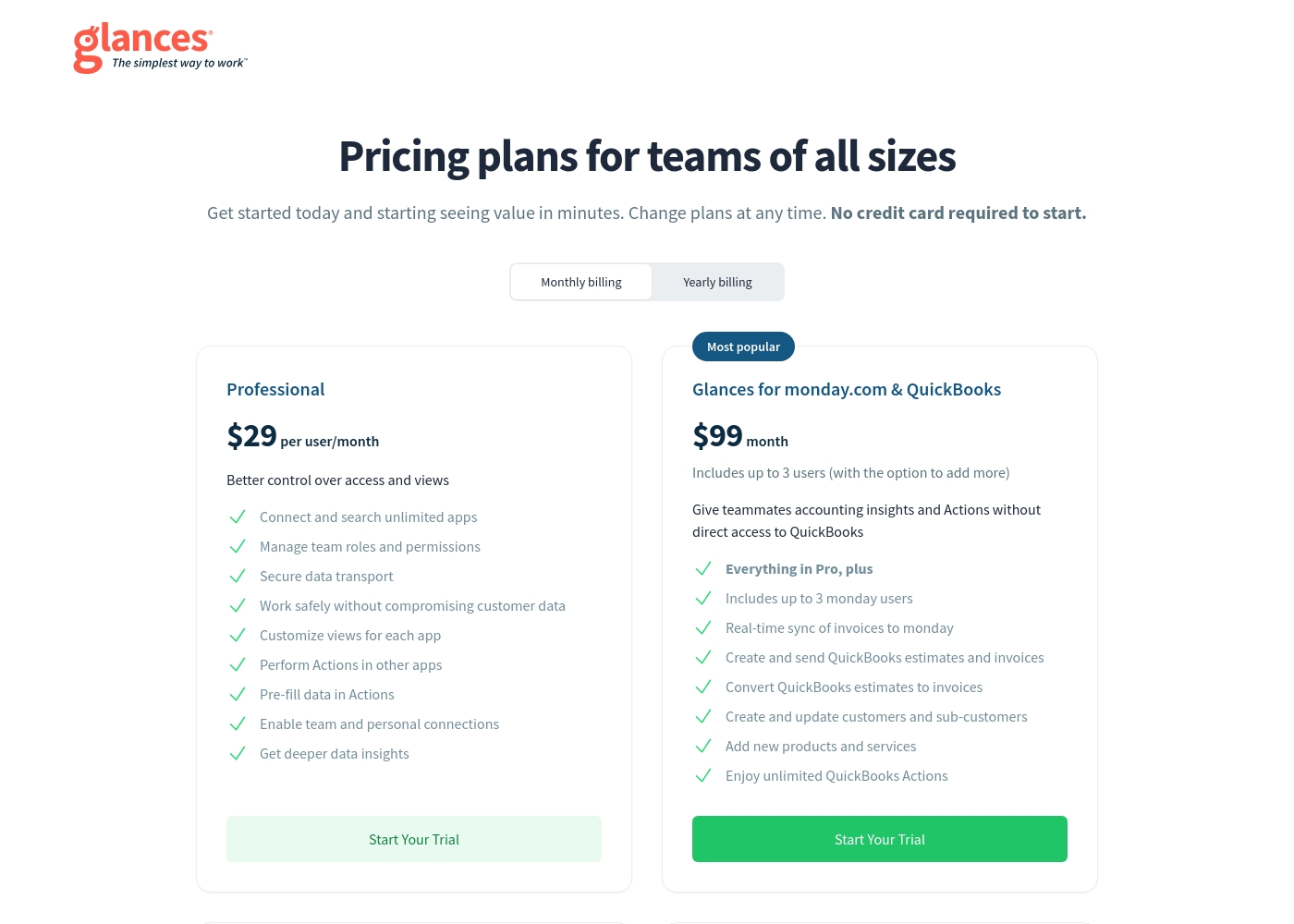
Glances costs $29–$99 per month with 2 plans: Professional at $29 per user/month, Glances for monday.com & QuickBooks at $99 month. The pricing shown reflects monthly billing; yearly pricing isn’t displayed here. A free trial is available for both plans, and you won’t be asked for a credit card to start.
The pricing details below break down what you get with each plan.
Professional
Price: $29 per user/month Best For: teams needing strong control over access and app-wide visibility Other Features:
- Connect and search unlimited apps
- Manage team roles and permissions
- Secure data transport
- Customize views for each app
- Perform Actions in other apps
- Connect and search unlimited apps
- Manage team roles and permissions
- Secure data transport
- Customize views for each app
- Perform Actions in other apps
- Everything in Pro, plus up to 3 users
- Real-time sync of invoices to Monday
- Create and send QuickBooks estimates and invoices
- Convert QuickBooks estimates to invoices
- Create and update customers and sub-customers
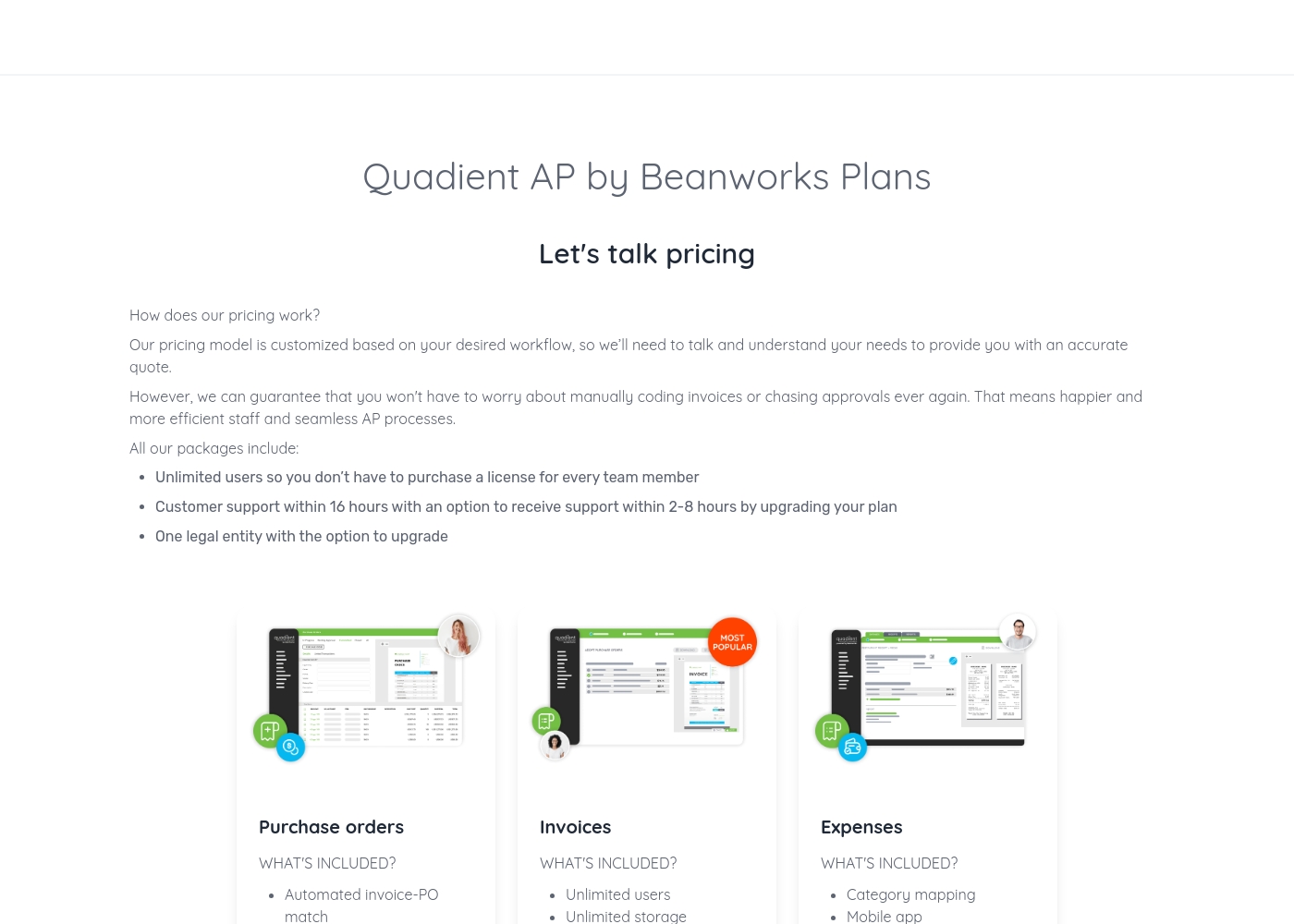
Quadient pricing: Quadient AP by Beanworks uses a custom pricing model based on your specific workflow and needs. They offer feature-specific packages for purchase orders, invoices, and expenses to ensure you only pay for what you use.
All plans include unlimited users and standard support, with the option to upgrade for faster response times or more entities. This tailored approach allows the platform to scale with your business while removing the burden of manual AP processes once and for all.
Contact them for a personalized quote today and discover how much you could save by automating your business's workflows. Their team of experts is ready to help you find the perfect solution for your accounts payable needs, whether you're a small business or a large corporation.
Pricing Notes
- Glances has transparent, public pricing. Quadient requires contacting sales for a custom quote.
- Glances offers a free trial with no credit card. Quadient does not advertise a public free trial.
- Quadient's plans include unlimited users, which can be a major cost advantage for large teams.
- Quadient's pricing is based on workflow needs, not user count, which may offer better value for high-volume operations.
Pricing Head-to-Head
User Reviews
Capterra listings suggest Glances is valued for its no‑code approach, broad integrations, and a clear path to a unified, live data view. Trustpilot data isn’t provided in our inputs, but Capterra mentions that users appreciate running routine tasks across apps without leaving their current workflow, which helps reduce errors and save time.
The product emphasizes a 360‑degree view, real‑time data, and secure access for teammates, plus a straightforward free trial. Pricing shows two plans—Professional at $29 per user/month and a $99/month bundle for monday.com & QuickBooks—with a no‑card required trial.
Glances unifies our apps without the mess. The no-code setup saved us hours, and the live view keeps our team aligned across systems.
External reviews for Quadient are mixed. On Trustpilot, users frequently complain about poor customer service, slow support, and billing issues, creating a frustrating experience.
💔 Some mention difficult contracts and a lack of responsiveness. However, on Capterra, the limited feedback for the Impress platform is more positive, with a user praising its document creation capabilities and template management as highly important features.
The software itself might work, but the customer service is a nightmare. Getting any help or a simple question answered takes forever. We've wasted so much time trying to get support.
Our Verdict
This isn't a fair fight—it's a case of the right tool for the job. Glances is your agile connector. Quadient is your heavy-duty workflow engine. Picking the winner depends entirely on the problem you're trying to solve. Glances's superpower is simplicity and speed. It plugs into your existing apps like Asana, QuickBooks, and Zendesk. In minutes, you get a single live view to take actions without the constant tab-hopping. Quadient's superpower is enterprise-grade automation. It tackles massive, complex processes. Think automating your entire accounts payable cycle from purchase order to payment, or sending thousands of personalized legal documents across print and digital channels. The deciding factor is your team's scale and pain point. If your main issue is juggling too many browser tabs, Glances is the quick win. If your issue is a slow, manual financial process draining team hours, Quadient is the serious investment. So, choose Glances if you're a growing team needing a unified command center for your apps. Choose Quadient if you're a large enterprise ready to automate core financial and communication workflows at scale. One makes your current work smoother; the other rebuilds how the work gets done.
Frequently Asked Questions
Which is easier to set up, Glances or Quadient?
Glances is significantly easier. It offers a no-code setup with guided assistance. You can connect apps and be productive in minutes. Quadient often requires a more complex implementation process with internal resources.
Is Quadient worth the extra cost over Glances?
It's not about extra cost—it's about different needs. Quadient's custom pricing includes unlimited users, which can be cheaper for large teams. You're paying for deep workflow automation, not a simple app connector like Glances.
Which tool is better for accounts payable automation?
Quadient is built for this. Its AP module automates the entire process from purchase orders to payments. Glances can show you data from QuickBooks, but it doesn't automate the core financial workflow like Quadient does.
Can I try Glances before buying?
Yes. Glances offers a free trial for both its plans, and you don't need a credit card to start. Quadient does not publicly offer a free trial; you'll need to request a demo through their sales team.
Which has better customer support?
Based on user reviews, Glances appears better. It focuses on guided onboarding. Quadient's standard support has a 16-hour response time, and external reviews on Trustpilot frequently cite slow and unhelpful support.
Is Glances or Quadient better for large enterprises?
Quadient is designed for enterprise scale. It handles high-volume transactions and offers unlimited users. Glances is great for mid-sized teams but may not meet the deep automation needs of a large finance department.
Ready to Choose?
Both tools have their strengths. Choose based on your specific needs.