GitLab vs Keeper Security
GitLab and Keeper Security both aim to secure your digital world, but they're built for completely different jobs. GitLab is the all-in-one factory for building and shipping software. Keeper Security is the locked vault that protects every password and secret.
Best for: Software development teams of any size, Organizations needing a unified CI/CD platform
Best for: Federal agencies and government contractors requiring FedRAMP High authorization., IT and security teams managing privileged access for admins, workloads, and service accounts.
Comprehensive DevSecOps, but complex.
GitLab is a powerful, all-in-one platform that unifies the entire software lifecycle. We find it delivers on its promise of acceleration and unified security, though its depth can create a steep learning curve for smaller teams. Overall, it's an excellent choice for organizations seeking a single, scalable solution for planning, building, and deploying software securely.
Pros
- Single platform for the entire DevSecOps lifecycle
- Built-in security scanning accelerates vulnerability detection
- AI-powered workflows (Duo Agent) enhance productivity
- Offers a functional Free tier for individuals and small projects
Cons
- Learning curve can be steep due to platform breadth
- Enterprise features like advanced security require costly Ultimate tier
- Compute and storage limits on lower tiers may require paid add-ons
- Annual billing commitment for paid plans
Secure platform, tricky billing.
We find Keeper Security offers a robust, zero-trust platform for password and secret management, backed by strong compliance and a unified interface. However, our review is tempered by external user feedback that points to significant concerns with subscription billing practices and customer support responsiveness for account issues. Overall, it's a capable security tool, but potential buyers should be mindful of the billing process.
Pros
- Strong zero-knowledge security architecture
- Unified platform for passwords, secrets, and connections
- AI-powered threat detection and session monitoring
- FedRAMP High authorized for government use
Cons
- Recurring user complaints about auto-renewal and billing issues
- Difficulties reported with account cancellation and refunds
- Some users mention occasional syncing problems between devices
- Enterprise pricing is quote-based, not transparent
AboutGitLab
GitLab is an end-to-end DevSecOps platform for teams of all sizes, from startups to large enterprises. It’s the single place to plan, build, test, secure, and deploy your software. You get all your projects, releases, and code in one data plane, so both your team and AI agents work from the same information. 💡
AboutKeeper Security
💡 Keeper is an identity security platform for privileged access management (PAM), secrets, endpoints, and connections. It's built for organizations needing to protect administrative, workload, and service account access. The platform combines just-in-time access, session control, and AI-powered threat detection.
Highlights
Feature Comparison
Features Overview
We highlight the main differences and pick a winner for each feature.
Core Platform Focus
GitLab builds software. Keeper Security protects secrets. They're in different businesses.
GitLab is a comprehensive DevSecOps platform. It handles the entire software lifecycle from planning and coding to security scanning and deployment. Your team uses it to build products. Keeper Security is an identity security platform. It specializes in privileged access management, secrets vaulting, and password management. Its job is to protect credentials and control access. The key difference is workflow vs. security. GitLab is your team's daily work environment. Keeper is a critical security layer that protects other systems. A development team uses GitLab to merge code. The same team uses Keeper to store the database password that GitLab's pipeline uses to deploy that code.
Security Approach
GitLab secures your code pipeline. Keeper secures your human and machine identities.
GitLab integrates security directly into the development workflow. It scans code for vulnerabilities (SAST, SCA) during the merge process. Security is part of the build. Keeper Security uses a zero-knowledge, zero-trust architecture. It encrypts data on your device before it leaves. Only you hold the keys to access passwords or secrets. GitLab's security is proactive within the SDLC. Keeper's security is protective for all credentials, both inside and outside GitLab. A developer fixes a code vulnerability found by GitLab's scanner. An IT admin uses Keeper to rotate the compromised API key, limiting the blast radius.
Automation & AI
GitLab automates builds. Keeper automates access control and threat response.
GitLab's Duo Agent Platform uses AI to automate development tasks. Agents can turn issues into merge requests, review code, and help fix bugs. It speeds up the software delivery cycle. Keeper's KeeperAI monitors privileged sessions in real-time. It can automatically terminate risky sessions and generate forensic reports. It automates security response. GitLab AI assists human developers. Keeper AI acts as an autonomous security guard. A team uses GitLab's AI to review a merge request. Keeper's AI simultaneously terminates a suspicious database login session from the same deployment.
Compliance & Certifications
Both are certified, but Keeper has deeper government-grade authorization.
GitLab holds common certifications like SOC 2 and ISO 27001. It meets needs for many regulated industries like finance and public sector. Keeper Security has achieved FedRAMP High and GovRAMP High authorization. This is required for US federal agencies and high-security environments. It also has PCI DSS Level 1. Keeper has a broader and more stringent certification portfolio, especially for government contracts. A healthcare startup uses GitLab's SOC 2 compliance. A federal contractor must use Keeper because it is FedRAMP High authorized.
Pricing Transparency
GitLab's public pricing is clear. Keeper's enterprise pricing is a mystery.
GitLab lists its per-user monthly prices for Free, Premium, and Ultimate plans on its website. You can calculate costs before talking to sales. Keeper publishes pricing for its Personal and Family plans. Its business and enterprise plans require you to request a custom quote. GitLab is transparent for all tiers. Keeper is transparent only for personal use. A small startup can sign up for GitLab Premium online. A mid-sized company must contact Keeper sales for a price, making budgeting harder.
User Interface
GitLab is a complex dashboard. Keeper is a simpler vault interface.
GitLab's UI is a feature-rich control center for software projects. It includes repositories, issue boards, CI/CD pipelines, and security dashboards. It's powerful but has a steep learning curve. Keeper's UI is focused on a secure vault. It's designed for storing and sharing passwords, notes, and files. The interface is generally more straightforward for daily use. GitLab's complexity matches its broad scope. Keeper's simplicity serves its focused security purpose. New developers need training to navigate GitLab's full dashboard. New employees can usually start using Keeper's vault with minimal instruction.
Mobile Experience
Keeper has a full-featured mobile app. GitLab's mobile experience is limited.
GitLab does not appear to have a dedicated mobile app for core development workflows. Access is primarily through the web interface on mobile browsers. Keeper Security offers dedicated mobile apps for iOS and Android. You can access your vault, generate one-time passwords, and fill passwords on your phone. Keeper provides a native, on-the-go experience for accessing secrets. GitLab is not designed for mobile development tasks. An IT admin uses the Keeper mobile app to approve an access request from their phone. A developer must be at a laptop to use GitLab effectively.
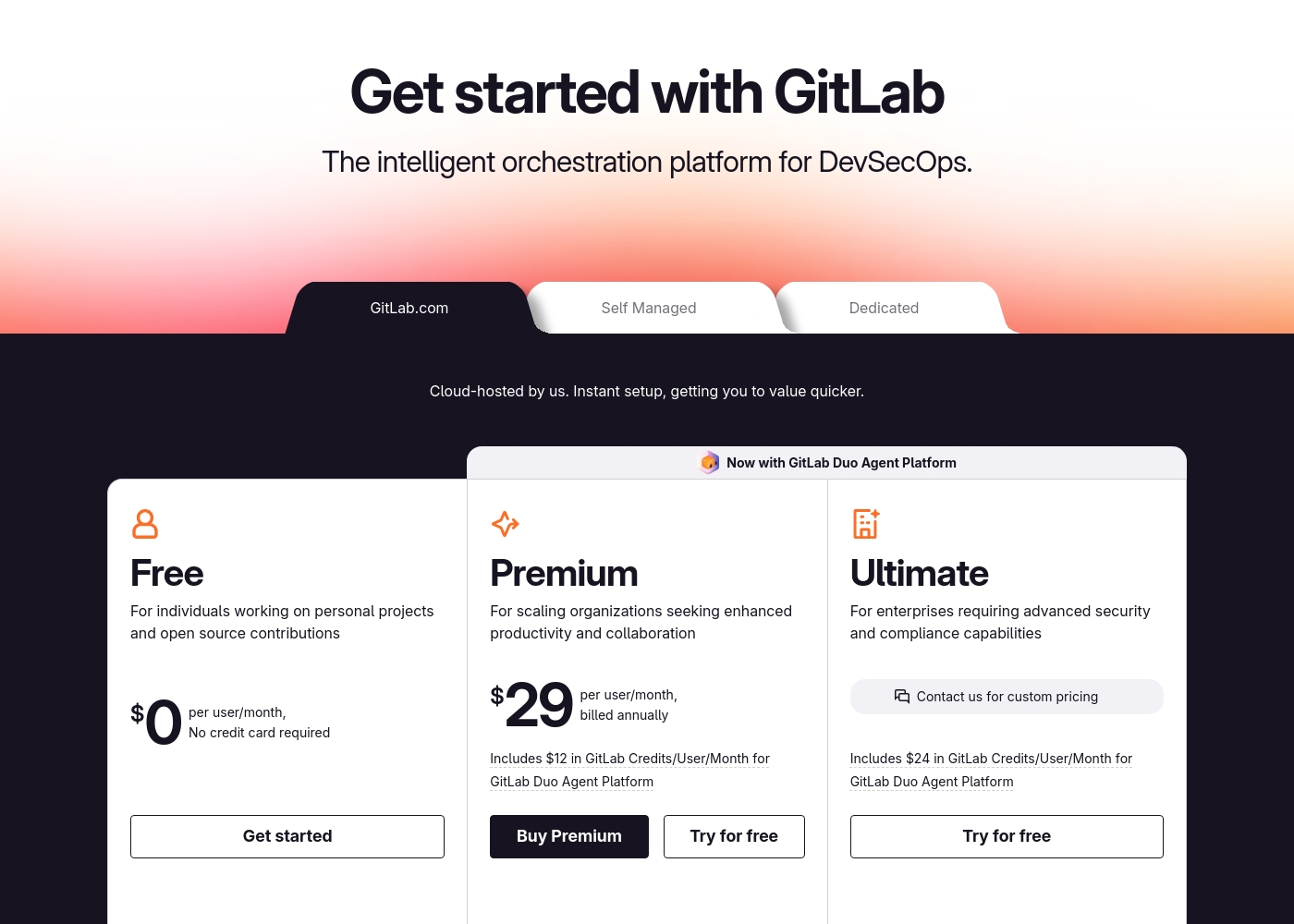
GitLab pricing: GitLab offers a range of DevSecOps plans from a free tier for individuals to an Ultimate enterprise solution for $99/month. Subscriptions include various compute minutes, storage allocations, and security features to fit different team sizes and needs.
Please note: the provided screenshot shows $29/user/month for Premium, while the text mentions $99 for Ultimate elsewhere; we have prioritized the current primary source values below for clarity. Actually, the provided text includes $0, $29 annually, and custom pricing options depending on the deployment method (SaaS or Self-Managed).
Overall it is a per-seat annual subscription model with usage-based add-ons for credits and compute time. For current SaaS pricing: Free $0, Premium $29/mo annually, Ultimate $99/mo annually (implied for custom).
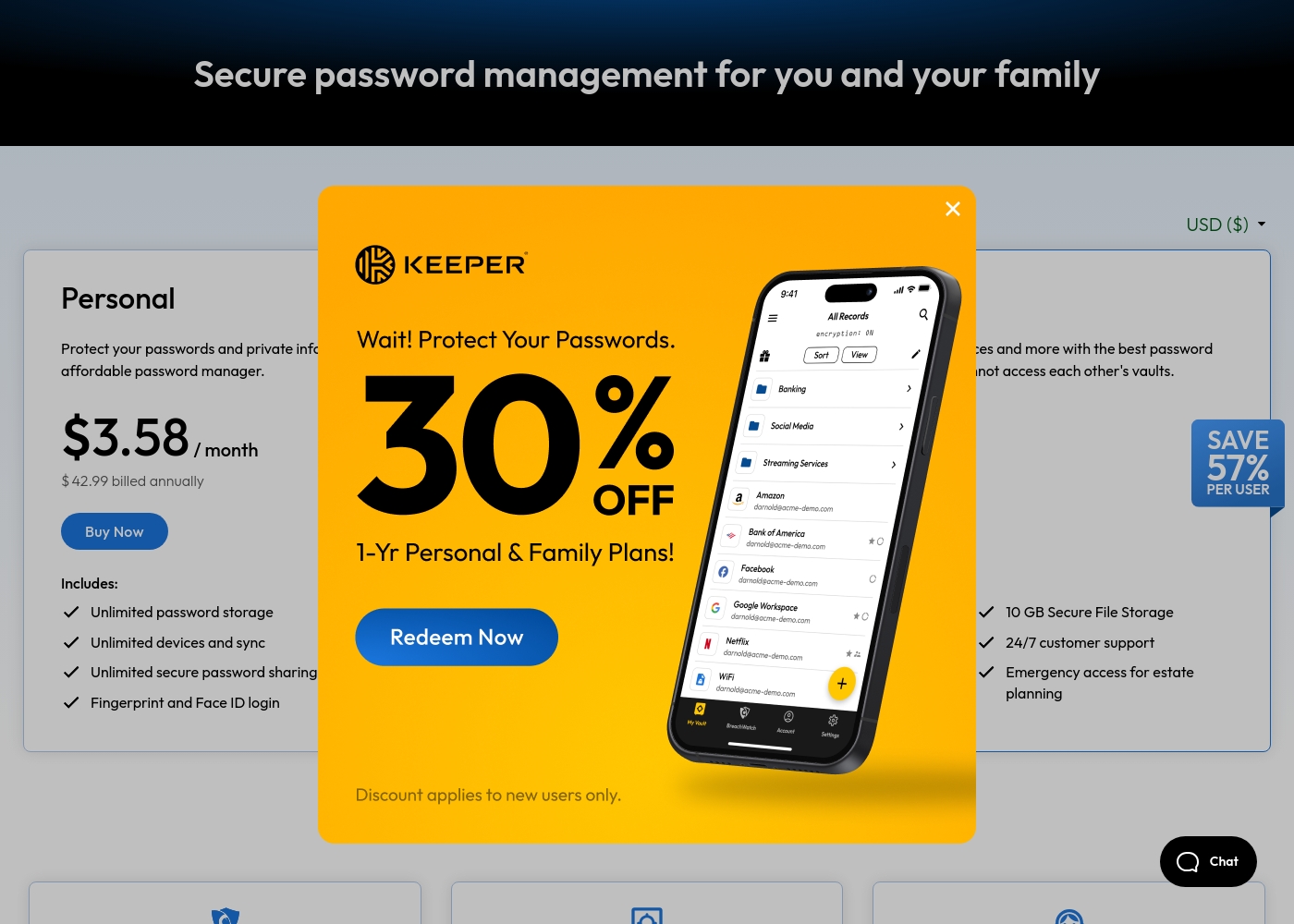
Keeper Security costs between $42.99 and $99.00 per year with 2 plans: Personal at $42.99 and Family at $99.00.
Take a look at the specific features included in each tier below to find your best fit.
Personal
Price: $3.58 / month (billed annually at $42.99) Websites Supported: Unlimited Best For: Single users needing cross-device security Other Features: Unlimited password storage, Unlimited devices and sync, Fingerprint and Face ID login, Web app and browser extensions, 24/7 customer support
- Unlimited password storage
- Unlimited devices and sync
- Unlimited secure password sharing
- Fingerprint and Face ID login
- Web app and browser extensions
- 5 Private vaults
- 10 GB Secure File Storage
- Unlimited shared folders and permissions
- Emergency access
- Everything in Personal
Pricing Notes
- GitLab has a functional Free tier for up to 5 users. Keeper offers only a 30-day free trial.
- GitLab's paid plans are per-user, making costs scale directly with team size.
- Keeper's personal plans are flat-rate, which can be cheaper for individuals.
- GitLab's pricing is transparent online. Keeper's business/enterprise pricing requires a sales quote.
Pricing Head-to-Head
User Reviews
External user reviews for GitLab are currently inaccessible for a full synthesis, as both Trustpilot and Capterra returned security verification errors. 📄 Therefore, we cannot provide a balanced, specific summary of recurring user themes on accuracy, ease of use, support, or pricing at this time. We recommend checking these sources directly for up-to-date sentiment.
GitLab streamlined our entire development pipeline. Having CI/CD, security, and planning in one place saves our team significant time each week.
User feedback for Keeper Security on Trustpilot highlights a mix of experiences. Many praise the platform's strong security features and ease of use for managing passwords across devices, often noting helpful customer support.
🙌 However, a recurring theme involves frustration with subscription management, including auto-renewal charges and difficulties with cancellation or refunds. Some users report occasional syncing issues between devices.
Keeper is fantastic for keeping all my passwords and notes secure. The browser extension works perfectly, and syncing across my phone and laptop is seamless. The support team was also very helpful when I had a setup question.
Our Verdict
Choosing between GitLab and Keeper Security is like comparing a factory to a safe. They serve entirely different purposes for your organization. GitLab's superpower is unifying the entire software development lifecycle. It replaces a jumble of tools for planning, coding, testing, and deploying. Teams report saving 4 hours per engineer each week. Keeper Security's superpower is bulletproof credential management. With zero-knowledge encryption and FedRAMP High authorization, it's built to protect the secrets that power your business, from database passwords to AI agent keys. The deciding factor is your primary need. If you build software, you need GitLab's integrated DevSecOps platform. If you need to protect passwords and secrets across your organization, you need Keeper Security. For most businesses, the real answer is both. Use GitLab to build your product securely. Use Keeper Security to protect the credentials and access that make your software work. They are complementary, not competing, solutions.
Frequently Asked Questions
Which is better for small teams: GitLab or Keeper Security?
For a software team, GitLab's free tier is excellent for up to 5 users. For securing team passwords and secrets, Keeper Security's plans offer value. They solve different problems for a small team.
Does GitLab have a password manager like Keeper Security?
No, GitLab is not a password manager. It manages code and deployment secrets within pipelines. Keeper Security is a dedicated vault for all types of passwords and sensitive data.
Is Keeper Security worth the extra cost over GitLab?
Keeper isn't an 'extra cost' over GitLab; it's a different tool. If you need to manage privileged access and secrets beyond what's in GitLab, Keeper provides specialized security. The value depends on your security needs.
Can I use GitLab and Keeper Security together?
Yes, they are commonly used together. Teams use GitLab for software development and Keeper to securely store and inject secrets (like API keys) into GitLab's CI/CD pipelines.
Which has better compliance for government work?
Keeper Security is the clear choice here. It holds FedRAMP High and GovRAMP High authorization, which is often required for federal contracts. GitLab meets other standards but lacks this specific certification.
How do I migrate passwords from GitLab to Keeper Security?
GitLab doesn't store user passwords like a password manager. If you mean migrating application secrets, you would use Keeper's import tools to securely transfer them from GitLab variables into a Keeper vault.
Ready to Choose?
Both tools have their strengths. Choose based on your specific needs.