GetResponse vs Sender
GetResponse and Sender both help you email customers, but they're built for different stages of growth. GetResponse is an all-in-one powerhouse for scaling businesses. Sender is the simple, affordable champion for beginners and small teams.
Best for: Growing ecommerce stores needing advanced automation, Content creators selling courses and hosting webinars
Best for: Small businesses and startups on a tight budget, Bloggers and solo entrepreneurs starting their first list
Exceptional support meets scalable marketing automations.
We found GetResponse to be an exceptionally powerful and affordable platform offering limitless features like autoresponders, automation workflows, and newsletters, designed specifically for scaling businesses. Customer support is consistently praised as immediate and highly knowledgeable, mitigating the platform’s initial navigation complexity. Overall, GetResponse provides superior value, high deliverability, and proactive guidance through its industry-leading onboarding calls.
Pros
- Industry-leading 24/7 customer support (fast, professional, and real people).
- Personalized onboarding calls offer detailed, tailored guidance.
- Reliable email deliverability rate (reported 99%).
- Supports unlimited newsletters, landing pages, and automations.
Cons
- Strict no-refund policy for annual subscriptions.
- Navigation can be confusing for new users starting out.
- Landing page editor interface is perceived as needing a modernization update.
- Pricing scales significantly based on contact list size.
Simple, free, and effective for basics.
We found Sender to be a solid, no-frills tool for core email marketing tasks. Its free plan is a major draw for startups and small businesses. Overall, it delivers good value with a straightforward interface, though it may lack some advanced features for power users.
Pros
- Extremely generous free plan (2,500 contacts, 15k emails/month).
- Clean, user-friendly interface that's easy to learn.
- Transparent, affordable pricing with no hidden fees.
- Includes essential automation features from the start.
Cons
- Advanced features and segmentation are limited on lower tiers.
- Some users report occasional email deliverability issues.
- Integrations can be inconsistent with certain platforms.
- Free plan lacks SMS marketing capabilities.
AboutGetResponse
GetResponse is a scalable email marketing and automation platform designed for entrepreneurs, ecommerce stores, and Global Brands. It helps you manage and automate channels you own, like email, your website, landing pages, and SMS. You can use powerful, smart AI tools to personalize campaigns and launch products faster. It's trusted by over 350,000 customers worldwide. 💡
AboutSender
Sender is an email marketing platform designed for businesses of all sizes. It helps you build, automate, and send email campaigns that people actually want to read. Think of it as your straightforward tool for staying in touch with your audience and driving sales. 🚀
Highlights
Feature Comparison
Features Overview
We highlight the main differences and pick a winner for each feature.
Free Plan & Value
GetResponse offers a free trial, but Sender's free plan is a permanent feature. Sender wins for budget-conscious beginners.
GetResponse's free trial lasts 30 days on paid plans. You get full features but must upgrade or lose access. The Starter plan starts at $15.58/month. Sender's Free Forever plan gives you 2,500 contacts and 15,000 emails monthly for $0. This includes automation and support, with no time limit. The key trade-off is access vs. permanence. GetResponse offers a test drive of premium tools. Sender offers a free launchpad for your first list. If you're just starting, Sender's free plan lets you grow without upfront cost. GetResponse's trial is better if you need advanced features immediately.
Ease of Use & Setup
Sender is built for simplicity and 5-minute setup. GetResponse is powerful but has a steeper learning curve.
GetResponse is an all-in-one suite. New users might find navigation confusing at first. The landing page editor also feels a bit dated. Sender is praised for its clean, intuitive interface. Users report setting up their first campaign in about 5 minutes. It connects easily to WordPress. GetResponse offers personalized onboarding calls to help you learn. Sender's simplicity means you likely won't need as much hand-holding. For a non-technical user wanting to send newsletters fast, Sender is the easier choice. GetResponse rewards those who invest time to learn its depth.
Automation & Workflows
GetResponse offers unlimited, complex automation workflows. Sender provides simpler, essential sequences.
GetResponse (Marketer plan and above) gives you unlimited marketing automation. You can build complex customer journeys with triggers, conditions, and actions. Sender includes email automation even on its free plan. You can set up basic welcome series and automated sequences. It's effective for core nurturing. GetResponse's automation is deeper, with features like contact scoring and advanced segmentation. Sender covers the fundamentals well. For sophisticated ecommerce automation or lead scoring, GetResponse is superior. For basic "set-it-and-forget-it" campaigns, Sender works perfectly.
Templates & Design
Both offer templates, but GetResponse's AI tools help create content faster. Sender has a solid library for straightforward emails.
GetResponse includes AI email and landing page generators. You can create personalized content quickly without starting from scratch. Sender provides over 100 ready-to-use email templates. Their builder is intuitive, helping you create clean, professional emails without design skills. GetResponse's AI focus is great for speed and personalization. Sender's template library is practical and easy to use. If you want AI-powered content creation, GetResponse leads. If you prefer a classic template editor, both are capable, but Sender's approach is simpler.
Ecommerce Features
GetResponse has dedicated tools for ecommerce like cart recovery. Sender focuses on the email marketing fundamentals for stores.
GetResponse's Marketer plan adds abandoned cart recovery, promo codes, and sales funnels. It's built to directly increase store revenue. Sender helps you send promotions and recover carts with basic automation sequences. It's a simpler approach to ecommerce email. GetResponse offers a more comprehensive toolkit designed specifically for online selling. Sender provides the essential email layer. For a Shopify or WooCommerce store needing advanced revenue-driving automations, GetResponse is the more powerful platform.
Scalability & Limits
GetResponse scales with unlimited sends and custom pricing. Sender's limits are more defined until Enterprise.
GetResponse's paid plans offer unlimited email sends and automation workflows. Pricing scales with your contact list size, up to Enterprise custom plans. Sender's Free plan has clear caps (15k emails/mo). Paid plans increase these limits (12k-24k emails/mo) and add user seats. GetResponse removes sending anxiety as you grow. Sender's model is transparent but requires upgrades for higher volume. If you expect rapid list growth and high send volumes, GetResponse's limitless approach is advantageous. Sender's structure is fine for predictable growth.
Support & Onboarding
GetResponse's 24/7 support is industry-leading with onboarding calls. Sender offers solid 24/7 support for all plans.
GetResponse has a 5-star rated Customer Success Team. They offer personalized onboarding calls that users call a "game changer." Sender provides 24/7 live support on every plan, including Free Forever. It's helpful and responsive for troubleshooting. GetResponse goes further with proactive, personalized setup assistance. Sender provides reliable, standard support. For complex platform migrations or needing detailed guidance, GetResponse's support is exceptional. For general questions, both teams are helpful.
Pricing Model
GetResponse uses tiered plans based on contacts. Sender's Free plan is unmatched, with simple paid tiers.
GetResponse has four tiers: Starter, Marketer, Creator, Enterprise. Prices start at $15.58/mo (annual) and scale with your list size. Sender has a robust Free plan, then Standard ($7/mo) and Professional ($14/mo) based on subscribers. No hidden fees. GetResponse offers more features at each paid tier but at a higher starting cost. Sender's value is centered on its free offering. If budget is the primary concern from day one, Sender wins. If you need all-in-one features and are ready to pay, GetResponse's tiers offer more power.
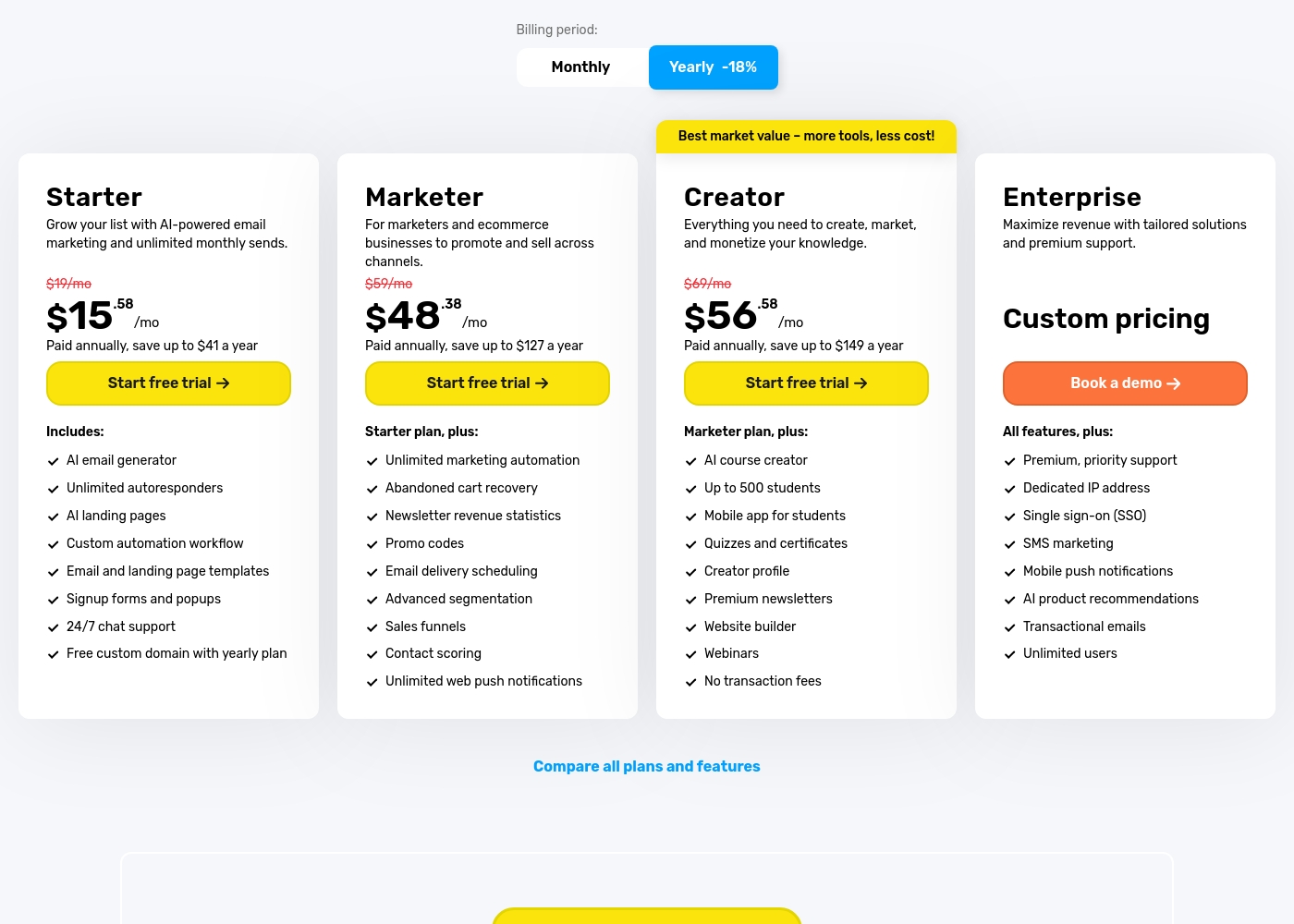
GetResponse costs between $15.58 and $56.58 per month (billed annually for a 1k list size) with four plans: Starter at $15.58/mo, Marketer at $48.38/mo, Creator at $56.58/mo, and Enterprise requiring custom pricing.
Here is a detailed look at what each plan includes. You should know that all paid plans scale their price based on the size of your specified contact list.
Starter
Price: $15.58/month (Billed annually) or $19/month (Monthly) Websites Supported: 5 active websites Best For: Growing your list and AI-powered email marketing Other Features:
- AI email generator and AI landing pages
- Unlimited autoresponders and monthly sends
- Custom automation workflow (limited to 1)
- 24/7 chat support
- Free custom domain with yearly plan The Starter package is perfect if you’re focusing on essential email marketing functions and building your subscriber list quickly. This entry-level tier allows for collaboration among 3 users and provides the core tools needed to run effective email campaigns.
- AI email generator
- Unlimited autoresponders
- AI landing pages
- 24/7 chat support
- Custom automation workflow (1)
- Unlimited marketing automation
- Abandoned cart recovery
- Sales funnels
- Advanced segmentation
- Unlimited web push notifications
- AI course creator (up to 500 students)
- Webinars
- Premium newsletters
- Website builder
- No transaction fees
- Dedicated IP address
- SMS marketing
- Premium, priority support
- Unlimited users
- Single sign-on (SSO)
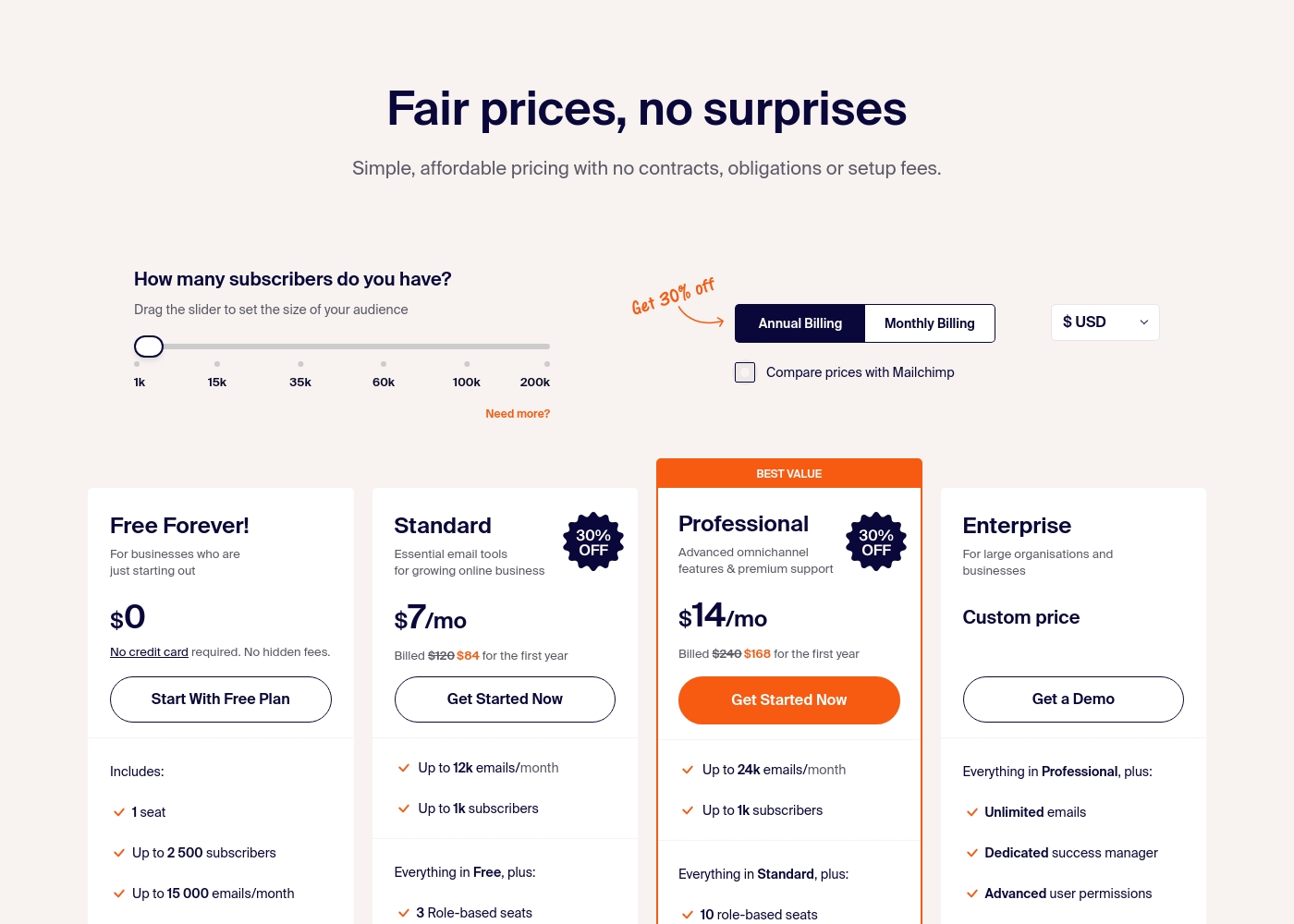
Sender costs between $0 and a custom price per month with 4 plans: Free Forever at $0, Standard at $7, Professional at $14, and Enterprise at Custom price.
Take a look at the specific features and limits included in each plan tier below.
Free Forever!
Price: $0 monthly Best For: Businesses who are just starting out Other Features: 1 seat, up to 2,500 subscribers, 15,000 emails/month, 24/7 live support, email automation.
- 1 seat
- Up to 2,500 subscribers
- Up to 15,000 emails/month
- 24/7 live support
- Email automation
- Up to 12k emails/month
- Up to 1k subscribers
- 3 Role-based seats
- Automated sequences
- Up to 24k emails/month
- Up to 1k subscribers
- 10 role-based seats
- Premium support
- Unlimited emails
- Dedicated success manager
- Advanced user permissions
Pricing Notes
- GetResponse offers a 30-day free trial on paid plans, but reverts to a limited free version if you don't upgrade.
- Sender's Free Forever plan is permanent and includes 15,000 emails/month for up to 2,500 contacts with no time limit.
- GetResponse's pricing scales significantly with your contact list size, which can become expensive for large lists.
- SMS marketing is an extra cost on Sender (credits purchased separately) and is only included in GetResponse's Enterprise plan.
- Both platforms offer discounts for annual billing. GetResponse saves up to 18%, while Sender's annual plans are clearly marked.
Pricing Head-to-Head
User Reviews
GetResponse consistently earns high marks for its exceptional customer support and expansive features. Users frequently describe the 24/7 live chat as fast, professional, and composed of knowledgeable human agents who go the extra mile.
A recurring highlight is the personalized, live onboarding call, which many reviewers called a "GAME CHANGER" for accelerating setup and understanding the complex feature set. Customers find the platform user-friendly, noting the effectiveness of drag-and-drop tools for emails and landing pages, alongside reliable autoresponders and marketing automation features that drive increased ROI.
Get Response is awesome! Like anything new, it takes some time to get set up and used to things, but the customer support is second to none in helping out and quickly answering all my questions along the way.
User sentiment on Trustpilot and Capterra highlights Sender's generous free plan and ease of setup as major positives. Many praise the intuitive interface and reliable automation.
😊 However, some note occasional deliverability hiccups and a learning curve for advanced features. Customer support is frequently mentioned as responsive, though a few users report slow responses during peak times.
The free plan is unbeatable for a new business. I set up my first automation in minutes. The platform is simple and gets the job done without fuss.
Our Verdict
It's not a one-size-fits-all win. GetResponse is the powerhouse for scaling businesses, while Sender is the smart starter for beginners. GetResponse's superpower is its limitless, all-in-one toolkit. You get unlimited automation workflows, AI content generation, and even SMS marketing (on Enterprise). It's built to grow with you. Sender's superpower is its incredible free plan and simplicity. You can launch campaigns in minutes with no credit card. It's straightforward, affordable email marketing. The deciding factor is your stage and needs. Choose Sender if you're starting out, have a tight budget, and want to learn email marketing without complexity. Choose GetResponse if you're ready to invest in a scalable system with advanced automations, ecommerce tools, and need room to grow into courses or SMS. Pick the tool that matches where you are today.
Frequently Asked Questions
Which is better for small teams: GetResponse or Sender?
Sender is often better for very small teams or solos due to its free plan and simplicity. GetResponse's paid plans (Starter/Marketer) allow 3-5 users and offer more collaboration tools for growing teams.
Does GetResponse have a free plan like Sender?
GetResponse has a 30-day free trial on paid plans. After the trial, it reverts to a very limited free version. Sender's Free Forever plan is much more robust and permanent.
Is Sender worth the extra cost over GetResponse?
It depends. Sender's paid plans are cheaper, but GetResponse includes more advanced features like unlimited automation, AI tools, and webinars. Choose based on which features you actually need.
Can I migrate from GetResponse to Sender easily?
Migration specifics aren't detailed, but both platforms support CSV imports/exports. You'd typically export your contacts from GetResponse and import them into Sender. Design and automation layouts may need manual rebuilding.
Which tool has better email deliverability?
GetResponse claims a 99% deliverability rate, which is a key selling point. Some Sender reviews mention occasional deliverability hiccups. GetResponse's reputation is stronger here.
Does Sender offer SMS marketing like GetResponse?
No, Sender does not include SMS marketing. GetResponse offers SMS capabilities, but only on its high-tier Enterprise plan. Sender requires purchasing separate SMS credits.
Ready to Choose?
Both tools have their strengths. Choose based on your specific needs.