Framer vs Ycode
Framer and Ycode are both powerful platforms enabling designers to build sites without coding. Framer targets speed and maximum creative control for design professionals. Ycode focuses on extreme affordability, robust visual features, and cost-effective team scaling. It's a key decision between high-end design refinement and maximizing long-term value.
Best for: Large design agencies prioritizing rapid creative iteration, Designers migrating directly from Figma workflows
Best for: Founders and entrepreneurs seeking extreme long-term value, Small businesses needing unlimited free collaborators
Powerful Design, Challenging User Experience.
Framer is pitched as a high-performance visual tool offering designers full creative control and rapid deployment capabilities. However, we note that the steep learning curve, combined with systemic issues like unhelpful support and reports of misleading pricing structures, creates a challenging user environment. Overall, we find that the foundational technology is impressive, but major user experience and customer service failures drastically undermine its claimed efficiency.
Pros
- Powerful visual tool favored by designers, especially those familiar with Figma.
- Enables handoff-free publishing and rapid site deployment.
- Built-in modern features like advanced CMS, SEO tools, and AI generation.
Cons
- Highly complicated and unintuitive user interface (UI/UX).
- Frequent reports of constant bugs and reliability issues.
- Pricing is often misleading, with unexpected, high costs for basic features like localization.
- Customer support is reportedly slow, difficult to access, and often relies on unhelpful AI bots.
Powerful visual editor with smart pricing.
We see Ycode successfully bridges the gap between powerful design tools and affordability, offering extensive features like an integrated CMS and team collaboration without excessive cost. Overall, this platform presents a compelling alternative for designers and founders seeking complete control over their complex projects.
Pros
- Extremely competitive pricing structure beginning at $5/month annually.
- Comprehensive Free plan perfect for development and testing new projects.
- Total design autonomy via an intuitive visual editor, requiring no code.
- Integrated CMS simplifies content structuring and data management.
Cons
- Custom code integration is restricted to Basic and Pro plans.
- The Mini plan is significantly limited in scope (only 5 published pages).
- No explicit refund policy or money-back guarantee is provided.
AboutFramer
Framer is a powerful visual design tool made for crafting and publishing modern websites. It empowers you to build exactly what you imagine using smooth effects, animations, and interactions. You can craft responsive layouts visually, eliminating the need to write code.
The platform helps you skip the blank canvas entirely. Integrated AI can generate sophisticated page layouts and advanced components right away. Collaboration is built in, meaning updates are seamless, and the entire process is completely handoff-free. 💡
AboutYcode
Ycode is a comprehensive, all-in-one website builder and integrated CMS. It's built specifically for designers, creators, and founders who want professional results without relying on code. Using its intuitive visual editor, you gain complete design control to craft beautiful, fully responsive websites. You can publish your creations instantly and manage everything easily from one reliable platform. ✅
Highlights
Feature Comparison
Features Overview
We highlight the main differences and pick a winner for each feature.
Team Pricing & Seats
Ycode offers unlimited free collaborators, eliminating user seat fees for growing teams.
Framer limits editors to 10 on its standard paid plans. Each editor added after that costs a substantial $40 per month. This model quickly becomes expensive for larger teams. Ycode uses a per-usage model, not a per-seat model. All paid plans allow you to invite unlimited collaborators to your projects at zero extra cost. Ycode is the only sensible choice for cost-effective team scaling. Ycode avoids the budgetary shock that Framer’s per-seat pricing often introduces.
Design & AI Tools
Framer leverages strong AI generation and Figma familiarity; Ycode relies on a superior visual editor.
Framer’s strength is its deep focus on the modern designer’s workflow. The platform includes AI Wireframer to generate components and site layouts instantly. Framer also enables designers to ship updates daily without code handoffs. Ycode provides total design autonomy via its intuitive visual editor. It allows powerful interactions like scroll effects and hover states without any coding. While Ycode is powerful, Framer’s proprietary AI tools offer unmatched speed and creative acceleration for initial drafts.
A/B Testing
Framer provides necessary, integrated A/B testing capabilities; Ycode lacks optimization tools.
Framer's Scale plan allows access to integrated A/B testing and growth funnels. This functionality is part of the Advanced Analytics add-on, which is usage-based. This feature is vital for data-driven optimization. Ycode currently limits its growth tools to built-in site analytics. Expanding beyond basic traffic analysis requires reliance on external third-party tools. Framer is fundamentally better equipped for teams that require integrated performance testing.
Ease of Use & UX
Ycode is praised for its intuitive UI; Framer is widely criticized for clunky, complicated navigation.
Framer receives frequent customer complaints regarding its User Interface and Experience. Many users find Framer clunky, complicated, and unintuitive, even for established web designers. Ycode is noted for providing powerful features within a superior user interface. Users often praise the intuitive nature of Ycode's visual editor. If your team values a smooth workflow and minimal friction, Ycode is the clearly preferred choice.
Localization
Ycode offers unlimited localization on its top plan; Framer charges high fees for extra locales.
Scaling globally is costly with Framer due to restrictive locale limits. The Scale plan, for example, only includes up to 20 locales before charging $40 per additional locale. Ycode offers full language flexibility on its Pro plan. Subscribers to Ycode's top tier get unlimited languages for global scaling without hidden fees. This makes Ycode far more predictable and cost-effective for international projects.
Upfront Pricing
Ycode is highly affordable; Framer's high-tier pricing and hidden costs are a major pain point.
Ycode’s paid plans range from just $5 to $25 per month when billed annually. Ycode offers extreme value for its feature set. Framer’s paid plans start significantly higher, ranging from $75 to $200 per month. Framer users report unexpected high costs for basic features like localization or additional editors. Ycode’s pricing is more transparent and budget-friendly for small and growing teams.
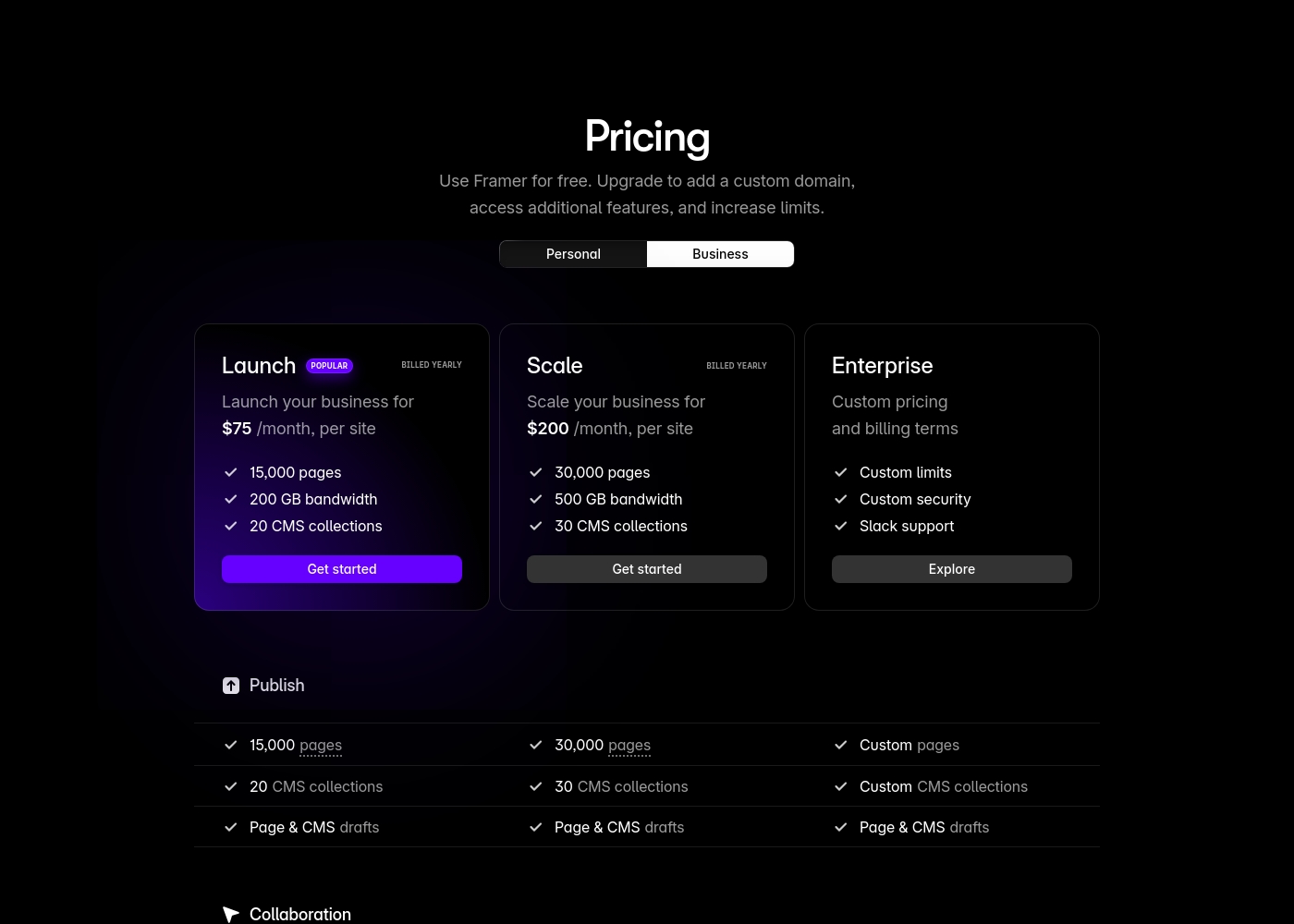
Framer costs between $75 and $200 per month (billed yearly) with two fixed-price plans: Launch at $75/month and Scale at $200/month, plus a custom Enterprise option.
Framer offers a Free plan to let you start designing right away. When you are ready to add a custom domain and access advanced features, you can choose from these paid business offerings.
Launch (Popular Business Plan)
Price: $75/month, per site (billed yearly) Websites Supported: Per site Best For: Launching a business site or marketing stack Refund Policy: 14-day refund eligible for EU and Turkey residents Other Features:
- 15,000 pages, 20 CMS collections
- 200 GB bandwidth, 50GB file storage
- Password protect, Custom code, Cookie banner
- Up to 10 editors (additional editors $40/month)
- 10 CMS collections
- 1,000 pages
- 5MB file uploads
- Free locale to try
- 15,000 pages
- 20 CMS collections
- 200 GB bandwidth
- 50GB storage
- 90 day version history
- 30,000 pages
- 30 CMS collections
- 500 GB bandwidth
- 100GB storage
- 120 day version history
- Custom limits and security
- Premium CDN and hosting
- Unlimited analytics and redirects
- Dedicated Slack support and team training
- SSO for editors and sites
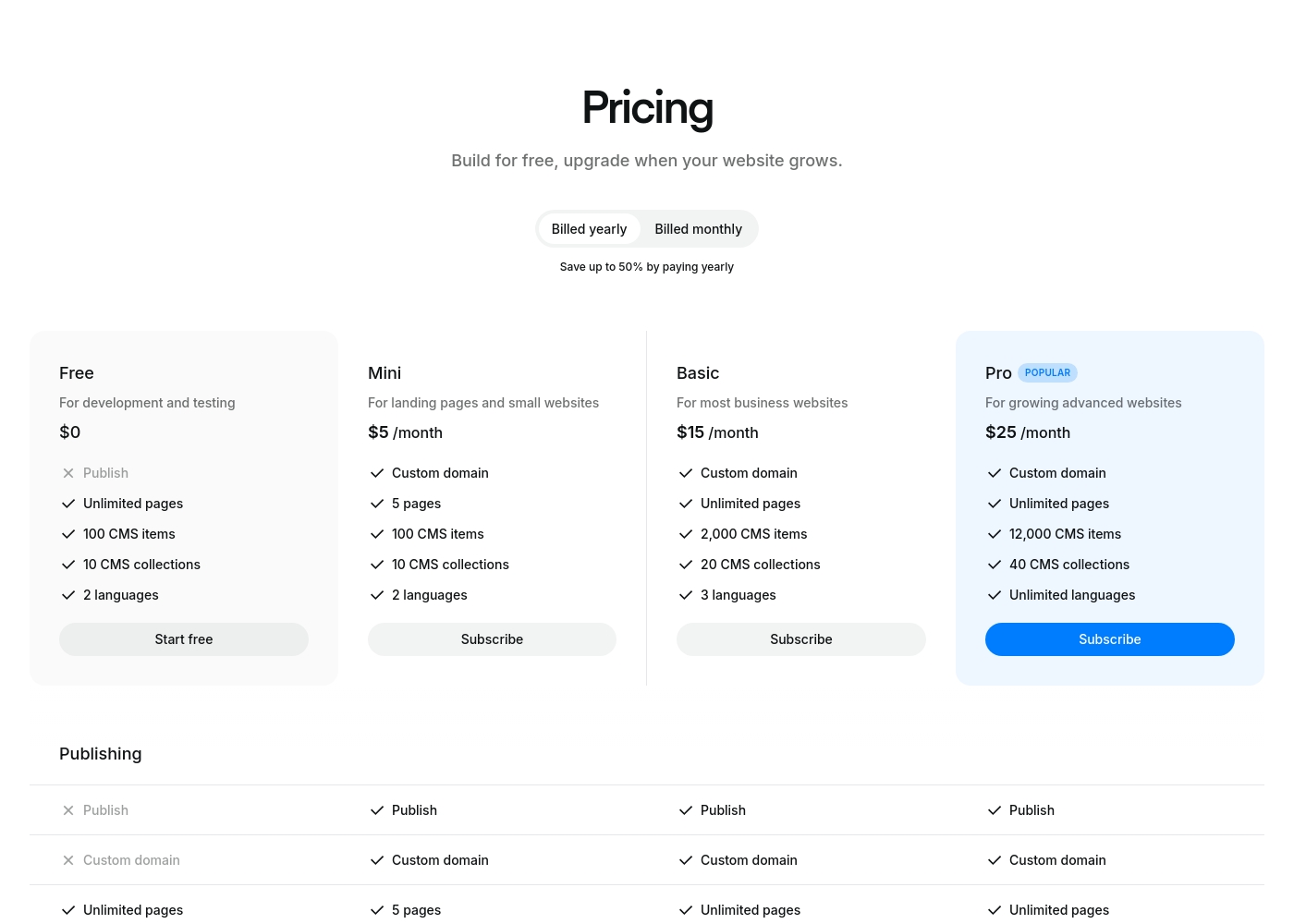
Ycode costs between $0 and $30 per month, with four plans: Free at $0, Mini at $5/month (billed yearly), Basic at $15/month (billed yearly), and Pro at $25/month (billed yearly).
Here’s a breakdown of what each tier offers so you can choose the best fit for your project.
Free
Price: $0 Best For: development and testing Other Features: Unlimited pages on a ycode.site domain, 100 CMS items, 10 CMS collections, 2 languages, 1K monthly visits.
- Publish to ycode.site
- Unlimited pages
- 100 CMS items
- 10 CMS collections
- 2 languages
- Custom domain
- 5 pages
- 100 CMS items
- 10 CMS collections
- 2 languages
- Custom domain
- Unlimited pages
- 2,000 CMS items
- 20 CMS collections
- 3 languages
- Custom domain
- Unlimited pages
- 12,000 CMS items
- 40 CMS collections
- Unlimited languages
Pricing Notes
- Framer charges $40/month per editor beyond the 10 included seats.
- Framer's Advanced Analytics are billed separately on a usage-based model after a 30-day trial.
- Ycode is significantly more affordable, with annual plans starting as low as $5/month.
- Ycode offers unlimited free collaborators on all paid plans, providing substantial savings for teams.
Pricing Head-to-Head
User Reviews
Framer generates highly polarized feedback, reflected in its low Trustpilot standing. Users generally praise the platform’s powerful features and the impressive technical capabilities for designers, noting its potential as a beautiful site builder.
However, the external criticism mainly centers on poor User Experience (UX), which many describe as clunky, complicated, and unintuitive, making even simple tasks frustrating 😡. A significant number of reports highlight constant bugs and half-baked features impacting overall reliability.
The UI/UX is truly terrible, clunky, and overly complicated. I’ve been in web design for eight years, and this is the least intuitive platform I have ever used. Seriously, they need to hire a new designer quickly.
Ycode is strongly positioned as a high-value and professional alternative to established web development platforms, frequently emphasizing user satisfaction and powerful design capabilities. The company maintains that thousands of users worldwide praise its innovation and supportive environment.
This platform aims to cut through complexity by combining powerful features with an intuitive, user-friendly interface. Key themes promoted internally include superior user interface design and competitive pricing compared to rivals like Webflow, alongside strong functionality for animation and visual effects.
Our Verdict
Framer and Ycode present a core dilemma: power versus price efficiency. Both let you build high-quality sites visually, but they serve different priorities. For most small-to-medium teams focused on budget and value, Ycode is the clear overall champion. The final decision rests entirely on whether you prioritize proprietary advanced tools or affordability. Framer is the ideal tool for the premium designer seeking maximum creative speed. Its AI Wireframer feature accelerates initial design dramatically, skipping the blank canvas entirely. Framer truly excels at handoff-free publishing and offers must-have integrated A/B testing and growth funnels. Ycode wins overwhelmingly on financial scalability and ease of use. Paid plans start at just $5/month, while Framer starts at $75 monthly. Ycode offers unlimited free collaborators, saving companies thousands in annual seat fees. Its intuitive interface and superior localization options make team content management seamless. The deciding factor should be your team structure and budget sensitivity. If you are a high-end agency needing specific growth tools, choose Framer. If you need powerful design delivery without the high costs, difficulty, and hidden fees, Ycode is your smarter choice. Choose Ycode if you prioritize long-term team scaling and budget control. Stick with Framer only if you already rely heavily on integrated A/B testing and accept the steeper learning curve and high per-seat costs.
Frequently Asked Questions
How much cheaper is Ycode compared to Framer?
Ycode is significantly cheaper than Framer. Ycode's top-tier plan is $25 per month annually. Framer's paid plans, in contrast, start at $75 per month. You also save substantial money with Ycode because of its policy of unlimited free collaborators.
Which tool is better for large team collaboration: Framer or Ycode?
Ycode is vastly superior for team collaboration budgets. Ycode allows unlimited collaborators for free on all plans. Framer requires you to pay $40/month for every editor after the first 10 seats. This makes Ycode the only cost-effective option for scaling teams.
Does Ycode offer A/B testing like Framer?
No, Ycode does not offer native A/B testing or conversion funnels. Framer provides fully integrated A/B testing capabilities as a usage-based add-on. Teams requiring integrated optimization tools should choose Framer.
Which software has the steeper learning curve?
Framer has a notably steeper learning curve reported by many users. Users often describe Framer's interface as complicated and clunky. Ycode is widely praised for having a superior, more intuitive user experience.
Can I manage localized sites easily with Framer or Ycode?
Ycode handles localization much better and more affordably. Ycode's Pro plan includes support for unlimited languages at no extra cost. Framer severely limits locales and charges high fees, up to $40 per additional language.
Are there free plans available for Framer and Ycode?
Yes, both Framer and Ycode offer permanent Free plans. These plans are intended for development and testing. To publish your completed site to a custom domain, you must upgrade to a paid subscription on either platform.
Ready to Choose?
Both tools have their strengths. Choose based on your specific needs.