Framer vs Pixpa
Framer and Pixpa serve vastly different online creators and professionals. Framer is built for designers needing total creative freedom and blazing speed. Pixpa prioritizes affordability and unbelievably responsive 24/7 customer support. The choice ultimately hinges on deep complexity versus dependable simplicity and low cost.
Best for: Design agencies requiring handoff-free publishing, Startups needing rapid site deployment and maximum performance
Best for: Photographers and visual artists managing portfolios and sales, Budget-conscious creators starting at $5/month
Powerful Design, Challenging User Experience.
Framer is pitched as a high-performance visual tool offering designers full creative control and rapid deployment capabilities. However, we note that the steep learning curve, combined with systemic issues like unhelpful support and reports of misleading pricing structures, creates a challenging user environment. Overall, we find that the foundational technology is impressive, but major user experience and customer service failures drastically undermine its claimed efficiency.
Pros
- Powerful visual tool favored by designers, especially those familiar with Figma.
- Enables handoff-free publishing and rapid site deployment.
- Built-in modern features like advanced CMS, SEO tools, and AI generation.
Cons
- Highly complicated and unintuitive user interface (UI/UX).
- Frequent reports of constant bugs and reliability issues.
- Pricing is often misleading, with unexpected, high costs for basic features like localization.
- Customer support is reportedly slow, difficult to access, and often relies on unhelpful AI bots.
Exceptional Support, Inconsistent Reliability
We find Pixpa offers genuinely responsive, world-class customer support and highly affordable plans, positioning it well for artists and simple portfolio users. However, we noted persistent issues with core functionality like mobile responsiveness and integrated store reliability which impede professional use. Overall, Pixpa is a solid choice for lightweight portfolios, but scaling businesses might experience frustrating technical limits.
Pros
- World-class customer service is remarkably responsive 24/7.
- Very affordable, all-inclusive pricing tiers start at $5/month.
- Intuitive design environment praised over competitors like Squarespace.
- Support agents often create step-by-step videos to resolve issues.
Cons
- Reports of poor mobile optimization and image scaling problems.
- E-commerce functions (like the "add to basket" option) are often buggy.
- Website reliability is inconsistent, with recurring monthly downtime reported.
- Performance issues when hosting extensive high-resolution galleries for sale.
AboutFramer
Framer is a powerful visual design tool made for crafting and publishing modern websites. It empowers you to build exactly what you imagine using smooth effects, animations, and interactions. You can craft responsive layouts visually, eliminating the need to write code.
The platform helps you skip the blank canvas entirely. Integrated AI can generate sophisticated page layouts and advanced components right away. Collaboration is built in, meaning updates are seamless, and the entire process is completely handoff-free. 💡
AboutPixpa
Users describe Pixpa as a top-notch web service that just works. Its primary focus is on usability, offering design tools and a consistent User Interface (UI) that is intuitive. Designs are simple and clean, making site creation approachable. Furthermore, the service carries the distinction of being Top Rated for 11+ Years, reflecting proven quality and reliability. ✅
Highlights
Feature Comparison
Features Overview
We highlight the main differences and pick a winner for each feature.
Core Focus & Design Style
Framer targets high-end design, while Pixpa focuses on simple, all-in-one portfolios.
Framer is a powerful visual design tool, enabling total creative mastery and customization. It’s built specifically for designers shipping high-performance, custom sites. You bring complex designs to life entirely visually within Framer. Pixpa offers a simple, clean, elegant web service with 200+ premium templates. Pixpa focuses on all-in-one usability for visual artists and small businesses. Its design environment is intuitive and consistent. Framer is the choice for unique, custom projects that demand no code limits. Pixpa is built for quick, affordable professional presentations via standardized templates. The decision centers on needing maximum creative control (Framer) or dependable simplicity (Pixpa).
Pricing & Affordability
Pixpa is vastly more affordable; Framer’s plans start much higher and add hidden costs.
Framer’s paid plans start high, ranging from $75 to $200 per month when paid annually. Users report unexpected high costs in Framer for essentials like extra languages or editors. Framer charges $40 per additional editor monthly. Pixpa is extremely budget-friendly, with annual plans starting at just $5 per month. All Pixpa subscriptions include secure hosting and 24/7 support regardless of the tier chosen. Pixpa is a clear winner for maximum cost savings. Framer targets high-budget creative agencies capable of absorbing these scaling costs. Pixpa targets solo creators and small businesses focused on value and predictable expenses. Both platforms offer free entry points, Framer an indefinite Free plan, Pixpa a 15-day trial.
Customer Support
Pixpa offers world-class 24/7 expert service; Framer's support is reportedly poor and slow.
Framer’s customer support is widely criticized as slow, difficult to access, and reliant on AI bots. Only Enterprise customers receive priority support and a dedicated Slack channel in Framer. This lack of reliable help is a frequent user complaint. Pixpa provides unbelievably responsive 24/7 expert support via live chat and email assistance. Users praise Pixpa agents for going above and beyond, sometimes creating quick step-by-step videos. Pixpa consistently delivers a better support experience. If rapid problem resolution is critical, Pixpa is the obvious champion. Framer users often face frustration when trying to overcome technical issues without dedicated expert help.
AI & Automation
Framer uses integrated AI to accelerate design; Pixpa relies on standard templates.
Framer features integrated AI capable of generating full site layouts and advanced components in seconds. The AI Wireframer feature in Framer allows immediate momentum in the design process. Framer supports advanced growth tools like A/B testing (via add-on). Pixpa does not highlight integrated AI generation or complex automation capabilities. It focuses on using over 200 premium templates for fast site setup. Pixpa's tools prioritize usability over high-tech design acceleration. Framer helps you overcome the blank canvas challenge with instant AI output. Pixpa requires manual customization starting from a template. Framer is better for teams prioritizing current technology and speed through automation.
E-commerce & Portfolios
Pixpa is an all-in-one platform for selling; Framer focuses on marketing content.
Pixpa is purpose-built to combine stunning professional portfolios, online stores, and client galleries. It provides all the necessary infrastructure for visual artists to showcase and sell their work directly. Pixpa even offers separate client gallery plans. Framer is primarily designed for high-performance marketing and brand sites. E-commerce is not a core specialization; Framer does not offer integrated client gallery management tools. You would need external plugins to achieve selling functionality with Framer. While Pixpa's e-commerce functions are occasionally reported as buggy, it is the focused solution. Framer is better suited for sites that generate leads, not direct sales via a built-in store. Pixpa is the integrated selling platform.
Advanced Analytics
Framer offers detailed growth analytics like A/B testing; Pixpa does not feature these tools.
Framer includes Advanced Analytics with tools like A/B testing, click tracking, and conversion funnels. This functionality is available as a usage-based add-on after a 30-day trial period. Framer allows data-driven optimization of content. Pixpa’s feature set description does not include advanced growth optimization tools like A/B testing. Pixpa focuses on a basic web presence and relies on external tools for complex tracking. Its built-in functionality is simpler. If growth metrics and multivariate testing are essential to your strategy, Framer is required. Designers using Framer can bake performance optimizations directly into their workflow. Pixpa provides less insight into detailed user behavior.
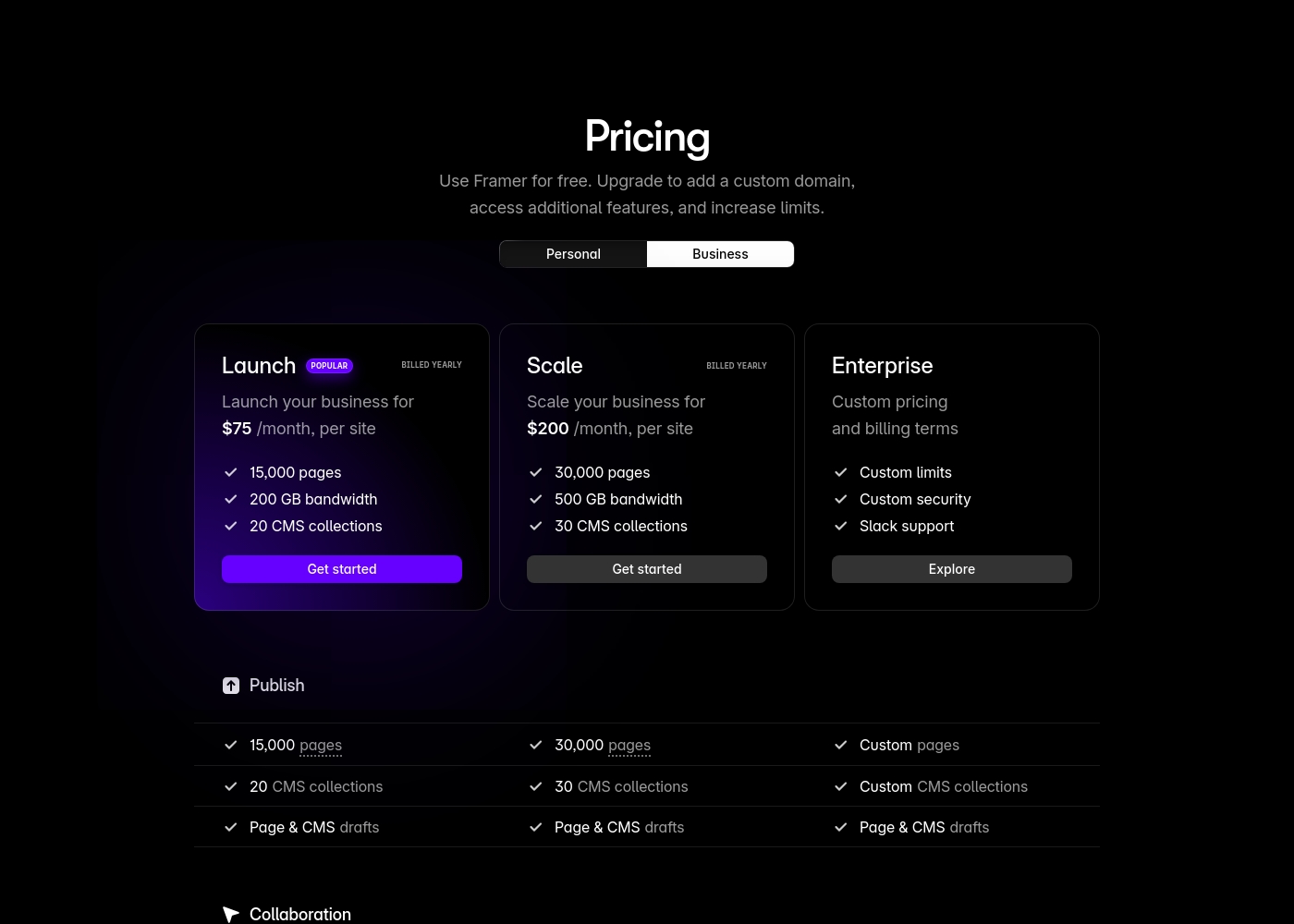
Framer costs between $75 and $200 per month (billed yearly) with two fixed-price plans: Launch at $75/month and Scale at $200/month, plus a custom Enterprise option.
Framer offers a Free plan to let you start designing right away. When you are ready to add a custom domain and access advanced features, you can choose from these paid business offerings.
Launch (Popular Business Plan)
Price: $75/month, per site (billed yearly) Websites Supported: Per site Best For: Launching a business site or marketing stack Refund Policy: 14-day refund eligible for EU and Turkey residents Other Features:
- 15,000 pages, 20 CMS collections
- 200 GB bandwidth, 50GB file storage
- Password protect, Custom code, Cookie banner
- Up to 10 editors (additional editors $40/month)
- 10 CMS collections
- 1,000 pages
- 5MB file uploads
- Free locale to try
- 15,000 pages
- 20 CMS collections
- 200 GB bandwidth
- 50GB storage
- 90 day version history
- 30,000 pages
- 30 CMS collections
- 500 GB bandwidth
- 100GB storage
- 120 day version history
- Custom limits and security
- Premium CDN and hosting
- Unlimited analytics and redirects
- Dedicated Slack support and team training
- SSO for editors and sites
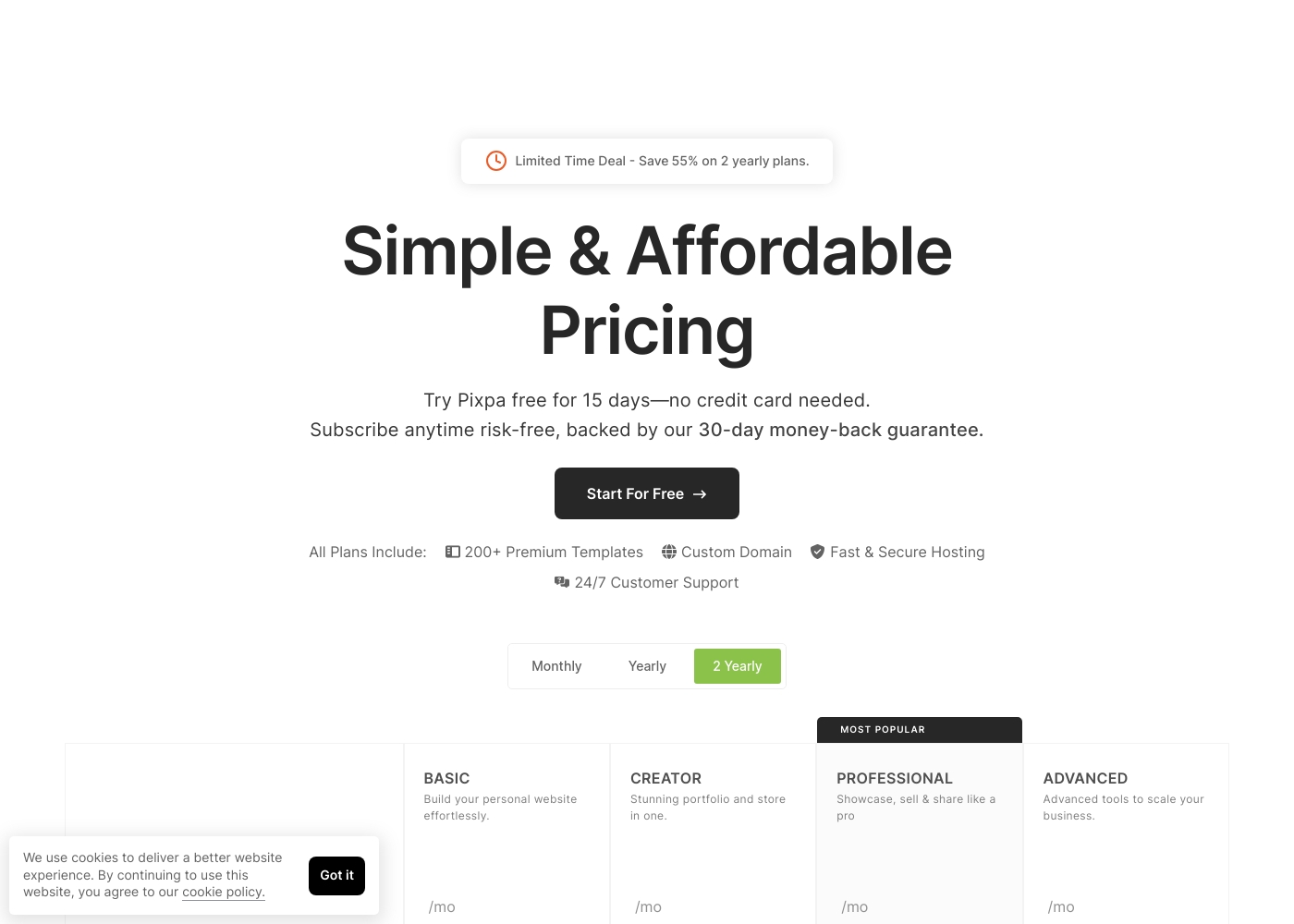
Pixpa costs between $5 and $21 per month (when billed annually) with four main plans: Basic at $5/mo, Creator at $12/mo, Professional at $18/mo, and Advanced at $21/mo.
Pixpa offers all-inclusive, affordable plans to handle your full website, store, blog, and client galleries in one place.
Basic
Price: $5/month (billed yearly) or $8/month (billed monthly) Best For: Building your personal website effortlessly Refund Policy: 30-day money-back guarantee Other Features: 200+ Premium Templates, Custom Domain, 24/7 Customer Support
- Build your personal website effortlessly
- Includes 200+ Premium Templates
- Custom Domain support
- 24/7 Customer Support
- Stunning portfolio and store in one
- Includes 200+ Premium Templates
- Custom Domain support
- Fast & Secure Hosting
- Showcase, sell & share like a pro
- Most Popular plan
- Includes 200+ Premium Templates
- 24/7 Customer Support
- Advanced tools to scale your business
- Includes 200+ Premium Templates
- Custom Domain support
- Fast & Secure Hosting
Pricing Notes
- Pixpa is exponentially cheaper, with paid plans starting at $5/month annually.
- Framer requires annual billing for the listed prices and charges $40/month per extra editor.
- Framer's advanced features, like A/B testing, are usage-based add-ons, increasing overall cost.
- Pixpa offers a 30-day money-back guarantee; Framer's 14-day policy is limited to EU/Turkey residents.
Pricing Head-to-Head
User Reviews
Framer generates highly polarized feedback, reflected in its low Trustpilot standing. Users generally praise the platform’s powerful features and the impressive technical capabilities for designers, noting its potential as a beautiful site builder.
However, the external criticism mainly centers on poor User Experience (UX), which many describe as clunky, complicated, and unintuitive, making even simple tasks frustrating 😡. A significant number of reports highlight constant bugs and half-baked features impacting overall reliability.
The UI/UX is truly terrible, clunky, and overly complicated. I’ve been in web design for eight years, and this is the least intuitive platform I have ever used. Seriously, they need to hire a new designer quickly.
Pixpa’s external feedback demonstrates a clear split between its stellar customer service and technical reliability issues. Many users consistently praise the support staff, describing the team as “truly remarkable” and incredibly responsive via simultaneous live chat and email. They often provide quick, effective resolutions, with some agents creating step-by-step video guides to solve complex problems.
However, users frequently cite significant technical shortcomings. The most recurring complaints revolve around necessary mobile optimization, with reports of uploaded images becoming stretched or badly rendered on phones. Reliability is also a key concern, as some users experienced their websites breaking down monthly or having downtime that was dismissed by initial support responses. E-commerce functionality also needs improvement. Shoppers struggle with buggy “add to basket” options, especially on mobile, rendering the shop useless for some. While the pricing is affordable (as low as $5/month), reviewers noted performance limitations when dealing with extensive high-resolution galleries and poor SEO indexing help. It’s a platform with amazing support but noticeable technical shortcomings 🛠️.
Customer service is truly remarkable. They quickly find a resolution to your issue and go out of their way to help. Their website is much more fluid and easier to use than Squarespace.
Our Verdict
Framer and Pixpa are fundamentally different tools serving opposite users. Framer is the powerful, complex designer tool with a high price tag. Pixpa is the affordable, simple website builder backed by outstanding customer service. Your choice depends entirely on your required complexity and budget. Framer’s superpower is enabling total creative mastery for high-performing, custom sites. Designers use Framer’s integrated AI to generate code-free layouts in seconds. It is the best choice for fast deployment and utilizing growth tools like A/B testing. Pixpa excels in affordability and dependable, accessible customer care for artists. Paid Pixpa plans start affordably at just $5/month, which is outstanding value. Pixpa provides unbelievably responsive 24/7 support, including personalized agent videos. The decisive factor is the trade-off between power and peace of mind. Choose Framer if you are an expert designer needing maximum control and complex scaling options. Pick Pixpa if you are starting out, hate complex UIs, and need integrated portfolios and stores. For most solo creators prioritizing budget and support, Pixpa is the reliable winner. Agencies and design professionals demanding advanced features should invest in Framer.
Frequently Asked Questions
Which is better for a beginner: Framer or Pixpa?
Pixpa is significantly better for beginners due to its intuitive and consistent UI. Framer has a steep learning curve and many users find its interface complicated. Pixpa offers 200+ templates for easy starting points.
Which tool is more affordable, Framer or Pixpa?
Pixpa is far more affordable, with annual paid plans starting at only $5/month. Framer’s paid tiers start at $75/month, plus extra costs for editors and usage. Pixpa also offers a more generous 30-day money-back guarantee.
Does Framer offer better customer support than Pixpa?
No, Pixpa is widely praised for its world-class, unbelievably responsive 24/7 support. Framer's support is frequently described as slow, difficult to access, and relies heavily on AI bots. Pixpa is the clear winner for support.
Can I build an online store with Framer or Pixpa?
Pixpa is built as an all-in-one solution for portfolios, stores, and client galleries. Framer focuses on marketing sites and lacks dedicated integrated selling features. Choose Pixpa for e-commerce and gallery management.
Which tool offers A/B testing functionality: Framer or Pixpa?
Framer offers A/B testing and conversion funnel tracking via its Advanced Analytics add-on. Pixpa does not list these specific growth optimization tools in its core feature set. Framer is better for data-driven optimization.
How different is the user interface between Framer and Pixpa?
Framer's UI is complex, high-powered, and often clunky, built for professional designers. Pixpa's UI is simple, clean, and intuitive, prioritizing ease of use for all users. Pixpa has the easier learning curve.
Ready to Choose?
Both tools have their strengths. Choose based on your specific needs.