Framer vs PageCloud
Framer and PageCloud offer two very different paths to building a modern website. Framer focuses on design fidelity and eliminating developer handoffs for agencies. PageCloud prioritizes total creative drag-and-drop freedom and superb customer support for small businesses. Choosing one depends entirely on your team's technical skill level and unique growth needs.
Best for: Designers familiar with Figma interfaces, Agencies needing handoff-free publishing and rapid deployment
Best for: Small business owners or solo entrepreneurs, Marketers prioritizing conversion optimization (popups, forms)
Powerful Design, Challenging User Experience.
Framer is pitched as a high-performance visual tool offering designers full creative control and rapid deployment capabilities. However, we note that the steep learning curve, combined with systemic issues like unhelpful support and reports of misleading pricing structures, creates a challenging user environment. Overall, we find that the foundational technology is impressive, but major user experience and customer service failures drastically undermine its claimed efficiency.
Pros
- Powerful visual tool favored by designers, especially those familiar with Figma.
- Enables handoff-free publishing and rapid site deployment.
- Built-in modern features like advanced CMS, SEO tools, and AI generation.
Cons
- Highly complicated and unintuitive user interface (UI/UX).
- Frequent reports of constant bugs and reliability issues.
- Pricing is often misleading, with unexpected, high costs for basic features like localization.
- Customer support is reportedly slow, difficult to access, and often relies on unhelpful AI bots.
Unrestricted design power for simple websites.
We found PageCloud delivers impressive design flexibility, allowing designers and novices to create unique sites without writing code. The intuitive drag-and-drop editor enables full creative control beyond standard template constraints. Overall, we note repeated user feedback citing significant backend bugs and potential limitations, which suggest it might best serve users focused on straightforward design requirements.
Pros
- Provides total design freedom, avoiding typical template restrictions.
- Highly effective and intuitive drag-and-drop website editor.
- Excellent, responsive, and constantly available customer support.
- Ideal for non-technical users who want to avoid HTML or widgets.
Cons
- Reports of frequent bugs where edited elements shift or change unexpectedly.
- May be limited or frustrating for complex website requirements.
- Exact pricing details for premium subscriptions are not explicitly published.
- Some older feedback references support being unresponsive or immature.
AboutFramer
Framer is a powerful visual design tool made for crafting and publishing modern websites. It empowers you to build exactly what you imagine using smooth effects, animations, and interactions. You can craft responsive layouts visually, eliminating the need to write code.
The platform helps you skip the blank canvas entirely. Integrated AI can generate sophisticated page layouts and advanced components right away. Collaboration is built in, meaning updates are seamless, and the entire process is completely handoff-free. 💡
AboutPageCloud
PageCloud is a comprehensive platform designed to help you create and grow your online presence. You can easily build standard websites, specialized landing pages, and even dedicated Link-in-Bio pages. 💡
The platform also offers powerful tools to create customized popups, including slide-ins, exit-intents, and banners. This suite of tools is an excellent fit for small business owners, professional services, marketers, and agencies managing client projects who need to streamline their growth process.
Highlights
Feature Comparison
Features Overview
We highlight the main differences and pick a winner for each feature.
User Experience (UX)
PageCloud offers an intuitive, easy-to-use editor; Framer has a steep, complicated learning curve.
Framer is immensely powerful but frequently criticized for its complex and clunky UI/UX. Experienced designers often find Framer unintuitive, making simple tasks frustrating. PageCloud's editor is praised for offering total design freedom within an easy, highly intuitive drag-and-drop interface. Users feel they can customize PageCloud precisely without needing to touch confusing code or widgets. If you are not a professional designer, PageCloud will be significantly less painful to start using.
Design Approach
Framer prioritizes designer control and speed; PageCloud focuses on flexibility for non-coders.
Framer allows designers who use tools like Figma to transition smoothly into live publishing. It provides full visual control over complex responsive layouts and interactions without writing code. PageCloud's core promise is unrestricted design freedom using simple drag-and-drop. This approach works best for users who want unique sites but need to avoid HTML or technical hurdles. Framer focuses on the high-performance site, while PageCloud focuses on accessible creative freedom.
Customer Support
PageCloud offers highly responsive, excellent support; Framer's support is frequently frustrating and slow.
User feedback overwhelmingly favors PageCloud for its responsive and highly available expert support team. Customers consistently describe PageCloud’s support as helpful and top-tier. Framer users report significant frustration when seeking help and complain about slow response times and reliance on unhelpful AI bots. If reliable support is critical for your business, PageCloud is the safer choice. Framer's reliance on self-service documentation disappoints many paying customers.
Growth Tools
Framer offers integrated A/B testing; PageCloud offers specialized conversion pop-up builders.
Framer includes integrated analytics tools designed for monitoring performance and A/B testing. This functionality helps users optimize conversion funnels using data. PageCloud focuses heavily on conversion by allowing users to build specialized popups like exit-intents and modals. You can also embed PageCloud conversion elements on external websites. Both tools offer integrated SEO features to boost search ranking and organic traffic visibility.
E-commerce & Sales
PageCloud provides a comprehensive e-commerce platform; Framer does not prioritize sales tools.
PageCloud offers dedicated e-commerce add-ons for creating a custom storefront and managing inventory. Crucially, PageCloud supports selling products across multiple channels like Instagram, TikTok, and Amazon. Framer is primarily built as a publishing platform and does not feature dedicated e-commerce or multi-channel sales management. If selling products online is your primary goal, PageCloud is fully equipped. Framer requires external integrations for comprehensive store functionality.
Pricing Clarity
Framer prices are public but have hidden fees; PageCloud keeps premium pricing hidden entirely.
Framer publishes clear base prices for its Launch ($75) and Scale ($200) plans, billed annually. However, users face unexpected, high costs for essentials like additional editors ($40/month) or extra locales. PageCloud does not display specific pricing for its Premium subscriptions publicly. Users must start a free build and select a plan when ready to publish. Neither platform is perfectly transparent, but Framer at least provides a range upfront.
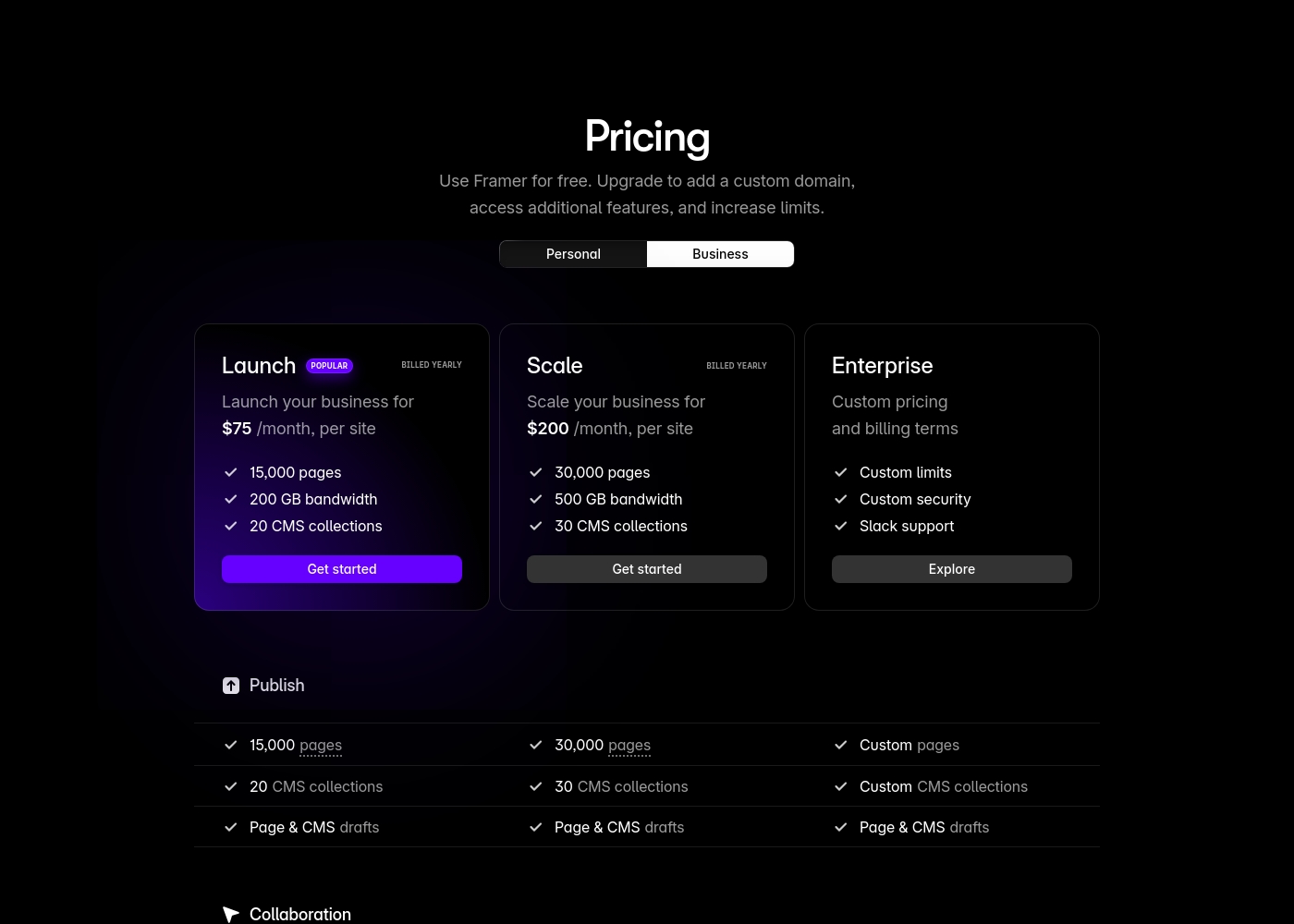
Framer costs between $75 and $200 per month (billed yearly) with two fixed-price plans: Launch at $75/month and Scale at $200/month, plus a custom Enterprise option.
Framer offers a Free plan to let you start designing right away. When you are ready to add a custom domain and access advanced features, you can choose from these paid business offerings.
Launch (Popular Business Plan)
Price: $75/month, per site (billed yearly) Websites Supported: Per site Best For: Launching a business site or marketing stack Refund Policy: 14-day refund eligible for EU and Turkey residents Other Features:
- 15,000 pages, 20 CMS collections
- 200 GB bandwidth, 50GB file storage
- Password protect, Custom code, Cookie banner
- Up to 10 editors (additional editors $40/month)
- 10 CMS collections
- 1,000 pages
- 5MB file uploads
- Free locale to try
- 15,000 pages
- 20 CMS collections
- 200 GB bandwidth
- 50GB storage
- 90 day version history
- 30,000 pages
- 30 CMS collections
- 500 GB bandwidth
- 100GB storage
- 120 day version history
- Custom limits and security
- Premium CDN and hosting
- Unlimited analytics and redirects
- Dedicated Slack support and team training
- SSO for editors and sites
All premium plans automatically include key features like the website builder, robust hosting, and expert support. Review the options below to figure out which approach is right for your project whether you DIY or choose a custom-built solution.
Premium Subscription
Best For: Small businesses, Professional services, Artists & Designers, SaaS, Non-profit, Personal Other Features:
- No code website builder
- Advanced Analytics (GDPR compliant)
- AI tools for writing and refinement
- Free custom domain and email (with annual subscription)
- SEO tools including keyword research by Semrush
- Unlimited draft sites and pages
This core subscription level is great if you want to build and manage a new, high-performing website yourself. It gives you immediate access to powerful tools like the AI writer and shared team collaboration features, helping you focus entirely on your online growth.
- No code website builder
- Advanced Analytics
- AI tools for copy
- Search engine optimization (SEO)
- Blog and unlimited posts
Pricing Notes
- Framer's listed prices are stable, but users complain about deceptive, high add-on costs for localization and extra editors ($40/month).
- PageCloud does not publish its premium subscription pricing; users select a plan only when ready to publish their free-built site.
- Framer employs complex usage limits related to bandwidth and CMS collection counts, which can trigger mandatory upgrades.
- PageCloud's free tier allows indefinite draft building, making it accessible for testing before commitment.
Pricing Head-to-Head
User Reviews
Framer generates highly polarized feedback, reflected in its low Trustpilot standing. Users generally praise the platform’s powerful features and the impressive technical capabilities for designers, noting its potential as a beautiful site builder.
However, the external criticism mainly centers on poor User Experience (UX), which many describe as clunky, complicated, and unintuitive, making even simple tasks frustrating 😡. A significant number of reports highlight constant bugs and half-baked features impacting overall reliability.
The UI/UX is truly terrible, clunky, and overly complicated. I’ve been in web design for eight years, and this is the least intuitive platform I have ever used. Seriously, they need to hire a new designer quickly.
PageCloud receives polarized feedback, though many users appreciate its core value: total design flexibility without coding. The drag-and-drop editor is highly praised, providing creative freedom often missing in template-driven platforms.
Users frequently highlight the exceptional customer support, describing the team as responsive, approachable, and truly helpful, even calling it "second to none." However, the platform faces criticism regarding reliability. Some early reviewers reported significant technical instability and complained the editor can be "buggy," causing elements to jump or change themselves.
The platform is simple to use and very designer friendly, capable of so many cool things like animated buttons. They also have the best customer support around. The team is always available and happy to help customers.
Our Verdict
Choosing between Framer and PageCloud is largely a battle of complexity versus simplicity. Framer is built for high-performance visual designers craving precision and control. PageCloud is the intuitive tool for business owners focused on easy conversions and great support. Your technical comfort level and budget tolerance are the core deciding factors here. Framer’s superpower is its speed and visual design fidelity, especially for those familiar with Figma. It lets designers build complex, custom sites and publish them instantly, skipping necessary developer handoffs. The integrated AI Wireframer accelerates the initial layout process dramatically, perfect for agencies needing rapid deployment. PageCloud excels by offering total design freedom through an incredibly intuitive drag-and-drop editor. This system is beginner-friendly and requires absolutely no coding knowledge for full customization. Users consistently praise PageCloud's outstanding, responsive customer support, which is critical for non-technical users. The major deciding factor revolves around specialized features versus user experience. PageCloud is the reliable choice if you need intuitive design, integrated e-commerce, and responsive support. However, Framer offers integrated A/B testing and deep localization capabilities, but its steep learning curve frustrates many users. We recommend PageCloud for most small businesses and marketers prioritizing ease-of-use and reliability. Choose Framer only if you are a professional designer accustomed to complex visual tools and prioritize design fidelity above all else.
Frequently Asked Questions
Which platform is easier for beginners, Framer or PageCloud?
PageCloud is widely considered much easier for beginners due to its intuitive drag-and-drop system. Framer is noted by users for having a steep learning curve and a complicated, sometimes clunky, user interface. If you value simplicity, choose PageCloud.
Which tool provides better customer support, Framer or PageCloud?
PageCloud is the clear winner for support quality, with users often calling it excellent and responsive. Framer support is repeatedly described as slow, difficult to access, and relies heavily on unhelpful AI bots. PageCloud offers a better experience.
Does Framer have integrated e-commerce like PageCloud does?
No, Framer focuses on high-performance website publishing and lacks dedicated e-commerce features. PageCloud offers comprehensive e-commerce add-ons, allowing you to manage inventory and sell across social channels like Amazon and TikTok.
Is Framer truly handoff-free for designers?
Yes, Framer’s core value is enabling designers to ship daily updates without development handoffs. This ensures high-performance sites are deployed quickly using designers' existing design principles.
How do PageCloud's and Framer's pricing models differ?
Framer publishes its base prices ($75–$200/mo) but has extra costs, such as $40/month per extra editor. PageCloud does not publish its premium pricing, requiring customers to inquire about costs directly before publishing.
Can I perform A/B testing within PageCloud or Framer?
Framer offers integrated A/B testing and click tracking via its Advanced Analytics add-on. PageCloud features powerful conversion tools like popups but does not explicitly list built-in A/B testing capabilities.
Ready to Choose?
Both tools have their strengths. Choose based on your specific needs.