Format vs Pixpa
Format and Pixpa both excel at building stunning portfolio websites for visual artists. Format is the professional toolkit focused on deep customization and integrated client workflow management. Pixpa counters with incredible affordability and unbelievably responsive 24/7 customer support. The choice rests on whether you prioritize unique design flexibility or budget and service quality.
Best for: Filmmakers needing dedicated, secure hosted video capacity up to 120 minutes, Photographers requiring integrated client contracts and secure file transfer workflows
Best for: Budget-conscious artists seeking a professional portfolio starting at $5/month, Users prioritizing fast, hassle-free 24/7 technical support and expert help
Flexible creative tools, serious billing risks.
We recognize Format offers strong customization and an easy-to-use platform ideal for creative portfolios, especially with its integrated client tools. However, the recurring and severe complaints regarding unauthorized billing, price increases without notice, and unclear checkout practices are highly concerning. Overall, we recommend caution until core business integrity issues are proven solved.
Pros
- Intuitive, easy-to-use interface for creative professionals.
- High level of website customization and design flexibility.
- Integrated client management tools (contracts, galleries, file transfers).
- Robust e-commerce capabilities with low commission on high-tier plans.
Cons
- Serious, recurring reports of unauthorized billing and payment issues.
- Pricing is often described as too high compared to alternatives.
- Customer support responsiveness is inconsistent and often relies on 'robots' for complex issues.
- Reports of 'bait and switch' sales tactics regarding included services.
Exceptional Support, Inconsistent Reliability
We find Pixpa offers genuinely responsive, world-class customer support and highly affordable plans, positioning it well for artists and simple portfolio users. However, we noted persistent issues with core functionality like mobile responsiveness and integrated store reliability which impede professional use. Overall, Pixpa is a solid choice for lightweight portfolios, but scaling businesses might experience frustrating technical limits.
Pros
- World-class customer service is remarkably responsive 24/7.
- Very affordable, all-inclusive pricing tiers start at $5/month.
- Intuitive design environment praised over competitors like Squarespace.
- Support agents often create step-by-step videos to resolve issues.
Cons
- Reports of poor mobile optimization and image scaling problems.
- E-commerce functions (like the "add to basket" option) are often buggy.
- Website reliability is inconsistent, with recurring monthly downtime reported.
- Performance issues when hosting extensive high-resolution galleries for sale.
AboutFormat
Format is the specialized portfolio builder designed for visual professionals. This includes photographers, filmmakers, illustrators, artists, architects, and designers. It offers all the tools you need to support your creative endeavors in one powerful platform. You will find a professional online portfolio, integrated client management, and robust e-commerce capabilities. Best of all, Format includes hosting and requires absolutely no coding to build your unique vision. ✅
AboutPixpa
Users describe Pixpa as a top-notch web service that just works. Its primary focus is on usability, offering design tools and a consistent User Interface (UI) that is intuitive. Designs are simple and clean, making site creation approachable. Furthermore, the service carries the distinction of being Top Rated for 11+ Years, reflecting proven quality and reliability. ✅
Highlights
Feature Comparison
Features Overview
We highlight the main differences and pick a winner for each feature.
Pricing Affordability
Pixpa is significantly cheaper, specializing in highly affordable entry-level pricing.
Format starts at $8 per month when customers commit to an annual plan. Format's Pro Plus top tier is still quite reasonable at $13/month annually. Pixpa offers a remarkable starting point at just $5 per month when billed yearly. Its Advanced top plan is only $21 per month, offering substantial long-term savings. Pixpa is the undisputed champion for budget-conscious users prioritizing the lowest monthly cost. Format bundles advanced, niche features at a higher price point. If cost is your primary barrier, Pixpa allows you to launch a complete, professional site very cheaply.
Creative Customization
Format offers unique, deep design control through its proprietary Flex Block tool.
Format provides over 90 themes and the Flex Block tool for maximal design freedom. Flex Block lets users drag, drop, scale, and overlap elements for truly unique layouts. Pixpa uses 200+ premium templates for simple, quick site generation. Pixpa focuses on clean, consistent design rather than deep, advanced layout tinkering. Format is geared toward creatives who require an unconventional portfolio look that stands out. Pixpa provides immediate professional polish without a steep learning curve. If your brand demands custom CSS or complex graphic arrangement, Format is the more powerful tool.
Client Workflow Tools
Format bundles full client management including contracts, which Pixpa lacks.
Format offers an integrated client workflow with contracts, CRM Light, and secure file transfers up to 10 GB. This manages the client process end-to-end within the platform. Pixpa provides excellent dedicated client galleries for sharing and proofing work. However, Pixpa requires third-party solutions for secure contract management and bulk file transfers. For photographers engaging in secured client work, Format simplifies the entire business administration side. Pixpa requires users to piece together solutions for necessary legal documents. Automation like secure contracts saves hours of administrative time, making Format a stronger business tool.
Customer Support
Pixpa has 'unbelievably responsive' support, consistently outshining Format’s team.
Format provides 24/7 customer support via its team of industry professionals, with faster Priority Support in Pro Plus. However, user reviews cite inconsistent responsiveness and slow resolutions. Pixpa constantly receives overwhelming praise for its world-class, 24/7 support via live chat. Agents often create custom, step-by-step videos to resolve complex issues quickly. If you need reliability in technical help, Pixpa’s support is a key differentiator and selling point. Format's support experience is sometimes reported as frustratingly slow. Pixpa ensures beginners and professionals get immediate, high-quality assistance when something goes wrong.
Hosted Media Limits
Format explicitly supports high-capacity video hosting, a crucial feature for filmmakers.
Format explicitly provides up to 120 minutes of hosted video on its Pro Plus plan. This ensures high-quality streaming for videographers without external links. Pixpa does not state any specific limits or capacities for direct hosted video content. Users likely must link out to sites like YouTube or Vimeo. Format is crucial for filmmakers who need private, secure hosting for pitches or client reviews. Pixpa's solution may impact branding and load times with external embeds. For high-resolution photography, Format offers up to 1TB of image storage on top plans.
Learning Curve
Pixpa is widely praised for its intuitive simplicity, while Format is more complex.
Format’s Flex Block tool and Custom Code access offer power but require more time to master complex layouts. Setting up a truly unique site demands attention. Pixpa is frequently described as having an intuitive, clean UI that is easier than Squarespace. Launching a site quickly with simple steps is Pixpa’s strength. Beginners will find the simplicity of Pixpa to be significantly less frustrating. Format's advanced tools are aimed at experienced designers. Pixpa gets you live and functional much faster if heavy customization is not your goal.
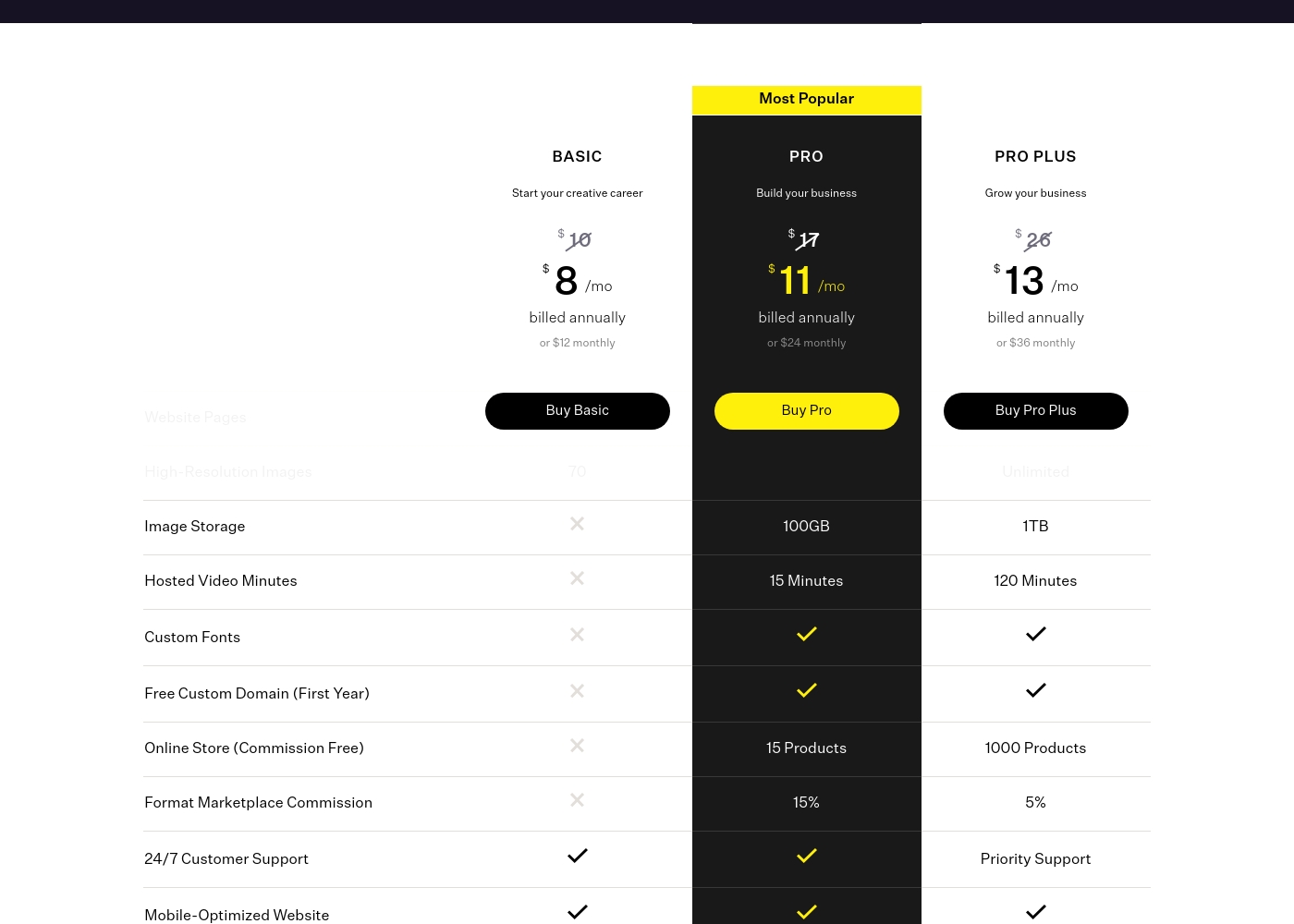
Format costs between $8 and $13 per month when billed annually with three plans: Basic at $8/month, Pro at $11/month, and Pro Plus at $13/month.
Taking a closer look at the options will help you decide which one best suits your current needs.
Basic
Price: $8/month billed annually or $12 monthly Best For: Start your creative career Refund Policy: 30-day money-back guarantee for yearly plans Other Features:
- 10 Website pages and 70 High-Resolution images
- 2 GB file transfers and 10 Client Galleries
- 24/7 Customer Support and Mobile-Optimized Website
- CRM Light, Client Contracts, and Gallery Password Protection
- 10 Website Pages
- 70 High-Resolution Images
- 10 Client Galleries
- 2 GB File Transfers
- CRM Light, Contracts, and Gallery Password Protection
- Unlimited Website Pages
- 1500 High-Resolution Images
- 100GB Image Storage, 15 Minutes Hosted Video
- 50 Client Galleries, 5 GB File Transfers
- Online Store (15 Products), 15% Marketplace Commission
- Unlimited High-Resolution Images
- 1TB Image Storage, 120 Minutes Hosted Video
- Online Store (1000 Products), 5% Marketplace Commission
- 250 Client Galleries, 10 GB File Transfers
- Priority 24/7 Customer Support
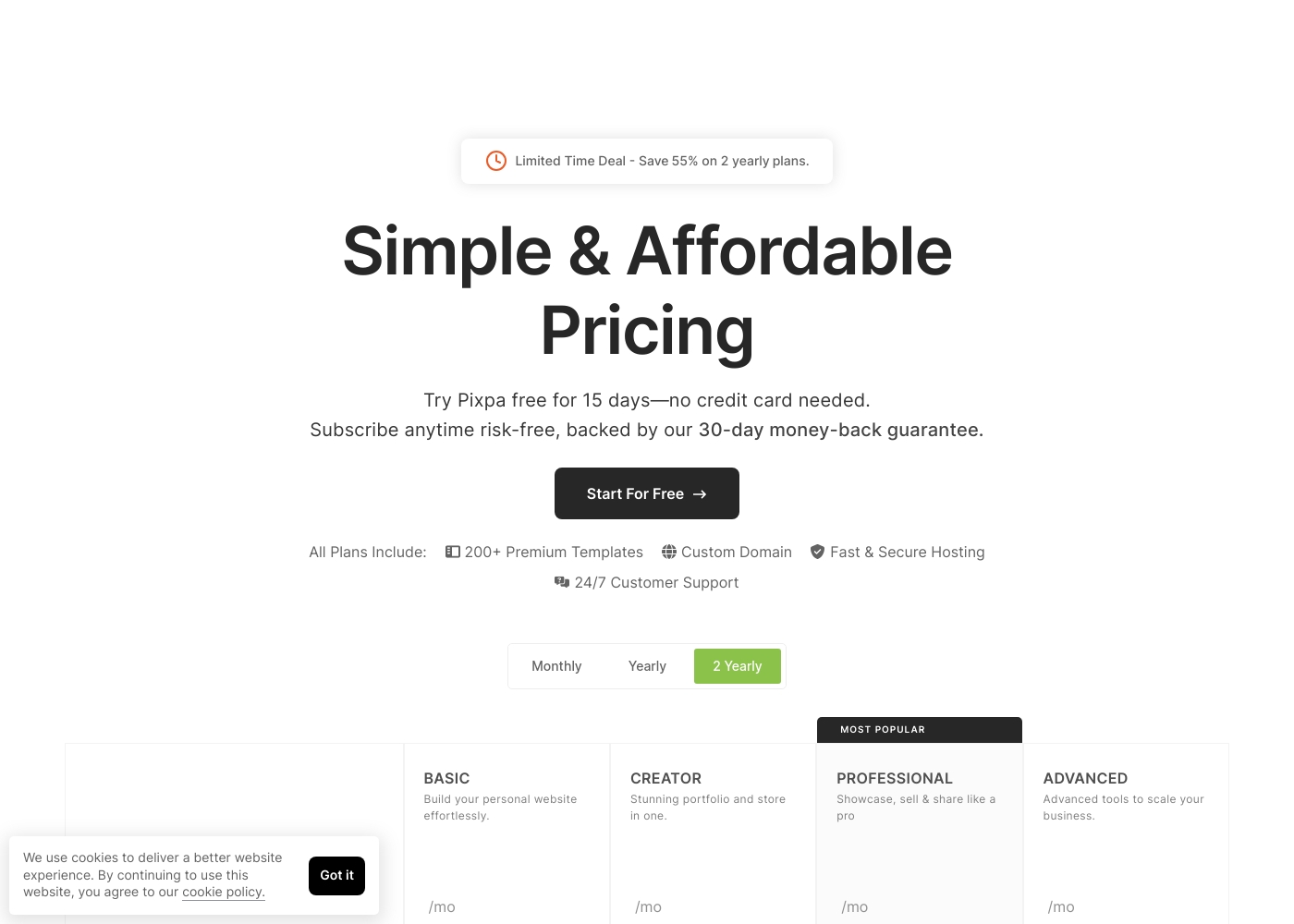
Pixpa costs between $5 and $21 per month (when billed annually) with four main plans: Basic at $5/mo, Creator at $12/mo, Professional at $18/mo, and Advanced at $21/mo.
Pixpa offers all-inclusive, affordable plans to handle your full website, store, blog, and client galleries in one place.
Basic
Price: $5/month (billed yearly) or $8/month (billed monthly) Best For: Building your personal website effortlessly Refund Policy: 30-day money-back guarantee Other Features: 200+ Premium Templates, Custom Domain, 24/7 Customer Support
- Build your personal website effortlessly
- Includes 200+ Premium Templates
- Custom Domain support
- 24/7 Customer Support
- Stunning portfolio and store in one
- Includes 200+ Premium Templates
- Custom Domain support
- Fast & Secure Hosting
- Showcase, sell & share like a pro
- Most Popular plan
- Includes 200+ Premium Templates
- 24/7 Customer Support
- Advanced tools to scale your business
- Includes 200+ Premium Templates
- Custom Domain support
- Fast & Secure Hosting
Pricing Notes
- Pixpa is significantly more affordable, starting at $5/month annually compared to Format's $8/month entry tier.
- Format’s Pro Plus plan reaches $36/month (monthly billing) while Pixpa’s Advanced tier is capped at $27/month (monthly)
- Format's 30-day money-back guarantee only applies to yearly plans; Pixpa offers the guarantee on all new subscriptions.
- Pixpa provides education discounts up to 55%; Format does not advertise similar specialized pricing.
Pricing Head-to-Head
User Reviews
Format receives highly polarized feedback, reflected by its extremely low score on Trustpilot. On the positive side, some users compliment the easy onboarding, the customizable website interface, and the helpful, responsive live chat feature.
Users find the platform generally beginner-friendly. However, significant concerns center around billing practices and financial transparency.
Amazing customer support and an easy product. Their live chat works very well, and the support team is kind and helpful. The websites are fully customizable and very beginner-friendly, though the prices feel a bit steep for the services provided.
Pixpa’s external feedback demonstrates a clear split between its stellar customer service and technical reliability issues. Many users consistently praise the support staff, describing the team as “truly remarkable” and incredibly responsive via simultaneous live chat and email. They often provide quick, effective resolutions, with some agents creating step-by-step video guides to solve complex problems.
However, users frequently cite significant technical shortcomings. The most recurring complaints revolve around necessary mobile optimization, with reports of uploaded images becoming stretched or badly rendered on phones. Reliability is also a key concern, as some users experienced their websites breaking down monthly or having downtime that was dismissed by initial support responses. E-commerce functionality also needs improvement. Shoppers struggle with buggy “add to basket” options, especially on mobile, rendering the shop useless for some. While the pricing is affordable (as low as $5/month), reviewers noted performance limitations when dealing with extensive high-resolution galleries and poor SEO indexing help. It’s a platform with amazing support but noticeable technical shortcomings 🛠️.
Customer service is truly remarkable. They quickly find a resolution to your issue and go out of their way to help. Their website is much more fluid and easier to use than Squarespace.
Our Verdict
Choosing between Format and Pixpa depends entirely on your business needs and trust threshold. Both platforms build world-class visual portfolios, but they serve different priorities. Format is the superior professional toolkit for deep client integration and media specialization. If your business depends on secure client contracts and hosted video up to 120 minutes, Format is built for you. However, proceed with caution: Format faces serious, recurring user complaints regarding unauthorized billing practices. Pixpa is the clear winner for value and foundational reliability in customer service. It starts at an outstanding $5/month and boasts unbelievably responsive 24/7 support. Pixpa’s simple UI means faster launch times for less experienced users. The deciding factor is complexity vs. cost and trust. If you need powerful, unique customization and media hosting, choose Format. If you want maximum affordability, a simple platform, and guaranteed support quality, Pixpa is the safer, easier bet. Pick Pixpa for peace of mind, or Format for specialized portfolio power.
Frequently Asked Questions
Which is cheaper for a long-term commitment: Format or Pixpa?
Pixpa is significantly more affordable across all plan tiers. Pixpa starts at $5 per month when billed annually. Format's entry-level annual plan costs $8 per month, making Pixpa the cheaper option.
Can I get reliable, fast customer support from Format or Pixpa?
Pixpa offers superior customer support that is universally praised as responsive and helpful. Format offers 24/7 support, but user feedback suggests inconsistent quality and long wait times for complex issues.
Which tool is better for integrated client workflow, including contracts?
Format is better for professional client management workflow. Format includes built-in secure contracts, CRM, and file transfer limits up to 10 GB. Pixpa focuses on dedicated client galleries but lacks built-in contract features.
Does Pixpa have the same high-capacity video hosting as Format?
No. Format explicitly offers high-quality hosted video capacity up to 120 minutes on the Pro Plus plan. Pixpa does not advertise this feature, suggesting reliance on external video platforms.
Is the customization process easier in Format or Pixpa?
Pixpa is easier for beginners, utilizing clean, functional templates. Format features the advanced Flex Block tool which allows for complex, unconventional layouts, but this requires a steeper learning curve.
Which platform carries greater risk based on user reviews: Format or Pixpa?
Format carries a greater trust risk due to pervasive reports of unauthorized billing and payment issues. Pixpa's main user complaints involve technical execution, like buggy e-commerce and poor mobile optimization.
Ready to Choose?
Both tools have their strengths. Choose based on your specific needs.