FlowMattic vs TaskMagic
FlowMattic and TaskMagic approach automation from totally different angles. FlowMattic is a deeply powerful WordPress plugin with predictable annual pricing. TaskMagic is a clever web action recorder, perfect for automating tasks lacking APIs. Your choice depends heavily on where your workflow lives.
Best for: Agencies managing automation for 5 to 100 client WordPress sites, E-commerce businesses needing automated order fulfillment and syncing
Best for: Individual users needing to automate specialized web tasks without an API, Teams looking for a zero-cost entry point into web recording automation
WordPress automation with budget-friendly power.
We found FlowMattic to be a highly competitive WordPress automation tool, offering deep integration and powerful features like unlimited task execution. Overall, it delivers exceptional value backed by highly personalized support, making it an excellent choice for businesses aiming to reduce reliance on expensive SaaS platforms.
Pros
- Unlimited task executions included in all annual pricing tiers.
- Outstanding and highly responsive developer support team.
- Cost-effective replacement for usage-based SaaS automation tools.
- Deep, native integration within the WordPress ecosystem.
Cons
- Some reports of instability and bugs noticed on production sites.
- Limited structured public documentation or manuals available.
- Relies heavily on developer personal involvement for complex troubleshooting.
Pros
Cons
AboutFlowMattic
FlowMattic is a powerful automation tool trusted by over 7,582 WordPress professionals worldwide. It helps businesses manage their vital operations effortlessly. The platform acts as an essential, reliable, and future-proof tool for anyone running a business on WordPress. Users find that it easily replaces other complex automation systems thanks to its seamless integration. ✅
Whether you run an agency, an e-commerce store, a SaaS platform, or an educational platform, FlowMattic provides the dedicated automated workflows needed for sustainable growth.
AboutTaskMagic
✨ TaskMagic is an AI automation platform for anyone who wants to save time. It works for solopreneurs, teams, and agencies. If you can explain a manual task in everyday language, TaskMagic can automate it. It connects to tools you already use, like Gmail or Salesforce, and it automates any website, even without an API. You just describe the goal, and it builds the automation for you.
Highlights
Feature Comparison
Features Overview
We highlight the main differences and pick a winner for each feature.
Core Technology
FlowMattic is a WordPress plugin; TaskMagic automates web interactions externally.
FlowMattic integrates deeply inside the WordPress ecosystem. It leverages server power for API and data workflows. Users retain crucial control and ownership over all their automation data. TaskMagic simulates human clicking, typing, and copying actions. It’s perfect for automating steps in web apps that lack an open API. This core difference drives the entire functional comparison. Decide if you need internal server automation or external web interaction.
Pricing Model
FlowMattic features predictable annual pricing; TaskMagic uses monthly subscriptions.
FlowMattic offers annual subscriptions from $129 to $449 based on site count. This provides great budget certainty for growing agencies. TaskMagic uses monthly plans ranging from $0 up to $49 per month. Its low barrier to entry is excellent for individuals. FlowMattic also offers a money-back guarantee, which TaskMagic doesn't explicitly state. FlowMattic's unlimited tasks for a fixed yearly fee deliver exceptionally high value.
Browser Automation
TaskMagic records browser actions; FlowMattic relies on Webhooks and data parsing.
TaskMagic's strength is cloning yourself to handle web tasks manually. It records complex actions like form log-ins and data entry. FlowMattic focuses on server communications, API endpoints, and complex data manipulation. It is not designed to click buttons in external browsers. The top TaskMagic tier specifically includes crucial browser-enabled automation features. TaskMagic is the clear choice for tasks that traditional automation tools fail to execute.
Data Handling
FlowMattic has advanced parsing and transformation; TaskMagic provides basic flow logic.
FlowMattic provides dedicated features like the CSV Parser and powerful Data Transformer. You can manage complex datasets using its Lookup Table functionality. TaskMagic offers simple logic steps like Filter and Math to manage the process flow. Its focus is on mimicking interaction success, not complex data preparation. If you need to cleanse, structure, and manipulate data heavily, FlowMattic is superior. FlowMattic supports mission-critical data processing workflows better.
Ease of Setup
TaskMagic uses simple record-and-replay; FlowMattic requires deeper technical setup.
TaskMagic allows you to create an automation by pressing record and performing the steps. Fixing a TaskMagic flow is easy by quickly re-recording the steps. FlowMattic requires configuring API access, multi-step sequences, and understanding developer tools. It has an AI Workflow Generator, but the initial technical hurdle is higher. Beginners seeking immediate results will find TaskMagic’s record function much more approachable.
Scaling and Stability
FlowMattic has explicit stability controls; TaskMagic relies on quick flow updates.
FlowMattic includes Advanced API Rate Limit Handling for high-volume use. It offers Custom Database Tables to manage complex scaling challenges. TaskMagic suggests re-recording the flow instantly if changes break the automation. FlowMattic is designed to manage intense, continuous server workloads reliably. For mission-critical tasks running thousands of times, FlowMattic offers stronger infrastructure assurances.
Customer Support
FlowMattic is known for outstanding developer support; TaskMagic support quality is unclear.
FlowMattic users consistently praise the responsive and dedicated developer support team. Reviewers mention personal help solving deep technical hurdles effectively. TaskMagic does not publish explicit response times or SLAs in the available data. When complex workflows break, personalized developer support is extremely valuable. FlowMattic is the safer choice if reliable, responsive support is a requirement.
Future-Proofing
FlowMattic emphasizes constant evolution; TaskMagic focuses on easy flow updating.
FlowMattic boasts constant evolution and responsiveness to user suggestions for new integrations. It provides an AI Workflow Generator to speed up creation significantly. TaskMagic ensures you can quickly re-record your automation if the target website layout changes. This agility ensures minimal downtime for browser flows. Both tools focus on mitigating the risks of automation breakages effectively.
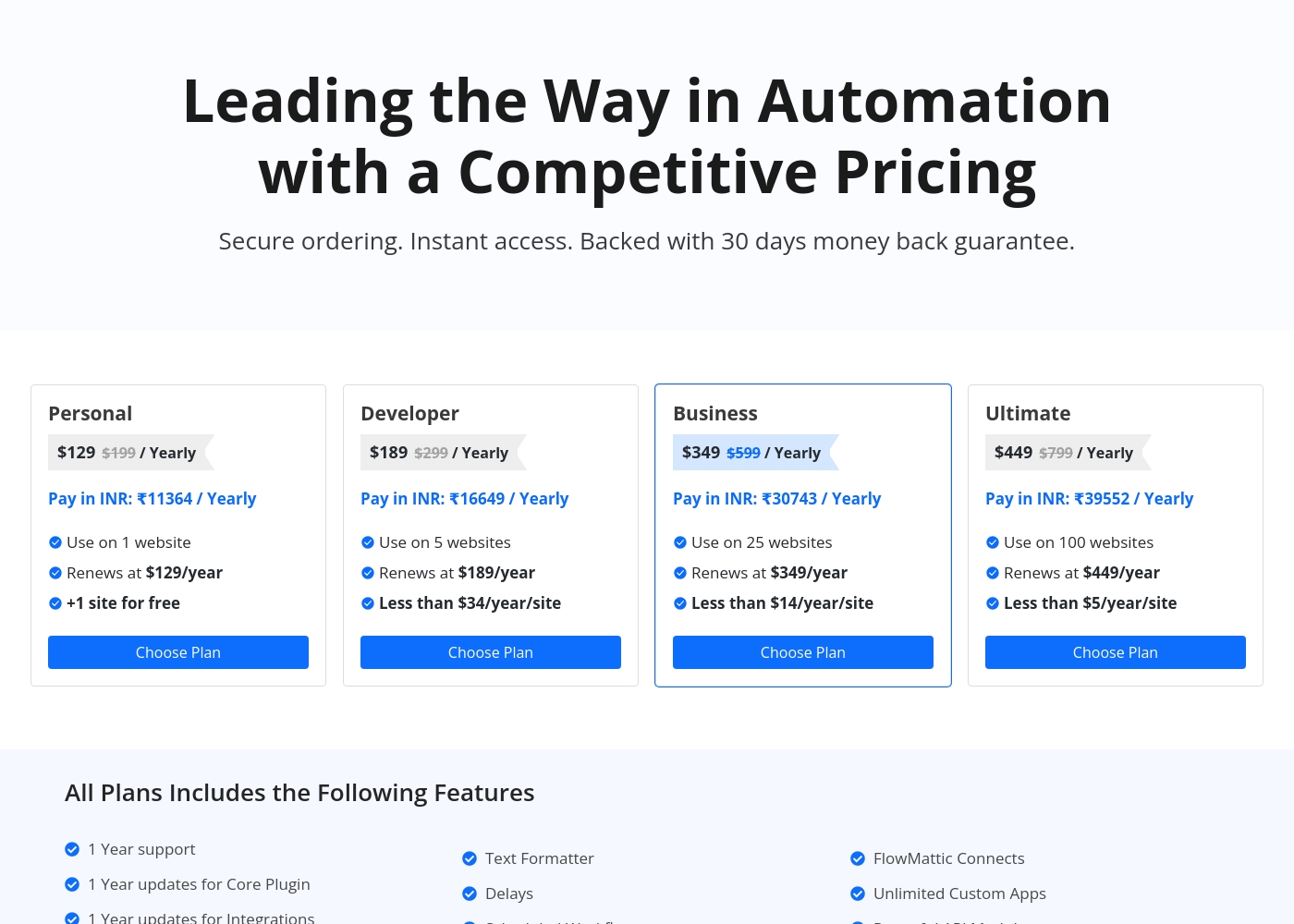
FlowMattic costs between $129 and $449 per year with four plans: Personal at $129, Developer at $189, Business at $349, and Ultimate at $449.
Let's explore what each plan offers for your automation needs.
Personal
Price: $129 / Yearly (Renews at $129/year) Websites Supported: 1 website (+1 site for free) Refund Policy: 30-day money-back guarantee Other Features: 1 year support and updates, Unlimited Custom Apps, Powerful API Module, Unlimited Task Executions, Powerful MCP Server
- Use on 1 website (+1 site for free)
- 1 Year support
- 1 Year updates for Core Plugin and Integrations
- Unlimited Task Executions
- Powerful MCP Server
- Use on 5 websites
- Renews at $189/year
- Instant Webhook Iterator
- Multi-Step Workflows
- AI Workflow Generator
- Use on 25 websites
- Renews at $349/year
- FlowMattic Connects
- Webpage Parser
- CSV Parser
- Use on 100 websites
- Renews at $449/year
- Unlimited AI Assistants
- Powerful API Module
- Custom Database Tables
TaskMagic pricing: TaskMagic offers straightforward monthly subscription plans starting at $29 per month. Both plans include full access to apps and agents with predictable credit systems and no per-task fees or hidden costs. Plans range: 404

Pricing Head-to-Head
User Reviews
FlowMattic maintains an excellent 4.6-star rating on Trustpilot based on dozens of reviews, with users consistently praising its value and exceptional customer support. Many reviewers highlight the responsiveness and dedication of the development team, noting that suggestions are often implemented quickly.
A key competitive advantage frequently mentioned is the pricing structure: FlowMattic offers unlimited task executions for a fixed annual fee or lifetime deal, making it extremely cost-effective and a great replacement for usage-based automation tools like Zapier or Pabbly. Users find the plugin powerful, intuitive, and constantly evolving with new integrations.
The support and the product are absolutely amazing. We appreciate that you don’t pay per task execution, and their available one-time purchase option makes FlowMattic incredibly valuable for the price.
Our Verdict
Choosing between FlowMattic and TaskMagic requires asking one key question. FlowMattic generally leads for professional WordPress automation due to its predictable scaling. TaskMagic is amazing for solving highly specific, tricky web issues that lack APIs. FlowMattic’s superpower is providing fixed annual pricing for unlimited tasks across up to 100 websites. It offers advanced API handling, data parsing, and an AI workflow generator. This makes FlowMattic the reliable choice for data-heavy e-commerce and agency operations. TaskMagic’s superpower is democratizing web automation using simple record-and-replay technology. It handles tasks like complicated logins, clicking, and typing that FlowMattic simply cannot do. TaskMagic allows you to visually automate tasks and update flows quickly. The deciding factor is your platform: If your success depends on deep, high-volume automation inside WordPress, FlowMattic is essential. If you spend time manually interacting with external web apps, TaskMagic saves that time immediately. TaskMagic has a valuable Free Forever plan to test your needs easily. For agencies and WordPress infrastructure, FlowMattic is the reliable heavyweight for scaling. For automating tricky, repetitive web tasks through recording, TaskMagic reigns supreme. Both FlowMattic and TaskMagic offer excellent unique value to their specific users.
Frequently Asked Questions
Which is better for high-volume, cost-effective automation: FlowMattic or TaskMagic?
FlowMattic is generally more cost-effective for high volume. It offers unlimited task executions for a fixed annual fee. TaskMagic charges monthly, but also advertises unlimited steps and tasks. FlowMattic provides better long-term budget predictability.
Can TaskMagic handle complex data transformations like FlowMattic?
FlowMattic offers dedicated modules like Data Transformer and CSV/Webpage Parser. TaskMagic focuses on interaction and provides basic logic steps only. For heavy data cleanup and manipulation, FlowMattic is the better-featured tool.
Do I need to install WordPress to use FlowMattic?
Yes, FlowMattic is a native WordPress plugin designed for deep integration. It requires WordPress 5.0 or later to function correctly. TaskMagic is an external tool and does not require WordPress for use.
Which software has better customer support reviews?
FlowMattic has earned outstanding reviews specifically praising its responsive developer support. TaskMagic does not publish explicit support details, making FlowMattic the safer bet for quick help.
Can I try TaskMagic for free, or does it have a trial like FlowMattic?
TaskMagic offers a Free Forever plan at $0 per month to explore core features. FlowMattic provides a complimentary test site and a 30-day money-back guarantee instead of a permanent free tier.
Which tool is meant for tasks that don't have an API available?
TaskMagic is explicitly designed for this scenario. It automates web actions like typing and clicking, bypassing the need for an API. FlowMattic primarily uses APIs and Webhooks for its server workflows.
Ready to Choose?
Both tools have their strengths. Choose based on your specific needs.