Flowith vs Quadient
Flowith and Quadient are for totally different people. Flowith is a visual AI workspace for creators and thinkers. Quadient automates big business finance and communication workflows. It's like comparing a creative sandbox to a factory assembly line.
Best for: Solo entrepreneurs and creators needing a visual AI workspace, Students and researchers organizing complex projects and notes
Best for: Enterprise finance teams automating AP and AR workflows, Customer communications managers handling omnichannel document delivery
Visual Thinking Meets AI Execution
Flowith presents a compelling platform that aims to bridge creative thinking and AI-powered execution. It offers a unique Canvas interface and a powerful agent system for managing knowledge and tasks. Overall, we find it to be a promising and innovative tool for creators and knowledge workers, though its real-world value will depend on user experience and support.
Pros
- Offers a unique Canvas for visual idea mapping and connection.
- Combines a Knowledge Garden for unified notes and research.
- Features a next-gen AI agent (FlowithOS) for task execution.
- Scalable pricing with a free Starter plan available.
Cons
- Core concept (Canvas-based AI) may have a learning curve.
- No verified external user reviews are currently available.
- Pricing scales to high-cost tiers for premium access.
- Actual performance and reliability are unverified by third parties.
Powerful automation, but support concerns us.
We find Quadient offers robust tools for automating AP/AR and managing customer communications at scale. However, persistent user complaints about customer support and contract flexibility temper our recommendation. Overall, it's a capable suite for larger enterprises, but smaller teams should proceed with caution.
Pros
- Automates end-to-end AP and AR workflows.
- Strong omnichannel document creation and delivery.
- Empowers business users, reducing IT dependency.
- Scales well for high-volume, complex needs.
Cons
- Significant concerns about customer service and support responsiveness.
- Contracts and billing terms can be rigid or difficult.
- May be too complex or costly for small businesses.
- Onboarding and integration can present challenges.
AboutFlowith
Flowith is a next-generation AI platform built for creators, knowledge workers, and anyone who thinks visually. 💡 It moves beyond simple chat interfaces. At its core, it offers a Canvas to map out ideas and a powerful AI agent called FlowithOS to help you execute plans.
AboutQuadient
Quadient is a suite of process automation solutions focused on two core areas: customer communications management (CCM) and financial workflow automation. It's designed for mid-to-large enterprises that need to design, manage, and deliver personalized documents and messages across digital, print, and mobile channels, while also automating key AP and AR processes. 💡
Highlights
Feature Comparison
Features Overview
We highlight the main differences and pick a winner for each feature.
Core Interface
Flowith offers a visual Canvas for free-form thinking. Quadient uses traditional, workflow-based dashboards.
**Flowith** provides a Canvas interface where you can map, connect, and reshape ideas visually. It's designed to break free from linear chat. **Quadient** uses a more traditional interface focused on managing processes like invoice approvals or document templates. It's functional but less visually creative. The key difference is creativity vs. process control. Flowith is for exploring ideas; Quadient is for executing defined business workflows. A designer might use Flowith's Canvas to brainstorm a campaign, while an accountant uses Quadient's dashboard to approve 500 invoices.
Automation & AI
Flowith uses an AI agent (FlowithOS) for execution. Quadient automates specific business processes without a general AI agent.
**Flowith** features FlowithOS, a next-gen AI agent designed for task execution and self-improvement. It turns visual plans into actions. **Quadient** automates end-to-end accounts payable, receivable, and document delivery. It uses rules-based logic, not a conversational AI agent. Flowith's AI is broad and generative. Quadient's automation is narrow and process-specific. If you want AI to help you write code from a diagram, use Flowith. If you need to automate invoice matching for 1,000 vendors, use Quadient.
Target User
Flowith is for creators and visual thinkers. Quadient is for enterprise finance and communications teams.
**Flowith** is built for creators, students, knowledge workers, and anyone who thinks visually. Its community claims over 1 million users. **Quadient** is designed for mid-to-large enterprises. It's ideal for finance teams, customer communications managers, and IT departments. The platforms serve almost opposite audiences. One is for individual creativity; the other is for large-scale business operations. A freelance writer would pick Flowith. A Fortune 500 company's AP department would pick Quadient.
Collaboration
Flowith supports concurrent work on the Canvas. Quadient offers unlimited users across the organization.
**Flowith** allows for concurrent nodes and tasks on its paid plans (e.g., 5 on Pro, unlimited on Infinite). Collaboration happens visually. **Quadient** includes unlimited users in all its plans. The focus is on workflow access and permissions for different roles in a large team. Flowith's collaboration is about shared creative space. Quadient's is about scalable operational access. A project team might share a Flowith Canvas. A whole finance department would share access to Quadient's AP system.
Knowledge Management
Flowith's Knowledge Garden unifies notes and research with AI connections. Quadient manages formal documents and communications.
**Flowith** offers the Knowledge Garden to cultivate notes, research, and projects. AI helps connect and grow this unified context. **Quadient** manages and delivers structured customer documents like bills, statements, and notices. It's a document repository, not a personal knowledge base. Flowith is for personal/team knowledge growth. Quadient is for official document lifecycle management. A researcher would build a Knowledge Garden in Flowith. A company would use Quadient to manage all its customer invoices.
Pricing Transparency
Flowith has clear, published subscription tiers. Quadient uses custom, quote-based pricing.
**Flowith** lists four clear plans: Starter ($0), Pro ($17.91), Ultimate ($42.42), and Infinite ($399.92). Prices are public. **Quadient** states pricing is customized. You must contact sales for a quote. Public details are limited to 'unlimited users' in plans. Flowith lets you self-serve and know costs upfront. Quadient requires a sales conversation for every quote. A startup can sign up for Flowith's Starter plan today. You can't do that with Quadient.
Scalability
Flowith scales with creative project complexity. Quadient is built for enterprise-scale transaction volumes.
**Flowith** scales via higher-tier plans (e.g., Infinite plan for more credits, devices, and concurrent tasks). It scales for creative workload. **Quadient** is designed to handle over 2 trillion connections annually. It scales for massive, high-volume business transactions. They scale in different dimensions. One scales for creativity; the other for transaction volume. An agency can scale its creative output on Flowith. A bank can scale its invoice processing on Quadient.
Learning Curve
Flowith's visual Canvas may have a learning curve. Quadient's enterprise tools require significant onboarding.
**Flowith** acknowledges its Canvas concept may have a learning curve for new users. It's a new way of thinking. **Quadient** is noted by external reviews to have complex onboarding that may require dedicated internal resources and planning. Flowith's curve is about adopting a new mental model. Quadient's is about implementing a complex system. Learning Flowith is like learning a new creative app. Implementing Quadient is like launching new enterprise software.
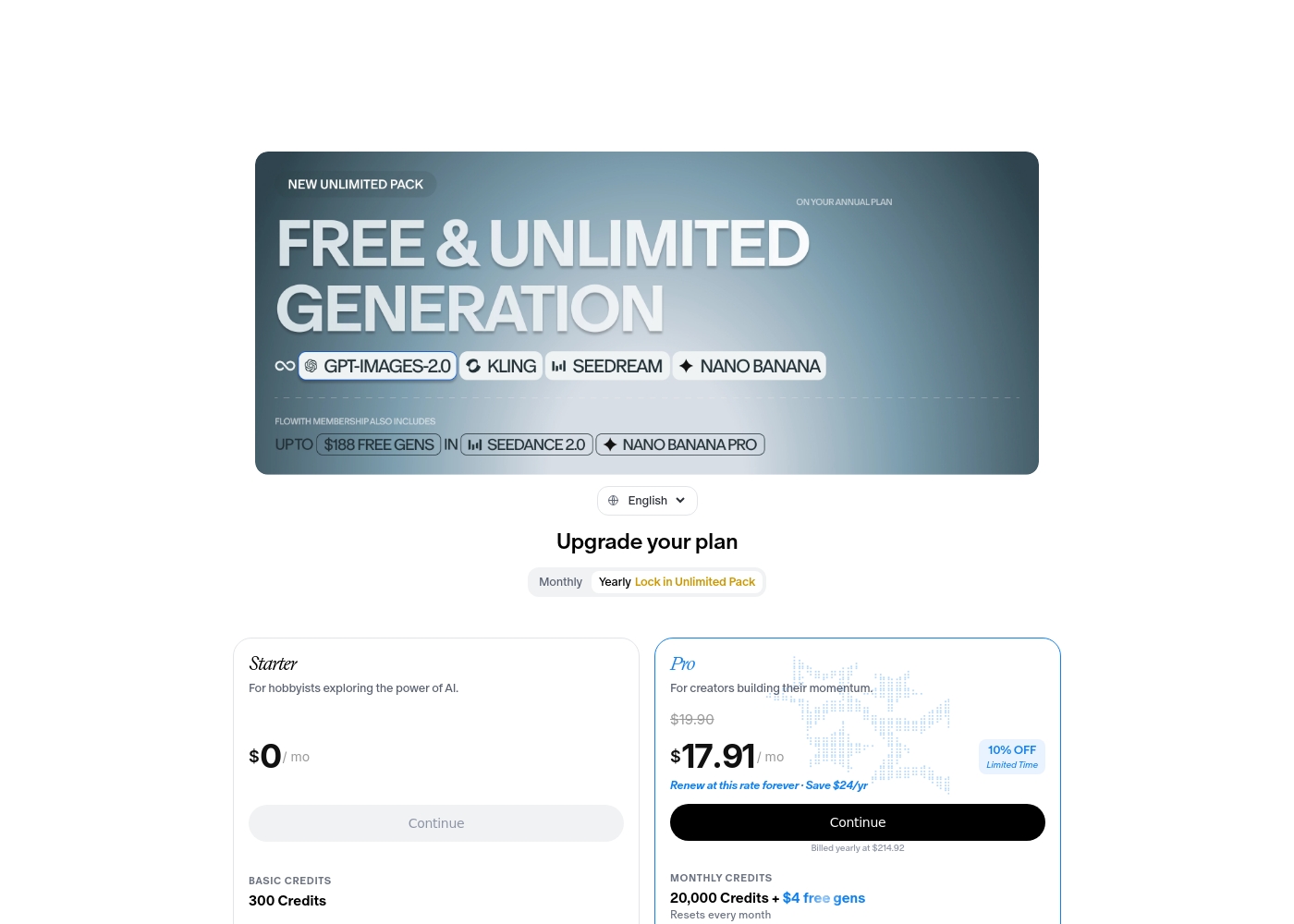
Flowith pricing: Flowith offers a range of subscription plans starting from a free Starter tier up to a comprehensive Infinite plan at $399.92 per month. Pricing scales based on credit allotments, concurrent tasks, and access to premium AI models with options for monthly or yearly billing discounts. ⚡️ Unlock the potential of AI with our flexible plans tailored for every creative need. Whether you're a curious hobbyist or a professional building momentum, we've got a perfect flow for you. Explore our comparison to find your ideal match today! 🚀✨
- Starter Plan at $0 /mo
- Pro Plan at $17.91 /mo
- Ultimate Plan at $42.42 /mo
- Infinite Plan at $399.92 /mo
- Free plan available with basic credits.
- Discounts available for yearly subscriptions.
- Different plans offer varying AI model access.
- Flexible billing to suit your flow.
- Enhanced features with premium tiers. ✨
- All major payment methods accepted.
- Credits reset monthly for paid plans.
- Unlimited mode available on select plans. ⚡️
- Support levels increase with plan tier.
- Cancellation available at any time. 🚫⚓️
- Carbon removal supported with every use. ☘️
- Dynamic rate limiting for fair use. ⚖️
- Standard and priority processing options.
- Multi-device support for seamless work.
- Commercial licensing included in paid tiers.
- Early access to Flowith OS features. 🛠️✨
- Direct access to developers for top tiers. 👨💻
- Advanced batch generation capabilities.
- High-speed processing for intensive tasks. ⚡️
- Unlimited concurrent nodes for team use. 🤝✨
- Join a global community of innovators today! 🌍🚀✨
- Ready to elevate your creativity? 🪜✨
- Select your plan and start flowing. 🌊✨
- Your journey with AI starts here. 🚀✨
- Experience the power of Flowith now! ⚡️✨
- We're here to support your growth. 🌱✨
- Unleash your imagination effortlessly. 🌠✨
- Transform your workflow with Flowith. 🔄✨
- Secure and reliable AI execution. 🛡️✨
- Flexible solutions for every budget. 💰✨
- Elevate your creativ
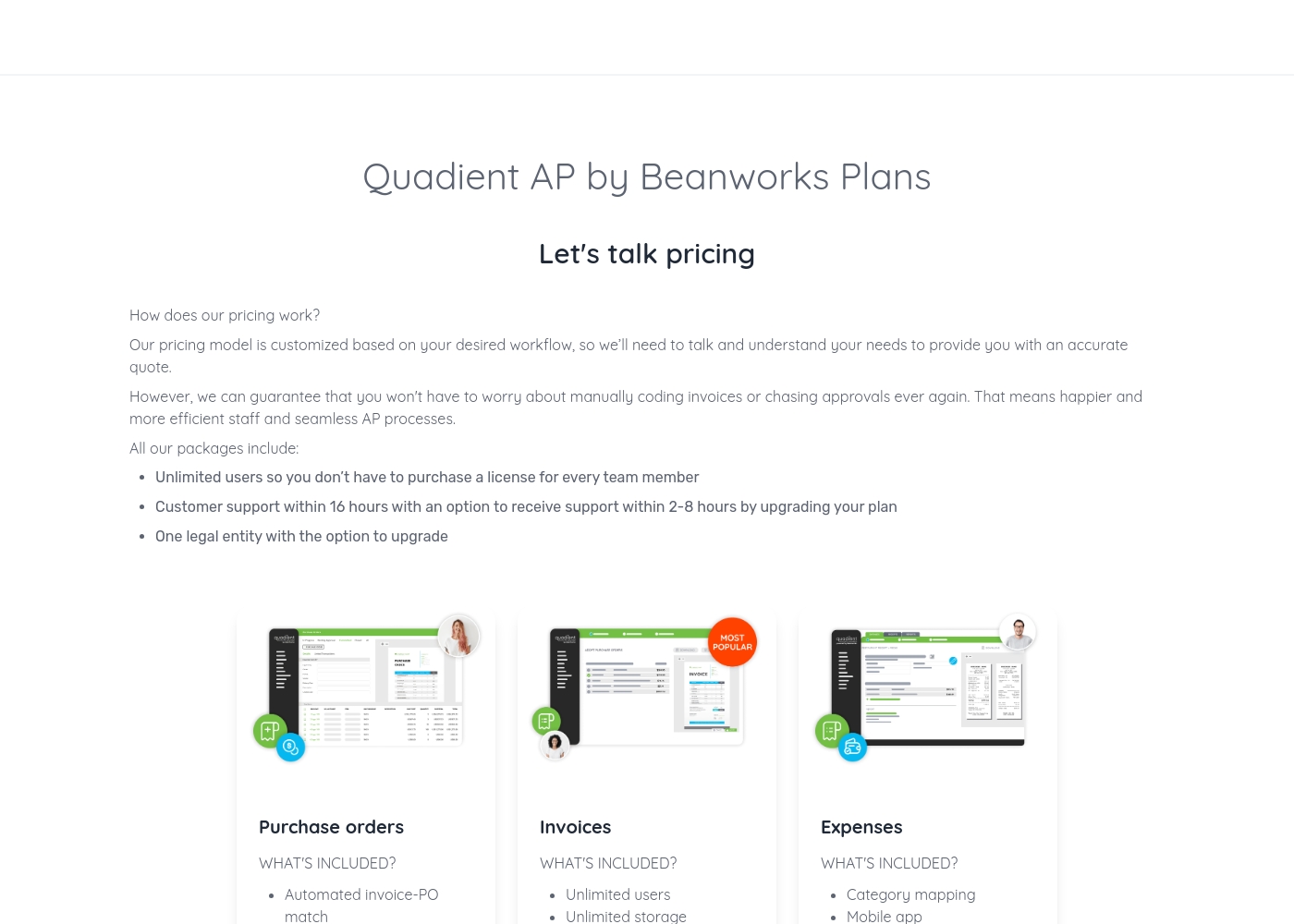
Quadient pricing: Quadient AP by Beanworks uses a custom pricing model based on your specific workflow and needs. They offer feature-specific packages for purchase orders, invoices, and expenses to ensure you only pay for what you use.
All plans include unlimited users and standard support, with the option to upgrade for faster response times or more entities. This tailored approach allows the platform to scale with your business while removing the burden of manual AP processes once and for all.
Contact them for a personalized quote today and discover how much you could save by automating your business's workflows. Their team of experts is ready to help you find the perfect solution for your accounts payable needs, whether you're a small business or a large corporation.
Pricing Notes
- Flowith's free Starter plan is a major advantage for individuals and testing.
- Quadient requires contacting sales, making cost comparison difficult upfront.
- Flowith's top tier (Infinite) is $399.92/month, which is transparent but high for individuals.
- Quadient's pricing is opaque and likely requires a significant commitment.
- Flowith offers yearly billing discounts; Quadient likely uses annual contracts.
Pricing Head-to-Head
User Reviews
Based on the provided external review snippets, we cannot synthesize a balanced summary of user sentiment from Trustpilot or Capterra. The only available snippet is a connection error page, which contains no actual user feedback, ratings, or recurring themes. Therefore, a meaningful review summary that references specific user experiences regarding accuracy, ease of use, support, pricing, or other factors cannot be constructed from the given data. 😅 We must rely solely on the website's own description for this review.
The Canvas is a game-changer for organizing my research. It's so much better than a chat window for complex projects. I can finally see how all my ideas connect visually.
External reviews for Quadient are mixed. On Trustpilot, users frequently complain about poor customer service, slow support, and billing issues, creating a frustrating experience.
💔 Some mention difficult contracts and a lack of responsiveness. However, on Capterra, the limited feedback for the Impress platform is more positive, with a user praising its document creation capabilities and template management as highly important features.
The software itself might work, but the customer service is a nightmare. Getting any help or a simple question answered takes forever. We've wasted so much time trying to get support.
Our Verdict
There's no single winner here—it depends entirely on what you're building. Flowith and Quadient serve completely different masters. 🎯 Flowith's superpower is visual thinking. It's the best tool for mapping messy ideas and letting AI help you connect the dots on a free-form Canvas. If you're a creator, student, or strategist, it's a game-changer. 🧠 Quadient's superpower is enterprise-grade automation. It turns chaotic financial and communication workflows into streamlined, repeatable processes. If you're a finance team drowning in paper, it's a lifeline. 🏭 The deciding factor is your goal. Ask yourself: Am I trying to create and explore? Or am I trying to automate and execute a defined business process? Choose Flowith if you need an AI-powered creative workspace for brainstorming, research, and project planning. Choose Quadient if you need to automate high-volume accounts payable or manage complex customer communications at scale. They're in different leagues. ⚽️ vs 🏈
Frequently Asked Questions
Which is better for small teams: Flowith or Quadient?
Flowith is generally better for small creative or knowledge teams. It has a free plan and scales for project-based work. Quadient is designed for larger enterprises and may be too complex and costly for small teams with simple needs.
Is Quadient worth the extra cost over Flowith?
They aren't direct competitors. Quadient isn't an 'extra cost' version of Flowith. You'd only pay for Quadient if you need enterprise-level AP/AR automation or CCM. For a creative AI workspace, Flowith is the relevant and more affordable choice.
Can I use Flowith for accounting or finance tasks?
Flowith is not designed for financial workflow automation. It's a visual AI workspace for ideas and knowledge. For automating accounts payable or receivable, you would need a tool like Quadient.
Does Quadient have an AI agent like Flowith's FlowithOS?
No, Quadient does not mention a general-purpose AI agent. Its automation is rules-based and specific to processes like invoice matching or document delivery. Flowith's FlowithOS is a distinct, generative AI execution tool.
Which tool has better user reviews?
Based on the provided data, Flowith has better user reviews. Its sentiment is positive (4.2/5). Quadient's reviews are mixed (3.2/5), with notable complaints about customer support and rigid contracts.
Is Flowith a good alternative to Quadient?
No, Flowith is not an alternative to Quadient. They solve different problems. Flowith is for creative ideation and knowledge work. Quadient is for automating business finance and communication processes.
Ready to Choose?
Both tools have their strengths. Choose based on your specific needs.