Flowith vs Notion
Flowith and Notion are both top productivity tools, but they take very different approaches. Flowith is all about visual thinking and AI agents, while Notion focuses on being a single, unified workspace. Here's how to pick the right one for you.
Best for: Visual thinkers and creators, Solo entrepreneurs mapping complex ideas
Best for: Small to medium teams needing an all-in-one workspace, Companies consolidating project management and wikis
Visual Thinking Meets AI Execution
Flowith presents a compelling platform that aims to bridge creative thinking and AI-powered execution. It offers a unique Canvas interface and a powerful agent system for managing knowledge and tasks. Overall, we find it to be a promising and innovative tool for creators and knowledge workers, though its real-world value will depend on user experience and support.
Pros
- Offers a unique Canvas for visual idea mapping and connection.
- Combines a Knowledge Garden for unified notes and research.
- Features a next-gen AI agent (FlowithOS) for task execution.
- Scalable pricing with a free Starter plan available.
Cons
- Core concept (Canvas-based AI) may have a learning curve.
- No verified external user reviews are currently available.
- Pricing scales to high-cost tiers for premium access.
- Actual performance and reliability are unverified by third parties.
Powerful software, risky provider.
We found Notion is an exceptionally flexible and powerful productivity tool, praised globally for its block-based editor and ability to consolidate diverse workflows. However, external evidence highlights significant failures in subscription management and support responsiveness. Overall, we advise extreme caution regarding billing procedures due to recurring reports of unauthorized charges and cancellation difficulties.
Pros
- Exceptionally powerful and versatile block-based editor.
- Effective for personal knowledge management and team use.
- Consolidates multiple specialized tools (wikis, CRMs, project management).
- Strong native AI assistance integrated throughout the workspace.
Cons
- Widespread reports of deceptive or confusing billing practices.
- Extremely poor and unresponsive customer support experiences.
- Users report app is often slow and unreliable.
- Difficulty canceling subscriptions and obtaining timely refunds.
AboutFlowith
Flowith is a next-generation AI platform built for creators, knowledge workers, and anyone who thinks visually. 💡 It moves beyond simple chat interfaces. At its core, it offers a Canvas to map out ideas and a powerful AI agent called FlowithOS to help you execute plans.
AboutNotion
Notion is your dedicated AI workspace and everything app. It is built to replace multiple specialized tools with one powerful platform. This centralized space lets teams consolidate project management, internal wikis, and basic CRM functions. Notion is trusted broadly; over 100 million users worldwide use it, and 62% of the Fortune 100 are customers. You can use it right in your browser or download specialized tools like Notion Mail and Notion Calendar to keep time and work together. ✅
Highlights
Feature Comparison
Features Overview
We highlight the main differences and pick a winner for each feature.
Visual Interface
Flowith uses a Canvas for freeform idea mapping. Notion uses a block-based page editor.
Flowith's Canvas lets you connect ideas visually, breaking from linear chat. You can reshape concepts freely on the screen. It's designed for visual thinkers who want to see relationships between thoughts. Notion's editor is block-based and structured. You stack text, images, and databases in a linear or nested layout. It's excellent for documents, wikis, and organized content. The key difference is non-linear vs. linear thinking. Flowith's Canvas feels like a digital whiteboard. Notion feels like a powerful, interactive document. If you brainstorm visually, Flowith wins. If you build structured docs, Notion is better.
AI Integration
Flowith has dedicated AI agents for execution. Notion has AI built into its workspace for writing and search.
Flowith offers FlowithOS, an AI agent for task execution. It also has Agent Neo for large-scale creation. The AI is focused on turning visual plans into action. Notion provides an AI assistant to every team member. It's integrated for writing, summarizing, and searching. G2 rates it the #1 AI writing tool. It's great for content and research tasks. Flowith's AI is an agent that executes. Notion's AI is an assistant that helps you work within the platform. Choose Flowith for automated execution. Choose Notion for AI-powered writing and search.
Knowledge Management
Flowith's Knowledge Garden unifies notes with AI connections. Notion is a highly-rated, structured knowledge base.
Flowith's Knowledge Garden is a unified context system. You cultivate notes and research, and AI helps you find connections. It's designed for growing a living knowledge base. Notion is rated the #1 knowledge base on G2 for three years. It excels at organizing team wikis, procedures, and documentation. Its search function scans across connected apps. Flowith's system is more about AI-assisted discovery. Notion's is about structured organization and accessibility. Use Flowith to discover hidden patterns. Use Notion to build a reliable company wiki.
Collaboration Tools
Flowith offers shared Canvas and plans. Notion has granular permissions and free guest access.
Flowith supports collaboration through shared visual Canvas and team plans. It claims unlimited concurrent nodes for teams on higher tiers. The focus is on visual, non-linear brainstorming together. Notion provides granular database permissions and unlimited blocks for individuals. It offers 100+ guest seats on paid plans. Teams can collaborate on pages, databases, and wikis in real-time. Notion's collaboration is more traditional and document-focused. Flowith's is more visual and concept-focused. For structured team docs, Notion is strong. For visual group thinking, Flowith is unique.
Pricing Model
Flowith uses credit-based subscriptions with a free tier. Notion uses per-seat pricing with a free plan.
Flowith's pricing ranges from $0 (Starter) to $399.92/month (Infinite). It's credit-based and includes unlimited mode on select plans. Annual billing discounts are available. Notion's pricing is per seat: Free ($0), Plus ($10), Business ($20), Enterprise (custom). Guests are always free. It offers a free plan for individuals and a limited trial for teams. Flowith's cost can scale high for heavy AI usage. Notion's cost scales with team size but is predictable per user. For solo creators, Flowith's free plan is a good start. For teams, Notion's per-seat model is clearer.
Integrations
Flowith has limited, Canvas-focused integrations. Notion connects with Slack, GitHub, Jira, and more.
Flowith's integration details are not provided. Its focus seems to be on the Canvas and internal AI agents. It may not connect widely with external tools. Notion integrates with essential tools like Slack, GitHub, Jira, Google Drive, and MS Teams. Integrations are categorized by plan: Basic, Premium, and Advanced. This helps consolidate your workflow. Notion clearly wins for connecting with existing tools. Flowith's integration ecosystem is unclear. If you rely on multiple apps, Notion is the better hub. Flowith is more self-contained.
Security & Compliance
Flowith's security is not detailed. Notion offers advanced features on Business and Enterprise plans.
Flowith does not detail specific data security measures or compliance certifications. You should review their Terms of Service for information. Notion provides advanced security on Business/Enterprise plans. Features include Audit log, SCIM provisioning, DLP/SIEM integrations, and zero data retention for AI. It follows standard data protection practices. Notion is clearly stronger for security-conscious teams. Flowith's security posture is unknown. For enterprise compliance, Notion is the safer choice.
Customer Support
Flowith offers priority support on paid plans. Notion has reports of poor and unresponsive support.
Flowith's support levels increase with plan tiers. All paid plans include Priority 1-on-1 Onboarding & Support and a dedicated Discord Channel Manager. Responsiveness is not documented. Notion's support is frequently described as unsatisfactory. Reviews mention it is unresponsive, unhelpful, or even condescending. It often fails to resolve billing or login issues. Flowith's support seems more hands-on for paid users. Notion's support has a significant negative reputation. If support is critical, Flowith appears better. Notion's support is a major pain point.
User Experience
Flowith may have a learning curve for its Canvas. Notion's block editor is powerful but reports of slowness exist.
Flowith's Canvas concept may have a learning curve. It breaks from linear interfaces, which can be initially confusing. The focus is on visual thinking. Notion's block-based editor is exceptionally powerful and versatile. However, users report the app is often slow and unreliable. The experience can degrade with complex workspaces. Flowith offers innovation but with a potential learning curve. Notion offers power but with potential performance issues. Choose Flowith for a fresh, visual approach. Choose Notion for a powerful but potentially slow editor.
Flowith pricing: Flowith offers a range of subscription plans starting from a free Starter tier up to a comprehensive Infinite plan at $399.92 per month. Pricing scales based on credit allotments, concurrent tasks, and access to premium AI models with options for monthly or yearly billing discounts. ⚡️ Unlock the potential of AI with our flexible plans tailored for every creative need. Whether you're a curious hobbyist or a professional building momentum, we've got a perfect flow for you. Explore our comparison to find your ideal match today! 🚀✨
- Starter Plan at $0 /mo
- Pro Plan at $17.91 /mo
- Ultimate Plan at $42.42 /mo
- Infinite Plan at $399.92 /mo
- Free plan available with basic credits.
- Discounts available for yearly subscriptions.
- Different plans offer varying AI model access.
- Flexible billing to suit your flow.
- Enhanced features with premium tiers. ✨
- All major payment methods accepted.
- Credits reset monthly for paid plans.
- Unlimited mode available on select plans. ⚡️
- Support levels increase with plan tier.
- Cancellation available at any time. 🚫⚓️
- Carbon removal supported with every use. ☘️
- Dynamic rate limiting for fair use. ⚖️
- Standard and priority processing options.
- Multi-device support for seamless work.
- Commercial licensing included in paid tiers.
- Early access to Flowith OS features. 🛠️✨
- Direct access to developers for top tiers. 👨💻
- Advanced batch generation capabilities.
- High-speed processing for intensive tasks. ⚡️
- Unlimited concurrent nodes for team use. 🤝✨
- Join a global community of innovators today! 🌍🚀✨
- Ready to elevate your creativity? 🪜✨
- Select your plan and start flowing. 🌊✨
- Your journey with AI starts here. 🚀✨
- Experience the power of Flowith now! ⚡️✨
- We're here to support your growth. 🌱✨
- Unleash your imagination effortlessly. 🌠✨
- Transform your workflow with Flowith. 🔄✨
- Secure and reliable AI execution. 🛡️✨
- Flexible solutions for every budget. 💰✨
- Elevate your creativ

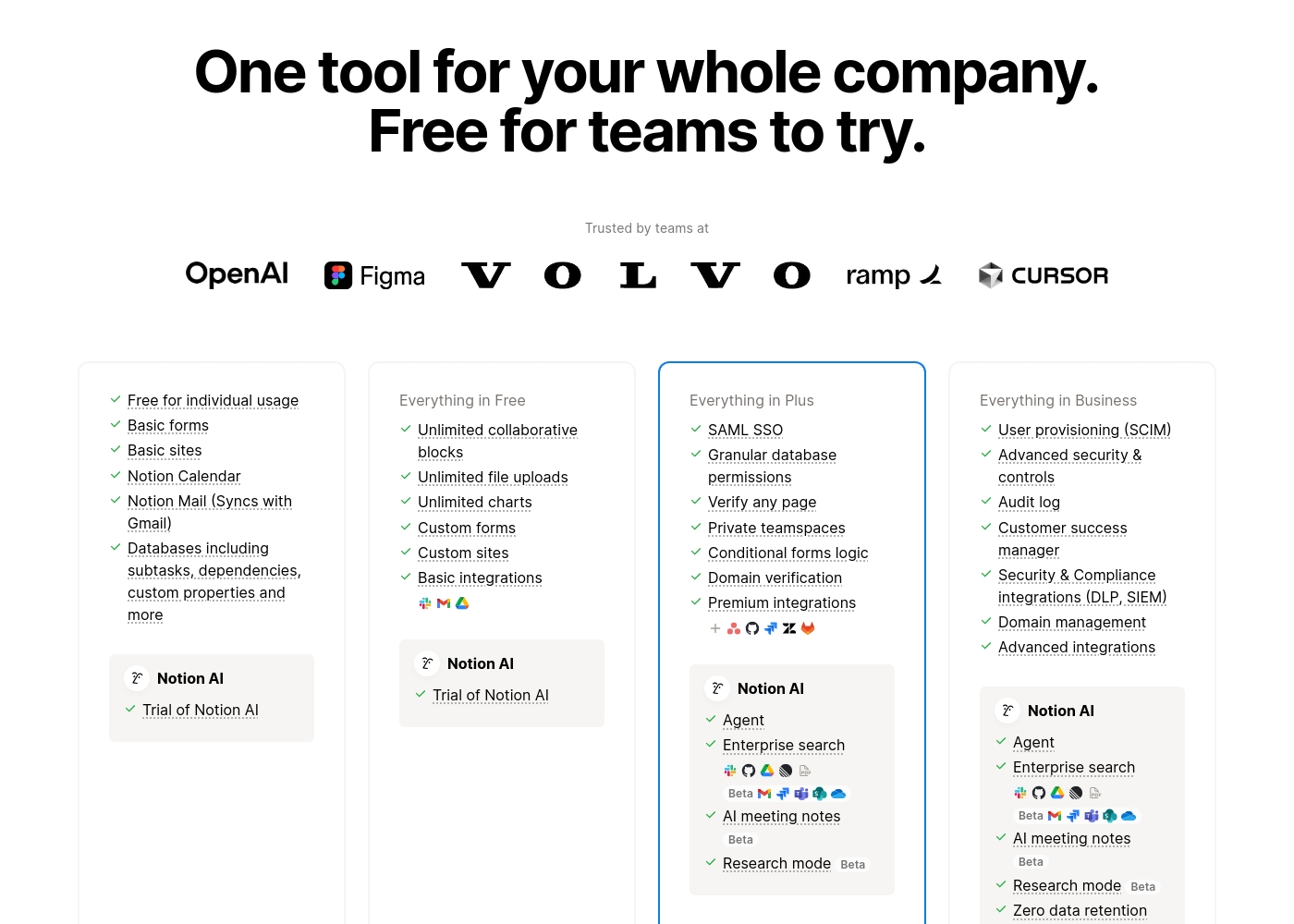
Notion costs between $0 and $20 per seat/month with four plans: Free at $0/seat/month, Plus at $10/seat/month, Business at $20/seat/month, and Enterprise (custom pricing).
Here’s a detailed look at the core features included in each subscription level.
- Unlimited pages and blocks for individuals
- Web publishing with 1 custom subdomain
- Basic forms and sites
- Notion Calendar and Mail synchronization
- Databases with subtasks and dependencies
- Unlimited blocks and file uploads
- 30 days of page history
- Basic SAML SSO
- Granular database permissions
- Access to unlimited charts
- 90 days of page history
- Advanced security controls and Audit log
- Conditional forms logic
- Domain verification
- Advanced page analytics (includes editor list)
- Unlimited page history and workspace analytics
- SCIM user provisioning
- Zero data retention with LLM providers for Notion AI
- Customer Success Manager support
- Security & Compliance integrations (DLP, SIEM)
Pricing Head-to-Head
User Reviews
Based on the provided external review snippets, we cannot synthesize a balanced summary of user sentiment from Trustpilot or Capterra. The only available snippet is a connection error page, which contains no actual user feedback, ratings, or recurring themes. Therefore, a meaningful review summary that references specific user experiences regarding accuracy, ease of use, support, pricing, or other factors cannot be constructed from the given data. 😅 We must rely solely on the website's own description for this review.
The Canvas is a game-changer for organizing my research. It's so much better than a chat window for complex projects. I can finally see how all my ideas connect visually.
Trustpilot feedback paints a sharply divided picture of Notion. While many users praise the platform as a terrific tool—highlighting its power, versatility, and unique block-based editor for personal and professional organization—these compliments are often eclipsed by grave concerns regarding management and billing practices.
A recurring major theme across many reviews details frustrating experiences with unexpected charges, deceptive auto-upgrades (especially relating to annual plans and new members), and significant challenges when trying to cancel subscriptions or obtain timely refunds. Furthermore, support responsiveness is frequently described as unsatisfactory, unhelpful, or even condescending, often failing to resolve billing errors or login issues.
Enjoy using Notion a lot for my daily work interface. It helps me set up my employees and assign tasks with no issue at all. We upgraded from the free plan and will absolutely continue using the platform.
Our Verdict
Flowith and Notion are both strong tools, but they serve different needs. It's not a simple winner-takes-all situation. Flowith's superpower is its visual Canvas. It lets you map ideas freely and use AI agents to execute them. It's built for thinkers who want to break out of linear chat. Notion's superpower is being a single, unified workspace. It replaces multiple tools for project management, wikis, and CRM. It's trusted by over 100 million users and is great for teams. The deciding factor is how you think and work. If you think visually and want AI to execute your plans, Flowith is compelling. If you need to consolidate tools and manage a team, Notion is the better fit. Choose Flowith if you're a solo creator or visual thinker. Choose Notion if you're a team needing an all-in-one platform. Both can boost your productivity, just in very different ways.
Frequently Asked Questions
Which is better for small teams: Flowith or Notion?
Notion is likely better for small teams needing a unified workspace. It has per-seat pricing and integrates with tools like Slack and GitHub. Flowith's team features are less detailed in the provided data.
Does Flowith have AI capabilities like Notion?
Yes, Flowith has AI agents (FlowithOS and Agent Neo) for execution. Notion has a built-in AI assistant for writing and search. Both use AI differently: Flowith for execution, Notion for assistance.
Is Notion worth the extra cost over Flowith?
It depends on your needs. Notion's per-seat pricing can add up for large teams. Flowith's credit-based model might be cheaper for solo users. Consider the features you'll actually use.
Can I migrate my data from Flowith to Notion easily?
The data does not specify migration tools for Flowith. Notion is a more established platform with broad integration options. Migration may require manual effort or third-party tools.
Which tool has better customer support?
Flowith appears to have better support, with priority options on paid plans. Notion's support is frequently criticized as poor and unresponsive in user reviews.
Is Flowith's free plan good enough for personal use?
Flowith's free Starter plan includes 300 one-time credits and basic access. It's a good start for personal use, but you may hit limits quickly if you use AI features heavily.
Ready to Choose?
Both tools have their strengths. Choose based on your specific needs.