Filmora 14 vs Viddyoze
Filmora 14 and Viddyoze offer very different paths to professional video results. Filmora 14 is a powerful, AI-assisted timeline editor for full creative control. Viddyoze is an unlimited template generator focusing purely on speed and basic branded animations.
Best for: Content creators needing full control over raw footage editing (e.g., vlogs, tutorials), Users who perform complex tasks like multi-camera editing or motion tracking
Best for: Business owners who need professional branding videos (intros, stingers) quickly, Freelancers and agencies creating high-volume client assets (commercial rights included)
Powerful AI Editor, Buyer Beware.
We find Filmora 14 offers a powerful suite of AI editing tools and an accessible interface perfect for creators across all skill levels. While the feature set and performance are top-tier, we cannot overlook the severe, verified reports of deceptive billing and poor customer support from the vendor. Overall, this is a technically impressive editor marred by critical issues related to trust and operational transparency.
Pros
- Exceptionally easy to use interface suitable for all skill levels.
- Robust AI feature set simplifies complex edits like object removal and background cutting.
- Access to a massive 2.9M+ library of creative assets, music, and templates.
- Optimized performance with GPU acceleration, even on modest hardware.
Cons
- Severe billing issues and reported difficulties canceling auto-renewals.
- Support is often automated, unresponsive, and unhelpful via chat or email.
- Lack of transparency regarding hidden costs and AI credit consumption per feature.
- Perpetual license holders report forced migration to the newest version.
Quick, Quality Video Creation with Billing Friction.
We find Viddyoze delivers excellent, professional video templates that are genuinely easy to customize and use. The platform significantly speeds up production for branding elements, allowing unlimited creation capacity for $47 per month. Overall, this is a highly functional tool marred by concerning reports of subscription transparency issues and difficult trial cancellation polices.
Pros
- Access to 5,000+ high-quality, professional templates.
- Extremely quick and easy to use, even for beginners.
- Unlimited creation capacity included in the monthly price.
- Commercial rights provided for client work.
Cons
- Free trial cancellation process is reported as confusing and deliberately difficult.
- Users report being incorrectly charged after attempting to cancel the trial.
- Requires caution regarding subscription monitoring and cancellation guidelines.
- The web interface is described as ‘cranky’ by some users.
AboutFilmora 14
Filmora 15 is an award-winning video editor designed for both beginners and experts alike. It aims to help you edit as an expert with Filmora AI by streamlining the entire creative process.
The interface is intuitive and clean, making video editing simple even for those without prior experience. You can literally type, drop, or sketch ideas into the platform, and Filmora helps bring them to life with AI-driven effects. The platform provides a connected experience; it's available across desktop, tablet, and mobile, allowing you to create exactly as you wish. 💡
AboutViddyoze
Viddyoze is an intuitive, easy-to-use video creator designed for business owners and professionals. Over 180,000 creators trust this platform.
It’s been called the “Swiss Army Knife” for corporate branding video media because it allows you to brand content using your own colors and logos effortlessly. The best part?
You don’t need any video editing experience to start. If you can click a mouse, you can create amazing videos in minutes.
Highlights
Feature Comparison
Features Overview
We highlight the main differences and pick a winner for each feature.
Core Editing Control
Filmora 14 provides deep timeline editing control, while Viddyoze is strictly a template customizer.
Filmora 14 offers a robust, full timeline editing experience. It supports advanced features like multi-camera editing and magnetic timelines. Users enjoy precise control over cuts, sequences, and effects. Viddyoze is not a traditional editor; it is a template-driven animation tool. You select a template and customize text, logos, and colors only. This is a major trade-off between power and simplicity. Filmora 14 handles complex raw footage edits, Viddyoze generates branded elements. If your project requires cutting hours of raw clips, Filmora 14 is the only option here.
Editing Speed & Simplicity
Viddyoze is unrivaled for generating instant, branded video assets with zero editing skill required.
Viddyoze boasts Lightning Fast Creation using its 3-click customization method. Professionals can produce branded intros in seconds. It requires essentially no video editing experience whatsoever. Filmora 14 speeds up production using AI (like Idea to Video). However, it still requires using a timeline and manually arranging clips. For high-volume output of simple, repeatable branded animations, Viddyoze is exponentially faster. Filmora 14 takes more conscious effort. Marketers needing dozens of identical promo videos should choose Viddyoze for sheer efficiency.
Commercial Licensing
Viddyoze explicitly includes commercial rights for client work, much safer than Filmora 14's asset limitations.
Viddyoze subscriptions include explicit commercial rights, allowing videos to be created for paying clients. This removes licensing ambiguity for freelancers. Filmora 14 restricts commercial use for AI-generated assets and many premium effects. Only specific assets are labeled as commercially viable. For agencies relying on professional content deliverables, Viddyoze’s clear licensing is a massive advantage. If generating revenue from your video work is essential, Viddyoze streamlines usage rights significantly.
Advanced AI Features
Filmora 14 offers deeper, specialized AI tools for quality and accessibility, unlike Viddyoze's concept-focused ViddyBot.
Filmora 14’s AI suite performs complex editing tasks. This includes AI Video Enhancer to fix quality and AI Video Translation for dubbing content. Viddyoze provides ViddyBot, a 24/7 AI chat assistant. ViddyBot primarily assists with generating ideas and structuring content concepts. Filmora 14 integrates AI directly into editing and production quality. Viddyoze uses AI for pre-production ideation. If you struggle with footage quality, Filmora 14's AI Enhancer is invaluable, a feature Viddyoze does not offer.
Pricing Structure
Filmora 14 is cheaper annually and offers flexibility; Viddyoze is expensive monthly but guarantees unlimited output.
Filmora 14 starts at $69.99/year and offers perpetual licenses. The tiered subscriptions manage AI credits and cloud storage limits. Viddyoze costs $47/month ($564/year) for its single plan. The benefit is truly unlimited video creation capacity. While Filmora 14 is cheaper, its hidden costs lie in purchasing extra AI credits. Viddyoze is higher upfront but all-inclusive. Choose Filmora 14 if you are a moderate user who values low annual cost and flexibility in payment.
Mobile Functionality
Filmora 14 offers dedicated cross-platform applications and syncing; Viddyoze is restricted to web browser usage.
Filmora 14 supports Mac, Windows, and dedicated apps for iOS and iPadOS. Higher tiers include Apple Sync for editing continuity. Viddyoze is purely a web-based platform accessed via your internet browser. This means you cannot download a native editing app. Creators who film in the field and need to edit on an iPad require Filmora 14 for native performance. Viddyoze's web interface is sufficient for customizing templates but falls short for serious mobile editing workflows.
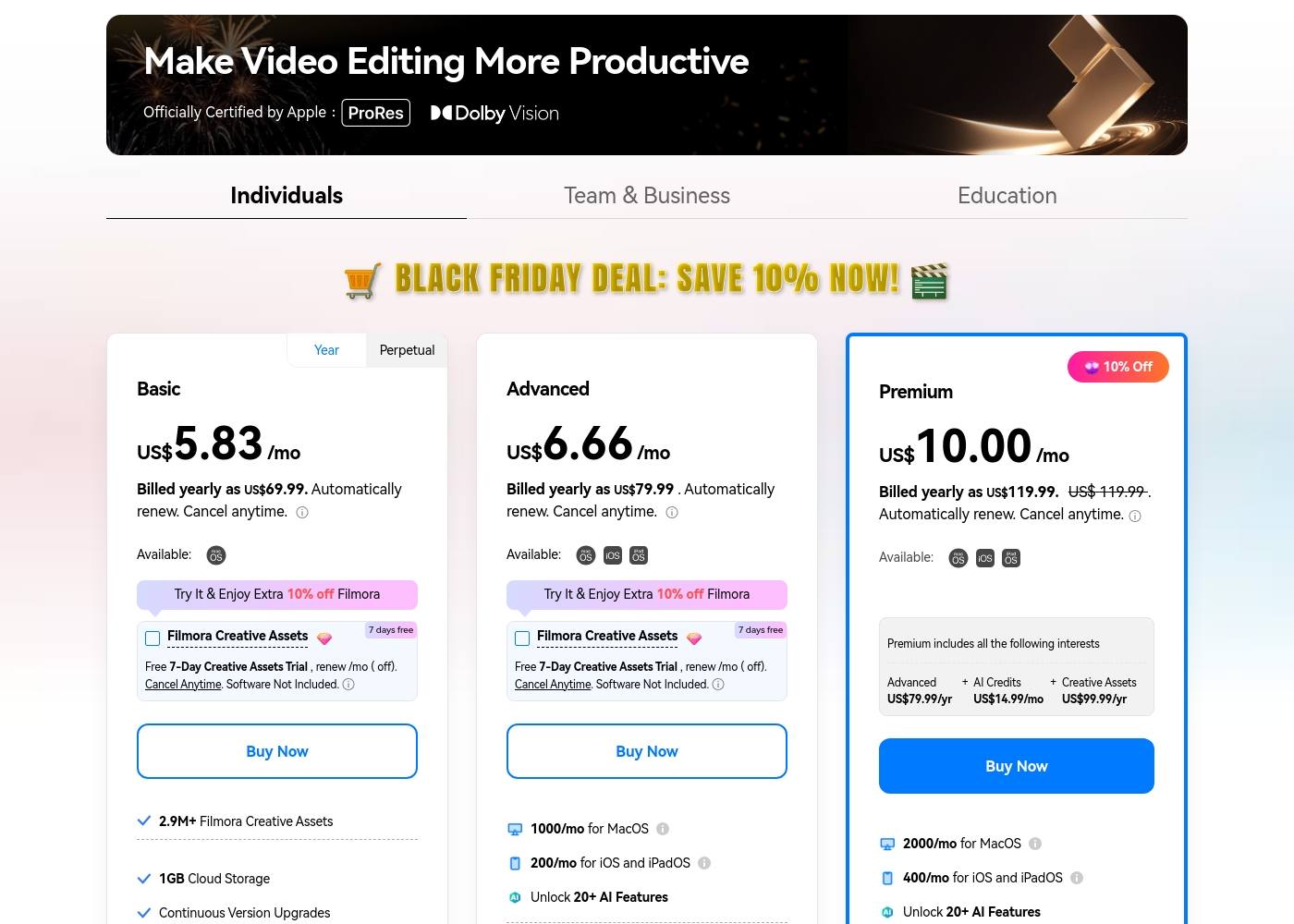
Filmora 14 costs between US$69.99 and US$119.99 per year with three individual annual plans: Basic at US$69.99, Advanced at US$79.99, and Premium at US$119.99.
These individual tiers offer flexible subscription options designed to fit different creator needs, from casual editing to advanced AI-enabled projects. All plans are billed annually and allow you to cancel renewal automatically at any time.
Basic
Price: Billed yearly as US$69.99 (US$5.83/mo) Refund Policy: 30-day money-back guarantee Other Features:
- 2.9M+ Filmora Creative Assets
- 1GB Cloud Storage
- Export without Watermark
- Continuous Version Upgrades
- 2.9M+ Filmora Creative Assets
- 1GB Cloud Storage
- Continuous Version Upgrades
- Export without Watermark
- 4K HD Export
- All Basic Features
- Apple Sync: macOS, iOS, iPadOS
- 10GB Cloud Storage
- 1000 AI Credits/mo for MacOS
- 200 AI Credits/mo for iOS and iPadOS
- All Advanced Features
- 2000 AI Credits/mo for MacOS
- 400 AI Credits/mo for iOS and iPadOS
- 100GB Cloud Storage
- Premium includes advanced bundle and creative assets
- One-time payment structure
- Enjoy Filmora 14 updates only (no major upgrades)
- 1,000 Filmora AI Credits (one-time grant)
- 2.9M+ Filmora Creative Assets
- 1GB Cloud Storage
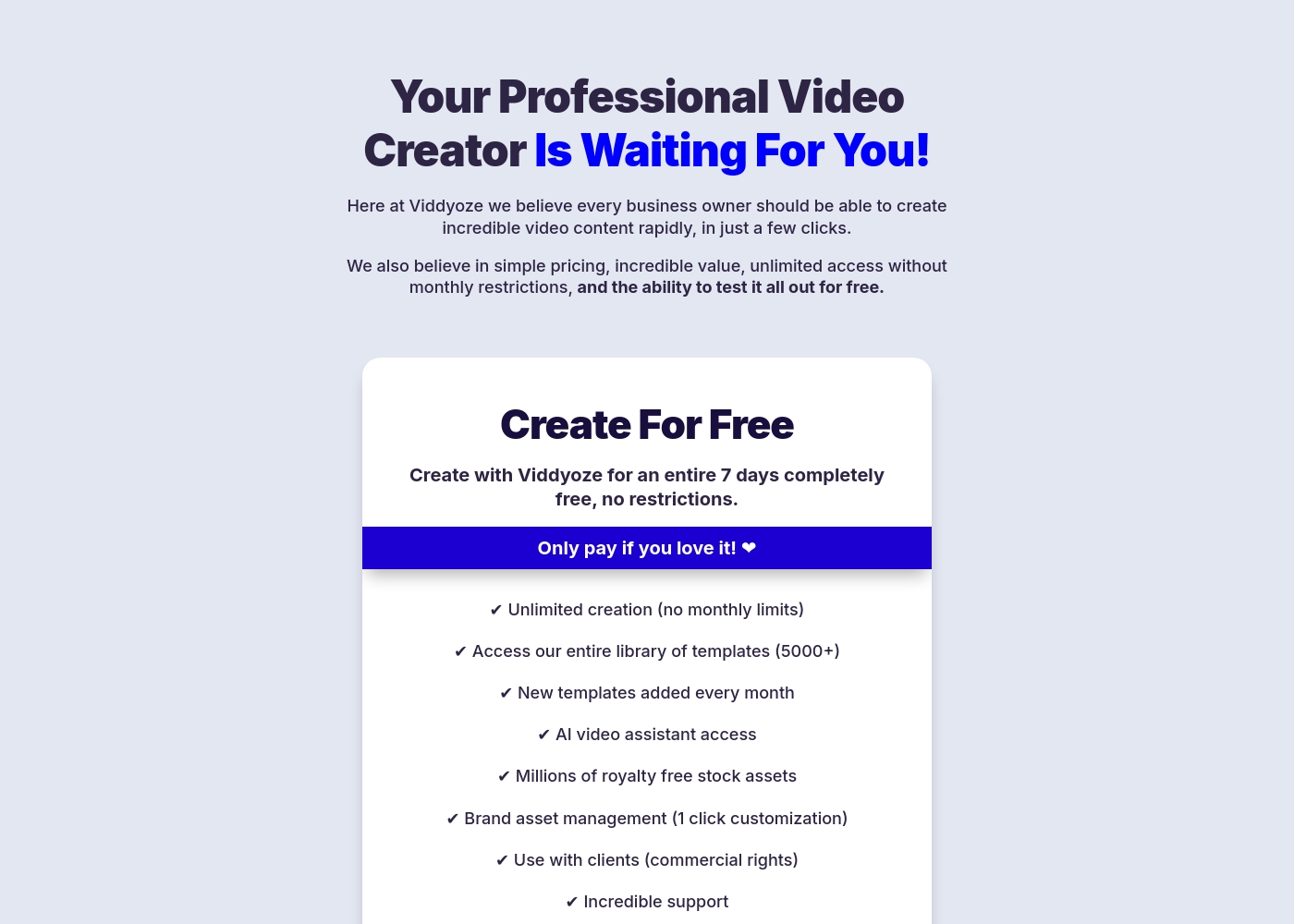
Viddyoze costs $47 per month with one plan: Monthly Subscription at $47/month.
We believe in simple pricing, so Viddyoze focuses on providing unlimited value within a single monthly fee. Here is a closer look at what the subscription includes.
Monthly Subscription
Price: $47/month Best For: Users needing unlimited video creation capacity and commercial rights Refund Policy: Cancel anytime (after the 7-day trial) Other Features:
- Unlimited creation (absolutely no monthly limits).
- Access to our massive library of over 5000+ templates.
- Includes full access to the AI video assistant (ViddyBot).
- Commercial rights for creating videos for your clients.
- Millions of royalty-free stock assets are included.
- Unlimited video creation (no monthly limits)
- Access to entire template library (5000+)
- New templates added every month
- AI video assistant access (ViddyBot)
- Millions of royalty free stock assets
Pricing Notes
- Filmora 14 offers cheaper annual rates but charges extra for AI credits and limits cloud storage capacity.
- Viddyoze is significantly more expensive monthly ($564/year) but includes unlimited video creation capacity.
- Filmora 14 utilizes specific AI credits that must be managed and do not roll over monthly.
- Viddyoze users report severe difficulties canceling the 7-day free trial, often resulting in unauthorized charges.
- Unlike Filmora 14, Viddyoze offers a single plan that includes full commercial usage rights.
Pricing Head-to-Head
User Reviews
Users consistently praise Filmora for its excellent ease of use and intuitive, simple interface. Many editors, from hobbyists to long-term users, find the built-in features helpful, noting the software performs well even on modest hardware.
However, external feedback sharply pivots when discussing company operations. A significant volume of criticism focuses intensely on deceptive billing practices and poor customer service.
I love using Wondershare’s video editor, Filmora! It’s so easy to use and really fun too. This program keeps up with my creativity every step of the way.
Users frequently praise Viddyoze for its exceptional ease of use and high-quality templates, noting it's a great tool for quickly creating professional intros, outros, and branding materials. Many long-term users call it the “best investment” and value the simplicity of customizing animations in just a few clicks.
The tool is celebrated for helping content stand out and serving as a powerful secret weapon for marketing. However, external feedback reveals serious inconsistencies regarding billing and customer support reliability, particularly around the 7-day free trial.
I have been using Viddyoze for years. I love the ease of use and the quality of the projects it delivers. This tool has gotten me out of many creative jams quickly!
Our Verdict
Deciding between Filmora 14 and Viddyoze means choosing your priority: control or automated speed. If you need deep, precise editing, Filmora 14 is your winner. If you need 50 professional branded animations in an hour, Viddyoze is currently unrivaled in its niche. The difference is choosing a full editor or a specialized template generator. Filmora 14's superpower is its AI-assisted timeline environment. It allows users to fix blurry footage with the powerful AI Video Enhancer. Filmora 14 excels at complex jobs like multi-camera syncing and instant video translation. Its flexible pricing structure allows users to choose annual subscriptions or perpetual licenses. Viddyoze offers an addictive, lightning-fast creation workflow. You select from 5,000+ templates and apply your brand colors in three clicks. Viddyoze is perfect for business users needing unlimited branded content for clients, thanks to its clear commercial rights licensing. It requires a high monthly fee ($47), but there are zero constraints on your output quantity. The deciding factor is your content type. If you cut raw footage or need mobile editing sync, choose Filmora 14. If you are a marketer selling professional animation templates to clients, Viddyoze pays for itself quickly. Be cautious, as Viddyoze users widely report severe difficulty canceling the free trial. Ultimately, Filmora 14 provides a more sustainable and feature-rich editing experience. If your content needs extend beyond simple animations, Filmora 14 offers unparalleled depth and professional tools. Choose Filmora 14 unless you are 100% certain that Viddyoze’s specialized template library is all you require.
Frequently Asked Questions
Which software is better for creating long-form content, Filmora 14 or Viddyoze?
Filmora 14 is designed as a full timeline video editor. It handles raw footage, multi-cam editing, and extensive sequences easily. Viddyoze is limited to short, templated animations and is not suitable for long-form editing projects.
Does Viddyoze offer advanced editing features like Filmora 14's motion tracking?
No, Viddyoze focuses strictly on template customization in a browser environment. It lacks professional features like Filmora 14's motion tracking or AI background removal. Filmora 14 provides significantly deeper editing control.
Can I use Filmora 14 or Viddyoze for client work?
Viddyoze explicitly includes full commercial rights for client work with its subscription. Filmora 14 limits commercial use rights for many of its premium AI assets. Viddyoze is functionally simpler for professional agency use.
How do the free options for Filmora 14 and Viddyoze compare?
Filmora 14 offers a permanently free version, but all exported videos have a watermark. Viddyoze offers a 7-day free trial providing full access. Note that Viddyoze requires extreme caution upon cancellation.
Which is more budget-friendly for a solo content creator?
Filmora 14 is more budget-friendly, starting at $69.99 annually. Viddyoze costs $47 monthly, equating to $564 annually. Filmora 14 offers a better price/feature ratio for low-volume users.
Which software has better cross-platform support and mobile editing?
Filmora 14 offers strong desktop software and dedicated mobile apps with syncing for Mac and iOS/iPadOS users. Viddyoze is web-based, relying only on your internet browser for access.
Ready to Choose?
Both tools have their strengths. Choose based on your specific needs.