Filmora 14 vs VEED
Filmora 14 and VEED both aim to simplify video editing using powerful artificial intelligence. Filmora 14 excels with desktop performance and deep creative AI features. VEED wins on web accessibility and streamlined team collaboration workflows. The key difference is native desktop power versus cloud-based convenience.
Best for: Individual creators producing high-quality, long-form content or tutorials., Users who demand optimized 4K editing performance on Mac or Windows desktop.
Best for: Marketing or L&D teams of 5-50 requiring synchronized cross-platform access., Content creators focused purely on short-form social media production (e.g., Shorts/Reels).
Powerful AI Editor, Buyer Beware.
We find Filmora 14 offers a powerful suite of AI editing tools and an accessible interface perfect for creators across all skill levels. While the feature set and performance are top-tier, we cannot overlook the severe, verified reports of deceptive billing and poor customer support from the vendor. Overall, this is a technically impressive editor marred by critical issues related to trust and operational transparency.
Pros
- Exceptionally easy to use interface suitable for all skill levels.
- Robust AI feature set simplifies complex edits like object removal and background cutting.
- Access to a massive 2.9M+ library of creative assets, music, and templates.
- Optimized performance with GPU acceleration, even on modest hardware.
Cons
- Severe billing issues and reported difficulties canceling auto-renewals.
- Support is often automated, unresponsive, and unhelpful via chat or email.
- Lack of transparency regarding hidden costs and AI credit consumption per feature.
- Perpetual license holders report forced migration to the newest version.
Browser-based video editing power.
We find VEED to be a highly accessible, browser-based video editing solution that excels at streamlining content creation using powerful AI. Overall, we recommend this platform, especially for short-form content, despite the premium pricing required for full functionality.
Pros
- Extremely intuitive and beginner-friendly interface.
- Fully web-based; no software installation or downloads required.
- Powerful AI tools for auto-subtitles, translations, and video generation.
- Excellent for creating and editing short-form content (e.g., YouTube Shorts).
Cons
- Subscription costs are frequently cited as a limiting factor.
- Unreliable for long-form video recording and editing (potential data loss/glitches).
- Exporting 4K video is restricted to higher-tier or professional plans.
- AI translations (subtitles) can sometimes be inaccurate or difficult to edit manually.
AboutFilmora 14
Filmora 15 is an award-winning video editor designed for both beginners and experts alike. It aims to help you edit as an expert with Filmora AI by streamlining the entire creative process.
The interface is intuitive and clean, making video editing simple even for those without prior experience. You can literally type, drop, or sketch ideas into the platform, and Filmora helps bring them to life with AI-driven effects. The platform provides a connected experience; it's available across desktop, tablet, and mobile, allowing you to create exactly as you wish. 💡
AboutVEED
VEED is a complete end-to-end video suite designed for busy teams and creators. It allows you to create, collaborate, and share impressive videos entirely from within your browser. This platform offers seamless workflow consolidation, perfect for everyone from individual content makers to large organizations like the Fortune 500. It includes smart collaboration tools and a dedicated Brand Kit, ensuring your team maintains consistency. Additionally, you access a vast, royalty-free stock library featuring over 2 million video and audio assets. 💡
Highlights
Feature Comparison
Features Overview
We highlight the main differences and pick a winner for each feature.
Platform & Access
Filmora 14 is a native app with hardware power; VEED is a highly accessible web tool.
Filmora 14 requires a software download but provides deep system integration for performance. Mac optimization includes Metal rendering for demanding 4K workloads. VEED is 100% web-based, allowing you to edit instantly from any location. You avoid installation hassles and lengthy software updates entirely. Filmora 14 has better stability and speed for long, complex projects. VEED is perfect for creators who switch computers often or use Chromebooks. The choice is raw desktop power versus total cloud flexibility.
AI Editing Power
Filmora 14 focuses on creative AI; VEED minimizes friction and appearance corrections.
Filmora 14 offers unique AI Video Enhancer tools to boost quality, reduce noise, and fix bad lighting. It has creative features like Idea to Video and AI Hug/Kiss for narrative depth. VEED uses AI heavily for workflow and presentation polish instead. It offers Filler Word Removal and Eye Contact Correction to perfect speaker delivery. Filmora 14 excels at restoring and enhancing footage quality automatically. VEED is faster at polishing presentations and removing awkward pauses.
Team Collaboration
VEED is built for scaling teams, while Filmora 14 focuses on single-user mastery.
VEED provides a sophisticated suite of tools ideal for multiple users collaborating. Features include a shared Brand Kit, Asset Sharing, and a Review Mode for timeline feedback. This consolidation streamlines output quality across marketing teams. Filmora 14 is fundamentally a single-user application. Teams must buy separate, higher-priced Business plans for limited collaboration features. If you manage a content team, VEED is engineered to reduce workflow friction. Filmora 14 users are predominantly solo creators or small businesses with one editor.
Performance & Stability
Filmora 14 offers superior hardware optimization, ensuring stability; VEED can lag due to the browser.
Filmora 14 utilizes GPU acceleration for significantly faster rendering and smoother playback. Mac users enjoy dedicated Metal rendering support for high-resolution video projects. VEED, being cloud-based, occasionally suffers from technical glitches, instability, and lag, especially when handling long or complex timelines. Filmora 14 offers a reliable, powerful experience for heavy video workloads. VEED is high-speed chaos for short clips, but risky for long-form reliability.
Pricing Structure
Filmora 14 has transparent pricing; VEED obscures the cost of its standard paid subscriptions.
Filmora 14 clearly lists annual subscription tiers (e.g., $69.99, $79.99, $119.99). It also offers a perpetual license option which guarantees predictable long-term costs. VEED relies on hidden pricing for its paid tiers, usually forcing small teams to contact sales. This lack of initial transparency is frustrating and makes budgeting difficult. Filmora 14 lets you know exactly what you are paying for annually. VEED excels at getting you started free, but the necessary advanced features require unknown investment.
Accessibility Tools
VEED excels in mobile accessibility, offering a dedicated app for captions and editing on the move.
Both Filmora 14 and VEED offer excellent AI translation and dubbing features in many languages. Filmora 14 includes Auto Captioning for subtitles quickly and effectively. VEED stands out with its dedicated Captions App, allowing professional recording and subtitling entirely from a phone. This mobile-first focus is critical for social creators making short, timely content. Filmora 14 requires transferring assets back to the desktop for most deep editing work.
Deep Editing Features
Filmora 14 provides deeper control like Planar Tracking, targeting complex effects and graphics.
Filmora 14 offers specialized desktop features like Planar Tracking to lock graphics onto moving objects. It also handles simultaneous Multi-Camera Editing, vital for events and interviews. VEED’s editing emphasizes speed, using tools like Magic Cut for rapid timeline cleanup. VEED is simple for quick cuts but lacks the sophisticated compositing tools available in Filmora 14. Filmora 14 is better suited for producing complex, polished, cinematic projects.
Library Assets
Both offer massive asset libraries, but Filmora 14 includes more creative assets like effects and stickers.
Filmora 14 provides access to over 2.3 million Filmora Creative Assets, including titles, stickers, and specialized effects. These assets integrate seamlessly into the native environment. The VEED library features over 2 million royalty-free stock video and audio items. Both tools give you plenty of media to enhance your videos. Filmora 14 often focuses more on effects and overlays for creative output.
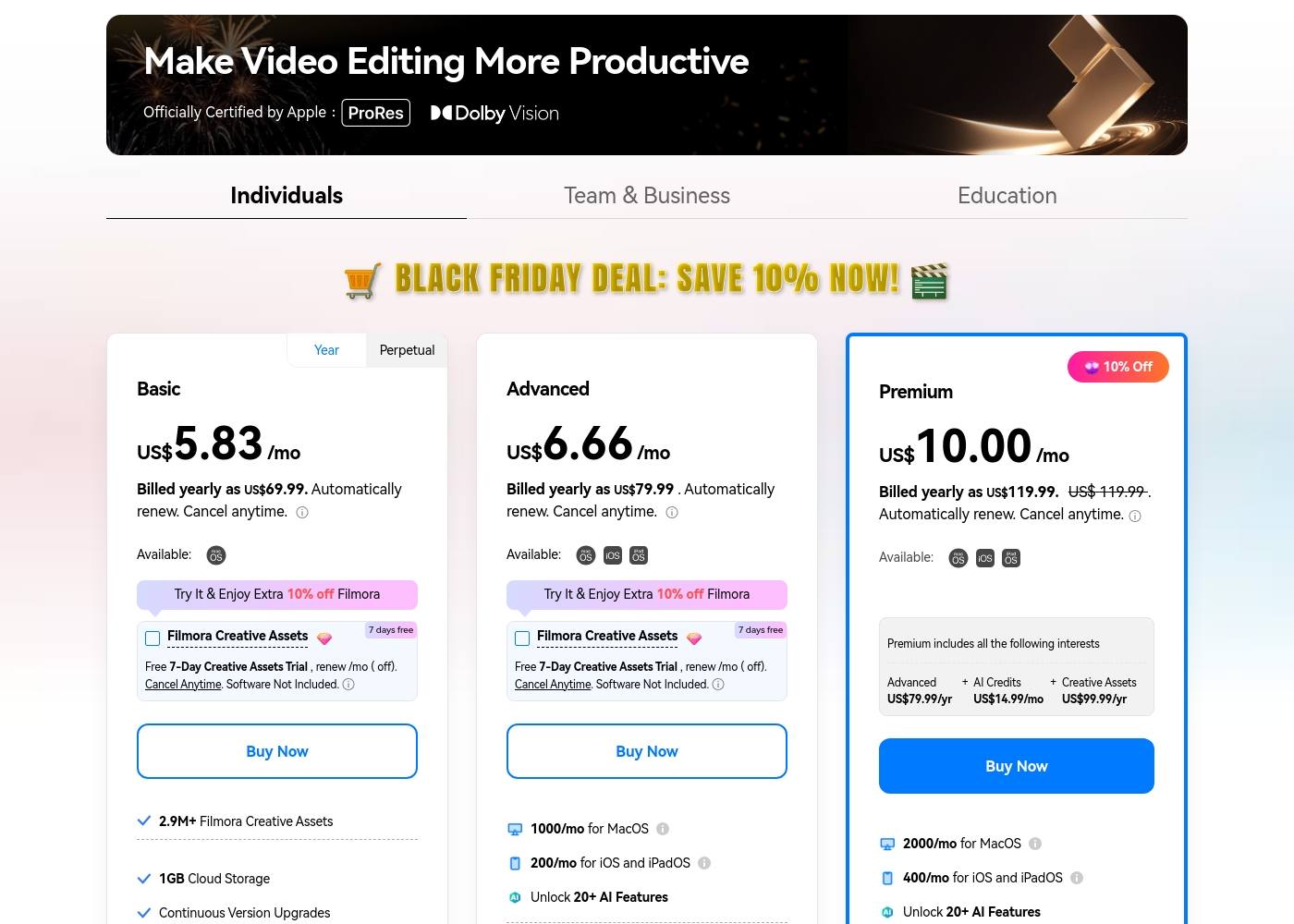
Filmora 14 costs between US$69.99 and US$119.99 per year with three individual annual plans: Basic at US$69.99, Advanced at US$79.99, and Premium at US$119.99.
These individual tiers offer flexible subscription options designed to fit different creator needs, from casual editing to advanced AI-enabled projects. All plans are billed annually and allow you to cancel renewal automatically at any time.
Basic
Price: Billed yearly as US$69.99 (US$5.83/mo) Refund Policy: 30-day money-back guarantee Other Features:
- 2.9M+ Filmora Creative Assets
- 1GB Cloud Storage
- Export without Watermark
- Continuous Version Upgrades
- 2.9M+ Filmora Creative Assets
- 1GB Cloud Storage
- Continuous Version Upgrades
- Export without Watermark
- 4K HD Export
- All Basic Features
- Apple Sync: macOS, iOS, iPadOS
- 10GB Cloud Storage
- 1000 AI Credits/mo for MacOS
- 200 AI Credits/mo for iOS and iPadOS
- All Advanced Features
- 2000 AI Credits/mo for MacOS
- 400 AI Credits/mo for iOS and iPadOS
- 100GB Cloud Storage
- Premium includes advanced bundle and creative assets
- One-time payment structure
- Enjoy Filmora 14 updates only (no major upgrades)
- 1,000 Filmora AI Credits (one-time grant)
- 2.9M+ Filmora Creative Assets
- 1GB Cloud Storage
Specific pricing tables are not publicly detailed here, but VEED does offer multiple ways to engage with the product, ranging from free access to custom enterprise solutions. This structure ensures users of all sizes can find a suitable entry point.
Free Access
Price: Free Best For: Users who want to test core features or single creators with minimal usage needs. Other Features:
- Start for free * No credit card required
- Use the video editor
- Access AI tools like Auto Subtitle Generator
You can begin using VEED immediately without needing to enter any payment information. It’s an ideal option for anyone looking to quickly test the core capabilities and user experience of this powerful video editing suite before deciding on a financial commitment.

Pricing Notes
- Filmora 14 provides transparent annual pricing and offers a perpetual license for cost certainty.
- VEED hides the cost of its standard paid tiers, frustrating users who require advanced features beyond the free tier.
- Filmora 14 requires AI credit purchases or high tiers for full AI functionality, which can be an unexpected cost.
- Filmora 14 offers a 30-day money-back guarantee; VEED does not publicly state a refund policy for paid plans.
Pricing Head-to-Head
User Reviews
Users consistently praise Filmora for its excellent ease of use and intuitive, simple interface. Many editors, from hobbyists to long-term users, find the built-in features helpful, noting the software performs well even on modest hardware.
However, external feedback sharply pivots when discussing company operations. A significant volume of criticism focuses intensely on deceptive billing practices and poor customer service.
I love using Wondershare’s video editor, Filmora! It’s so easy to use and really fun too. This program keeps up with my creativity every step of the way.
VEED enjoys generally positive external feedback, focusing heavily on its ease of use and accessibility. Reviewers consistently praise the web-based platform for being intuitive, beginner-friendly, and having a clean interface, which makes creating professional videos quick and simple.
Many users appreciate the robust features like drag-and-drop functionality, good animation options, and powerful AI tools, particularly for generating content and quickly creating YouTube Shorts. The platform’s ability to handle high-fidelity transcriptions is also frequently mentioned.
VEED simplifies the video creation process significantly. Editing and adding effects, especially utilizing new AI technology, makes improving your product fast and seamless. I highly recommend this platform.
Our Verdict
The choice between Filmora 14 and VEED comes down to desktop power versus web efficiency. For complex projects and individual creators, Filmora 14 is usually the winner. Filmora 14’s native application uses your computer's resources for superior performance and stability. It delivers professional features like Multi-Cam and Planar Tracking without being overly complicated. Filmora 14's superpower is its deep video enhancement and creative AI features. You can fix dark or noisy footage using the AI Video Enhancer with one click. The magnetic timeline makes desktop editing effortless, speeding up production significantly. VEED’s superpower is making team workflows painless and publishing incredibly fast. As a browser-based suite, VEED requires zero installation and is ready for team collaboration immediately. If you need a shared Brand Kit and instant, accurate auto-subtitles, VEED is the efficiency king. The deciding factor is your team structure and project complexity. If you handle complex video effects or need stable, Mac-optimized performance, choose Filmora 14. If you frequently create short, high-volume content with a marketing team, VEED is the clear efficiency driver. Final verdict: Choose Filmora 14 if you are a solo pro needing power and predictable pricing. Pick VEED if you value team accessibility and quick, frequent web-based content creation.
Frequently Asked Questions
Which is better for large teams: Filmora 14 or VEED?
VEED is significantly better for large teams due to its design. It features a Brand Kit, Asset Sharing, and Review Mode built for team collaboration. Filmora 14 requires separate enterprise plans and focuses more on individual user experience.
Is Filmora 14 faster at rendering than VEED?
Yes, Filmora 14 is generally faster for heavy rendering because it utilizes GPU acceleration. VEED relies solely on browser speed, which can cause lag or performance issues on long videos. Filmora 14 is optimized specifically for Mac users with Metal rendering support.
Which video editor offers a perpetual license: Filmora 14 or VEED?
Filmora 14 offers a perpetual license option, allowing a one-time purchase for the current major version. VEED is exclusively subscription-based, though its pricing tiers are not publicly visible.
Can I export in 4K resolution using VEED?
Yes, VEED supports 4K export, but this feature is restricted to the highest-tier professional plans. Filmora 14 includes 4K export capability on all of its standard paid annual plans.
Which tool is easier for beginners: Filmora 14 or VEED?
VEED has a slight edge on ease of use as it's fully browser-based and requires no installation. Both tools are highly praised for their intuitive, beginner-friendly interfaces. Filmora 14 is very accessible despite containing deeper features.
Does the free version of Filmora 14 have a watermark?
Yes, all exports made using the permanently free version of Filmora 14 include a non-removable watermark. Paid subscription tiers are required to export videos without this branding.
Ready to Choose?
Both tools have their strengths. Choose based on your specific needs.