Filmora 14 vs Pinnacle Studio
Filmora 14 is built for lightning-fast, AI-driven content repurposing and creation. Pinnacle Studio focuses on deeper customization and technical editing depth. The choice depends on whether you value maximum efficiency or frame-accurate control.
Best for: Social media content creators who need fast output, Beginner editors needing professional results quickly
Best for: Editors working exclusively with 8K high-resolution cinematic footage, Users focused on traditional, manual editing and effect application
Powerful AI Editor, Buyer Beware.
We find Filmora 14 offers a powerful suite of AI editing tools and an accessible interface perfect for creators across all skill levels. While the feature set and performance are top-tier, we cannot overlook the severe, verified reports of deceptive billing and poor customer support from the vendor. Overall, this is a technically impressive editor marred by critical issues related to trust and operational transparency.
Pros
- Exceptionally easy to use interface suitable for all skill levels.
- Robust AI feature set simplifies complex edits like object removal and background cutting.
- Access to a massive 2.9M+ library of creative assets, music, and templates.
- Optimized performance with GPU acceleration, even on modest hardware.
Cons
- Severe billing issues and reported difficulties canceling auto-renewals.
- Support is often automated, unresponsive, and unhelpful via chat or email.
- Lack of transparency regarding hidden costs and AI credit consumption per feature.
- Perpetual license holders report forced migration to the newest version.
Powerful features, critical flaws.
We found that Pinnacle Studio 26 advertises excellent advanced features like 8K video support and extensive creative bundles, often appealing through affordable one-time pricing. However, overwhelmingly negative user feedback regarding pervasive instability and completely absent customer support casts serious doubt on its usability. Overall, we cannot recommend this software until the severe stability and support issues reported by the user base are definitively addressed.
Pros
- Offers sophisticated, multi-track editing features (MultiCam, 8K support).
- Pricing model is an affordable one-time purchase (especially upgrade bundles).
- Includes comprehensive utility and asset bundles in higher-tier packages.
- Interface is considered user-friendly by some long-time users.
Cons
- Extremely frequent crashing and freezing are reported across multiple versions.
- Customer support is consistently described as non-existent and unhelpful.
- Users experience major issues with rendering, artifacts, and export failures.
- The software can fail to uninstall properly, requiring complex manual steps.
AboutFilmora 14
Filmora 15 is an award-winning video editor designed for both beginners and experts alike. It aims to help you edit as an expert with Filmora AI by streamlining the entire creative process.
The interface is intuitive and clean, making video editing simple even for those without prior experience. You can literally type, drop, or sketch ideas into the platform, and Filmora helps bring them to life with AI-driven effects. The platform provides a connected experience; it's available across desktop, tablet, and mobile, allowing you to create exactly as you wish. 💡
AboutPinnacle Studio
Pinnacle Studio 26 provides a welcoming, intuitive workspace designed for sophisticated video creation. It is a comprehensive tool that includes video editing, screen recording, and DVD authoring capabilities. Whether you are new to video editing or already an experienced producer, this software has a tier that meets your goals. Use it professionally for vlogging, creating channel content, or powerful business video production. Pinnacle Studio helps you achieve professional results while taking your edits to the next level. 💡
Highlights
Feature Comparison
Features Overview
We highlight the main differences and pick a winner for each feature.
AI & Automation
Filmora 14 offers unparalleled AI tools; Pinnacle Studio relies on manual processes.
Filmora 14 specializes in AI tools like Idea to Video and Smart Short Clips. These features automate scriptwriting and content repurposing instantly. AI Video Enhancer also boosts quality and fixes lighting in one simple click. Pinnacle Studio focuses heavily on core editing fundamentals and manual precision techniques. It does not offer dedicated AI features for generating content or performing instant image or translation tasks. Users must leverage classic keyframing and manual effects. Filmora 14 is perfect for users wanting complex tasks expedited by AI for rapid content deployment. Pinnacle Studio demands greater manual effort for deeper, granular creative control. Repurposing a long interview into 10 social media shorts takes minutes using Filmora 14’s Smart Short Clips functionality.
Stability & Reliability
Filmora 14 delivers proven stability; Pinnacle Studio struggles with frequent reported crashes.
Filmora 14 supports GPU acceleration and Mac Metal rendering for efficient workflow execution. Users generally report a smooth, predictable experience with high-speed rendering outputs. Stability is a key strength for Filmora 14 users. Pinnacle Studio highlights internal performance updates and 200+ crash fixes for improved stability. Despite these claims, user reviews frequently cite critical crashes, rendering failure issues, and general instability during key projects. Filmora 14 provides consistent and reliable operational speed crucial for meeting deadlines. Pinnacle Studio's instability creates high-risk interruptions to professional workflows. If you are editing mission-critical projects, the reliability record of Filmora 14 is a significant confidence booster.
High-Res Support
Pinnacle Studio handles native 8K video; Filmora 14 focuses on 4K and below resolutions.
Filmora 14 handles high-resolution 4K footage extremely well, focusing efforts on enhancing performance in this common range. Its featured toolset centers around resolutions suitable for social platforms and standard web output. Pinnacle Studio explicitly allows direct import and smooth manipulation of highly demanding 8K footage. This capability is essential for professionals working with the newest, highest-resolution cinema cameras. You can maintain maximum detail throughout your project. If your camera primarily shoots in 8K, Pinnacle Studio offers the necessary native support. Filmora 14 is better suited for creators using 4K and standard HD formats. This makes Pinnacle Studio the clear technical choice for large-format, high-budget cinematic productions.
Social Media Tools
Filmora 14 automatically optimizes content; Pinnacle Studio requires manual formatting effort.
Filmora 14 includes dedicated social tools like Auto Reframe for dynamic aspect ratio changes. It instantly adapts videos to vertical or square formats, keeping the subject centered correctly. The Social Video Planner helps schedule and optimize distribution. Pinnacle Studio allows users to edit clips for any platform but lacks automated optimization tools. Users must manually crop and resize content within standard export settings. There are no built-in scheduling or re-framing assistants. Filmora 14 dramatically streamlines the critical, repetitive steps for multi-platform publishing. Pinnacle Studio forces a time-consuming manual workflow for social media management. For creators focusing on TikTok, Reels, and YouTube Shorts, Filmora 14 saves hours every week on formatting work.
Multi-Camera Editing
Both offer multi-cam editing, but Pinnacle Studio focuses on frame-accurate precision.
Filmora 14 includes Multi-Camera Editing to easily sync and switch between multiple angles. Used with the Magnetic Timeline, this accelerates event or interview editing. The focus is on fast, automated syncing. Pinnacle Studio also features MultiCam editing, emphasizing frame-accurate customization. This provides deep control, beneficial for complex musical performances or technical reviews. Both tools offer essential features. Filmora 14 is faster for everyday vlogs and interviews where quick syncing is paramount. Pinnacle Studio provides the precision needed for fine-tuned, complex scene work. If you often work with long, intricate synced footage, Pinnacle Studio's frame accuracy might justify the added effort.
Pricing Clarity
Filmora 14 offers transparent annual plans; Pinnacle Studio pricing is listed only as a range.
Filmora 14 provides clear annual subscriptions across three tiers ($69.99 to $119.99 per year). These tiers clearly define limits on AI credits and cloud storage capacity. Perpetual licenses are also an option. Pinnacle Studio only provides a pricing range ($26–$200), strongly suggesting tiered one-time purchases (perpetual licenses). Detailed feature breakdowns per dollar are harder to confirm upfront. Filmora 14 buyers know exactly what feature set and resource limits accompany their subscription cost. Pinnacle Studio requires further investigation for true feature value. Clear subscription models make budgeting easier for freelancers and frequent annual upgraders.
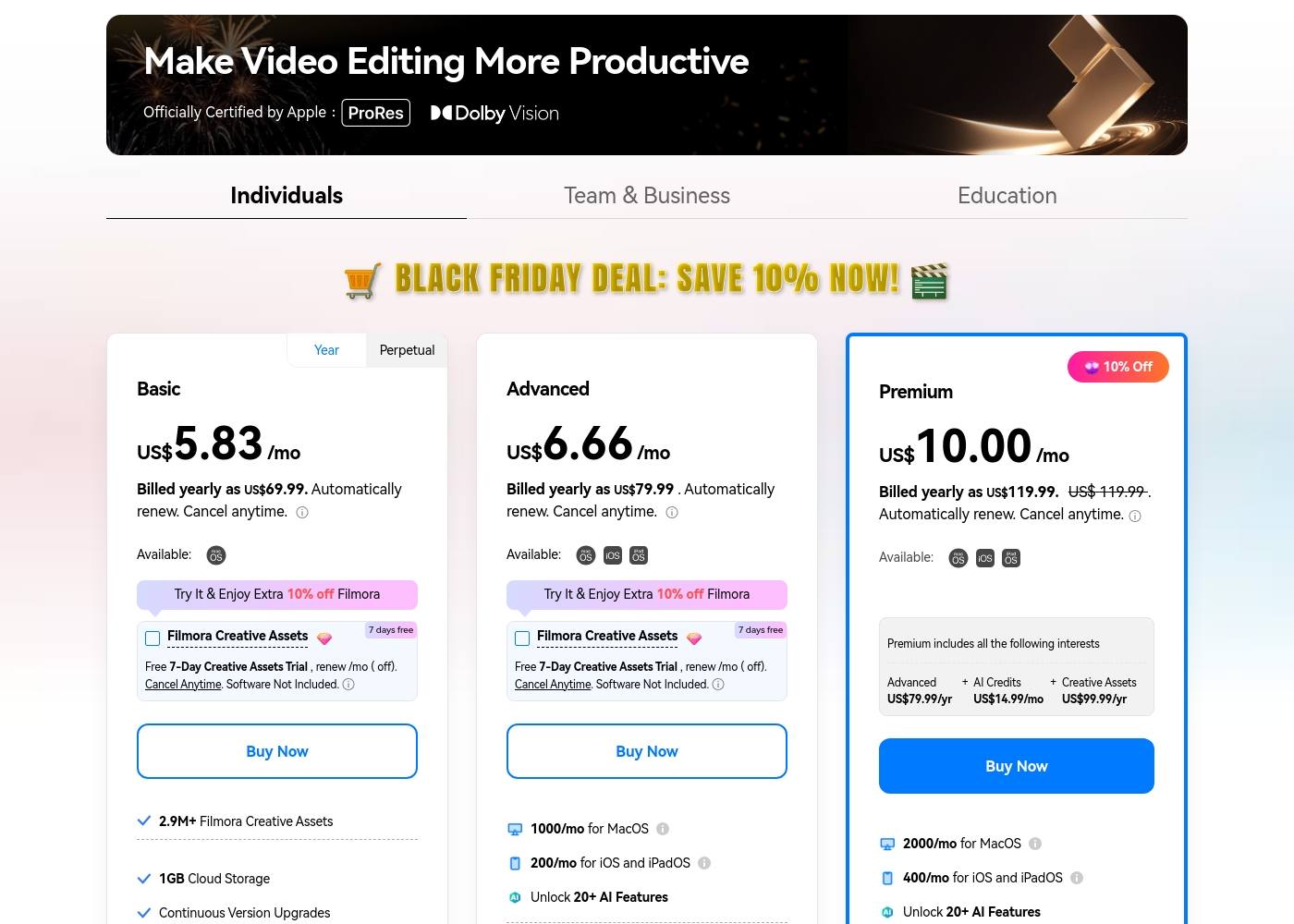
Filmora 14 costs between US$69.99 and US$119.99 per year with three individual annual plans: Basic at US$69.99, Advanced at US$79.99, and Premium at US$119.99.
These individual tiers offer flexible subscription options designed to fit different creator needs, from casual editing to advanced AI-enabled projects. All plans are billed annually and allow you to cancel renewal automatically at any time.
Basic
Price: Billed yearly as US$69.99 (US$5.83/mo) Refund Policy: 30-day money-back guarantee Other Features:
- 2.9M+ Filmora Creative Assets
- 1GB Cloud Storage
- Export without Watermark
- Continuous Version Upgrades
- 2.9M+ Filmora Creative Assets
- 1GB Cloud Storage
- Continuous Version Upgrades
- Export without Watermark
- 4K HD Export
- All Basic Features
- Apple Sync: macOS, iOS, iPadOS
- 10GB Cloud Storage
- 1000 AI Credits/mo for MacOS
- 200 AI Credits/mo for iOS and iPadOS
- All Advanced Features
- 2000 AI Credits/mo for MacOS
- 400 AI Credits/mo for iOS and iPadOS
- 100GB Cloud Storage
- Premium includes advanced bundle and creative assets
- One-time payment structure
- Enjoy Filmora 14 updates only (no major upgrades)
- 1,000 Filmora AI Credits (one-time grant)
- 2.9M+ Filmora Creative Assets
- 1GB Cloud Storage
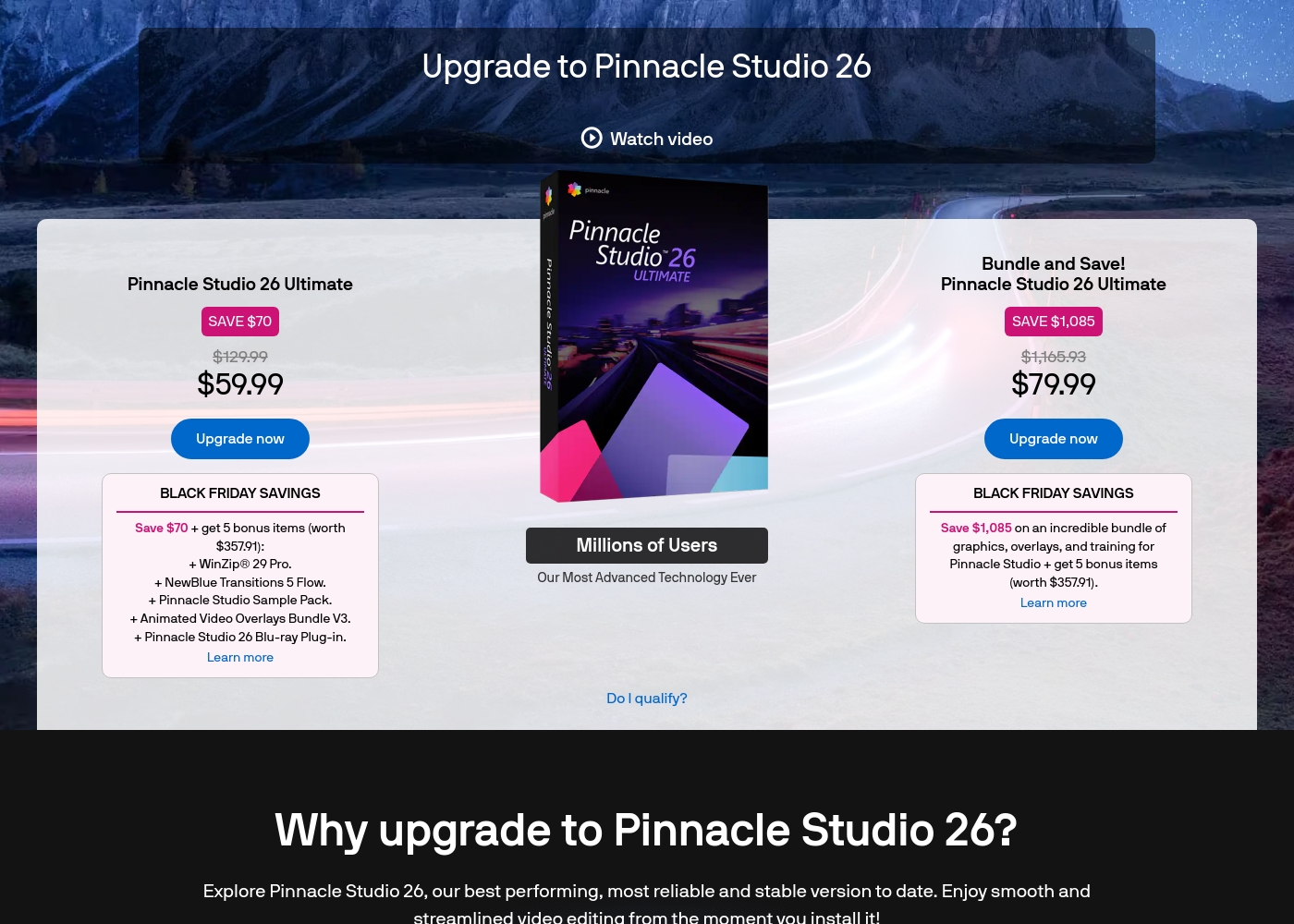
Pinnacle Studio 26 Ultimate acquisition costs range between $59.99 and $79.99 as a one-time upgrade purchase, with two main options: Pinnacle Studio 26 Ultimate at $59.99, and the Bundle and Save! version at $79.99.
These prices represent special Black Friday upgrade offers for users looking to access the latest features. Here is how the deals compare:
Pinnacle Studio 26 Ultimate
Price: $59.99 (One-time Upgrade Price) Best For: Current users who want the latest, most stable software version and specific utility tools. Other Features:
- Saves you $70 off the regular $129.99 price.
- Includes a total of 5 bonus items worth $357.91.
- Comes with WinZip® 29 Pro and NewBlue Transitions 5 Flow.
- Features the Pinnacle Studio 26 Blu-ray Plug-in.
- Includes the Pinnacle Studio Sample Pack and Animated Video Overlays Bundle V3.
- One-time price of $59.99 (was $129.99)
- 5 bonus items included (worth $357.91)
- Includes WinZip® 29 Pro
- Includes NewBlue Transitions 5 Flow
- Includes Pinnacle Studio 26 Blu-ray Plug-in
- One-time price of $79.99 (was $1,165.93)
- Includes all 5 bonus items (worth $357.91)
- Includes training, graphics, and overlays bundle
- Save $1,085 on the total package
Pricing Notes
- Filmora 14 uses clear annual subscriptions based on AI credits and cloud storage limits.
- Pinnacle Studio relies primarily on perpetual, one-time purchase tiers but lacks detailed plan visibility.
- The free version of Filmora 14 is permanent but enforces a watermark on all video exports.
- Pinnacle Studio offers a 10-day StudioBacklot trial for training and royalty-free content.
Pricing Head-to-Head
User Reviews
Users consistently praise Filmora for its excellent ease of use and intuitive, simple interface. Many editors, from hobbyists to long-term users, find the built-in features helpful, noting the software performs well even on modest hardware.
However, external feedback sharply pivots when discussing company operations. A significant volume of criticism focuses intensely on deceptive billing practices and poor customer service.
I love using Wondershare’s video editor, Filmora! It’s so easy to use and really fun too. This program keeps up with my creativity every step of the way.
User feedback for Pinnacle Studio is exceptionally poor, primarily focusing on extreme frustrations with the software's reliability and performance. Despite newer versions claiming improved stability, many users report constant crashing, freezing, and issues with rendering, even when using high-spec computers.
This instability leads to lost progress and wasted time. The second overwhelmingly negative theme is customer support.
I’ve been using this product for several years because it is user friendly and features many nice tools. However, the tech support when there is an issue is not good at all. I was extremely disappointed and uninstalled the software despite owning it.
Our Verdict
This comparison pits Filmora 14’s efficiency against Pinnacle Studio’s technical depth. For the vast majority of video creators, Filmora 14 is the clear winner here. It offers a more reliable platform and incredible AI features boosting speed. Filmora 14 delivers exceptional results through automation and its extensive asset library. Tools like Auto Reframe and AI Video Translation instantly solve major social media pain points. Filmora 14 is fast, highly intuitive, and its performance is predictable for meeting deadlines. Pinnacle Studio excels when handling highly technical, high-resolution projects like native 8K video. It provides deep, frame-accurate control and specialized features like Stop Motion Animation. However, reviewers repeatedly warn that Pinnacle Studio frequently suffers from unstable performance and crashes. Stability should be your primary deciding factor for reliable output. Choose Filmora 14 if you publish frequently and rely on a stable, modern editing workflow. Only select Pinnacle Studio if handling native 8K files outweighs concerns about reliability and stability. Filmora 14 combines powerful AI technology with user accessibility for the modern content sphere. Pinnacle Studio caters to deeper, traditional technical editing but requires patience and risk tolerance.
Frequently Asked Questions
Which is more reliable for long projects: Filmora 14 or Pinnacle Studio?
Filmora 14 is significantly more reliable based on widespread user reports and higher ratings. Pinnacle Studio users frequently cite critical crashes and rendering failures, hindering long-term projects. Filmora 14 leverages GPU acceleration for smooth, stable performance.
Can Pinnacle Studio use AI like Filmora 14 does for efficiency?
No. Filmora 14 is heavily focused on AI automation, offering tools like AI Video Enhancer and Idea to Video. Pinnacle Studio does not include dedicated generative or automatic AI features. You must perform all editing and optimization manually in Pinnacle Studio.
Does Filmora 14 support Multi-Camera editing like Pinnacle Studio?
Yes, Filmora 14 has Multi-Camera editing tools to sync and switch angles easily. Pinnacle Studio also offers this, emphasizing frame-accurate control. Both tools handle multi-angle footage effectively for interviews or events.
Which is better for social media content creation and repurposing?
Filmora 14 is vastly superior for social media creation and optimization. Its Auto Reframe tool and Social Video Planner save hours of manual adjustment time. Pinnacle Studio requires manual formatting for platform-specific aspect ratios.
Is Pinnacle Studio worth the stability risk for 8K video editing?
Only if native 8K import is absolutely essential to your workflow. Pinnacle Studio supports extremely high resolutions like 8K, which Filmora 14 does not explicitly support. However, be prepared for potential crashes and rendering issues reported by users.
How do the pricing models differ between Filmora 14 and Pinnacle Studio?
Filmora 14 uses clear annual subscriptions, including AI credits and cloud storage. Pinnacle Studio appears to use tiered perpetual licenses, meaning a one-time purchase. Filmora 14 provides greater transparency in its pricing structure.
Ready to Choose?
Both tools have their strengths. Choose based on your specific needs.