Filmora 14 vs Invideo
Filmora 14 and Invideo both heavily utilize AI, yet their core philosophies are vastly different. Filmora 14 provides robust, precise desktop editing and advanced enhancement tools. Invideo focuses entirely on rapid content generation using simple text prompts for sheer volume. This comparison determines whether you need control (Filmora 14) or speed (Invideo).
Best for: Traditional video editors requiring precise, frame-level timeline control., Creators using multi-camera setups for events or interviews.
Best for: Marketing agencies needing to generate large volumes of UGC ads rapidly., Solopreneurs focused on drastically cutting video creation time (down to 30 minutes).
Powerful AI Editor, Buyer Beware.
We find Filmora 14 offers a powerful suite of AI editing tools and an accessible interface perfect for creators across all skill levels. While the feature set and performance are top-tier, we cannot overlook the severe, verified reports of deceptive billing and poor customer support from the vendor. Overall, this is a technically impressive editor marred by critical issues related to trust and operational transparency.
Pros
- Exceptionally easy to use interface suitable for all skill levels.
- Robust AI feature set simplifies complex edits like object removal and background cutting.
- Access to a massive 2.9M+ library of creative assets, music, and templates.
- Optimized performance with GPU acceleration, even on modest hardware.
Cons
- Severe billing issues and reported difficulties canceling auto-renewals.
- Support is often automated, unresponsive, and unhelpful via chat or email.
- Lack of transparency regarding hidden costs and AI credit consumption per feature.
- Perpetual license holders report forced migration to the newest version.
Rapid AI Video Creation, Backed by Humans.
We found Invideo AI to be exceptionally effective at transforming text prompts into polished videos quickly, enabling users to cut production time significantly. The platform stands out due to its genuinely dedicated, 24/7 customer support, which navigates users past complexity and technical inconsistencies. Overall, Invideo is a powerful AI tool deserving of content creators looking for speed and reliability, especially given the human safety net.
Pros
- Exceptional 24/7 customer support delivered by responsive, real humans.
- Dramatically reduces video creation time, boosting workflow efficiency.
- Highly user-friendly for generating videos from simple text prompts.
- Allows sophisticated editing of audio, voice, and captions using natural language.
Cons
- Occasional inconsistencies or anomalous results in AI-generated content quality.
- Users report frustration being charged for unsatisfactory generative AI prompts.
- Generating time can be lengthy when making multiple revisions.
- The media and video library needs expansion to offer more content variety.
AboutFilmora 14
Filmora 15 is an award-winning video editor designed for both beginners and experts alike. It aims to help you edit as an expert with Filmora AI by streamlining the entire creative process.
The interface is intuitive and clean, making video editing simple even for those without prior experience. You can literally type, drop, or sketch ideas into the platform, and Filmora helps bring them to life with AI-driven effects. The platform provides a connected experience; it's available across desktop, tablet, and mobile, allowing you to create exactly as you wish. 💡
AboutInvideo
Invideo is an AI tool designed to give you the power to play and create. It transforms simple text prompts related to your business or casual ideas into cinematic videos, professional promos, and detailed explainers instantly.
This platform is perfect for creators, educators, non-profits, and marketing agencies seeking rapid content creation. Whether you need an engaging UGC ad or a detailed product reel, Invideo handles the complex work. You're empowered to generate and edit content that reaches new customers across various countries, languages, and beliefs worldwide. 💡
Highlights
Feature Comparison
Features Overview
We highlight the main differences and pick a winner for each feature.
Core Workflow Speed
Invideo generates full videos from text prompts very rapidly. Filmora 14 involves more manual user engagement on the timeline.
Filmora 14 uses a precise timeline interface for manual editing and clip manipulation. Its AI speeds up elements like enhancement and reframing. This hybrid approach offers detailed control for video editing. Invideo focuses on instant content creation from just simple text prompts. Complex promotional videos are generated quickly in minutes. Users report cutting creation time down to only 30 minutes with Invideo. If your main priority is high volume video creation speed, Invideo is clearly superior. Filmora 14 is better suited for deep editing polish. Need to create 20 marketing assets weekly? Invideo’s text-to-video power makes that goal highly achievable and scalable.
Timeline Control & Depth
Filmora 14 provides superior magnetic timeline functionality and frame-level adjustments. Invideo lacks granular visual control.
Filmora 14 users benefit from a magnetic timeline that prevents frustrating editing gaps. Advanced features include planar tracking and multi-camera sync. This provides professional-grade control over the final output. Invideo edits occur primarily through natural language text commands. It changes images or adds music based on the prompt, not through manual trimming. This sacrifices precision for pure editing speed. For achieving a professional, nuanced finish with custom motion graphics, Filmora 14 is superior. Invideo cannot match its frame-by-frame precision. Utilize Filmora 14 when your project requires complex, choreographed actions or precise syncing in a multi-angle interview setup.
AI Video Enhancement
Filmora 14 features unique AI tools to restore and improve existing footage quality. Invideo generates new content but doesn't fix old videos.
The Filmora 14 AI Video Enhancer restores old or dark footage with a single click. It reduces noise and sharpens details efficiently. The AI Color Palette replicates cinematic grading easily. Invideo’s AI focuses purely on assembling visuals and structure based on a text prompt. It is a generative tool and does not include enhancement or restoration features. Its output quality depends on the generated assets. Filmora 14 is absolutely necessary if you work primarily with raw, imperfect, or low-light video files. Invideo is not designed for footage correction. If you need to restore five years of product archives shot with older iPhones, Filmora 14 will deliver superior results efficiently.
Customer Support Quality
Invideo offers highly-praised 24/7 human customer support. Filmora 14 support is criticized for reliance on frustrating automated bots.
Filmora 14 offers live chat and email support, aiming for a 24-hour response time. Many users report getting stuck first with automated support bots. Resolving complex platform issues can be difficult. Invideo users consistently commend the knowledgeable and dedicated human support staff. Reviewers praise the 24/7 availability and personalized attention provided by Invideo representatives. Invideo provides a reliable human safety net when technical problems arise. Filmora 14's reliance on automation is a source of user frustration. If you value rapid issue resolution and need reliable support for mission-critical videos, Invideo is the clear choice.
Pricing Flexibility
Filmora 14 is better for a low fixed annual budget and offers a perpetual license. Invideo uses a higher-cost monthly, usage-based model.
Filmora 14 annual plans start at $69.99 ($5.83/month equivalent), offering cost predictability. It also uniquely provides a perpetual license for a single major version. Pricing includes assets and cloud storage. Invideo paid plans start substantially higher at $28 monthly, scaling up to $899 monthly. Its pricing uses usage-based credits for generative features. Running out of credits increases the total cost. Filmora 14 offers superior budget predictability for consistent editors, especially with the lower annual rates. Invideo costs fluctuate easily with high AI usage. If a perpetual license is important to you, only Filmora 14 offers that purchasing flexibility today.
Learning Curve
Invideo's text-prompt interface is simpler to learn than Filmora 14's traditional editing platform. Both have high accessibility.
Filmora 14 has a very gentle learning curve compared to competitors like Premiere Pro. Its magnetic timeline helps streamline basic functions. Mastery of features like planar tracking still takes time. Invideo reduces the creative process to using simple text prompts. Even complex edits like changing voiceovers are done via typing a command. Content creation friction is near zero. For users intimidated by traditional software timelines, Invideo provides the fastest path to a polished first video. Filmora 14 requires navigation of standard menus. Someone new to video can confidently generate a UGC ad in Invideo much faster than learning the Filmora 14 environment.
Global Strategy
Filmora 14 has a dedicated instant AI Video Translation tool. Invideo empowers global content creation through natural language localization.
Filmora 14 includes dedicated features for AI Video Translation and instant dubbing in 28 languages. Users can quickly repurpose videos for specific international markets. Auto Caption boosts accessibility across the globe. Invideo is designed to create videos that resonate across various countries and beliefs. Simple commands like 'Change the voiceover to Spanish' localize content effortlessly. It focuses on broad, personalized global engagement. Both tools excel at breaking language barriers for creators. Filmora 14’s instant dubbing is a highly focused, specific feature. If dubbing an existing webinar into five simultaneous languages is your goal, Filmora 14's specialized tool simplifies that task considerably.
Mobile Sync & Editing
Filmora 14 supports cross-device editing and sync (iOS/iPadOS). Invideo is a purely web-based, cloud generation platform.
The Advanced and Premium plans of Filmora 14 support Apple Sync across macOS, iOS, and iPadOS devices. This allows for mobile editing and workflow continuity. It’s ideal for creators working on the go. Invideo is designed as an end-to-end cloud generation service. It lacks a dedicated mobile editing application or cross-device sync feature, relying on the desktop browser interface. Mobile creators needing to start an edit on their desktop and finish on their iPad should exclusively choose Filmora 14. Invideo requires consistent access to a web browser. Filmora 14 provides valuable flexibility for travel vloggers who need to edit and upload snippets immediately from their mobile devices.
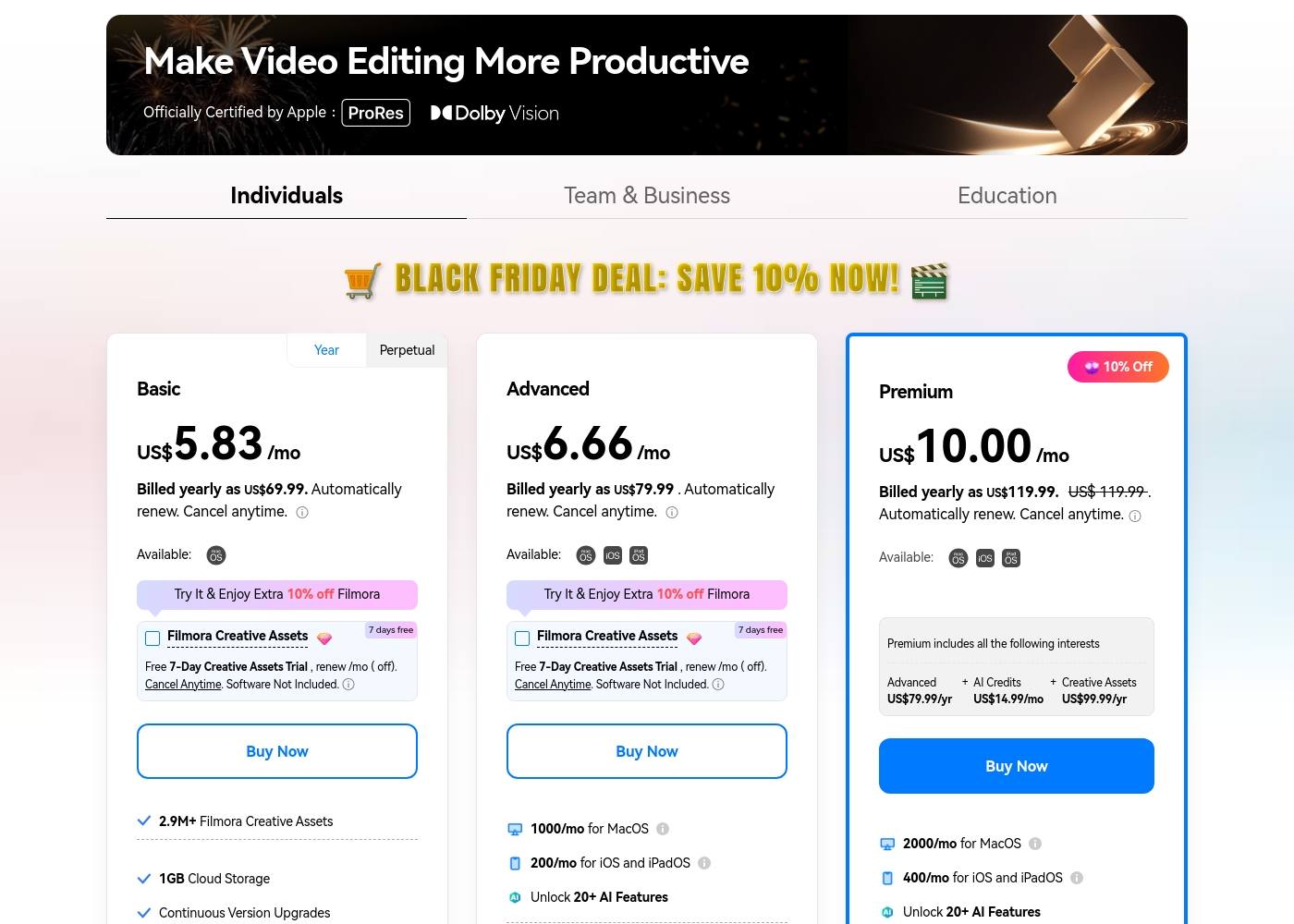
Filmora 14 costs between US$69.99 and US$119.99 per year with three individual annual plans: Basic at US$69.99, Advanced at US$79.99, and Premium at US$119.99.
These individual tiers offer flexible subscription options designed to fit different creator needs, from casual editing to advanced AI-enabled projects. All plans are billed annually and allow you to cancel renewal automatically at any time.
Basic
Price: Billed yearly as US$69.99 (US$5.83/mo) Refund Policy: 30-day money-back guarantee Other Features:
- 2.9M+ Filmora Creative Assets
- 1GB Cloud Storage
- Export without Watermark
- Continuous Version Upgrades
- 2.9M+ Filmora Creative Assets
- 1GB Cloud Storage
- Continuous Version Upgrades
- Export without Watermark
- 4K HD Export
- All Basic Features
- Apple Sync: macOS, iOS, iPadOS
- 10GB Cloud Storage
- 1000 AI Credits/mo for MacOS
- 200 AI Credits/mo for iOS and iPadOS
- All Advanced Features
- 2000 AI Credits/mo for MacOS
- 400 AI Credits/mo for iOS and iPadOS
- 100GB Cloud Storage
- Premium includes advanced bundle and creative assets
- One-time payment structure
- Enjoy Filmora 14 updates only (no major upgrades)
- 1,000 Filmora AI Credits (one-time grant)
- 2.9M+ Filmora Creative Assets
- 1GB Cloud Storage
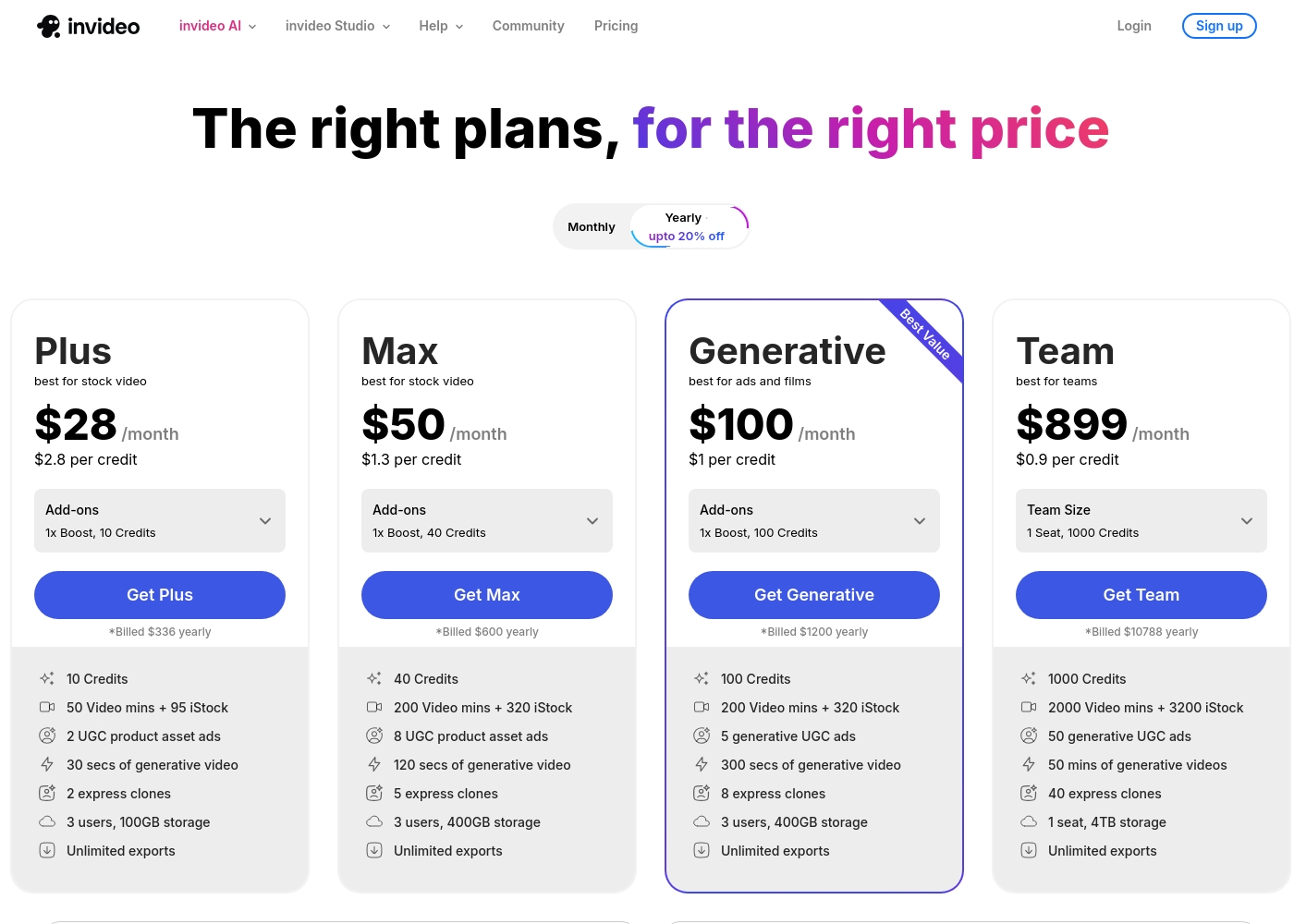
Invideo pricing ranges from $0 for the Free plan up to $899 per month for the Team plan, with three intermediate tiers: Plus at $28/month, Max at $50/month, and Generative at $100/month.
Here are the details for the plans available across monthly and yearly billing cycles.
- 10 Video mins and 1 AI credit per week
- 1 Express avatar
- 4 Exports per week with invideo watermark
- No access to generative features
- 10 Credits ($2.8 per credit)
- 50 Video mins + 95 iStock
- 2 UGC product asset ads
- 30 secs of generative video
- 2 express clones
- 40 Credits ($1.3 per credit)
- 200 Video mins + 320 iStock
- 8 UGC product asset ads
- 120 secs of generative video
- 5 express clones
- 100 Credits ($1 per credit)
- 200 Video mins + 320 iStock
- 5 generative UGC ads
- 300 secs of generative video
- 8 express clones
Pricing Notes
- Filmora 14 offers better fixed cost predictability with low annual rates and perpetual license options.
- Invideo pricing is usage-based; costs increase based on AI credits consumed, which can make budgeting difficult at high scale.
- Filmora 14's free export permanently includes a watermark; Invideo's free plan limits exports and includes a watermark.
- Invideo's effective cost per credit decreases significantly from the Plus plan ($2.80) up to the Team plan ($0.90).
Pricing Head-to-Head
User Reviews
Users consistently praise Filmora for its excellent ease of use and intuitive, simple interface. Many editors, from hobbyists to long-term users, find the built-in features helpful, noting the software performs well even on modest hardware.
However, external feedback sharply pivots when discussing company operations. A significant volume of criticism focuses intensely on deceptive billing practices and poor customer service.
I love using Wondershare’s video editor, Filmora! It’s so easy to use and really fun too. This program keeps up with my creativity every step of the way.
Invideo AI enjoys widely positive reception, particularly for the strength of its customer support. Users frequently highlight the responsiveness and genuine care of the support team, praising specific agents for being patient, kind, and knowledgeable in resolving complex issues like billing errors or login problems.
Reviewers consistently find the platform an invaluable tool that is super easy to use, delivering professional results and saving significant time; some creators even attribute substantial growth in their channels to using the software. However, sentiment isn't universally positive regarding the core AI engine.
I had made the mistake of removing the email connected to my plan and couldn't understand why I was being charged. Patrick immediately located the account, helped me cancel the subscription, and provided great service. The team is excellent!
Our Verdict
Choosing between Filmora 14 and Invideo is a classic decision between control and speed. Both tools leverage AI effectively, but they target fundamentally different creative workflows. You must decide if you are an editor seeking polish or a marketer driving sheer content volume. Filmora 14's superpower lies in its ability to marry traditional timeline control with powerful AI enhancements. Need to fix low-light footage or add precise motion graphics using multi-camera angles? Filmora 14 excels here. Its predictable annual cost and perpetual license option offer superior budget transparency over Invideo. Invideo, contrastingly, is a rapid content generation machine optimized for marketers. Its key strength is turning complex ideas into polished videos using only a text prompt. Invideo drastically cuts production time and is backed by exceptional 24/7 human support. The deciding factor is your output demand: Filmora 14 is for careful, quality-focused projects requiring fine adjustments. Pick Invideo if you must generate 30 high-impact social clips this week. Invideo users prioritize speed and scaling above all else. If you need deep control over your cuts and footage quality, choose Filmora 14. If you run a marketing agency focused on maximum speed and volume using a generative AI, Invideo will dramatically improve your workflow efficiencies.
Frequently Asked Questions
Which is faster for generating marketing content: Filmora 14 or Invideo?
Invideo is significantly faster because it generates entire videos instantly from text prompts. Users report cutting creation time down to 30 minutes with Invideo. Filmora 14's workflow still requires manual use of the editing timeline.
Which software offers a perpetual license option: Filmora 14 or Invideo?
Only Filmora 14 provides an option for a perpetual license for a single version. Invideo operates exclusively on subscription models, primarily using monthly usage credits. Filmora 14 offers better long-term budgetary predictability.
Which is better for fixing low-quality video footage: Filmora 14 or Invideo?
Filmora 14 is vastly superior for footage correction and enhancement. It features a dedicated AI Video Enhancer to reduce noise and restore details. Invideo is a generative tool and cannot perform enhancement on existing files.
Is Invideo customer support better than Filmora 14 support?
Yes, Invideo is widely praised for its exceptional 24/7 human customer support. Filmora 14 users frequently report frustration with automated bots and difficulties reaching human representatives for help.
Can I edit and sync footage from multiple cameras in Invideo like I can in Filmora 14?
No, Invideo does not have traditional multi-camera editing or precise sync features. Filmora 14 excels at this, allowing easy angle switching on its magnetic timeline. Filmora 14 is the choice for event coverage.
Do I need to pay for AI credits in Filmora 14 or Invideo?
Both platforms rely on credits for advanced AI usage. Filmora 14 includes monthly AI credits in its Advanced and Premium plans. Invideo’s pricing is heavily based on usage and credit consumption in all paid tiers.
Ready to Choose?
Both tools have their strengths. Choose based on your specific needs.