FamiSafe vs SentryPC
FamiSafe and SentryPC both offer deep device monitoring, but their core purposes differ hugely. FamiSafe is built for modern AI-powered parental safety and driver coaching. SentryPC emphasizes comprehensive, stealth monitoring suitable for corporate or enterprise environments. Here is how to pick the right monitoring tool for your specific needs.
Best for: Large families requiring coverage for 40+ connected smartphones and devices, Parents supervising new teenage drivers who need monitoring reports
Best for: Enterprise organizations managing 500+ employee devices remotely, Users who require complete stealth monitoring and unseen operation
Advanced parental controls, reliability needed.
We recognize FamiSafe's exceptionally comprehensive feature set, including AI monitoring and affordable plans that cover up to 40 devices. External feedback raises serious concerns regarding installation frustration, technical glitches, and overall reliability, especially on iOS devices. Overall, we recommend FamiSafe primarily for users who value advanced monitoring features and are comfortable managing potential technical challenges.
Pros
- Flexible subscription tiers covering up to 40 devices ($4.99/mo annual rate).
- Features include AI-powered monitoring for social media, chats, and content safety.
- Robust physical safety tools like real-time location tracking and Geofence alerts.
- Customer support, when reached, is often highly professional and technically focused.
Cons
- Users report significant issues with technical instability and app reliability.
- Setup process can be challenging, leading some users to report system disruption.
- Required iOS features/companion apps sometimes crash frequently upon opening.
- Initial refund procedures may be frustrating, requiring extensive troubleshooting and logs.
Stealth Monitoring, Enterprise Ready.
We find SentryPC offers robust, cloud-based activity monitoring and usage scheduling features that scale well from basic home use to large corporate environments. Overall, the comprehensive feature set—including powerful filtering and stealth operation—makes it a viable choice, but potential users should weigh the mixed external feedback regarding long-term reliability and support experience.
Pros
- Software described positively as 'mind blowing' by some users.
- Comprehensive monitoring and control features are included in all plans.
- Scales effectively from single home use to 1,000+ enterprise licenses.
- Operates remotely and completely unseen in stealth mode.
Cons
- Extremely polarized reports on reliability and core functionality.
- Highly negative feedback reported regarding customer support quality.
- Requires an annual commitment; no free trial is explicitly offered.
AboutFamiSafe
FamiSafe is a next-generation parental control application designed by Wondershare. It empowers families to establish positive digital habits together. The platform lets you see and guide your child's activities, balancing freedom with necessary protection. It is built for all parents who want reliable tools to manage screens, monitor device activity, and protect loved ones in real life. You’ll receive detailed reports on daily device usage and app activities effortlessly. 💡
AboutSentryPC
SentryPC is a completely cloud-based solution. It seamlessly combines activity monitoring, content filtering, and time management features into one secure platform. If you are a concerned parent or a business looking for employee monitoring, this software is your answer. SentryPC supports devices running Android, Chromebook, Mac, and Windows, helping you manage all your endpoints. Once installed, every activity is recorded in real-time and handled remotely in your account. 💡
Highlights
Feature Comparison
Features Overview
We highlight the main differences and pick a winner for each feature.
Stealth & Monitoring Focus
SentryPC specializes in complete stealth operation and deep logging. FamiSafe is a transparent, family-focused safety manager.
SentryPC is specifically designed to operate entirely unseen by the user. It prioritizes detailed logging, including every keystroke and activity, for comprehensive oversight. This makes SentryPC ideal for covert employee monitoring or strict corporate device governance. FamiSafe primarily focuses on establishing healthy digital habits alongside transparent safety features. While it performs monitoring, its primary use case involves the family being aware of device rules. FamiSafe adds modern safety layers like AI scanning for immediate risk detection in chats. The key difference is visibility: SentryPC is a spy, while FamiSafe is a watchful guide. Choosing SentryPC means accepting the risk of intense scrutiny, which might not suit a typical parent-child relationship. FamiSafe makes sense if you need open communication about screen limits and physical safety. Use SentryPC only if unseen, remote monitoring is absolutely necessary for your security requirements.
Social Media & Chat Safety
FamiSafe uses AI to scan 14+ social platforms for immediate risk alerts. SentryPC relies on generic keystroke logging.
FamiSafe uses advanced AI-powered tools to scan communications across 14+ social platforms simultaneously. It looks for specific, customized keywords that trigger instant risk alerts to the parent. This helps FamiSafe address modern threats like cyberbullying or self-harm warnings quickly. SentryPC provides standard keystroke logging and captures text messages and email records. It does not advertise specialized AI analysis for social media content or comprehensive chat risk detection. SentryPC logs the activity, but FamiSafe actively analyzes its emotional context. The AI advantage of FamiSafe makes it superior for addressing complex online social interactions and hidden risks. SentryPC excels at capturing simple text inputs but misses the context FamiSafe provides. If monitoring the nuances of TikTok, Snapchat, or Instagram chats is critical, FamiSafe is the clear technological leader here.
Physical Safety Tools
FamiSafe includes SOS Alerts, Geofences, and Driving Reports for safety. SentryPC only offers basic Geofencing for location awareness.
FamiSafe provides critical tools for immediate physical safety, not just digital protection. Children can send an instant SOS Alert with their precise location in an emergency. FamiSafe also offers Driving Reports to monitor new teens’ speed and routes for coaching. SentryPC includes basic Geofencing to track the device's location and notify you when it enters or exits a boundary. However, SentryPC notably lacks the urgent SOS or specialized driving reports FamiSafe offers. This functionality gap is huge for parental use. FamiSafe covers both digital activity and real-world movements, offering true 360-degree protection. SentryPC is mainly focused on what happens on the screen rather than external safety needs. If driving safety and emergency location services are non-negotiable, FamiSafe delivers the necessary specialized features immediately.
Scalability & Enterprise Use
SentryPC handles massive corporate scaling up to 1,000 licenses. FamiSafe is capped at a maximum of 40 devices.
SentryPC’s pricing structure is built for large organizations, offering plans up to 1,000 licenses. The cost per license drops significantly in higher business tiers, reaching under $10 per year. This makes SentryPC ideal for complex employee monitoring needs. FamiSafe caps its coverage at 40 devices, even with its highest annual plan. While generous for large families, this limit excludes FamiSafe from true enterprise or large-scale business deployment. FamiSafe is strictly a consumer product. Consequently, SentryPC is the only viable option if you need to manage hundreds of devices centrally. FamiSafe simply does not possess the capacity or commercial model for enterprise scaling. SentryPC is the definite winner for any organization needing 50+ licenses and centralized, remote management from one cloud dashboard.
Pricing Flexibility & Commitment
FamiSafe offers monthly plans and a free trial. SentryPC requires an annual commitment with no trial or guarantee.
FamiSafe offers maximum payment flexibility, including monthly and quarterly plans starting at $9.99/month. You can protect up to 40 devices for an effective $4.99 monthly rate annually. FamiSafe also includes a 7-day free trial and a money-back guarantee. SentryPC requires users to commit annually, starting at $69.95 for a single device license. There is no explicit free trial or money-back guarantee mentioned in their terms. This demands higher commitment before you can test functionality fully. FamiSafe wins on accessibility and low initial commitment, letting you test the product risk-free. SentryPC's annual lock-in makes changing your mind much harder. The combination of lower monthly pricing and the 7-day guarantee makes FamiSafe the better choice for cost-conscious users who want to try before they commit.
Reporting and Storage
SentryPC provides detailed activity logs but retains them for only 30 days. FamiSafe offers historical data retention for paid users.
SentryPC captures comprehensive logs, including keystrokes, emails, and thousands of screenshots. However, SentryPC automatically purges all logs older than 30 days, requiring users to archive important data locally. Screenshot storage is also capped (500-2,000 images). FamiSafe provides activity reports and location history, with paid plans offering access to historical data beyond the current day. This means FamiSafe retains long-term records so you can review usage patterns over months, not weeks. If reviewing device usage trends over a long period (e.g., semester-to-semester) is important, FamiSafe is better. SentryPC's 30-day purge policy forces too short a review cycle. For sheer log volume and short-term intensity, SentryPC is effective. But for historical accountability, FamiSafe is superior due to extended retention.
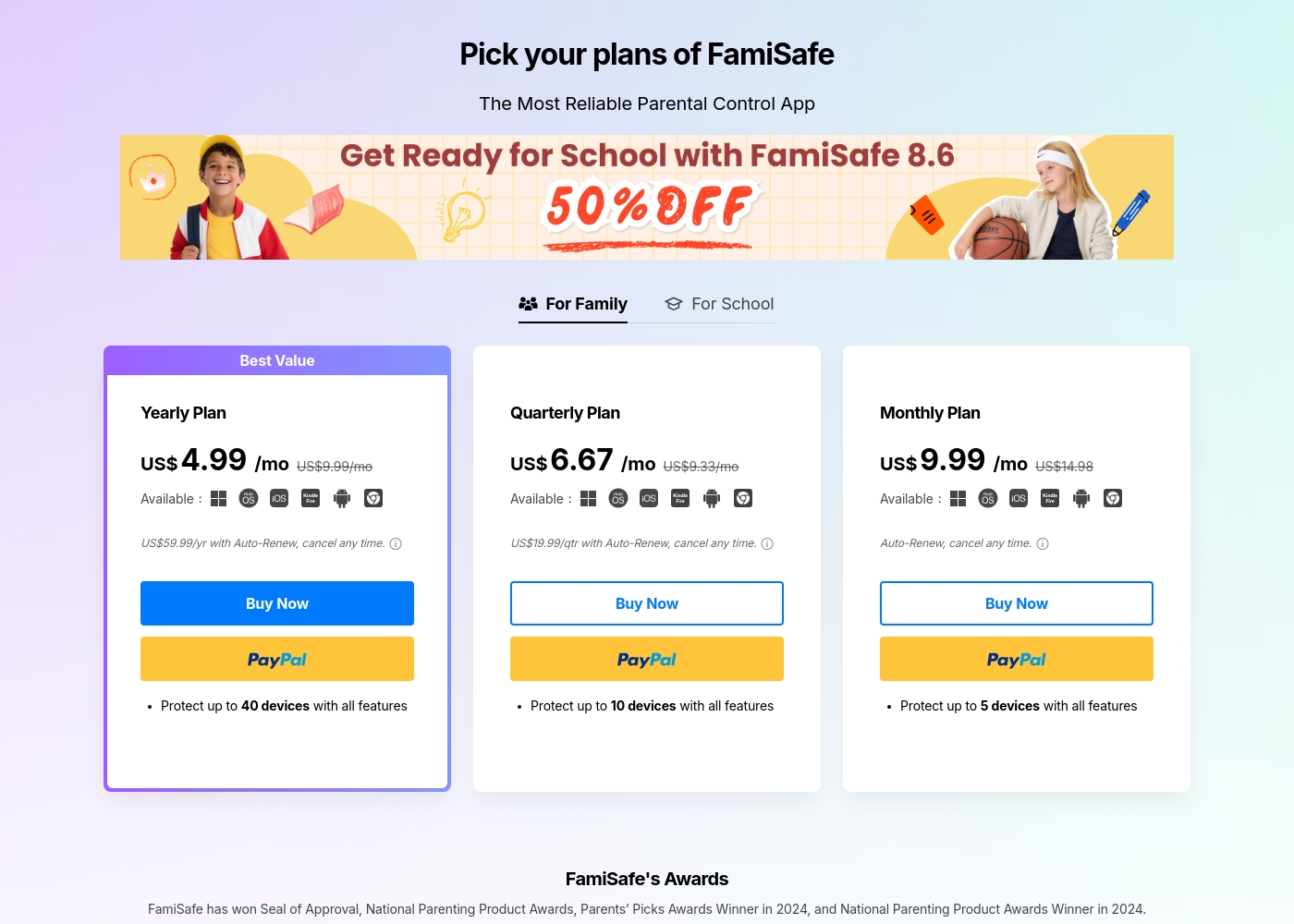
FamiSafe costs between US$4.99 and US$9.99 per month with three main plans: Yearly Plan at US$59.99/year, Quarterly Plan at US$19.99/quarter, and Monthly Plan at US$9.99/month.
FamiSafe provides simple, device-based plans for family monitoring. Here is a closer look at what each subscription offers.
Yearly Plan
Price: US$59.99 per year (effective US$4.99/mo) Websites Supported: Up to 40 devices Best For: Families needing comprehensive, long-term coverage Refund Policy: 7-day money-back guarantee Other Features:
- Includes all premium features
- Auto-Renews, cancel any time
- Protection for the highest number of devices
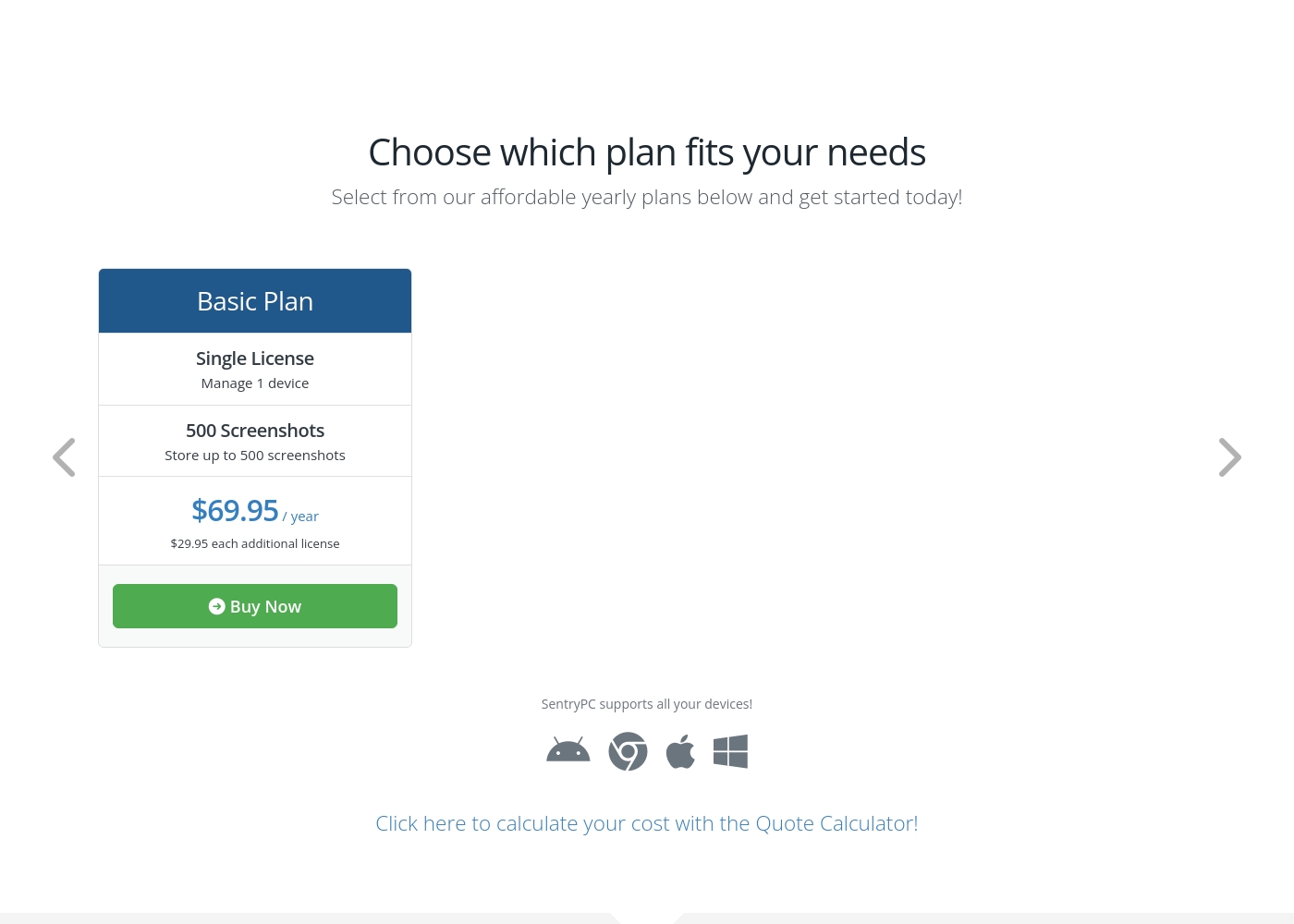
SentryPC costs between $69.95 and $9,995.00 per year with 6 plans: Basic Plan at $69.95, Business 50 at $1,495.00, Business 100 at $2,495.00, Business 250 at $4,995.00, Business 500 at $7,495.00, and Business 1,000 at $9,995.00.
SentryPC offers several affordable annual plans designed for both home users and large enterprises. Pricing is based entirely on the number of licenses and required screenshot storage.
Basic Plan
Price: $69.95 / year Best For: Home users Other Features:
- Single license to manage 1 device
- Includes 500 screenshots storage
- Additional licenses available for $29.95 each per year
- Single License (Manage 1 device)
- 500 Screenshots storage
- Free lifetime updates
- 50 Licenses (Manage up to 50 devices)
- 500 Screenshots storage
- Free lifetime updates
- 100 Licenses (Manage up to 100 devices)
- 1,000 Screenshots storage
- Free lifetime updates
- 250 Licenses (Manage up to 250 devices)
- 1,000 Screenshots storage
- Free lifetime updates
Pricing Notes
- FamiSafe offers maximum flexibility with monthly, quarterly, and annual subscription options.
- SentryPC requires an annual commitment and does not explicitly offer a free trial or money-back guarantee.
- FamiSafe's Yearly Plan delivers the best value, protecting up to 40 devices for an effective $4.99/month rate.
- SentryPC scales costs purely by the required number of licenses, making it cheaper per license at high volumes (1,000+).
- SentryPC charges $29.95 per year for every 500 increments if you need more screenshot storage.
Pricing Head-to-Head
User Reviews
FamiSafe holds a “Poor” 2.5 TrustScore, reflecting significant user frustration despite the company actively replying to 100% of negative feedback. The central issues revolve around technical operation and reliability. Users frequently cite major compatibility problems, including slow download speeds, app crashes—especially with the required “Wondershare Connect” tool for iPhone features—and reports of the application improperly installing or “ruining” device setup. The process to secure a refund can also be bureaucratic initially; customers sometimes had to “jump through hoops” by providing log files before the engineering team was convinced the product failed.
Conversely, nearly all positive feedback is centered on specific customer support agents, who are often described as outstanding, patient, fast, and technically competent (e.g., Mojoe, John, Angelo C). When a user successfully contacts a live agent, the problem is frequently resolved quickly or a full refund is processed, even covering taxes and VAT requested by European users. Overall, while the individual support experience is high-quality, the underlying product stability and the initial difficulty getting help contribute to the low external rating. 🤔
Mojoe was outstanding. He was technically competent, patient, and analytical, taking the time to walk me through every step. However, getting to a live person took too long, and I waited 30 minutes after being told it would be 13.
SentryPC’s external sentiment is sparse and highly polarized, based solely on the few available reviews. One user described the software as 'mind blowing,' suggesting strong satisfaction with its monitoring capabilities and performance. However, this positive view is sharply contrasted by a critical review claiming severe functionality issues and the 'WORST CUSTOMER SUPPORT EVER.' The negative review specifically mentioned that the product does not work well. The company provided detailed context for this critical feedback, noting a particular scenario where they provided remote installation assistance, issued a full refund upon request, and claimed the reported malfunction was caused by the user sending an uninstall command.
Given the extremely low volume of feedback, it's challenging to establish statistically significant recurring themes regarding ease of use, pricing, or integrations. The available data suggests a dramatic difference in user experience, ranging from total success (accuracy/liking) to fundamental failure (reliability/support). Customers should note the conflict surrounding technical support responsiveness and ultimate operational reliability 🧐 before committing to a subscription plan.
This software is simply mind blowing. I am currently using SentryPC and I am highly satisfied with its performance and comprehensive monitoring capabilities. It provides full transparency for device usage in real-time.
Our Verdict
If your priority is family protection with modern safety features, FamiSafe wins the overall comparison. FamiSafe offers critical next-gen features like AI social monitoring and driver coaching. SentryPC is unbeatable, however, for deep, untraceable surveillance in large corporate environments. FamiSafe's core strength is providing comprehensive child protection that works across platforms. It actively monitors 14+ social platforms and screens messages for risky keywords immediately. FamiSafe also includes crucial physical safety tools like Geofencing and teen Driving Reports. SentryPC masters scale and stealth for users requiring intensive administrative control. It efficiently manages up to 1,000 devices from one centralized cloud dashboard. If you specifically need robust keystroke logging and completely unseen operation, SentryPC is the definite choice. Your reliability trade-off is the deciding factor in this comparison. FamiSafe users report technical bugs, but SentryPC lacks a money-back guarantee commitment upfront. Pick FamiSafe if you prioritize specialized safety tools and risk-free commitment before purchasing. Choose FamiSafe for lower cost per device and modern, AI-backed family management features. Stick with SentryPC if you are an enterprise seeking maximum stealth and centralized administrative control over large device fleets.
Frequently Asked Questions
Which is better for real-time risk detection: FamiSafe or SentryPC?
FamiSafe is superior for real-time risk detection using AI analysis. FamiSafe actively scans over 14 social media channels for risky or inappropriate keywords. SentryPC focuses more on general keystroke collection and usage logging.
Does FamiSafe or SentryPC offer better scalability for businesses?
SentryPC is far better for corporate scalability, offering plans up to 1,000 licenses. FamiSafe is strictly family-focused, capping coverage at 40 devices maximum. Enterprises must select SentryPC for large-scale device management.
Is SentryPC worth the extra cost over FamiSafe?
SentryPC is worth the cost if you absolutely require comprehensive stealth and robust centralized management of many PCs. FamiSafe is better value if you only need coverage for 40 devices or fewer. FamiSafe also offers more flexible monthly pricing.
Can I test FamiSafe or SentryPC before committing to a plan?
Yes, you can test FamiSafe using its 7-day free trial and risk-free money-back guarantee. SentryPC does not explicitly offer a free trial period or a formal money-back guarantee. Commitment to SentryPC is higher upfront.
Which tool provides specialized monitoring for new teen drivers?
FamiSafe includes specific Driving Reports to monitor speed, routes, and harsh driving habits of teens. SentryPC does not offer this specialized reporting capability. FamiSafe is the clear winner for supervising new drivers.
How long do FamiSafe and SentryPC retain my activity logs?
SentryPC maintains activity logs for a strict maximum of 30 days before purging the oldest data daily. FamiSafe offers access to historical data for paid users, allowing for much longer retention periods. Reviewing long-term patterns requires FamiSafe.
Ready to Choose?
Both tools have their strengths. Choose based on your specific needs.