Emergent vs Framer
Emergent and Framer are both fast builders, but they speak different languages. Emergent builds entire apps from a text prompt. Framer gives designers total visual control to craft sites pixel by pixel. This comparison helps you pick the right one.
Best for: Solo entrepreneurs building an MVP, Small teams creating internal tools
Best for: Designers and creative agencies, Marketing teams building high-performance sites
Fast app building, clear pricing.
We find Emergent delivers on its promise of rapid, no-code app development with a straightforward tiered pricing model. It's a strong tool for creators and small teams who need to move from idea to prototype quickly. Overall, we see it as a solid, accessible platform for its target audience.
Pros
- Truly no-code platform for building full-stack web and mobile apps.
- Extremely fast from concept to deployment.
- Clear, tiered pricing with a free entry-level option.
- Pro plans include advanced features like large context windows and custom AI agents.
Cons
- External user review data is currently unavailable to validate support quality or reliability.
- Advanced features like 'Ultra Thinking' and high credit limits are only on the expensive Pro plan.
- The Free plan is limited to 10 credits per month, which may be restrictive for testing.
Powerful Design, Challenging User Experience.
Framer is pitched as a high-performance visual tool offering designers full creative control and rapid deployment capabilities. However, we note that the steep learning curve, combined with systemic issues like unhelpful support and reports of misleading pricing structures, creates a challenging user environment. Overall, we find that the foundational technology is impressive, but major user experience and customer service failures drastically undermine its claimed efficiency.
Pros
- Powerful visual tool favored by designers, especially those familiar with Figma.
- Enables handoff-free publishing and rapid site deployment.
- Built-in modern features like advanced CMS, SEO tools, and AI generation.
Cons
- Highly complicated and unintuitive user interface (UI/UX).
- Frequent reports of constant bugs and reliability issues.
- Pricing is often misleading, with unexpected, high costs for basic features like localization.
- Customer support is reportedly slow, difficult to access, and often relies on unhelpful AI bots.
AboutEmergent
💡 Emergent is an AI-powered development platform for creators, entrepreneurs, and teams. It's designed for anyone with an idea, regardless of technical skill. You describe what you want in natural language, and the platform generates the code, design, and infrastructure. It's a complete tool for building websites, mobile apps, and custom AI agents.
AboutFramer
Framer is a powerful visual design tool made for crafting and publishing modern websites. It empowers you to build exactly what you imagine using smooth effects, animations, and interactions. You can craft responsive layouts visually, eliminating the need to write code.
The platform helps you skip the blank canvas entirely. Integrated AI can generate sophisticated page layouts and advanced components right away. Collaboration is built in, meaning updates are seamless, and the entire process is completely handoff-free. 💡
Highlights
Feature Comparison
Features Overview
We highlight the main differences and pick a winner for each feature.
User Interface
Emergent is a prompt-based text interface. Framer is a complex visual canvas.
Emergent's interface is minimal. You describe your app in a text box. The AI builds it. You refine with more text. It's a conversation, not a canvas. Framer's interface is a full design studio. It resembles Figma. You drag elements, adjust properties, and craft layouts. It's powerful but has a steep learning curve. The key difference is control vs. simplicity. Emergent is simpler for non-designers. Framer offers more granular control for experienced visual builders.
Speed to Launch
Emergent launches apps in minutes. Framer launches sites in hours or days.
Emergent's core promise is speed. You can go from idea to a live, deployed app in minutes. The AI handles code, design, and infrastructure instantly. Framer accelerates design, not generation. AI Wireframer helps start layouts fast. But crafting the final site, adding interactions, and optimizing still takes focused design time. Emergent wins for raw, idea-to-deployment speed. Framer wins for design iteration speed once the project is underway.
Customization & Control
Framer gives you pixel-level design control. Emergent gives you high-level feature control.
With Emergent, you control the app's features through natural language prompts. You ask for a login page, a dashboard, a checkout. You don't control pixel placement. With Framer, you control everything visually. You set exact spacing, colors, animations, and responsive breakpoints. It's limitless for visual design. The trade-off is creative freedom. Framer offers total visual freedom. Emergent offers freedom from code.
Collaboration
Framer has built-in real-time editing. Emergent uses GitHub for version control.
Emergent's collaboration happens via GitHub integration on paid plans. Teams can manage code versions. It's developer-style collaboration. Framer allows multiple editors on the canvas. You see changes in real-time. It's designed for design teams to work together seamlessly without handoffs. For design teams, Framer's collaboration is more natural. For technical teams, Emergent's GitHub flow might fit better.
Advanced Features
Emergent builds custom AI agents. Framer offers A/B testing and analytics.
Emergent's Pro plan lets you build custom AI agents. You can create specialized tools for automation or data analysis. This is a unique, powerful capability. Framer's Scale plan includes Advanced Analytics. This is a usage-based add-on for A/B testing, conversion funnels, and click tracking. It's built for marketing optimization. The features serve different goals. Emergent builds functional tools. Framer optimizes marketing sites.
Scalability
Emergent scales via credits. Framer scales via page counts and bandwidth.
Emergent scales through monthly credit allocations. You use more credits for bigger projects. The Pro plan offers 750 credits and high-performance computing. Framer scales through clear limits. The Scale plan offers 30,000 pages and 500 GB bandwidth. You can add extra editors for $40/month each. Framer's scaling is more predictable for websites. Emergent's is usage-based, which can vary.
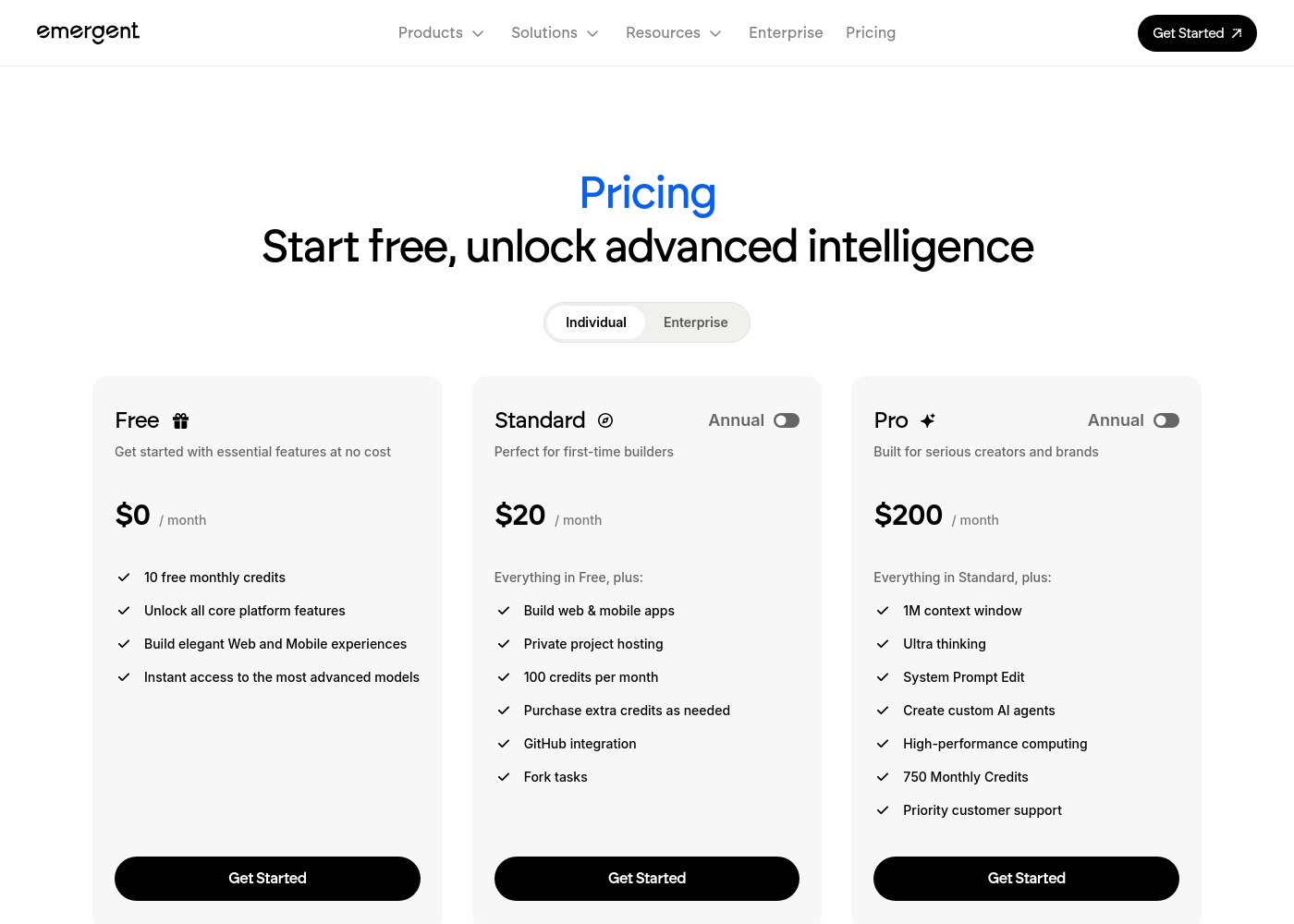
Emergent pricing: Emergent offers a range of options from a free entry-level tier to professional plans starting at $20 per month. Pricing is primarily based on monthly credit allocations and advanced AI capabilities like larger context windows and private hosting.
Individual annual and monthly billing options are available for scaling your software development needs efficiently. These plans provide flexible choices for every stage of your building process, whether you're starting fresh or managing an established brand with high performance requirements.
Note that annual prices listed reflect a discount compared to monthly billing rates, offering substantial savings for long-term users. For teams, there's also an Enterprise option for high-volume needs.
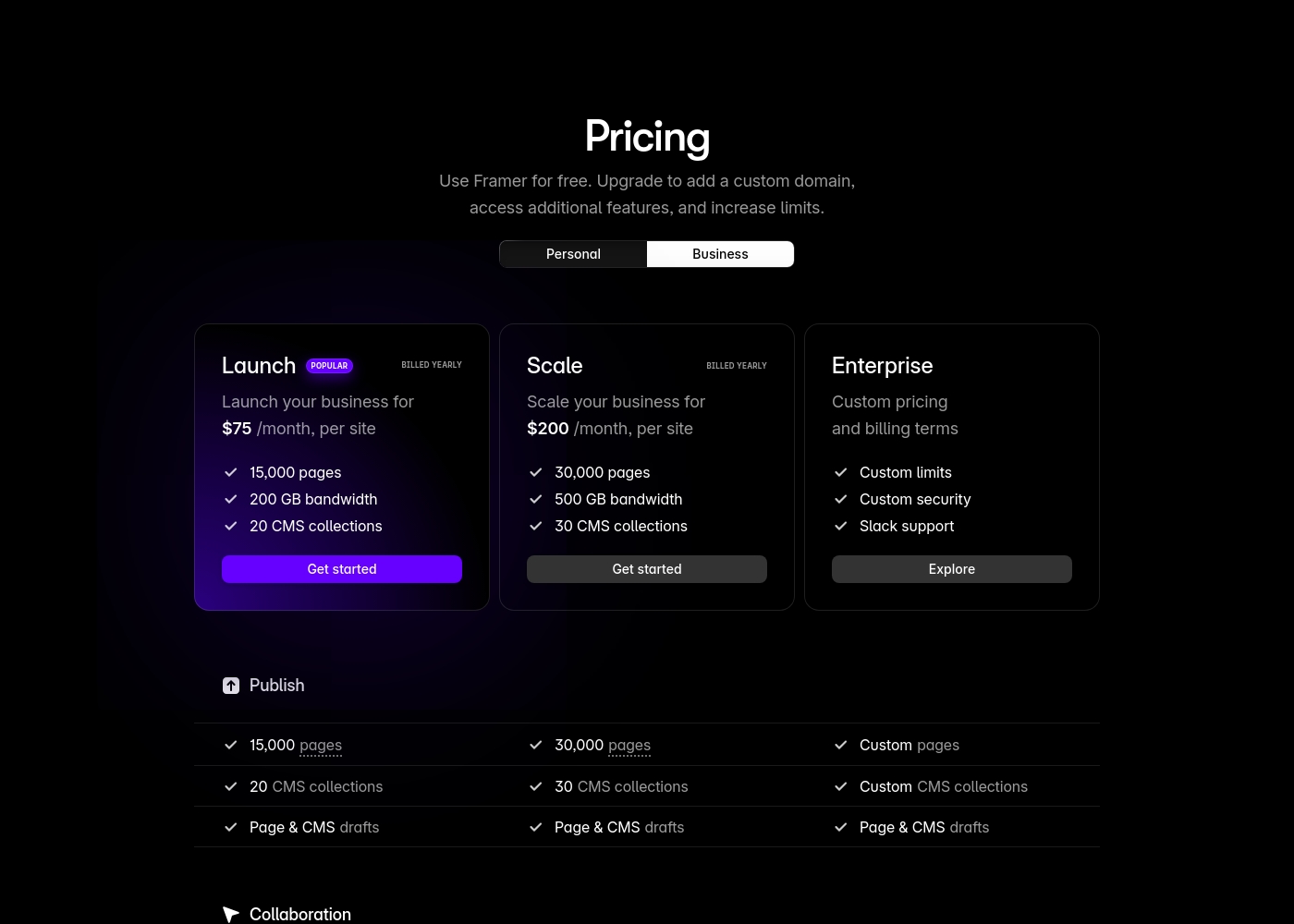
Framer costs between $75 and $200 per month (billed yearly) with two fixed-price plans: Launch at $75/month and Scale at $200/month, plus a custom Enterprise option.
Framer offers a Free plan to let you start designing right away. When you are ready to add a custom domain and access advanced features, you can choose from these paid business offerings.
Launch (Popular Business Plan)
Price: $75/month, per site (billed yearly) Websites Supported: Per site Best For: Launching a business site or marketing stack Refund Policy: 14-day refund eligible for EU and Turkey residents Other Features:
- 15,000 pages, 20 CMS collections
- 200 GB bandwidth, 50GB file storage
- Password protect, Custom code, Cookie banner
- Up to 10 editors (additional editors $40/month)
- 10 CMS collections
- 1,000 pages
- 5MB file uploads
- Free locale to try
- 15,000 pages
- 20 CMS collections
- 200 GB bandwidth
- 50GB storage
- 90 day version history
- 30,000 pages
- 30 CMS collections
- 500 GB bandwidth
- 100GB storage
- 120 day version history
- Custom limits and security
- Premium CDN and hosting
- Unlimited analytics and redirects
- Dedicated Slack support and team training
- SSO for editors and sites
Pricing Notes
- Emergent's free plan is permanent with 10 monthly credits. Framer's free plan is also permanent but limited.
- Emergent charges per account. Framer charges per site, which can multiply costs.
- Framer's Advanced Analytics is a separate, usage-based add-on after a 30-day trial.
- Framer charges extra for additional editors ($40/month) and extra locales ($40 each).
- Emergent offers a clear upgrade path from Free to Standard ($20) to Pro ($200).
Pricing Head-to-Head
User Reviews
External review data for Emergent is currently limited, as the provided Trustpilot link resulted in a verification error and Capterra information is unavailable. 🔍 This means we can't yet synthesize specific user sentiment on recurring themes like accuracy, ease of use, or support responsiveness from external review platforms. Our assessment is therefore based primarily on the provided feature and pricing information. We encourage you to check these review sites directly for the latest user feedback as it becomes available.
No specific user testimonials could be synthesized from the provided snippets, as the Trustpilot page returned a verification error and Capterra data was not available. Real user feedback was not accessible for this review.
Framer generates highly polarized feedback, reflected in its low Trustpilot standing. Users generally praise the platform’s powerful features and the impressive technical capabilities for designers, noting its potential as a beautiful site builder.
However, the external criticism mainly centers on poor User Experience (UX), which many describe as clunky, complicated, and unintuitive, making even simple tasks frustrating 😡. A significant number of reports highlight constant bugs and half-baked features impacting overall reliability.
The UI/UX is truly terrible, clunky, and overly complicated. I’ve been in web design for eight years, and this is the least intuitive platform I have ever used. Seriously, they need to hire a new designer quickly.
Our Verdict
Emergent wins for most people who want to build an application. Framer wins for designers who need to craft a perfect website. Your choice depends on whether you're building a tool or a showcase. Emergent's superpower is turning words into a working app. You can describe a mobile ordering system, and Emergent builds it. It handles the code, design, and deployment so you can focus on your idea. Framer's superpower is giving you total visual freedom. You can craft immersive, animated websites that look exactly like your Figma mockups. It's built for designers who won't compromise on pixel perfection. The deciding factor is your goal. Do you need a functional product built fast? Choose Emergent. Do you need a stunning marketing site built with design control? Choose Framer. Final verdict: If you're a non-technical founder with an app idea, start with Emergent's free plan. If you're a designer building a brand site, explore Framer's capabilities but watch the pricing closely.
Frequently Asked Questions
Which is better for small teams: Emergent or Framer?
Emergent is better for small technical teams building internal apps. Framer is better for small design teams building marketing sites. Emergent's per-account pricing is simpler for small budgets.
Does Emergent have a CMS like Framer?
No, Emergent does not have a built-in CMS. Framer's CMS is a core feature for managing site content. You'd need to build or add a CMS in Emergent.
Is Framer worth the extra cost over Emergent?
It's not about extra cost. They serve different needs. Framer is worth it for designers who need visual control and CMS. Emergent is worth it for builders who need to create apps without code.
Can I migrate from Emergent to Framer easily?
Migration would be difficult. Emergent builds full-stack apps with databases. Framer builds front-end websites. They are fundamentally different products.
Which platform is better for mobile apps?
Emergent. It explicitly builds and deploys mobile apps from text prompts. Framer is a website builder and does not create mobile applications.
Do I need to know code to use Emergent or Framer?
No, both are no-code platforms. Emergent uses AI to generate code from text. Framer uses a visual editor. You don't need programming skills for either.
Ready to Choose?
Both tools have their strengths. Choose based on your specific needs.