DemoCreator vs Snagit
People often compare Snagit’s speed against DemoCreator’s comprehensive power. DemoCreator offers a deep, AI-enhanced video creation suite. Snagit masters fast screen capture and essential annotation for documentation. Choosing means deciding between rapid visual feedback and deep post-production control.
Best for: Content creators who publish video tutorials frequently to YouTube, Educators needing multi-language subtitles and accessibility features
Best for: Corporate users requiring rapid, annotated screenshots for internal documentation, Professionals who prioritize simple screen capture over video editing
Affordable, AI-Powered Recording and Editing Mastery.
We found DemoCreator to be an incredibly comprehensive and accessible solution that effectively integrates high-quality screen recording and AI-driven editing tasks. It provides exceptional value, especially with its affordable perpetual plan and professional recording capabilities. Overall, this is one of the strongest all-in-one video creation tools available for educators and content creators today.
Pros
- Excellent value due to affordable pricing and a strong $79.99 one-time payment option.
- Combines recording, editing, and AI tools in an intuitive, beginner-friendly interface.
- Advanced features like text-based video editing and 4K/120 FPS recording are standard.
- Supports separate recording tracks for audio, video, and screen, simplifying post-production control.
Cons
- AI functionalities (like advanced speech-to-subtitle) are occasionally noted as quirky or unreliable for some users.
- The software sometimes requires significant computing resources during operation.
- The free version is heavily limited by watermarking and a short five-minute recording cap.
Industry-standard capture, marred by licensing.
We find Snagit is truly the industry standard for screen capture and annotation on both Mac and Windows, offering professional quality and great simplicity. Its powerful features dramatically simplify complex communication, making the tool invaluable for documentation. Overall, the software quality is exceptional, although recent mandatory subscription changes may frustrate long-term users.
Pros
- Dramatically simpler and easier to use than comparable desktop tools.
- Deep feature set supports complex projects and professional annotation.
- The software is considered an industry-standard, essential tool by users.
- Customer support is often reported as very good, responsive, and quick to resolve issues.
Cons
- Recent shift to a mandatory annual subscription frustrates long-time perpetual license holders.
- Individual licenses enforce a strict one-sign-in limit, making device switching cumbersome.
- Support experiences are inconsistent, with some users reporting unhelpful staff or long waits.
- Requires purchasing the more expensive 'Teams' license for flexible multi-device access.
AboutDemoCreator
DemoCreator is an all-encompassing screen recorder and video editor, uniquely powered by next-generation AI. It simplifies your entire content creation process in one singular, intuitive package.
The software offers six different recording modes to perfectly optimize your content capture. These options include standard screen capture and dedicated modes for gameplay, virtual avatars, and video presentations. It records your screen, webcam, system audio, and microphone onto separate tracks for streamlined post-production. 💡
This robust solution adapts easily to many specialized requirements. It is the perfect choice for educators, corporate trainers, marketers, and emerging gaming content creators alike.
AboutSnagit
Snagit is hailed as the best snipping tool available for both Mac and Windows users. It’s a powerful application designed to simplify how you capture and share information. You get tools to quickly capture screenshots and record your screen directly. It's built for anyone who needs to clearly communicate processes or complex concepts. This unified approach makes your entire workflow much smoother. 💡
Highlights
Feature Comparison
Features Overview
We highlight the main differences and pick a winner for each feature.
Core Focus & Editing
DemoCreator is a full video editor; Snagit is optimized for fast screen capture.
DemoCreator is an all-in-one software package combining capture and robust editing. This makes DemoCreator ideal for users needing deep post-production control quickly. Snagit focuses intensely on being the fastest and best snipping tool available. Snagit excels at quick image grabs and professional annotation for documentation. If you need a dedicated editor, DemoCreator is the clear choice here. If you mostly need to annotate screenshots, Snagit saves you time.
AI Automation
DemoCreator provides essential AI tools; Snagit does not offer any significant AI.
DemoCreator is powered by next-generation AI features built into the core workflow. Tools include text-based editing and an AI Teleprompter for confident presentation delivery. Snagit entirely focuses on manual capture and annotation workflows. Snagit does not offer comparable AI features to speed up post-production or transcription. If you want to cut editing time instantly, DemoCreator's AI provides superior efficiency and depth.
Recording Quality
DemoCreator offers high-end 4K/120 FPS; Snagit provides basic screen video capture.
DemoCreator offers professional specifications, including 4K UHD resolution and 120 FPS recording. This high-end quality is crucial for creating professional tutorials or fast gameplay videos. Snagit provides reliable video recording but doesn't specify top resolutions or frame rates. Snagit's recording is best for basic demos where quality requirements are lower. Users needing cinematic or high-motion results should select DemoCreator.
Annotation Speed
Snagit is faster for simple annotation; DemoCreator focuses on video effects.
Snagit is the industry-leading solution for rapid annotation and visual markup. Its specialized Sidekicks tools make adding clarity and feedback lightning fast for users. DemoCreator includes basic creative tools, transitions, and effects for video polish. However, DemoCreator isn't optimized for the immediate, transactional annotation Snagit handles. For quick feedback on static images and processes, Snagit’s specialized toolbox takes the lead.
Licensing Flexibility
DemoCreator offers perpetual ownership; Snagit forces a strict annual subscription.
DemoCreator provides maximum flexibility with a $79.99 Perpetual Plan. This grants lifetime access to the current major software version (V8.X). Snagit shifted to a mandatory annual subscription ($39.00/year) and eliminated perpetual options. Snagit's Individual license also has a strict, annoying one-sign-in limit between machines. DemoCreator is much kinder to your wallet and device switching habits over the long haul.
Global Accessibility
DemoCreator offers 90+ languages; Snagit lists no multi-language support.
DemoCreator allows users to generate precise Auto Subtitles in over 90 different languages. This single-click feature maximizes global content reach and accessibility easily. Snagit does not widely focus on or list such localization or advanced accessibility features. While Snagit exports content, its primary utility is internal documentation, not global publishing. For mass-market content, DemoCreator's accessibility features are invaluable.
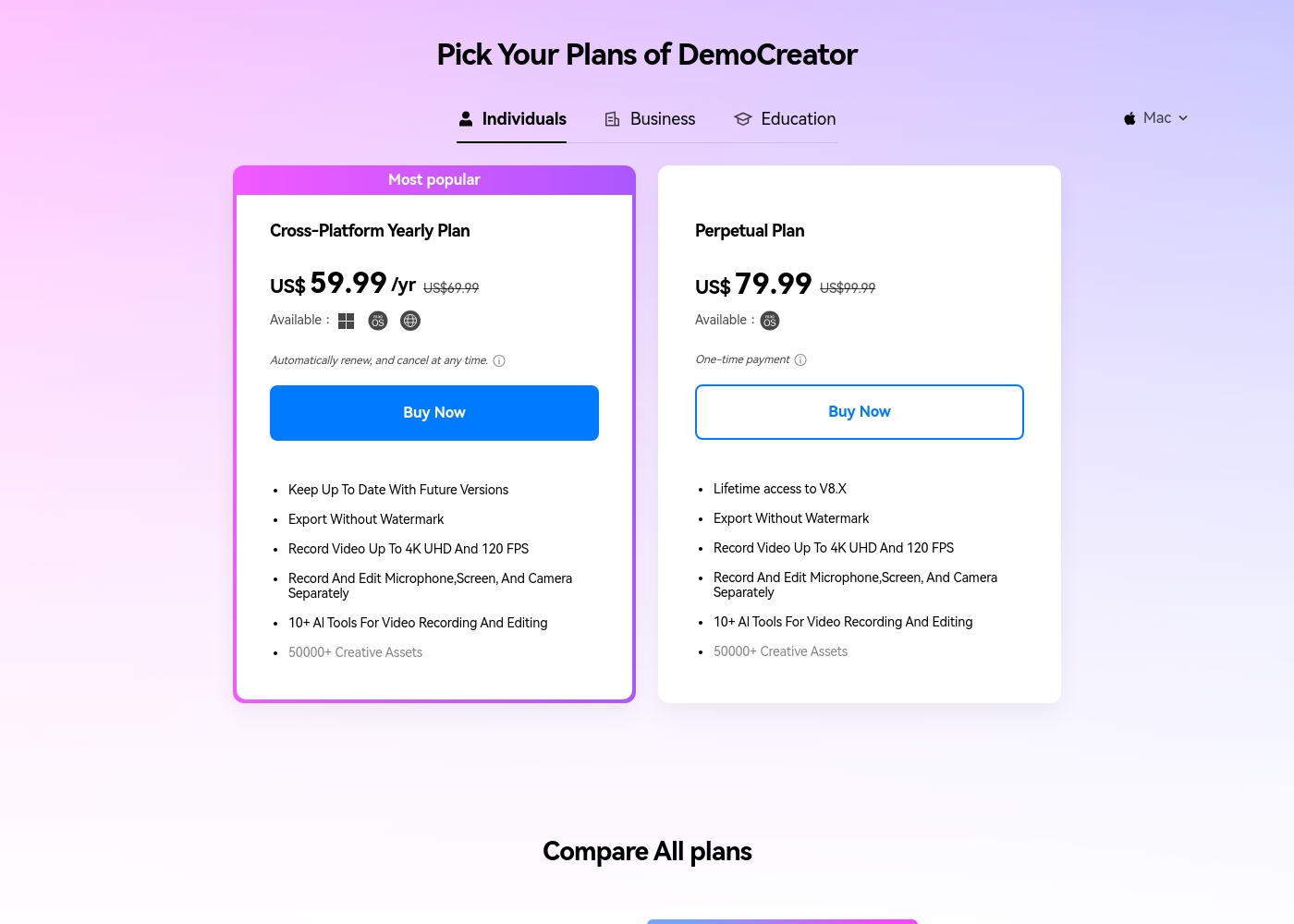
DemoCreator costs between $0 and $79.99 (One-time payment) covering three main options: a Free plan, the Cross-Platform Yearly Plan at $59.99 per year, and the Perpetual Plan at $79.99.
We offer a selection of flexible options so you can choose the right feature set for your video creation needs, whether you prefer a subscription or a one-time purchase.
Free Plan
Price: Free Best For: Trying the core screen recording and editing features. Refund Policy: Not applicable Other Features:
- 1080P export quality
- Basic video editing toolset
- 100 AI credits (one-time)
- 300+ templates and limited visual assets
- Remove Watermark: No
- Recording Export Quality: 1080P
- Frame Rate: 30FPS
- AI Credits: 100 credits
- Export Without Watermark
- Keep Up To Date With Future Versions
- Record Video Up To 4K UHD And 120 FPS
- 500 AI Credits/ Month
- 50,000+ Creative Assets
- Export Without Watermark
- Lifetime access to V8.X
- Record Video Up To 4K UHD And 120 FPS
- 2000 AI Credits (one-time)
- 50,000+ Creative Assets
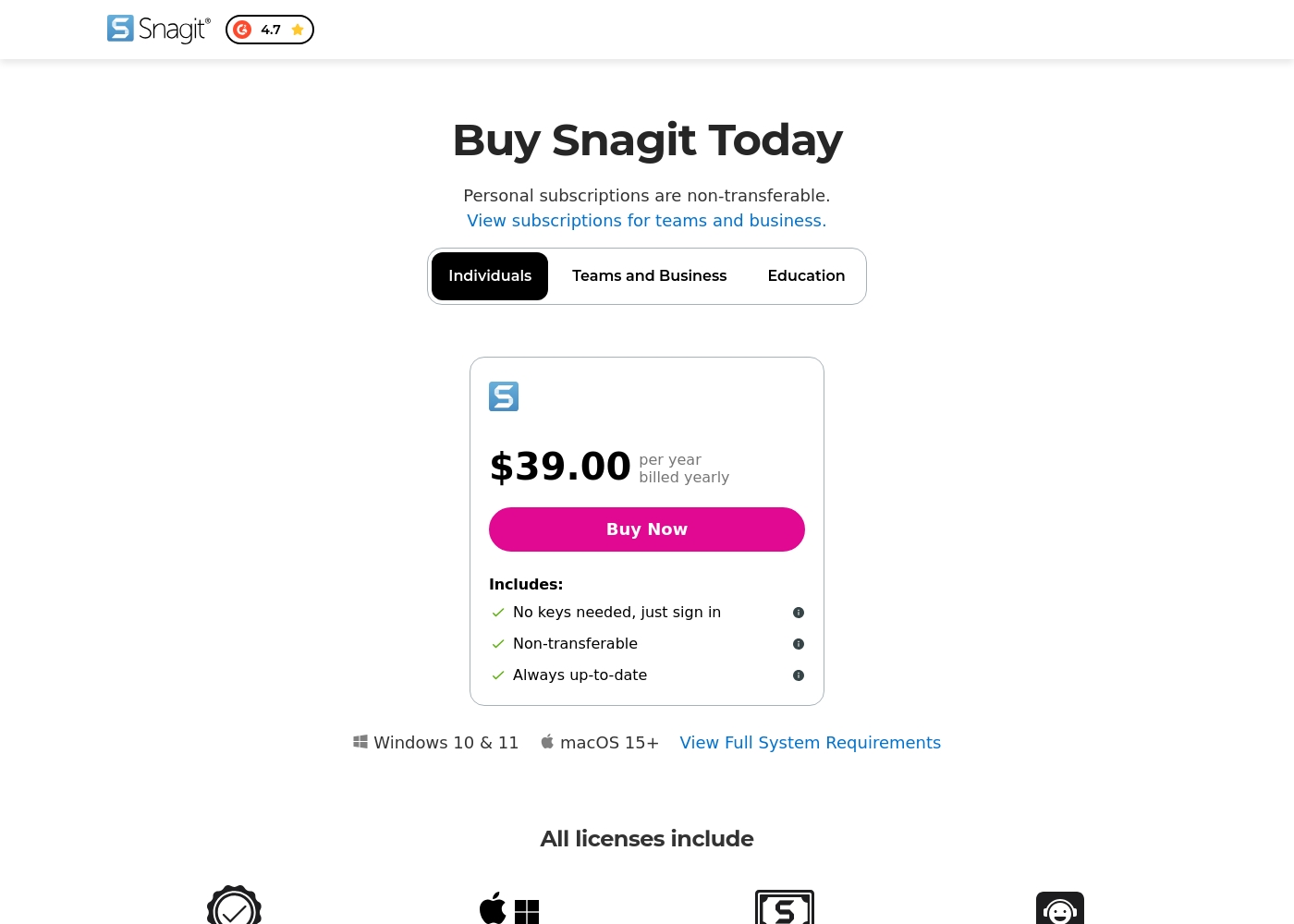
Snagit costs $39.00 per year with one explicitly priced plan visible: the Individuals subscription priced at $39.00 annually.
Here’s a deeper look at what is included in the available subscription options.
Individuals
Price: $39.00 per year, billed yearly Best For: Personal use Refund Policy: 14-day money-back guarantee Other Features:
- No physical keys needed; unlock software via account sign-in
- Always up-to-date access to the latest features and versions
- Compatibility for both Mac and Windows systems
- Includes Snagit Certification and Live support
- No keys needed, just sign in
- Always up-to-date software and features
- Mac and Windows compatibility
- Snagit Certification
- Live support
Pricing Notes
- Snagit is cheaper upfront at $39.00 annually, but requires mandatory renewal every year.
- DemoCreator's Perpetual Plan costs $79.99, offering lifetime access to V8.X and avoiding recurring fees.
- The Snagit Individual license is strictly non-transferable and limits users to one sign-in at a time, a major friction point.
- DemoCreator includes 500 monthly AI credits with its Yearly Plan, which covers advanced features like text-based editing.
- DemoCreator offers a generous 30-day money-back guarantee; Snagit offers 14 days.
Pricing Head-to-Head
User Reviews
Users are overwhelmingly pleased with Wondershare DemoCreator, awarding it an excellent 4.7-star Trustpilot rating. Reviewers frequently highlight the software's intuitive user experience, calling it surprisingly easy for beginners to start recording and editing quickly.
The all-in-one nature—combining high-quality screen recording, live streaming, and robust editing—is a major time-saver for creators and educators. Specifically, users praise the product quality, noting the precise accuracy of the AI auto captioning and the useful text-based editing tools.
I’m not a professional editor, but DemoCreator made it surprisingly easy to record and cut my first tutorial. The interface is clean, and I figured out the basics within an hour. It’s perfect for someone new to editing.
Reviewers consistently recognize Snagit as an industry-standard tool. Users frequently praise the software's deep feature set, clarity, and ease of use, noting that it is much faster and simpler than comparable, more complex alternatives. Long-time customers, however, express significant frustration over the shift from perpetual licenses to a mandatory annual subscription model. This change is seen as an unnecessary profit driver that introduces considerable overhead, especially for professionals needing to switch between multiple devices.
The new licensing structure strictly limits individual subscriptions to one sign-in at a time, requiring users to repeatedly sign out and sign in, or forcing expensive upgrades to the 'Teams' tier for flexible access. Customer support also receives mixed reviews; while many customers report positive experiences, noting quick fixes and responsive staff within 24 hours (sometimes via live chat), others complain about unhelpful service, lack of follow-up, and receiving generic, automated-sounding answers. Despite these operational headaches, the general consensus remains that Snagit is an awesome, essential piece of software that many users 'can't live without.' 🤩
This is a great product. It's dramatically simpler than comparable capture tools like those from Adobe, yet it has a deep feature set. We use the product for complex projects all the time and love the functionality.
Our Verdict
Choosing between DemoCreator and Snagit pits feature depth against documentation speed. If you are a serious content creator or educator, DemoCreator is the definitive winner every time. If your primary goal is rapid screenshot annotation, Snagit remains the industry champion. DemoCreator provides an unmatched all-in-one content creation experience powered by AI. You gain 4K/120 FPS recording, multi-track editing, and an AI Teleprompter for delivery. Crucially, DemoCreator’s affordable perpetual license offers maximum value compared to Snagit's required annual fee. Snagit excels because it is dramatically simpler and masters fast, transactional visual communication. Its annotation toolkit is best optimized for lightning-fast feedback and creating clear process documentation. Snagit is best for corporate environments where speed and static image clarity are paramount. The deciding factor is control versus immediacy. Choose DemoCreator if professional post-production control, AI automation, and high-res video are non-negotiable needs. Opt for Snagit if you simply need the fastest, easiest way to grab, annotate, and share a clean screenshot immediately. For most modern users focused on publishing video, DemoCreator provides far superior features and value. Snagit is specifically recommended for teams focused only on rapid internal documentation and visual feedback.
Frequently Asked Questions
Which software offers better value for money: DemoCreator or Snagit?
DemoCreator delivers superior long-term value thanks to its $79.99 Perpetual Plan. This one-time payment grants lifetime access to the major version, avoiding subscriptions. Snagit requires a mandatory $39.00 annual subscription, which adds up year after year.
Which tool is better for creating polished YouTube video tutorials?
DemoCreator is significantly better for polished video content and tutorials. It offers 4K/120 FPS recording and an AI editing suite. DemoCreator includes text-based editing and a massive library of 50,000+ creative assets.
Does Snagit offer advanced AI features like DemoCreator's Text-to-Speech?
No, Snagit focuses mainly on screen capture and simple annotation tools. DemoCreator is highly integrated with AI features like Text-to-Speech, AI Teleprompter, and translation to 90+ languages. Snagit does not currently offer comparable advanced AI functionality.
Can I still buy a lifetime license for Snagit?
Snagit shifted to a mandatory annual subscription model and no longer offers perpetual licenses. DemoCreator still offers a one-time purchase option. DemoCreator gives you long-term ownership of the current major software version.
Which tool is easier to use for quick annotation and feedback?
Snagit is generally faster for quick annotation and documentation use cases. It is dramatically simpler for fast cuts and specialized visual feedback tools. DemoCreator's interface handles deep editing, making simple grabs slightly less direct.
What are the limitations of DemoCreator's permanent Free plan?
The DemoCreator Free plan heavily limits video export length to five minutes. All exports will also include an unavoidable watermark, and asset library access is restricted. Snagit only offers a 14-day free trial.
Ready to Choose?
Both tools have their strengths. Choose based on your specific needs.