DemoCreator vs Loom
People often compare DemoCreator and Loom when searching for screen recording solutions. DemoCreator focuses on deep video editing and content creation for external audiences. Loom champions fast, asynchronous communication for speedy team briefs and feedback loops. The clear choice depends on whether you value polished production or internal communication speed.
Best for: Content creators needing 4K/120 FPS video quality and full editing control, Educators creating detailed, polished tutorial courses and training modules
Best for: Distributed teams focused purely on fast, asynchronous communication to replace meetings, Sales or Customer Success teams sending personalized video updates to clients
Affordable, AI-Powered Recording and Editing Mastery.
We found DemoCreator to be an incredibly comprehensive and accessible solution that effectively integrates high-quality screen recording and AI-driven editing tasks. It provides exceptional value, especially with its affordable perpetual plan and professional recording capabilities. Overall, this is one of the strongest all-in-one video creation tools available for educators and content creators today.
Pros
- Excellent value due to affordable pricing and a strong $79.99 one-time payment option.
- Combines recording, editing, and AI tools in an intuitive, beginner-friendly interface.
- Advanced features like text-based video editing and 4K/120 FPS recording are standard.
- Supports separate recording tracks for audio, video, and screen, simplifying post-production control.
Cons
- AI functionalities (like advanced speech-to-subtitle) are occasionally noted as quirky or unreliable for some users.
- The software sometimes requires significant computing resources during operation.
- The free version is heavily limited by watermarking and a short five-minute recording cap.
Essential Video Messaging, Challenging Service.
Loom offers a powerful solution for asynchronous video communication, helping teams replace excessive meetings and emails with personalized recordings. We appreciate the strong feature set, including the new AI suite, but we cannot overlook the severe, frequent complaints regarding billing issues and the failure of customer support to respond to essential inquiries. Overall, its technical promise is undermined by critical operational deficiencies.
Pros
- Excellent tool for asynchronous video communication and remote team briefs.
- Comprehensive AI features streamline editing, summarizing, and note generation.
- Starter plan is free and provides essential recording and sharing tools.
- Paid tiers remove recording limits and support unlimited video storage and 4K quality.
Cons
- Customer service is largely non-existent, unresponsive, and fails to handle billing issues.
- High subscription price felt unreasonable for features widely available for free elsewhere.
- Technical instability includes slow website speeds and loss of unstable 4K recordings.
- Basic features like video download often require an unexpected paid upgrade.
AboutDemoCreator
DemoCreator is an all-encompassing screen recorder and video editor, uniquely powered by next-generation AI. It simplifies your entire content creation process in one singular, intuitive package.
The software offers six different recording modes to perfectly optimize your content capture. These options include standard screen capture and dedicated modes for gameplay, virtual avatars, and video presentations. It records your screen, webcam, system audio, and microphone onto separate tracks for streamlined post-production. 💡
This robust solution adapts easily to many specialized requirements. It is the perfect choice for educators, corporate trainers, marketers, and emerging gaming content creators alike.
AboutLoom
Loom is a communication tool built around asynchronous video. It allows millions of people across 400,000 companies to share detailed information quickly using recordings instead of text. Professionals use Loom to connect personally with others without needing constant live meetings. It provides a way to amplify your communication with the team like nothing else has. ✅
Highlights
Feature Comparison
Features Overview
We highlight the main differences and pick a winner for each feature.
Core Purpose
DemoCreator is for creating polished content; Loom is for rapid team communication.
DemoCreator is a robust video production tool built for external distribution like tutorials. It offers diverse recording modes for seamless editing and polished results. Loom replaces email and live meetings with quick, conversational video messages. Loom focuses entirely on fast sharing and enhancing internal team feedback loops. DemoCreator focuses on the single creator’s output quality first and foremost. Loom is designed to facilitate quick, efficient asynchronous workflow for teams. You need to identify your primary goal before choosing either tool. We recommend DemoCreator for teaching or external marketing materials.
Video Quality & Editing
DemoCreator offers superior technical quality and complete timeline editing suite.
DemoCreator captures pristine 4K video footage running at smooth 120 FPS. You can separate screen, audio, and webcam tracks for fine-grained editing control. Loom records up to 4K on paid tiers, but its editor is very simplified. Loom limits editing to basic trimming and stitching video clips together. DemoCreator is essential if you require professional post-production capabilities.
Pricing & Licensing
DemoCreator offers far better value with an affordable one-time payment option.
DemoCreator offers a Perpetual Plan license for a simple one-time payment of $79.99. Loom utilizes mandatory per-user pricing, starting at $15/user/month (billed annually). For a small team, Loom's costs quickly skyrocket into the hundreds of dollars yearly. DemoCreator provides robust editing features needed for production at a fraction of Loom's recurring cost. If you dread subscriptions, DemoCreator offers a perfect licensing model.
Team Collaboration Flow
Loom is intrinsically built for team communication and tracking engagement insights.
Loom makes video messaging among internal teams frictionless and highly tracked. It provides critical viewing data, showing exactly who watched the briefing and when. DemoCreator shares content via secure DemoAir links that allow reviewer comments and feedback. However, DemoCreator lacks the pervasive internal tracking Loom provides to managers. Loom seamlessly integrates video communication directly into established team workflows like Jira and Slack. Your choice depends on whether you seek external feedback (DemoCreator) or internal efficiency (Loom).
Advanced AI Tools
DemoCreator uses AI for production finesse; Loom uses AI for summarizing documents.
DemoCreator's AI suite focuses on video refinement, offering a smart Teleprompter and background removal. It uses AI for text-based editing and 90+ language subtleties. Loom's AI focuses on communication efficiency, generating instant summaries and meeting notes. Loom helps managers save time reading; DemoCreator helps creators save time editing. Both tools employ AI intelligently, but they solve very different problems for users. DemoCreator also offers 30 virtual avatars for creators who wish to remain anonymous.
Support and Reliability
DemoCreator assures timely support; Loom has widespread, critical user complaints.
DemoCreator guarantees responsive support via live chat and email within 24 hours. Loom has a terrible 1.8-star Trustpilot rating due to severe billing and customer support failures. Users report they cannot resolve critical issues or get responses from Loom support. DemoCreator's high user satisfaction rating reflects its dedication to support reliability. Do not choose a tool like Loom if dependable support is a requirement for your operations. DemoCreator provides far more peace of mind.
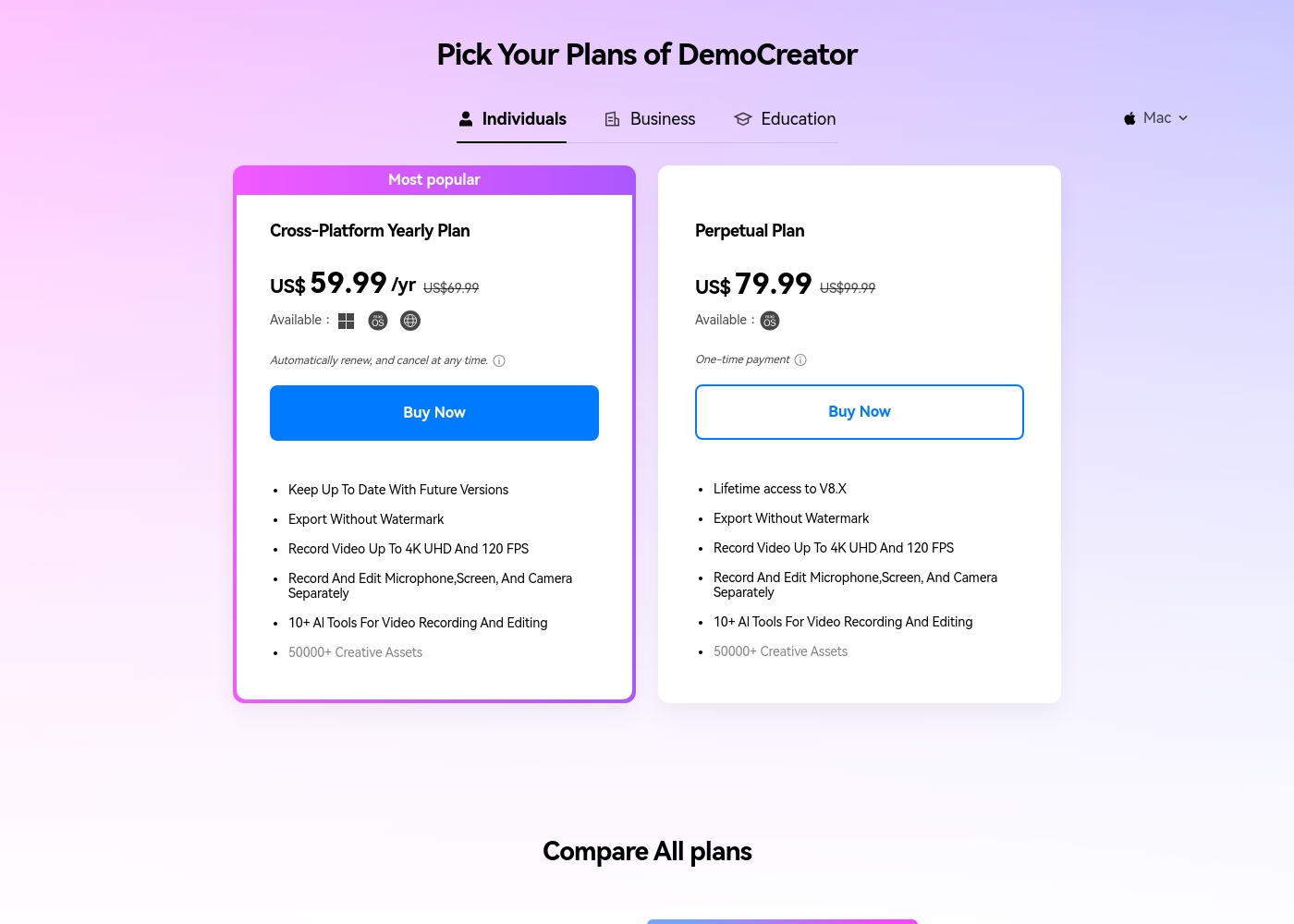
DemoCreator costs between $0 and $79.99 (One-time payment) covering three main options: a Free plan, the Cross-Platform Yearly Plan at $59.99 per year, and the Perpetual Plan at $79.99.
We offer a selection of flexible options so you can choose the right feature set for your video creation needs, whether you prefer a subscription or a one-time purchase.
Free Plan
Price: Free Best For: Trying the core screen recording and editing features. Refund Policy: Not applicable Other Features:
- 1080P export quality
- Basic video editing toolset
- 100 AI credits (one-time)
- 300+ templates and limited visual assets
- Remove Watermark: No
- Recording Export Quality: 1080P
- Frame Rate: 30FPS
- AI Credits: 100 credits
- Export Without Watermark
- Keep Up To Date With Future Versions
- Record Video Up To 4K UHD And 120 FPS
- 500 AI Credits/ Month
- 50,000+ Creative Assets
- Export Without Watermark
- Lifetime access to V8.X
- Record Video Up To 4K UHD And 120 FPS
- 2000 AI Credits (one-time)
- 50,000+ Creative Assets
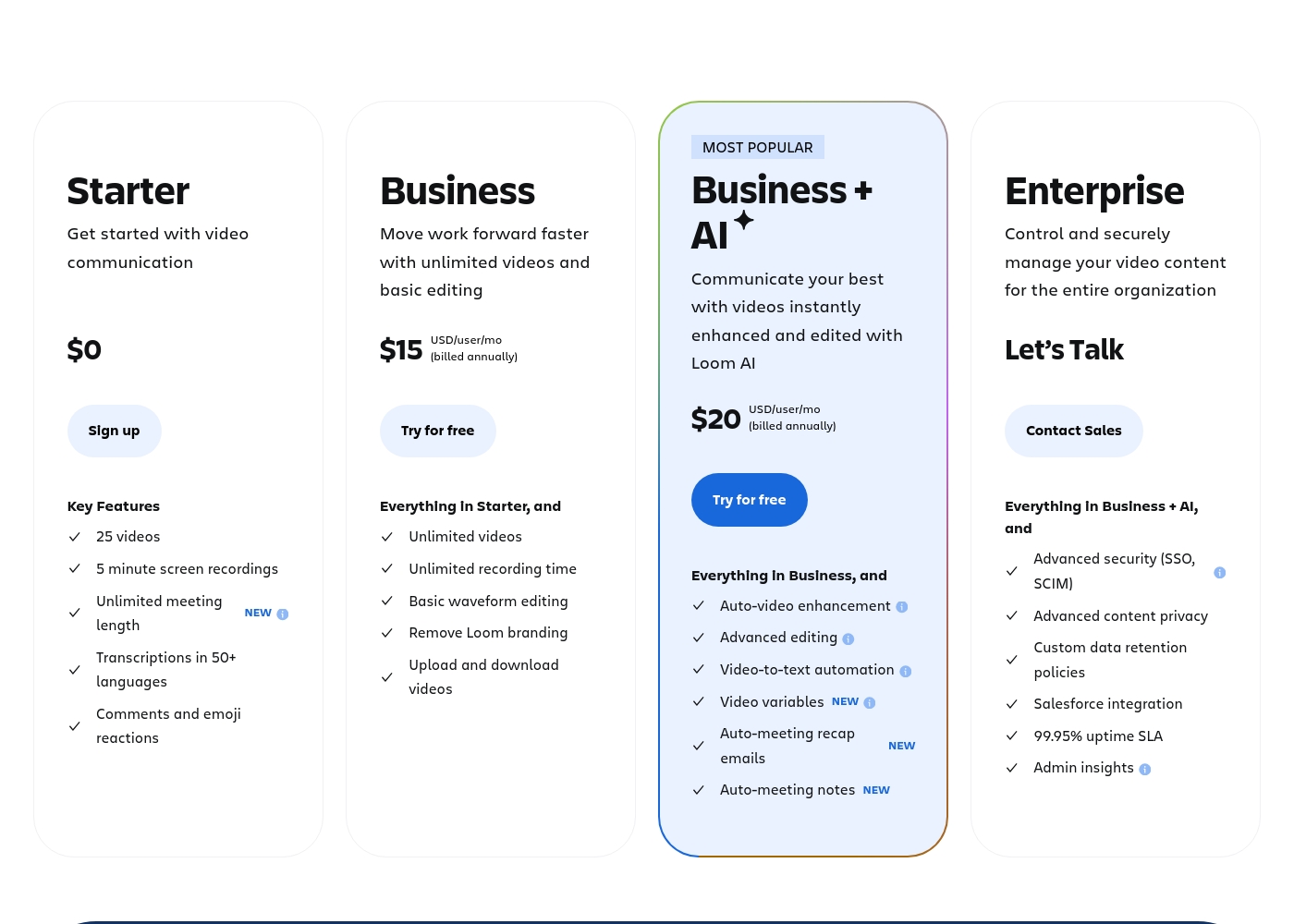
Loom costs between $0 and $20 per user per month (billed annually) with 4 plans: Starter at $0, Business at $15, Business + AI at $20, and Enterprise (custom pricing).
Here’s a breakdown of what each plan offers, helping you pick the right fit for your needs and your team.
Starter
Price: $0 Best For: Getting started with video communication Refund Policy: Not applicable (free) Other Features:
- 25 videos
- 5 minute screen recordings
- Unlimited meeting length
- Transcriptions in 50+ languages
- Up to 50 team members
- 5 minute screen recordings
- Unlimited meeting length
- Transcriptions in 50+ languages
- Up to 50 Workspace Members
- Unlimited videos and recording time
- Basic waveform editing
- Remove Loom branding
- High-def up to 4k video quality
- Auto-video enhancement and advanced editing
- Video-to-text automation and variables
- Auto-meeting notes and recap emails
- Comprehensive Loom AI Suite (Auto CTA, Titles, Summaries, etc.)
- Advanced security (SSO, SCIM)
- Advanced content privacy and custom data retention policies
- 99.95% uptime SLA
- Dedicated support and account manager
Pricing Notes
- DemoCreator leads in value with the Perpetual Plan, offering long-term access for a single fee ($79.99).
- Loom uses a per-user billing model, making it exponentially more expensive for teams.
- A team of five users costs $900-$1200 per year just for Loom’s Business plans.
- Loom's premium video features, like 4K exports and downloading videos, are paywalled.
- Both tools offer a free plan, but DemoCreator's is heavily limited by a watermark and length cap.
Pricing Head-to-Head
User Reviews
Users are overwhelmingly pleased with Wondershare DemoCreator, awarding it an excellent 4.7-star Trustpilot rating. Reviewers frequently highlight the software's intuitive user experience, calling it surprisingly easy for beginners to start recording and editing quickly.
The all-in-one nature—combining high-quality screen recording, live streaming, and robust editing—is a major time-saver for creators and educators. Specifically, users praise the product quality, noting the precise accuracy of the AI auto captioning and the useful text-based editing tools.
I’m not a professional editor, but DemoCreator made it surprisingly easy to record and cut my first tutorial. The interface is clean, and I figured out the basics within an hour. It’s perfect for someone new to editing.
The external feedback for Loom is starkly divided, reflected in a very low Trustpilot rating (1.8). While some long-term Pro users find it reliable and essential for team briefs, the overwhelming negative sentiment focuses heavily on pricing and customer support responsiveness.
Many users feel the value is low, noting that Loom charges a high annual price for basic recorder features available for free elsewhere. The company also faces strong criticism regarding billing, with multiple reports of unauthorized charges continuing after cancellation and prices allegedly changing without warning.
We canceled our account several months ago, but the charges kept appearing. Despite multiple attempts, customer service never responded. This lack of support is how good products eventually fail.
Our Verdict
If you are torn between DemoCreator and Loom, the decision is surprisingly clear. It boils down to whether you are a content creator or a communicator. DemoCreator clearly wins for individuals seeking powerful, reliable video production. Loom remains essential for specific team communication workflows. DemoCreator’s superpower is affordable, professional video mastery for individuals. It offers a $79.99 Perpetual Plan and delivers pristine 4K/120 FPS recording depth. DemoCreator provides a full editing suite and AI tools like a Teleprompter and text-based editing. You get comprehensive production control for a low, one-time fee. Loom’s strength is streamlining asynchronous video communication for busy remote teams. Loom is built for fast feedback loops and efficiently replacing endless internal meetings. The per-user pricing is steep, but it excels at tracking viewer engagement and providing AI summaries. Loom is all about keeping remote teams synchronized instantly. When we consider reliability and budget, DemoCreator wins here easily. Loom has widespread complaints about serious billing issues and critically non-existent customer support. Choose DemoCreator if you need a high-quality, dependable editor and recorder. Pick DemoCreator if polished tutorials or external content are your long-term goals. Go with Loom only if fast internal video messaging is absolutely mission-critical to your team’s flow. Be forewarned about Loom's high cost and deeply reported service issues.
Frequently Asked Questions
Which is better for high-quality video production: DemoCreator or Loom?
DemoCreator is better for production, offering 4K resolution at 120 FPS recording. It supports professional features like multi-track recording and a full editing timeline. Loom is better for fast, low-friction communication rather than technical polish.
Can I buy a perpetual license for Loom like I can for DemoCreator?
No, Loom uses a mandatory per-user subscription model, starting at $15/user/month annually. DemoCreator offers a generous one-time Perpetual Plan license for $79.99. This makes DemoCreator much more affordable for long-term individual use.
What is the main difference in AI functionality between DemoCreator and Loom?
DemoCreator's AI focuses on production tasks like 90-language subtitles and text-based editing. Loom's AI suite focuses on communication efficiency, creating instant summaries, titles, and meeting notes. The AI tools solve completely different workflow problems.
Why do users report better customer support from DemoCreator than Loom?
DemoCreator guarantees an email response within 24 hours and offers live chat support. Loom has garnered a very low 1.8-star rating due to poor support and unresolved billing issues. Reliability is a major concern when choosing Loom.
Which tool is better suited for a large team environment and collaboration?
Loom is structured for teams using a per-user pricing plan for collaborative sharing. DemoCreator is fundamentally designed for individual content creators. Teams using Loom benefit from viewing insights and shared workspaces.
Does DemoCreator have video engagement monitoring like Loom does?
Loom offers detailed viewer insights and tracking data on paid plans. DemoCreator provides secure DemoAir links where collaborators can leave comments. DemoCreator is less focused on surveillance-style tracking than Loom.
Ready to Choose?
Both tools have their strengths. Choose based on your specific needs.