DeepBrain AI vs Visla
People are often torn between DeepBrain AI and Visla for AI video generation. DeepBrain AI prioritizes lifelike AI Avatars and global language support. Visla focuses intensely on converting documents like PDFs into video drafts. This comparison reveals which tool truly fits your project needs.
Best for: Enterprises requiring ISO, SOC 2, and GDPR compliance, Agencies needing video localization into 150+ languages
Best for: Individuals quickly converting PDFs and PPTs into narrated videos, Content creators needing integrated screen and camera recording tools
Powerful AI video studio, with cost considerations.
We find DeepBrain AI's AI STUDIOS is a potent tool for turning scripts into polished videos quickly. It excels at creating realistic avatars and simplifying multilingual content. Overall, it's a strong choice for teams and businesses, but individual creators should weigh the subscription costs against their specific needs.
Pros
- Creates professional videos from text in minutes.
- Offers a vast library of realistic AI avatars.
- Supports video dubbing and translation into 150+ languages.
- Cloud-based with collaborative features for teams.
Cons
- Subscription costs can be high for individual creators.
- Some users report inconsistent customer support experiences.
- Advanced features and longer videos require higher-tier plans.
- Occasional technical glitches mentioned in reviews.
AI Video Power, Billing Risk.
We find Visla offers a robust AI video creation workflow, making complex production accessible without specialized editing skills. The commitment to enterprise features like SOC 2 suggests strong security intent. However, external feedback detailing questionable billing practices and significant reliability issues raises serious operational concerns. Overall, we recommend approaching this tool with caution due to recurring reports of subscription and performance problems.
Pros
- AI generously generates professional video drafts from text or ideas quickly.
- Extremely easy and intuitive interface, suitable for non-editors and beginners.
- Offers advanced compliance focused on enterprise needs (SSO, SOC 2 Type II).
- Free plan provides 1,000 monthly credits for effective testing.
Cons
- Repeated, serious reports of unauthorized subscription charges and billing scams.
- Rigid "no refund policy" and difficult, cumbersome cancellation process for users.
- Video generation can stick/fail or result in highly inaccurate/irrelevant content.
- Customer support is criticized for being unresponsive to financial complaints.
AboutDeepBrain AI
Think of AI STUDIOS as your all-in-one creative studio for video. It's a cloud platform that turns your text, images, or product pages into complete videos. You get lifelike AI avatars, voiceovers in over 150 languages, and simple editing tools. It’s built for creators, marketers, educators, and businesses who want to make great videos fast without a big production crew. 🎥
AboutVisla
Visla is an innovative, AI-powered platform designed for seamless video creation. It eliminates the barrier of needing editing expertise, allowing you to move quickly from an initial thought to a polished final video. The core of the system is the intelligent AI Video Agent, which analyzes your input and builds a complete draft with visuals and narration. The platform is ready for enterprise teams, too, supporting secure Single Sign-On and SOC 2 Type II compliance for strong data integrity. 💡
Highlights
Feature Comparison
Features Overview
We highlight the main differences and pick a winner for each feature.
AI Avatar Selection
DeepBrain AI offers vastly more ready-to-use avatars than Visla and specific 'Product Avatars.'
DeepBrain AI gives you immediate access to over 2,000 realistic, ready-to-use AI Avatars. They offer specialized Product Avatars that naturally hold and interact with physical items. Users can also create custom avatars from a single photo or short video clip. Visla provides 150 unlimited public avatars for quick use in its Free plan. Visla supports custom avatar creation, but only 2-3 are included in Pro/Business plans. Visla's custom avatar offering is adequate but not as expansive as DeepBrain AI's. DeepBrain AI is the clear winner if your brand relies on diverse, high-volume avatar content. Visla concentrates less on sheer volume and more on core video generation. DeepBrain AI makes it easy for e-commerce brands to quickly generate persuasive, avatar-led video advertisements that mimic UGC.
Localization & Dubbing
DeepBrain AI guarantees superior global outreach using 150+ languages with seamless lip-sync.
DeepBrain AI supports translation and dubbing into more than 150 languages automatically. Crucially, its Intelligent AI Translator ensures the original tone is retained. The system automatically provides seamless lip-sync for all translated narration. Visla also supports video translation and generating synthetic voiceovers in multiple languages. However, the data does not specify the language volume or explicitly guarantee seamless lip-sync quality. If international market entry is critical, the 150+ language support makes DeepBrain AI superior. DeepBrain AI’s verified lip-sync is a major quality differentiator. DeepBrain AI users can effortlessly localize a single training video for global adoption in minutes.
Stock Media Access
Visla provides access to a much larger, more diverse premium stock footage library in its high tiers.
DeepBrain AI includes access to 3 million+ premium Shutterstock media starting in the Personal plan. This provides high-quality images and video assets for general use. The media library is robust enough for most individual creators and small teams. Visla’s Business and Enterprise tiers include the massive Getty Images premium library. This library features over 16 million videos, significantly larger than DeepBrain AI's offering. Access to both Storyblocks and Getty Images provides unparalleled visual choice for Visla users. If premium, high-volume stock video is your primary concern, Visla offers better selection. Visla provides the visual resources major production houses demand for complex projects. For high-end marketing agencies building visually complex campaigns, Visla's Getty Images integration offers a key competitive edge.
Document Conversion
Both systems convert documents into video; Visla specifically highlights PDFs and PPTs for rapid repurposing.
DeepBrain AI offers Text-to-Video AI, converting prompts, links, PDFs, or slides into finished videos. This feature is integrated into its all-in-one content conversion workflow. It eliminates the need for expensive actors and filming. Visla specifically focuses on allowing users to upload existing PDFs or PPT presentation files. The Visla AI Agent analyzes the static document and builds a dynamic, narrated visual timeline draft immediately. Both platforms handle document-to-video conversion well, but Visla emphasizes presentations and documents as a core starting input. DeepBrain AI integrates this function alongside many other input options. For L&D teams needing to mass-convert internal training slides, Visla’s specific focus on PPT/PDF may simplify the workflow slightly more.
Pricing Clarity
DeepBrain AI has clear dollar pricing; Visla uses an opaque credit system with major reported billing issues.
DeepBrain AI provides transparent monthly and annual subscription costs, ranging from $0 to $55 per seat. This straightforward model lets users easily predict monthly overhead costs beforehand. Annual billing offers a 20% savings. Visla pricing relies on assigned monthly credits, and the explicit dollar costs are not specified in the data. This lack of transparency makes budgeting challenging for new users. Users have reported unauthorized subscription charges and rigid refund policies with Visla. DeepBrain AI wins here because its financial structure is clear, predictable, and reliable based on available data. Visla's user complaints about billing are a massive red flag. Budget-conscious solo creators or organizations should strongly prefer DeepBrain AI for guaranteed financial predictability.
Integrated Capture
Visla includes built-in screen and camera recording tools; DeepBrain AI focuses primarily on text/document input.
Visla features integrated content capture tools for both desktop and mobile devices. You can record your screen, camera, or both simultaneously for quick tutorials. This instantly feeds original content into the AI workflow. DeepBrain AI focuses on converting existing material, such as text prompts, links, and documents. While you can upload recorded footage, it lacks the integrated, frictionless recording feature Visla offers. Visla is better if you frequently create video content by recording product demos or tutorials. The integrated recorder streamlines the creation workflow substantially. Visla is ideal for content creators who need to quickly record a software demo and have the AI handle the complex scene assembly immediately after.
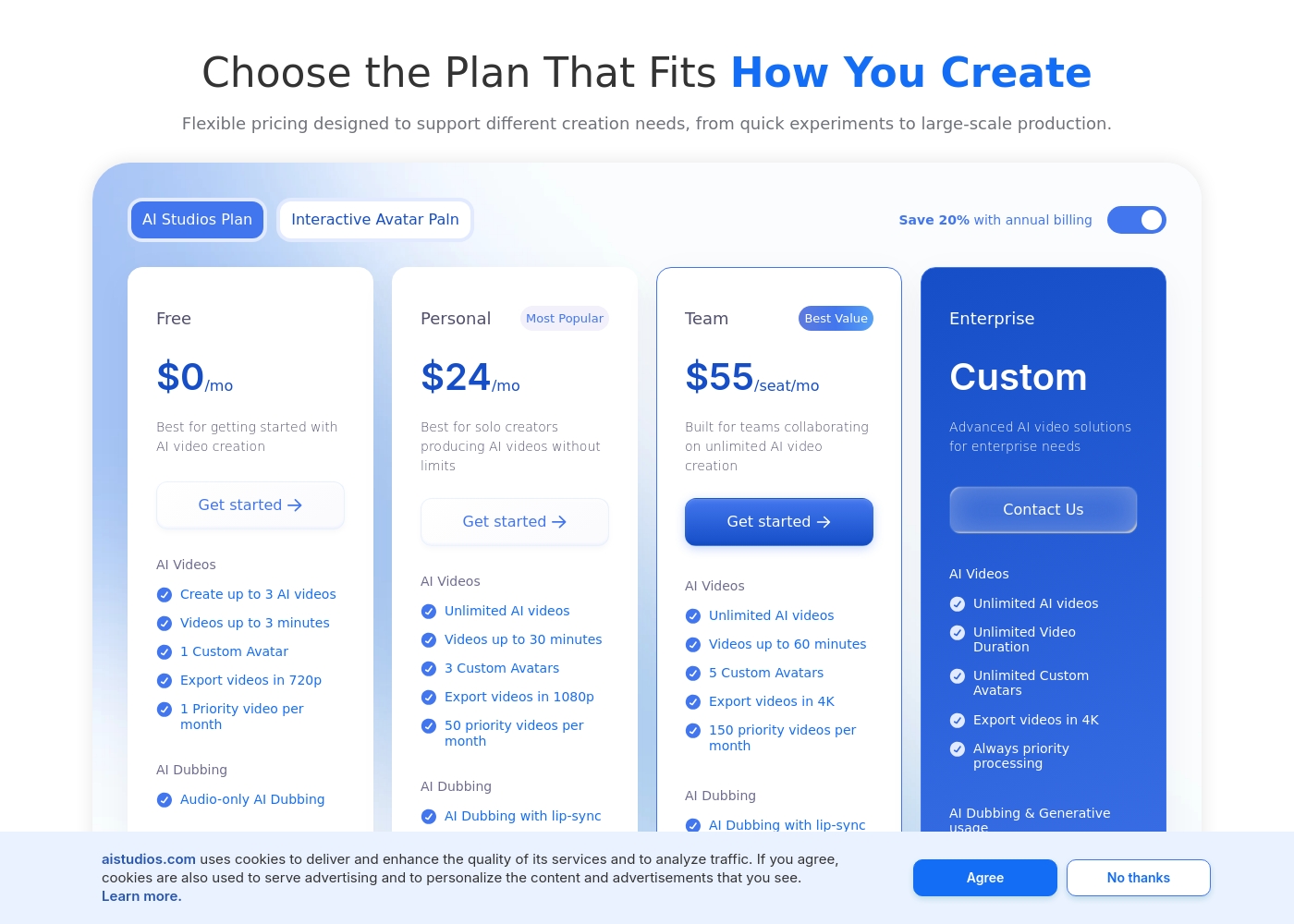
DeepBrain AI costs between $0 and $55 per month with 4 plans: Free at $0, Personal at $24, Team at $55, and Enterprise at Custom.
Here are the details for each plan:
Free
Price: $0/month Best For: trying out AI video creation and basic AI Dubbing Other Features: Create 3 AI videos, 1 Custom Avatar, 720p exports, Audio-only AI Dubbing, 16 one-time generative credits
- Create up to 3 AI videos
- Videos up to 3 minutes
- 1 Custom Avatar
- Export videos in 720p
- 1 Priority video per month
- Unlimited AI videos
- Videos up to 30 minutes
- 3 Custom Avatars
- Export videos in 1080p
- 50 priority videos per month
- Videos up to 60 minutes
- 5 Custom Avatars
- Export videos in 4K
- Shared Workspaces
- Proofread and refine scripts
- Unlimited Video Duration
- Unlimited Custom Avatars
- Always priority processing
- SAML SSO
- SCORM Export
You can compare the key differences in monthly allocated credits and feature access below.
Free
Websites Supported: Not applicable Best For: Individuals and casual creators Other Features:
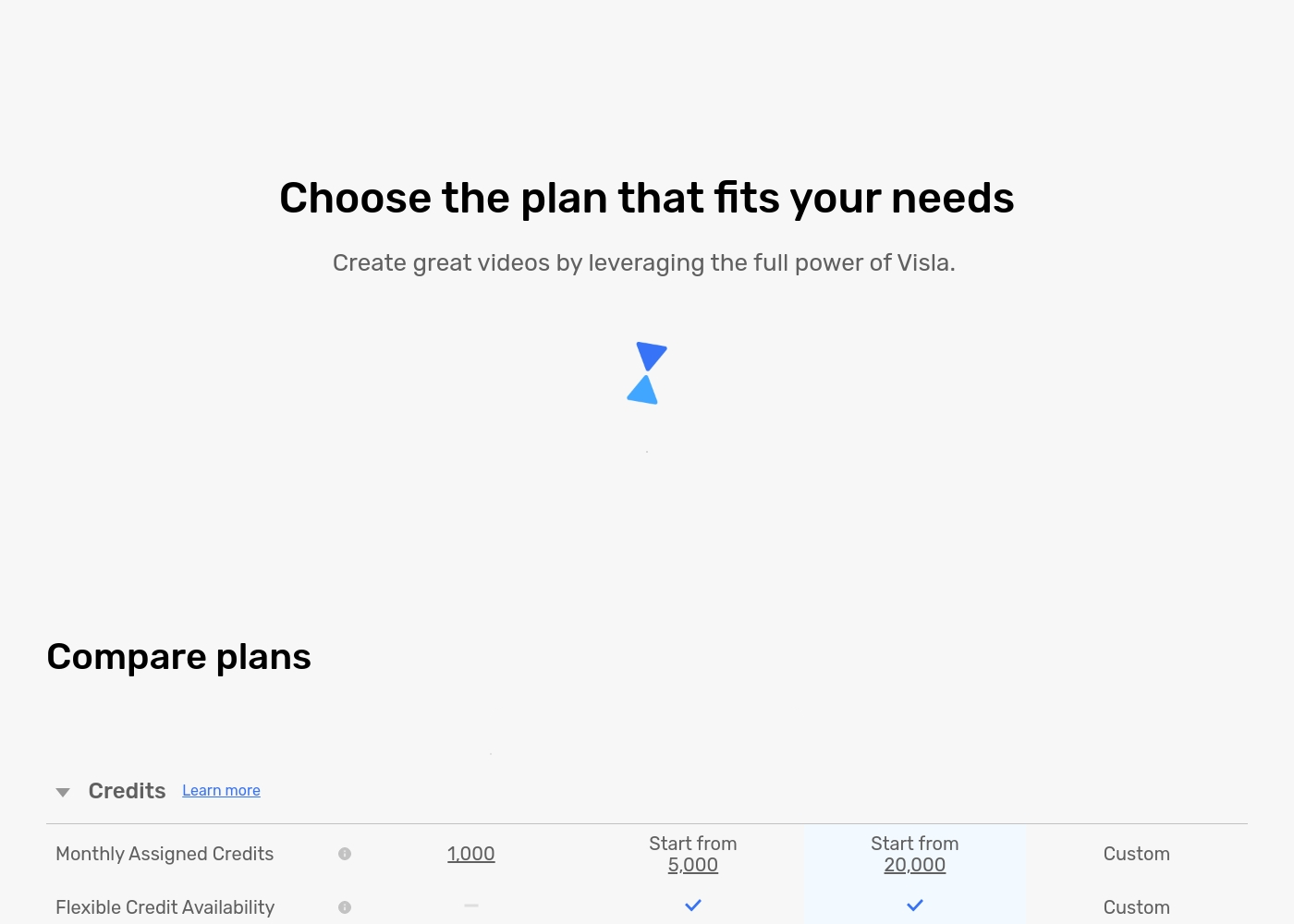
- 1,000 Monthly Assigned Credits
- Maximum resolution of 1080p
- Access to the standard Free Stock Library
- Record audio, screen, and camera content
- Visla Watermark will be on exported videos
- Video Creation from Idea/Script/Text
- 1,000 Monthly Assigned Credits
- Maximum resolution 1080p
- 150 Unlimited Public Avatars
- 3GB / 1 hour media upload limit
- Monthly Assigned Credits starting from 5,000
- Flexible Credit Availability
- Visla Watermark Removal
- Access to Storyblocks Library (4M videos)
- Instant Voice Cloning (3 voices)
- Monthly Assigned Credits starting from 20,000
- Maximum resolution 4K
- Access to Getty Images (16+ Million videos)
- 20 GB / 3 hour media upload limit
- SOC 2 Type II Report Available
- Custom Monthly Assigned Credits
- Single sign-on (SSO)
- SOC 2 Type II Report Available
- Video Creation API Support
- Role-based workspace/teamspace control
Pricing Notes
- DeepBrain AI maintains clear dollar-based pricing, ranging from $0 to $55 per month.
- Visla solely uses a credit-based model, and specific dollar costs for paid tiers are not provided.
- Visla users report unauthorized subscription charges and complex, rigid cancellation policies.
- DeepBrain AI offers unlimited video exports in its paid tiers, scaling based on custom avatars and generative credits.
- Visla's free plan offers 1,000 monthly credits, allowing substantial testing before commitment.
Pricing Head-to-Head
User Reviews
We found user sentiment from Trustpilot to be mixed, with some praise for the platform's ease of use and quality of AI avatars. However, a notable recurring theme is concerns over pricing and value, with some users feeling the costs are high for individual creators.
There are also scattered reports about customer support responsiveness and occasional technical glitches during video generation. On the positive side, many highlight the time-saving potential for creating professional-looking content without a production team.
AI STUDIOS has saved our marketing team countless hours. We can now produce training videos in a fraction of the time, and the avatars look incredibly professional. The multilingual dubbing feature is a game-changer for our global campaigns.
Visla receives sharply mixed feedback across platforms. Users praise its potential as a game-changer for generating training videos, noting that the AI tools make complex video creation incredibly easy, even for people without editing experience.
They appreciate the intuitive interface and the resulting professional look. However, the positive experiences are overshadowed by significant complaints regarding payment and reliability.
Visla has been a game-changer for creating internal and external training videos. With no background in video creation, I found it incredibly easy to use without any training included. The AI tools are fantastic for generating video drafts and saving me hours of professional work.
Our Verdict
Choosing between DeepBrain AI and Visla depends entirely on your risk tolerance and core project needs. DeepBrain AI is the safer, more specialized bet for reliable corporate use. Visla offers unique input flexibility but comes with user-reported financial pitfalls. DeepBrain AI is the undisputed leader in AI Avatars and multilingual outreach support. It gives you immediate access to over 2,000 ready-made AI Avatars. Its 150+ language dubbing includes automatic, seamless lip-sync technology. Choose DeepBrain AI for professional, globally scaled content creation. Visla’s superpower is making polished video creation accessible to anyone. The AI Video Agent quickly builds drafts from almost anything, including links and audio files. It specifically excels at repurposing static presentations and PDFs into dynamic video assets. Plus, Visla offers expansive stock access, including Getty Images. If you need reliability and security, the clear winner is DeepBrain AI. DeepBrain AI has clear, published pricing and robust security certifications like ISO 27001. Visla's credit model is opaque, and users report painful unauthorized billing issues. We recommend DeepBrain AI if you demand guaranteed professional output and transparency for scaling. If you are a solo user prioritizing easy document conversion, explore Visla's free plan first before considering a paid tier.
Frequently Asked Questions
Which tool has the most advanced AI Avatars for professional use?
DeepBrain AI is the clear leader here, providing over 2,000 ready-to-use AI Avatars. It also features specialized Product Avatars for e-commerce videos. Visla has a smaller public library of 150 unlimited public avatars.
Is Visla worth the risk given the reported billing issues?
Visla users frequently report unauthorized subscription charges and difficult refund processes. DeepBrain AI has transparent, published dollar pricing and clear usage tiers. If financial predictability is important, DeepBrain AI is the safer and more professional choice.
Does DeepBrain AI offer built-in screen recording like Visla?
No, Visla includes specific integrated tools for screen and camera recording for demos and tutorials. DeepBrain AI prioritizes rapid content conversion from text, documents, and links. You must upload pre-recorded clips to DeepBrain AI.
Which software is better for video localization and global audiences?
DeepBrain AI offers superior localization, supporting over 150 languages. It guarantees seamless lip-sync alongside translation via its Intelligent AI Translator. While Visla supports translation, DeepBrain AI's technology is specified as more advanced for global scaling.
Which tool provides access to the Getty Images stock library?
Visla provides access to the extensive Getty Images library, featuring over 16 million videos, in its Business plan and above. DeepBrain AI includes access to premium Shutterstock media across its paid tiers.
Do DeepBrain AI and Visla both offer enterprise-level security?
Yes, both offer SOC 2 compliance for data security. However, DeepBrain AI offers a more robust security suite. DeepBrain AI also includes ISO 27001 and GDPR compliance for large organizations.
Ready to Choose?
Both tools have their strengths. Choose based on your specific needs.