DeepBrain AI

DeepBrain AI

All-in-One AI video studio for branded, multilingual AI avatar videos—fast.

software.categoryRank
1 min read · Updated 2/24/2026
DeepBrain AI homepage screenshot

At a glance

Quick overview for DeepBrain AI: rating, pricing summary, key features, and highlights.
Range: $0–$55/seat/moFree plan, Monthly subscription, Yearly subscription, Per seat pricing
This section is a summary. Detailed sections about features, use cases, pricing, and reviews follow below.
Disclosure: This page may contain affiliate links for DeepBrain AI. If you click these links and make a purchase, Ciroapp may earn a commission at no additional cost to you.

DeepBrain AI review, pricing, features, pros & cons

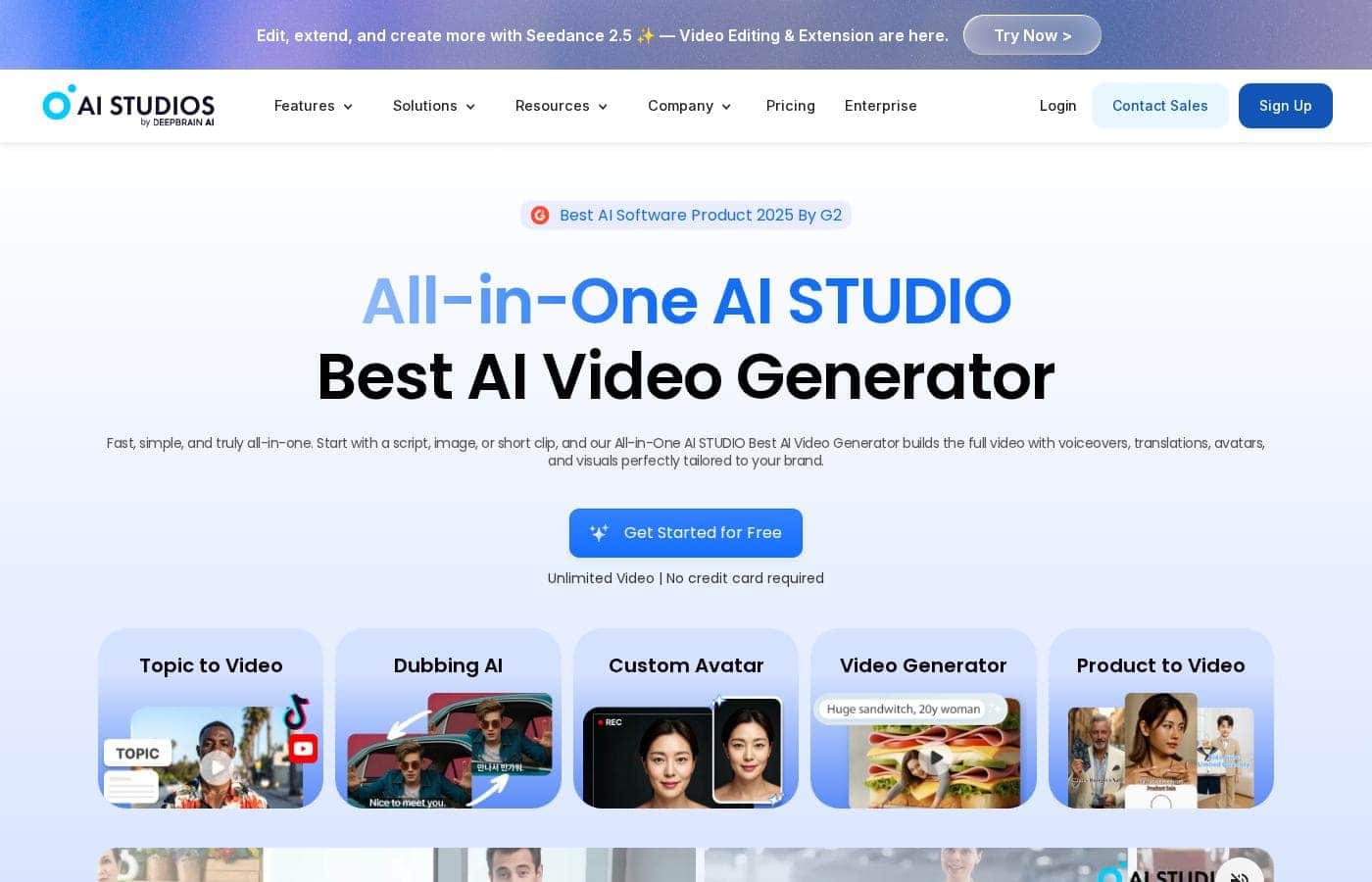
Struggling to produce branded videos quickly without a studio? DeepBrain AI's All-in-One AI STUDIO builds a full video from a script, image, or short clip, with voiceovers, translations, avatars, and visuals tailored to your brand. You'll save time, cut costs, and reach audiences worldwide with 150+ languages and 2,000+ avatars—all in one platform.

🎬

What is DeepBrain AI?

🎥 AI STUDIOS is a cloud-based video-creation SaaS for building AI avatar videos, text-to-video content, and multilingual dubbing. You can paste a script, upload a document, or share a URL, then generate a polished video with lifelike avatars, visuals, and narration in minutes. It’s designed for marketers, creators, and educators who want a single workspace to create, translate, and export videos.

DeepBrain AI Key Features

🎬 Fast, all-in-one video creation

Get branded AI avatar videos fast with an all-in-one studio. It builds a complete video from a script, image, or short clip, with voiceovers, translations, avatars, and visuals tailored to your brand. AI STUDIOS lets you paste a script, upload a document, or share a URL, and the cloud-based platform generates a polished video in minutes.

It's designed for marketers, educators, and creators who want a single workspace to create, translate, and export. You’ll save time, cut costs, and reach audiences worldwide with 150+ languages and 2,000+ avatars.

✨ Lifelike avatars, voices, and lip-sync

Choose from 2,000+ ready-to-use avatars, or create custom avatars from photos, videos, and products. Text-to-speech offers 2,000+ voices across 150 languages; you can use voice cloning for a consistent brand voice. Export videos in 4K with natural lip-sync in dubbing.

✨ Branding, security, and collaboration

Keep content on-brand with fully customizable avatars and automated brand-kit management. Collaborate securely with real-time teamwork, role-based access, and formal standards like ISO 27001, SOC 2 Type II, and GDPR. Shared workspaces and interactive avatars help teams stay aligned and productive.

✨ Multilingual dubbing and localization workflow

Translate and dub videos into 150+ languages with natural voiceovers and accurate lip-sync. You can review and edit translations before exporting, then choose from 2,000 voices or apply a custom voice clone to keep your tone consistent across languages. All in one workflow, so you don’t juggle multiple tools.

✨ Outcomes, scale, and teamwork

For teams, you can accelerate production and reduce costs with steady, scalable outputs. The platform supports unlimited videos at higher tiers, with exports in 4K and tools that grow with your needs. It’s built to help marketers, creators, and educators produce branded videos quickly at scale.

Use Cases

🌐 Global Marketing with Branded AI Avatars

Launch global marketing with branded AI videos in minutes. DeepBrain AI's All-in-One AI STUDIO builds a full video from a script, image, or short clip, with voiceovers, avatars, and visuals tailored to your brand. It lets you translate and tailor content for different audiences without a studio.

Choose from 2,000+ avatars and 150+ languages for localization. Export in 4K with natural lip-sync and dubbing, and manage your brand with automated kit features. Teams can collaborate in real time with role-based access and formal compliance standards (ISO 27001, SOC 2 Type II, GDPR) to keep content secure and on-brand.

🎓 Multilingual Training & Education

Turn training into engaging, multilingual videos. AI STUDIOS supports interactive training videos with avatars, quizzes, and branching scenarios that are SCORM-compliant for LMS. Educators can translate and dub content across 150 languages, with lip-sync and natural voice.

Create, translate, and export from one workspace. The platform helps keep learners engaged and content on-brand. It also supports 4K exports and secure collaboration across teams.

📦 Product Demos & Tutorials for Global Reach

Showcase products with lifelike avatars across languages. Topic-to-Video and Product Avatar turn product pages into walkthroughs in minutes. Choose from 2,000+ avatars and 150+ languages to reach global customers.

Step flow: 1) paste content, 2) select an avatar, 3) generate scenes with dubbing, 4) export in 4K. This creates consistent, share-ready product videos at scale.

🤖 Live Real-Time Conversational Avatars for Support & Events

Engage customers in real time with conversational AI avatars. These live avatars understand and respond in 150+ languages and can connect with systems like ChatGPT. They support demos, customer service, and event experiences.

Use cases include live Q&A, guided tours, and on-demand help. The platform also offers real-time deepfake detection for safety and trust. This helps you deliver authentic experiences at global events.

🔒 Enterprise Collaboration & Security

For large teams, real-time collaboration with role-based access is built in. The platform supports formal compliance standards like ISO 27001, SOC 2 Type II, and GDPR.

Shared workspaces and permissions help teams stay aligned. RESTful API and webhook integrations connect video work to existing tools, enabling scalable workflows.

🌍 Localization & Brand Consistency Across Content

Keep visuals on-brand as you scale. Automated brand kit management ensures consistent visuals across all videos. With 2,000+ avatars and 150+ languages, localization is fast and flexible.

Export videos in 4K to preserve quality for global audiences. Localization and branding stay in sync across languages and channels.

📎 Content Repurposing from Docs, URLs, and Slides

Turn existing materials into ready-to-publish videos. Docs to Video, URL to Video, and Topic to Video automate the creation process.

Paste a slide deck or document, choose an avatar and language, then export. This speeds up content refresh and keeps messaging consistent.

Pricing Overview for DeepBrain AI

Pricing range
$0–$55/seat/mo
Pricing types
Free plan, Monthly subscription, Yearly subscription, Per seat pricing

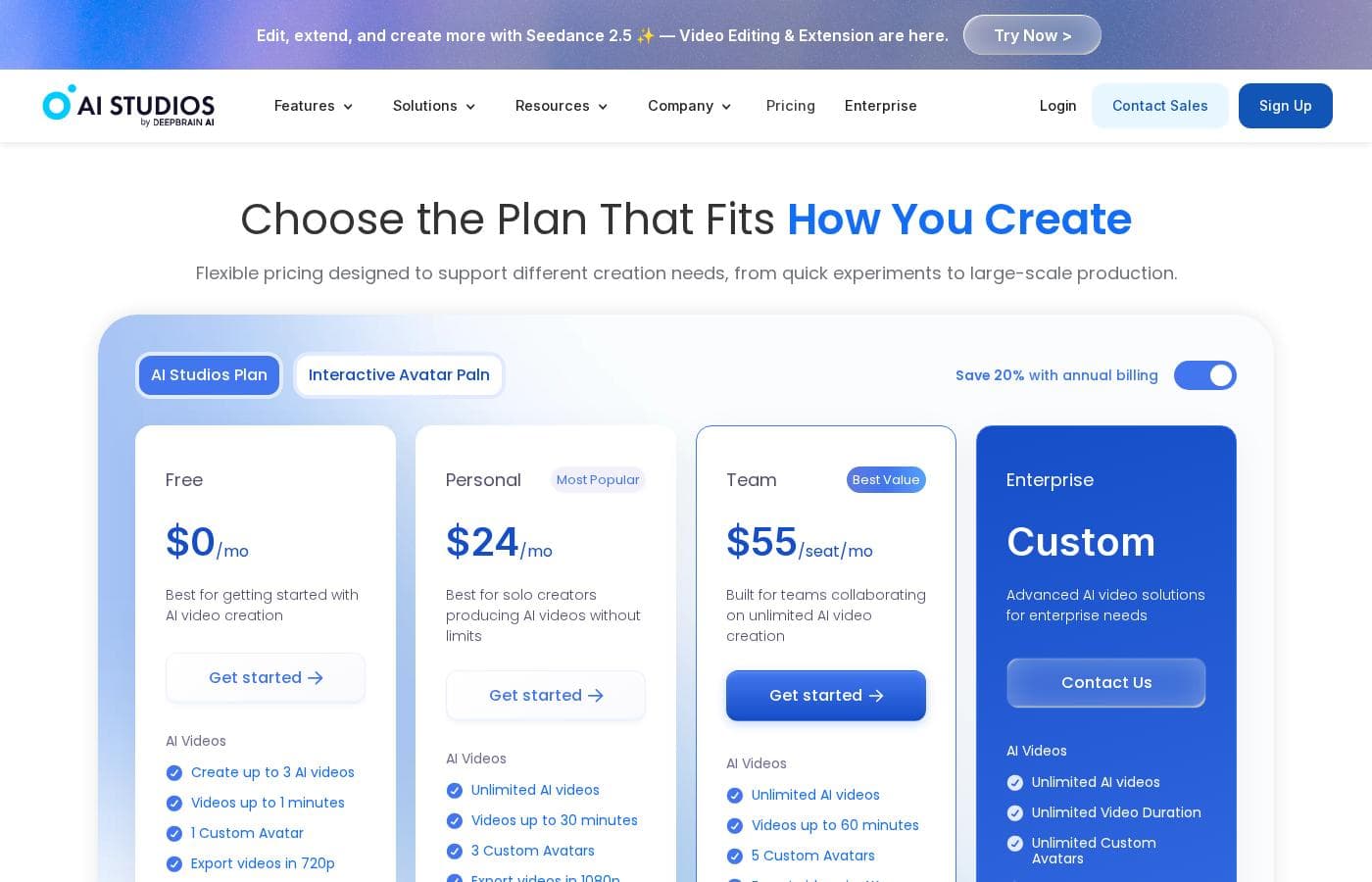
4 plans are available: Free at $0/mo, Personal at $24/mo, Team at $55/seat/mo, and Enterprise Custom pricing.

Plans & Pricing

Free

Monthly$0
YearlyNot explicitly stated
Limited videos per month; video length restrictions; access to generative models restricted
  • Create up to 3 AI videos
  • Videos up to 3 minutes
  • 1 Custom Avatar
  • Export videos in 720p
  • 1 Priority video per month
  • Audio-only AI Dubbing

Personal

Monthly$24
YearlyNot explicitly stated
Generative credits and dubbing minutes are included and can be expanded via add-ons
  • Unlimited AI videos
  • Videos up to 30 minutes
  • 3 Custom Avatars
  • Export videos in 1080p
  • 50 priority videos per month
  • AI Dubbing with lip-sync
  • 120 minutes of AI Dubbing per month
  • 720 generative credits per year
  • + 3 more features

Team

Monthly$55/seat
YearlyNot explicitly stated
Generative credits and dubbing minutes shared per team; per-seat pricing
  • Unlimited AI videos
  • Videos up to 60 minutes
  • 5 Custom Avatars
  • Export videos in 4K
  • 150 priority videos per month
  • AI Dubbing with lip-sync
  • 240 minutes of AI Dubbing per month
  • 1800 generative credits per year (per seat, shared across the team)
  • + 7 more features

Enterprise

MonthlyNot explicitly stated
YearlyNot explicitly stated
Custom pricing and terms; tailored for large organizations
  • Unlimited AI videos
  • Videos up to 60 minutes
  • Unlimited Custom Avatars
  • Export videos in 4K
  • Always priority processing
  • AI Dubbing & Generative credits
  • Interactive Avatars
  • SAML SSO
  • + 2 more features

DeepBrain AI pricing is structured across four plans, starting with a free option and moving to per-seat team pricing, with a custom Enterprise tier. The first line captures the ranges and plan names clearly, then each plan is laid out in detail below.

Free

Price: $0/mo Websites Supported: Not explicitly stated Best For: Not explicitly stated Refund Policy: Not explicitly stated Other Features:

  • Create up to 3 AI videos
  • Videos up to 3 minutes
  • 1 Custom Avatar
  • Export videos in 720p
  • 1 Priority video per month
  • Audio-only AI Dubbing

This plan is designed for trying out AI video creation and basic AI Dubbing with short projects.

Personal

Price: $24/mo Websites Supported: Not explicitly stated Best For: Not explicitly stated Refund Policy: Not explicitly stated Other Features:

  • Unlimited AI videos
  • Videos up to 30 minutes
  • 3 Custom Avatars
  • Export videos in 1080p
  • 50 priority videos per month
  • AI Dubbing with lip-sync
  • 120 minutes of AI Dubbing per month
  • 720 generative credits per year
  • 60 generative credits per month
  • Full access to generative models
  • Add-ons for additional generative credits

Best for solo creators seeking more capacity and dubbing options.

Team

Price: $55/seat/mo Websites Supported: Not explicitly stated Best For: Not explicitly stated Refund Policy: Not explicitly stated Other Features:

  • Unlimited AI videos
  • Videos up to 60 minutes
  • 5 Custom Avatars
  • Export videos in 4K
  • 150 priority videos per month
  • AI Dubbing with lip-sync
  • 240 minutes of AI Dubbing per month
  • 1800 generative credits per year (per seat, shared across the team)
  • 150 generative credits per month (per seat, shared across the team)
  • Full access to generative models
  • Add-ons for additional generative credits
  • Interactive Avatars
  • Premium Stock Library
  • SRT Upload & Download
  • Shared Workspaces

Built for teams collaborating on unlimited AI video creation.

Enterprise

Price: Not explicitly stated Websites Supported: Not explicitly stated Best For: Not explicitly stated Refund Policy: Not explicitly stated Other Features:

  • Unlimited AI videos
  • Videos up to 60 minutes
  • Unlimited Custom Avatars
  • Export videos in 4K
  • Always priority processing
  • AI Dubbing & Generative credits
  • Interactive Avatars
  • SAML SSO and enterprise-grade security
  • Dedicated technical support
  • Custom contracts & invoicing

Enterprise plans provide customized AI video solutions for large teams and organizations with flexible credits and security options.

User Reviews

No reviews yet.

Write a Review

Write a Review for DeepBrain AI
0/100 characters
0/2000 characters

Why use DeepBrain AI?

If you want fast, on-brand videos with global reach, AI STUDIOS makes it possible. ✅

Ready to transform your workflow with DeepBrain AI?

Frequently Asked Questions

How is pricing structured for teams versus individuals?

Personal is $24 per month for individuals, while Team is $55 per seat per month. Enterprise pricing is custom, and annual billing offers a 20% discount; a Free plan is available with limits.

Is there a free trial or refunds policy?

There is a Free plan ($0/mo) with limits; Not explicitly stated on the official site is a separate free trial or money-back guarantee.

What security and compliance features does AI Studios offer?

The platform cites ISO 27001, SOC 2 Type II, and GDPR; Enterprise adds SAML SSO and enterprise-grade security.

What integrations are available to connect with existing systems?

There are RESTful API and Webhook integrations, plus bulk video generation to connect with workflows.

What are the plan limits for video length and number of videos?

Free: up to 3 AI videos, each up to 3 minutes; Personal: unlimited videos up to 30 minutes; Team: unlimited videos up to 60 minutes; Enterprise: custom limits.

How does billing work and what payment methods are supported?

Billing supports monthly and annual options with a 20% annual discount; payments can be made by credit card, bank transfer, and Cash App Pay; cancellations end at the current cycle.

Is onboarding or migration assistance available?

Not explicitly stated for all plans; Enterprise mentions customized onboarding and training.

How many languages and regions are supported?

Supports 150+ languages; the site does not explicitly state regional availability or limits.

How can I cancel or change my plan?

Upgrades take effect immediately; downgrades and cancellations take effect at the end of the current billing cycle.

Who is AI Studios best suited for?

Team plans target teams and collaboration; Personal suits solo creators; Enterprise is geared toward large organizations with custom needs.

What kind of support is available and is there an SLA?

Enterprise offers dedicated technical support and 24/7 priority support; Live chat support is available via the website; standard SLA details are not explicitly stated.

Can I purchase add-ons or additional assets?

Yes. Add-ons cover extra generative credits and custom avatars, and some features like custom avatars can be bought separately.

How are AI Dubbing and generative credits managed across plans?

AI Dubbing minutes reset monthly; generative credits reset per billing cycle; usage beyond included amounts uses credits or add-ons.

Where can I confirm the latest plan details and terms?

Not explicitly stated on the official site in this context; check the pricing page and Enterprise contact options for the most current terms.

Ready to try DeepBrain AI? Check out the official site or pricing.