DataSnipper vs Sender
DataSnipper and Sender solve completely different problems. DataSnipper automates data tasks for audit and finance teams. Sender is an email marketing platform for businesses of all sizes. Your choice depends entirely on your job function.
Best for: Audit teams automating bank confirmation matching, Finance professionals doing data extraction from PDFs
Best for: Small businesses launching their first email newsletter, E-commerce stores needing abandoned cart recovery
AI-Powered Audit Assistant
We found DataSnipper to be a specialized AI platform that genuinely tackles the repetitive data tasks in audit and finance. It promises significant time savings by automating data collection, extraction, and verification. Overall, it looks like a powerful tool for teams ready to embrace intelligent automation, though the lack of transparent pricing and external review details is a consideration.
Pros
- Automates repetitive data tasks like collection and extraction, promising major time savings.
- Focuses on enhancing accuracy by using AI to cross-reference and validate information.
- Designed to integrate with existing documents and workflows, minimizing disruption.
- Keeps humans in control with a 'human-led intelligence' approach.
Cons
- Pricing is not public and requires a custom proposal, lacking transparency upfront.
- No free trial or money-back guarantee is mentioned, increasing commitment risk.
- Core feature details beyond automation benefits are not deeply specified.
- No accessible external user reviews were found to verify claims or gauge satisfaction.
Simple, free, and effective for basics.
We found Sender to be a solid, no-frills tool for core email marketing tasks. Its free plan is a major draw for startups and small businesses. Overall, it delivers good value with a straightforward interface, though it may lack some advanced features for power users.
Pros
- Extremely generous free plan (2,500 contacts, 15k emails/month).
- Clean, user-friendly interface that's easy to learn.
- Transparent, affordable pricing with no hidden fees.
- Includes essential automation features from the start.
Cons
- Advanced features and segmentation are limited on lower tiers.
- Some users report occasional email deliverability issues.
- Integrations can be inconsistent with certain platforms.
- Free plan lacks SMS marketing capabilities.
AboutDataSnipper
DataSnipper is an Intelligent Automation Platform designed for Audit and Finance teams. 💡 It acts as a virtual assistant, using AI to handle complex data workflows. The platform helps professionals gather information from multiple sources, pull out key details, and check everything for accuracy. It’s built to work with you, keeping humans in control.
AboutSender
Sender is an email marketing platform designed for businesses of all sizes. It helps you build, automate, and send email campaigns that people actually want to read. Think of it as your straightforward tool for staying in touch with your audience and driving sales. 🚀
Highlights
Feature Comparison
Features Overview
We highlight the main differences and pick a winner for each feature.
Primary Purpose
DataSnipper automates complex data workflows for auditors. Sender automates email campaigns for marketers.
DataSnipper is an Intelligent Automation Platform built exclusively for Audit and Finance teams. It uses AI agents to collect, extract, and verify data from documents like PDFs and spreadsheets. The goal is to eliminate repetitive manual data entry. Sender is an email marketing platform designed for businesses of all sizes. It helps you build, automate, and send email campaigns. Think of it as a tool for growing your audience and driving sales through email. The key difference is their entire focus. DataSnipper tackles back-office data tasks in finance. Sender tackles front-office communication and marketing. If you're an auditor, DataSnipper is your specialized assistant. If you're a marketer, Sender is your communication engine.
Setup & Ease of Use
Sender promises setup in 5 minutes. DataSnipper integrates into existing workflows.
DataSnipper is designed to work with your existing documents and audit processes. The goal is minimal disruption. You don't need to overhaul your entire workflow to start. Sender explicitly states you can set up your first campaign in about 5 minutes. It integrates with popular tools like WordPress and WooCommerce immediately. The platform is built for simplicity. DataSnipper's ease of use is about seamless integration into a complex professional workflow. Sender's ease of use is about quick, intuitive setup for a general user. For a marketer, Sender's quick start is a huge win. For an auditor, DataSnipper's seamless fit into existing processes is the priority.
Automation Capabilities
DataSnipper automates data verification. Sender automates email sequences.
DataSnipper automates the collection, extraction, and cross-referencing of data. Its AI agents can verify information and flag inconsistencies across thousands of documents. It's intelligent automation for data-heavy tasks. Sender's automation focuses on email marketing. You can set up automated welcome series, nurture campaigns, and abandoned cart reminders. It's powerful email automation included even on the free plan. The trade-off is specialization. DataSnipper automates complex audit procedures. Sender automates customer communication journeys. DataSnipper's automation saves hours on bank confirmations. Sender's automation recovers lost sales while you sleep.
Pricing Model
DataSnipper uses custom, per-seat quotes. Sender has transparent, public pricing.
DataSnipper's pricing is not public. It offers Basic, Professional, and Enterprise plans, but you must request a custom proposal. Billing is a yearly, per-seat subscription. Sender offers a clear, tiered pricing structure. It starts with a generous Free Forever plan (2,500 contacts, 15k emails/month). Paid plans like Standard ($7/mo) and Professional ($14/mo) are publicly listed. The key difference is transparency. DataSnipper's model requires sales engagement. Sender's model lets you self-serve and see costs upfront. For budget-conscious teams, Sender's transparency is a major advantage. For enterprise buyers, DataSnipper's custom model may offer tailored flexibility.
Integration Ecosystem
DataSnipper works with audit documents. Sender connects to marketing tools.
DataSnipper integrates with the documents and data you already use in audit and finance workflows. The focus is on processing PDFs, spreadsheets, and financial data sources. Sender integrates with popular business and e-commerce platforms. This includes WordPress, WooCommerce, PrestaShop, and Zapier. It's built to connect with your website and CRM. DataSnipper's integrations are deep but narrow, focused on data processing. Sender's integrations are broad but marketing-focused. An auditor needs DataSnipper to handle Excel and PDF data. A store owner needs Sender to connect to WooCommerce.
Customer Support
DataSnipper offers world-class support for Enterprise. Sender provides 24/7 support to all.
DataSnipper promises 'world-class support and training' specifically for its Enterprise plan customers. Support terms for other tiers are not detailed publicly. Sender offers 24/7 live customer support across all plans, including the Free Forever plan. This is a key feature highlighted for all users. The difference is access versus tiering. DataSnipper's top-tier support is an Enterprise perk. Sender's support is a baseline feature for everyone. For a small startup, Sender's 24/7 access is crucial. For a large corporation, DataSnipper's dedicated Enterprise support may be preferred.
Reporting & Analytics
DataSnipper has advanced reporting. Sender offers basic campaign analytics.
DataSnipper includes 'Advanced Reporting' and 'Advanced Analytics' as features in its Professional and Enterprise plans. This suggests detailed insights for audit and finance data. Sender's user reviews note that its reporting could be more in-depth. It provides standard email campaign metrics like opens and clicks, but lacks advanced, cross-channel analytics. DataSnipper is built for data analysis. Sender is built for sending emails, not deep analytics. If you need to analyze audit data trends, DataSnipper wins. If you just need open rates, Sender is sufficient.
Security & Compliance
DataSnipper emphasizes audit-grade security. Sender provides standard protection.
DataSnipper handles sensitive financial data for audits. The platform states it invests heavily in security, though specific certifications aren't listed. This focus is inherent to its audit use case. Sender is an email marketing platform. While it has security policies, it's not handling financial data with the same regulatory scrutiny as audit software. DataSnipper's security is a core feature for its regulated industry. Sender's security is standard for SaaS applications. For an audit firm, DataSnipper's security posture is non-negotiable. For a marketing team, Sender's standard protection is adequate.
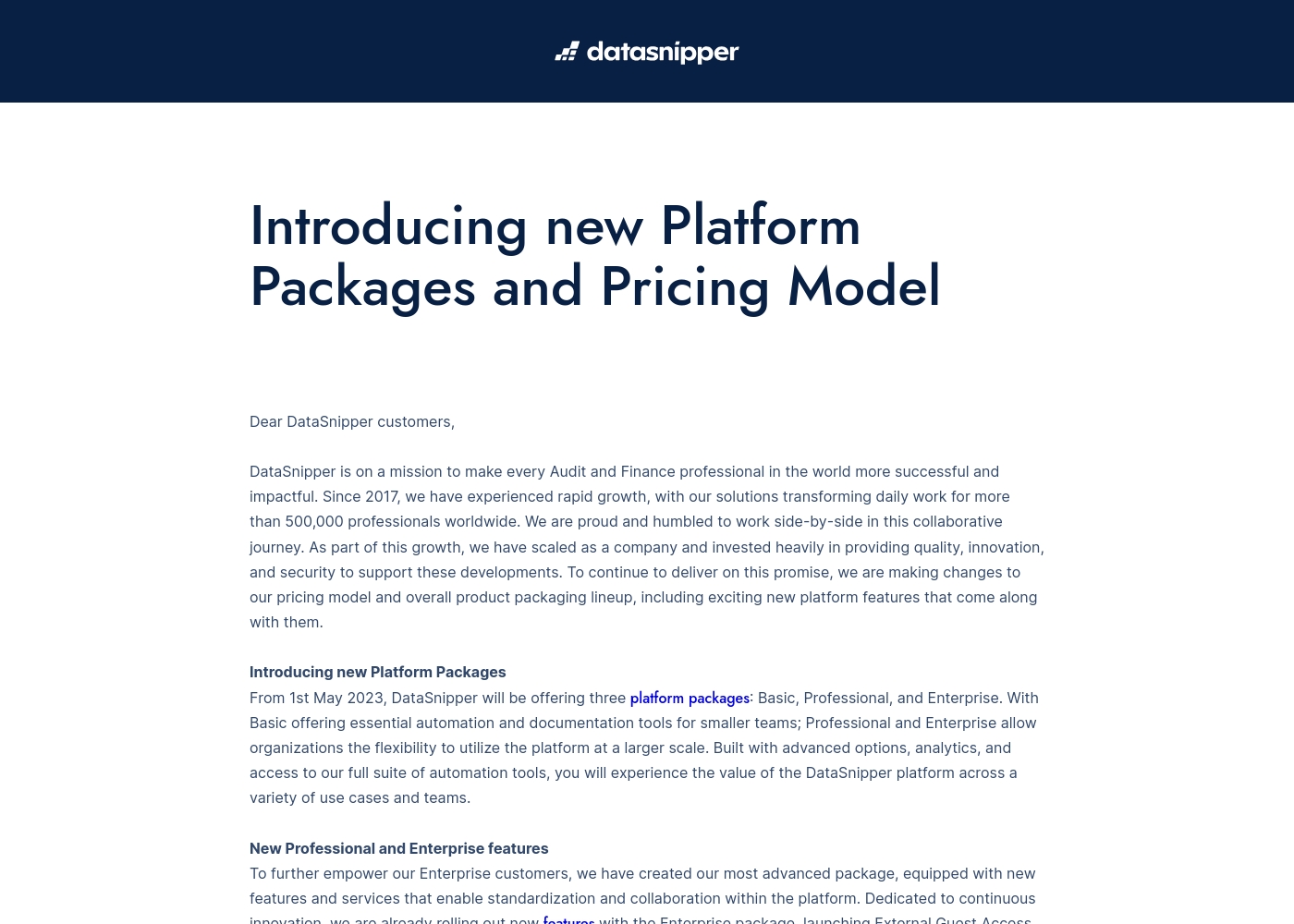
Take a look at the breakdown of our platform packages below to find your fit.
Basic
Best For: Smaller teams needing essential automation Other Features: Essential automation tools, Documentation tools
This plan is great for smaller audit or finance teams who want to start automating their workflows. It provides the core tools you need to document your work faster and more accurately.
- Essential automation tools
- Documentation tools
- Advanced options
- Advanced analytics
- Full suite of automation tools
- External Guest Access
- Advanced Reporting
- Company Templates
- Standardization tools
- World-class support & training
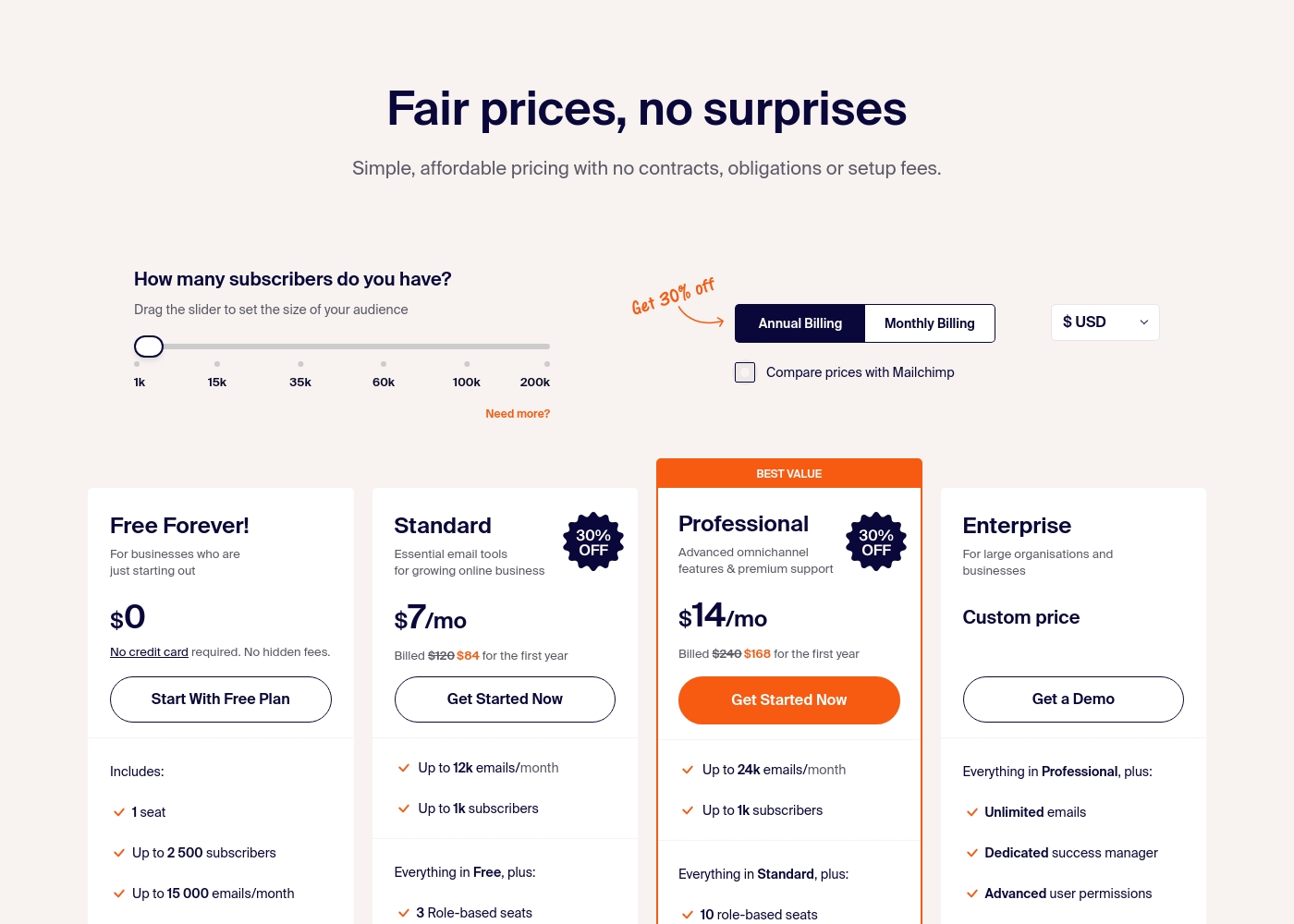
Sender costs between $0 and a custom price per month with 4 plans: Free Forever at $0, Standard at $7, Professional at $14, and Enterprise at Custom price.
Take a look at the specific features and limits included in each plan tier below.
Free Forever!
Price: $0 monthly Best For: Businesses who are just starting out Other Features: 1 seat, up to 2,500 subscribers, 15,000 emails/month, 24/7 live support, email automation.
- 1 seat
- Up to 2,500 subscribers
- Up to 15,000 emails/month
- 24/7 live support
- Email automation
- Up to 12k emails/month
- Up to 1k subscribers
- 3 Role-based seats
- Automated sequences
- Up to 24k emails/month
- Up to 1k subscribers
- 10 role-based seats
- Premium support
- Unlimited emails
- Dedicated success manager
- Advanced user permissions
Pricing Notes
- DataSnipper requires a custom sales proposal; pricing is not public. This may involve negotiation and commitment.
- Sender offers a permanent 'Free Forever' plan with no credit card required. This is a major advantage for new users.
- Sender's paid plans are publicly listed and affordable (e.g., $7-$14/mo for 1,000 subscribers).
- DataSnipper's model is per-seat, which could get expensive for large teams. Sender's model is per-subscriber, scaling with your audience.
Pricing Head-to-Head
User Reviews
Based on the limited external data we could access, the Capterra review page was unavailable due to a security verification block, so we have no direct user review snippets to analyze. We cannot provide a balanced summary of recurring themes like accuracy, ease of use, or support responsiveness without actual user feedback.
Our review is therefore primarily based on the product information provided by DataSnipper, which highlights its focus on audit and finance automation. We recommend checking the external review platforms directly for current user sentiment.
User sentiment on Trustpilot and Capterra highlights Sender's generous free plan and ease of setup as major positives. Many praise the intuitive interface and reliable automation.
😊 However, some note occasional deliverability hiccups and a learning curve for advanced features. Customer support is frequently mentioned as responsive, though a few users report slow responses during peak times.
The free plan is unbeatable for a new business. I set up my first automation in minutes. The platform is simple and gets the job done without fuss.
Our Verdict
There's no single winner here because DataSnipper and Sender serve completely different worlds. DataSnipper is your audit firm's new best friend. It automates the grueling data collection from spreadsheets and PDFs. Sender is the quick, affordable way to start email marketing tomorrow. DataSnipper's superpower is turning hours of manual data entry into minutes. It uses AI to extract, verify, and cross-reference financial data with high accuracy. This is a game-changer for audit and finance teams. Sender's superpower is getting you started for free, fast. You can set up your first automated email sequence in 5 minutes. It's perfect for small businesses that need simple, effective communication tools without the cost. The deciding factor is your job function. If you work with financial documents and need automation, DataSnipper is your tool. If you need to send marketing emails and grow a subscriber list, Sender is your platform. Choose DataSnipper if you're an auditor or finance pro drowning in data tasks. Choose Sender if you're a small business owner or marketer needing a straightforward email tool. They're both excellent, just for very different people.
Frequently Asked Questions
Which is better for small teams: DataSnipper or Sender?
Sender is better for small teams needing email marketing. Its free plan supports up to 2,500 subscribers. DataSnipper is for specialized audit teams and requires a custom proposal.
Does DataSnipper have email marketing features like Sender?
No. DataSnipper is solely focused on automating audit and finance data workflows. Sender is an email marketing platform. They don't compete in the same category.
Is Sender worth the extra cost over DataSnipper?
This question doesn't apply. They solve different problems. Sender is often free or very affordable. DataSnipper's cost is custom and for a specialized business need.
Can I use DataSnipper for email campaigns?
No. DataSnipper is built for processing financial documents, not creating or sending marketing emails. Sender is the tool for email campaigns.
Which tool has better free options?
Sender wins here. It offers a permanent Free Forever plan with 15,000 emails per month. DataSnipper does not offer a public free plan or trial.
DataSnipper vs Sender: Which is easier to learn?
Sender is generally easier for most users. It promises setup in 5 minutes. DataSnipper is a specialized platform for professionals, which may involve a steeper learning curve.
Ready to Choose?
Both tools have their strengths. Choose based on your specific needs.