DataSnipper vs Pabbly Connect
DataSnipper and Pabbly Connect solve totally different problems. DataSnipper automates audit and finance data tasks. Pabbly Connect connects your apps to sync data automatically.
Best for: Audit and finance teams automating data collection from documents, Organizations needing AI-assisted verification and cross-referencing
Best for: Marketers and operations teams automating app data syncing, Small businesses on a budget needing affordable, powerful automation
AI-Powered Audit Assistant
We found DataSnipper to be a specialized AI platform that genuinely tackles the repetitive data tasks in audit and finance. It promises significant time savings by automating data collection, extraction, and verification. Overall, it looks like a powerful tool for teams ready to embrace intelligent automation, though the lack of transparent pricing and external review details is a consideration.
Pros
- Automates repetitive data tasks like collection and extraction, promising major time savings.
- Focuses on enhancing accuracy by using AI to cross-reference and validate information.
- Designed to integrate with existing documents and workflows, minimizing disruption.
- Keeps humans in control with a 'human-led intelligence' approach.
Cons
- Pricing is not public and requires a custom proposal, lacking transparency upfront.
- No free trial or money-back guarantee is mentioned, increasing commitment risk.
- Core feature details beyond automation benefits are not deeply specified.
- No accessible external user reviews were found to verify claims or gauge satisfaction.
Advanced Automation, Risky Support Structure
We found Pabbly Connect delivers robust, powerful automation, especially benefiting from unlimited operations and excluding internal steps from task counts. However, external feedback consistently highlights catastrophic customer support and administrative issues, creating a high-risk user environment. Overall, this is a strong technical tool hampered severely by company governance.
Pros
- Unlimited operations (checks) are included at no extra cost.
- Internal steps (filters, routers) do not count toward monthly task limits.
- Offers a clear, cost-effective Unlimited Task plan for $69/month.
- Supports advanced workflow logic, including custom scripts (JS/Python).
Cons
- Customer support is overwhelmingly reported as slow, unhelpful, or ineffective.
- The 30-day money-back guarantee is frequently difficult or impossible to reclaim.
- Users report major inflexibility regarding account management (e.g., changing email addresses).
- Automations may occasionally break, leading to platform instability for some users.
AboutDataSnipper
DataSnipper is an Intelligent Automation Platform designed for Audit and Finance teams. 💡 It acts as a virtual assistant, using AI to handle complex data workflows. The platform helps professionals gather information from multiple sources, pull out key details, and check everything for accuracy. It’s built to work with you, keeping humans in control.
AboutPabbly Connect
Pabbly Connect is an integration application that connects tools so you can send data from one place to another. Setting up an automation workflow is straightforward.
💡 First, you select a Trigger application. This is the starting point when data is received.
Next, you choose an Action step to transfer that data to the destination application. When you enable the workflow, it runs automatically around the clock.
Highlights
Feature Comparison
Features Overview
We highlight the main differences and pick a winner for each feature.
Core Automation
DataSnipper automates document data tasks. Pabbly Connect automates app-to-app data transfers.
DataSnipper uses AI agents to collect, extract, and verify data from audit documents like PDFs and Excel. It focuses on repetitive finance tasks. This saves hours on manual data entry and cross-checking. The automation is specialized for audit workflows. Pabbly Connect triggers actions when data arrives in one app, then sends it to another. It connects 700+ apps. You set it up once, and it runs 24/7. This is great for syncing CRM, email, and marketing tools. DataSnipper's automation is deep but narrow for finance. Pabbly Connect's is broad but requires you to design the logic. Choose based on whether you need document intelligence or app connectivity.
Ease of Use
DataSnipper is designed for audit pros. Pabbly Connect is for building automation workflows.
DataSnipper aims to integrate into existing audit workflows. It minimizes disruption. The platform is built specifically for finance teams. Learning to use it should be straightforward for its target audience. Pabbly Connect uses a trigger-action model. You select apps and map data fields. It offers advanced features like filters and routers. This has a steeper learning curve but powerful customization. Both require learning. DataSnipper's use case is more specific. Pabbly Connect's flexibility means more initial setup complexity.
Integration Ecosystem
DataSnipper works with your docs. Pabbly Connect connects your software apps.
DataSnipper focuses on integrating with the documents and data you already use in audit work. It doesn't emphasize a large list of third-party app integrations. The value is in its specialized document processing. Pabbly Connect boasts over 700 pre-built integrations with popular apps. You can connect CRMs, email services, e-commerce platforms, and more. It also has custom API modules for any app with an API. If you need to connect many different SaaS tools, Pabbly Connect wins. If your need is deep document processing within a specific workflow, DataSnipper is the choice.
Advanced Features
DataSnipper offers AI verification. Pabbly Connect offers custom code and logic.
DataSnipper's advanced feature is AI-powered cross-referencing and verification between documents. It flags inconsistencies automatically. This is a smart, specialized capability for audit accuracy. Pabbly Connect offers filters, routers, delays, iterators, and a code module. You can run custom JavaScript or Python scripts. This allows for highly complex, conditional workflows. DataSnipper's advanced features are built-in AI for a specific task. Pabbly Connect's are flexible tools for building any logic you need.
Security & Compliance
Both emphasize security. Pabbly Connect lists specific certifications.
DataSnipper states it invests heavily in security for handling sensitive financial data. Exact certifications aren't listed publicly. You get details in a proposal. Pabbly Connect is ISO 27001:2022 certified and SOC2 Type 2 compliant. These are well-known, rigorous standards. This provides clear security assurance. Both tools prioritize security. Pabbly Connect's public certifications give it an edge in transparency.
Customer Support
DataSnipper offers support for Enterprise. Pabbly Connect support is highly criticized.
DataSnipper promises 'world-class support' for its Enterprise plan. Details like SLAs aren't public. You need to ask sales. Pabbly Connect's support is a major pain point. Reviews consistently call it slow, unhelpful, or ineffective. Getting refunds or account changes is difficult. DataSnipper's support quality is unverified. Pabbly Connect's is publicly problematic. Based on data, DataSnipper has a better potential support experience.
Value for Money
DataSnipper pricing is opaque. Pabbly Connect offers transparent, high-value plans.
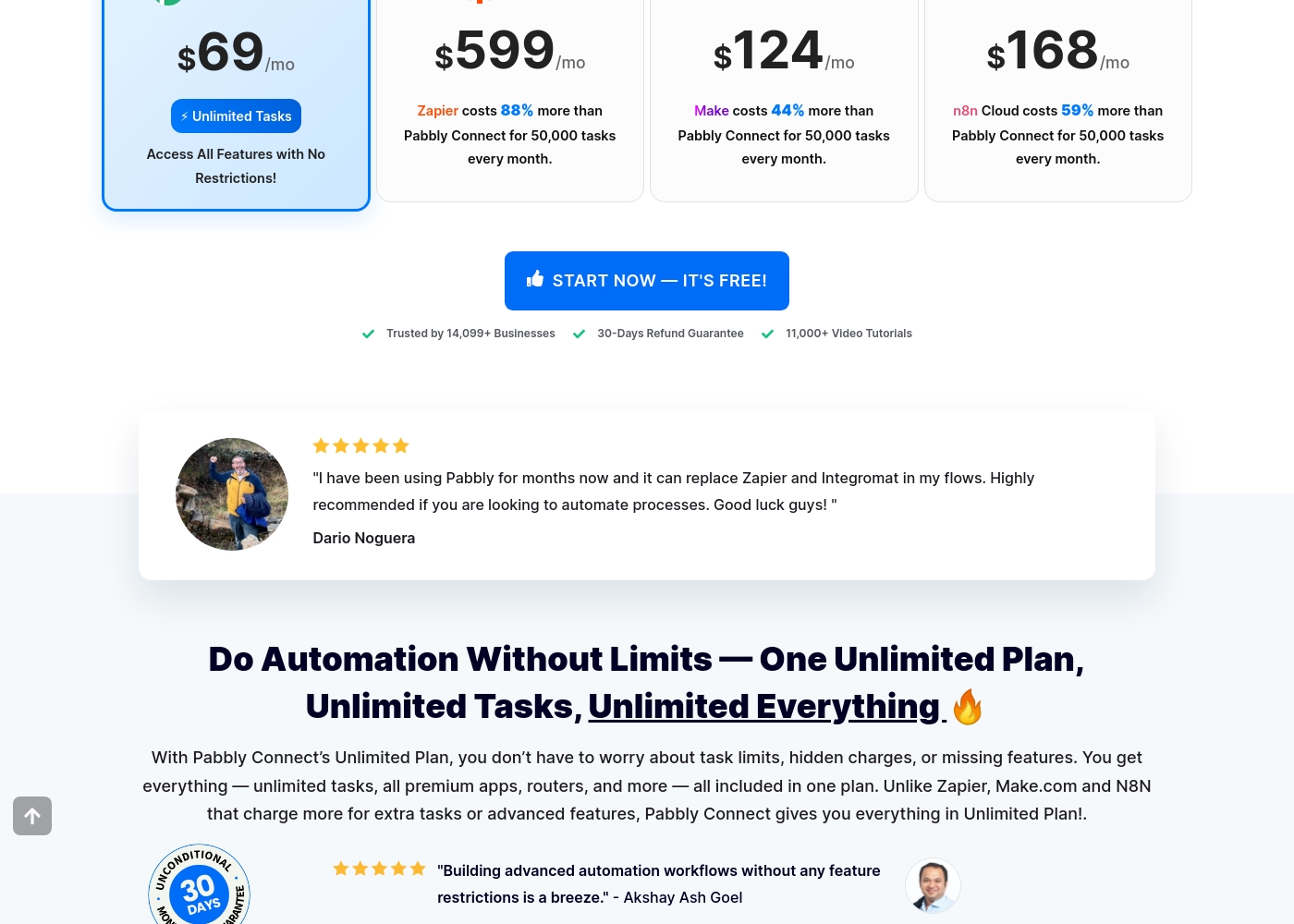
DataSnipper has no public pricing. You get a custom quote. This lacks transparency. The value depends entirely on your negotiated deal. Pabbly Connect's Unlimited Plan is $69/month. It includes unlimited tasks, as internal steps don't count. You can save 25% yearly. This is clear, predictable value. Pabbly Connect wins on transparent, cost-effective pricing. DataSnipper's value is hidden until you talk to sales.
Customization
DataSnipper customizes for your audit process. Pabbly Connect customizes workflows with code.
DataSnipper customizes via its Professional and Enterprise plans. These offer advanced options, templates, and standardization tools. Customization is geared towards audit processes. Pabbly Connect offers deep customization. You can use Code by Pabbly for custom scripts. API modules let you connect to any app. Filters and routers shape every data flow. Pabbly Connect offers more technical customization for workflows. DataSnipper offers more process customization within its niche.
Take a look at the breakdown of our platform packages below to find your fit.
Basic
Best For: Smaller teams needing essential automation Other Features: Essential automation tools, Documentation tools
This plan is great for smaller audit or finance teams who want to start automating their workflows. It provides the core tools you need to document your work faster and more accurately.
- Essential automation tools
- Documentation tools
- Advanced options
- Advanced analytics
- Full suite of automation tools
- External Guest Access
- Advanced Reporting
- Company Templates
- Standardization tools
- World-class support & training
Before you dive into the details, remember that Pabbly Connect operates on a task-based system. Triggers and internal steps like filters or routers do not count towards your monthly task limit, which is a major benefit.
Standard Plan (Tier 1)
Best For: Users new to automation or those with small volume needs. Refund Policy: 30-day money-back guarantee Other Features: 10,000 Tasks every month, eligibility for future integrations and updates.
This plan is ideal for individuals or small operations just starting their automation journey. It provides a solid foundation with 10,000 tasks per month to figure out your workflow needs.
- Unlimited Tasks every month
- Access All Features with No Restrictions
- All premium apps
- Routers and advanced features included
Pricing Notes
- DataSnipper uses custom, per-seat annual pricing. You must contact sales for a quote.
- Pabbly Connect's Unlimited Plan is a clear $69/month for unlimited tasks.
- Pabbly Connect excludes triggers and internal steps from task counts, maximizing value.
- DataSnipper offers a 30-day money-back guarantee. DataSnipper does not mention one.
- Pabbly Connect offers up to 25% savings on yearly plans. DataSnipper's discount structure is unknown.
Pricing Head-to-Head
User Reviews
Based on the limited external data we could access, the Capterra review page was unavailable due to a security verification block, so we have no direct user review snippets to analyze. We cannot provide a balanced summary of recurring themes like accuracy, ease of use, or support responsiveness without actual user feedback.
Our review is therefore primarily based on the product information provided by DataSnipper, which highlights its focus on audit and finance automation. We recommend checking the external review platforms directly for current user sentiment.
Pabbly Connect receives highly polarized external feedback. While some users describe the product as technically superior and incredibly fast, noting advanced features that surpass major competitors, the overall customer rating is severely affected by corporate and support issues.
The majority of reviewers describe customer service as 'diabolical,' 'useless,' and extremely slow, frequently failing to resolve tickets properly or in a timely manner. Recurring themes involve difficulty processing the advertised 30-day money-back guarantee, with users alleging the company actively tries to deny refunds.
Pabbly Connect has the absolute worst customer service. They don't read email tickets correctly and take days to reply, if they reply at all. This lack of responsiveness makes advanced troubleshooting impossible.
Our Verdict
This isn't a head-to-head battle. DataSnipper and Pabbly Connect serve completely different masters. DataSnipper is your audit team's new AI assistant. Pabbly Connect is your app's new best friend. DataSnipper's superpower is intelligent document processing. It uses AI to extract data from PDFs and Excel files, then cross-references it automatically. This saves auditors countless hours on manual work and reduces errors. Pabbly Connect's superpower is affordable, flexible app integration. For $69/month, you get unlimited tasks and connections to over 700 apps. It's built for marketers and operations teams who live in multiple software tools. The deciding factor is your job. If you're in audit or finance drowning in paperwork, DataSnipper is the clear choice. If you need to connect your CRM, email, and project management tools, Pabbly Connect is your answer. Choose DataSnipper to automate audit data tasks. Choose Pabbly Connect to automate app data flows. There's no overlap—your profession picks the winner.
Frequently Asked Questions
Which is better for small teams: DataSnipper or Pabbly Connect?
It depends on your team's function. For small audit or finance teams, DataSnipper's Basic plan is designed for essential automation. For small marketing or operations teams, Pabbly Connect's low-cost plans offer great app integration value.
Does DataSnipper integrate with my existing audit or financial software?
DataSnipper is designed to work with the documents and data you already use. It integrates with common formats and workflows to minimize disruption. It focuses on document processing rather than connecting a long list of SaaS apps.
Is Pabbly Connect worth the cost if I'm on a budget?
Yes, Pabbly Connect is often more affordable. Its Unlimited Plan is $69/month, and internal workflow steps don't count as tasks. This can make it very cost-effective compared to other automation tools.
Can I try DataSnipper before purchasing?
The official site does not mention a free trial. Your best option is to book a demo with the DataSnipper sales team to see the platform in action.
How does Pabbly Connect's task counting save me money?
Pabbly Connect only counts action steps that transfer data externally. Triggers, filters, routers, and formatters are free. This lets you build complex workflows without depleting your monthly task limit.
Which tool has better customer support?
Based on user reviews, DataSnipper likely has better support. Pabbly Connect's support is widely criticized as slow and unhelpful. DataSnipper promises 'world-class support' for Enterprise customers.
Ready to Choose?
Both tools have their strengths. Choose based on your specific needs.