Crowdcast vs Zoom
People often debate the best platform for hosting live virtual events for external audiences. Crowdcast offers deep audience engagement and creator monetization tools. Zoom, however, excels as an integrated AI-first communication platform (UCaaS). Crowdcast is your dedicated event stage, while Zoom is optimized for enterprise efficiency.
Best for: Content creators hosting paid online courses or exclusive live series., Hosts using Patreon who need seamless, direct integration for member-only events.
Best for: Enterprise organizations needing an AI-first unified suite for internal collaboration (UCaaS)., Hybrid teams requiring AI tools to summarize meetings and accelerate document drafting.
Advanced, Intuitive Livestreaming Platform for Creators
We found Crowdcast delivers on its promise to provide an advanced stage built specifically for modern creators focused on engagement and monetization. It offers a professional, intuitive interface with strong streaming stability and excellent audience interaction features. Overall, we recommend Crowdcast as a powerful tool for hosts looking to build and grow a dedicated live community.
Pros
- Highly intuitive interface, making it easy for beginners and guests to operate.
- Excellent audience engagement tools, including real-time Q&A and bringing attendees on screen.
- Designed specifically for creators with strong monetization and customized branding options.
- Reliable streaming stability and generally good audio/video quality reported by long-term users.
Cons
- Support responsiveness can be slow, especially for international users during critical live events.
- Full platform functionality may feel dated when compared to newer social streaming services.
- Offline video download is deliberately unavailable, as event hosts control access to replays.
- Overage fees apply if a plan’s limits for attendees or streaming hours are exceeded.
Powerful features, poor customer commitment.
We recognize Zoom Workplace as a robust, AI-first platform offering industry-leading features for collaboration and potential time savings. However, we found that its operational reality, including support and subscription handling, presents major challenges that introduce significant risks for users. Overall, organizations must weigh the advanced functionality against the widely documented customer service and billing failures.
Pros
- AI Companion features like summarization save significant time (up to six hours weekly).
- Robust core video conferencing and meeting product that is quick to deploy.
- The integrated Zoom Workplace minimizes app switching and workflow friction.
- Supports enhanced organizational culture and managing hybrid workforces.
Cons
- Customer service and technical support are widely viewed as non-existent and impossible to reach.
- Widespread issues with unexpected auto-renewal, difficult cancellation processes, and refund refusals.
- Setting up specialized services like Zoom Phone is often complicated and poorly supported.
- User interface (UI/UX) is reported as confusing and lacking intuition on the desktop application.
AboutCrowdcast
Crowdcast is an advanced online event platform completely re-designed for today’s creators. After hosting over 10 million attendees, the platform offers a groundbreaking new experience. It moves beyond simple streaming; it gives you the tools to create a dedicated community hub. If you host live shows, teach online courses, or run large virtual summits, this platform is built with your specific needs in mind. You get a customized stage where you control the entire attendee experience, from branding to live interaction. 💡
AboutZoom
Zoom is an AI-first Unified Communications as a Service (UCaaS) solution built for modern teams. It is a single platform dedicated entirely to collaboration. This integrated system, called Zoom Workplace, streamlines essential communication tools like Meetings, Chat, and Docs.
It’s designed for any business that needs to strengthen its organizational culture and effectively engage a hybrid workforce. Zoom also supports critical customer-facing functions, offering specialized AI-first contact center and Customer Experience (CX) solutions. This level of connection helps your entire team work together without friction. ✅
Highlights
Feature Comparison
Features Overview
We highlight the main differences and pick a winner for each feature.
Audience Engagement
Crowdcast focuses on dynamic interaction; Zoom offers standard meeting tools.
Crowdcast lets you natively bring attendees onto the screen instantly for live participation. It also offers live polls and time-stamped Q&A features for easier replay navigation. These tools help create highly interactive, engaging events for creators. Zoom provides standard communication like chat and Q&A within the unified platform. Its focus is on internal collaboration efficiency, not external audience involvement. Crowdcast provides a superior, tailor-made set of tools if deep interaction is your goal.
AI Productivity
Zoom is an AI-first platform with huge time savings; Crowdcast has no integrated AI features.
Zoom's AI Companion provides massive time savings by quickly summarizing long internal meetings. The AI can also efficiently generate strong first drafts of necessary documents. This AI power saves Zoom users an estimated six hours every single week. Crowdcast solely focuses on live production and event engagement without reporting any AI automation features. For organizations needing quick meeting wrap-ups and automated reporting, Zoom is the definitive winner.
Monetization Tools
Crowdcast offers built-in ticketing and low fees; Zoom requires external tools for e-commerce.
Crowdcast integrates directly with Stripe and Patreon for seamless ticket sales and exclusive event access. Its Business plan significantly reduces transaction fees to a low 2%. Zoom is a UCaaS tool requiring complex third-party setup for direct event payment processing. Creators can smoothly manage a paid membership model right within the Crowdcast ecosystem. Selling access directly is much simpler and cheaper with Crowdcast's integrated system.
Pricing Clarity
Crowdcast has transparent pricing; Zoom only provides custom quotes via Sales.
Crowdcast offers three transparent monthly plans ranging from $49 to $195 per month. Pricing scales clearly based on live attendees and total monthly streaming hours used. Pricing for Zoom Workplace is not published; you must request a personalized quote from the sales department. Crowdcast's transparency allows instant budgeting, ideal for individual creators or small businesses. Zoom's quote model points toward customized, enterprise-level solutions.
Customer Support
Crowdcast offers reliable support; Zoom users report customer service is nearly non-existent.
Crowdcast provides reliable email and chat support during standard PST business hours. Though response times can vary, general service satisfaction is high. Zoom customers widely criticize its support as “non-existent” and “impossible to reach” in public reviews. Customers report extreme difficulty canceling, securing refunds, and getting help setting up specialized tools like Zoom Phone. The documented severe lack of support in Zoom introduces significant risk.
Platform Design
Zoom unifies communications (UCaaS); Crowdcast is structured around content channels.
Zoom Workplace is built around a single, integrated platform combining Meetings, Chat, and Docs. This design aims to eliminate multi-tab juggling and communication friction for hybrid teams. Crowdcast is structured around persistent 'channels' which serve as a home base for all your content series and events. Choosing Zoom means prioritizing internal communication efficiency. Choosing Crowdcast means optimizing external audience growth and content presentation.
Branding Control
Crowdcast offers high branding control; Zoom focuses on functional, generic efficiency.
Crowdcast allows intelligent branding, letting hosts add logos, custom backgrounds, and adjust the session layout. It feels like a dedicated online stage tailored to your brand identity. Zoom is primarily designed for high functionality and uniform user experience across its UCaaS suite. It prioritizes standardized integration over intricate visual customization for external events. For creators demanding a polished, unique look, Crowdcast delivers superior visual control.
Developer Flexibility
Zoom provides deep API control via SDK; Crowdcast offers RTMP mode for professional input.
Zoom offers its robust Video SDK, granting developers massive control over application integration and layout customization. This allows integration into specialized digital products and apps. Crowdcast supports RTMP mode, easily connecting professional external encoding software like OBS for high-definition quality streams. Zoom is the better tool for technical teams building custom software products from the ground up. Crowdcast serves producers seeking quality input with existing streaming tools.
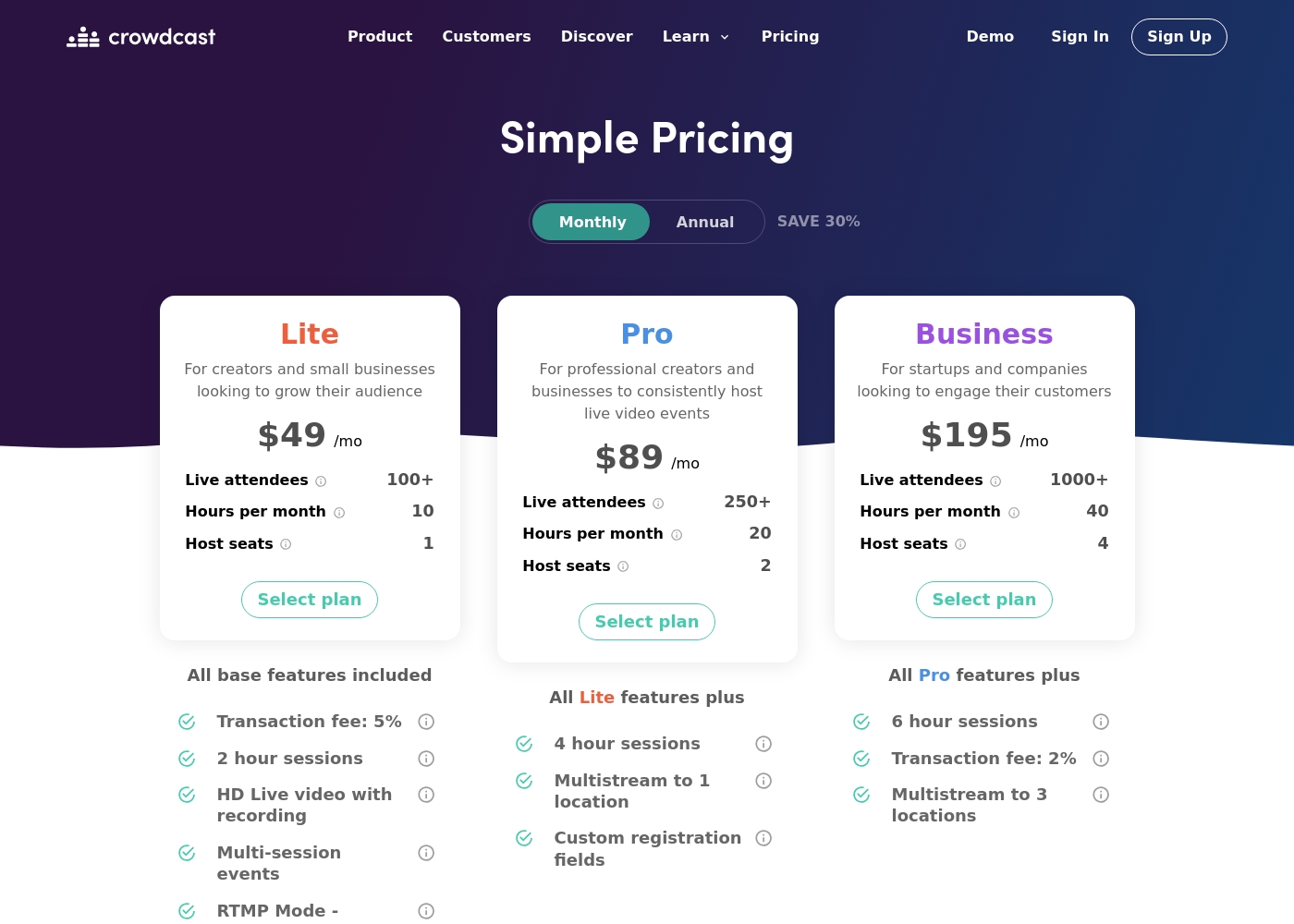
Crowdcast costs between $49 and $195 per month with three main plans: Lite at $49/mo, Pro at $89/mo, and Business at $195/mo. Annual billing is also available, offering a worthwhile 30% savings compared to the monthly rates.
Below is a clear overview of the features, limits, and specific costs associated with each plan.
Lite
Price: $49/mo Best For: Creators and small businesses looking to grow their audience Other Features:
- 100+ Live Attendees included
- 10 Streaming Hours per month
- 1 Host seat
- 5% Transaction fee on ticket sales (plus Stripe processing fees)
- 2-hour session limits
- 100+ Live Attendees
- 10 Hours per month
- 1 Host seat
- 5% Transaction fee (plus Stripe fee)
- 2 hour sessions
- 250+ Live Attendees
- 20 Hours per month
- 2 Host seats
- 4 hour sessions
- Multistream to 1 location
- 1000+ Live Attendees
- 40 Hours per month
- 4 Host seats
- 2% Transaction fee (plus Stripe fee)
- 6 hour sessions
It looks like specific plan names, detailed features, and publicly advertised prices for Zoom Workplace are not available directly on this page. You’ll need to connect with the sales team for current rates.
Zoom Workplace (Plan Details Unavailable)
Best For: Businesses seeking a unified, AI-first platform for collaboration and customer experience. Other Features: AI Companion summarizing meetings, seamless integration, video SDK flexibility, Meetings, Chat, and Docs integration.
Since specific dollar amounts are not listed here, this indicates that pricing is likely customized based on your business size and feature usage. Get in touch with their team to define the right package for your organization. 💡
Pricing Notes
- Crowdcast has transparent pricing, ranging from $49 to $195/month, based on attendee count and streaming hours.
- Crowdcast also charges transaction fees (5% Lite/Pro, 2% Business) on ticket sales, plus Stripe processing fees.
- Zoom does not publish pricing publicly; users must contact sales for a custom quote based on per-seat requirements.
- Crowdcast offers a 14-day free trial; Zoom’s free trial is not explicitly stated and must be requested via sales.
- Crowdcast charges overage fees (15¢ per extra attendee) if you exceed your plan limits, which must be considered for budgeting.
Pricing Head-to-Head
User Reviews
Crowdcast maintains a “Great” 4.1/5 rating on Trustpilot, largely due to its approachability and utility for live event hosting. Users frequently praise the seamless and intuitive experience, noting it effectively replaces traditional webinar tools like Zoom.
The platform is excellent for audience engagement, offering easy Q&A management and stable, high-quality audio and video streams. Many users find it a wonderful asset for widening their reach and appreciate the fair price relative to competitor quality.
This software has been a game changer for us. We were complete newcomers to webinars, but the platform is incredibly user-friendly and easy to operate. We went live without a single hitch—smooth sailing from start to finish!
External sentiment, primarily from Trustpilot users, indicates extreme dissatisfaction with Zoom services outside of the core video product. While many users mention that Zoom’s video calls are generally reliable and quick to set up, the overwhelming majority of feedback centers on failures in essential business operations, particularly customer support and billing.
Users describe support as nonexistent, atrocious, and even a "myth." They consistently report inability to reach a human, long wait times (up to a week), and tickets being closed without resolution. This difficulty extends especially to Zoom Phone setup, which many call impossible and complicated.
I tried calling Sales because I couldn't reach Tech Support, but they refused to connect me unless I upgraded my account first. My account was already locked, waiting for some specific form verification. This is an absolutely disgraceful level of service for a paying customer.
Our Verdict
The choice between Crowdcast and Zoom comes down to internal efficiency versus external community monetization. For external creators and event hosts, Crowdcast is clearly superior. It’s purpose-built for monetization, branding, and dynamic audience interaction. Zoom should be reserved for enterprise use cases only. Crowdcast's superpower is its deep focus on the creator experience and seamless e-commerce integration. It offers native ticketing via Stripe and direct Patreon linkage for exclusive content. You can easily bring attendees on screen and capture valuable emails from external streams. Crowdcast provides the perfect fully branded stage for high-impact workshops and courses. Zoom’s superpower is its comprehensive AI-first integration and workflow efficiency for large organizations. The powerful AI Companion saves users an estimated six hours weekly on meeting summaries and drafting. Zoom Workplace unifies communications (Meetings, Chat, Docs), dramatically reducing friction for hybrid teams. It operates best as an indispensable internal infrastructure tool. However, the massive deciding factor is customer support reliability. Crowdcast has transparent pricing and reliable support for event hosts. Zoom introduces unacceptable operational risk due to widespread reports of non-existent support and aggressive billing practices. Pick Crowdcast if you host external events and value stability and fairness. Choose Zoom only if your company requires the AI companion and can handle navigating enterprise sales channels.
Frequently Asked Questions
Which platform is better for external paid webinars: Crowdcast or Zoom?
Crowdcast is far better because it is purpose-built for external events and monetization. It offers built-in ticketing, Stripe integration, and flexible transaction fees. Zoom requires complicated external tools and addons for paid event hosting.
Does Crowdcast have AI features like Zoom's Companion?
No, Crowdcast does not currently offer AI features like Zoom’s Companion. Zoom uses its AI Companion to summarize meetings and automatically draft documents. Crowdcast focuses its technology on high-quality production and deep audience engagement tools.
Is Zoom harder to use than Crowdcast?
For individual event hosting and production, Crowdcast is generally reported as highly intuitive and user-friendly. Zoom's core video is simple, but its overall enterprise UI/UX is criticized as confusing by many users. Crowdcast provides a smoother experience for creators.
Why are the user reviews so different for Crowdcast and Zoom?
Crowdcast users praise its reliability and strong audience engagement features. Zoom’s external reviews are critically low due to failures outside the core video product. Users consistently report non-existent support, difficult cancellations, and unexpected aggressive billing practices from Zoom.
Can I multistream my events from both Crowdcast and Zoom?
Yes, both can multistream events to external platforms like YouTube or Facebook Live. Crowdcast’s business plan allows streaming up to three locations directly. Crowdcast also streamlines capturing external viewers’ emails for community growth.
How does Crowdcast's pricing compare to Zoom's pricing?
Crowdcast features clear, public pricing from $49 to $195 per month, based on usage limits. Zoom's pricing is opaque and customized per customer. You must contact Zoom sales for a personalized quote, making budget planning difficult.
Ready to Choose?
Both tools have their strengths. Choose based on your specific needs.