Crowdcast vs GoTo Webinar
This comparison is a battle between creative engagement and corporate scale. Crowdcast is favored by creators focused on interactive community building and monetization. GoTo Webinar dominates with high participant capacity and enterprise-level automation. The best choice depends entirely on your specific event goals.
Best for: Content creators focused on building highly engaged communities, Solopreneurs monetizing through workshops and flexible ticket sales
Best for: Large corporations running mandatory training for 3,000+ employees, Marketing teams needing advanced lead tracking and source identification
Advanced, Intuitive Livestreaming Platform for Creators
We found Crowdcast delivers on its promise to provide an advanced stage built specifically for modern creators focused on engagement and monetization. It offers a professional, intuitive interface with strong streaming stability and excellent audience interaction features. Overall, we recommend Crowdcast as a powerful tool for hosts looking to build and grow a dedicated live community.
Pros
- Highly intuitive interface, making it easy for beginners and guests to operate.
- Excellent audience engagement tools, including real-time Q&A and bringing attendees on screen.
- Designed specifically for creators with strong monetization and customized branding options.
- Reliable streaming stability and generally good audio/video quality reported by long-term users.
Cons
- Support responsiveness can be slow, especially for international users during critical live events.
- Full platform functionality may feel dated when compared to newer social streaming services.
- Offline video download is deliberately unavailable, as event hosts control access to replays.
- Overage fees apply if a plan’s limits for attendees or streaming hours are exceeded.
Reliable platform for high-capacity virtual events.
We assessed GoTo Webinar based on its robust feature set and clear, scale-based pricing structure. It seems designed for hassle-free delivery of professional, large-scale virtual events that include strong analytical tools. Overall, it is a highly viable platform for businesses prioritizing participant capacity and functional reliability.
Pros
- Supports very large events (up to 3,000 participants).
- Setup is fast and the platform is described as "hassle-free."
- Higher plans include modern features like AI Meeting Summaries.
- Unlimited Cloud Storage is available on the popular Pro plan.
Cons
- Precise numerical pricing is not displayed publicly on the website.
- Annual billing is required for all listed plans.
- Advanced features require the Pro tier or the Enterprise tier.
- No explicit money-back guarantee was mentioned.
AboutCrowdcast
Crowdcast is an advanced online event platform completely re-designed for today’s creators. After hosting over 10 million attendees, the platform offers a groundbreaking new experience. It moves beyond simple streaming; it gives you the tools to create a dedicated community hub. If you host live shows, teach online courses, or run large virtual summits, this platform is built with your specific needs in mind. You get a customized stage where you control the entire attendee experience, from branding to live interaction. 💡
AboutGoTo Webinar
GoTo Webinar is designed as an all-in-one platform for hosting virtual events of any size. It makes events easy, whether you are running remote staff trainings or complex multi-day conferences.
Setup takes just minutes, and managing your ongoing events is simple. You don't even need dedicated IT support to make it work! The system is built with enterprise-grade security to keep all attendee data safe and your events uninterrupted. 🔐
Highlights
Feature Comparison
Features Overview
We highlight the main differences and pick a winner for each feature.
Audience Capacity & Scale
GoTo Webinar handles audiences three times larger than Crowdcast’s highest tier. Crowdcast is great for smaller, community-focused groups.
Crowdcast’s Business plan caps out at 1000+ live attendees for major events. Live attendee pricing overages start at 15¢ per extra person. Crowdcast is great for growing a medium-sized, loyal community. GoTo Webinar is built for maximum scale, supporting up to 3,000 participants on the Enterprise plan. This massive capacity makes GoTo Webinar perfect for large corporate all-hands meetings or educational programs. The platform is designed for reliable, high-volume delivery. GoTo Webinar clearly wins on sheer physical participant capacity for single events. If your event size regularly exceeds 1,000 people, GoTo Webinar is the safer bet. Crowdcast is plenty large for most creator channels, however. Example: A university hosting mandatory compliance training for 2,500 staff should choose GoTo Webinar for its reliability and size. A solo coach hosting a paid masterclass should stick with Crowdcast.
Live Interaction Tools
Crowdcast excels at dynamic audience interaction, allowing attendees on screen. GoTo Webinar focuses on controlled, large-group engagement.
Crowdcast lets hosts bring any attendee directly onto the screen instantly. This creates a highly engaging, reality TV-style, conversational flow. Crowdcast also offers timestamped Q&A for helpful replay navigation for viewers. GoTo Webinar focuses on classic engagement methods like polls, Q&A features, and virtual ‘raise hand’ functions. The platform allows up to six organizers/presenters to deliver content collaboratively. GoTo Webinar is reliable for large, formal question-and-answer sessions. Crowdcast is significantly better for genuine, spontaneous, two-way interaction. GoTo Webinar maintains a stricter separation between presenters and the massive audience. Crowdcast is better for workshops where participation is key. If you want your audience to feel like co-hosts, Crowdcast is the tool to use. If you need controlled interaction for 3,000 people, GoTo Webinar provides better structure.
Monetization & Ticketing
Crowdcast focuses heavily on flexible monetization via Stripe and Patreon integration. GoTo Webinar supports basic paid access via Stripe only.
Crowdcast has robust E-commerce features with flexible ticketing options for paid events. It charges a 5% transaction fee on Lite/Pro plans, lowering to 2% on Business. Crowdcast also integrates directly with Patreon for exclusive events. GoTo Webinar allows hosts to secure and simplify payment acceptance using Stripe integration. This enables paid access for workshops or training sessions. The fee structure for ticket sales using GoTo Webinar is less transparent. Crowdcast provides deeper integration for creators building external membership revenue streams. The direct Patreon connection in Crowdcast simplifies access management greatly. Crowdcast is clearly superior for content monetization. Creaters charging $100 for an exclusive weekly webinar series will find Crowdcast easier to manage and scale revenue. GoTo Webinar works for one-off paid corporate training events.
Pricing Model Flexibility
Crowdcast offers flexible monthly billing and clear costs. GoTo Webinar requires mandatory yearly commitments with undisclosed upfront pricing.
Crowdcast has transparent pricing, ranging from $49 to $195 per month across its three tiers. Users can choose either monthly or annual billing options. This flexibility is great for seasonal businesses or startups managing cash flow. GoTo Webinar does not publish its numerical plan costs on its website, requiring a quote. Crucially, all listed GoTo Webinar plans mandate yearly commitment and annual billing. This lack of transparency is a major commitment hurdle. Crowdcast wins easily due to its accessible, clear monthly pricing structure. GoTo Webinar forces users into a long-term financial commitment immediately. Startups should prefer Crowdcast's lower barrier to entry. Subscribers trying out the platform for a few months might find Crowdcast’s monthly option perfect. GoTo Webinar’s annual commitment creates friction for uncertain users.
Professional Production
Crowdcast offers integrated Studio tools and RTMP mode for professional quality streaming. GoTo Webinar prioritizes hassle-free delivery.
The Crowdcast Studio tools let you manage overlays, share videos, and present slides efficiently. Crowdcast supports RTMP mode, allowing high-quality streams from software like OBS or Wirecast. This results in superb production control. GoTo Webinar emphasizes HD video and crystal-clear audio quality for an effortless attendee experience. Setup takes just minutes, and it is largely optimized for standard presentation sharing. GoTo Webinar maintains structural security over custom video inputs. Crowdcast is better equipped for hosts who want a highly customized, broadcast-level production quality. GoTo Webinar is simpler for quick, reliable presentations. Hosts running a cinematic, professional broadcast should utilize Crowdcast's RTMP capabilities. A corporate trainer needing high reliability for slide sharing can depend on GoTo Webinar.
Analytics & Tracking
GoTo Webinar offers superior tracking, including source detection for marketing campaigns. Crowdcast provides robust event analytics and data export.
GoTo Webinar includes comprehensive attendance reports and strong analysis tools. A major benefit is source tracking, which identifies which marketing channel drove sign-ups. This is critical for optimizing lead generation efforts. Crowdcast allows you to export attendee data, chat messages, and emails into a CSV file. Crowdcast offers event and session analytics to measure performance. The focus is more on community engagement metrics. GoTo Webinar is the stronger selection for marketing and sales funnel optimization. Its source tracking feature provides actionable intelligence for paid campaigns. Crowdcast is sufficient for tracking basic event success metrics. If generating qualified leads is the primary goal, GoTo Webinar offers better data tools. Crowdcast is more focused on ensuring high replay value and community growth.
Automation & Workflow
GoTo Webinar has powerful, robust automation for event management. Crowdcast's automation relies slightly more on Zapier for depth.
GoTo Webinar excels at simplifying workflow with strong native automation tools built in. It automates essential communications like invites, reminders, and follow-up emails effectively. This reliability saves teams significant administrative time. Crowdcast handles automated registration and reminder sending before events take place. Crowdcast relies on Zapier integration to connect with over 1,500 external applications. This allows varied customized automated workflows. GoTo Webinar’s native automation pipeline is robust for standard webinar functions. Crowdcast offers powerful flexibility through Zapier integration, but it’s an extra step. For core event automation, GoTo Webinar is more seamless. Marketing teams running frequent campaigns should rely on GoTo Webinar’s built-in email automation. Creative hosts needing unique integrations might prefer Crowdcast's Zapier ecosystem.
Storage & Advanced Features
GoTo Webinar offers Unlimited Cloud Storage and AI analysis in higher plans. Crowdcast requires manual management of streaming hour limits.
GoTo Webinar offers Unlimited Cloud Storage for recordings on its Pro and Enterprise plans. The Pro plan also includes cutting-edge features like AI Meeting Summaries. These are valuable for modern professional organizations. Crowdcast limits usage by the total streaming hours allowed per month (up to 40 hours). Hosts also pay a $20 fee for every extra 5 hours of overuse. This requires constant monitoring of usage limits for recordings. GoTo Webinar clearly wins for teams that produce high volumes of recorded content. Unlimited storage removes the stress of tracking and deleting old sessions. Crowdcast's hour limits can quickly increase costs. If you plan to record every session for permanent archiving, GoTo Webinar's Pro plan is a good investment. Teams doing short, weekly live updates may find Crowdcast’s included hours sufficient.
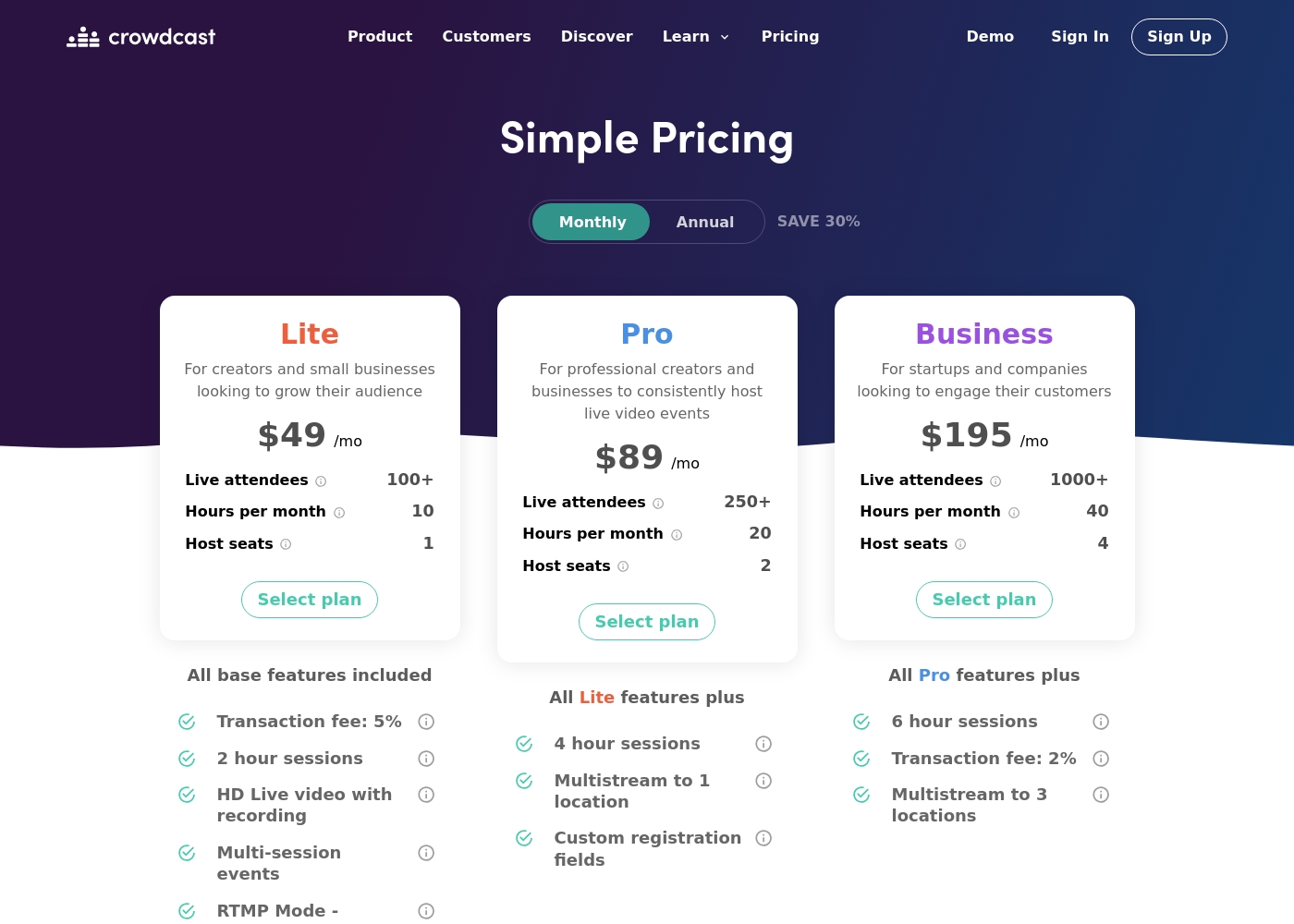
Crowdcast costs between $49 and $195 per month with three main plans: Lite at $49/mo, Pro at $89/mo, and Business at $195/mo. Annual billing is also available, offering a worthwhile 30% savings compared to the monthly rates.
Below is a clear overview of the features, limits, and specific costs associated with each plan.
Lite
Price: $49/mo Best For: Creators and small businesses looking to grow their audience Other Features:
- 100+ Live Attendees included
- 10 Streaming Hours per month
- 1 Host seat
- 5% Transaction fee on ticket sales (plus Stripe processing fees)
- 2-hour session limits
- 100+ Live Attendees
- 10 Hours per month
- 1 Host seat
- 5% Transaction fee (plus Stripe fee)
- 2 hour sessions
- 250+ Live Attendees
- 20 Hours per month
- 2 Host seats
- 4 hour sessions
- Multistream to 1 location
- 1000+ Live Attendees
- 40 Hours per month
- 4 Host seats
- 2% Transaction fee (plus Stripe fee)
- 6 hour sessions
Selecting the right GoTo Webinar plan ensures you have the necessary capacity and features for your live events or automated sessions. Here’s a detailed look at what each plan provides:
Lite
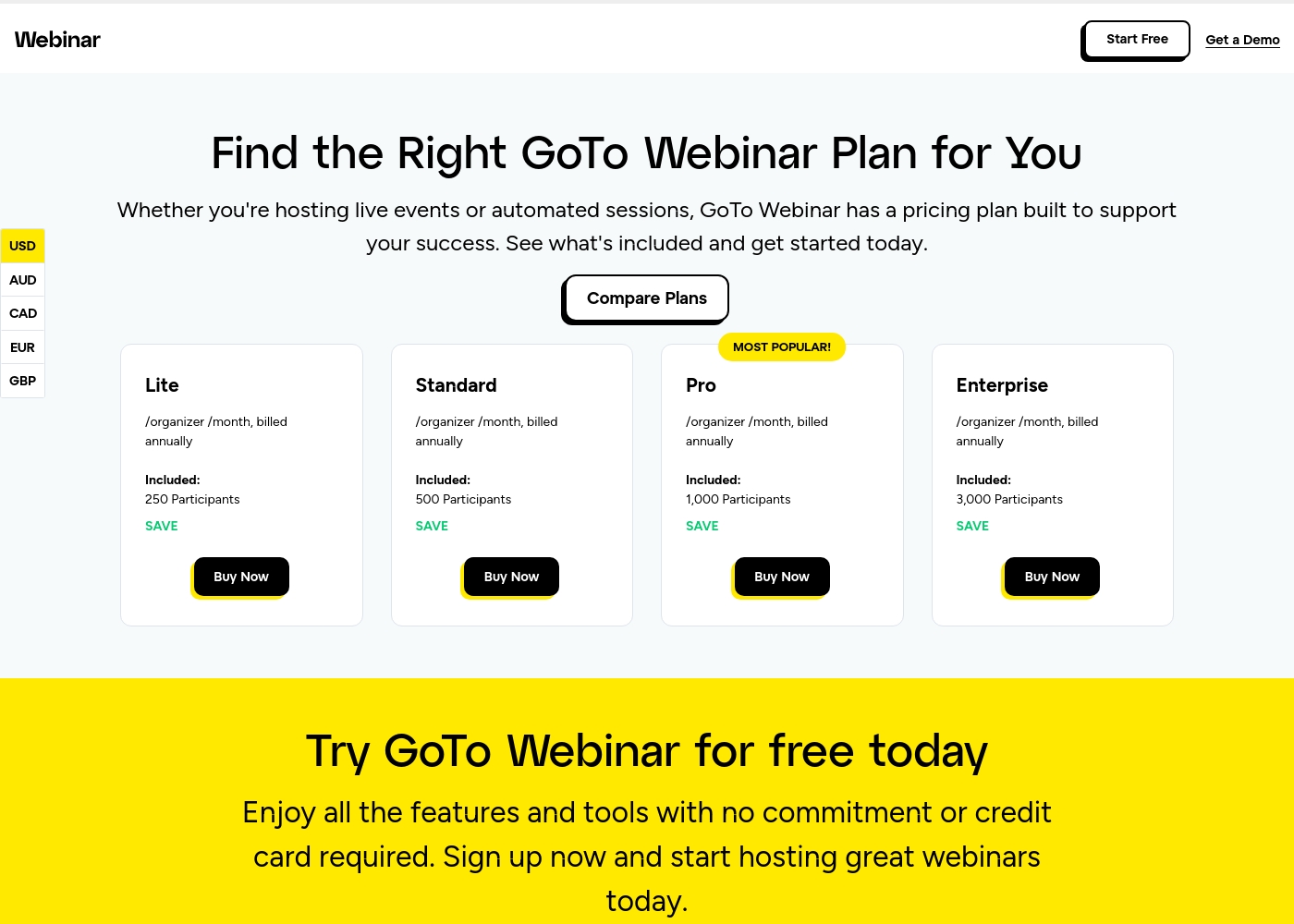
Websites Supported: 5 Page Best For: Small or starting teams Other Features: 250 Participants, Reporting and Analytics, Automated Emails, Mobile App, GoTo Meeting (1 License)
The Lite plan is perfect if your webinars consistently host fewer than 250 attendees and you need essential tools for registration, communication, and reporting. It’s a great starting point for individuals or small operations testing the webinar waters.
- 250 Participants
- Full Service Registration
- Reporting and Analytics
- Audio - VoIP and Phone
- 500 Participants
- Automated Emails
- Custom Branding
- 1 License for GoTo Meeting
- 1,000 Participants
- Unlimited Cloud Storage
- AI Meeting Summary
- Virtual Events
- New Integrations
- 3,000 Participants
- GoTo Stage
- Custom URL
- Certificates
- Transcripts
Pricing Notes
- Crowdcast offers clear, transparent monthly pricing, starting at $49/month.
- All GoTo Webinar plans require mandatory annual commitment; monthly options are unavailable.
- The numerical pricing for GoTo Webinar is not disclosed publicly, requiring potential customers to contact sales.
- Crowdcast implements transactional fees (2% - 5%) for paid ticket sales, plus Stripe processing.
- Crowdcast's pricing scales based on live attendees and total streaming hours; GoTo Webinar scales by maximum participant limit.
Pricing Head-to-Head
User Reviews
Crowdcast maintains a “Great” 4.1/5 rating on Trustpilot, largely due to its approachability and utility for live event hosting. Users frequently praise the seamless and intuitive experience, noting it effectively replaces traditional webinar tools like Zoom.
The platform is excellent for audience engagement, offering easy Q&A management and stable, high-quality audio and video streams. Many users find it a wonderful asset for widening their reach and appreciate the fair price relative to competitor quality.
This software has been a game changer for us. We were complete newcomers to webinars, but the platform is incredibly user-friendly and easy to operate. We went live without a single hitch—smooth sailing from start to finish!
Specific, recent user feedback snippets from leading platforms like Trustpilot and Capterra were unavailable during this review phase 🚫. Therefore, our synthesis relies solely on the product’s reported features and clear pricing structure.
GoTo Webinar is marketed as a platform emphasizing scale and ease of use. Key advertised benefits include supporting up to 3,000 participants and quick setup times, often highlighted as “hassle-free.” The system provides essential features across its four tiers (Lite, Standard, Pro, Enterprise), scaling interactivity and storage significantly in higher plans.
Our Verdict
Choosing between Crowdcast and GoTo Webinar requires asking who your audience is. This comparison is truly a choice between interaction and scale. Crowdcast is engineered for community builders seeking engagement and flexibility. GoTo Webinar is built for large corporate organizations requiring maximum capacity. Crowdcast’s superpower is its conversational interaction and monetization features. You can bring attendees directly onto the screen easily. Its flexible ticketing helps you monetize content quickly via Stripe or Patreon. Crowdcast is perfect for creators prioritizing community and quality interaction. GoTo Webinar specializes in reliably handling massive, professional audiences. It easily hosts up to 3,000 participants in large webcasts. GoTo Webinar offers key enterprise tools like AI Summaries and advanced lead source tracking. Use GoTo Webinar when reliability and data capture are your absolute top concern. The required billing structure is a major hurdle separating them. Crowdcast offers clear, transparent monthly plans and costs. GoTo Webinar demands a mandatory annual commitment and hides its numerical pricing. This commitment is a significant barrier for growing businesses. Go with Crowdcast if you are a creator focused on community interaction and flexible monthly payments. Choose GoTo Webinar if you are an established organization needing 3,000 seats and superior analytics for lead tracking.
Frequently Asked Questions
Which platform is better for small teams: Crowdcast or GoTo Webinar?
Crowdcast is generally better for small teams and creators. It offers monthly plans starting at $49/month with clear pricing. GoTo Webinar requires a costly annual commitment regardless of your team size.
Can I accept payments from attendees using both Crowdcast and GoTo Webinar?
Yes, both platforms offer Stripe integration for accepting payments. Crowdcast has a clear edge, also supporting direct integration with Patreon. Crowdcast specifies transaction fees (2%-5%), which GoTo Webinar does not publicly state.
Which platform handles the largest audience capacity—Crowdcast or GoTo Webinar?
GoTo Webinar handles the largest capacity, supporting up to 3,000 participants. Crowdcast's top tier supports 1000+ live attendees. If your target audience is over 1,000, choose GoTo Webinar.
Does GoTo Webinar have built-in social multistreaming like Crowdcast?
Crowdcast offers robust multistreaming to Facebook, YouTube, and Twitch on its upper plans. The provided data does not indicate that GoTo Webinar supports direct social multistreaming. Crowdcast is better for maximizing external reach.
Which tool provides better data for marketing and lead tracking?
GoTo Webinar provides superior tools for sales and marketing teams. It includes advanced source tracking to identify key lead channels. While Crowdcast offers general analytics, GoTo Webinar gives deeper strategic insight.
Is GoTo Webinar worth the extra cost over Crowdcast?
GoTo Webinar is worth the cost if you need 3,000 attendees, Unlimited Cloud Storage, or AI features. However, Crowdcast offers better overall value for creators needing engagement and monetization tools. GoTo Webinar pricing is less transparent.
Ready to Choose?
Both tools have their strengths. Choose based on your specific needs.