CopyTrans vs iMazing
CopyTrans and iMazing both replace iTunes for powerful iOS data management. The crucial difference is the pricing model: CopyTrans is a budget-friendly one-time purchase. iMazing delivers advanced features like NAS backup on an annual subscription.
Best for: Windows users on a strict budget who want a permanent license, Users needing seamless photo management and automatic HEIC conversion
Best for: Professionals or advanced users requiring scheduled, wireless backups to NAS storage, Families or users needing to manage 5 to 20 Apple mobile devices annually
Seamless iOS data control for Windows.
We recognize CopyTrans as a robust and highly dependable solution for PC users managing iOS data, effectively bridging limitations imposed by native syncing tools. Overall, this established software earns exceptionally high reliability scores and offers outstanding value through its lifetime pricing model.
Pros
- Functions as an efficient, reliable alternative to iTunes.
- Offers exceptional value with affordable, one-time payment pricing (especially the 7 Pack Bundle).
- Reliably transfers music and media, even from vintage iPods.
- Includes seamless HEIC photo conversion and powerful photo organization.
Cons
- The software is primarily a transfer and backup tool, not a full synchronization program.
- Some applications have conversion limits (e.g., 100 photos at a time for HEIC conversion).
- Pricing for the Business License requires requesting a quote rather than being listed transparently.
Essential iOS File Management Tool
We find that iMazing provides powerful flexibility for managing iOS data, effectively surpassing the limitations imposed by iTunes and iCloud. Overall, we recommend iMazing highly, recognizing its stellar support team and reliable functionality despite recent user friction over subscription pricing.
Pros
- Exceptional customer support is fast, friendly, and highly responsive, even outside normal business hours.
- Clean, intuitive interface makes advanced iOS data management easy for all users.
- Reliable features for deep backups, restoration, and data extraction from devices or files.
- Allows flexible transfer of data (photos, music, files) between PC/Mac and iOS devices.
Cons
- Recent shift from permanent licenses to a subscription-based model has caused user frustration.
- License activation is tied to a specific number of devices, requiring support requests when hardware changes.
- Was not able to consistently facilitate all transfer needs for specific data between iPhones for some users.
- Some users found support instructions occasionally too technical.
AboutCopyTrans
CopyTrans offers several powerful programs designed to put you back in control of your iOS data. It serves as a comprehensive free iTunes alternative and a less complicated way to handle transfers than using iCloud for Windows. This suite is highly rated (4.5/5) and has been successfully trusted by over 250,000 users. 💡
This software is perfect for PC users who own an iPhone, iPad, or iPod and want reliable, plug-and-play ways to back up personal data, organize media, and transfer files effortlessly.
AboutiMazing
iMazing is the world's most trusted software for handling your iPhone and iPad data on Mac or PC. It specializes in helping you transfer and save your messages, music, and various files quickly and safely. This powerful tool gives you capabilities for data extraction, media transfer, and robust backup management. Millions of users trust iMazing, and it provides specialized solutions for businesses, legal purposes, and IT management. ✅
Highlights
Feature Comparison
Features Overview
We highlight the main differences and pick a winner for each feature.
Pricing Structure
CopyTrans uses permanent licensing; iMazing strictly uses annual subscriptions.
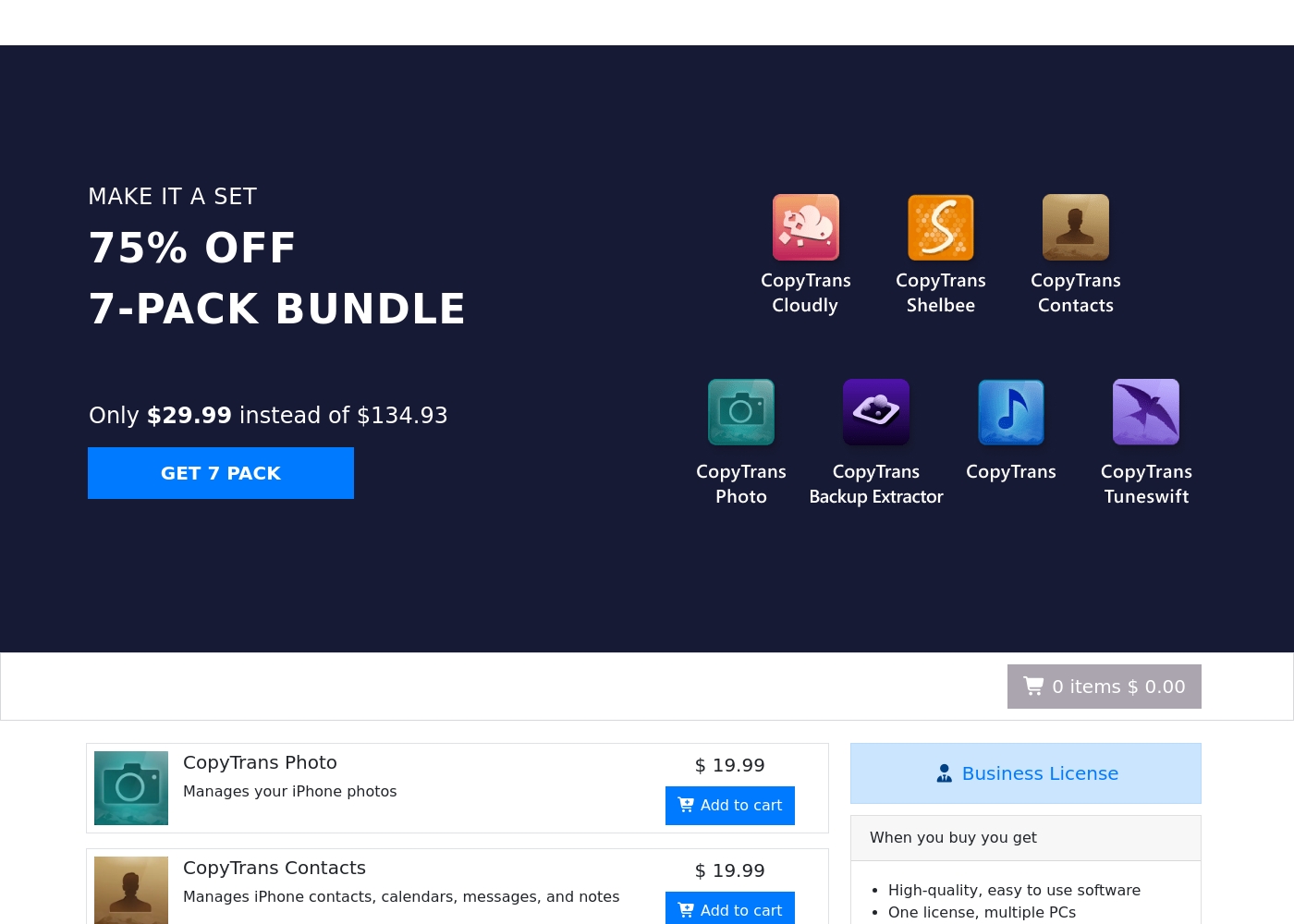
CopyTrans offers incredible value with its one-time purchase model for permanent use. You can buy the full 7-pack bundle for just $29.99, covering all essential utilities. This means you pay once and own the CopyTrans software forever. In contrast, iMazing operates strictly on an annual subscription model. Personal plans start at $49.99 per year, meaning the cost compounds every 12 months. This makes iMazing significantly more expensive over three or four years. If budget stability is paramount, CopyTrans is the clear winner for lifetime ownership. iMazing's annual fee funds continuous updates and better professional support. Choose CopyTrans if you never want to pay again, but accept that iMazing offers features often locked behind subscriptions.
Backup Automation & Storage
iMazing provides advanced wireless and scheduled backups; CopyTrans backup is manual.
CopyTrans allows for secure, custom local backups to your PC or external drives. However, these backups must generally be initiated manually by the user or scheduled via OS tools. You get great flexibility on what data CopyTrans restores. iMazing excels by offering sophisticated, autonomous backup functionality. iMazing lets users schedule automatic wireless backups, ensuring critical data is saved without manual intervention. Crucially, iMazing offers native support for saving backups to Network Attached Storage (NAS). CopyTrans primarily supports only direct external drives. Users needing set-it-and-forget-it reliability and support for network drives should definitely choose iMazing for their security strategy.
Platform & Licensing
iMazing is fully cross-platform (Mac & PC); CopyTrans is only for Windows PCs.
CopyTrans is tailored specifically for the Windows environment connecting to iOS devices. Its consumer licenses are generally limited to installation on a single personal PC. iMazing provides more installation flexibility for individual and family users. You can install iMazing on any Mac or PC that you personally own, increasing convenience. The iMazing license uses device slots, covering 5 or 20 unique devices per year, regardless of your computer system. CopyTrans relies on permanent licensing per single machine. If your household uses both Mac and Windows computers, only iMazing provides the simple, cross-platform coverage you need across all machines.
Deep Data Extraction
iMazing accesses deeper device information, including call history and voicemails.
CopyTrans manages essential organizational data like contacts, calendars, and notes from your devices. CopyTrans allows you to easily export contacts to external platforms like Outlook or Android systems. iMazing’s power lies in extracting and managing specialized, normally inaccessible data. This includes vital records like call history, voicemails, ringtones, and detailed notes. iMazing grants you the ability to browse device backups like a standard hard drive structure. CopyTrans’s focus remains on high-level media and organizational transfers. For forensics, archiving, or deep administrative control, iMazing provides superior access to hidden system data.
Photo Management & HEIC
CopyTrans provides seamless, automatic HEIC conversion; iMazing is simpler media transfer.
CopyTrans is famously successful at handling photo transfer, specifically HEIC files for Windows users. CopyTrans automatically converts HEIC files to standard JPG, PNG, or PDF formats on import. The CopyTrans suite is often praised by users for this seamless, integrated conversion utility. It eliminates the need for separate converters entirely. iMazing supports general photo and video transfer via USB or Wi-Fi to your computer. However, iMazing does not explicitly highlight or offer the same automatic HEIC conversion utility. If the core frustration you face is managing HEIC files on a Windows PC, CopyTrans offers the best, quickest solution.
Media Library Control
CopyTrans offers detailed ID3 tag editing; iMazing focuses on restriction-free movement.
CopyTrans provides comprehensive control over your media library, acting as a complete iTunes replacement. You can easily transfer music and videos to your iPhone or iPod. CopyTrans allows users to edit ID3 tags, ratings, and add missing album artwork directly. iMazing facilitates efficient, two-way, restriction-free media transfer between your devices and computer. Its Quick Transfer feature makes copying large files simple and fast. iMazing’s primary benefit is bypassing traditional Apple sync restrictions without fuss. CopyTrans layers on the structural organization tools like tag editing and full playlist management. If meticulous music library organization and metadata perfection matter, CopyTrans gives you deeper editing agency than iMazing.
These prices represent the one-time costs associated with using CopyTrans tools for effectively managing your iOS devices.
Individual App Licenses
Price: $19.99 (One-time payment) Best For: Managing specific iPhone data Refund Policy: 30 days money back guarantee Other Features: Manages specific device needs like photos, contacts, or backups; CopyTrans TuneSwift is $14.99
If you only need one specialized function, like moving photos or managing contacts, this is the simple choice. This pay-once option gives you the exact tool you require without investing in unnecessary extras.
- One-time purchase
- Focuses on a single device management task (e.g., photos or contacts)
- Instant digital delivery
- 30 days money back guarantee
- 7 separate CopyTrans applications included
- 75% discounte off individual prices ($134.93 value)
- One-time payment
- 30 days money back guarantee
- One license valid for multiple PCs
- High-quality software
- 2 years of regular updates guaranteed
- One-time payment, no hidden fees
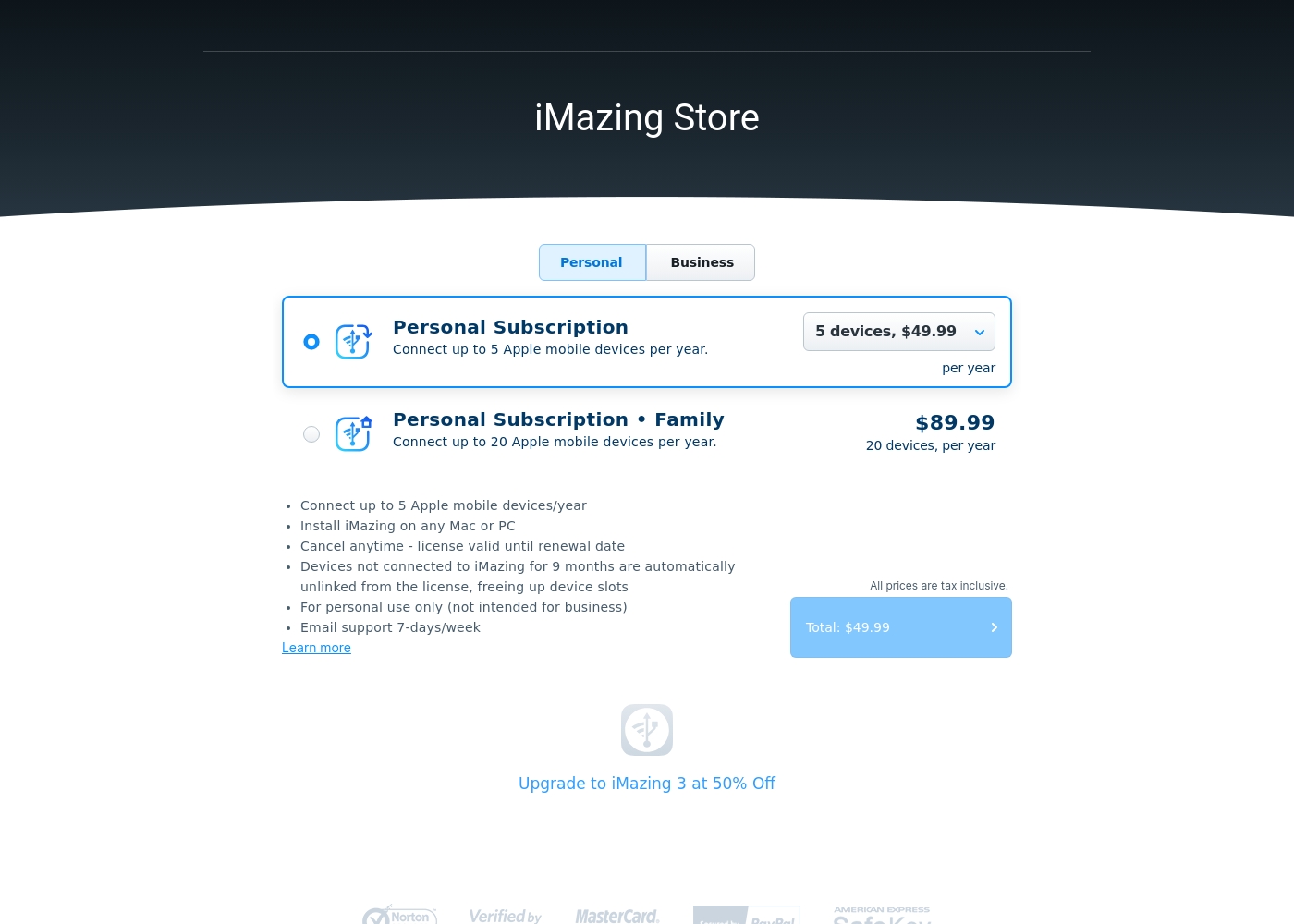
iMazing personal subscriptions cost between $49.99 and $89.99 per year with 2 plans: Personal Subscription at $49.99 and Personal Subscription • Family at $89.99. These clear, annual rates make it easy to choose the right fit for managing your Apple devices.
- Connects up to 5 Apple mobile devices/year
- Installable on any Mac or PC
- Email support 7-days/week
- Connects up to 20 Apple mobile devices/year
- Installable on any Mac or PC
- Email support 7-days/week
Pricing Notes
- CopyTrans uses a permanent, one-time payment model, offering exceptional long-term value.
- The CopyTrans 7-Pack Bundle at $29.99 costs significantly less than one year of iMazing.
- iMazing requires an annual subscription, incurring recurring costs for continued feature access.
- iMazing’s pricing is based on device slots (5 or 20 devices), not on the amount of data transferred.
- CopyTrans offers a confirmed 30-day money-back guarantee, which iMazing does not explicitly promise.
Pricing Head-to-Head
User Reviews
CopyTrans maintains an excellent 4.3/5.0 rating on Trustpilot, driven by high customer satisfaction. Recurring user feedback highlights the software's exceptional reliability and ease of use, making it a highly effective alternative to restrictive default Apple tools.
Users, many of whom have trusted the product for over a decade, praise its ability to effortlessly transfer music libraries, complete with playlists and artwork, even from very old iPod devices onto new PCs. A major advantage frequently mentioned is the seamless management of photos, particularly the praised HEIC file conversion tool that "just works" and solves a common pain point for Windows users.
I had an issue activating my app purchase, but customer support was excellent. They were quick, courteous, and professional, getting me up and running almost immediately. This program makes interfacing with my iPhone so much easier.
iMazing consistently receives excellent user feedback, holding a strong 4.6 rating across thousands of reviews. Users overwhelmingly praise the customer service, calling it responsive, friendly, and exemplary.
Support representatives often resolve intricate licensing issues quickly, sometimes even during late hours or weekends. Reviewers also find the software itself intuitive and reliable.
iMazing has been my singular go-to solution for all my iOS devices for many years. Their team has provided me with amazing support every time I needed help. An exemplary team and a highly reliable piece of software.
Our Verdict
Choosing your iTunes replacement boils down to cost versus comprehensive power. Both CopyTrans and iMazing offer reliable, simple data management far exceeding Apple's proprietary tools. The core decision rests on your budget and platform. CopyTrans wins decisively on cost and specific utility for Windows users. Its $29.99 one-time price for the 7-pack bundle provides incredible, permanent value. If HEIC photo conversion is your main pain point, CopyTrans handles it automatically and beautifully. iMazing is the powerhouse, offering features that justify its annual subscription fee. iMazing supports scheduled, automatic wireless backups, crucial for busy users. It’s the only tool here that conveniently supports saving backups directly to your NAS drive. The deciding factor is your need for advanced administration and cross-platform flexibility. If you run both Mac and PC and manage 5+ devices, iMazing is worth the yearly cost. If you are strictly a Windows user seeking a solution with guaranteed lifetime use, stick with CopyTrans. Choose CopyTrans if you want a permanent, feature-rich tool focused on photos and value. Pick iMazing only if you require Mac compatibility and the convenience of advanced scheduled network storage backups.
Frequently Asked Questions
Which offers a better price: CopyTrans or iMazing?
CopyTrans offers far superior long-term value with its one-time payment structure. The 7-pack bundle costs only $29.99 for permanent use. iMazing requires an annual subscription starting at $49.99, making it significantly more expensive over time.
Can I install CopyTrans on my Mac, or is iMazing better for Mac users?
CopyTrans is strictly designed for Windows PC installation and management. iMazing is fully cross-platform, allowing flexible installation on both your Mac and your PC. If you use a Mac, stick with iMazing.
Which tool is better for running automated backups to external storage?
iMazing is superior for advanced backup automation and storage. iMazing provides scheduled, wireless (Wi-Fi) backups that can be saved to NAS drives. CopyTrans relies on more manual processes to PC or external USB drives.
Does iMazing support customized HEIC photo conversion like CopyTrans?
CopyTrans specifically excels at automatically converting HEIC files to JPG or PNG during transfer to a Windows PC. While iMazing transfers photos easily, it does not highlight or feature this automatic conversion utility.
What kind of deep data can iMazing extract that CopyTrans cannot?
iMazing allows you to extract specialized data, including call history, voicemails, and system notes. CopyTrans focuses primarily on organizational data like contacts and media management.
How many devices can I manage with a personal license of CopyTrans versus iMazing?
A standard CopyTrans consumer license is tied to one PC, regardless of how many devices you connect. iMazing licenses are based on device slots (5 or 20 per year), but you can install iMazing on any personal computer.
Ready to Choose?
Both tools have their strengths. Choose based on your specific needs.