Cognito Forms vs Jotform
Cognito Forms and Jotform are top contenders for building powerful digital forms and automating workflows. Cognito Forms focuses on deep internal team function and compliance features. Jotform excels with its unmatched ease of use and massive integration ecosystem. The choice relies heavily on whether you prioritize internal control or external connectivity.
Advanced forms with noticeable support gaps.
We note that Cognito Forms offers an exceptionally powerful feature set, including HIPAA compliance and advanced logic, even on its free tier. However, we have observed significant, recurring concerns regarding customer support responsiveness and platform reliability, particularly when users encounter critical issues or upgrade their accounts. Overall, this is a strong tool for users needing advanced form logic who are confident they can manage potential technical challenges internally.
Pros
- Access to advanced features (calculations, conditional logic) even on the free plan.
- Strong data collection capabilities, including required HIPAA compliance features.
- Supports complex business needs like generating contracts and electronic signatures.
- Simple setup and easy integration with external websites for basic forms.
Cons
- Form builder complexity increases sharply beyond basic use cases.
- Significant reliability concerns reported, including forms disappearing and unexpected data loss.
- Lack of live or weekend technical support, even for Enterprise clients.
- Support communication quality is inconsistent and often reported as unhelpful.
Highly intuitive, feature-rich form automation.
We found Jotform to be an exceptionally user-friendly form builder that democratizes complex data collection through its drag-and-drop interface and powerful features. Overall, we believe it provides outstanding value, combining robust capabilities with excellent workflow automation for businesses large and small.
Pros
- Intuitive, user-friendly interface simplifies form creation without technical skills.
- Robust, permanently free Starter plan is ideal for individual users and new startups.
- Seamless integrations with over 150 third-party apps automate crucial data tasks.
- Powerful conditional logic and customization options create dynamic, tailored forms.
Cons
- Exact pricing for Bronze, Silver, and Gold paid tiers is not explicitly listed publicly.
- Some users report slow customer service response times when troubleshooting specific technical bugs.
- Specific Enterprise features, like Data Residency, can carry a very high custom price.
- Occasional reliability issues (e.g., missed submissions or feature glitches) have been reported by some long-term users.
AboutCognito Forms
Cognito Forms provides a comprehensive platform for centralizing data collection and automating vital business processes. It's built to support key departments, including Human Resources, Marketing, Sales, IT, and Project Management. This service is dedicated to helping teams create an effective digital transformation strategy. Organizations can use it to streamline both internal and external operations with greater efficiency and consistency. 💡
AboutJotform
Jotform is known as the easiest online form builder available today. You can create professional-looking forms quickly in just minutes. It's built for anyone who needs to manage data efficiently without needing to code. Over 30 million users worldwide already trust Jotform to handle their form needs. ✅
Highlights
Feature Comparison
Features Overview
We highlight the main differences and pick a winner for each feature.
Ease of Use
Cognito Forms is powerful but complexity grows quickly; Jotform is the undisputed user experience champion.
Jotform is widely praised for its intuitive, user-friendly drag-and-drop interface. Users call it the easiest form builder available today, requiring zero coding. Cognito Forms offers great functionality, but the builder complexity increases sharply beyond basic use cases. Setting up advanced workflows in Cognito Forms may feel technical and less accessible to newcomers. Jotform makes building dynamic forms feel simple for any member of your team. This ease is why Jotform has won over millions of users worldwide and garners higher review scores.
Multi-User Scalability
Cognito Forms supports small teams cheaply; Jotform is strictly single-user until Enterprise pricing.
Cognito Forms is superior for teams needing collaborative access without breaking the bank. Multi-user access starts on the Pro plan and scales up to 20 users on Enterprise. Additional users cost a simple $5 per month on all paid Cognito Forms tiers. Jotform's standard Bronze, Silver, and Gold accounts are based entirely on account usage limits. To get true multi-user functionality in Jotform, you must spring for the custom-priced Enterprise plan. For 2-15 employees, Cognito Forms offers a much clearer and cheaper solution for collaboration.
Integration Ecosystem
Jotform connects to 150+ apps; Cognito Forms focuses primarily on internal data and payments.
Jotform dominates external connectivity with over 150 powerful integrations available. You can seamlessly connect Jotform submissions to CRMs, email marketing services, and project boards. Cognito Forms lists only core payment processors like Stripe and PayPal. While Cognito Forms handles internal routing well, its ability to act as a wide external data pipeline is limited. If you rely on specialized third-party tools, Jotform is the much safer bet for reliable connection out-of-the-box. Jotform makes transferring data to your existing stacks automatic and painless.
HIPAA and Compliance
Cognito Forms provides HIPAA much earlier; Jotform requires Gold or costly Enterprise plans.
Cognito Forms makes HIPAA compliance accessible starting on its Team plan, costing only $39 per month. This tier includes necessary Data Encryption features for sensitive information. Jotform reserves optional HIPAA compliance features for its high-level Gold plan or custom Enterprise tier. This makes initial compliance implementation potentially much more costly with Jotform. Organizations needing compliance on a fixed budget should strongly consider Cognito Forms for this critical requirement. Both platforms protect data, but Cognito Forms scales security benefits earlier.
Customer Support Quality
Jotform boasts 24/7 support; Cognito Forms support is a major reported weakness leading to frustration.
Jotform actively advertises strong 24/7 customer support for users needing help. User reviews generally reflect a better experience with responsiveness when issues arise. Cognito Forms has received significant user criticism regarding support quality and availability. Users report long wait times, unhelpful communications, and zero support on weekends, even at the costly Enterprise level. If reliability and guaranteed fast support are crucial, the user sentiment favors Jotform decisively. Reliability gaps are a clear risk when choosing Cognito Forms.
Pricing Transparency
Cognito Forms displays fixed monthly prices; Jotform hides prices for its main standard paid plans.
Cognito Forms maintains transparent pricing for all tiers, ranging from the Free plan up to $129 per month. All additional costs, like per-user fees, are clearly stated upfront. Jotform does not publicly list the prices for its Bronze, Silver, or Gold paid subscriptions. Potential Jotform customers must initiate an upgrade process or contact sales to discover the actual recurring cost. For budget planning and quick comparisons, Cognito Forms' transparency is far superior. Jotform forces users to rely on the free tier until they commit to interacting with unknown costs.
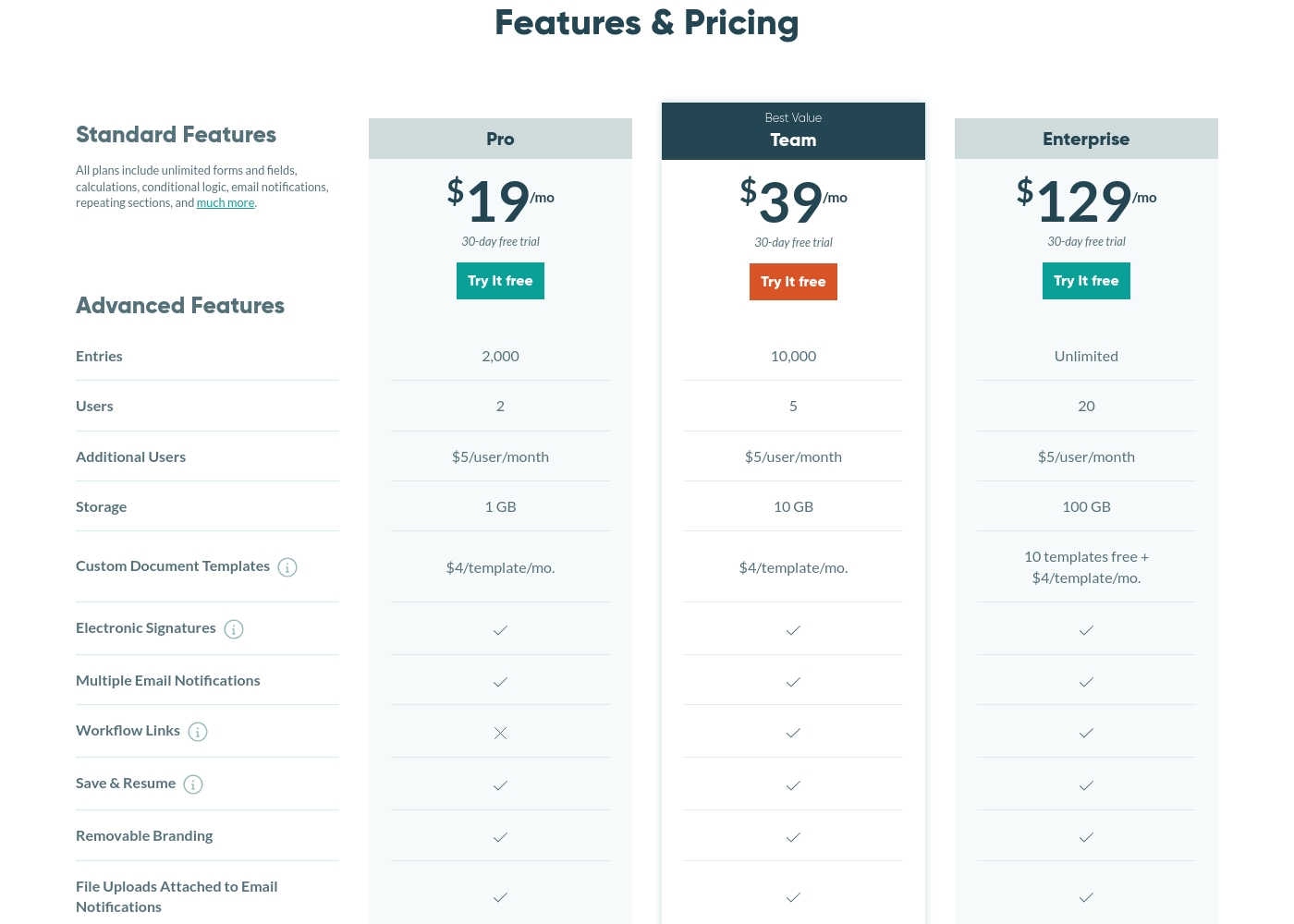
Cognito Forms costs between $0 and $129 per month with four plans: Individual (Free), Pro at $19/mo, Team at $39/mo, and Enterprise at $129/mo.
Let's look closely at what each subscription tier offers your team.
Individual Plan
Price: Free Forever Websites Supported: Not explicitly stated Best For: Not explicitly stated Refund Policy: Not explicitly stated Other Features:
- Includes all standard features
- 100 entries per month
- 1 user
- 100 MB storage
- Unlimited forms and fields
- Calculations
- Conditional Logic
- 1 User
- 2 Users
- Electronic Signatures
- Removable Branding
- Payment Processing
- 5 Users
- Workflow Links
- HIPAA Compliance
- Save & Resume
- 20 Users
- Unlimited Entries
- 10 free custom document templates
- Required Two-Factor Authentication
Jotform costs between Free and Not explicitly stated per Not explicitly stated with 5 plans: Starter at Free, Bronze at Not explicitly stated, Silver at Not explicitly stated, Gold at Not explicitly stated, and Enterprise at Custom Pricing.
Jotform offers a range of options suitable for individuals up to large enterprises. We structure our standard plans to scale comfortably with your growing usage needs.
Starter
Price: Free Websites Supported: Not explicitly stated Best For: Individuals or small teams just starting data collection. Refund Policy: Not explicitly stated Other Features:
- Standard features included (form templates, payment integrations, widgets).
- You must upgrade to increase limits.
- Forms and documents include Jotform branding.
- Includes all standard features
- Form templates, payment integrations, and widgets available
- Lowest-priced paid plan
- Removes Jotform branding
- Best value for small to mid-tier businesses
- Removes Jotform branding
- Highest standard limits
- Optional HIPAA compliance features
- Removes Jotform branding
Pricing Notes
- Cognito Forms features fully transparent pricing up to $129/month; Jotform hides the cost of its Bronze, Silver, and Gold plans.
- Jotform offers a generous 50% discount for approved educational and nonprofit organizations on standard paid plans.
- Cognito Forms offers a 30-day free trial for all paid plans, whereas Jotform relies on its robust free Starter plan instead of a paid trial.
- Cognito Forms charges a simple $5 per additional user per month across all paid tiers, offering clear scaling costs.
- Jotform provides a 30-day money-back guarantee for paid subscriptions, a benefit not explicitly advertised by Cognito Forms.
Pricing Head-to-Head
User Reviews
Cognito Forms receives very polarized feedback, resulting in a 4.1 score on Trustpilot. Many users highlight its exceptional value, noting that the free and basic plans offer powerful features—like calculations, conditional logic, and the ability to handle complex needs like document signing and contracts—which saves small businesses significant time and effort. Its simplicity for basic tasks is frequently praised by users starting out. 👍
However, the platform faces recurring criticism regarding reliability and customer support quality. Multiple users report forms or work disappearing, databases being deleted unexpectedly, and complex issues arising seemingly after upgrading to paid tiers. Crucially, support is cited as an Achilles’ heel: users mention long waits, lack of live help, and unresolved issues, especially during weekends or for Enterprise-level accounts. When the platform works, it’s excellent, particularly for compliance needs like HIPAA; but when critical problems strike, the lack of timely support creates significant frustration and business disruption.
As a small business owner, I found Cognito Forms incredibly comprehensive. It lets me manage everything—intake forms, contracts, document signing, and order forms—all within one system. The inclusion of these robust features has been a true lifesaver for my daily operations.
Jotform users are generally delighted with the platform, frequently describing it as the best form builder out there. Reviewers consistently praise its user-friendliness and intuitive drag-and-drop interface, making complex form creation possible without coding.
The ability to integrate seamlessly with tools like Google Sheets and PayPal truly streamlines workflows, saving users significant time and effort. Many users feel the robust free plan offers exceptional value, though they note that paid plans are necessary for higher usage and to remove branding.
Setting up a document for signature and sending it to our attendees was incredibly easy. It took less than 10 minutes from creating the account to actually sending it out. That swift efficiency is fantastic.
Our Verdict
Choosing between Cognito Forms and Jotform requires prioritizing reliability versus internal workflow depth. If you need a reliable product with amazing integrations, Jotform is the clear winner for most users today. Jotform’s legendary ease of use makes complex form building truly accessible for everyone. Cognito Forms is the specialist choice for deep, internal operational needs. It offers fully transparent pricing up to $129/month, unlike Jotform’s opaque mid-tier costs. Crucially, Cognito Forms enables multi-user access and HIPAA compliance much earlier in its paid tiers. Jotform, conversely, is the connectivity champion with its 150+ powerful integrations. Its 4.6 user rating and 24/7 support also promise a much smoother, more reliable experience. Reliability is critical if you cannot risk forms failing or support being unavailable on weekends, a known weakness of Cognito Forms. The deciding factor is your budget for security and team access. If you need multi-user collaboration or HIPAA compliance cheaply, pick Cognito Forms. However, if your business relies on connecting data seamlessly to many external apps and you require highly rated customer support, opt for Jotform. Jotform is generally better for marketing, while Cognito Forms is built for internal HR/IT management.
Frequently Asked Questions
Which is more affordable for small teams: Cognito Forms or Jotform?
Cognito Forms is more affordable for small teams needing multiple user accounts. It offers multi-user access starting at only $19/month on the Pro plan. Jotform requires the custom-priced Enterprise plan for true multi-user functionality. Cognito Forms also has fully transparent pricing for easy budgeting.
Does Jotform have a free trial available like Cognito Forms?
Jotform does not offer a traditional free trial for its paid subscriptions. Instead, customers use the permanent free Starter plan to test all core functionality. Cognito Forms provides a 30-day free trial on its Pro, Team, and Enterprise plans. Both tools offer excellent ways to test features before spending money.
Which tool has better third-party integrations: Cognito Forms or Jotform?
Jotform has a significantly superior integration ecosystem with connectivity to over 150 apps. This allows for seamless data flow to CRMs and marketing tools. Cognito Forms focuses more on internal workflow and lists only basic payment processors. Jotform is the better choice for external system connectivity.
Is Cognito Forms or Jotform better for handling sensitive data and HIPAA compliance?
Cognito Forms provides access to HIPAA compliance functionality at a much lower rate. Compliance starts on the $39/month Team plan for Cognito Forms. Jotform requires users to subscribe to its higher-tier Gold or custom Enterprise plans. Cognito Forms makes regulatory compliance more financially accessible.
Are the prices for Jotform’s Bronze and Silver plans publicly available?
No, Jotform does not publicly list the sticker prices for its standard Bronze, Silver, and Gold plans. This lack of transparency means you must start the upgrade process to view costs. Cognito Forms is completely transparent, listing all plan tiers and their exact monthly prices.
Which platform gets better user reviews regarding overall reliability and support?
Jotform consistently receives higher user ratings, averaging 4.6/5.0 across major review sites. Users cite its reliability and 24/7 advertised support. Cognito Forms has lower scores due to frequent reports of frustratingly slow or absent customer support, especially on weekends.
Ready to Choose?
Both tools have their strengths. Choose based on your specific needs.