Cognito Forms

Cognito Forms review

The form builder that handles what happens after the submit button.

Cognito Forms costs from $24/mo · 4 plans · Free plan available · prices checked Nov 5, 2026

By Ciroapp Editorial Team · Updated Sep 16, 2026

Commission may apply at no extra cost

Cognito Forms homepage screenshot

At a glance

Quick overview for Cognito Forms: rating, pricing summary, key features, and highlights.
Pricing verified Nov 5, 2026

Ciroapp score

4.0/ 5

Cognito Forms pairs a no-code form builder with built-in workflow automation, native payments through Square, Stripe, or PayPal, document generation, e-signatures, and HIPAA, GDPR, and CCPA support. Entry caps on lower tiers push big volumes toward the $174 Enterprise plan, add-on fees stack up, and no support SLA is published. Overall, it's a solid pick for teams that want submissions to trigger real follow-up work.

Pros

  • Workflows are built in rather than bolted on — submissions can trigger statuses, approvals, task assignments with due dates, and email notifications, so follow-up happens inside the same tool as data collection.
  • Payments run natively on forms through Square, Stripe, or PayPal with no plugins required, which removes the need for a separate payment page or third-party checkout for orders, donations, and fees.
  • Document generation creates custom Word or PDF files like contracts and estimates on submission, paired with legally binding e-signatures integrated directly into the form.

Cons

  • Entry and user caps on lower tiers force upgrades quickly — the free plan allows only 100 entries per month with 1 user, Pro allows 2,000 entries and 2 users, and Team allows 10,000 entries and 5 users — high volume effectively requires the $174/month Enterprise plan.
  • Add-on costs stack on top of the base price — extra users cost $5 per user per month on any tier, and custom document templates run $4 per template per month, with only Enterprise including 10 templates free.
  • No published support hours or response-time guarantee exists — the site says support answers every ticket, but there is no SLA buyers can hold the vendor to.
Best for
  • Small businesses handling orders, surveys, and employee onboarding
  • Nonprofits running donations, events, volunteer signups, and grant applications
  • Healthcare teams needing HIPAA-compliant patient intake and releases
Free trial
Yes — 30 days
This section is a summary. Detailed sections about features, use cases, pricing, and reviews follow below.

What is Cognito Forms?

Chasing approvals over email and retyping form data wastes hours you don't have. Cognito Forms puts forms, payments, and workflow automation in one place, so submissions trigger the next steps automatically. You can start free and build no-code forms with calculations, e-signatures, and notifications.

Cognito Forms is an online form builder with built-in workflow automation. You create forms, collect data, and accept payments, then route each submission through approvals, tasks, and notifications. It's built for teams that want to replace paperwork without hiring developers.

The vendor's site targets nonprofits, small businesses, healthcare, education, government, and tech teams, with matching templates. More than 1.5 million users have signed up, according to the company, and getting started is free.

Should you choose Cognito Forms?

Quick buyer guidance before you compare plans or click through.

Choose it if

  • Teams that need full workflows — statuses, user roles, and tasks — not just data collection
  • Buyers who want legally binding e-signatures and document generation from submissions
  • Organizations that need to accept payments without extra add-ons
  • Users in regulated industries who need HIPAA, GDPR, or CCPA signals
  • No-code builders who want conditional logic, calculations, and custom themes

Skip it if

  • If your process depends on specific tools, confirm each integration is supported before you sign up
  • Headline stats like 90% faster action on data and 8 hours saved weekly come from the vendor, not independent testing
  • The site says support answers every ticket, but doesn't publish hours or response-time guarantees

Next steps before buying

  1. 1Check the pricing page to confirm which plan covers the features and volume you need
  2. 2Browse the integrations list to verify your existing software connects
  3. 3Pick an industry template close to your use case and test it with the free signup
  4. 4Compare Cognito Forms against two alternatives so you know what's standard in the market
  5. 5Review any trial or refund terms shown at checkout before you commit

Ease of use

Signals point to an easy start. User reviews featured on the site mention creating a form in minutes and simple sharing. The builder is no-code, and ready-made templates cover common industries. Support is described as responsive, answering every ticket. Workflow setup with roles, statuses, and actions may take some learning if your process is complex.

Cognito Forms Key Features

✨ Forms that act, not just collect

Most form builders stop when someone hits submit. Cognito Forms keeps going. Each submission can trigger approvals, notifications, tasks, and documents automatically.

Build with calculations, conditional logic, and repeating sections — no code needed. It's a fit when you want data collection and follow-up in one place, whether ten or a thousand entries arrive daily.

⚙️ Workflow that engages the right people

Workflow moves each entry from start to finish. User Roles identify who's involved, whether internal colleagues or external clients. Statuses show the data that matters at each step, and specific roles can take action to move things along.

Email notifications keep everyone in the loop, with customized links that prompt action or review.

✍️ Payments and paperwork, handled

You can accept secure payments right on your forms through Square, Stripe, or PayPal — no plugins required. Documents complete themselves too. When a form is submitted, Cognito Forms generates custom Word or PDF files like estimates and contracts, paired with legally binding e-signatures integrated directly into your forms.

✨ Tasks and a portal that keep work moving

Automated tasks and a self-service portal keep everyone moving. As statuses change, workflow actions can assign tasks with due dates to specific users or roles. The client portal gives clients, partners, and members a secure spot to:

  • Submit new forms
  • View previous submissions
  • Track progress in one place

✨ Security you can point to

Sensitive data stays protected. Cognito Forms supports GDPR, HIPAA, and CCPA compliance, with data encryption, single sign-on, and two-factor authentication. That makes it a practical option for healthcare intake, education records, or government requests.

If you get stuck, support answers every ticket.

Use Cases

💚 Nonprofit donations and volunteer drives

You run a nonprofit and need donations, event signups, and volunteer applications in one place. Build a donation form, take payments through Stripe or PayPal, and send thank-you notifications automatically.

Expected outcome: Less manual tracking, more time for community work.

🏥 HIPAA-compliant patient intake

Healthcare teams collect patient intake forms, medical releases, and emergency contacts online. HIPAA support, e-signatures, and document generation keep records complete and signed.

Tip: Start from the healthcare template closest to your process.

🛒 Order forms that take payments

Small businesses take orders, track inventory, and survey customers. Payments arrive through Square, Stripe, or PayPal right on the form, and submissions can trigger fulfillment tasks.

Expected outcome: Orders move forward without retyping data.

🧑‍💼 Employee onboarding with approvals

HR managers streamline hiring, onboarding, and performance reviews. Submissions move through statuses and user roles, so the right person approves at the right time.

Tip: Use workflow tasks to assign due dates automatically.

Cognito Forms pricing

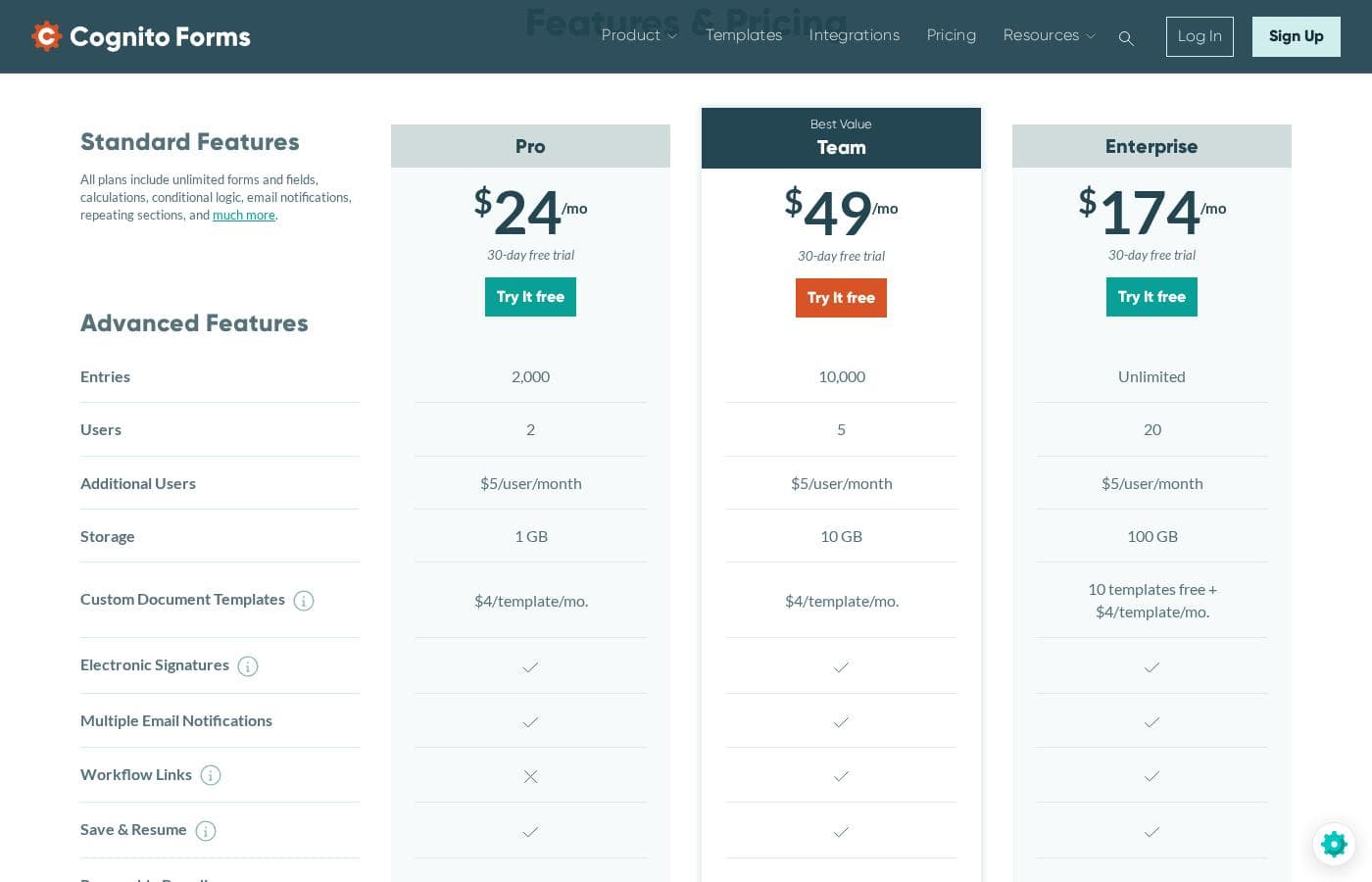
From$24/mo

  • 4 plans
  • Free plan available

Prices checked on Nov 5, 2026 from Cognito Forms's pricing page

Cognito Forms pricing page screenshotView pricing page screenshot
PlanBilled monthlyBilled annuallyIncludes
Individual
Free
—
100 entries/month, 1 user, 100 MB storage
  • All standard features
  • Unlimited forms
  • Calculations and conditional logic
  • File uploads
Pro
$24/mo
—
2,000 entries, 2 users, 1 GB storage, document templates at $4/template/month
  • Unlimited forms and fields
  • Calculations and conditional logic
  • Email notifications
  • Repeating sections
  • Additional users at $5/user/month
Team
$49/mo
—
10,000 entries, 5 users, 10 GB storage, document templates at $4/template/month
  • Unlimited forms and fields
  • Calculations and conditional logic
  • Email notifications
  • Repeating sections
  • Additional users at $5/user/month
Enterprise
$174/mo
—
20 users, 100 GB storage
  • Unlimited entries
  • Unlimited forms and fields
  • 10 free document templates, then $4/template/month
  • Additional users at $5/user/month

Price history

Tracking prices since Oct 9, 2026. No price change detected yet.

Pricing types: Free plan, Free trial, Monthly subscription, Per seat pricing

Pricing notes

Cognito Forms offers a free Individual plan plus three paid tiers: Pro at $24, Team at $49, and Enterprise at $174. Higher tiers add more entries, users, and storage, and every plan can be tried free for 30 days.

Cognito Forms costs between $24 and $174 per month with three paid plans: Pro at $24, Team at $49, and Enterprise at $174. There's also a free Individual plan you can keep forever.

Here's a closer look at what each tier includes. 👇

Pro

Price: $24/month Other Features:

  • 2,000 entries and 2 users
  • 1 GB of storage
  • Unlimited forms and fields with calculations and conditional logic
  • Add extra users for $5/user/month

Pro is the entry point to the paid plans. It fits solo operators and small teams collecting a steady but manageable flow of entries — think order forms, signups, and contact forms. If you're bumping against the free plan's 100 monthly entries, this is the natural next step.

Team

Price: $49/month Other Features:

  • 10,000 entries and 5 users
  • 10 GB of storage
  • Custom document templates at $4/template/month
  • Add extra users for $5/user/month

Team works well for growing businesses where several people build forms or handle responses. The larger entry allowance and storage mean you won't hit ceilings as quickly. Groups tracking registrations, requests, or payments across a small team will feel comfortable here.

Enterprise

Price: $174/month Other Features:

  • Unlimited entries and 20 users
  • 100 GB of storage
  • 10 free document templates, then $4/template/month
  • Add extra users for $5/user/month

Enterprise is built for organizations running forms at high volume with many collaborators. Unlimited entries remove any worry about monthly caps, and 100 GB of storage handles heavy file uploads. If your team is larger than 20 people, just budget for extra seats at $5 each per month.

Every plan comes with a 30-day free trial, so you can test drive before you commit. The Individual plan is free forever and includes 100 entries per month, 1 user, and 100 MB of storage. All tiers share the same standard features — unlimited forms, file uploads, spam prevention, and a WordPress plugin — and the comparison table lists extras like electronic signatures, payment processing, HIPAA compliance, and two-factor authentication. One tip: confirm the billing period and entry limits for your team size before you buy, since add-ons are quoted per month.

Cost calculator

Estimate what Cognito Forms costs for your team.

Billing
Per month
$24
Per year
$288

Pro has a flat price: the number of seats does not change the total. Estimate based on published list prices, before taxes, add-ons and discounts.

How to pay less for Cognito Forms

  • Start on the free plan and upgrade only when you hit its limits.
  • Use the 30-day free trial before you pay.
  • Cheaper tools in this category start at $9/mo.
Start free trial

Email me when Cognito Forms changes price

One email when we detect a price change on the vendor's pricing page. No newsletter, no deals. Unsubscribe in one click.

User Reviews

No reviews yet.

Write a Review

Write a Review for Cognito Forms
0/100 characters
0/2000 characters

Why use Cognito Forms?

Most form tools stop at collecting answers. Cognito Forms is designed to act on them — routing data, triggering approvals, and generating documents automatically.

  • Workflows built in — Submissions can trigger statuses, approvals, task assignments, due dates, and email notifications.
  • Payments without plugins — Accept secure payments through Square, Stripe, or PayPal directly on your forms.
  • Paperwork that completes itself — Auto-generate Word or PDF documents and collect legally binding e-signatures tied to your forms.
  • Power for complex forms — Conditional logic, calculations, repeating sections, data lookups, and custom themes are available for advanced builders.
  • Security and compliance — GDPR, HIPAA, and CCPA support, plus data encryption, single sign-on, and two-factor authentication.
  • Popular at scale — The vendor reports 1.5 million+ users and 4.7/5 ratings on G2, Capterra, Software Advice, and Product Hunt.

If you want forms that finish the job instead of just collecting answers, the free signup makes trying it low-risk.

Cognito Forms alternatives

Other tools in the Online Form Builder category

View all Online Form Builder tools
Formaloo

Formaloo

Online Form Builder3.5/5From $9/mo

Formaloo provides a set of powerful, user-friendly survey tools designed specifically for effectiveness. It helps you collect the feedback you need without unnecessary friction. Marketing teams looking to transform insights into real results will find this platform perfect. You're ready to start building impactful campaigns today!

Pabbly Form Builder

Pabbly Form Builder

Online Form Builder4.1/5

Pabbly Form Builder is an online form building app for your business. You create forms in a dashboard by clicking fields, then share form links online or embed them on your site. You can manage all your data from the same dashboard and collect payments via Stripe or PayPal. It also supports multilingual forms, video tutorials, and options to embed as sliding or plain forms, or to share a direct link.

Wufoo

Wufoo

Online Form Builder3.9/5From $16/mo

Wufoo is an extremely powerful online form builder trusted by over three million users and many popular brands. You can easily create the forms you need to collect valuable data, files, and payments. The builder provides an easy-to-use experience, complete with templates, galleries, and robust reporting tools. It’s designed to let you customize forms to your heart's delight. Whether you are a webmaster or a marketing manager, the goal is to provide a flexible tool that integrates immediately into your existing framework.

Jotform

Jotform

Online Form Builder4.1/5

Jotform is known as the easiest online form builder available today. You can create professional-looking forms quickly in just minutes. It's built for anyone who needs to manage data efficiently without needing to code. Over 30 million users worldwide already trust Jotform to handle their form needs.

involve.me

involve.me

Online Form Builder3.9/5

involve.me is a unified funnel platform that gives businesses all the tools they need to grow. It is highly rated and already used by more than 4,500 companies worldwide, helping them boost conversions. This platform lets you combine various elements—like forms, quizzes, surveys, and calculators—into a single, cohesive funnels 📈. Best of all, you can build and tweak everything by chatting with an AI Agent, requiring zero code or learning curve.

Cognito Forms FAQ

How much does Cognito Forms cost?

Cognito Forms's cheapest paid plan, Pro, costs $24 per month. Paid plans range from $24 to $174 per month. Prices checked on Nov 5, 2026 from the vendor's pricing page.

Does Cognito Forms have a free plan?

Yes. Cognito Forms has a free plan (Individual); paid plans start at $24 per month.

Does Cognito Forms offer a free trial or a money-back guarantee?

Cognito Forms offers a 30-day free trial.

Has Cognito Forms's price changed recently?

No. We have not detected a price change since we started tracking on Oct 9, 2026.

Which apps and tools does Cognito Forms integrate with, and how can I verify my stack connects before signing up?

You can connect form data to the software your team already uses, and payments run through Square, Stripe, and PayPal. There's also a WordPress plugin. For anything beyond that, check the integrations page before you sign up.

How fast is customer support, and is there a published response-time guarantee or service-level agreement buyers can rely on?

The vendor states that support answers every ticket, and user reviews on the site describe responsive help. However, no published support hours, response-time targets, or SLA appear on the reviewed pages. If a guaranteed response window matters to your organization, ask the vendor directly or test responsiveness during the 30-day free trial before committing to a paid plan.

Is Cognito Forms secure and compliant enough for regulated data like patient records or personal information?

The platform supports GDPR, HIPAA, and CCPA compliance, and includes data encryption, single sign-on, and two-factor authentication. That combination makes it practical for healthcare intake, education records, and government requests. Note that HIPAA compliance is listed as a plan-level extra alongside e-signatures and payment processing, so confirm which tier includes it for your use case on the pricing page before collecting patient data.

Ready to try Cognito Forms? Check out the official site or pricing.

Are you Cognito Forms? Claim this listing · Get the badge