Coast vs Quickbooks
Coast and QuickBooks solve very different problems. Coast is a smart fuel card for fleets, while QuickBooks is accounting software for finance. Your choice depends entirely on whether you're managing trucks or tracking money.
Best for: Fleet managers and operations leaders in construction, landscaping, and field services, Small to mid-sized businesses seeking to consolidate fuel and corporate card programs
Best for: Solo entrepreneurs needing basic invoicing and expense tracking, Small businesses preparing for tax season with an accountant
Smart fuel card, real control.
We found Coast to be a strong, unified solution for fleet-based businesses tired of juggling separate fuel and expense cards. It delivers powerful controls and real-time tracking that can genuinely cut down on admin and prevent fraud. Overall, it's a compelling choice for teams ready to consolidate their spending into one efficient platform.
Pros
- All-in-one card for fuel, field, and office expenses simplifies tracking.
- Strong custom controls and telematics integrations help prevent fuel fraud.
- Real-time spending visibility and alerts for immediate oversight.
- Competitive fuel rebates and discounts at 30,000+ stations.
Cons
- $4 monthly fee per active user can become significant for large teams.
- 2.5% fee on foreign transactions limits international use.
- Customer support responsiveness is inconsistent according to some users.
- Requires integrations with telematics/accounting software for maximum value.
Power, Precision, and Painful Support.
We observe that QuickBooks offers market-leading feature depth and scalability, catering strongly to diverse business needs and growth stages with its tiered plans and AI tools. Overall, however, the severe and repeated reports of poor customer support and reliability issues necessitate caution, significantly hindering its operational effectiveness for many users.
Pros
- Scalable plans supporting solo operations up to 25 users.
- Customized experience based on specific business size and needs.
- Integration of advanced AI tools like Intuit Assist and Accounting Agents.
- Includes a 30-day free trial period for risk-free testing.
Cons
- Customer service is consistently reported as inefficient and unhelpful.
- Aggressive and frequent increases in subscription pricing.
- Software is frequently unstable, unreliable, and prone to accounting errors.
- Constant, unplanned user interface updates frustrate long-time users.
AboutCoast
Coast is an all-in-one fuel card, corporate card, and expense management platform built for businesses with fleets. It's designed to replace multiple card programs and manual processes, giving companies like landscaping, construction, and field service teams a single tool to control and track all their spending. The platform provides powerful fraud prevention, integrates with existing telematics and accounting software, and aims to help businesses save significantly on fuel and admin time.
AboutQuickbooks
QuickBooks is a system designed to support modern businesses, regardless of their size. It’s built to personalize the site experience using simple criteria, like how many employees you have. ✨
Whether you are running a large team or operate as "Just me," the system aims to tailor features specifically to your needs. This focus on customization helps pave the way for successful business growth.
Highlights
Feature Comparison
Features Overview
We highlight the main differences and pick a winner for each feature.
Core Purpose
Coast is a payment tool for fleets. QuickBooks is accounting software for finances.
Coast provides a single Visa card for fuel, maintenance, and job site supplies. It's built for operations teams in the field. QuickBooks Online manages invoicing, payroll, bills, and financial reporting. It's designed for back-office accounting and tax prep. The key difference is physical vs. digital. Coast gives your drivers a card; QuickBooks gives your accountant a ledger. For a landscaping company, Coast pays for gas and shovels. QuickBooks tracks that expense and handles payroll.
Fraud Prevention
Coast actively blocks fraud at the pump. QuickBooks relies on standard accounting controls.
Coast locks cards by default. You set rules per driver, vehicle, or time. Telematics integration can block a transaction if the truck isn't at a gas station. QuickBooks offers user permissions and bank reconciliation. It doesn't control point-of-sale transactions. Coast's approach stops fraud before it happens. QuickBooks helps you find it after the fact in the reports. If preventing unauthorized fuel is your top concern, Coast is the clear tool for the job.
Ease of Use
Coast offers a fast online setup. QuickBooks customizes your experience but can feel complex.
Coast's application is quick, sometimes approved in minutes. The card is ready to use after simple shipping. QuickBooks starts with a 30-day trial. You answer questions to tailor the dashboard to your business size. Coast is simpler because it does one thing well. QuickBooks has more features, which means a steeper learning curve. A new driver can use a Coast card in 5 minutes. Setting up a full QuickBooks chart of accounts might take an hour.
Customer Support
Coast promises first-call resolution. QuickBooks support gets poor user reviews.
Coast provides 100% US-based support. Their goal is to solve your issue on the first call. QuickBooks support is frequently criticized for long holds and unhelpful agents. Users report difficulty canceling subscriptions. Coast focuses on rapid support for operational issues. QuickBooks handles broader accounting questions. When a card is declined at a pump, you need help fast. Coast is built for that moment.
Mobile Experience
Coast's app controls the card. QuickBooks' app runs your business.
The Coast app lets drivers securely unlock their card for a specific purchase. You get real-time transaction alerts. QuickBooks' mobile app allows invoicing, expense capture, and report viewing from anywhere. Coast's app is a remote control for spending. QuickBooks' app is a full office in your pocket. For a field tech, Coast's app means no more lost receipts. For an owner, QuickBooks' app means approving bills from the job site.
Integration Ecosystem
Coast plugs into telematics and accounting. QuickBooks connects to 300+ apps.
Coast connects two-way with Samsara, Geotab, QuickBooks, and NetSuite. This automates expense data flow. QuickBooks Online integrates with over 300 apps for payroll, e-commerce, and CRM. Coast's integrations are deep for fleet management. QuickBooks' ecosystem is broader for general business software. Coast uses your telematics to block fraud. QuickBooks uses your bank feed to categorize income.
Pricing Model
Coast charges per active user. QuickBooks uses fixed monthly tiers.
Coast costs $4 per user who makes a transaction. Inactive users pay nothing. QuickBooks plans range from $38 to $275 per month with fixed user limits (1 to 25 users). Coast's model scales with your team's activity. QuickBooks' model scales with your team's size and feature needs. For a 10-truck crew with 8 active drivers, Coast costs $32/mo. The equivalent QuickBooks plan for 5+ users is $115/mo.
Scalability
Coast scales with fleet size. QuickBooks scales with business complexity.
Coast's pricing and controls grow as you add more drivers and vehicles. It's built for operational scale. QuickBooks offers four tiers from solo use to 25-user teams. It handles growing accounting needs. Coast scales horizontally by adding more card users. QuickBooks scales vertically with more features and users. A 50-vehicle fleet uses Coast easily. A 50-person company with departments uses QuickBooks Advanced.
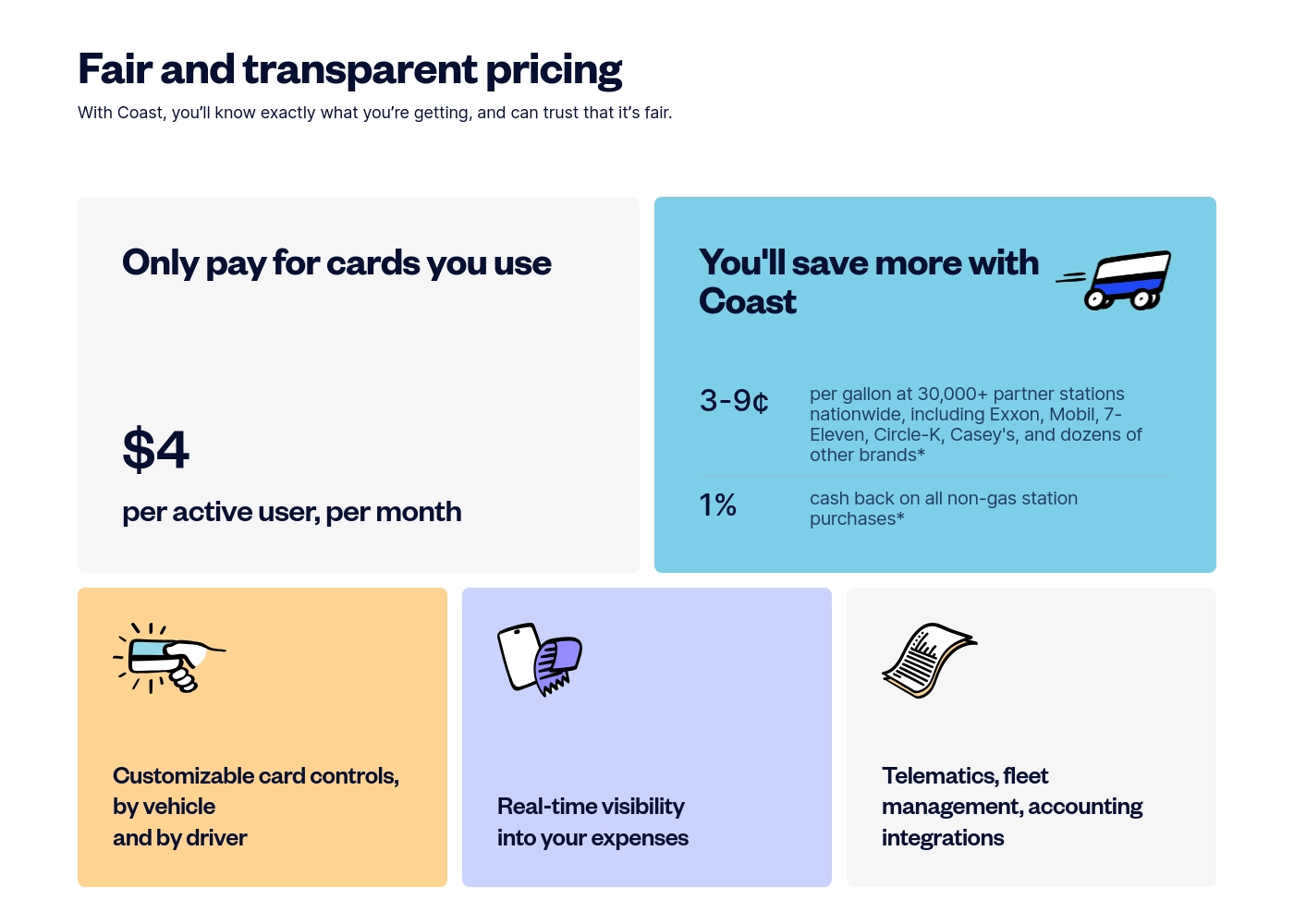
Coast costs $4 per active user per month with 1 plan: Coast Fleet & Fuel Card at $4 per active user per month.
Take a look at how our simple, usage-based model works for your team.
Coast Fleet & Fuel Card
Price: $4 per active user per month Best For: Growing fleets needing fuel and expense management Other Features: 3–9¢ fuel rebates per gallon, 1% cashback on non-gas purchases, customizable card controls, Visa acceptance everywhere, real-time expense visibility
- 3–9¢ per gallon rebates at 30,000+ partners
- 1% cash back on all non-gas station purchases
- Customizable card controls by vehicle and driver
- Real-time visibility into expenses
- Accounting and telematics integrations
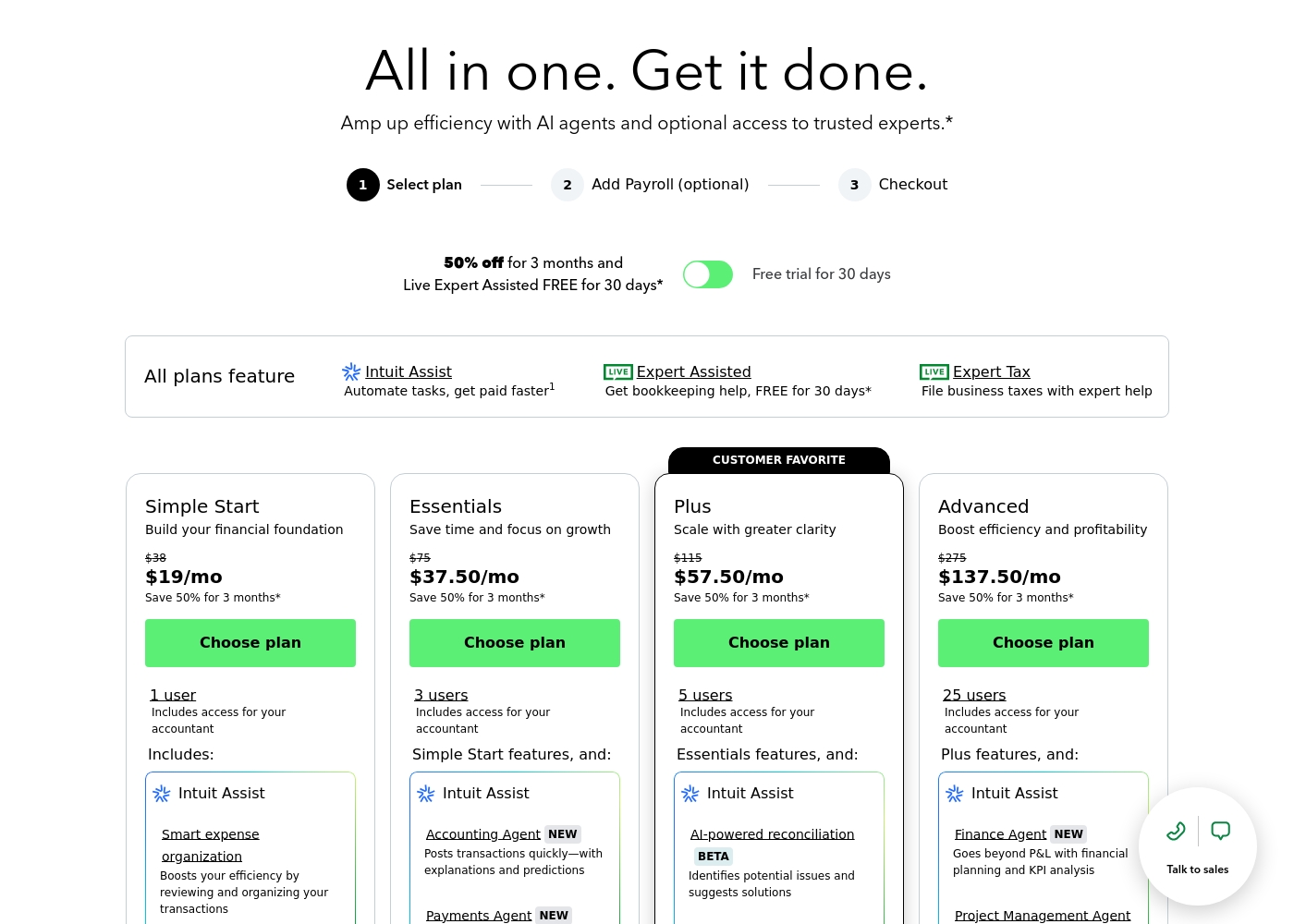
QuickBooks costs between $38 and $275 per month with 4 plans: Simple Start at $38, Essentials at $75, Plus at $115, and Advanced at $275.
Here’s a closer look at what features and capacity are included with each plan.
Simple Start
Price: $38/month (or $19/month for 3 months) Best For: Building your financial foundation Other Features:
- 1 user access
- Includes access for your accountant
- Intuit Assist
- Smart expense organization
- 1 user access
- Includes access for your accountant
- Intuit Assist
- Smart expense organization
- 3 users access
- Simple Start features included
- Accounting Agent NEW
- Payments Agent NEW
- 5 users access
- Essentials features included
- AI-powered reconciliation (BETA)
- 25 users access
- Plus features included
- Finance Agent NEW (Financial planning and KPI analysis)
- Project Management Agent
Pricing Notes
- Coast charges only for users who make at least one transaction per month.
- QuickBooks offers a 30-day free trial that doesn't auto-renew.
- QuickBooks frequently runs promotions like 50% off for the first 3 months.
- Coast has a 2.5% fee on foreign transactions; QuickBooks has overage fees for ACH.
- Both have no hidden setup fees, but QuickBooks may have add-on costs for payroll or payments.
Pricing Head-to-Head
User Reviews
We couldn't access detailed reviews from Capterra due to a security block. From Trustpilot, users praise Coast's easy setup and the real-time visibility it provides over fleet spending.
Many highlight the fuel rebates and the simplicity of having one card for all expenses. However, some note that customer support can be slow to resolve issues and that the $4 per user monthly fee adds up for larger teams.
Signing up was incredibly fast. The card gives me real-time notifications for every purchase, which is perfect for managing my crew's spending. The fuel rebates are a nice bonus that adds up.
User sentiment collected primarily from Trustpilot is overwhelmingly negative, frequently contrasting with the platform’s marketing promises of accuracy and seamless growth. While QuickBooks offers feature depth and personalized experiences, the recurring themes of frustration are significant among users.
Customers consistently report atrocious and unhelpful customer service, often involving extremely long holding times, multiple transfers, and conflicting information without resolution. Reliability is a major concern; users describe the software as unstable, prone to costly accounting errors, and sometimes necessitating external accountant intervention.
I spent almost three months migrating from the Desktop to the Online version. The transition was supposed to be easy, but I had constant issues. Customer support was unknowledgeable and unable to assist me thoroughly.
Our Verdict
This isn't a fair fight. Coast and QuickBooks solve completely different problems for different people. Coast's superpower is fleet control. It gives you a smart card that stops fraud at the pump. You save on fuel and kill manual expense reports. QuickBooks' superpower is financial management. It tracks every dollar in and out. It handles invoicing, payroll, and helps you file taxes. The deciding factor is your primary pain point. If unauthorized fuel purchases keep you up at night, choose Coast. If balancing your books does, choose QuickBooks. For a landscaping crew, the answer is Coast. For the accountant managing that crew's payroll and profits, the answer is QuickBooks. Many businesses will eventually need both.
Frequently Asked Questions
Which is better for small teams: Coast or QuickBooks?
It depends on your need. Coast is better for small fleets needing to control fuel and field spending. QuickBooks is better for small businesses needing basic accounting and invoicing tools.
Can I use Coast for all my business expenses, or just fuel?
You can use the Coast card for all Visa purchases. It works for fuel, vehicle maintenance, job supplies, and office expenses. You set custom controls for what's allowed.
Does QuickBooks have fleet-specific features like Coast?
No. QuickBooks is accounting software. It tracks expenses you enter but doesn't control point-of-sale transactions or integrate with telematics to block fuel fraud.
Is Coast worth the $4 per user fee compared to free options?
For fleets, yes. The fee includes the card, the platform, real-time controls, and fuel rebates. The savings from prevented fraud and admin time often outweigh the cost.
Why do QuickBooks users complain about customer support?
Many users report long hold times, unhelpful agents, and difficulty canceling subscriptions. This is a frequent theme in Trustpilot reviews.
Can Coast and QuickBooks work together?
Yes. Coast integrates with QuickBooks Online. Transactions and receipts sync automatically, so your accounting stays up-to-date without manual entry.
Ready to Choose?
Both tools have their strengths. Choose based on your specific needs.