Clover vs Square POS
Clover and Square POS are major POS systems, but they handle pricing very differently. Square POS is transparent and free for core software, avoiding monthly subscription fees. Clover requires contacting sales for custom pricing and relies on proprietary hardware. This comparison helps you decide which POS model suits your business needs better.
Best for: Businesses prioritizing a deeply integrated hardware/software solution backed by traditional merchant services, Established retail stores comfortable with negotiating long-term provider contracts
Best for: Solo entrepreneurs or new businesses seeking a zero-cost entry point, Quick-service restaurants needing specialized table management and fast order entry
Unreliable support and costly hidden fees.
We found that the extensive negative user feedback concerning billing integrity and unresponsive support casts serious doubt on Clover's operational credibility. The reported frequency of undisclosed fees and sudden fund freezing highlights significant financial risk for users. Overall, we advise caution due to recurring documented sales misrepresentation and critical customer service failures.
Pros
- Provides a comprehensive POS system combined with card reader technology.
- Used by established banks as a standard merchant service provider.
- The system has been in use by some customers for many years.
Cons
- Customer support is frequently described as unprofessional and extremely difficult to reach.
- Users report high incidences of unexpected fees and unauthorized charges.
- Sales representatives allegedly misrepresent rates and contract terms.
- There are reports of customer funds being frozen without communication or timely release.
Affordable Software, Reliable Payments, Easy Setup.
We recognize Square POS as an incredibly accessible platform that democratizes reliable payment acceptance for businesses of any size, offering a free core software solution. Overall, it delivers tremendous value for its $0 monthly fee, though users should carefully monitor the variable transaction processing rates.
Pros
- No monthly subscription fee or complex contracts required.
- Exceptional ease of use with a straightforward, beginner-friendly interface.
- Fast and reliable daily payment deposits into your bank account.
- Ability to accept all major payment methods, including contactless and invoicing.
Cons
- Standard transaction processing rates may be higher than some competitors pay.
- Customer support responsiveness can be inconsistent for complex billing or account issues.
- Setup, especially bank verification, may take several business days to complete.
- Less optimized for businesses that manage large or complicated inventory lists.
AboutClover
Clover provides essential tools for small businesses seeking better payment solutions. It integrates both a complete POS System and reliable Credit Card Reader technology. If you need a trustworthy platform to handle transactions and processing, Clover is ready to deliver. 💡
AboutSquare POS
Square Point of Sale is a central hub combining essential hardware and software. It enables businesses to streamline operations and accept almost any payment method. This system supports transactions, tracks inventory, and helps analyze sales data from one platform. Square is designed to scale easily, supporting businesses from a single location all the way up to specialized, complex operations. Setting up is easy, and you can be ready to sell in just a few minutes. ✅
Highlights
Feature Comparison
Features Overview
We highlight the main differences and pick a winner for each feature.
Pricing Transparency
Square POS offers $0 monthly software costs and clear processing fees. Clover requires a custom quote and hides potentially complex hardware costs.
Clover requires users to contact a sales team for individualized hardware and software cost quotes. Financial complaints against Clover are extensive, citing unexpected fees and complex contract terms. Square POS software is fully free, relying only on published, usage-based processing fees like 2.6% + 15¢. There are no setup fees, lock-ins, or mandatory monthly subscriptions with Square POS core software. Square POS operates on a clear, pay-as-you-go model for low financial risk. Clover operates using opaque, customized subscriptions often including expensive proprietary equipment. Square POS allows seamless growth without contractual penalty. Clover forces complex negotiations just to obtain basic service pricing information.
Hardware Flexibility
Clover mandates its proprietary hardware for use. Square POS is flexible, running well on existing smartphones and tablets.
Clover markets an integrated solution combining its required POS systems and proprietary Card Reader technology. You will likely need to purchase or lease Clover's expensive proprietary equipment. Square POS works easily with your existing smartphone or tablet devices to run the application. Square POS even offers a free magstripe reader to start accepting payments immediately. Square POS prioritizes compatibility and flexibility on common devices, saving significant upfront expenditure. Clover forces equipment purchase, removing hardware choice for users. The clear difference is cost savings and accessibility. Square POS allows immediate, low-barrier entry using existing gear.
Ease of Use
Square POS is highly praised as intuitive and setup is instant. Clover requires substantial sales interaction and setup time.
Square POS setup is very fast; businesses can often start accepting payments in just a few minutes. New users find the entire interface straightforward and easy to navigate. Staff members require minimal training time due to Square POS's intuitive design and layout. The system works well for busy, fast-paced environments. Clover setup requires engaging with a sales team to acquire a custom quote and equipment delivery. This typically means a much longer onboarding process. Square POS is self-service and instant, making it ideal for new or quickly scaling businesses. Clover is sales-driven and process-heavy by comparison.
Customer Support
Clover receives overwhelming complaints about non-responsive support. Square POS generally offers reliable live phone support and dispute resolution.
Clover users report "atrocious customer service" and chronic issues trying to resolve basic billing disputes or complex complaints. Support often transfers users repeatedly without resolution. Square POS users generally report positive customer support experiences and outstanding service when assistance is needed. Live phone support is included even with the free core software. Square POS users can trust complex issues will be handled effectively and quickly. Clover users report extreme difficulty engaging with customer service. For critical POS operations, reliable support is essential. Square POS provides this reliability; Clover users report major operational friction.
Deposit & Financial Reliability
Square POS guarantees fast, reliable fund transfers. Clover users report serious financial risks including frozen high-value transactions.
Funds processed through Square POS are transferred to an external account free of charge as early as the next business day. Instant transfers are also available for a fee. Square POS has an essential offline payments feature, enabling continuous sales even without an internet connection for up to 24 hours. Clover documentation lacks clarity on standard deposit speed or offline capabilities for merchants. Users cite major financial risks with Clover. Clover reviews specifically mention freezing significant transaction funds, like $63,000, without timely release or communication. Square POS ensures reliable, fast cash flow.
While specific details are unavailable here, Clover operates as a comprehensive POS and payment processing provider. This means your required pricing components will likely include hardware costs, ongoing transaction fees, and subscription fees for software access.
This tier’s details are unclear, but typically a base plan suits small businesses needing core payment processing and basic inventory management functions. It's a great starting point for new operations or those looking to modernize their existing system.
Without explicit information, we can only infer that a higher tier would offer expanded features like advanced customer loyalty programs or detailed employee management tools. Businesses with high transaction volumes or multiple locations often find these robust packages essential.

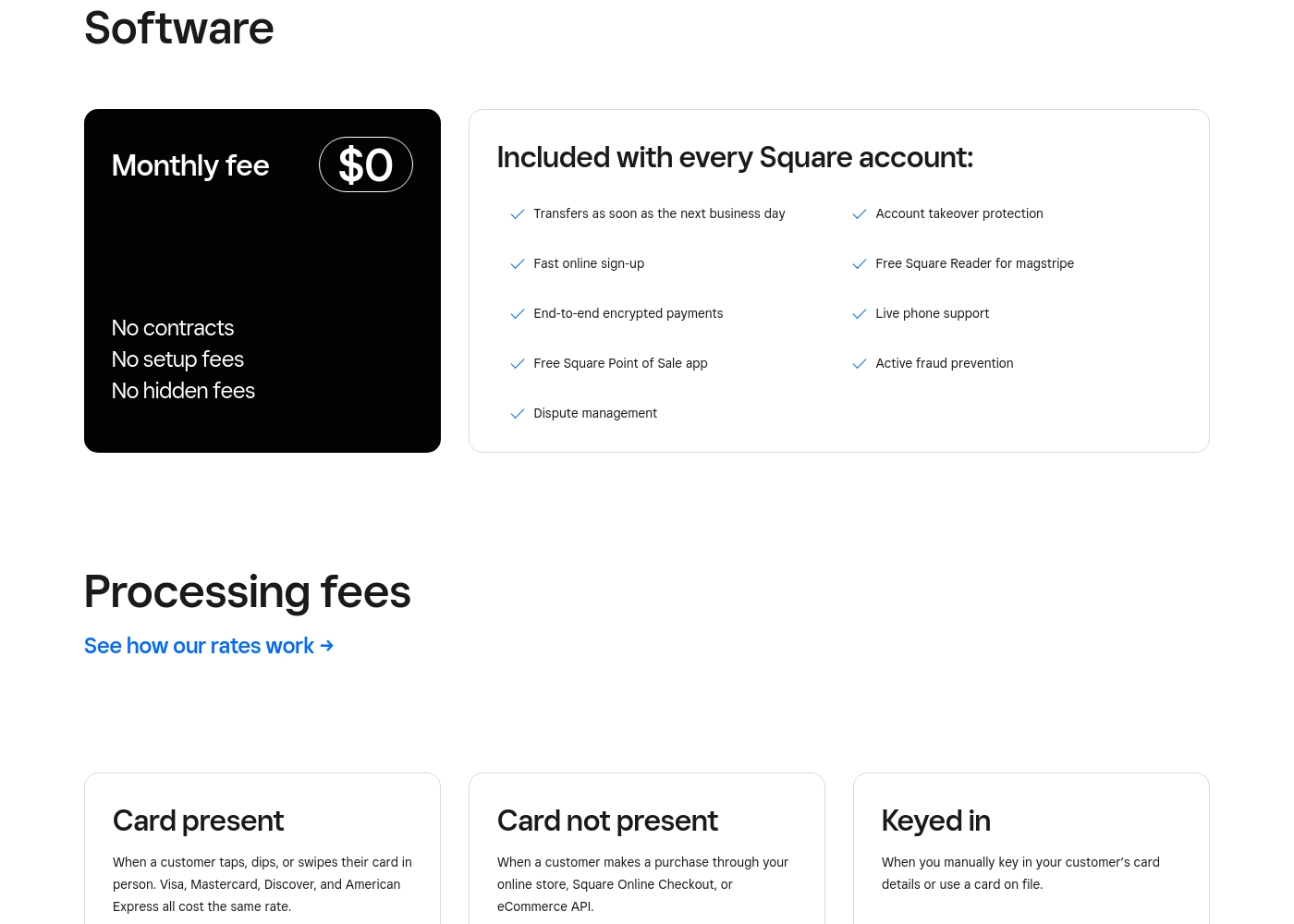
Square POS costs $0 per month with 1 core plan: Square Point of Sale Software at $0/month, plus variable processing fees.
Square offers simple and transparent pricing. The software is free to get started, and you only pay a fee when you actually take a payment. There are no contracts, setup fees, or hidden charges involved with the basic software.
Square Point of Sale Software (Base)
Price: $0/month Best For: All businesses at any stage or size Other Features:
- Transfers available as early as the next business day
- Free Square Reader for magstripe
- End-to-end encrypted payments
- Live phone support and dispute management
- Free Square Point of Sale app
- No contracts or setup fees
- Transfers as soon as the next business day
- Free Square Reader for magstripe (one per account)
- End-to-end encrypted payments and active fraud prevention
- Live phone support and dispute management
- Custom pricing for processing fees
- Available for businesses processing $250K+ in credit card sales annually
Pricing Notes
- Square POS offers a zero-cost entry point with its free core software and only charges usage-based transaction fees.
- Clover requires contacting sales for pricing, which typically includes expensive proprietary hardware costs and subscription fees.
- Square POS has fully transparent processing rates, such as 2.6% + 15¢ for card-present transactions.
- Clover users frequently complain about hidden fees and unexpected charges, undermining pricing transparency.
- Square POS offers custom, reduced processing rates for high-volume merchants processing over $250,000 annually.
Pricing Head-to-Head
User Reviews
The external sentiment for Clover is decisively negative, particularly apparent in the high volume of concerns raised on Trustpilot. The most recurring complaint centers on atrocious customer service.
Users report spending hours attempting to resolve basic issues, often being transferred repeatedly or failing to reach helpful representatives. Financially, many users feel deceived.
I spent over six hours dealing with support trying to stop invalid billing charges. They kept bouncing me between tech support and their 3rd party merchant service provider. This is the worst customer support I have ever experienced.
Square maintains a generally positive reputation among users, holding a solid 4.2-star rating on Trustpilot based on thousands of reviews. Reviewers consistently praise the platform's exceptional ease of use and overall simplicity, especially for small businesses and service providers.
Users find the software "beginner-friendly" and effective for managing sales, invoicing, and keeping track of income. Many appreciate the flexibility to accept nearly all payment methods and commend the speed and reliability of payment transfers and deposits.
Running my fitness studio is challenging enough, but Square makes handling payments seamless. I can accept payments whether a client is in here training or signing up later online. The money lands quickly and reliably in my account.
Our Verdict
If you need a reliable POS, the choice between Clover and Square POS is extremely clear based on user experiences. Square POS is the hands-down winner for almost all small businesses today. It offers exceptional transparency, reliable support, and a zero-cost path to start selling immediately. Clover's customized pricing and high rate of billing complaints make it a significant risk. Square POS shines with its flexible, free core software platform. You pay only transparent processing fees, like the 2.6% + 15¢ per transaction. Square POS is praised for its ease of use, letting you get set up and selling in minutes. It also includes integrated features like advanced inventory and specialized industry modes for free. Clover's value centers on providing a proprietary, integrated hardware bundle tied to traditional merchant services. However, this comes with serious reported issues. These issues include freezing user funds and non-responsive customer support as user reviews confirm. Choosing Clover means locking into a complex, custom-quoted contract with high risk of hidden costs. The deciding factor is risk and flexibility for your operations. Does your business want transparent, pay-as-you-go processing with Square POS? Or do you trust a custom quote and proprietary gear from Clover, despite overwhelming negative reports? The clear lack of financial risk with Square POS makes it the most secure choice. Choose Square POS if you seek immediate setup and flexible contracts for retail or service businesses. Only consider Clover if you absolutely need their proprietary terminal system and are willing to risk serious contractual and billing headaches.
Frequently Asked Questions
Which has better upfront costs: Clover or Square POS?
Square POS offers a zero-cost entry point with free core software. Clover requires contacting sales for a custom quote, often including considerable upfront costs. Square POS eliminates software monthly fees entirely.
Does Clover or Square POS offer better transparency regarding fees?
Square POS excels in transparency with clearly published processing rates. Clover users frequently report hidden fees and unexpected charges after sales interactions. This lack of clear billing makes Clover a higher risk.
Can I use my existing tablet with Clover or Square POS?
You can easily use your existing tablet or smartphone device with Square POS. Clover strictly requires the purchase or lease of its own proprietary POS terminals and card reader hardware.
Which POS system is better for handling fast-paced retail or food service operations?
Square POS is superior here, offering specialized operating modes like Retail or Food & Beverage. These modes include specific tools like quick order entry or advanced inventory control, which Clover does not detail.
Are there long-term contracts required for Clover or Square POS?
Square POS confirms they have no lock-in contracts; you can cancel or change plans anytime. The Clover model often involves complex, long-term contracts that are reportedly very difficult to terminate.
Why are the user reviews for Clover so much lower than Square POS?
Square POS receives high praise for ease of use and reliability (4.4 stars). Clover suffers from extremely negative feedback (1.5 stars) due to complaints about frozen funds and unprofessional customer support.
Ready to Choose?
Both tools have their strengths. Choose based on your specific needs.