ClickUp vs Wrike
ClickUp and Wrike are heavyweight project management platforms serving different needs. ClickUp is the highly flexible, features-first, all-in-one workspace. Wrike focuses on enterprise stability, robust security, and deep structural workflows. Your choice depends on prioritizing cost, reliability, and team size.
Best for: Teams seeking to consolidate 50+ applications into a single, flexible workspace., Startups or small teams valuing maximum features at the lowest cost.
Best for: Large enterprise organizations requiring complex compliance features (SSO/Audit)., Cross-functional teams scaling between 20 and 20,000 users.
Feature-rich, but expect complex setup.
We recognize ClickUp’s ambitious goal to be an all-in-one workspace, offering impressive versatility and an extensive feature set that streamlines project management. While this comprehensive nature is powerful, we found numerous external reports regarding recurring system bugs, slow performance, and extremely poor customer service experiences. Overall, we see that ClickUp is highly flexible for complex business workflows, but teams must be ready for a steep learning curve and potential challenges with reliability and support responsiveness.
Pros
- Extremely flexible platform offering over 15 customizable views (Gantt, List, Board).
- Consolidates over 50 applications into a single, centralized workspace.
- Effective replacement for specialized tools like Jira and Notion.
- Strong Free Forever plan is generous for individual users and small projects.
Cons
- Frequent reports of bugs, unreliable performance, and a slow user interface.
- Customer support is widely criticized for being inaccessible and ineffective.
- The massive feature set makes the learning curve surprisingly steep.
- Billing practices lack clarity regarding user seats and unexpected automatic charges.
Enterprise Power Meets Complex Commitment.
We find Wrike is an exceptionally versatile project solution, noted for scaling efficiently across corporate environments up to 3000 users and unifying communication across highly complex workflows. Overall, the software offers a powerful feature set for advanced visibility and customization, but we caution users regarding the rigid annual subscriptions and documented difficulties with managing auto-renewal and pricing increases.
Pros
- Transforms and streamlines complex corporate workflows efficiently.
- Highly customizable for various methodologies (e.g., Holacracy, OKR).
- Excellent collaborative transparency and 360° project visibility.
- Provides fast and helpful customer support regarding implementation and bugs.
Cons
- Pricing practices are reported as aggressive, often resulting in significant renewal increases.
- Subscriptions are difficult to cancel, and users report trouble stopping automatic renewal.
- Some teams report challenging adoption and setup processes.
- Users report instances of being oversold on features bundles they did not need.
AboutClickUp
ClickUp is reliably described as the essential all-in-one workspace for modern teams. It’s designed to align, collaborate, and boost productivity across your entire organization. This platform helps eliminate app sprawl by converging over 50+ different applications into one centralized hub. Teams managing operations, campaigns, or product development use ClickUp to get more done faster, together. ✅
AboutWrike
Wrike is a trusted end-to-end enterprise work management solution. It's designed for organizations ready to transform manual processes into interconnected, automated workflows. Teams from 20 to 20,000 thrive here because Wrike is highly adaptable to any industry or size. It brings multiple teams into the same place for game-changing visual collaboration. Wrike is where you can easily align strategy and effectively execute your projects and programs. 💡
Highlights
Feature Comparison
Features Overview
We highlight the main differences and pick a winner for each feature.
Pricing & Value
ClickUp is cheaper and offers far more flexible pricing options. Wrike forces mandatory annual commitments for all paid tiers.
ClickUp has a robust, permanent Free Forever plan with unlimited tasks. Paid plans start low at only $7 per user per month. ClickUp pricing offers flexible monthly billing and a 30-day money-back guarantee. Wrike's entry-level paid plan is $10 per user per month annually. All functional paid plans, Team and above, require an annual billing commitment. Wrike users report significant friction when trying to cancel contracts and auto-renewal. ClickUp delivers better short-term value and lowers financial risk for growing teams. Wrike is a substantial, unavoidable financial commitment initially. Teams should choose ClickUp if budget flexibility and a generous free plan are top priority.
Reliability & UI
Wrike provides greater stability for enterprises; ClickUp users report frequent bugs and slow performance.
ClickUp's massive feature set often results in a steep learning curve for new users. Reviewers frequently criticize the platform for being buggy and suffering slow UI performance. This instability can hinder maximum daily productivity. Wrike’s architecture prioritizes transforming and streamlining complex corporate workflows. The platform is notably stable, guaranteeing 99.9% uptime for all users. Wrike is focused on predictable, reliable operation. ClickUp sacrifices fluid performance for maximum feature depth and complexity. Wrike focuses on ensuring enterprise stability, which is highly valued by large organizations. If you manage critical operations, Wrike's reliable performance is a safer bet than ClickUp's feature-heavy system.
Scalability & Focus
Wrike is dedicated to large enterprise scale; ClickUp is best suited for mid-sized complexity.
ClickUp scales well for growing startups and mid-sized teams needing flexibility. Custom roles and Enterprise API access support large organizations efficiently. However, ClickUp focuses on consolidating 50+ apps into one hub. Wrike is optimized for global enterprises, scaling from 20 to 20,000+ users. It includes advanced features like customizable user types and Admin permissions. Wrike focuses on 360° visibility across complex departments. If your organization has hundreds or thousands of users, Wrike provides the necessary structure. ClickUp strives to be the "everything app," sometimes at the expense of rigid structure. Choose Wrike for high-stakes scaling across many business units with demanding security needs.
Advanced Workflow Proofing
Wrike's proofing is superior, supporting video and guest approvals. ClickUp offers basic visual asset proofing only.
ClickUp's built-in Proofing feature helps speed up standard feedback cycles on visual assets. It allows teams to manage rapid review cycles directly within the platform. This is sufficient for simple image or document review. Wrike's Business plan unlocks comprehensive proofing for 30+ file types, including video and HTML proofing. Crucially, Wrike supports guest approvals for external clients easily. This depth makes Wrike dramatically better for creative teams and agencies needing client sign-offs. ClickUp cannot match Wrike's sophisticated media handling. For professional services with external clients, Wrike’s dedicated proofing saves significant time and effort.
AI Capabilities
ClickUp AI focuses on content generation; Wrike AI focuses on predictive analytics and risk assessment.
ClickUp Brain integrates tools like AI Writer, AI Notetaker, and AI Q&A across the platform. Connected Brain provides enterprise search, pulling answers from integrated apps like Salesforce. This accelerates content creation and knowledge retrieval. Wrike leverages Generative AI and Wrike Copilot for strategic decision-making. The AI predicts risk and optimizes resource allocation using advanced analytics. This helps PMOs manage scope and prevent unforeseen costs proactively. ClickUp is better for teams seeking AI assistance with daily tactical tasks like documentation. Wrike is superior for leaders needing high-level strategic intelligence and risk prediction.
Custom Views
ClickUp offers 15+ ways to view work; Wrike provides standard, high-quality essential views.
ClickUp is unmatched in flexibility, offering over 15 unique, customizable views for work. Users can instantly switch between List, Board, Gantt, and specialized views. This guarantees every team can find a workflow style that works best. Wrike provides core views like Board, Table, Gantt charts, and Calendar functionality. These views offer necessary transparency and control for large project portfolios. They are robust but less numerous than ClickUp's offerings. If total visualization flexibility is your priority, ClickUp is the only choice here. Wrike serves essential project management views perfectly. Teams experimenting with different methodologies gain massive benefit from ClickUp’s viewing freedom.
Customer Support
Wrike support is often praised for being helpful; ClickUp support is widely criticized as inaccessible.
ClickUp reviews consistently report poor customer support experiences and long response times. Users note chats are often disconnected or agents are unable to solve complex issues. Ineffective support is a primary complaint about ClickUp. Wrike users frequently cite 'exemplar' support during implementation and fast bug fixes. Positive sentiment suggests Wrike ensures reliable client support and dedication. This support is critical for complex enterprise adoption. Support quality is a massive distinguishing factor when comparing these two complex platforms. Wrike provides reliable support, a necessity for a platform of this scale.
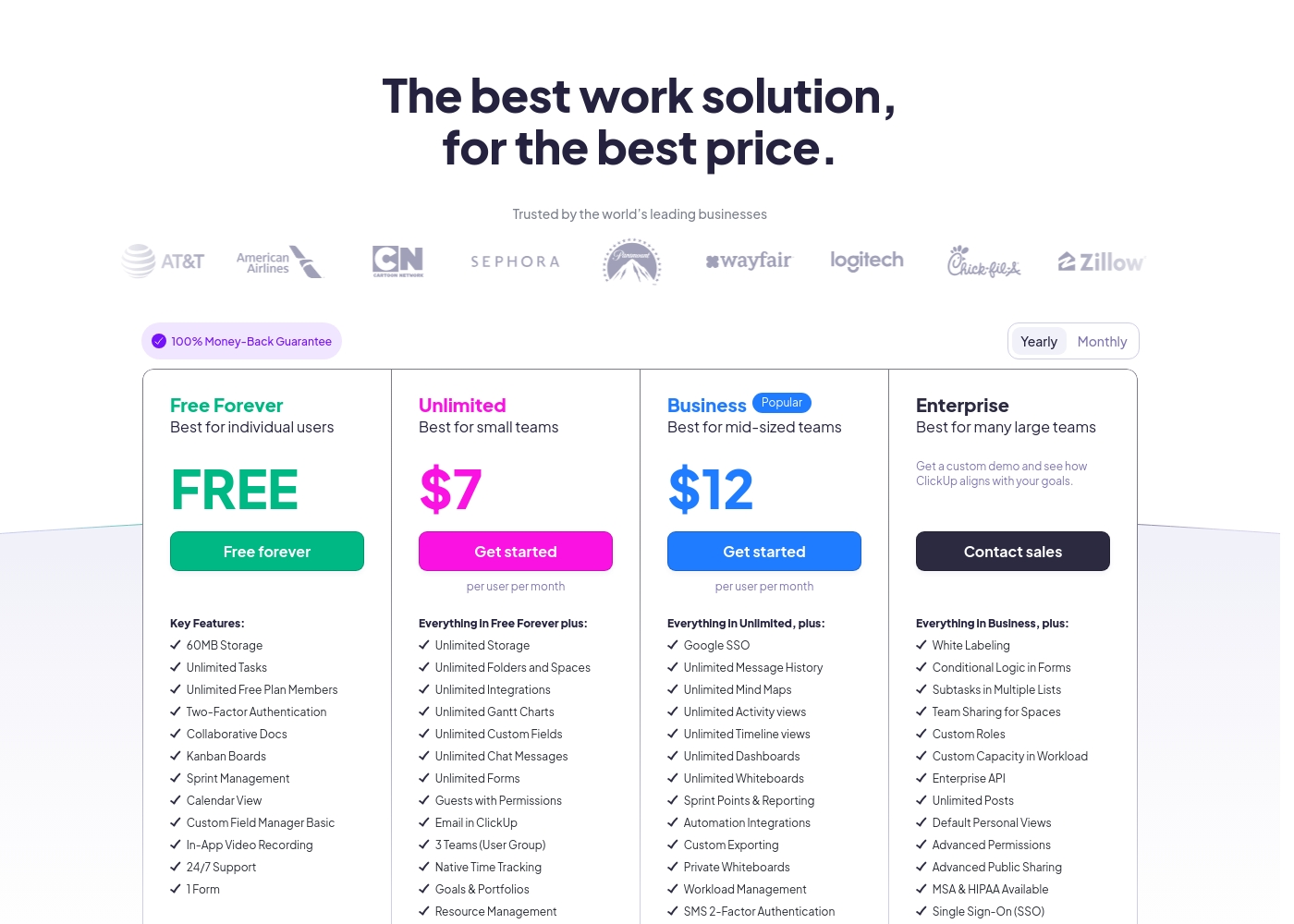
ClickUp costs between Free and $12 per user per month (billed annually) with four plans: Free Forever (Free), Unlimited ($7), Business ($12), and Enterprise (Custom).
Below, you'll find the specific details regarding what each plan includes.
Free Forever
Price: Free forever Best For: Individual users Refund Policy: Not applicable Other Features: 60MB Storage, Unlimited Tasks, Two-Factor Authentication, Collaborative Docs, Kanban Boards, 24/7 Support
- 60MB Storage
- Unlimited Tasks
- Unlimited Free Plan Members
- Two-Factor Authentication
- Collaborative Docs
- Unlimited Storage, Folders and Spaces
- Unlimited Integrations
- Unlimited Gantt Charts, Custom Fields, Chat Messages, and Forms
- Guests with Permissions
- Email in ClickUp
- Google SSO
- Unlimited Message History, Mind Maps, Activity views, Timeline views, Dashboards, and Whiteboards
- Sprint Points & Reporting
- Automation Integrations
- Custom Exporting
- White Labeling
- Conditional Logic in Forms
- Subtasks in Multiple Lists
- Custom Roles
- Enterprise API
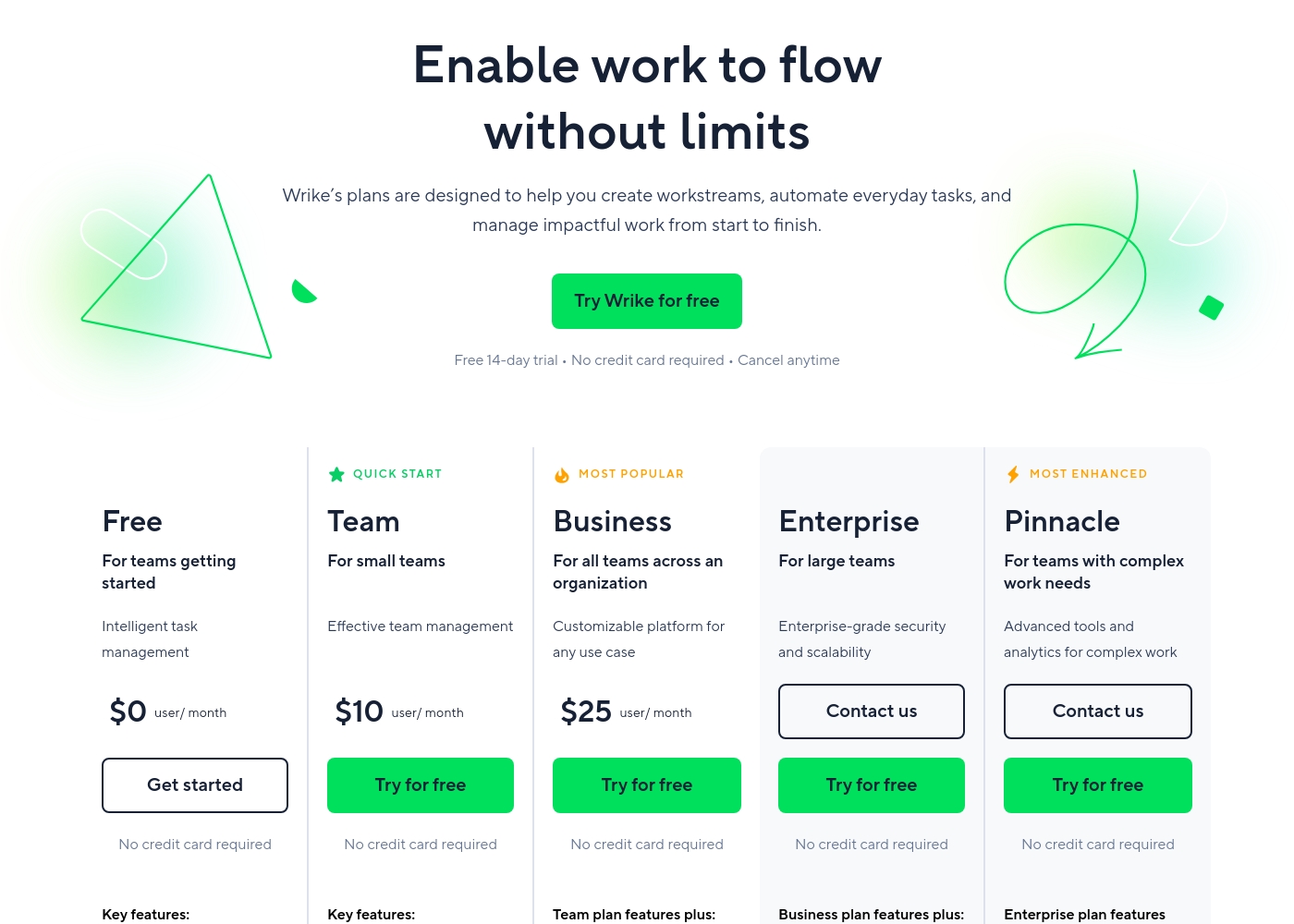
Wrike costs between $0 and $25 per user/month, with five plans: Free at $0/user/month, Team at $10/user/month, Business at $25/user/month, and Enterprise and Pinnacle which require users to contact sales.
- Web, desktop, and mobile apps
- Project and task management
- Board view (Kanban)
- Table view (spreadsheet format)
- Folders structure & nested projects
- Unlimited projects, tasks, & subtasks
- Gantt charts, Calendar & Chart view
- Generative AI, 2 GB storage per user
- Project Blueprints and Unlimited request forms
- Approvals & guest approvals
- Resource & Capacity Planning
- File and video proofing (30+ file formats)
- Real-time reports
- SAML-based SSO and Two-Factor Authentication (2FA)
- Password policies and custom access roles
- Customizable user types and Admin permissions
- User audit reports
Pricing Notes
- ClickUp offers a permanent Free Forever plan with unlimited tasks, unlike Wrike's Free plan limitations.
- ClickUp provides far more pricing flexibility, allowing monthly billing and a 30-day money-back guarantee.
- Wrike's paid plans (Team and above) require mandatory annual prepayment, which limits financial flexibility.
- Wrike's lowest paid tier is $10/user/month, while ClickUp's lowest paid tier is $7/user/month.
- Wrike users report difficulties with cancellations and price increases upon renewal, requiring caution.
Pricing Head-to-Head
User Reviews
ClickUp receives highly polarized feedback, reflected in its low 2.3 Trustpilot score. Users frequently praise the platform’s versatility and comprehensive nature, noting it successfully replaces disconnected tools like Jira, Slack, and spreadsheets.
Teams find it effective for centralized task management, project planning, and acting as a central knowledge base. However, reliability and customer service are major concerns across the user base.
Truly a game changer. I never went back to email, Slack, and spreadsheets after switching. ClickUp is a singular app for everything and helps us move fast daily.
Users consistently praise Wrike's powerful capabilities in transforming workflow management and driving organizational efficiency. Many reviewers, including team leads and large enterprise users, call it one of the best project management systems available, noting its strong suitability for high-level customization for specific methodologies like OKR.
Its ability to centralize communication, provide 360° visibility, and manage collaboration across large global teams is frequently highlighted as second to none. Furthermore, customer support is often described as exemplar, particularly regarding implementation and quick bug fixes.
Using Wrike for three years has completely changed how we manage our workflows. The biggest transformation is how streamlined and fast our operations have become. It's truly efficient for our large team.
Our Verdict
ClickUp and Wrike are two heavyweight project management contenders, but they serve different masters. Wrike is the victor for large companies demanding stability and structure. ClickUp dominates on sheer flexibility and incredible feature-to-cost value. The choice boils down to your team size and reliability requirements. ClickUp's superpower is being the “everything app for work.” It offers over 15 custom views and replaces dozens of disparate applications. If you love boundless features and customization, ClickUp provides the ultimate playground. ClickUp is also significantly cheaper with a fantastic, permanent Free Forever plan. Wrike’s distinct advantage is enterprise-grade structure and guaranteed reliability. Wrike is designed to scale effortlessly from 20 to 20,000 users across complex departments. Its superior customer support and dedicated advanced proofing tools make Wrike better for deep operational workflows. The final decision comes down to risk tolerance and financial commitment. You must choose Wrike if 360° visibility and predictable, guaranteed performance are essential. However, Wrike is costly and requires mandatory annual contracts that are notoriously hard to exit. Choose ClickUp if flexibility, a low entry price, and diverse features outweigh the risk of occasional bugs and poor support. ClickUp is ideal for scaling startups and feature-hungry teams. Bottom Line: ClickUp wins for small to mid-sized teams craving flexibility and value. Wrike is unequivocally better suited for complex, large organizations that need rigid structure, advanced proofing, and proven stability.
Frequently Asked Questions
Which is more affordable: ClickUp or Wrike?
ClickUp is more affordable and offers greater value overall. ClickUp’s paid plans start at $7/user/month billed annually. Wrike’s paid plans start higher at $10/user/month.
Which tool is better for enterprise scalability?
Wrike is better for high scalability in large organizations. Wrike is geared toward managing complex teams from 20 to 20,000+ users. ClickUp is better suited for small to mid-sized scaling teams.
Does ClickUp or Wrike offer better advanced media proofing?
Wrike offers significantly superior advanced media proofing capabilities. Wrike supports video, HTML, and 30+ file formats for simplified review cycles. ClickUp offers competent visual proofing but lacks Wrike's depth.
Are mandatory annual contracts required for Wrike paid plans?
Yes, Wrike requires a mandatory annual contract commitment for all paid plans. ClickUp provides monthly billing options for much greater financial flexibility.
Which platform has better customer support according to users?
Wrike has significantly better reported customer support quality. ClickUp users frequently report support is inaccessible, slow, or ineffective in resolving problems.
How flexible are the task views in ClickUp compared to Wrike?
ClickUp is much more flexible, offering over 15 different customizable project views. Wrike provides the essential views like Gantt, Board, and Calendar effectively for corporate standards.
Ready to Choose?
Both tools have their strengths. Choose based on your specific needs.