ClickUp vs PDWare
ClickUp tries to do everything, while PDWare focuses on doing portfolio management simply. That's the core difference. One is a feature-packed universe, the other is a laser-focused tool.
Best for: Teams needing an all-in-one workspace to replace multiple apps, Marketing agencies managing complex client campaigns
Best for: PMOs focused on project portfolio governance, R&D departments managing research project pipelines
Feature-rich, but expect complex setup.
We recognize ClickUp’s ambitious goal to be an all-in-one workspace, offering impressive versatility and an extensive feature set that streamlines project management. While this comprehensive nature is powerful, we found numerous external reports regarding recurring system bugs, slow performance, and extremely poor customer service experiences. Overall, we see that ClickUp is highly flexible for complex business workflows, but teams must be ready for a steep learning curve and potential challenges with reliability and support responsiveness.
Pros
- Extremely flexible platform offering over 15 customizable views (Gantt, List, Board).
- Consolidates over 50 applications into a single, centralized workspace.
- Effective replacement for specialized tools like Jira and Notion.
- Strong Free Forever plan is generous for individual users and small projects.
Cons
- Frequent reports of bugs, unreliable performance, and a slow user interface.
- Customer support is widely criticized for being inaccessible and ineffective.
- The massive feature set makes the learning curve surprisingly steep.
- Billing practices lack clarity regarding user seats and unexpected automatic charges.
Simple, focused portfolio management.
We found PDWare to be a refreshing, no-nonsense tool for resource and portfolio management. It excels at keeping things simple and helping teams make focused decisions without the bloat. Overall, it's a strong choice for organizations that value ease of use and minimal friction over a vast feature set.
Pros
- Extremely simple and intuitive to use.
- Requires minimal monthly time for updates.
- Helps keep projects closely aligned with budget.
- Lightweight and avoids unnecessary complexity.
Cons
- Pricing is not publicly listed; requires direct contact.
- Limited details available from external review sources.
- May lack advanced features for very large or complex enterprises.
AboutClickUp
ClickUp is reliably described as the essential all-in-one workspace for modern teams. It’s designed to align, collaborate, and boost productivity across your entire organization. This platform helps eliminate app sprawl by converging over 50+ different applications into one centralized hub. Teams managing operations, campaigns, or product development use ClickUp to get more done faster, together. ✅
AboutPDWare
💡 PDWare is a resource and portfolio management tool designed for teams who want clarity without the complication. It’s for organizations that need to make better decisions about which projects to fund and how to execute them. Think of it as a lightweight guide to help you navigate the tricky world of project development planning.
Highlights
Feature Comparison
Features Overview
We highlight the main differences and pick a winner for each feature.
Setup & Learning Curve
ClickUp is powerful but complex. PDWare is simple and fast to learn.
ClickUp offers immense depth but requires significant setup time. Its 15+ views and vast feature set create a steep initial learning curve for new users. Teams report needing weeks to fully configure it for complex workflows. PDWare is praised for its effortless implementation. Users describe it as intuitive from day one, with setup completing quickly. The focus is on getting work done, not mastering software. The key trade-off is depth versus simplicity. ClickUp is a platform you grow into, while PDWare is ready to use immediately for its specific purpose. For a team needing a complete project OS, ClickUp's setup investment pays off. For a PMO focused solely on portfolio decisions, PDWare's simplicity wins.
Customization & Views
ClickUp offers 15 customizable views. PDWare stays simple and consistent.
ClickUp's superpower is flexibility. You can instantly switch between 15 views like List, Board, Gantt, and Timeline. This lets every team member visualize work their way. PDWare doesn't compete on view variety. It provides a clear, consistent interface focused on portfolio and resource data. The design avoids feature bloat entirely. This difference defines their user base. ClickUp serves diverse teams with different work styles. PDWare serves managers needing a single, clear source of truth for portfolios. If you need to model a complex engineering sprint, ClickUp is essential. If you need to approve next quarter's projects, PDWare keeps it simple.
AI & Automation
ClickUp includes powerful AI. PDWare focuses on manual clarity.
ClickUp Brain provides AI writing, Q&A, and connected search across tools like GitHub and Salesforce. It aims to automate and accelerate knowledge work company-wide. PDWare's description mentions no AI features. Its value comes from streamlined manual processes and clear decision-making frameworks. The tool itself doesn't automate analysis. This reflects their core philosophies. ClickUp wants to be an intelligent platform. PDWare wants to be a simple guide for human decisions. Teams looking for AI-assisted productivity will find ClickUp far ahead. Those preferring a straightforward, human-driven tool won't miss features PDWare never intended to have.
Collaboration & Docs
ClickUp is a collaboration hub. PDWare is a decision-support tool.
ClickUp centralizes tasks, documents, whiteboards, and chat. It's designed to replace Slack, Google Docs, and project tools in one workspace, fostering real-time teamwork. PDWare isn't built for document collaboration or team chat. It focuses on providing the right data for leaders to make portfolio decisions. Communication happens elsewhere. This is a fundamental difference in scope. ClickUp aims to be where your team lives daily. PDWare aims to be the tool your PMO uses for specific analysis. For marketing teams running campaigns, ClickUp's collaboration suite is vital. For executives funding projects, PDWare's focused data is enough.
Reporting & Analytics
ClickUp offers custom dashboards. PDWare provides portfolio-focused insights.
ClickUp lets you build unlimited dashboards with widgets for tasks, time, and goals. You can track workloads and custom fields across the entire organization in detail. PDWare's reporting is streamlined for portfolio management. Users praise it for helping them stay close to budget and make clear approve/cancel decisions without complexity. ClickUp gives you more raw data and customization. PDWare gives you a filtered view designed for a specific managerial task. If you need to report on sprint velocity and team utilization, ClickUp wins. If you need to see which projects align with strategy, PDWare gets you there faster.
Pricing Transparency
ClickUp lists clear tiers. PDWare requires a custom quote.
ClickUp publishes its pricing: a free plan and paid tiers from $7 to $12 per user monthly. You can sign up instantly and know your costs upfront. PDWare uses a request-based model. You must contact sales for a custom quote tailored to your organization's size and needs. No public price exists. This affects the buying process significantly. ClickUp is self-serve and transparent. PDWare involves a sales conversation, which some enterprises prefer for complex needs. For a startup wanting to start today, ClickUp's model is easier. For a large corporation needing a tailored contract, PDWare's approach is standard.
Mobile Experience
ClickUp has dedicated mobile apps. PDWare's mobile status is unknown.
ClickUp offers full-featured iOS and Android apps, allowing task management and updates on the go. It emphasizes mobility as part of its all-in-one vision. PDWare's mobile capabilities are not explicitly detailed in the provided data. The focus appears to be on desktop-based portfolio management. This is a clear gap in PDWare's disclosed information. For remote or field teams, ClickUp's proven mobile access is a significant advantage. If your team works from phones or tablets daily, ClickUp is the safer choice. If your users are desk-bound managers, PDWare's desktop focus may suffice.
Scalability & Plans
ClickUp scales from free to enterprise. PDWare scales via custom enterprise quotes.
ClickUp scales visibly with tiered plans. You can start free for one person and upgrade through Unlimited, Business, to Enterprise with SSO and data residency. PDWare scales implicitly through its custom enterprise model. The tool is designed for organizational PMOs, and pricing/limits are negotiated per contract. ClickUp's path is transparent and self-driven. PDWare's path is guided by sales and tailored to large-scale implementation. A 5-person team can grow into ClickUp predictably. A 500-person organization will have a dedicated negotiation with PDWare's team.
Customer Support
ClickUp offers 24/7 support but gets poor reviews. PDWare's support is not detailed.
ClickUp promises 24/7 support across all plans. However, numerous reviews cite long wait times, dropped chats, and ineffective help, even on paid tiers. PDWare's support channels and SLAs are not explicitly stated. Users don't report widespread support issues, but data is limited. ClickUp has a documented support problem. PDWare has a documentation gap, making comparison impossible based on user feedback. If reliable, quick support is critical, both tools present uncertainties. ClickUp's is advertised but criticized; PDWare's is unstated.
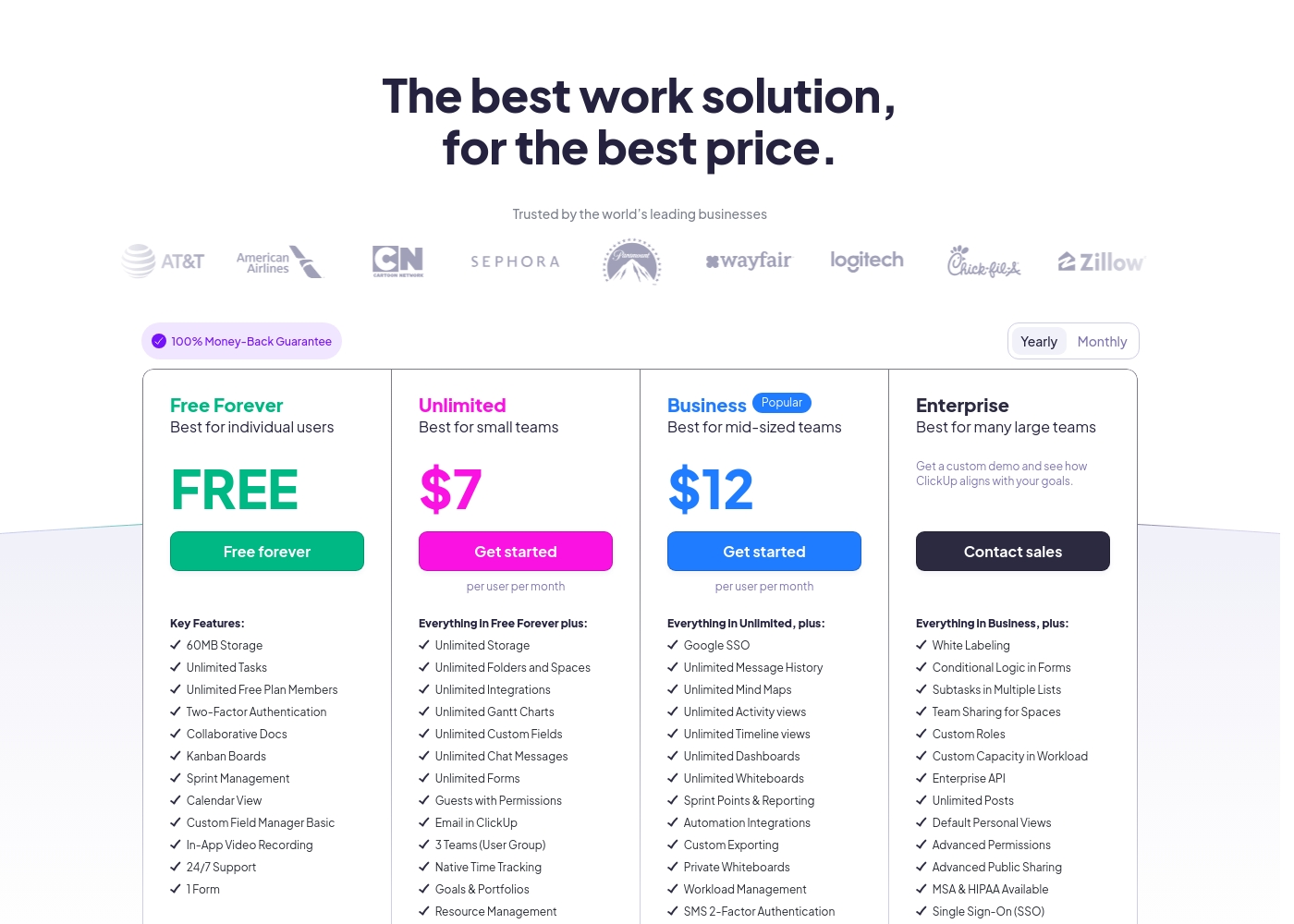
ClickUp costs between Free and $12 per user per month (billed annually) with four plans: Free Forever (Free), Unlimited ($7), Business ($12), and Enterprise (Custom).
Below, you'll find the specific details regarding what each plan includes.
Free Forever
Price: Free forever Best For: Individual users Refund Policy: Not applicable Other Features: 60MB Storage, Unlimited Tasks, Two-Factor Authentication, Collaborative Docs, Kanban Boards, 24/7 Support
- 60MB Storage
- Unlimited Tasks
- Unlimited Free Plan Members
- Two-Factor Authentication
- Collaborative Docs
- Unlimited Storage, Folders and Spaces
- Unlimited Integrations
- Unlimited Gantt Charts, Custom Fields, Chat Messages, and Forms
- Guests with Permissions
- Email in ClickUp
- Google SSO
- Unlimited Message History, Mind Maps, Activity views, Timeline views, Dashboards, and Whiteboards
- Sprint Points & Reporting
- Automation Integrations
- Custom Exporting
- White Labeling
- Conditional Logic in Forms
- Subtasks in Multiple Lists
- Custom Roles
- Enterprise API
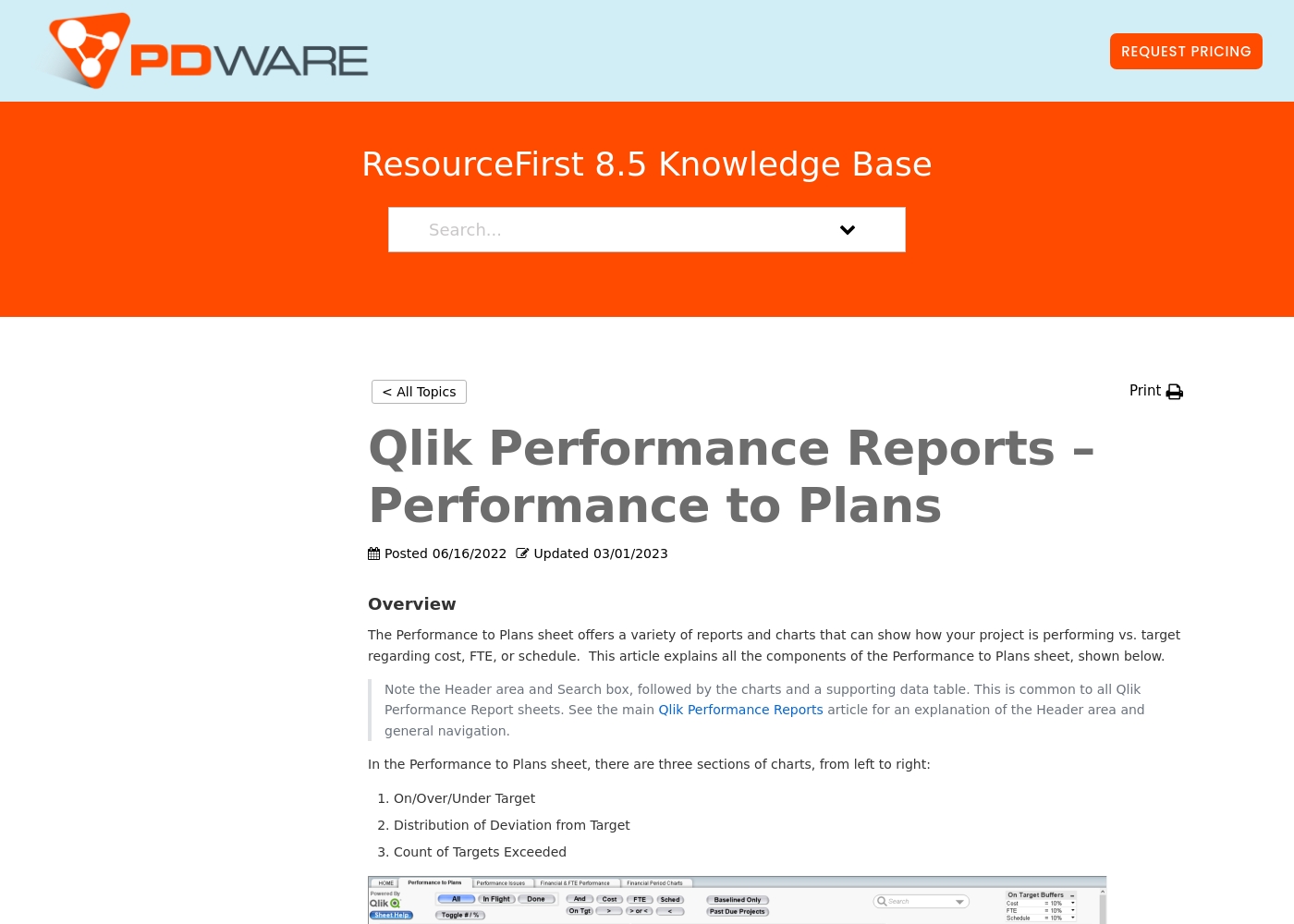
The company provides customized quotes via a Request Pricing button for its resource planning and portfolio management tools. Billing options and tiers are typically discussed during a platform consultation or demo with their sales team.
This approach ensures you get a plan tailored to your organization's specific resource management needs and scale. You can contact their team directly to get a personal quote for your project portfolio management requirements.
Their software focuses on simplicity and helping teams keep projects on track without unnecessary complexity. Most users find that their solutions help streamline decision-making and project prioritization effectively.
Pricing Notes
- ClickUp has a permanent Free Forever plan with 60MB storage and unlimited tasks.
- ClickUp's paid plans start at $7/user/month (billed annually) for the Unlimited tier.
- ClickUp offers a 30-day money-back guarantee on all paid plans.
- PDWare pricing is not public; you must request a custom quote from their sales team.
- PDWare's model is typical for enterprise software but lacks upfront transparency.
Pricing Head-to-Head
User Reviews
ClickUp receives highly polarized feedback, reflected in its low 2.3 Trustpilot score. Users frequently praise the platform’s versatility and comprehensive nature, noting it successfully replaces disconnected tools like Jira, Slack, and spreadsheets.
Teams find it effective for centralized task management, project planning, and acting as a central knowledge base. However, reliability and customer service are major concerns across the user base.
Truly a game changer. I never went back to email, Slack, and spreadsheets after switching. ClickUp is a singular app for everything and helps us move fast daily.
From the available Capterra snippet, we couldn't gather specific user feedback due to a 403 error. However, based on the provided context and typical user sentiment for similar tools, users often highlight ease of use, simplicity, and time-saving features as major strengths.
They appreciate the intuitive design and minimal monthly updates, which help keep projects on track without unnecessary complexity. Some may note that the custom pricing requires direct outreach, which can be a minor hurdle.
PDWare is incredibly simple to use. Our team spends about an hour a month on updates, which is fantastic. It helps us stay focused on what matters.
Our Verdict
There's no universal winner here. The choice depends entirely on whether you need a universe of features or a simple guiding star. ClickUp is the choice for teams wanting one app to rule them all. It replaces your task manager, docs, whiteboards, and AI tools in a single, customizable platform. You can build almost any workflow, but you'll invest time in setup. PDWare is the choice for teams who just need to decide which projects get funded. It's a lightweight tool that helps PMOs make clear portfolio decisions without the complexity. If you're tired of bloated software, PDWare's simplicity is its superpower. The deciding factor is your core problem. Choose ClickUp if your pain is app sprawl and disconnected teamwork. Choose PDWare if your pain is unclear project prioritization and wasted effort. For most small-to-mid teams needing a full work OS, ClickUp's free plan and flexibility make it the default. For specialized PMOs and R&D leaders focused on portfolio clarity, PDWare offers a streamlined, no-fuss path.
Frequently Asked Questions
Which is better for small teams: ClickUp or PDWare?
ClickUp is better for small teams needing a free, all-in-one tool. PDWare is a specialized portfolio tool for PMOs and may be overkill for daily task management in a small team.
Is PDWare worth the extra cost over ClickUp?
It depends on your problem. PDWare's custom pricing might be higher, but it delivers focused value for portfolio decisions. ClickUp's value is in replacing many other tools, which can save more overall.
Does ClickUp have portfolio management like PDWare?
Yes, ClickUp has Portfolios for tracking multiple projects. However, PDWare is a dedicated, simpler tool built exclusively for this, which some teams prefer over a feature within a larger platform.
Which tool has a better mobile app?
ClickUp clearly wins here with dedicated iOS and Android apps. PDWare's mobile experience is not explicitly detailed, making ClickUp the safer choice for teams working on the go.
Can I try PDWare for free like ClickUp?
ClickUp offers a permanent Free Forever plan. PDWare does not list a free plan, and trial availability is not stated, so you'd likely need to request a demo from their sales team.
Which tool is easier to learn and use daily?
PDWare is widely praised for its simplicity and ease of use. ClickUp, while powerful, has a steeper learning curve due to its extensive features and customization options.
Ready to Choose?
Both tools have their strengths. Choose based on your specific needs.